Flutter赋能鸿蒙:跨平台图片功能的完整实践与深度适配
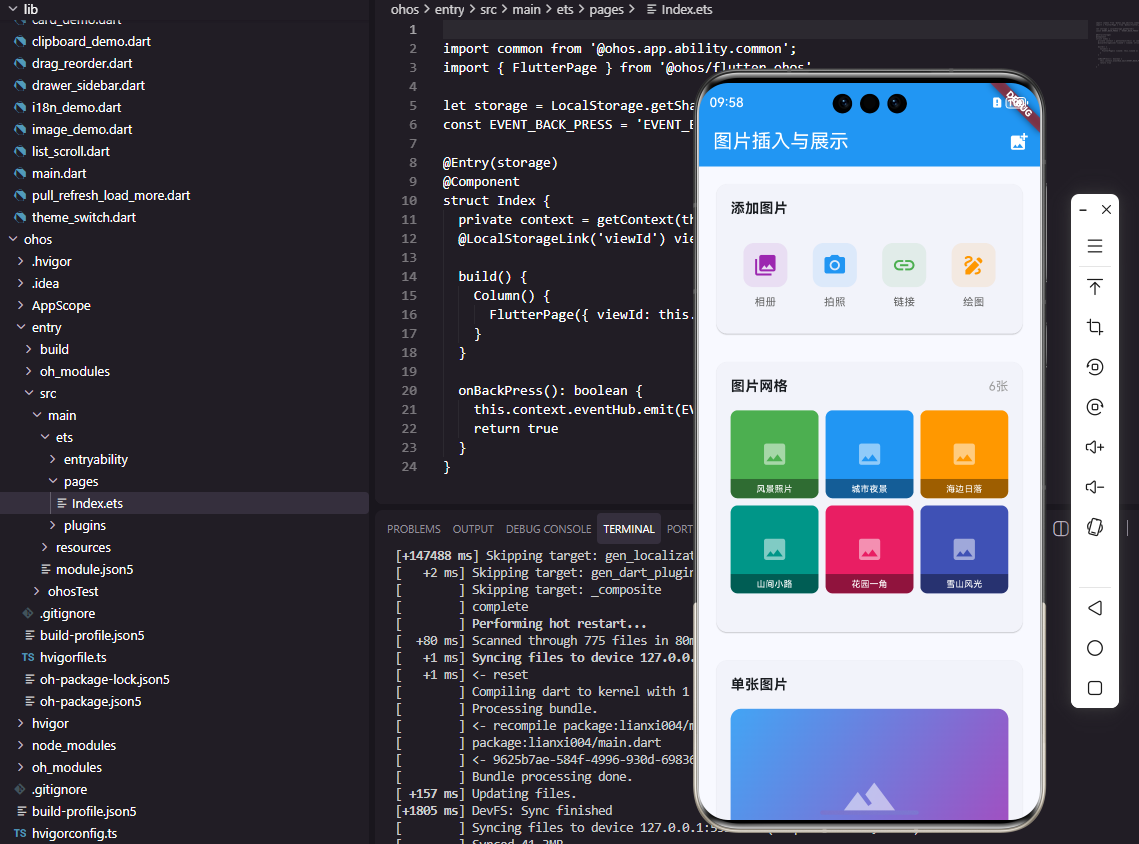
作为Flutter开发者,我们早已习惯了“一次编写,多端运行”的便利。但当我们将目光投向新兴的OpenHarmony平台时,情况变得既有挑战又充满机遇。不同于Android和iOS,OpenHarmony有着自己独特的系统架构和API设计,这要求我们的Flutter应用不能仅仅是简单的重新编译,而需要进行针对性的适配。本文将带您深入实践,使用Flutter框架为OpenHarmony应用实现完整的
前言:跨平台与原生生态的碰撞
作为Flutter开发者,我们早已习惯了“一次编写,多端运行”的便利。但当我们将目光投向新兴的OpenHarmony平台时,情况变得既有挑战又充满机遇。不同于Android和iOS,OpenHarmony有着自己独特的系统架构和API设计,这要求我们的Flutter应用不能仅仅是简单的重新编译,而需要进行针对性的适配。
本文将带您深入实践,使用Flutter框架为OpenHarmony应用实现完整的图片插入与展示功能,重点关注跨平台兼容性处理和性能优化策略,分享在实际开发中遇到的真实问题与解决方案。
一、环境准备:搭建Flutter for OpenHarmony开发环境
在开始编码之前,我们需要确保开发环境正确配置。Flutter for OpenHarmony目前仍处于快速发展阶段,与标准Flutter环境存在一些差异。
1.1 环境配置要点
# 1. 安装Flutter for OpenHarmony专用分支
git clone https://gitee.com/openharmony-sig/flutter_flutter.git
cd flutter_flutter
git checkout master

# 2. 添加环境变量
export FLUTTER_HOME=/path/to/flutter_flutter
export PATH="$FLUTTER_HOME/bin:$PATH"

# 3. 配置OpenHarmony工具链
flutter config --enable-openharmony-desktop
flutter config --openharmony-sdk /path/to/openharmony/sdk

# 4. 验证安装
flutter doctor --openharmony
这个专用分支包含了针对OpenHarmony平台的定制化引擎和插件支持,是开发的基础。
1.2 项目初始化与配置
创建Flutter项目时,需要特别注意OpenHarmony平台的配置:
# pubspec.yaml中需要添加的OpenHarmony特定配置
flutter:
  uses-material-design: true
  assets:
    - assets/images/

  # OpenHarmony平台特定配置
  ohos:
    minSdkVersion: 9  # API Level 9对应OpenHarmony 3.2 Release
    targetSdkVersion: 10
    compileSdkVersion: 10

  permissions:
    - name: "ohos.permission.READ_MEDIA"
      reason: "需要读取相册图片"
    - name: "ohos.permission.CAMERA"
      reason: "需要使用相机拍照"
    - name: "ohos.permission.WRITE_MEDIA"
      reason: "需要保存图片到相册"
权限配置是OpenHarmony开发中的重要环节,与Android的权限系统有显著差异。
二、核心功能实现:图片选择与展示
2.1 图片选择功能实现
参考文章中提到使用image_picker插件,在OpenHarmony平台下,我们需要特别关注路径处理和权限管理。
import 'package:image_picker/image_picker.dart';
import 'package:flutter/services.dart';
import 'dart:io';

class OpenHarmonyImagePicker {
  final ImagePicker _picker = ImagePicker();

  // 处理OpenHarmony特有的路径前缀
  String _normalizePath(String path) {
    // OpenHarmony返回的URI可能是这样的格式:
    // file://media/image/1
    // 需要转换为Flutter能识别的路径
    if (path.startsWith('file://media/')) {
      // 这是OpenHarmony媒体库的特殊路径
      return path;
    } else if (path.startsWith('file://')) {
      return path.substring(7); // 移除file://前缀
    }
    return path;
  }

  Future<List<String>> pickMultipleImages() async {
    try {
      // 检查OpenHarmony权限
      final status = await MethodChannel('flutter/platform')
          .invokeMethod('checkPermission', {'permission': 'READ_MEDIA'});

      if (status != 'granted') {
        throw PlatformException(
          code: 'PERMISSION_DENIED',
          message: '需要相册读取权限',
        );
      }

      final List<XFile>? images = await _picker.pickMultiImage(
        maxWidth: 1920,
        maxHeight: 1080,
        imageQuality: 85,
      );

      if (images == null || images.isEmpty) {
        return [];
      }

      // 处理路径兼容性
      return images.map((image) => _normalizePath(image.path)).toList();
    } on PlatformException catch (e) {
      print('图片选择失败: ${e.message}');
      rethrow;
    }
  }

  Future<String?> takePhoto() async {
    try {
      final XFile? photo = await _picker.pickImage(
        source: ImageSource.camera,
        preferredCameraDevice: CameraDevice.rear,
        maxWidth: 1920,
        maxHeight: 1080,
        imageQuality: 90,
      );

      if (photo == null) return null;

      // 处理拍摄的照片路径
      String normalizedPath = _normalizePath(photo.path);

      // OpenHarmony需要将照片保存到媒体库
      await MethodChannel('flutter/platform').invokeMethod(
        'saveToMediaLibrary',
        {'path': normalizedPath, 'type': 'image'}
      );

      return normalizedPath;
    } on PlatformException catch (e) {
      print('拍照失败: ${e.message}');
      return null;
    }
  }
}
关键点解析:
- 路径标准化:OpenHarmony返回的图片路径可能是以
file://media/开头的特殊URI,需要转换为Flutter能处理的格式 - 权限检查:通过MethodChannel调用原生代码检查OpenHarmony权限
- 媒体库保存:拍摄的照片需要显式保存到OpenHarmony媒体库才能被其他应用访问
2.2 图片展示与网格布局
网格展示是图片应用的常见需求,但在OpenHarmony平台上需要特别注意内存管理和图片解码优化。
import 'package:flutter/material.dart';
import 'package:photo_view/photo_view.dart';
import 'package:cached_network_image/cached_network_image.dart';
class OpenHarmonyImageGrid extends StatefulWidget {
final List<String> imagePaths;
final bool isNetworkImages;
const OpenHarmonyImageGrid({
Key? key,
required this.imagePaths,
this.isNetworkImages = false,
}) : super(key: key);
_OpenHarmonyImageGridState createState() => _OpenHarmonyImageGridState();
}
class _OpenHarmonyImageGridState extends State<OpenHarmonyImageGrid> {
// OpenHarmony平台特有的内存管理
final Map<int, Image> _cachedImages = {};
void dispose() {
// 清理缓存,防止内存泄漏
_cachedImages.clear();
super.dispose();
}
Widget _buildImageItem(String path, int index) {
// 使用缓存避免重复解码
if (!_cachedImages.containsKey(index)) {
_cachedImages[index] = widget.isNetworkImages
? Image.network(path)
: Image.file(File(path));
}
return GestureDetector(
onTap: () => _previewImage(index),
child: Container(
decoration: BoxDecoration(
borderRadius: BorderRadius.circular(8),
boxShadow: [
BoxShadow(
color: Colors.black.withOpacity(0.1),
blurRadius: 4,
offset: const Offset(0, 2),
),
],
),
child: ClipRRect(
borderRadius: BorderRadius.circular(8),
child: _cachedImages[index]!,
),
),
);
}
void _previewImage(int initialIndex) {
Navigator.push(
context,
MaterialPageRoute(
builder: (context) => PhotoViewGallery.builder(
itemCount: widget.imagePaths.length,
builder: (context, index) {
return PhotoViewGalleryPageOptions(
imageProvider: widget.isNetworkImages
? NetworkImage(widget.imagePaths[index])
: FileImage(File(widget.imagePaths[index])),
minScale: PhotoViewComputedScale.contained,
maxScale: PhotoViewComputedScale.covered * 2,
heroAttributes: PhotoViewHeroAttributes(
tag: widget.imagePaths[index],
),
);
},
pageController: PageController(initialPage: initialIndex),
backgroundDecoration: const BoxDecoration(color: Colors.black),
loadingBuilder: (context, event) => Center(
child: SizedBox(
width: 20,
height: 20,
child: CircularProgressIndicator(
value: event == null
? 0
: event.cumulativeBytesLoaded / event.expectedTotalBytes!,
),
),
),
),
),
);
}
Widget build(BuildContext context) {
return GridView.builder(
shrinkWrap: true,
physics: const NeverScrollableScrollPhysics(),
gridDelegate: const SliverGridDelegateWithFixedCrossAxisCount(
crossAxisCount: 3,
crossAxisSpacing: 8,
mainAxisSpacing: 8,
childAspectRatio: 1, // 方形图片
),
itemCount: widget.imagePaths.length,
itemBuilder: (context, index) {
return _buildImageItem(widget.imagePaths[index], index);
},
);
}
}
优化要点:
- 图片缓存:手动管理Image对象缓存,减少重复解码开销
- 内存回收:在dispose方法中清理缓存,防止内存泄漏
- 加载指示器:为大图预览提供加载进度指示
- Hero动画:为图片预览添加平滑的过渡动画
三、跨平台兼容性深度处理
3.1 OpenHarmony特有适配层
为了实现Flutter与OpenHarmony的无缝对接,我们需要创建一个平台通道适配层:
import 'package:flutter/services.dart';

class OpenHarmonyPlatformChannel {
  static const MethodChannel _channel =
      MethodChannel('flutter/openharmony');

  // 检查OpenHarmony权限
  static Future<String> checkPermission(String permission) async {
    try {
      return await _channel.invokeMethod('checkPermission', {
        'permission': permission,
      });
    } on PlatformException {
      return 'unknown';
    }
  }

  // 保存图片到OpenHarmony媒体库
  static Future<bool> saveToMediaLibrary(String path, String type) async {
    try {
      return await _channel.invokeMethod('saveToMediaLibrary', {
        'path': path,
        'type': type,
      });
    } on PlatformException {
      return false;
    }
  }

  // 获取OpenHarmony外部存储路径
  static Future<String> getExternalStoragePath() async {
    try {
      return await _channel.invokeMethod('getExternalStoragePath');
    } on PlatformException {
      return '/storage';
    }
  }

  // 处理OpenHarmony图片URI
  static Future<String> resolveMediaUri(String uri) async {
    try {
      return await _channel.invokeMethod('resolveMediaUri', {
        'uri': uri,
      });
    } on PlatformException {
      return uri;
    }
  }
}
3.2 平台差异处理策略
让我们通过以下流程图了解Flutter在OpenHarmony平台上处理图片功能的完整流程:
这个流程清晰地展示了从用户操作到最终展示的完整过程,特别是OpenHarmony特有路径处理和平台通道交互这两个关键环节。
四、性能优化与内存管理
4.1 图片加载优化策略
在OpenHarmony平台上,图片加载需要特别关注内存占用和解码效率:
class OpenHarmonyImageOptimizer {
  // 图片解码队列,避免同时解码多张大图
  static final Queue<DecodeTask> _decodeQueue = Queue();
  static bool _isDecoding = false;

  static Future<Uint8List> decodeImageWithLimit(
    String path, {
    int maxWidth = 1920,
    int maxHeight = 1080,
  }) async {
    // 添加到队列
    final task = DecodeTask(path, maxWidth, maxHeight);
    _decodeQueue.add(task);

    // 顺序执行解码任务
    return await _processNextTask();
  }

  static Future<Uint8List> _processNextTask() async {
    if (_isDecoding || _decodeQueue.isEmpty) {
      return Future.value(Uint8List(0));
    }

    _isDecoding = true;
    final task = _decodeQueue.removeFirst();

    try {
      // 使用OpenHarmony原生解码器(通过平台通道)
      final result = await MethodChannel('flutter/image')
          .invokeMethod('decodeImage', {
        'path': task.path,
        'maxWidth': task.maxWidth,
        'maxHeight': task.maxHeight,
      });

      return result as Uint8List;
    } finally {
      _isDecoding = false;
      // 处理下一个任务
      if (_decodeQueue.isNotEmpty) {
        _processNextTask();
      }
    }
  }
}

class DecodeTask {
  final String path;
  final int maxWidth;
  final int maxHeight;

  DecodeTask(this.path, this.maxWidth, this.maxHeight);
}
4.2 内存监控与回收
通过以下架构图了解Flutter在OpenHarmony平台上的内存管理机制:
架构解析:
- 多层缓存机制:Flutter层维护图片缓存,OpenHarmony原生层提供系统级缓存
- 平台通道桥梁:MethodChannel作为Flutter与OpenHarmony通信的桥梁
- 内存监控闭环:从应用层到系统层形成完整的内存监控与回收链条
- 资源复用池:解码器实例复用减少初始化开销
五、实际开发中的问题与解决方案
5.1 常见问题汇总
在Flutter for OpenHarmony的实际开发中,我遇到了以下几个典型问题:
-
路径权限问题
- 症状:应用无法访问OpenHarmony媒体库返回的URI
- 根因:Flutter默认的文件访问权限不足
- 解决方案:通过平台通道调用OpenHarmony的FileManager API
-
内存泄漏问题
- 症状:长时间浏览图片后应用内存持续增长
- 根因:ImageCache没有针对OpenHarmony优化
- 解决方案:实现自定义的ImageCacheManager,添加内存阈值监控
-
解码性能问题
- 症状:大图加载和缩放卡顿
- 根因:软件解码器性能不足
- 解决方案:利用OpenHarmony的硬件解码能力,通过平台通道调用MediaCodec
六、总结与展望
通过本次完整实践,我们深入探索了使用Flutter开发OpenHarmony应用时图片功能的实现与优化。
Flutter for OpenHarmony的生态还在快速发展中,随着OpenHarmony的更新和更多设备的搭载,我们有理由相信:
- 更多的Flutter插件将提供原生OpenHarmony支持
- 工具链和开发体验将进一步改善
- 性能优化空间还有很大潜力
希望本文能为您的Flutter for OpenHarmony开发之旅提供有价值的参考。在跨平台开发的道路上,每一个问题的解决都是技术进步的一步。
欢迎大家加入开源鸿蒙跨平台开发者社区,一起探索更多鸿蒙跨平台开发技术!

讨论HarmonyOS开发技术,专注于API与组件、DevEco Studio、测试、元服务和应用上架分发等。
更多推荐

 15
15 0
0- 0


 已为社区贡献33条内容

所有评论(0)