Flutter 框架跨平台鸿蒙开发 - 打造趣味抽签占卜应用
);动画设计:旋转、缩放、渐变等多种动画效果枚举扩展:为枚举添加属性和方法数据持久化:SharedPreferences + JSON序列化Material 3设计:现代化UI组件随机算法:公平的随机抽取机制通过本项目,你不仅学会了如何实现占卜应用,还掌握了Flutter中动画、数据管理、UI设计的核心技术。这些知识可以应用到更多场景,如抽奖应用、游戏开发、互动娱乐等领域。占卜虽是娱乐,但也能给人
·
Flutter实战:打造趣味抽签占卜应用
前言
占卜和抽签是一种有趣的娱乐方式,也是探索内心的一种途径。本文将带你从零开始,使用Flutter开发一个功能丰富、动画精美的抽签占卜应用。
应用特色
- 🎴 六种占卜类型:运势签、塔罗牌、是否占卜、决策占卜、姻缘签、事业签
- ✨ 精美动画:旋转缩放动画,增强仪式感
- 🎨 渐变设计:每种占卜类型都有独特的配色
- 📊 等级系统:上上签、上签、中签、下签、下下签
- 📜 历史记录:保存所有占卜结果,随时回顾
- 💾 数据持久化:使用SharedPreferences本地存储
- 🌓 深色模式:自动适配系统主题
- 🎯 Material 3:现代化UI设计
效果展示
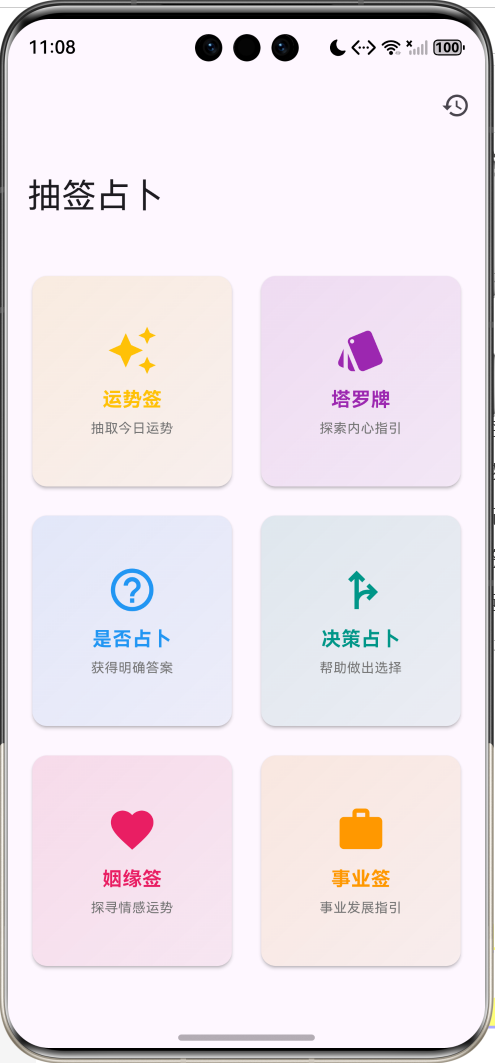
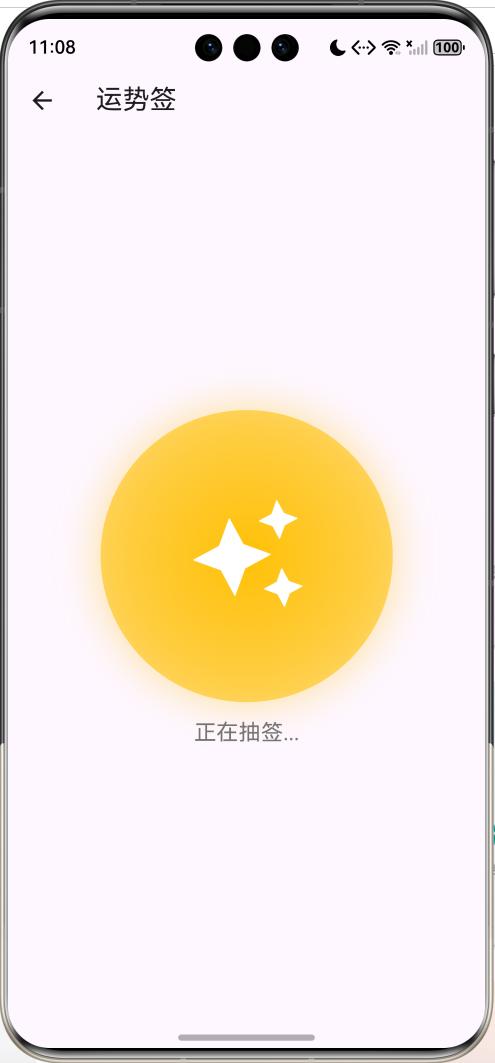
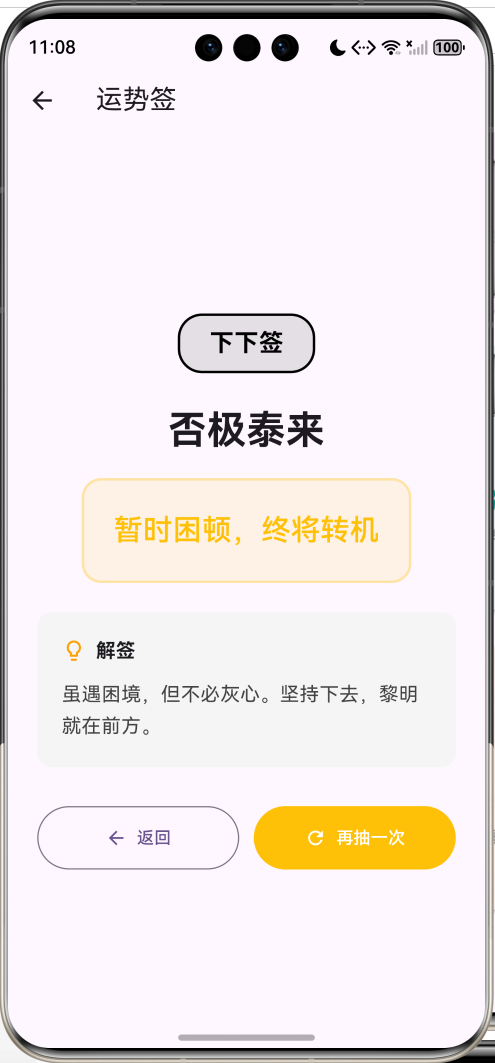
数据模型设计
1. 占卜类型枚举
enum DivinationType {
  fortune,    // 运势签
  tarot,      // 塔罗牌
  yesNo,      // 是否占卜
  decision,   // 决策占卜
  love,       // 姻缘签
  career;     // 事业签

  String get title {
    switch (this) {
      case DivinationType.fortune: return '运势签';
      case DivinationType.tarot: return '塔罗牌';
      // ...
    }
  }

  IconData get icon {
    switch (this) {
      case DivinationType.fortune: return Icons.auto_awesome;
      case DivinationType.tarot: return Icons.style;
      // ...
    }
  }

  Color get color {
    switch (this) {
      case DivinationType.fortune: return Colors.amber;
      case DivinationType.tarot: return Colors.purple;
      // ...
    }
  }
}
2. 签文等级枚举
enum FortuneLevel {
  great,   // 上上签
  good,    // 上签
  medium,  // 中签
  bad,     // 下签
  worst;   // 下下签

  String get label {
    switch (this) {
      case FortuneLevel.great: return '上上签';
      case FortuneLevel.good: return '上签';
      // ...
    }
  }

  Color get color {
    switch (this) {
      case FortuneLevel.great: return Colors.red;
      case FortuneLevel.good: return Colors.orange;
      // ...
    }
  }
}
3. 占卜结果模型
class DivinationResult {
  final DivinationType type;      // 占卜类型
  final String title;             // 标题
  final String content;           // 内容
  final String interpretation;    // 解释
  final FortuneLevel? level;      // 等级(可选)
  final DateTime timestamp;       // 时间戳

  DivinationResult({
    required this.type,
    required this.title,
    required this.content,
    required this.interpretation,
    this.level,
    required this.timestamp,
  });

  // JSON序列化
  Map<String, dynamic> toJson() => {
    'type': type.index,
    'title': title,
    'content': content,
    'interpretation': interpretation,
    'level': level?.index,
    'timestamp': timestamp.toIso8601String(),
  };

  // JSON反序列化
  factory DivinationResult.fromJson(Map<String, dynamic> json) =>
      DivinationResult(
        type: DivinationType.values[json['type']],
        title: json['title'],
        content: json['content'],
        interpretation: json['interpretation'],
        level: json['level'] != null
            ? FortuneLevel.values[json['level']]
            : null,
        timestamp: DateTime.parse(json['timestamp']),
      );
}
占卜数据库
1. 运势签文
static final List<Map<String, dynamic>> fortuneSigns = [
  {
    'level': FortuneLevel.great,
    'title': '鸿运当头',
    'content': '紫气东来,万事大吉',
    'interpretation': '今日运势极佳,诸事顺遂。把握机会,勇往直前,必有所获。',
  },
  {
    'level': FortuneLevel.great,
    'title': '龙凤呈祥',
    'content': '贵人相助,心想事成',
    'interpretation': '将遇贵人相助,事业爱情双丰收。保持积极心态,好运自然来。',
  },
  // ... 更多签文
];
2. 塔罗牌数据
static final List<Map<String, dynamic>> tarotCards = [
  {
    'title': '愚者',
    'content': '🃏 The Fool',
    'interpretation': '新的开始,保持童心。勇敢踏出第一步,相信直觉的指引。',
  },
  {
    'title': '魔术师',
    'content': '🎩 The Magician',
    'interpretation': '你拥有实现目标的所有资源。专注行动,化想法为现实。',
  },
  // ... 22张大阿卡纳
];
3. 是否占卜答案
static final List<Map<String, String>> yesNoAnswers = [
  {'answer': '是的', 'interpretation': '答案是肯定的,放心去做吧!'},
  {'answer': '当然', 'interpretation': '毫无疑问,这是正确的选择。'},
  {'answer': '很有可能', 'interpretation': '成功的概率很高,值得一试。'},
  {'answer': '不确定', 'interpretation': '需要更多信息,再观察一下。'},
  {'answer': '不', 'interpretation': '答案是否定的,考虑其他选择。'},
  // ... 8种答案
];
核心功能实现
1. 抽签动画
使用AnimationController实现旋转和缩放动画:
class _DivinationPageState extends State<DivinationPage>
with SingleTickerProviderStateMixin {
late AnimationController _controller;
late Animation<double> _rotationAnimation;
late Animation<double> _scaleAnimation;
void initState() {
super.initState();
_controller = AnimationController(
duration: const Duration(milliseconds: 2000),
vsync: this,
);
// 旋转动画:旋转4圈
_rotationAnimation = Tween<double>(
begin: 0,
end: 4 * pi,
).animate(
CurvedAnimation(parent: _controller, curve: Curves.easeInOut),
);
// 缩放动画:先放大再缩小
_scaleAnimation = TweenSequence<double>([
TweenSequenceItem(
tween: Tween<double>(begin: 1.0, end: 1.2),
weight: 1,
),
TweenSequenceItem(
tween: Tween<double>(begin: 1.2, end: 1.0),
weight: 1,
),
]).animate(
CurvedAnimation(parent: _controller, curve: Curves.easeInOut)
);
// 动画完成后生成结果
_controller.addStatusListener((status) {
if (status == AnimationStatus.completed) {
setState(() {
_result = _generateResult();
widget.onResult(_result!);
});
}
});
}
}
2. 抽签按钮
Widget _buildDrawButton() {
  return AnimatedBuilder(
    animation: _controller,
    builder: (context, child) {
      return Transform.rotate(
        angle: _rotationAnimation.value,
        child: Transform.scale(
          scale: _scaleAnimation.value,
          child: GestureDetector(
            onTap: _draw,
            child: Container(
              width: 200,
              height: 200,
              decoration: BoxDecoration(
                shape: BoxShape.circle,
                gradient: RadialGradient(
                  colors: [
                    widget.type.color,
                    widget.type.color.withOpacity(0.6),
                  ],
                ),
                boxShadow: [
                  BoxShadow(
                    color: widget.type.color.withOpacity(0.3),
                    blurRadius: 20,
                    spreadRadius: 5,
                  ),
                ],
              ),
              child: Icon(
                widget.type.icon,
                size: 80,
                color: Colors.white,
              ),
            ),
          ),
        ),
      );
    },
  );
}
3. 随机生成结果
DivinationResult _generateResult() {
  final random = Random();

  switch (widget.type) {
    case DivinationType.fortune:
      final sign = DivinationData.fortuneSigns[
        random.nextInt(DivinationData.fortuneSigns.length)
      ];
      return DivinationResult(
        type: widget.type,
        title: sign['title'],
        content: sign['content'],
        interpretation: sign['interpretation'],
        level: sign['level'],
        timestamp: DateTime.now(),
      );

    case DivinationType.tarot:
      final card = DivinationData.tarotCards[
        random.nextInt(DivinationData.tarotCards.length)
      ];
      return DivinationResult(
        type: widget.type,
        title: card['title'],
        content: card['content'],
        interpretation: card['interpretation'],
        timestamp: DateTime.now(),
      );

    // ... 其他类型
  }
}
4. 结果展示
Widget _buildResult() {
  return Column(
    children: [
      // 等级标签
      if (_result!.level != null) ...[
        Container(
          padding: const EdgeInsets.symmetric(horizontal: 24, vertical: 8),
          decoration: BoxDecoration(
            color: _result!.level!.color.withOpacity(0.1),
            borderRadius: BorderRadius.circular(20),
            border: Border.all(
              color: _result!.level!.color,
              width: 2,
            ),
          ),
          child: Text(
            _result!.level!.label,
            style: TextStyle(
              fontSize: 20,
              fontWeight: FontWeight.bold,
              color: _result!.level!.color,
            ),
          ),
        ),
        const SizedBox(height: 24),
      ],

      // 标题
      Text(
        _result!.title,
        style: const TextStyle(
          fontSize: 32,
          fontWeight: FontWeight.bold,
        ),
        textAlign: TextAlign.center,
      ),

      // 签文内容
      Container(
        padding: const EdgeInsets.all(24),
        decoration: BoxDecoration(
          color: widget.type.color.withOpacity(0.1),
          borderRadius: BorderRadius.circular(16),
          border: Border.all(
            color: widget.type.color.withOpacity(0.3),
            width: 2,
          ),
        ),
        child: Text(
          _result!.content,
          style: TextStyle(
            fontSize: 24,
            color: widget.type.color,
            fontWeight: FontWeight.w500,
          ),
          textAlign: TextAlign.center,
        ),
      ),

      // 解签
      Container(
        padding: const EdgeInsets.all(20),
        decoration: BoxDecoration(
          color: Colors.grey.shade100,
          borderRadius: BorderRadius.circular(12),
        ),
        child: Column(
          crossAxisAlignment: CrossAxisAlignment.start,
          children: [
            Row(
              children: [
                Icon(Icons.lightbulb_outline, color: Colors.amber.shade700),
                const SizedBox(width: 8),
                const Text('解签', style: TextStyle(fontWeight: FontWeight.bold)),
              ],
            ),
            const SizedBox(height: 12),
            Text(
              _result!.interpretation,
              style: const TextStyle(fontSize: 16, height: 1.6),
            ),
          ],
        ),
      ),
    ],
  );
}
UI设计详解
1. 主页网格布局
SliverGrid(
  gridDelegate: const SliverGridDelegateWithFixedCrossAxisCount(
    crossAxisCount: 2,
    childAspectRatio: 1.2,
    crossAxisSpacing: 16,
    mainAxisSpacing: 16,
  ),
  delegate: SliverChildBuilderDelegate(
    (context, index) {
      final type = DivinationType.values[index];
      return _buildDivinationCard(type);
    },
    childCount: DivinationType.values.length,
  ),
)
2. 占卜卡片
Widget _buildDivinationCard(DivinationType type) {
  return Card(
    elevation: 2,
    child: InkWell(
      onTap: () => _startDivination(type),
      borderRadius: BorderRadius.circular(12),
      child: Container(
        padding: const EdgeInsets.all(16),
        decoration: BoxDecoration(
          borderRadius: BorderRadius.circular(12),
          gradient: LinearGradient(
            begin: Alignment.topLeft,
            end: Alignment.bottomRight,
            colors: [
              type.color.withOpacity(0.1),
              type.color.withOpacity(0.05),
            ],
          ),
        ),
        child: Column(
          mainAxisAlignment: MainAxisAlignment.center,
          children: [
            Icon(type.icon, size: 48, color: type.color),
            const SizedBox(height: 12),
            Text(
              type.title,
              style: TextStyle(
                fontSize: 18,
                fontWeight: FontWeight.bold,
                color: type.color,
              ),
            ),
            Text(
              type.description,
              style: TextStyle(fontSize: 12, color: Colors.grey.shade600),
              textAlign: TextAlign.center,
            ),
          ],
        ),
      ),
    ),
  );
}
3. 历史记录列表
Widget _buildHistoryItem(BuildContext context, DivinationResult result) {
  return Card(
    margin: const EdgeInsets.only(bottom: 12),
    child: InkWell(
      onTap: () => _showResultDialog(context, result),
      child: Padding(
        padding: const EdgeInsets.all(16),
        child: Column(
          crossAxisAlignment: CrossAxisAlignment.start,
          children: [
            Row(
              children: [
                // 类型图标
                Container(
                  padding: const EdgeInsets.all(8),
                  decoration: BoxDecoration(
                    color: result.type.color.withOpacity(0.1),
                    borderRadius: BorderRadius.circular(8),
                  ),
                  child: Icon(
                    result.type.icon,
                    color: result.type.color,
                    size: 20,
                  ),
                ),
                const SizedBox(width: 12),
                // 标题和等级
                Expanded(
                  child: Column(
                    crossAxisAlignment: CrossAxisAlignment.start,
                    children: [
                      Text(result.type.title),
                      Text(
                        result.title,
                        style: const TextStyle(
                          fontSize: 16,
                          fontWeight: FontWeight.bold,
                        ),
                      ),
                    ],
                  ),
                ),
              ],
            ),
            // 内容预览
            Text(
              result.content,
              maxLines: 2,
              overflow: TextOverflow.ellipsis,
            ),
            // 时间
            Text(_formatDateTime(result.timestamp)),
          ],
        ),
      ),
    ),
  );
}
技术要点详解
1. 动画组合技巧
| 动画类型 | 实现方式 | 效果 |
|---|---|---|
| 旋转动画 | Transform.rotate | 顺时针旋转4圈 |
| 缩放动画 | Transform.scale | 先放大后缩小 |
| 渐变背景 | RadialGradient | 径向渐变效果 |
| 阴影效果 | BoxShadow | 发光效果 |
2. TweenSequence使用
实现先放大后缩小的效果:
_scaleAnimation = TweenSequence<double>([
  TweenSequenceItem(
    tween: Tween<double>(begin: 1.0, end: 1.2),
    weight: 1,  // 前50%时间
  ),
  TweenSequenceItem(
    tween: Tween<double>(begin: 1.2, end: 1.0),
    weight: 1,  // 后50%时间
  ),
]).animate(CurvedAnimation(
  parent: _controller,
  curve: Curves.easeInOut,
));
3. 枚举扩展方法
为枚举添加属性和方法:
enum DivinationType {
  fortune,
  tarot;

  // 扩展属性
  String get title {
    switch (this) {
      case DivinationType.fortune: return '运势签';
      case DivinationType.tarot: return '塔罗牌';
    }
  }

  // 扩展方法
  IconData get icon {
    switch (this) {
      case DivinationType.fortune: return Icons.auto_awesome;
      case DivinationType.tarot: return Icons.style;
    }
  }
}
4. 日期格式化
智能显示相对时间:
String _formatDateTime(DateTime dateTime) {
  final now = DateTime.now();
  final today = DateTime(now.year, now.month, now.day);
  final yesterday = today.subtract(const Duration(days: 1));
  final date = DateTime(dateTime.year, dateTime.month, dateTime.day);

  String dateStr;
  if (date == today) {
    dateStr = '今天';
  } else if (date == yesterday) {
    dateStr = '昨天';
  } else {
    dateStr = '${dateTime.month}月${dateTime.day}日';
  }

  final hour = dateTime.hour.toString().padLeft(2, '0');
  final minute = dateTime.minute.toString().padLeft(2, '0');

  return '$dateStr $hour:$minute';
}
功能扩展建议
1. 每日一签
限制每天只能抽一次运势签:
Future<bool> _canDrawToday() async {
  final prefs = await SharedPreferences.getInstance();
  final lastDrawDate = prefs.getString('last_draw_date');
  final today = DateTime.now().toIso8601String().split('T')[0];

  return lastDrawDate != today;
}

Future<void> _recordDraw() async {
  final prefs = await SharedPreferences.getInstance();
  final today = DateTime.now().toIso8601String().split('T')[0];
  await prefs.setString('last_draw_date', today);
}
2. 分享功能
使用share_plus包分享结果:
import 'package:share_plus/share_plus.dart';

void _shareResult(DivinationResult result) {
  final text = '''
${result.type.title} - ${result.title}

${result.content}

解签:${result.interpretation}
  ''';

  Share.share(text);
}
3. 收藏功能
class DivinationResult {
  // ... 现有字段
  bool isFavorite;

  void toggleFavorite() {
    isFavorite = !isFavorite;
  }
}

List<DivinationResult> get favoriteResults {
  return _history.where((r) => r.isFavorite).toList();
}
4. 自定义签文
允许用户添加自己的签文:
class CustomSign {
  String title;
  String content;
  String interpretation;
  FortuneLevel level;

  CustomSign({
    required this.title,
    required this.content,
    required this.interpretation,
    required this.level,
  });
}

List<CustomSign> _customSigns = [];

void _addCustomSign(CustomSign sign) {
  _customSigns.add(sign);
  _saveCustomSigns();
}
5. 音效和震动
import 'package:audioplayers/audioplayers.dart';
import 'package:vibration/vibration.dart';

Future<void> _playDrawSound() async {
  final player = AudioPlayer();
  await player.play(AssetSource('sounds/draw.mp3'));
}

Future<void> _vibrate() async {
  if (await Vibration.hasVibrator() ?? false) {
    Vibration.vibrate(duration: 200);
  }
}
6. 统计分析
class DivinationStats {
  Map<DivinationType, int> typeCount = {};
  Map<FortuneLevel, int> levelCount = {};

  void analyze(List<DivinationResult> history) {
    for (var result in history) {
      typeCount[result.type] = (typeCount[result.type] ?? 0) + 1;
      if (result.level != null) {
        levelCount[result.level!] = (levelCount[result.level!] ?? 0) + 1;
      }
    }
  }

  Widget buildChart() {
    // 使用 fl_chart 包绘制统计图表
  }
}
性能优化建议
1. 历史记录限制
void _addToHistory(DivinationResult result) {
  setState(() {
    _history.insert(0, result);
    // 限制最多保存50条记录
    if (_history.length > 50) {
      _history = _history.sublist(0, 50);
    }
  });
  _saveTodos();
}
2. 懒加载历史记录
class _HistoryPageState extends State<HistoryPage> {
final ScrollController _scrollController = ScrollController();
int _displayCount = 20;
void initState() {
super.initState();
_scrollController.addListener(_onScroll);
}
void _onScroll() {
if (_scrollController.position.pixels ==
_scrollController.position.maxScrollExtent) {
setState(() {
_displayCount += 20;
});
}
}
List<DivinationResult> get _displayedHistory {
return widget.history.take(_displayCount).toList();
}
}
3. 动画优化
// 使用RepaintBoundary隔离重绘区域
RepaintBoundary(
  child: AnimatedBuilder(
    animation: _controller,
    builder: (context, child) {
      return Transform.rotate(
        angle: _rotationAnimation.value,
        child: child,
      );
    },
    child: Container(...),  // 静态内容
  ),
)
常见问题解答
Q1: 如何实现更复杂的塔罗牌解读?
A: 可以添加正位和逆位:
class TarotCard {
  String name;
  String uprightMeaning;    // 正位含义
  String reversedMeaning;   // 逆位含义
  bool isReversed;          // 是否逆位

  String get meaning => isReversed ? reversedMeaning : uprightMeaning;
}

TarotCard drawTarotCard() {
  final random = Random();
  final card = tarotCards[random.nextInt(tarotCards.length)];
  card.isReversed = random.nextBool();
  return card;
}
Q2: 如何添加抽签次数限制?
A: 使用计数器和时间戳:
class DrawLimiter {
  static const int dailyLimit = 3;

  Future<bool> canDraw() async {
    final prefs = await SharedPreferences.getInstance();
    final today = DateTime.now().toIso8601String().split('T')[0];
    final lastDate = prefs.getString('draw_date');

    if (lastDate != today) {
      await prefs.setString('draw_date', today);
      await prefs.setInt('draw_count', 0);
      return true;
    }

    final count = prefs.getInt('draw_count') ?? 0;
    return count < dailyLimit;
  }

  Future<void> recordDraw() async {
    final prefs = await SharedPreferences.getInstance();
    final count = prefs.getInt('draw_count') ?? 0;
    await prefs.setInt('draw_count', count + 1);
  }
}
Q3: 如何实现更真实的抽签效果?
A: 添加手势交互:
class ShakeDetector extends StatefulWidget {
final VoidCallback onShake;
State<ShakeDetector> createState() => _ShakeDetectorState();
}
class _ShakeDetectorState extends State<ShakeDetector> {
late StreamSubscription<AccelerometerEvent> _subscription;
void initState() {
super.initState();
_subscription = accelerometerEvents.listen((event) {
final magnitude = sqrt(
event.x * event.x + event.y * event.y + event.z * event.z
);
if (magnitude > 20) { // 检测到摇晃
widget.onShake();
}
});
}
void dispose() {
_subscription.cancel();
super.dispose();
}
}
项目结构
lib/
├── main.dart                      # 主程序入口
├── models/
│   ├── divination_type.dart      # 占卜类型枚举
│   ├── fortune_level.dart        # 签文等级枚举
│   └── divination_result.dart    # 占卜结果模型
├── data/
│   └── divination_data.dart      # 占卜数据库
├── screens/
│   ├── home_page.dart            # 主页面
│   ├── divination_page.dart      # 占卜页面
│   └── history_page.dart         # 历史记录页面
├── widgets/
│   ├── divination_card.dart      # 占卜卡片
│   ├── draw_button.dart          # 抽签按钮
│   └── result_card.dart          # 结果卡片
└── utils/
    ├── date_formatter.dart       # 日期格式化
    └── storage_helper.dart       # 存储助手
总结
本文实现了一个功能完整的抽签占卜应用,涵盖了以下核心技术:
- 动画设计:旋转、缩放、渐变等多种动画效果
- 枚举扩展:为枚举添加属性和方法
- 数据持久化:SharedPreferences + JSON序列化
- Material 3设计:现代化UI组件
- 随机算法:公平的随机抽取机制
通过本项目,你不仅学会了如何实现占卜应用,还掌握了Flutter中动画、数据管理、UI设计的核心技术。这些知识可以应用到更多场景,如抽奖应用、游戏开发、互动娱乐等领域。
占卜虽是娱乐,但也能给人带来思考和启发。希望这个应用能为用户带来乐趣和正能量!
欢迎加入开源鸿蒙跨平台社区:https://openharmonycrossplatform.csdn.net

讨论HarmonyOS开发技术,专注于API与组件、DevEco Studio、测试、元服务和应用上架分发等。
更多推荐
 12
12 0
0- 0



 已为社区贡献4条内容

所有评论(0)