鸿蒙跨端框架Flutter学习:渲染周期完整解析
渲染周期(Rendering Cycle)是Flutter的核心机制,通过VSync信号触发Build、Layout、Paint三个阶段的协同工作,实现60fps的流畅渲染。
·
一、知识点概述
渲染周期(Rendering Cycle)是Flutter的核心机制,通过VSync信号触发Build、Layout、Paint三个阶段的协同工作,实现60fps的流畅渲染。
二、渲染周期时间分配
| 阶段 | 耗时(目标) | 占比 | 超时后果 |
|---|---|---|---|
| VSync等待 | 0ms | 0% | 60fps基准 |
| Build | 1-3ms | 16-50% | 掉帧 |
| Layout | 0.5-2ms | 8-33% | 掉帧 |
| Paint | 1-5ms | 16-83% | 掉帧 |
| Composite | 0.5-2ms | 8-33% | 掉帧 |
| 总计 | <16.67ms | 100% | 保持60fps |
三、完整渲染周期
四、渲染周期监控示例
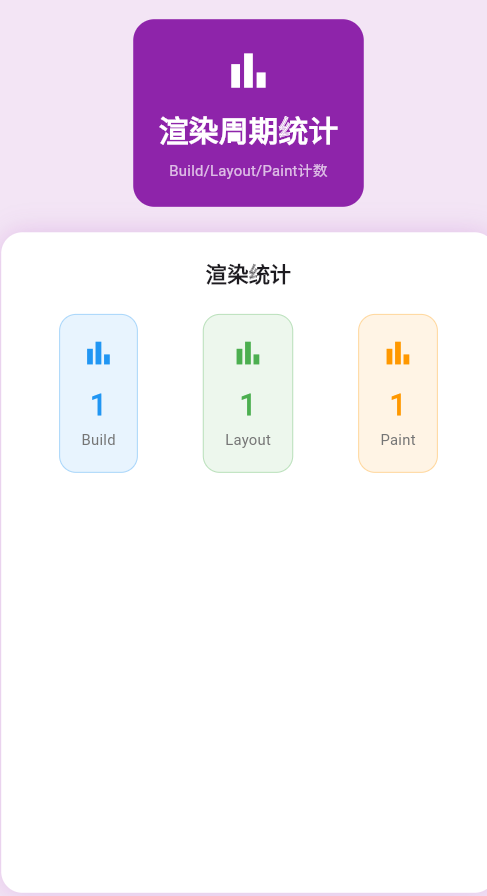
以下是一个渲染周期监控示例,实时显示Build、Layout、Paint的次数:
class _RenderingCyclePage extends StatefulWidget {
final int buildCount;
final int layoutCount;
final int paintCount;
const _RenderingCyclePage({
required this.buildCount,
required this.layoutCount,
required this.paintCount,
});
State<_RenderingCyclePage> createState() => _RenderingCyclePageState();
}
class _RenderingCyclePageState extends State<_RenderingCyclePage> {
late AnimationController _controller;
void initState() {
super.initState();
_controller = AnimationController(
duration: const Duration(seconds: 3),
vsync: this,
)..repeat();
}
void dispose() {
_controller.dispose();
super.dispose();
}
Widget build(BuildContext context) {
return Container(
color: Colors.purple.shade50,
padding: const EdgeInsets.all(20),
child: Column(
children: [
Container(
padding: const EdgeInsets.all(24),
decoration: BoxDecoration(
color: Colors.white,
borderRadius: BorderRadius.circular(20),
boxShadow: [
BoxShadow(
color: Colors.purple.withOpacity(0.2),
blurRadius: 20,
),
],
),
child: Column(
children: [
const Text(
'渲染周期统计',
style: TextStyle(
fontSize: 24,
fontWeight: FontWeight.bold,
),
),
const SizedBox(height: 24),
Row(
mainAxisAlignment: MainAxisAlignment.spaceAround,
children: [
_buildMetricCard('Build', widget.buildCount, Colors.blue),
_buildMetricCard('Layout', widget.layoutCount, Colors.green),
_buildMetricCard('Paint', widget.paintCount, Colors.orange),
],
),
const SizedBox(height: 24),
AnimatedBuilder(
animation: _controller,
builder: (context, child) {
return Column(
children: [
LinearProgressIndicator(
value: _controller.value,
minHeight: 8,
backgroundColor: Colors.grey.shade200,
valueColor: AlwaysStoppedAnimation<Color>(
Colors.purple.shade600,
),
),
const SizedBox(height: 8),
Text(
'帧进度: ${(_controller.value * 100).toInt()}%',
style: TextStyle(
color: Colors.grey.shade600,
fontSize: 14,
),
),
],
);
},
),
],
),
),
],
),
);
}
Widget _buildMetricCard(String label, int value, Color color) {
return Container(
padding: const EdgeInsets.all(20),
decoration: BoxDecoration(
color: color.withOpacity(0.1),
borderRadius: BorderRadius.circular(16),
border: Border.all(color: color.withOpacity(0.3)),
),
child: Column(
children: [
Icon(Icons.bar_chart, color: color, size: 32),
const SizedBox(height: 12),
Text(
value.toString(),
style: TextStyle(
fontSize: 28,
fontWeight: FontWeight.bold,
color: color,
),
),
const SizedBox(height: 4),
Text(
label,
style: TextStyle(
fontSize: 14,
color: Colors.grey.shade600,
),
),
],
),
);
}
}
五、调度机制
渲染周期通过VSync信号驱动Build、Layout、Paint三个阶段的协同工作,是实现流畅UI的核心。理解渲染周期机制,合理使用优化策略,可以显著提升应用性能。
欢迎加入开源鸿蒙跨平台社区:https://openharmonycrossplatform.csdn.net

讨论HarmonyOS开发技术,专注于API与组件、DevEco Studio、测试、元服务和应用上架分发等。
更多推荐

 12
12 0
0- 0


 已为社区贡献6条内容

所有评论(0)