HarmonyOS智慧农业管理应用开发教程--高高种地---第7篇:地块管理系统(下)- 增删改查
通过本篇教程,你将学会:完成本教程后,你将拥有完整的地块CRUD(增删改查)功能。添加页面是用户创建新地块的入口,需要提供一个完整的表单供用户填写地块信息。操作步骤:页面结构说明:二、创建地块编辑页面编辑页面与添加页面非常相似,可以复用大部分代码。我们可以通过路由参数判断是添加还是编辑模式。操作步骤:三、创建地块详情页面详情页面用于展示地块的完整信息,并提供编辑和删除操作的入口。操作步骤:四、配置
·
第7篇:地块管理系统(下)- 增删改查
效果
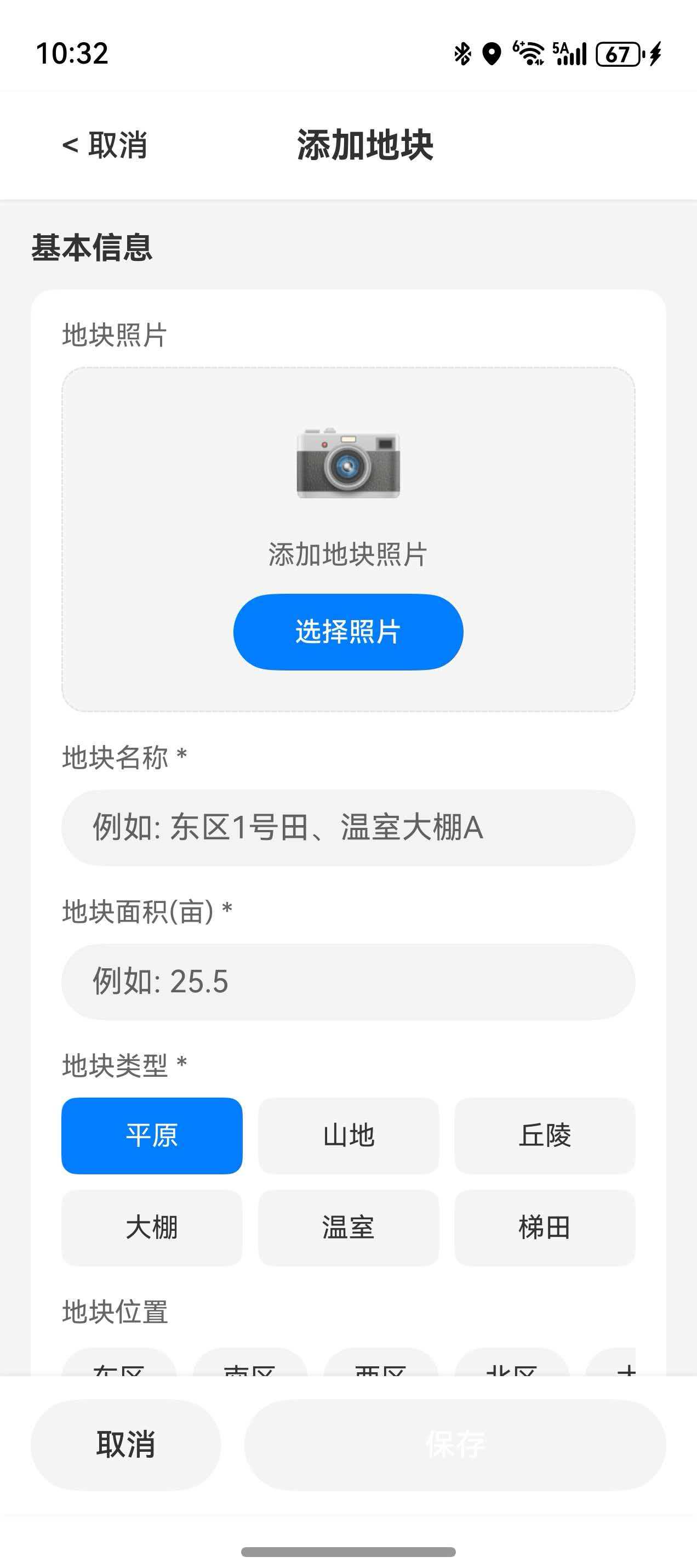
教程目标
通过本篇教程,你将学会:
- 实现地块添加页面
- 实现地块编辑页面(复用添加页面)
- 实现地块详情页面
- 实现表单验证与错误提示
- 实现删除确认对话框
- 实现坐标录入功能
完成本教程后,你将拥有完整的地块CRUD(增删改查)功能。
一、创建地块添加页面
添加页面是用户创建新地块的入口,需要提供一个完整的表单供用户填写地块信息。
1.1 创建 AddFieldPage.ets
操作步骤:
- 在 DevEco Studio 中,右键点击
Management文件夹 - 选择 New → ArkTS File
- 输入文件名
AddFieldPage,点击 OK - 输入以下代码
import { router } from '@kit.ArkUI';
import { FieldInfo, FieldType, IrrigationSystem } from '../../models/ProfessionalAgricultureModels';
import { FieldService } from '../../services/FieldService';
import { CommonCard, ActionButton } from '../../components/CommonComponents';
import { promptAction } from '@kit.ArkUI';

/**
 * 地块添加页面
 * 提供表单供用户输入地块信息
 */
@Entry
@ComponentV2
struct AddFieldPage {
  // 状态变量:表单字段
  @Local name: string = '';                          // 地块名称
  @Local type: FieldType = FieldType.FARMLAND;     // 地块类型
  @Local area: string = '';                          // 面积
  @Local location: string = '';                      // 位置描述
  @Local latitude: string = '';                      // 纬度
  @Local longitude: string = '';                     // 经度
  @Local soilType: string = '';                      // 土壤类型
  @Local irrigationSystem: IrrigationSystem = IrrigationSystem.NONE;  // 灌溉系统
  @Local notes: string = '';                         // 备注
  @Local isSubmitting: boolean = false;             // 提交状态

  // 服务实例
  private fieldService = FieldService.getInstance();

  // 地块类型选项
  private fieldTypes = [
    { label: '农田', value: FieldType.FARMLAND },
    { label: '果园', value: FieldType.ORCHARD },
    { label: '菜地', value: FieldType.VEGETABLE },
    { label: '温室大棚', value: FieldType.GREENHOUSE }
  ];

  // 灌溉系统选项
  private irrigationTypes = [
    { label: '无', value: IrrigationSystem.NONE },
    { label: '滴灌', value: IrrigationSystem.DRIP },
    { label: '喷灌', value: IrrigationSystem.SPRINKLER },
    { label: '漫灌', value: IrrigationSystem.FLOOD }
  ];

  build() {
    Column() {
      // 标题栏
      Row() {
        // 返回按钮
        Button() {
          Text('←')
            .fontSize(24)
        }
        .backgroundColor(Color.Transparent)
        .onClick(() => {
          router.back();
        })

        // 标题
        Text('添加地块')
          .fontSize(20)
          .fontWeight(FontWeight.Bold)
          .layoutWeight(1)
          .textAlign(TextAlign.Center)

        // 占位,保持标题居中
        Text('')
          .width(48)
      }
      .width('100%')
      .height(56)
      .padding({ left: 8, right: 8 })

      // 表单内容区域
      Scroll() {
        Column({ space: 16 }) {
          // 基本信息
          CommonCard({ title: '基本信息', icon: '📝' }) {
            Column({ space: 12 }) {
              // 地块名称输入
              this.buildFormItem('地块名称', '请输入地块名称', this.name, (value: string) => {
                this.name = value;
              })

              // 地块类型选择
              this.buildSelectItem('地块类型', this.fieldTypes, this.type, (value: FieldType) => {
                this.type = value;
              })

              // 面积输入
              this.buildFormItem('面积(亩)', '请输入面积', this.area, (value: string) => {
                this.area = value;
              }, 'number')
            }
          }

          // 位置信息
          CommonCard({ title: '位置信息', icon: '📍' }) {
            Column({ space: 12 }) {
              // 位置描述
              this.buildFormItem('位置描述', '如:湖北省武汉市东西湖区', this.location, (value: string) => {
                this.location = value;
              })

              // 经纬度输入(两列布局)
              Row({ space: 12 }) {
                Column() {
                  this.buildFormItem('纬度', '如:30.6228', this.latitude, (value: string) => {
                    this.latitude = value;
                  }, 'number')
                }
                .layoutWeight(1)

                Column() {
                  this.buildFormItem('经度', '如:114.1377', this.longitude, (value: string) => {
                    this.longitude = value;
                  }, 'number')
                }
                .layoutWeight(1)
              }

              // 地图选择按钮
              Button('从地图选择位置')
                .width('100%')
                .backgroundColor($r('app.color.background'))
                .fontColor($r('app.color.primary_professional'))
                .onClick(() => {
                  this.onSelectFromMap();
                })
            }
          }

          // 农田信息
          CommonCard({ title: '农田信息', icon: '🌾' }) {
            Column({ space: 12 }) {
              // 土壤类型
              this.buildFormItem('土壤类型', '如:黏土、沙壤土', this.soilType, (value: string) => {
                this.soilType = value;
              })

              // 灌溉系统选择
              this.buildSelectItem('灌溉系统', this.irrigationTypes, this.irrigationSystem, (value: IrrigationSystem) => {
                this.irrigationSystem = value;
              })
            }
          }

          // 备注信息(可选)
          CommonCard({ title: '备注(可选)', icon: '📄' }) {
            TextArea({ placeholder: '请输入备注信息' })
              .height(100)
              .onChange((value: string) => {
                this.notes = value;
              })
          }
        }
        .padding(16)
      }
      .layoutWeight(1)

      // 底部按钮组
      Row({ space: 12 }) {
        // 取消按钮
        Button('取消')
          .width('30%')
          .height(48)
          .backgroundColor($r('app.color.background'))
          .fontColor($r('app.color.text_primary'))
          .onClick(() => {
            router.back();
          })

        // 保存按钮
        ActionButton({
          text: '保存',
          type: 'primary',
          loading: this.isSubmitting,
          onClick: () => {
            this.onSubmit();
          }
        })
        .layoutWeight(1)
      }
      .width('100%')
      .padding(16)
    }
    .width('100%')
    .height('100%')
    .backgroundColor($r('app.color.background'))
  }

  /**
   * 构建表单输入项
   * @param label 标签文字
   * @param placeholder 占位符
   * @param value 当前值
   * @param onChange 值变化回调
   * @param inputType 输入类型
   */
  @Builder
  buildFormItem(
    label: string,
    placeholder: string,
    value: string,
    onChange: (value: string) => void,
    inputType: InputType = InputType.Normal
  ) {
    Column({ space: 8 }) {
      // 标签
      Text(label)
        .fontSize(14)
        .fontColor($r('app.color.text_secondary'))

      // 输入框
      TextInput({ placeholder: placeholder, text: value })
        .type(inputType)
        .onChange(onChange)
    }
    .alignItems(HorizontalAlign.Start)
    .width('100%')
  }

  /**
   * 构建选择器表单项
   * 使用泛型支持不同类型的选择器
   * @param label 标签文字
   * @param options 选项数组
   * @param selectedValue 当前选中的值
   * @param onChange 选择变化回调
   */
  @Builder
  buildSelectItem<T>(
    label: string,
    options: Array<{ label: string, value: T }>,
    selectedValue: T,
    onChange: (value: T) => void
  ) {
    Column({ space: 8 }) {
      // 标签
      Text(label)
        .fontSize(14)
        .fontColor($r('app.color.text_secondary'))

      // 选项按钮组
      Row({ space: 8 }) {
        ForEach(options, (option: { label: string, value: T }) => {
          Button(option.label)
            .fontSize(14)
            // 选中状态显示主题色
            .backgroundColor(selectedValue === option.value ?
              $r('app.color.primary_professional') : $r('app.color.background'))
            // 选中状态文字白色
            .fontColor(selectedValue === option.value ?
              Color.White : $r('app.color.text_primary'))
            .borderRadius(8)
            .padding({ left: 16, right: 16, top: 8, bottom: 8 })
            .onClick(() => {
              onChange(option.value);
            })
        })
      }
    }
    .alignItems(HorizontalAlign.Start)
    .width('100%')
  }

  /**
   * 表单验证
   * @returns 验证通过返回true,否则返回false
   */
  private validateForm(): boolean {
    // 验证地块名称
    if (!this.name || this.name.trim().length === 0) {
      promptAction.showToast({ message: '请输入地块名称' });
      return false;
    }

    // 验证面积
    if (!this.area || parseFloat(this.area) <= 0) {
      promptAction.showToast({ message: '请输入有效的面积' });
      return false;
    }

    // 验证面积不超过合理范围
    const areaValue = parseFloat(this.area);
    if (areaValue > 10000) {
      promptAction.showToast({ message: '面积不能超过10000亩' });
      return false;
    }

    // 验证位置描述
    if (!this.location || this.location.trim().length === 0) {
      promptAction.showToast({ message: '请输入位置描述' });
      return false;
    }

    // 验证经纬度格式
    if (this.latitude || this.longitude) {
      const lat = parseFloat(this.latitude);
      const lng = parseFloat(this.longitude);
      if (isNaN(lat) || lat < -90 || lat > 90) {
        promptAction.showToast({ message: '纬度必须在-90到90之间' });
        return false;
      }
      if (isNaN(lng) || lng < -180 || lng > 180) {
        promptAction.showToast({ message: '经度必须在-180到180之间' });
        return false;
      }
    }

    return true;
  }

  /**
   * 提交表单
   */
  private async onSubmit(): Promise<void> {
    // 先进行表单验证
    if (!this.validateForm()) {
      return;
    }

    this.isSubmitting = true;

    try {
      // 构��地块信息对象
      const field: FieldInfo = {
        id: Date.now().toString(),                          // 使用时间戳作为ID
        name: this.name.trim(),
        type: this.type,
        area: parseFloat(this.area),
        location: this.location.trim(),
        latitude: this.latitude ? parseFloat(this.latitude) : undefined,
        longitude: this.longitude ? parseFloat(this.longitude) : undefined,
        soilType: this.soilType.trim(),
        irrigationSystem: this.irrigationSystem,
        status: '闲置',                                   // 新地块默认为闲置状态
        createdAt: Date.now(),
        lastUpdatedAt: Date.now(),
        notes: this.notes.trim() || undefined
      };

      // 调用服务保存数据
      const success = await this.fieldService.addField(field);

      if (success) {
        promptAction.showToast({ message: '添加成功' });
        router.back();  // 返回列表页
      } else {
        promptAction.showToast({ message: '添加失败,请重试' });
      }
    } catch (error) {
      console.error('[AddFieldPage] Submit failed:', error);
      promptAction.showToast({ message: '添加失败' });
    } finally {
      this.isSubmitting = false;
    }
  }

  /**
   * 从地图选择位置
   */
  private onSelectFromMap(): void {
    // TODO: 在后续教程中实现地图选择功能
    promptAction.showToast({ message: '地图选择功能将在后续教程中实现' });
  }
}
页面结构说明:
┌─────────────────────────────────────┐
│  ←          添加地块                │  ← 标题栏
├─────────────────────────────────────┤
│  📝 基本信息                         │
│  ┌─────────────────────────────┐   │
│  │ 地块名称                     │   │
│  │ [_________________]          │   │
│  │                             │   │
│  │ 地块类型                     │   │
│  │ [农田] [果园] [菜地] [温室] │   │
│  │                             │   │
│  │ 面积(亩)                   │   │
│  │ [_________________]          │   │
│  └─────────────────────────────┘   │
│                                     │
│  📍 位置信息                         │
│  ┌─────────────────────────────┐   │
│  │ 位置描述                     │   │
│  │ [_________________]          │   │
│  │                             │   │
│  │ 纬度      经度              │   │
│  │ [____]    [____]            │   │
│  │                             │   │
│  │ [ 从地图选择位置 ]          │   │
│  └─────────────────────────────┘   │
│                  ...                │
│  [取消]              [保存]         │
└─────────────────────────────────────┘
二、创建地块编辑页面
编辑页面与添加页面非常相似,可以复用大部分代码。我们可以通过路由参数判断是添加还是编辑模式。
2.1 创建 EditFieldPage.ets
操作步骤:
- 右键点击
Management文件夹 → New → ArkTS File - 输入文件名
EditFieldPage,点击 OK - 输入以下代码
import { router } from '@kit.ArkUI';
import { FieldInfo, FieldType, IrrigationSystem } from '../../models/ProfessionalAgricultureModels';
import { FieldService } from '../../services/FieldService';
import { CommonCard, ActionButton, LoadingView } from '../../components/CommonComponents';
import { promptAction } from '@kit.ArkUI';

/**
 * 地块编辑页面
 * 加载现有地块数据,允许用户修改并保存
 */
@Entry
@ComponentV2
struct EditFieldPage {
  // 状态变量:表单字段
  @Local name: string = '';
  @Local type: FieldType = FieldType.FARMLAND;
  @Local area: string = '';
  @Local location: string = '';
  @Local latitude: string = '';
  @Local longitude: string = '';
  @Local soilType: string = '';
  @Local irrigationSystem: IrrigationSystem = IrrigationSystem.NONE;
  @Local notes: string = '';
  @Local status: string = '闲置';
  @Local isLoading: boolean = true;
  @Local isSubmitting: boolean = false;

  // 服务实例
  private fieldService = FieldService.getInstance();
  private fieldId: string = '';

  // 地块类型选项
  private fieldTypes = [
    { label: '农田', value: FieldType.FARMLAND },
    { label: '果园', value: FieldType.ORCHARD },
    { label: '菜地', value: FieldType.VEGETABLE },
    { label: '温室大棚', value: FieldType.GREENHOUSE }
  ];

  // 灌溉系统选项
  private irrigationTypes = [
    { label: '无', value: IrrigationSystem.NONE },
    { label: '滴灌', value: IrrigationSystem.DRIP },
    { label: '喷灌', value: IrrigationSystem.SPRINKLER },
    { label: '漫灌', value: IrrigationSystem.FLOOD }
  ];

  // 地块状态选项
  private statusOptions = [
    { label: '闲置', value: '闲置' },
    { label: '准备中', value: '准备中' },
    { label: '种植中', value: '种植中' }
  ];

  /**
   * 页面即将出现时获取参数并加载数据
   */
  aboutToAppear(): void {
    // 从路由参数获取地块ID
    const params = router.getParams() as Record<string, Object>;
    this.fieldId = params['fieldId'] as string;
    this.loadData();
  }

  build() {
    Column() {
      // 标题栏
      Row() {
        Button() {
          Text('←').fontSize(24)
        }
        .backgroundColor(Color.Transparent)
        .onClick(() => router.back())

        Text('编辑地块')
          .fontSize(20)
          .fontWeight(FontWeight.Bold)
          .layoutWeight(1)
          .textAlign(TextAlign.Center)

        // 占位,保持标题居中
        Text('').width(48)
      }
      .width('100%')
      .height(56)
      .padding({ left: 8, right: 8 })

      if (this.isLoading) {
        // 加载中状态
        LoadingView()
          .layoutWeight(1)
      } else {
        // 表单内容区域
        Scroll() {
          Column({ space: 16 }) {
            // 基本信息
            CommonCard({ title: '基本信息', icon: '📝' }) {
              Column({ space: 12 }) {
                this.buildFormItem('地块名称', '请输入地块名称', this.name, (value: string) => {
                  this.name = value;
                })

                this.buildSelectItem('地块类型', this.fieldTypes, this.type, (value: FieldType) => {
                  this.type = value;
                })

                this.buildFormItem('面积(亩)', '请输入面积', this.area, (value: string) => {
                  this.area = value;
                }, 'number')

                // 状态选择
                this.buildSelectItem('地块状态', this.statusOptions, this.status, (value: string) => {
                  this.status = value;
                })
              }
            }

            // 位置信息
            CommonCard({ title: '位置信息', icon: '📍' }) {
              Column({ space: 12 }) {
                this.buildFormItem('位置描述', '如:湖北省武汉市东西湖区', this.location, (value: string) => {
                  this.location = value;
                })

                Row({ space: 12 }) {
                  Column() {
                    this.buildFormItem('纬度', '如:30.6228', this.latitude, (value: string) => {
                      this.latitude = value;
                    }, 'number')
                  }
                  .layoutWeight(1)

                  Column() {
                    this.buildFormItem('经度', '如:114.1377', this.longitude, (value: string) => {
                      this.longitude = value;
                    }, 'number')
                  }
                  .layoutWeight(1)
                }

                Button('从地图选择位置')
                  .width('100%')
                  .backgroundColor($r('app.color.background'))
                  .fontColor($r('app.color.primary_professional'))
                  .onClick(() => {
                    this.onSelectFromMap();
                  })
              }
            }

            // 农田信息
            CommonCard({ title: '农田信息', icon: '🌾' }) {
              Column({ space: 12 }) {
                this.buildFormItem('土壤类型', '如:黏土、沙壤土', this.soilType, (value: string) => {
                  this.soilType = value;
                })

                this.buildSelectItem('灌溉系统', this.irrigationTypes, this.irrigationSystem, (value: IrrigationSystem) => {
                  this.irrigationSystem = value;
                })
              }
            }

            // 备注
            CommonCard({ title: '备注(可选)', icon: '📄' }) {
              TextArea({ placeholder: '请输入备注信息', text: this.notes })
                .height(100)
                .onChange((value: string) => {
                  this.notes = value;
                })
            }
          }
          .padding(16)
        }
        .layoutWeight(1)

        // 底部按钮组
        Row({ space: 12 }) {
          Button('取消')
            .width('30%')
            .height(48)
            .backgroundColor($r('app.color.background'))
            .fontColor($r('app.color.text_primary'))
            .onClick(() => {
              router.back();
            })

          ActionButton({
            text: '保存',
            type: 'primary',
            loading: this.isSubmitting,
            onClick: () => {
              this.onSubmit();
            }
          })
          .layoutWeight(1)
        }
        .width('100%')
        .padding(16)
      }
    }
    .width('100%')
    .height('100%')
    .backgroundColor($r('app.color.background'))
  }

  /**
   * 构建表单输入项
   */
  @Builder
  buildFormItem(
    label: string,
    placeholder: string,
    value: string,
    onChange: (value: string) => void,
    inputType: InputType = InputType.Normal
  ) {
    Column({ space: 8 }) {
      Text(label)
        .fontSize(14)
        .fontColor($r('app.color.text_secondary'))

      TextInput({ placeholder: placeholder, text: value })
        .type(inputType)
        .onChange(onChange)
    }
    .alignItems(HorizontalAlign.Start)
    .width('100%')
  }

  /**
   * 构建选择器表单项
   */
  @Builder
  buildSelectItem<T>(
    label: string,
    options: Array<{ label: string, value: T }>,
    selectedValue: T,
    onChange: (value: T) => void
  ) {
    Column({ space: 8 }) {
      Text(label)
        .fontSize(14)
        .fontColor($r('app.color.text_secondary'))

      Row({ space: 8 }) {
        ForEach(options, (option: { label: string, value: T }) => {
          Button(option.label)
            .fontSize(14)
            .backgroundColor(selectedValue === option.value ?
              $r('app.color.primary_professional') : $r('app.color.background'))
            .fontColor(selectedValue === option.value ?
              Color.White : $r('app.color.text_primary'))
            .borderRadius(8)
            .padding({ left: 16, right: 16, top: 8, bottom: 8 })
            .onClick(() => {
              onChange(option.value);
            })
        })
      }
    }
    .alignItems(HorizontalAlign.Start)
    .width('100%')
  }

  /**
   * 加载地块数据
   */
  private async loadData(): Promise<void> {
    try {
      const field = await this.fieldService.getFieldById(this.fieldId);
      if (field) {
        // 将地块数据填充到表单
        this.name = field.name;
        this.type = field.type;
        this.area = field.area.toString();
        this.location = field.location;
        this.latitude = field.latitude?.toString() || '';
        this.longitude = field.longitude?.toString() || '';
        this.soilType = field.soilType;
        this.irrigationSystem = field.irrigationSystem;
        this.status = field.status;
        this.notes = field.notes || '';
      } else {
        promptAction.showToast({ message: '地块不存在' });
        router.back();
      }
    } catch (error) {
      console.error('[EditFieldPage] Load failed:', error);
      promptAction.showToast({ message: '加载失败' });
    } finally {
      this.isLoading = false;
    }
  }

  /**
   * 表单验证
   */
  private validateForm(): boolean {
    if (!this.name || this.name.trim().length === 0) {
      promptAction.showToast({ message: '请输入地块名称' });
      return false;
    }
    if (!this.area || parseFloat(this.area) <= 0) {
      promptAction.showToast({ message: '请输入有效的面积' });
      return false;
    }
    const areaValue = parseFloat(this.area);
    if (areaValue > 10000) {
      promptAction.showToast({ message: '面积不能超过10000亩' });
      return false;
    }
    if (!this.location || this.location.trim().length === 0) {
      promptAction.showToast({ message: '请输入位置描述' });
      return false;
    }
    return true;
  }

  /**
   * 提交更新
   */
  private async onSubmit(): Promise<void> {
    if (!this.validateForm()) {
      return;
    }

    this.isSubmitting = true;

    try {
      // 构建更新后的地块信息
      const field: FieldInfo = {
        id: this.fieldId,  // 保持原ID不变
        name: this.name.trim(),
        type: this.type,
        area: parseFloat(this.area),
        location: this.location.trim(),
        latitude: this.latitude ? parseFloat(this.latitude) : undefined,
        longitude: this.longitude ? parseFloat(this.longitude) : undefined,
        soilType: this.soilType.trim(),
        irrigationSystem: this.irrigationSystem,
        status: this.status,
        createdAt: Date.now(),  // 注意:实际应用应保持原创建时间
        lastUpdatedAt: Date.now(),
        notes: this.notes.trim() || undefined
      };

      // 调用服务更新数据
      const success = await this.fieldService.updateField(field);

      if (success) {
        promptAction.showToast({ message: '更新成功' });
        router.back();
      } else {
        promptAction.showToast({ message: '更新失败,请重试' });
      }
    } catch (error) {
      console.error('[EditFieldPage] Submit failed:', error);
      promptAction.showToast({ message: '更新失败' });
    } finally {
      this.isSubmitting = false;
    }
  }

  /**
   * 从地图选择位置
   */
  private onSelectFromMap(): void {
    promptAction.showToast({ message: '地图选择功能将在后续教程中实现' });
  }
}
三、创建地块详情页面
详情页面用于展示地块的完整信息,并提供编辑和删除操作的入口。
3.1 创建 FieldDetailPage.ets
操作步骤:
- 右键点击
Management文件夹 → New → ArkTS File - 输入文件名
FieldDetailPage,点击 OK - 输入以下代码
import { router } from '@kit.ArkUI';
import { FieldInfo, FieldType } from '../../models/ProfessionalAgricultureModels';
import { FieldService } from '../../services/FieldService';
import { CommonCard, InfoRow, StatusBadge, ActionButton, LoadingView, getBadgeStyle, BadgeType } from '../../components/CommonComponents';
import { promptAction } from '@kit.ArkUI';

/**
 * 地块详情页面
 * 展示地块的完整信息,支持编辑和删除操作
 */
@Entry
@ComponentV2
struct FieldDetailPage {
  @Local field: FieldInfo | null = null;    // 地块数据
  @Local isLoading: boolean = true;           // 加载状态
  @Local showDeleteDialog: boolean = false;   // 删除确认对话框

  private fieldService = FieldService.getInstance();
  private fieldId: string = '';

  /**
   * 页面即将出现时获取参数并加载数据
   */
  aboutToAppear(): void {
    const params = router.getParams() as Record<string, Object>;
    this.fieldId = params['fieldId'] as string;
    this.loadData();
  }

  build() {
    Column() {
      // 标题栏
      Row() {
        // 返回按钮
        Button() {
          Text('←').fontSize(24)
        }
        .backgroundColor(Color.Transparent)
        .onClick(() => router.back())

        // 标题
        Text('地块详情')
          .fontSize(20)
          .fontWeight(FontWeight.Bold)
          .layoutWeight(1)
          .textAlign(TextAlign.Center)

        // 编辑按钮
        Button() {
          Text('编辑')
            .fontSize(16)
        }
        .backgroundColor(Color.Transparent)
        .fontColor($r('app.color.primary_professional'))
        .onClick(() => this.onEdit())
      }
      .width('100%')
      .height(56)
      .padding({ left: 8, right: 8 })

      if (this.isLoading) {
        // 加载中状态
        LoadingView()
          .layoutWeight(1)
      } else if (this.field) {
        // 详情内容
        Scroll() {
          Column({ space: 16 }) {
            // 基本信息
            CommonCard({ title: '基本信息', icon: '📝' }) {
              Column({ space: 8 }) {
                InfoRow({ label: '地块名称', value: this.field.name })
                InfoRow({ label: '地块类型', value: this.getFieldTypeLabel(this.field.type) })
                InfoRow({ label: '面积', value: `${this.field.area} 亩` })

                // 状态标签
                Row() {
                  Text('状态')
                    .fontSize(14)
                    .fontColor($r('app.color.text_secondary'))

                  Blank()

                  StatusBadge({
                    text: this.field.status,
                    textColor: this.getStatusColor(this.field.status).textColor,
                    backgroundColor: this.getStatusColor(this.field.status).backgroundColor
                  })
                }
                .width('100%')
              }
            }

            // 位置信息
            CommonCard({ title: '位置信息', icon: '📍' }) {
              Column({ space: 8 }) {
                InfoRow({ label: '位置', value: this.field.location })

                // 如果有坐标,显示经纬度
                if (this.field.latitude && this.field.longitude) {
                  InfoRow({
                    label: '坐标',
                    value: `${this.field.latitude.toFixed(4)}, ${this.field.longitude.toFixed(4)}`
                  })
                }
              }
            }

            // 土壤与灌溉
            CommonCard({ title: '土壤与灌溉', icon: '🌾' }) {
              Column({ space: 8 }) {
                InfoRow({ label: '土壤类型', value: this.field.soilType || '未设置' })
                InfoRow({
                  label: '灌溉系统',
                  value: this.getIrrigationLabel(this.field.irrigationSystem)
                })
              }
            }

            // 当前作物
            if (this.field.currentCrop) {
              CommonCard({ title: '当前作物', icon: '🌱' }) {
                Column({ space: 8 }) {
                  InfoRow({ label: '作物名称', value: this.field.currentCrop.name })
                  InfoRow({ label: '品种', value: this.field.currentCrop.variety })
                  InfoRow({
                    label: '种植日期',
                    value: new Date(this.field.currentCrop.plantingDate).toLocaleDateString()
                  })
                  InfoRow({
                    label: '预计收获',
                    value: new Date(this.field.currentCrop.expectedHarvestDate).toLocaleDateString()
                  })
                  InfoRow({
                    label: '生长阶段',
                    value: this.getGrowthStageLabel(this.field.currentCrop.growthStage)
                  })
                  InfoRow({
                    label: '健康状态',
                    value: this.getHealthStatusLabel(this.field.currentCrop.healthStatus)
                  })
                  InfoRow({
                    label: '预计产量',
                    value: `${this.field.currentCrop.expectedYield} 公斤`
                  })
                }
              }
            }

            // 备注信息
            if (this.field.notes) {
              CommonCard({ title: '备注', icon: '📄' }) {
                Text(this.field.notes)
                  .fontSize(14)
                  .fontColor($r('app.color.text_secondary'))
              }
            }

            // 时间信息
            CommonCard({ title: '时间信息', icon: '🕐' }) {
              Column({ space: 8 }) {
                InfoRow({
                  label: '创建时间',
                  value: new Date(this.field.createdAt).toLocaleString()
                })
                InfoRow({
                  label: '更新时间',
                  value: new Date(this.field.lastUpdatedAt).toLocaleString()
                })
              }
            }

            // 操作按钮区域
            Row({ space: 12 }) {
              ActionButton({
                text: '查看地图',
                type: 'secondary',
                onClick: () => this.onViewMap()
              })
              .layoutWeight(1)

              ActionButton({
                text: '删除地块',
                type: 'danger',
                onClick: () => this.onDeleteClick()
              })
              .layoutWeight(1)
            }
            .width('100%')
            .padding({ left: 16, right: 16 })
          }
          .padding(16)
        }
        .layoutWeight(1)
      }
    }
    .width('100%')
    .height('100%')
    .backgroundColor($r('app.color.background'))
    .bindContentCover(this.buildDeleteDialog())
  }

  /**
   * 构建删除确认对话框
   */
  @Builder
  buildDeleteDialog() {
    if (this.showDeleteDialog) {
      Column() {
        // 半透明遮罩
        Column()
          .width('100%')
          .height('100%')
          .backgroundColor('rgba(0, 0, 0, 0.5)')
          .onClick(() => {
            this.showDeleteDialog = false;  // 点击遮罩关闭对话框
          })

        // 对话框内容
        Column({ space: 16 }) {
          Column({ space: 8 }) {
            Text('确认删除')
              .fontSize(18)
              .fontWeight(FontWeight.Bold)

            Text('删除后将无法恢复,确定要删除该地块吗?')
              .fontSize(14)
              .fontColor($r('app.color.text_secondary'))
          }
          .padding({ top: 20, bottom: 20 })

          // 按钮组
          Row({ space: 12 }) {
            Button('取消')
              .layoutWeight(1)
              .height(40)
              .backgroundColor($r('app.color.background'))
              .fontColor($r('app.color.text_primary'))
              .onClick(() => {
                this.showDeleteDialog = false;
              })

            Button('删除')
              .layoutWeight(1)
              .height(40)
              .backgroundColor('#F5222D')
              .onClick(() => {
                this.onDeleteConfirm();
              })
          }
          .width('100%')
        }
        .width('80%')
        .maxWidth(320)
        .padding(20)
        .backgroundColor($r('app.color.card_background'))
        .borderRadius(12)
        .position({ x: '50%', y: '50%' })
        .translate({ x: '-50%', y: '-50%' })
        .shadow({ radius: 10, color: 'rgba(0, 0, 0, 0.1)' })
      }
      .width('100%')
      .height('100%')
      .position({ x: 0, y: 0 })
    }
  }

  /**
   * 加载地块数据
   */
  private async loadData(): Promise<void> {
    try {
      this.field = await this.fieldService.getFieldById(this.fieldId);
      if (!this.field) {
        promptAction.showToast({ message: '地块不存在' });
        router.back();
      }
    } catch (error) {
      console.error('[FieldDetailPage] Load failed:', error);
    } finally {
      this.isLoading = false;
    }
  }

  /**
   * 获取地块类型标签
   */
  private getFieldTypeLabel(type: FieldType): string {
    const types: Record<FieldType, string> = {
      [FieldType.FARMLAND]: '农田',
      [FieldType.ORCHARD]: '果园',
      [FieldType.VEGETABLE]: '菜地',
      [FieldType.GREENHOUSE]: '温室大棚'
    };
    return types[type] || type;
  }

  /**
   * 获取生长阶段标签
   */
  private getGrowthStageLabel(stage: string): string {
    const stages: Record<string, string> = {
      'seedling': '育苗期',
      'growing': '生长期',
      'flowering': '开花期',
      'fruiting': '结果期',
      'harvesting': '收获期',
      'fallow': '休耕期'
    };
    return stages[stage] || stage;
  }

  /**
   * 获取健康状态标签
   */
  private getHealthStatusLabel(status: string): string {
    const statuses: Record<string, string> = {
      'healthy': '健康',
      'attention': '需关注',
      'disease': '病害',
      'pest': '虫害'
    };
    return statuses[status] || status;
  }

  /**
   * 获取灌溉系统标签
   */
  private getIrrigationLabel(system: string): string {
    const labels: Record<string, string> = {
      'none': '无',
      'drip': '滴灌',
      'sprinkler': '喷灌',
      'flood': '漫灌'
    };
    return labels[system] || system;
  }

  /**
   * 获取状态颜色
   */
  private getStatusColor(status: string): { textColor: string, backgroundColor: string } {
    switch (status) {
      case '种植中':
        return getBadgeStyle(BadgeType.SUCCESS);
      case '闲置':
        return getBadgeStyle(BadgeType.INFO);
      case '准备中':
        return getBadgeStyle(BadgeType.WARNING);
      default:
        return getBadgeStyle(BadgeType.DEFAULT);
    }
  }

  /**
   * 编辑按钮点击
   */
  private onEdit(): void {
    router.pushUrl({
      url: 'pages/Management/EditFieldPage',
      params: { fieldId: this.fieldId }
    });
  }

  /**
   * 查看地图
   */
  private onViewMap(): void {
    router.pushUrl({
      url: 'pages/Map/FieldMapPage',
      params: { fieldId: this.fieldId }
    });
  }

  /**
   * 删除按钮点击 - 显示确认对话框
   */
  private onDeleteClick(): void {
    this.showDeleteDialog = true;
  }

  /**
   * 确认删除
   */
  private async onDeleteConfirm(): Promise<void> {
    this.showDeleteDialog = false;

    const success = await this.fieldService.deleteField(this.fieldId);
    if (success) {
      promptAction.showToast({ message: '删除成功' });
      router.back();
    } else {
      promptAction.showToast({ message: '删除失败,请重试' });
    }
  }
}
四、配置页面路由
在 HarmonyOS 中,所有可访问的页面都需要在路由配置文件中注册。
4.1 修改 main_pages.json
操作步骤:
- 打开
entry/src/main/resources/base/profile/main_pages.json - 在
src数组中添加新页面路由
{
  "src": [
    "pages/WelcomePage",
    "pages/Index",
    "pages/Map/FieldMapPage",
    "pages/Management/FieldManagementPage",
    "pages/Management/AddFieldPage",
    "pages/Management/EditFieldPage",
    "pages/Management/FieldDetailPage",
    "pages/OnboardingFlow/ModeSelectionPage",
    "pages/OnboardingFlow/LocationPage",
    "pages/OnboardingFlow/GoalsPage"
  ]
}
五、运行与测试
5.1 测试添加功能
-
进入添加页面
- 在地块管理页面点击"添加地块"按钮
- 进入添加地块页面
-
测试表单验证
- 直接点击"保存"按钮 → 应提示"请输入地块名称"
- 输入名称,面积留空,点击"保存" → 应提示"请输入有效的面积"
- 输入负数面积 → 应提示"请输入有效的面积"
- 输入超过10000的面积 → 应提示"面积不能超过10000亩"
-
成功添加地块
- 填写完整表单信息
- 点击"保存"按钮
- 返回列表页,新地块应出现在列表中
5.2 测试详情功能
-
查看详情
- 在列表中点击任意地块卡片
- 进入地块详情页面
- 检查所有信息是否正确显示
-
测试编辑
- 点击右上角"编辑"按钮
- 进入编辑页面
- 修改部分信息
- 点击"保存"
- 返回详情页,检查修改是否生效
-
测试删除
- 在详情页点击"删除地块"按钮
- 应弹出删除确认对话框
- 点击"取消",对话框关闭,地块保留
- 再次点击"删除地块",点击"删除"确认
- 返回列表页,该地块应已消失
5.3 预期效果
| 功能 | 预期效果 |
|---|---|
| 添加地块 | 新地块出现在列表中,状态为"闲置" |
| 编辑地块 | 信息正确更新,lastUpdatedAt时间更新 |
| 删除地块 | 地块从列表中移除,数据被清除 |
| 表单验证 | 空值、格式错误时显示对应提示 |
| 删除确认 | 点击删除后弹出确认对话框 |
六、常见问题与解决方案
6.1 页面路由报错
问题:点击按钮后提示页面不存在
解决方案:
- 检查
main_pages.json中是否已添加页面路由 - 确认路由路径与文件路径一致
- 注意大小写,路由区分大小写
6.2 编辑页面数据不回显
问题:进入编辑页面后表单为空
解决方案:
- 确认路由参数
fieldId正确传递 - 检查
loadData()方法是否正确获取数据 - 使用 console.log 调试参数获取
6.3 删除后列表不更新
问题:删除地块后返回列表,列表仍显示该地块
解决方案:
- 在列表页的
aboutToAppear()中重新加载数据 - 使用
router.replaceUrl()代替router.back()强制刷新 - 或在返回时传递刷新标志
6.4 表单验证不准确
问题:输入非法数据仍能提交
解决方案:
- 检查
validateForm()方法的所有验证条件 - 确保
parseFloat()转换后再次验证isNaN() - 字符串验证使用
trim()去除空格后检查length
七、总结
本篇教程完成了:
- ✅ 地块添加页面(完整表单、验证)
- ✅ 地块编辑页面(数据回显、更新)
- ✅ 地块详情页面��完整信息展示)
- ✅ 表单验证(空值、格式、范围验证)
- ✅ 删除确认对话框
- ✅ CRUD完整功能
关键技术点:
| 技术点 | 说明 |
|---|---|
| @Builder | 构建可复用的UI组件和方法 |
| 表单验证 | 多层次验证确保数据完整性 |
| 路由参数 | 使用 router.getParams() 传递数据 |
| 状态管理 | 使用 @Local 管理页面状态 |
| 对话框 | 使用 bindContentCover 实现自定义对话框 |
八、下一步
在下一篇教程中,我们将学习:
- 地块在地图上的标记展示
- 标记颜色与状态管理
- 标记点击事件处理
- 地图与地块数据联动
- 智能地图中心计算
准备工作:
- 了解高德地图标记(Marker)的使用方法
- 熟悉地图事件的监听和处理
- 准备带有坐标的地块测试数据
参考资料
教程版本:v1.0
更新日期:2026-01
适用版本:DevEco Studio 5.0+, HarmonyOS API 17+

讨论HarmonyOS开发技术,专注于API与组件、DevEco Studio、测试、元服务和应用上架分发等。
更多推荐

 9
9 0
0- 0


 已为社区贡献58条内容

所有评论(0)