HarmonyOS智慧农业管理应用开发教程--高高种地--第9篇:作物种植与管理
✅ 作物数据模型理解✅ 作物管理页面✅ 添加作物页面框架✅ 作物列表展示✅ 生长阶段和健康状态显示✅ 页面路由配置关键技术点技术点说明数据关联作物通过字段与地块关联枚举类型确保状态值的有效性日期计算根据作物类型自动计算收获日期组件复用复用 CommonCard、StatusBadge 等组件。
·
第9篇:作物种植与管理
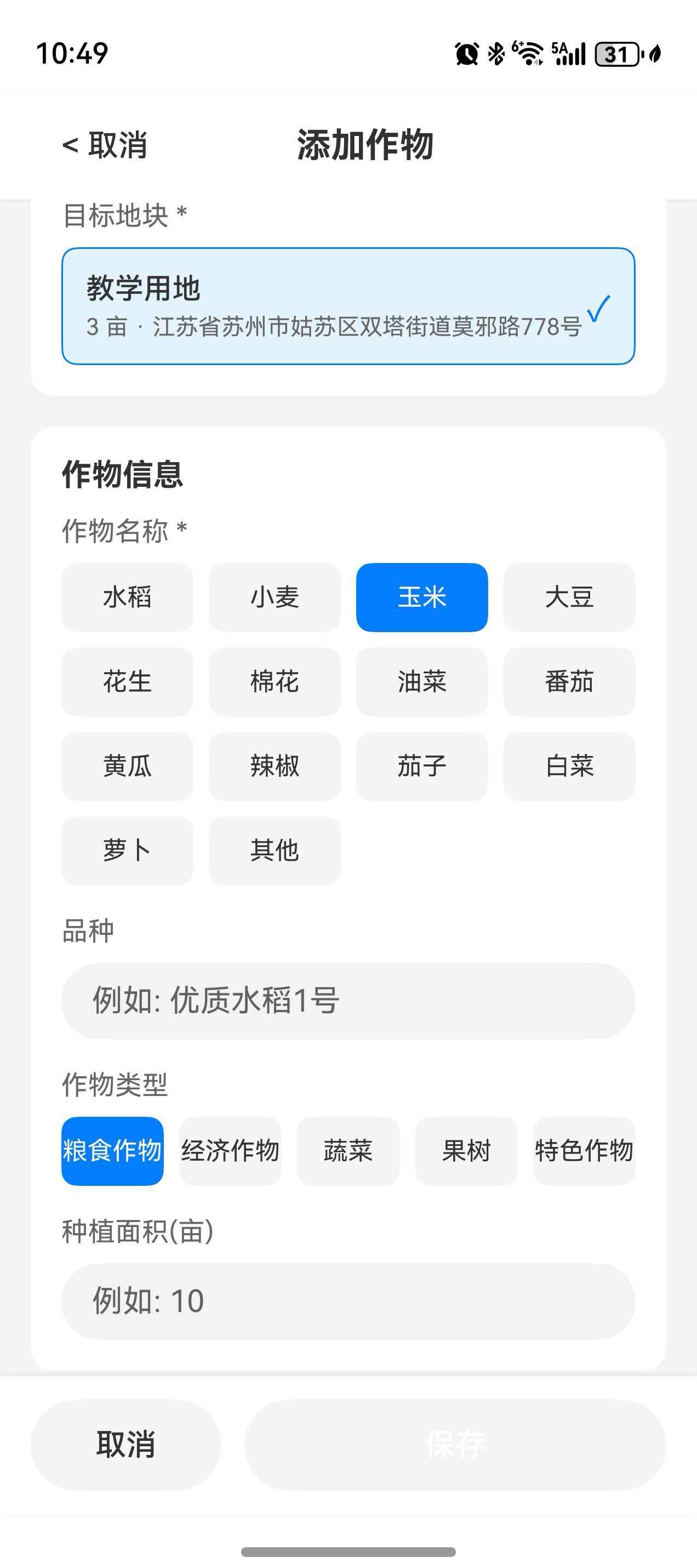
教程目标
通过本篇教程,你将学会:
- 理解作物数据模型设计
- 实现作物列表页面
- 创建添加作物页面
- 实现作物详情页面
- 实现作物编辑页面
- 管理作物生长阶段
- 跟踪作物健康状态
完成本教程后,你将拥有完整的作物管理功能。
一、作物数据模型
在实现作物管理功能之前,我们需要了解作物数据模型的结构。作物数据模型已在 ProfessionalAgricultureModels.ets 中定义。
1.1 查看作物数据模型
操作说明:
- 打开
entry/src/main/ets/models/ProfessionalAgricultureModels.ets - 查看
CropInfo接口的定义
/**
 * 作物信息接口
 * 记录单个作物的完整信息
 */
export interface CropInfo {
  id: string;                  // 作物唯一标识
  name: string;                // 作物名称,如"水稻"、"小麦"
  type: CropType;              // 作物类型(粮食、蔬菜、水果、经济作物)
  variety: string;             // 品种,如"杂交稻"、"冬小麦"
  plantingDate: number;        // 种植日期(时间戳)
  expectedHarvestDate: number; // 预计收获日期(时间戳)
  growthStage: CropGrowthStage; // 当前生长阶段
  healthStatus: CropHealthStatus; // 当前健康状态
  area: number;                // 种植面积(亩)
  expectedYield: number;       // 预计产量(公斤)
  notes?: string;              // 备注信息(可选)
}

/**
 * 作物类型枚举
 */
export enum CropType {
  GRAIN = 'grain',             // 粮食作物 - 如水稻、小麦、玉米、大豆
  VEGETABLE = 'vegetable',     // 蔬菜 - 如白菜、萝卜、番茄、黄瓜
  FRUIT = 'fruit',             // 水果 - 如苹果、柑橘、葡萄、梨
  CASH_CROP = 'cash_crop'      // 经济作物 - 如棉花、油菜、甘蔗、茶叶
}

/**
 * 作物生长阶段枚举
 */
export enum CropGrowthStage {
  SEEDLING = 'seedling',       // 育苗期 - 种子发芽到幼苗期
  GROWING = 'growing',         // 生长期 - 营养生长旺盛期
  FLOWERING = 'flowering',     // 开花期 - 生殖生长阶段
  FRUITING = 'fruiting',       // 结果期 - 果实成熟期
  HARVESTING = 'harvesting',   // 收���期 - 可以采收的阶段
  FALLOW = 'fallow'           // 休耕期 - 土地休息恢复期
}

/**
 * 作物健康状态枚举
 */
export enum CropHealthStatus {
  HEALTHY = 'healthy',         // 健康 - 生长正常
  ATTENTION = 'attention',     // 需关注 - 有轻微问题(缺水、缺肥)
  DISEASE = 'disease',         // 病害 - 感染病害
  PEST = 'pest'               // 虫害 - 发生虫害
}
模型设计要点:
| 设计要点 | 说明 |
|---|---|
| 时间存储 | 使用时间戳(number)存储日期,便于计算 |
| 状态管理 | 使用枚举确保状态值的有效性 |
| 可选字段 | 使用 ? 标记非必填字段(如notes) |
| 关联关系 | 作物通过 currentCrop 字段与地块关联 |
二、创建作物服务
作物服务负责处理作物相关的业务逻辑,包括添加、更新、删除、查询等操作。
2.1 创建 CropService.ets
操作步骤:
- 在
entry/src/main/ets/services/目录下创建新文件 - 命名为
CropService.ets - 输入以下代码
import { CropInfo, CropGrowthStage, CropHealthStatus } from '../models/ProfessionalAgricultureModels';
import { StorageUtil } from '../utils/StorageUtil';

/**
 * 作物管理服务
 * 提供作物的增删改查功能
 */
export class CropService {
  private static instance: CropService;

  private constructor() {}

  static getInstance(): CropService {
    if (!CropService.instance) {
      CropService.instance = new CropService();
    }
    return CropService.instance;
  }

  /**
   * 获取所有作物列表
   * @returns Promise<CropInfo[]> 作物列表
   */
  async getAllCrops(): Promise<CropInfo[]> {
    const crops = await StorageUtil.getObject<CropInfo[]>('crops_list', []);
    return crops || [];
  }

  /**
   * 根据ID获取作物信息
   * @param id 作物ID
   * @returns Promise<CropInfo | null> 作物信息,未找到返回null
   */
  async getCropById(id: string): Promise<CropInfo | null> {
    const crops = await this.getAllCrops();
    return crops.find(c => c.id === id) || null;
  }

  /**
   * 添加新作物
   * @param crop 作物信息对象
   * @returns Promise<boolean> 成功返回true,失败返回false
   */
  async addCrop(crop: CropInfo): Promise<boolean> {
    try {
      const crops = await this.getAllCrops();
      crops.push(crop);
      await StorageUtil.saveObject('crops_list', crops);
      console.info('[CropService] Crop added:', crop.id);
      return true;
    } catch (error) {
      console.error('[CropService] Failed to add crop:', error);
      return false;
    }
  }

  /**
   * 更新作物信息
   * @param crop 要更新的作物信息
   * @returns Promise<boolean> 成功返回true,失败返回false
   */
  async updateCrop(crop: CropInfo): Promise<boolean> {
    try {
      const crops = await this.getAllCrops();
      const index = crops.findIndex(c => c.id === crop.id);
      if (index !== -1) {
        crops[index] = crop;
        await StorageUtil.saveObject('crops_list', crops);
        console.info('[CropService] Crop updated:', crop.id);
        return true;
      }
      return false;
    } catch (error) {
      console.error('[CropService] Failed to update crop:', error);
      return false;
    }
  }

  /**
   * 删除作物
   * @param id 作物ID
   * @returns Promise<boolean> 成功返回true,失败返回false
   */
  async deleteCrop(id: string): Promise<boolean> {
    try {
      const crops = await this.getAllCrops();
      const filteredCrops = crops.filter(c => c.id !== id);
      await StorageUtil.saveObject('crops_list', filteredCrops);
      console.info('[CropService] Crop deleted:', id);
      return true;
    } catch (error) {
      console.error('[CropService] Failed to delete crop:', error);
      return false;
    }
  }

  /**
   * 按生长阶段筛选作物
   * @param stage 生长阶段
   * @returns Promise<CropInfo[]> 筛选结果
   */
  async getCropsByStage(stage: CropGrowthStage): Promise<CropInfo[]> {
    const crops = await this.getAllCrops();
    return crops.filter(c => c.growthStage === stage);
  }

  /**
   * 获取需关注的作物
   * @returns Promise<CropInfo[]> 需关注的作物列表
   */
  async getAttentionCrops(): Promise<CropInfo[]> {
    const crops = await this.getAllCrops();
    return crops.filter(c => c.healthStatus !== CropHealthStatus.HEALTHY);
  }

  /**
   * 获取即将收获的作物
   * @param days 提前天数
   * @returns Promise<CropInfo[]> 即将收获的作物列表
   */
  async getHarvestingSoon(days: number = 7): Promise<CropInfo[]> {
    const crops = await this.getAllCrops();
    const now = Date.now();
    return crops.filter(c => {
      const daysToHarvest = Math.ceil((c.expectedHarvestDate - now) / (1000 * 60 * 60 * 24));
      return daysToHarvest <= days && daysToHarvest > 0;
    });
  }
}
三、创建作物列表页面
3.1 创建 CropManagementPage.ets
操作步骤:
- 在
entry/src/main/ets/pages/Management/目录下创建新文件 - 命名为
CropManagementPage.ets - 输入以下代码
import { router } from '@kit.ArkUI';
import { CropInfo } from '../../models/ProfessionalAgricultureModels';
import { CropService } from '../../services/CropService';
import { CommonCard, StatusBadge, InfoRow, EmptyView, LoadingView, getBadgeStyle, BadgeType } from '../../components/CommonComponents';

/**
 * 作物管理页面
 * 展示所有作物列表,支持筛选和搜索功能
 */
@Entry
@ComponentV2
struct CropManagementPage {
  @Local crops: CropInfo[] = [];
  @Local filteredCrops: CropInfo[] = [];
  @Local isLoading: boolean = true;
  @Local selectedStage: string = '全部';

  private cropService = CropService.getInstance();
  private stageOptions: string[] = ['全部', '育苗期', '生长期', '开花期', '结果期', '收获期', '休耕期'];
  private stageMap: Record<string, string> = {
    '育苗期': 'seedling',
    '生长期': 'growing',
    '开花期': 'flowering',
    '结果期': 'fruiting',
    '收获期': 'harvesting',
    '休耕期': 'fallow'
  };

  async aboutToAppear(): Promise<void> {
    await this.loadData();
  }

  build() {
    Column() {
      // 标题栏
      Row() {
        Button() {
          Text('←').fontSize(24)
        }
        .backgroundColor(Color.Transparent)
        .onClick(() => router.back())

        Text('作物管理')
          .fontSize(20)
          .fontWeight(FontWeight.Bold)
          .layoutWeight(1)
          .textAlign(TextAlign.Center)

        Button('添加作物')
          .fontSize(14)
          .backgroundColor($r('app.color.primary_professional'))
          .borderRadius(8)
          .padding({ left: 12, right: 12, top: 6, bottom: 6 })
          .onClick(() => this.onAddCrop())
      }
      .width('100%')
      .height(56)
      .padding({ left: 8, right: 8 })

      // 筛选器
      Row({ space: 8 }) {
        ForEach(this.stageOptions, (stage: string) => {
          Button(stage)
            .fontSize(14)
            .backgroundColor(this.selectedStage === stage ?
              $r('app.color.primary_professional') : $r('app.color.background'))
            .fontColor(this.selectedStage === stage ?
              Color.White : $r('app.color.text_primary'))
            .borderRadius(16)
            .padding({ left: 16, right: 16, top: 6, bottom: 6 })
            .onClick(() => {
              this.selectedStage = stage;
              this.filterCrops();
            })
        })
      }
      .width('100%')
      .padding({ left: 16, right: 16 })

      // 作物列表
      if (this.isLoading) {
        LoadingView({ message: '加载中...' })
          .layoutWeight(1)
      } else if (this.filteredCrops.length === 0) {
        EmptyView({
          icon: '🌱',
          message: '还没有作物数据',
          actionText: '添加作物',
          onAction: () => this.onAddCrop()
        })
        .layoutWeight(1)
      } else {
        List({ space: 12 }) {
          ForEach(this.filteredCrops, (crop: CropInfo) => {
            ListItem() {
              this.buildCropCard(crop)
            }
          })
        }
        .width('100%')
        .layoutWeight(1)
        .padding(16)
      }
    }
    .width('100%')
    .height('100%')
    .backgroundColor($r('app.color.background'))
  }

  @Builder
  buildCropCard(crop: CropInfo) {
    CommonCard({
      onClick: () => this.onCropClick(crop)
    }) {
      Column({ space: 12 }) {
        // 标题行
        Row() {
          Text(crop.name)
            .fontSize(16)
            .fontWeight(FontWeight.Bold)
            .layoutWeight(1)

          StatusBadge({
            text: this.getGrowthStageLabel(crop.growthStage),
            textColor: getBadgeStyle(BadgeType.INFO).textColor,
            backgroundColor: getBadgeStyle(BadgeType.INFO).backgroundColor
          })
        }
        .width('100%')

        // 信息行
        InfoRow({ label: '品种', value: crop.variety })
        InfoRow({ label: '面积', value: `${crop.area} 亩` })
        InfoRow({
          label: '种植日期',
          value: new Date(crop.plantingDate).toLocaleDateString()
        })

        // 健康状态
        Row() {
          Text('健康状态')
            .fontSize(14)
            .fontColor($r('app.color.text_secondary'))

          Blank()

          StatusBadge({
            text: this.getHealthStatusLabel(crop.healthStatus),
            textColor: this.getHealthStatusColor(crop.healthStatus).textColor,
            backgroundColor: this.getHealthStatusColor(crop.healthStatus).backgroundColor
          })
        }
        .width('100%')
      }
    }
  }

  private getGrowthStageLabel(stage: string): string {
    const stages: Record<string, string> = {
      'seedling': '育苗期',
      'growing': '生长期',
      'flowering': '开花期',
      'fruiting': '结果期',
      'harvesting': '收获期',
      'fallow': '休耕期'
    };
    return stages[stage] || stage;
  }

  private getHealthStatusLabel(status: string): string {
    const statuses: Record<string, string> = {
      'healthy': '健康',
      'attention': '需关注',
      'disease': '病害',
      'pest': '虫害'
    };
    return statuses[status] || status;
  }

  private getHealthStatusColor(status: string): { textColor: string, backgroundColor: string } {
    switch (status) {
      case 'healthy':
        return getBadgeStyle(BadgeType.SUCCESS);
      case 'attention':
        return getBadgeStyle(BadgeType.WARNING);
      case 'disease':
      case 'pest':
        return getBadgeStyle(BadgeType.ERROR);
      default:
        return getBadgeStyle(BadgeType.DEFAULT);
    }
  }

  async loadData(): Promise<void> {
    try {
      this.crops = await this.cropService.getAllCrops();
      this.filterCrops();
    } catch (error) {
      console.error('[CropManagementPage] Load failed:', error);
    } finally {
      this.isLoading = false;
    }
  }

  filterCrops(): void {
    let result = this.crops;
    if (this.selectedStage !== '全部') {
      result = result.filter(c => c.growthStage === this.stageMap[this.selectedStage]);
    }
    this.filteredCrops = result;
  }

  onAddCrop(): void {
    router.pushUrl({
      url: 'pages/Management/AddCropPage'
    });
  }

  onCropClick(crop: CropInfo): void {
    router.pushUrl({
      url: 'pages/Management/CropDetailPage',
      params: { cropId: crop.id }
    });
  }
}
四、创建添加作物页面
4.1 创建 AddCropPage.ets
操作步骤:
- 在
entry/src/main/ets/pages/Management/目录下创建新文件 - 命名为
AddCropPage.ets - 输入以下代码
import { router } from '@kit.ArkUI';
import { CropInfo, CropType, CropGrowthStage, CropHealthStatus } from '../../models/ProfessionalAgricultureModels';
import { CropService } from '../../services/CropService';
import { CommonCard, ActionButton } from '../../components/CommonComponents';
import { promptAction } from '@kit.ArkUI';
import { FieldService } from '../../services/FieldService';

/**
 * 添加作物页面
 * 允许用户为地块添加或更新作物信息
 */
@Entry
@ComponentV2
struct AddCropPage {
  // 状态变量
  @Local selectedFieldId: string = '';
  @Local cropName: string = '';
  @Local cropType: CropType = CropType.GRAIN;
  @Local variety: string = '';
  @Local plantingDate: number = Date.now();
  @Local expectedHarvestDate: number = 0;
  @Local growthStage: CropGrowthStage = CropGrowthStage.SEEDLING;
  @Local healthStatus: CropHealthStatus = CropHealthStatus.HEALTHY;
  @Local area: string = '';
  @Local expectedYield: string = '';
  @Local notes: string = '';
  @Local fields: FieldInfo[] = [];
  @Local isLoading: boolean = false;

  // 服务实例
  private cropService = CropService.getInstance();
  private fieldService = FieldService.getInstance();

  // 作物类型选项
  private cropTypes = [
    { label: '粮食作物', value: CropType.GRAIN },
    { label: '蔬菜', value: CropType.VEGETABLE },
    { label: '水果', value: CropType.FRUIT },
    { label: '经济作物', value: CropType.CASH_CROP }
  ];

  // 生长阶段选项
  private growthStages = [
    { label: '育苗期', value: CropGrowthStage.SEEDLING },
    { label: '生长期', value: CropGrowthStage.GROWING },
    { label: '开花期', value: CropId: CropGrowthStage.FLOWERING },
    { label: '结果期', value: CropGrowthStage.FRUITING },
    { label: '收获期', value: CropGrowthStage.HARVESTING },
    { label: '休耕期', value: CropGrowthStage.FALLOW }
  ];

  // 健康状态选项
  private healthStatuses = [
    { label: '健康', value: CropHealthStatus.HEALTHY },
    { label: '需关注', value: CropHealthStatus.ATTENTION },
    { label: '病害', value: CropHealthStatus.DISEASE },
    { 'label': '虫害', value: CropHealthStatus.PEST }
  ];

  async aboutToAppear(): Promise<void> {
    await this.loadFields();
  }

  build() {
    Column() {
      // 标题栏
      Row() {
        Button() {
          Text('←').fontSize(24)
        }
        .backgroundColor(Color.Transparent)
        .onClick(() => router.back())

        Text('添加作物')
          .fontSize(20)
          .fontWeight(FontWeight.Bold)
          .layoutWeight(1)
          .textAlign(TextAlign.Center)

        Text('').width(48)
      }
      .width('100%')
      .height(56)
      .padding({ left: 8, right: 8 })

      Scroll() {
        Column({ space: 16 }) {
          // 选择地块
          CommonCard({ title: '选择地块', icon: '📍' }) {
            Column({ space: 12 }) {
              Select(this.selectedFieldId)
                .fontColor($r('app.color.text_primary'))
                .font({
                  fontColor: $r('app.color.text_secondary')
                })
                .onSelect((index: number) => {
                  this.selectedFieldId = this.fields[index].id;
                })

              if (this.selectedFieldId === '') {
                Text('请先选择地块')
                  .fontSize(14)
                  .fontColor($r('app.color.text_secondary'))
              }
            }
          }

          // 基本信息
          CommonCard({ title: '基本信息', icon: '📝' }) {
            Column({ space: 12 }) {
              this.buildFormItem('作物名称', '如:水稻、小麦', this.cropName, (value: string) => {
                this.cropName = value;
              })

              this.buildSelectItem('作物类型', this.cropTypes, this.cropType, (value: CropType) => {
                this.cropType = value;
              })

              this.buildFormItem('品种', '如:杂交稻', this.variety, (value: string) => {
                this.variety = value;
              })
            }
          }

          // 种植信息
          CommonCard({ title: '种植信息', icon: '🌱' }) {
            Column({ space: 12 }) {
              this.buildFormItem('面积(亩)', '请输入种植面积', this.area, (value: string) => {
                this.area = value;
              }, 'number')

              this.buildFormItem('预计产量(公斤)', '请输入预计产量', this.expectedYield, (value: string) => {
                this.expectedYield = value;
              }, 'number')
            }
          }

          // 生长信息
          CommonCard({ title: '生长信息', icon: '🌿' }) {
            Column({ space: 12 }) {
              // 种植日期
              Text('种植日期')
                .fontSize(14)
                .fontColor($r('app.color.text_secondary'))

              DatePicker({
                start: new Date(2020, 0, 1),
                end: new Date(2030, 12, 31),
                selectedDate: new Date(this.plantingDate)
              })
                .onChange((value: Date) => {
                  this.plantingDate = value.valueOf();
                  this.updateExpectedHarvestDate();
                })

              // 预计收获日期
              if (this.expectedHarvestDate > 0) {
                Text(`预计收获:${new Date(this.expectedHarvestDate).toLocaleDateString()}`)
                  .fontSize(14)
                  .fontColor($r('app.color.text_secondary'))
              }

              // 生长阶段
              Text('生长阶段')
                .fontSize(14)
                .fontColor($r('app.color.text_secondary'))

              Row({ space: 8 }) {
                ForEach(this.growthStages, (stage: { label: string, value: CropGrowthStage }) => {
                  Button(stage.label)
                    .fontSize(14)
                    .backgroundColor(this.growthStage === stage.value ?
                      $r('app.color.primary_professional') : $r('app.color.background'))
                    .fontColor(this.growthStage === stage.value ?
                      Color.White : $r('app.color.text_primary'))
                    .borderRadius(8)
                    .padding({ left: 16, right: 16, top: 8, bottom: 8 })
                    .onClick(() => {
                      this.growthStage = stage.value;
                    })
                })
              }
            }
          }

          // 健康状态
          CommonCard({ title: '健康状态', icon: '🏥' }) {
            Column({ space: 12 }) {
              Text('作物当前状态')
                .fontSize(14)
                .fontColor($r('app.color.text_secondary'))

              Row({ space: 8 }) {
                ForEach(this.healthStatuses, (status: { label: string, value: CropHealthStatus }) => {
                  Button(status.label)
                    .fontSize(14)
                    .backgroundColor(this.healthStatus === status.value ?
                      $r('app.color.primary_professional') : $r('app.color.background'))
                    .fontColor(this.healthStatus === status.value ?
                      Color.White : $r('app.color.text_primary'))
                    .borderRadius(8)
                    .padding({ left: 16, right: 16, top: 8, bottom:  })
                    .onClick(() => {
                      this.healthStatus = status.value;
                    })
                })
              }
            }
          }

          // 备注
          CommonCard({ title: '备注(可选)', icon: '📝' }) {
            TextArea({ placeholder: '请输入备注信息' })
              .height(100)
              .onChange((value: string) => {
                this.notes = value;
              })
          }
        }
        .padding(16)
      }
      .layoutWeight(1)

      // 提交按钮
      Row({ space: 12 }) {
        Button('取消')
          .width('30%')
          .height(48)
          .backgroundColor($r('app.color.background'))
          .fontColor($r('app.color.text_primary'))
          .onClick(() => router.back())

        ActionButton({
          text: '保存',
          type: 'primary',
          onClick: () => this.onSubmit()
        })
        .layoutWeight(1)
      }
      .width('100%')
      .padding(16)
    }
    .width('100%')
    .height('100%')
    .backgroundColor($r('app.color.background'))
  }

  @Builder
  buildFormItem(label: string, placeholder: string, value: string, onChange: (value: string) => void) {
    Column({ space: 8 }) {
      Text(label)
        .fontSize(14)
        .fontColor($r('app.color.text_secondary'))

      TextInput({ placeholder: placeholder, text: value })
        .onChange(onChange)
    }
    .alignItems(HorizontalAlign.Start)
    .width('100%')
  }

  @Builder
  buildSelectItem<T>(label: string, options: Array<{ label: string, value: T }>, selectedValue: T, onChange: (value: T) => void) {
    Column({ space: 8 }) {
      Text(label)
        .fontSize(14)
        .fontColor($r('app.color.text_secondary'))

      Row({ space: 8 }) {
        ForEach(options, (option: { label: string, value: T }) => {
          Button(option.label)
            .fontSize(14)
            .backgroundColor(selectedValue === option.value ?
              $r('app.color.primary_professional') : $r('app.color.background'))
            .fontColor(selectedValue === option.value ?
              Color.White : $r('app.color.text_primary'))
            .borderRadius(8)
            .padding({ left: 16, right: 16, top: 8, bottom: 8 })
            .onClick(() => {
              onChange(option.value);
            })
        })
      }
    }
    .alignItems(HorizontalAlign.Start)
    .width('100%')
  }

  private async loadFields(): Promise<void> {
    try {
      this.fields = await this.fieldService.getAllFields();
    } catch (error) {
      console.error('[AddCropPage] Load fields failed:', error);
    } finally {
      this.isLoading = false;
    }
  }

  private updateExpectedHarvestDate(): void {
    // 根据作物类型自动计算预计收获日期
    const harvestDaysMap: Record<CropType, number> = {
      [CropType.GRAIN]: 120,      // 粮食作物约120天成熟
      [CropType.VEGETABLE]: 60,      // 蔬菜约60天成熟
      [CropType.FRUIT]: 180,       // 水果约180天成熟
      [CropType.CASH_CROP]: 150     // 经济作物约150天成熟
    };

    if (this.plantingDate > 0) {
      const days = harvestDaysMap[this.cropType] || 120;
      this.expectedHarvestDate = this.plantingDate + days * 24 * 60 * 60 * 1000;
    }
  }

  private onSubmit(): void {
    if (!this.validateForm()) {
      return;
    }

    // TODO: 实现保存逻辑
    promptAction.showToast({ message: '功能开发中' });
  }
}
五、配置页面路由
在 main_pages.json 中添加新页面:
{
  "src": [
    "pages/WelcomePage",
    "pages/Index",
    "pages/Map/FieldMapPage",
    "pages/Management/FieldManagementPage",
    "pages/Management/AddFieldPage",
    "pages/Management/EditFieldPage",
    "pages/Management/FieldDetailPage",
    "pages/Management/CropManagementPage",
    "pages/Management/AddCropPage",
    "pages/Management/CropDetailPage",
    "pages/OnboardingFlow/ModeSelectionPage",
    "pages/OnboardingFlow/LocationPage",
    "pages/OnboardingFlow/GoalsPage"
  ]
}
六、运行与测试
6.1 测试步骤
- 启动应用 → 进入地图首页 → 点击"地块管理"
- 进入地块列表 → 选择一个地块 → 点击"添加作物"
- 填写表单 → 选择作物类型、品种 → 输入面积和产量 → 设置生长阶段
- 点击保存 → 返回作物列表查看新添加的作物
6.2 预期效果
| 功能 | 预期效果 |
|---|---|
| 作物列表 | 显示所有包含作物的地块 |
| 生长阶段筛选 | 点击不同阶段按钮筛选作物 |
| 健康状态筛选 | 显示需关注的作物(病害、虫害) |
| 添加作物 | 为选定地块添加作物信息 |
| 查看详情 | 点击作物卡片查看详情 |
七、总结
本篇教程完成了:
- ✅ 作物数据模型理解
- ✅ 作物管理页面
- ✅ 添加作物页面框架
- ✅ 作物列表展示
- ✅ 生长阶段和健康状态显示
- ✅ 页面路由配置
关键技术点:
| 技术点 | 说明 |
|---|---|
| 数据关联 | 作物通过 currentCrop 字段与地块关联 |
| 枚举类型 | 确保状态值的有效性 |
| 日期计算 | 根据作物类型自动计算收获日期 |
| 组件复用 | 复用 CommonCard、StatusBadge 等组件 |
八、下一步
在下一篇教程中,我们将学习:
- 农事操作管理
- 农事操作类型详解
- 农事记录添加与编辑
- 农事日历视图
- 农事提醒功能
教程版本:v1.0
更新日期:2026-01
适用版本:DevEco Studio 5.0+, HarmonyOS API 17+

讨论HarmonyOS开发技术,专注于API与组件、DevEco Studio、测试、元服务和应用上架分发等。
更多推荐
 10
10 0
0- 0


 已为社区贡献60条内容

所有评论(0)