Flutter for HarmonyOS 开发学习 DAY 3:使用dio网络请求库和Flutter构建游戏列表应用
本文将使用 Flutter、Dio 和 ListView.builder 构建一个展示免费游戏列表的应用。数据来自 FreeToGame 公开 API,无需 API Key。Flutter 框架Dio 5.4.0(网络请求)FreeToGame API(数据源)展示游戏列表(标题、图片、描述)下拉刷新加载状态与错误处理图片加载优化使用 Dio 进行网络请求使用 FreeToGame 公开 API
一、项目介绍
本文将使用 Flutter、Dio 和 ListView.builder 构建一个展示免费游戏列表的应用。数据来自 FreeToGame 公开 API,无需 API Key。
技术栈:
- Flutter 框架
- Dio 5.4.0(网络请求)
- FreeToGame API(数据源)
功能特点:
- 展示游戏列表(标题、图片、描述)
- 下拉刷新
- 加载状态与错误处理
- 图片加载优化
二、项目搭建
1. 创建 Flutter 项目
flutter create my_game_list
cd my_game_list
2. 添加依赖
在 pubspec.yaml 中添加 Dio:
dependencies:
  flutter:
    sdk: flutter
  dio: ^5.4.0
然后运行:
flutter pub get
三、数据模型(Model)
创建 lib/models/game.dart 文件,定义游戏数据模型:
/// 游戏数据模型
class Game {
  final int id;
  final String title;
  final String thumbnail;
  final String shortDescription;
  final String genre;
  final String platform;
  final String publisher;
  final String releaseDate;

  Game({
    required this.id,
    required this.title,
    required this.thumbnail,
    required this.shortDescription,
    required this.genre,
    required this.platform,
    required this.publisher,
    required this.releaseDate,
  });

  /// 从 JSON 创建 Game 对象
  factory Game.fromJson(Map<String, dynamic> json) {
    return Game(
      id: json['id'] ?? 0,
      title: json['title'] ?? '未知游戏',
      thumbnail: json['thumbnail'] ?? '',
      shortDescription: json['short_description'] ?? '暂无描述',
      genre: json['genre'] ?? '未知类型',
      platform: json['platform'] ?? '未知平台',
      publisher: json['publisher'] ?? '未知发行商',
      releaseDate: json['release_date'] ?? '未知日期',
    );
  }

  /// 转换为 JSON
  Map<String, dynamic> toJson() {
    return {
      'id': id,
      'title': title,
      'thumbnail': thumbnail,
      'short_description': shortDescription,
      'genre': genre,
      'platform': platform,
      'publisher': publisher,
      'release_date': releaseDate,
    };
  }
}
说明:
- 使用
factory构造函数实现fromJson,便于从 API 数据创建对象 - 使用
??提供默认值,避免空值错误
四、网络请求服务(Service)
创建 lib/services/game_service.dart 文件,实现网络请求:
import 'package:dio/dio.dart';
import '../models/game.dart';

/// 游戏数据服务
class GameService {
  final Dio _dio;

  GameService() : _dio = Dio() {
    // 配置 Dio 实例
    _dio.options = BaseOptions(
      baseUrl: 'https://www.freetogame.com/api ',
      connectTimeout: const Duration(seconds: 10),
      receiveTimeout: const Duration(seconds: 10),
      headers: {
        'Content-Type': 'application/json',
      },
    );

    // 添加请求拦截器(用于日志)
    _dio.interceptors.add(LogInterceptor(
      requestBody: true,
      responseBody: true,
      error: true,
    ));
  }

  /// 获取游戏列表
  /// 使用 FreeToGame 公开 API(无需 API key)
  Future<List<Game>> getGames({
    String? category,
    String? platform,
  }) async {
    try {
      final response = await _dio.get(
        '/games',
        queryParameters: {
          if (category != null) 'category': category,
          if (platform != null) 'platform': platform,
        },
      );

      if (response.statusCode == 200 && response.data is List) {
        final List<dynamic> data = response.data;
        return data.map((json) => Game.fromJson(json)).toList();
      } else {
        throw Exception('数据格式错误');
      }
    } on DioException catch (e) {
      // 处理网络错误
      if (e.type == DioExceptionType.connectionTimeout ||
          e.type == DioExceptionType.receiveTimeout) {
        throw Exception('网络请求超时,请检查网络连接');
      } else if (e.type == DioExceptionType.connectionError) {
        throw Exception('网络连接失败,请检查网络设置');
      } else if (e.response != null) {
        throw Exception('服务器错误: ${e.response?.statusCode}');
      } else {
        throw Exception('请求失败: ${e.message}');
      }
    } catch (e) {
      throw Exception('获取游戏列表失败: $e');
    }
  }

  /// 根据 ID 获取游戏详情
  Future<Game> getGameById(int id) async {
    try {
      final response = await _dio.get('/game', queryParameters: {'id': id});

      if (response.statusCode == 200 && response.data is Map) {
        return Game.fromJson(response.data);
      } else {
        throw Exception('数据格式错误');
      }
    } on DioException catch (e) {
      if (e.response != null) {
        throw Exception('服务器错误: ${e.response?.statusCode}');
      } else {
        throw Exception('请求失败: ${e.message}');
      }
    } catch (e) {
      throw Exception('获取游戏详情失败: $e');
    }
  }
}
关键点:
- Dio 配置:使用
BaseOptions设置 baseUrl、超时和请求头 - 注意:Dio 5.x 使用
baseUrl(小写),不是baseURL - 错误处理:使用
DioException区分超时、连接错误、服务器错误 - 日志拦截器:开发时便于调试
五、UI 界面实现(View)
创建 lib/pages/game_list_page.dart 文件,实现列表页面:
import 'package:flutter/material.dart';
import '../models/game.dart';
import '../services/game_service.dart';
/// 游戏列表页面
class GameListPage extends StatefulWidget {
const GameListPage({super.key});
State<GameListPage> createState() => _GameListPageState();
}
class _GameListPageState extends State<GameListPage> {
final GameService _gameService = GameService();
List<Game> _games = [];
bool _isLoading = false;
String? _errorMessage;
void initState() {
super.initState();
_loadGames();
}
/// 加载游戏列表
Future<void> _loadGames() async {
setState(() {
_isLoading = true;
_errorMessage = null;
});
try {
final games = await _gameService.getGames();
setState(() {
_games = games;
_isLoading = false;
});
} catch (e) {
setState(() {
_errorMessage = e.toString();
_isLoading = false;
});
}
}
Widget build(BuildContext context) {
return Scaffold(
appBar: AppBar(
title: const Text('小游戏列表'),
backgroundColor: Theme.of(context).colorScheme.inversePrimary,
actions: [
IconButton(
icon: const Icon(Icons.refresh),
onPressed: _loadGames,
tooltip: '刷新',
),
],
),
body: _buildBody(),
);
}
/// 构建页面主体
Widget _buildBody() {
// 加载中状态
if (_isLoading) {
return const Center(
child: Column(
mainAxisAlignment: MainAxisAlignment.center,
children: [
CircularProgressIndicator(),
SizedBox(height: 16),
Text('正在加载游戏列表...'),
],
),
);
}
// 错误状态
if (_errorMessage != null) {
return Center(
child: Column(
mainAxisAlignment: MainAxisAlignment.center,
children: [
const Icon(
Icons.error_outline,
size: 64,
color: Colors.red,
),
const SizedBox(height: 16),
Text(
'加载失败',
style: Theme.of(context).textTheme.titleLarge,
),
const SizedBox(height: 8),
Padding(
padding: const EdgeInsets.symmetric(horizontal: 32),
child: Text(
_errorMessage!,
textAlign: TextAlign.center,
style: Theme.of(context).textTheme.bodyMedium?.copyWith(
color: Colors.grey[600],
),
),
),
const SizedBox(height: 24),
ElevatedButton.icon(
onPressed: _loadGames,
icon: const Icon(Icons.refresh),
label: const Text('重试'),
),
],
),
);
}
// 空数据状态
if (_games.isEmpty) {
return Center(
child: Column(
mainAxisAlignment: MainAxisAlignment.center,
children: [
const Icon(
Icons.games_outlined,
size: 64,
color: Colors.grey,
),
const SizedBox(height: 16),
Text(
'暂无游戏数据',
style: Theme.of(context).textTheme.titleLarge,
),
const SizedBox(height: 8),
Text(
'请稍后再试或检查网络连接',
style: Theme.of(context).textTheme.bodyMedium?.copyWith(
color: Colors.grey[600],
),
),
const SizedBox(height: 24),
ElevatedButton.icon(
onPressed: _loadGames,
icon: const Icon(Icons.refresh),
label: const Text('刷新'),
),
],
),
);
}
// 正常列表状态 - 使用 ListView.builder
return RefreshIndicator(
onRefresh: _loadGames,
child: ListView.builder(
padding: const EdgeInsets.all(8),
itemCount: _games.length,
itemBuilder: (context, index) {
return _buildGameItem(_games[index]);
},
),
);
}
/// 构建游戏列表项
Widget _buildGameItem(Game game) {
return Card(
margin: const EdgeInsets.symmetric(horizontal: 8, vertical: 6),
elevation: 2,
shape: RoundedRectangleBorder(
borderRadius: BorderRadius.circular(12),
),
child: InkWell(
onTap: () {
ScaffoldMessenger.of(context).showSnackBar(
SnackBar(
content: Text('点击了: ${game.title}'),
duration: const Duration(seconds: 1),
),
);
},
borderRadius: BorderRadius.circular(12),
child: Padding(
padding: const EdgeInsets.all(12),
child: Row(
crossAxisAlignment: CrossAxisAlignment.start,
children: [
// 游戏图片
ClipRRect(
borderRadius: BorderRadius.circular(8),
child: game.thumbnail.isNotEmpty
? Image.network(
game.thumbnail,
width: 100,
height: 100,
fit: BoxFit.cover,
errorBuilder: (context, error, stackTrace) {
return Container(
width: 100,
height: 100,
color: Colors.grey[300],
child: const Icon(
Icons.image_not_supported,
color: Colors.grey,
),
);
},
loadingBuilder: (context, child, loadingProgress) {
if (loadingProgress == null) return child;
return Container(
width: 100,
height: 100,
color: Colors.grey[200],
child: Center(
child: CircularProgressIndicator(
value: loadingProgress.expectedTotalBytes != null
? loadingProgress.cumulativeBytesLoaded /
loadingProgress.expectedTotalBytes!
: null,
),
),
);
},
)
: Container(
width: 100,
height: 100,
color: Colors.grey[300],
child: const Icon(
Icons.games,
color: Colors.grey,
),
),
),
const SizedBox(width: 12),
// 游戏信息
Expanded(
child: Column(
crossAxisAlignment: CrossAxisAlignment.start,
children: [
// 标题
Text(
game.title,
style: const TextStyle(
fontSize: 16,
fontWeight: FontWeight.bold,
),
maxLines: 2,
overflow: TextOverflow.ellipsis,
),
const SizedBox(height: 8),
// 概括描述
Text(
game.shortDescription,
style: TextStyle(
fontSize: 14,
color: Colors.grey[700],
),
maxLines: 2,
overflow: TextOverflow.ellipsis,
),
const SizedBox(height: 8),
// 游戏信息标签
Wrap(
spacing: 8,
runSpacing: 4,
children: [
_buildInfoChip(
Icons.category,
game.genre,
Colors.blue,
),
_buildInfoChip(
Icons.computer,
game.platform,
Colors.green,
),
],
),
],
),
),
],
),
),
),
);
}
/// 构建信息标签
Widget _buildInfoChip(IconData icon, String label, Color color) {
return Chip(
avatar: Icon(icon, size: 16, color: color),
label: Text(
label,
style: const TextStyle(fontSize: 12),
),
padding: const EdgeInsets.symmetric(horizontal: 4),
materialTapTargetSize: MaterialTapTargetSize.shrinkWrap,
visualDensity: VisualDensity.compact,
);
}
}
核心要点:
-
ListView.builder 的优势:
- 懒加载,只渲染可见项
- 适合长列表,性能更好
- 使用
itemBuilder动态构建列表项
-
列表项设计:
- Card 作为容器
- Row 布局:左侧图片,右侧文字
- Image.network 加载网络图片
- loadingBuilder 显示加载进度
- errorBuilder 处理加载失败
-
状态管理:
_isLoading:加载状态_errorMessage:错误信息_games:游戏列表数据- 使用
setState更新 UI
六、应用入口
修改 lib/main.dart:
import 'package:flutter/material.dart';
import 'pages/game_list_page.dart';
void main() {
runApp(const MyApp());
}
class MyApp extends StatelessWidget {
const MyApp({super.key});
Widget build(BuildContext context) {
return MaterialApp(
title: '小游戏列表',
theme: ThemeData(
colorScheme: ColorScheme.fromSeed(seedColor: Colors.deepPurple),
useMaterial3: true,
),
home: const GameListPage(),
);
}
}
七、运行效果
运行应用:
flutter run
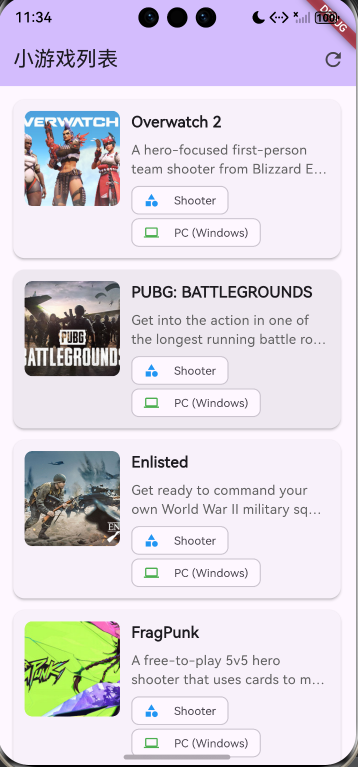
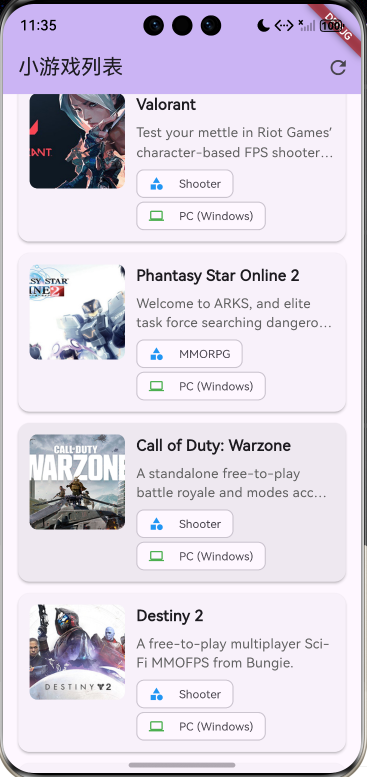
功能展示:
- 列表展示:游戏标题、缩略图、描述
- 下拉刷新:RefreshIndicator
- 加载状态:CircularProgressIndicator
- 错误处理:错误提示与重试
- 图片加载:加载进度与错误占位
八、常见问题
1. Dio 5.x 版本参数名变化
Dio 5.x 使用 baseUrl(小写),不是 baseURL:
// ✅ 正确
_dio.options = BaseOptions(
  baseUrl: 'https://www.freetogame.com/api ',
);

// ❌ 错误
_dio.options = BaseOptions(
  baseURL: 'https://www.freetogame.com/api ',  // 会报错
);
2. 网络权限配置
Android (android/app/src/main/AndroidManifest.xml):
<uses-permission android:name="android.permission.INTERNET"/>
iOS (ios/Runner/Info.plist):
<key>NSAppTransportSecurity</key>
<dict>
  <key>NSAllowsArbitraryLoads</key>
  <true/>
</dict>
3. 图片加载优化
- 使用
loadingBuilder显示加载进度 - 使用
errorBuilder处理加载失败 - 设置固定宽高避免布局抖动
九、总结
本文实现了:
- 使用 Dio 进行网络请求
- 使用 FreeToGame 公开 API 获取数据
- 使用 ListView.builder 构建列表
- 展示标题、图片和描述
- 完善的错误处理和状态管理
未来扩展:
- 添加搜索功能
- 实现详情页面
- 添加收藏功能
- 使用 Provider/Bloc 进行状态管理
欢迎加入开源鸿蒙跨平台社区,获取更多支持和资源:https://openharmonycrossplatform.csdn.net

讨论HarmonyOS开发技术,专注于API与组件、DevEco Studio、测试、元服务和应用上架分发等。
更多推荐
 10
10 0
0- 0


 已为社区贡献3条内容

所有评论(0)