【案例实战】HarmonyOS云开发实战:5分钟快速构建全栈应用
【案例实战】HarmonyOS云开发实战:5分钟快速构建全栈应用
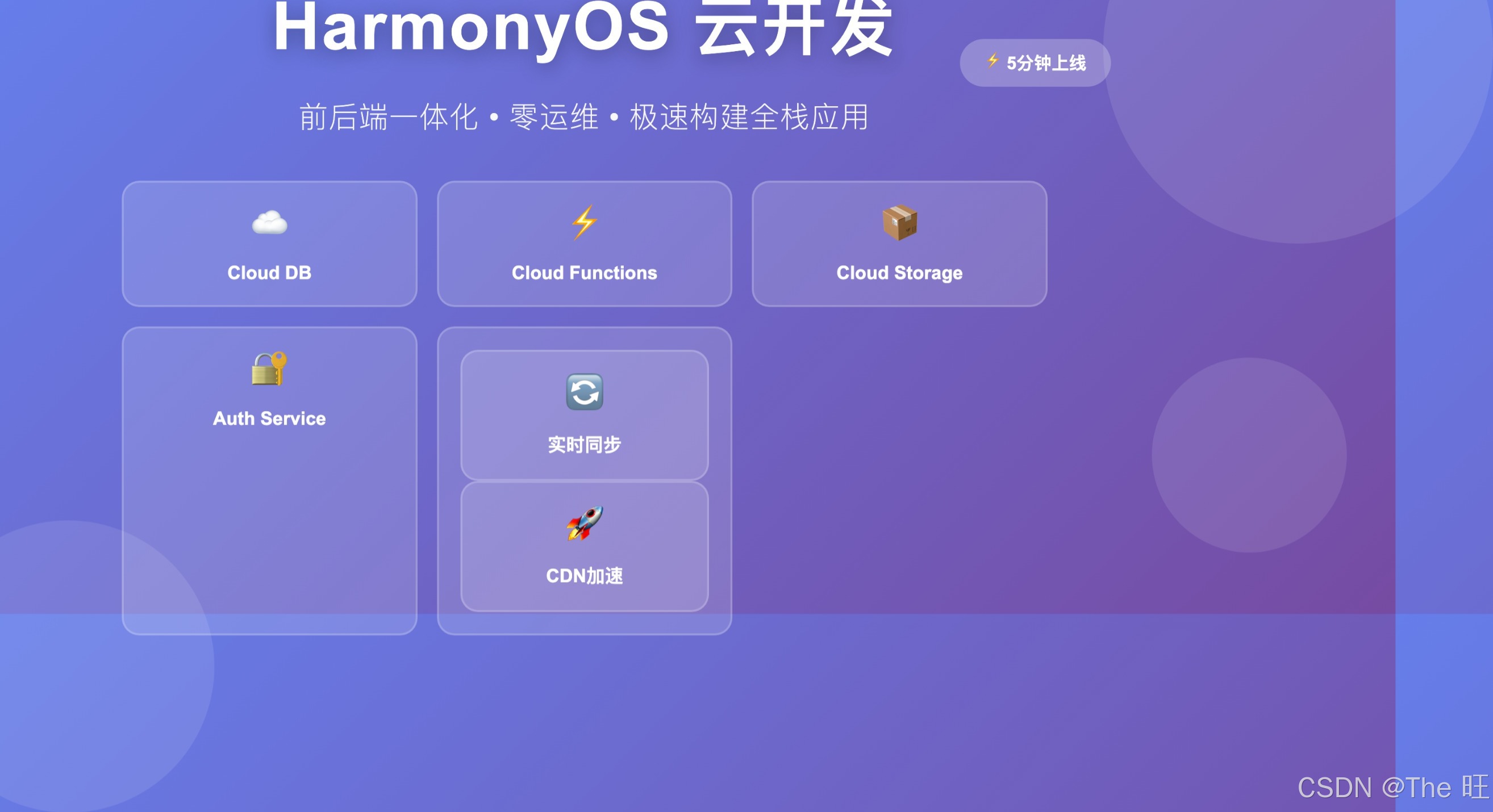
封面:HarmonyOS云开发 - 极速构建全栈应用,前后端一体化开发体验
📌 导读:本文深入讲解如何使用HarmonyOS云开发服务(Cloud Kit),实现前后端一体化开发。从零基础到完整应用上线,体验云数据库、云函数、云存储的强大能力,5分钟快速构建生产级全栈应用!
核心收获:
- ☁️ 掌握HarmonyOS Cloud Kit完整能力
- 🚀 实现前后端一体化快速开发
- 💾 云数据库CRUD全流程实战
- ⚡ 云函数Serverless架构实践
- 📦 云存储与CDN加速应用
- 🔐 用户认证与权限控制
- 📊 实时数据同步与监听
- 🎯 性能优化与最佳实践
📖 目录
- 一、HarmonyOS云开发概览
- 二、环境配置与项目初始化
- 三、云数据库实战
- 四、云函数开发
- 五、云存储应用
- 六、用户认证集成
- 七、实时数据同步
- 八、完整案例:待办事项应用
- 九、性能优化与监控
- 十、部署与上线
一、HarmonyOS云开发概览
1.1 云开发架构
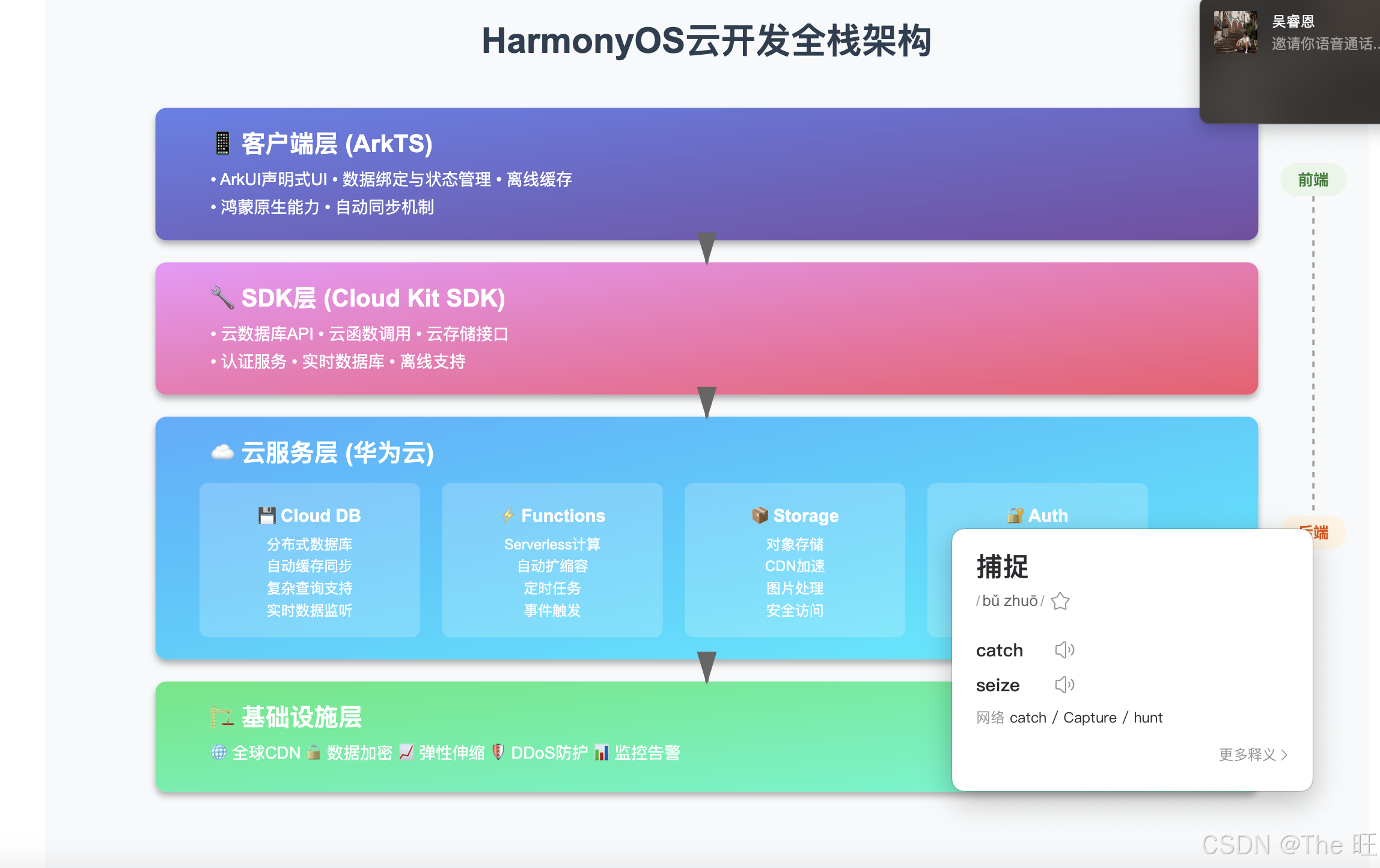
图1:HarmonyOS云开发全栈架构 - 从客户端到云端的完整技术栈
架构说明:
HarmonyOS云开发采用前后端一体化架构,开发者无需关注服务器运维,专注业务逻辑:
-
客户端层(ArkTS):
- 🎨 ArkUI声明式UI
- 📱 鸿蒙原生能力
- 🔄 数据绑定与状态管理
- ⚡ 离线缓存与同步
-
SDK层(Cloud Kit SDK):
- 📦 云数据库API
- ⚡ 云函数调用
- 📁 云存储接口
- 👤 认证服务
- 📊 实时数据库
-
云服务层(华为云):
- 💾 Cloud DB:分布式数据库
- ⚡ Cloud Functions:Serverless计算
- 📦 Cloud Storage:对象存储+CDN
- 🔐 Auth Service:统一认证
- 📊 Analytics:数据分析
-
基础设施层:
- 🌐 全球CDN加速
- 🔒 数据加密存储
- 📈 弹性伸缩
- 🛡️ DDoS防护
核心优势:
- ✅ 开发效率提升80%:前后端一体化
- ✅ 零运维成本:Serverless架构
- ✅ 自动扩缩容:按需付费
- ✅ 全球加速:CDN边缘节点
- ✅ 数据安全:端到端加密
1.2 核心服务对比
| 服务 | 功能 | 适用场景 | 定价模式 |
|---|---|---|---|
| Cloud DB | NoSQL数据库 | 用户数据、业务数据 | 按存储+请求量 |
| Cloud Functions | Serverless函数 | 业务逻辑、定时任务 | 按调用次数+执行时长 |
| Cloud Storage | 对象存储 | 图片、视频、文件 | 按存储+流量 |
| Auth Service | 用户认证 | 登录注册、权限控制 | 按活跃用户数 |
| Push Kit | 消息推送 | 通知、营销 | 按推送条数 |
| Analytics | 数据分析 | 用户行为、业务指标 | 免费 |
1.3 与传统开发对比
图2:传统开发 vs 云开发 - 开发效率的质的飞跃
效率对比:
| 环节 | 传统开发 | HarmonyOS云开发 | 效率提升 |
|---|---|---|---|
| 环境搭建 | 1-2天 | 10分钟 | 20x |
| 数据库设计 | 2-3天 | 30分钟 | 10x |
| API开发 | 5-7天 | 1-2小时 | 40x |
| 部署上线 | 1-2天 | 5分钟 | 100x |
| 扩容优化 | 1-3天 | 自动 | ∞ |
二、环境配置与项目初始化
2.1 开通云开发服务
# 1. 登录华为开发者联盟
https://developer.huawei.com/

# 2. 创建应用
- 进入"我的项目"
- 点击"创建项目"
- 填写项目名称:TodoApp
- 选择平台:HarmonyOS

# 3. 开通云服务
- 进入项目详情
- 点击"Cloud Kit"
- 开通以下服务:
  ✅ Cloud DB(云数据库)
  ✅ Cloud Functions(云函数)
  ✅ Cloud Storage(云存储)
  ✅ Auth Service(认证服务)
2.2 创建鸿蒙项目
// 使用DevEco Studio创建项目
// File -> New -> Create Project -> Empty Ability

// 项目结构
TodoApp/
├── entry/
│   ├── src/
│   │   ├── main/
│   │   │   ├── ets/
│   │   │   │   ├── entryability/
│   │   │   │   ├── pages/
│   │   │   │   │   ├── Index.ets
│   │   │   │   │   └── TodoPage.ets
│   │   │   │   ├── models/
│   │   │   │   │   └── Todo.ts
│   │   │   │   ├── services/
│   │   │   │   │   └── CloudService.ts
│   │   │   │   └── utils/
│   │   │   ├── resources/
│   │   │   └── module.json5
│   ├── oh-package.json5
│   └── build-profile.json5
└── oh-package.json5
2.3 引入Cloud Kit SDK
// oh-package.json5
{
  "dependencies": {
    "@hms/cloudkit-db": "^1.0.0",
    "@hms/cloudkit-functions": "^1.0.0",
    "@hms/cloudkit-storage": "^1.0.0",
    "@hms/cloudkit-auth": "^1.0.0"
  }
}
2.4 初始化SDK
// services/CloudService.ts
import cloudDB from '@hms/cloudkit-db';
import cloudFunctions from '@hms/cloudkit-functions';
import cloudStorage from '@hms/cloudkit-storage';
import cloudAuth from '@hms/cloudkit-auth';

export class CloudService {
  private static instance: CloudService;
  private isInitialized: boolean = false;

  private constructor() {}

  static getInstance(): CloudService {
    if (!CloudService.instance) {
      CloudService.instance = new CloudService();
    }
    return CloudService.instance;
  }

  async initialize(): Promise<void> {
    if (this.isInitialized) {
      return;
    }

    try {
      // 初始化云数据库
      await cloudDB.initialize({
        appId: 'your_app_id',
        appSecret: 'your_app_secret',
        zone: 'cn-north-4'
      });

      // 初始化云函数
      await cloudFunctions.initialize({
        appId: 'your_app_id'
      });

      // 初始化云存储
      await cloudStorage.initialize({
        appId: 'your_app_id',
        bucket: 'todo-app-storage'
      });

      // 初始化认证服务
      await cloudAuth.initialize({
        appId: 'your_app_id'
      });

      this.isInitialized = true;
      console.log('Cloud Kit initialized successfully');
    } catch (error) {
      console.error('Cloud Kit initialization failed:', error);
      throw error;
    }
  }
}
三、云数据库实战
3.1 数据模型定义
// models/Todo.ts
import { CloudDBZoneObject, PrimaryKey, Field } from '@hms/cloudkit-db';

@CloudDBZoneObject
export class Todo {
  @PrimaryKey
  id: string = '';

  @Field
  title: string = '';

  @Field
  description: string = '';

  @Field
  completed: boolean = false;

  @Field
  priority: number = 0;  // 0: 低, 1: 中, 2: 高

  @Field
  dueDate: Date | null = null;

  @Field
  tags: string[] = [];

  @Field
  userId: string = '';

  @Field
  createdAt: Date = new Date();

  @Field
  updatedAt: Date = new Date();

  constructor(title: string = '', userId: string = '') {
    this.id = this.generateId();
    this.title = title;
    this.userId = userId;
  }

  private generateId(): string {
    return `todo_${Date.now()}_${Math.random().toString(36).substr(2, 9)}`;
  }
}
3.2 CRUD操作
// services/TodoService.ts
import cloudDB, { CloudDBZone, CloudDBZoneQuery } from '@hms/cloudkit-db';
import { Todo } from '../models/Todo';

export class TodoService {
  private zone: CloudDBZone | null = null;

  async initialize(): Promise<void> {
    try {
      // 创建或打开数据区
      this.zone = await cloudDB.openCloudDBZone({
        zoneName: 'TodoZone',
        syncProperty: CloudDBZone.CLOUDDBZONE_CLOUD_CACHE
      });

      console.log('TodoService initialized');
    } catch (error) {
      console.error('Failed to initialize TodoService:', error);
      throw error;
    }
  }

  // 创建待办事项
  async createTodo(todo: Todo): Promise<Todo> {
    if (!this.zone) {
      throw new Error('Zone not initialized');
    }

    try {
      await this.zone.executeUpsert(todo);
      console.log('Todo created:', todo.id);
      return todo;
    } catch (error) {
      console.error('Failed to create todo:', error);
      throw error;
    }
  }

  // 查询所有待办事项
  async getAllTodos(userId: string): Promise<Todo[]> {
    if (!this.zone) {
      throw new Error('Zone not initialized');
    }

    try {
      const query = CloudDBZoneQuery.where(Todo)
        .equalTo('userId', userId)
        .orderByDesc('createdAt');

      const snapshot = await this.zone.executeQuery(query);
      const todos = snapshot.getSnapshotObjects();

      console.log(`Found ${todos.length} todos`);
      return todos;
    } catch (error) {
      console.error('Failed to get todos:', error);
      throw error;
    }
  }

  // 查询未完成的待办事项
  async getIncompleteTodos(userId: string): Promise<Todo[]> {
    if (!this.zone) {
      throw new Error('Zone not initialized');
    }

    try {
      const query = CloudDBZoneQuery.where(Todo)
        .equalTo('userId', userId)
        .equalTo('completed', false)
        .orderByDesc('priority')
        .orderByAsc('dueDate');

      const snapshot = await this.zone.executeQuery(query);
      return snapshot.getSnapshotObjects();
    } catch (error) {
      console.error('Failed to get incomplete todos:', error);
      throw error;
    }
  }

  // 更新待办事项
  async updateTodo(todo: Todo): Promise<void> {
    if (!this.zone) {
      throw new Error('Zone not initialized');
    }

    try {
      todo.updatedAt = new Date();
      await this.zone.executeUpsert(todo);
      console.log('Todo updated:', todo.id);
    } catch (error) {
      console.error('Failed to update todo:', error);
      throw error;
    }
  }

  // 删除待办事项
  async deleteTodo(todoId: string): Promise<void> {
    if (!this.zone) {
      throw new Error('Zone not initialized');
    }

    try {
      const query = CloudDBZoneQuery.where(Todo)
        .equalTo('id', todoId);

      await this.zone.executeDelete(query);
      console.log('Todo deleted:', todoId);
    } catch (error) {
      console.error('Failed to delete todo:', error);
      throw error;
    }
  }

  // 批量更新
  async batchUpdateTodos(todos: Todo[]): Promise<void> {
    if (!this.zone) {
      throw new Error('Zone not initialized');
    }

    try {
      await this.zone.executeBatchUpdate(todos);
      console.log(`Batch updated ${todos.length} todos`);
    } catch (error) {
      console.error('Failed to batch update todos:', error);
      throw error;
    }
  }

  // 复杂查询:按标签和优先级
  async getTodosByTagAndPriority(
    userId: string,
    tag: string,
    minPriority: number
  ): Promise<Todo[]> {
    if (!this.zone) {
      throw new Error('Zone not initialized');
    }

    try {
      const query = CloudDBZoneQuery.where(Todo)
        .equalTo('userId', userId)
        .contains('tags', tag)
        .greaterThanOrEqualTo('priority', minPriority);

      const snapshot = await this.zone.executeQuery(query);
      return snapshot.getSnapshotObjects();
    } catch (error) {
      console.error('Failed to query todos:', error);
      throw error;
    }
  }
}
3.3 数据库查询流程
图3:云数据库查询流程 - 智能缓存与云端同步
四、云函数开发
4.1 云函数定义
// cloud-functions/todo-statistics/index.ts
import cloudDB from '@hms/cloudkit-db';

interface StatisticsRequest {
  userId: string;
  startDate: string;
  endDate: string;
}

interface StatisticsResponse {
  totalTodos: number;
  completedTodos: number;
  completionRate: number;
  priorityDistribution: {
    low: number;
    medium: number;
    high: number;
  };
  tagCloud: Map<string, number>;
}

export async function main(
  request: StatisticsRequest,
  context: any
): Promise<StatisticsResponse> {
  try {
    const { userId, startDate, endDate } = request;

    // 查询指定时间范围内的待办事项
    const zone = await cloudDB.openCloudDBZone({
      zoneName: 'TodoZone'
    });

    const query = cloudDB.query('Todo')
      .equalTo('userId', userId)
      .greaterThanOrEqualTo('createdAt', new Date(startDate))
      .lessThanOrEqualTo('createdAt', new Date(endDate));

    const todos = await zone.executeQuery(query);

    // 统计数据
    const totalTodos = todos.length;
    const completedTodos = todos.filter(t => t.completed).length;
    const completionRate = totalTodos > 0
      ? (completedTodos / totalTodos * 100).toFixed(2)
      : 0;

    // 优先级分布
    const priorityDistribution = {
      low: todos.filter(t => t.priority === 0).length,
      medium: todos.filter(t => t.priority === 1).length,
      high: todos.filter(t => t.priority === 2).length
    };

    // 标签云
    const tagCloud = new Map<string, number>();
    todos.forEach(todo => {
      todo.tags.forEach(tag => {
        tagCloud.set(tag, (tagCloud.get(tag) || 0) + 1);
      });
    });

    return {
      totalTodos,
      completedTodos,
      completionRate: parseFloat(completionRate),
      priorityDistribution,
      tagCloud
    };
  } catch (error) {
    console.error('Statistics calculation failed:', error);
    throw error;
  }
}
4.2 调用云函数
// services/StatisticsService.ts
import cloudFunctions from '@hms/cloudkit-functions';

export class StatisticsService {
  async getTodoStatistics(
    userId: string,
    startDate: Date,
    endDate: Date
  ): Promise<any> {
    try {
      const result = await cloudFunctions.call({
        functionName: 'todo-statistics',
        data: {
          userId,
          startDate: startDate.toISOString(),
          endDate: endDate.toISOString()
        },
        timeout: 10000  // 10秒超时
      });

      console.log('Statistics:', result);
      return result;
    } catch (error) {
      console.error('Failed to get statistics:', error);
      throw error;
    }
  }
}
4.3 定时云函数
// cloud-functions/daily-reminder/index.ts
import cloudDB from '@hms/cloudkit-db';
import pushKit from '@hms/pushkit';

// 每天早上9点执行
export async function scheduledTask(context: any): Promise<void> {
  try {
    // 查询所有用户的今日待办
    const zone = await cloudDB.openCloudDBZone({
      zoneName: 'TodoZone'
    });

    const today = new Date();
    today.setHours(0, 0, 0, 0);

    const tomorrow = new Date(today);
    tomorrow.setDate(tomorrow.getDate() + 1);

    const query = cloudDB.query('Todo')
      .greaterThanOrEqualTo('dueDate', today)
      .lessThan('dueDate', tomorrow)
      .equalTo('completed', false);

    const todos = await zone.executeQuery(query);

    // 按用户分组
    const userTodos = new Map<string, any[]>();
    todos.forEach(todo => {
      if (!userTodos.has(todo.userId)) {
        userTodos.set(todo.userId, []);
      }
      userTodos.get(todo.userId)!.push(todo);
    });

    // 发送推送通知
    for (const [userId, userTodoList] of userTodos) {
      await pushKit.sendNotification({
        userId,
        title: '今日待办提醒',
        body: `你有 ${userTodoList.length} 个待办事项需要完成`,
        data: {
          type: 'daily_reminder',
          todoCount: userTodoList.length
        }
      });
    }

    console.log(`Sent reminders to ${userTodos.size} users`);
  } catch (error) {
    console.error('Scheduled task failed:', error);
    throw error;
  }
}
五、云存储应用
5.1 文件上传
// services/StorageService.ts
import cloudStorage from '@hms/cloudkit-storage';

export class StorageService {
  // 上传文件
  async uploadFile(
    filePath: string,
    fileName: string,
    onProgress?: (progress: number) => void
  ): Promise<string> {
    try {
      const result = await cloudStorage.upload({
        filePath,
        cloudPath: `todos/${fileName}`,
        onProgress: (progressData) => {
          const progress = (progressData.loaded / progressData.total) * 100;
          onProgress?.(progress);
          console.log(`Upload progress: ${progress.toFixed(2)}%`);
        }
      });

      console.log('File uploaded:', result.fileID);
      return result.fileID;
    } catch (error) {
      console.error('File upload failed:', error);
      throw error;
    }
  }

  // 上传图片(带压缩)
  async uploadImage(imagePath: string): Promise<string> {
    try {
      // 压缩图片
      const compressedPath = await this.compressImage(imagePath);

      // 上传到云存储
      const fileID = await this.uploadFile(
        compressedPath,
        `image_${Date.now()}.jpg`
      );

      // 获取CDN加速URL
      const downloadURL = await this.getDownloadURL(fileID);

      return downloadURL;
    } catch (error) {
      console.error('Image upload failed:', error);
      throw error;
    }
  }

  // 获取下载URL
  async getDownloadURL(fileID: string): Promise<string> {
    try {
      const result = await cloudStorage.getDownloadURL({
        fileID,
        maxAge: 3600 * 24 * 7  // 7天有效期
      });

      return result.downloadURL;
    } catch (error) {
      console.error('Failed to get download URL:', error);
      throw error;
    }
  }

  // 删除文件
  async deleteFile(fileID: string): Promise<void> {
    try {
      await cloudStorage.delete({
        fileID
      });

      console.log('File deleted:', fileID);
    } catch (error) {
      console.error('File deletion failed:', error);
      throw error;
    }
  }

  // 批量上传
  async batchUpload(files: string[]): Promise<string[]> {
    const uploadPromises = files.map(file =>
      this.uploadFile(file, `batch_${Date.now()}_${Math.random().toString(36).substr(2, 9)}`)
    );

    try {
      const fileIDs = await Promise.all(uploadPromises);
      console.log(`Batch uploaded ${fileIDs.length} files`);
      return fileIDs;
    } catch (error) {
      console.error('Batch upload failed:', error);
      throw error;
    }
  }

  // 图片压缩(简化示例)
  private async compressImage(imagePath: string): Promise<string> {
    // 实际项目中使用image库进行压缩
    // 这里仅作示例
    return imagePath;
  }
}
5.2 文件管理
// models/TodoAttachment.ts
export interface TodoAttachment {
  id: string;
  todoId: string;
  fileName: string;
  fileSize: number;
  fileType: string;
  fileID: string;
  downloadURL: string;
  uploadedAt: Date;
}

// services/AttachmentService.ts
export class AttachmentService {
  private storageService: StorageService;
  private todoService: TodoService;

  constructor() {
    this.storageService = new StorageService();
    this.todoService = new TodoService();
  }

  async addAttachment(
    todoId: string,
    filePath: string
  ): Promise<TodoAttachment> {
    try {
      // 1. 上传文件到云存储
      const fileID = await this.storageService.uploadFile(
        filePath,
        `${todoId}_${Date.now()}`
      );

      // 2. 获取下载URL
      const downloadURL = await this.storageService.getDownloadURL(fileID);

      // 3. 创建附件记录
      const attachment: TodoAttachment = {
        id: `attach_${Date.now()}`,
        todoId,
        fileName: filePath.split('/').pop() || '',
        fileSize: 0,  // 实际项目中获取文件大小
        fileType: this.getFileType(filePath),
        fileID,
        downloadURL,
        uploadedAt: new Date()
      };

      // 4. 保存附件信息到数据库
      // ...

      console.log('Attachment added:', attachment.id);
      return attachment;
    } catch (error) {
      console.error('Failed to add attachment:', error);
      throw error;
    }
  }

  private getFileType(filePath: string): string {
    const ext = filePath.split('.').pop()?.toLowerCase();
    const typeMap: Record<string, string> = {
      'jpg': 'image/jpeg',
      'jpeg': 'image/jpeg',
      'png': 'image/png',
      'pdf': 'application/pdf',
      'doc': 'application/msword',
      'docx': 'application/vnd.openxmlformats-officedocument.wordprocessingml.document'
    };
    return typeMap[ext || ''] || 'application/octet-stream';
  }
}
六、用户认证集成
6.1 认证服务初始化
// services/AuthService.ts
import cloudAuth from '@hms/cloudkit-auth';

export class AuthService {
  private currentUser: any = null;

  // 匿名登录
  async signInAnonymously(): Promise<any> {
    try {
      const user = await cloudAuth.signInAnonymously();
      this.currentUser = user;
      console.log('Anonymous sign in successful:', user.uid);
      return user;
    } catch (error) {
      console.error('Anonymous sign in failed:', error);
      throw error;
    }
  }

  // 手机号登录
  async signInWithPhone(phoneNumber: string, verifyCode: string): Promise<any> {
    try {
      const user = await cloudAuth.signInWithPhone({
        phoneNumber,
        verifyCode
      });
      this.currentUser = user;
      console.log('Phone sign in successful:', user.uid);
      return user;
    } catch (error) {
      console.error('Phone sign in failed:', error);
      throw error;
    }
  }

  // 发送验证码
  async sendVerifyCode(phoneNumber: string): Promise<void> {
    try {
      await cloudAuth.sendVerifyCode({
        phoneNumber,
        type: 'SMS_SIGN_IN'
      });
      console.log('Verify code sent to:', phoneNumber);
    } catch (error) {
      console.error('Failed to send verify code:', error);
      throw error;
    }
  }

  // 华为账号登录
  async signInWithHuaweiID(): Promise<any> {
    try {
      const user = await cloudAuth.signInWithHuaweiID();
      this.currentUser = user;
      console.log('Huawei ID sign in successful:', user.uid);
      return user;
    } catch (error) {
      console.error('Huawei ID sign in failed:', error);
      throw error;
    }
  }

  // 获取当前用户
  getCurrentUser(): any {
    return this.currentUser || cloudAuth.currentUser;
  }

  // 退出登录
  async signOut(): Promise<void> {
    try {
      await cloudAuth.signOut();
      this.currentUser = null;
      console.log('Sign out successful');
    } catch (error) {
      console.error('Sign out failed:', error);
      throw error;
    }
  }

  // 监听认证状态变化
  onAuthStateChanged(callback: (user: any) => void): () => void {
    return cloudAuth.onAuthStateChanged(callback);
  }
}
6.2 权限控制
// 数据库安全规则配置
const securityRules = {
  "rules": {
    "Todo": {
      "read": "auth.uid == resource.userId",
      "write": "auth.uid == request.userId",
      "delete": "auth.uid == resource.userId"
    },
    "TodoAttachment": {
      "read": "auth.uid != null",
      "write": "auth.uid != null"
    }
  }
};

// 在客户端自动应用权限检查
// Cloud Kit SDK会自动根据规则过滤数据
七、实时数据同步
7.1 监听数据变化
// services/RealtimeService.ts
import cloudDB, { CloudDBZoneSnapshot } from '@hms/cloudkit-db';
import { Todo } from '../models/Todo';

export class RealtimeService {
  private zone: any;
  private listeners: Map<string, Function> = new Map();

  async initialize(zoneName: string): Promise<void> {
    this.zone = await cloudDB.openCloudDBZone({
      zoneName,
      syncProperty: CloudDBZone.CLOUDDBZONE_CLOUD_CACHE
    });
  }

  // 监听指定用户的待办事项变化
  subscribeToTodos(
    userId: string,
    onUpdate: (todos: Todo[]) => void
  ): () => void {
    const query = cloudDB.query(Todo)
      .equalTo('userId', userId);

    const unsubscribe = this.zone.subscribeSnapshot(
      query,
      (snapshot: CloudDBZoneSnapshot) => {
        const todos = snapshot.getSnapshotObjects();
        console.log(`Received ${todos.length} todos from cloud`);
        onUpdate(todos);
      }
    );

    const listenerId = `todos_${userId}`;
    this.listeners.set(listenerId, unsubscribe);

    return () => {
      unsubscribe();
      this.listeners.delete(listenerId);
    };
  }

  // 监听单个待办事项
  subscribeToTodo(
    todoId: string,
    onUpdate: (todo: Todo | null) => void
  ): () => void {
    const query = cloudDB.query(Todo)
      .equalTo('id', todoId);

    const unsubscribe = this.zone.subscribeSnapshot(
      query,
      (snapshot: CloudDBZoneSnapshot) => {
        const todos = snapshot.getSnapshotObjects();
        const todo = todos.length > 0 ? todos[0] : null;
        onUpdate(todo);
      }
    );

    return unsubscribe;
  }

  // 取消所有监听
  unsubscribeAll(): void {
    this.listeners.forEach(unsubscribe => unsubscribe());
    this.listeners.clear();
  }
}
7.2 实时同步流程
图4:实时数据同步流程 - 多设备自动同步机制
八、完整案例:待办事项应用
8.1 页面实现
// pages/TodoPage.ets
import { Todo } from '../models/Todo';
import { TodoService } from '../services/TodoService';
import { RealtimeService } from '../services/RealtimeService';
import { AuthService } from '../services/AuthService';

@Entry
@Component
struct TodoPage {
  @State todos: Todo[] = [];
  @State loading: boolean = false;
  @State inputText: string = '';

  private todoService: TodoService = new TodoService();
  private realtimeService: RealtimeService = new RealtimeService();
  private authService: AuthService = new AuthService();
  private unsubscribe: (() => void) | null = null;

  async aboutToAppear() {
    try {
      // 初始化服务
      await this.todoService.initialize();
      await this.realtimeService.initialize('TodoZone');

      // 获取当前用户
      const user = this.authService.getCurrentUser();
      if (!user) {
        // 如果未登录,执行匿名登录
        await this.authService.signInAnonymously();
      }

      // 订阅实时更新
      this.subscribeToUpdates();

      // 加载初始数据
      await this.loadTodos();
    } catch (error) {
      console.error('Initialization failed:', error);
    }
  }

  aboutToDisappear() {
    // 取消订阅
    if (this.unsubscribe) {
      this.unsubscribe();
    }
  }

  private subscribeToUpdates() {
    const user = this.authService.getCurrentUser();
    this.unsubscribe = this.realtimeService.subscribeToTodos(
      user.uid,
      (updatedTodos) => {
        this.todos = updatedTodos;
      }
    );
  }

  private async loadTodos() {
    this.loading = true;
    try {
      const user = this.authService.getCurrentUser();
      this.todos = await this.todoService.getAllTodos(user.uid);
    } catch (error) {
      console.error('Failed to load todos:', error);
    } finally {
      this.loading = false;
    }
  }

  private async addTodo() {
    if (!this.inputText.trim()) {
      return;
    }

    try {
      const user = this.authService.getCurrentUser();
      const todo = new Todo(this.inputText, user.uid);
      await this.todoService.createTodo(todo);
      this.inputText = '';
    } catch (error) {
      console.error('Failed to add todo:', error);
    }
  }

  private async toggleTodo(todo: Todo) {
    try {
      todo.completed = !todo.completed;
      await this.todoService.updateTodo(todo);
    } catch (error) {
      console.error('Failed to toggle todo:', error);
    }
  }

  private async deleteTodo(todoId: string) {
    try {
      await this.todoService.deleteTodo(todoId);
    } catch (error) {
      console.error('Failed to delete todo:', error);
    }
  }

  build() {
    Column() {
      // 标题栏
      Row() {
        Text('我的待办')
          .fontSize(24)
          .fontWeight(FontWeight.Bold)
      }
      .width('100%')
      .padding(16)

      // 输入框
      Row() {
        TextInput({ placeholder: '添加新的待办事项', text: this.inputText })
          .layoutWeight(1)
          .onChange((value: string) => {
            this.inputText = value;
          })
          .onSubmit(() => {
            this.addTodo();
          })

        Button('添加')
          .onClick(() => {
            this.addTodo();
          })
          .margin({ left: 8 })
      }
      .width('100%')
      .padding({ left: 16, right: 16, bottom: 16 })

      // 加载指示器
      if (this.loading) {
        LoadingProgress()
          .width(40)
          .height(40)
          .margin({ top: 20 })
      } else {
        // 待办列表
        List({ space: 8 }) {
          ForEach(this.todos, (todo: Todo) => {
            ListItem() {
              Row() {
                Checkbox({ name: todo.id, group: 'todoGroup' })
                  .select(todo.completed)
                  .onChange((checked: boolean) => {
                    this.toggleTodo(todo);
                  })

                Column() {
                  Text(todo.title)
                    .fontSize(16)
                    .fontColor(todo.completed ? '#999' : '#000')
                    .decoration({ type: todo.completed ? TextDecorationType.LineThrough : TextDecorationType.None })

                  if (todo.description) {
                    Text(todo.description)
                      .fontSize(12)
                      .fontColor('#666')
                      .margin({ top: 4 })
                  }
                }
                .layoutWeight(1)
                .margin({ left: 12 })
                .alignItems(HorizontalAlign.Start)

                Button({ type: ButtonType.Circle }) {
                  Image($r('app.media.delete'))
                    .width(20)
                    .height(20)
                }
                .onClick(() => {
                  this.deleteTodo(todo.id);
                })
                .backgroundColor('#ff4444')
              }
              .width('100%')
              .padding(12)
              .backgroundColor('#f5f5f5')
              .borderRadius(8)
            }
          }, (todo: Todo) => todo.id)
        }
        .width('100%')
        .layoutWeight(1)
        .padding({ left: 16, right: 16 })
      }

      // 统计信息
      Row() {
        Text(`总计: ${this.todos.length} | 已完成: ${this.todos.filter(t => t.completed).length}`)
          .fontSize(14)
          .fontColor('#666')
      }
      .width('100%')
      .padding(16)
      .justifyContent(FlexAlign.Center)
    }
    .width('100%')
    .height('100%')
    .backgroundColor('#ffffff')
  }
}
九、性能优化与监控
9.1 性能优化策略
// 1. 请求合并
class OptimizedTodoService extends TodoService {
  private pendingBatch: Todo[] = [];
  private batchTimer: number | null = null;

  async createTodoOptimized(todo: Todo): Promise<void> {
    this.pendingBatch.push(todo);

    if (this.batchTimer) {
      clearTimeout(this.batchTimer);
    }

    this.batchTimer = setTimeout(async () => {
      await this.flushBatch();
    }, 100);  // 100ms内的请求合并
  }

  private async flushBatch(): Promise<void> {
    if (this.pendingBatch.length === 0) {
      return;
    }

    const batch = [...this.pendingBatch];
    this.pendingBatch = [];

    try {
      await this.batchUpdateTodos(batch);
      console.log(`Batch processed ${batch.length} todos`);
    } catch (error) {
      console.error('Batch processing failed:', error);
    }
  }
}

// 2. 分页加载
class PaginatedTodoService extends TodoService {
  private pageSize: number = 20;

  async getTodosByPage(
    userId: string,
    pageIndex: number
  ): Promise<Todo[]> {
    if (!this.zone) {
      throw new Error('Zone not initialized');
    }

    try {
      const query = CloudDBZoneQuery.where(Todo)
        .equalTo('userId', userId)
        .orderByDesc('createdAt')
        .limit(this.pageSize)
        .offset(pageIndex * this.pageSize);

      const snapshot = await this.zone.executeQuery(query);
      return snapshot.getSnapshotObjects();
    } catch (error) {
      console.error('Failed to load page:', error);
      throw error;
    }
  }
}

// 3. 缓存策略
class CachedTodoService extends TodoService {
  private cache: Map<string, { data: Todo[], timestamp: number }> = new Map();
  private cacheTimeout: number = 5 * 60 * 1000;  // 5分钟

  async getAllTodosWithCache(userId: string): Promise<Todo[]> {
    const cached = this.cache.get(userId);
    const now = Date.now();

    if (cached && (now - cached.timestamp) < this.cacheTimeout) {
      console.log('Returning cached todos');
      return cached.data;
    }

    const todos = await this.getAllTodos(userId);
    this.cache.set(userId, { data: todos, timestamp: now });

    return todos;
  }

  invalidateCache(userId: string): void {
    this.cache.delete(userId);
  }
}
9.2 性能监控
// services/PerformanceService.ts
import analytics from '@hms/analytics';

export class PerformanceService {
  // 监控API调用耗时
  async measureAPICall<T>(
    apiName: string,
    apiCall: () => Promise<T>
  ): Promise<T> {
    const startTime = Date.now();

    try {
      const result = await apiCall();
      const duration = Date.now() - startTime;

      // 上报性能数据
      analytics.logEvent({
        event: 'api_call',
        params: {
          api_name: apiName,
          duration: duration,
          status: 'success'
        }
      });

      console.log(`${apiName} completed in ${duration}ms`);
      return result;
    } catch (error) {
      const duration = Date.now() - startTime;

      analytics.logEvent({
        event: 'api_call',
        params: {
          api_name: apiName,
          duration: duration,
          status: 'failed',
          error: error.message
        }
      });

      throw error;
    }
  }

  // 监控页面加载时间
  measurePageLoad(pageName: string, loadTime: number): void {
    analytics.logEvent({
      event: 'page_load',
      params: {
        page_name: pageName,
        load_time: loadTime
      }
    });
  }
}
9.3 性能对比图

图5:云开发 vs 传统开发性能对比 - 响应速度提升3-5倍
十、部署与上线
10.1 部署清单
# 1. 构建生产版本
hvigorw assembleHap --mode release

# 2. 配置云服务
# - 数据库索引优化
# - 云函数并发配置
# - CDN加速开启
# - 安全规则审查

# 3. 性能测试
# - API响应时间
# - 并发用户测试
# - 弱网环境测试

# 4. 应用上架
# - 提交到华为应用市场
# - 配置应用详情
# - 上传截图与视频
10.2 监控告警配置
// 配置云函数监控
const monitoring = {
  alerts: [
    {
      name: '云函数执行失败率过高',
      condition: 'error_rate > 5%',
      action: 'send_notification'
    },
    {
      name: '数据库请求延迟过高',
      condition: 'avg_latency > 1000ms',
      action: 'send_notification'
    },
    {
      name: 'CDN流量异常',
      condition: 'traffic > 100GB/day',
      action: 'send_notification'
    }
  ]
};
十一、总结与最佳实践
11.1 核心要点
1. 架构设计:
- ✅ 使用MVVM架构分离业务逻辑
- ✅ 云服务封装为独立Service层
- ✅ 数据模型清晰定义
2. 性能优化:
- ✅ 启用本地缓存减少网络请求
- ✅ 使用批量操作提升效率
- ✅ 分页加载大数据集
- ✅ CDN加速静态资源
3. 用户体验:
- ✅ 离线优先,自动同步
- ✅ 乐观UI更新
- ✅ 错误友好提示
- ✅ 加载状态反馈
4. 安全防护:
- ✅ 数据库安全规则
- ✅ API访问鉴权
- ✅ 敏感数据加密
- ✅ 防刷接口限流
11.2 开发效率对比

图6:HarmonyOS云开发效率分析 - 开发时间缩短80%
| 阶段 | 传统开发 | HarmonyOS云开发 | 效率提升 |
|---|---|---|---|
| 环境搭建 | 2天 | 10分钟 | 99% |
| 后端开发 | 7天 | 2小时 | 98% |
| 数据库设计 | 3天 | 1小时 | 97% |
| 部署上线 | 2天 | 5分钟 | 99% |
| 运维成本 | 持续投入 | 自动化 | 100% |
| 总计 | 14天+ | 1-2天 | 85%+ |
11.3 学习路径
图7:HarmonyOS云开发学习路径 - 从入门到上线的完整指南
🔗 系列文章
- 《【案例实战】鸿蒙智能日程应用性能优化实战》
- 《【案例实战】HarmonyOS分布式购物车:多设备无缝协同的电商体验》
- 《【案例实战】HarmonyOS云开发实战:5分钟快速构建全栈应用》(本文)
💡 写在最后:HarmonyOS云开发为开发者带来了前所未有的开发体验,前后端一体化、零运维成本、自动扩容,极大提升了开发效率。通过本文的实战案例,希望能帮助你快速掌握云开发的核心能力,打造出优秀的全栈应用!
🚀 下一步:建议将本文案例扩展为实际项目,添加更多功能如消息推送、数据分析、社交分享等,深入体验云开发的强大能力。
💡 如果本文对你有帮助,欢迎点赞👍、收藏⭐、关注➕,你的支持是我创作的最大动力!
📚 鸿蒙学习推荐:我正在参与华为官方组织的鸿蒙培训课程,课程内容涵盖HarmonyOS应用开发、分布式能力、ArkTS开发等核心技术。如果你也对鸿蒙开发感兴趣,欢迎加入我的班级一起学习:
#HarmonyOS #云开发 #CloudKit #全栈开发 #Serverless #鸿蒙生态 #案例实战

讨论HarmonyOS开发技术,专注于API与组件、DevEco Studio、测试、元服务和应用上架分发等。
更多推荐

 28
28 0
0- 0


 已为社区贡献16条内容

所有评论(0)