Flutter鸿蒙开发指南(九):获取分类数据并渲染(AI)
本文介绍了使用Trae国际版实现分类数据获取与展示的全过程。首先定义了全局常量及API接口地址,然后通过工厂模式构建CategoryItem数据模型,封装网络请求工具。在实现部分,详细说明了分类API调用、数据转换和状态更新流程,并优化了HmCategory组件的UI展示效果。最终完成了分类数据从API获取到界面渲染的完整功能开发,丰富了应用功能。整个过程充分利用了TraeAI的辅助编程能力,提高
前言
本章使用Trae国际版来完成代码的编写,Trae有国内版和国际版,个人比较推荐国际版,国际版需要魔法下载。本篇不讲述Trae的安装教程,可自行搜索。获取分类的数据依旧分为七步:
(1) 安装dio
(2) 定义常量数据、基础地址、超时时间、业务状态、请求地址
(3) 封装网络请求工具,基础地址,拦截器
(4) 请求工具进一步解构,处理http状态和业务状态
(5) 类工厂转化动态类型到对象类型
(6) 封装请求API调用工厂函数
(7) 初始化数据更新状态
一、分类数据模型构建
1.1 分类列表接口介绍
修改lib/constants/index.dart代码
//全局状态
class GlobalConstants {
  //基础地址
  static const String BASE_URL = "https://meikou-api.itheima.net/";

  //超时时间
  static const int TIME_OUT = 10;

  //成功状态
  static const String SUCCESS_CODE = "1";
}

//存放请求地址接口的常量
class HttpConstants {
  //轮播图接口
  static const String BANNER_LIST = "/home/banner";

  //分类列表接口
  static const String CATEGORY_LIST = "/home/category/head";
}
分类接口完整API:
meikou-api.itheima.net/home/category/head
返回数据:
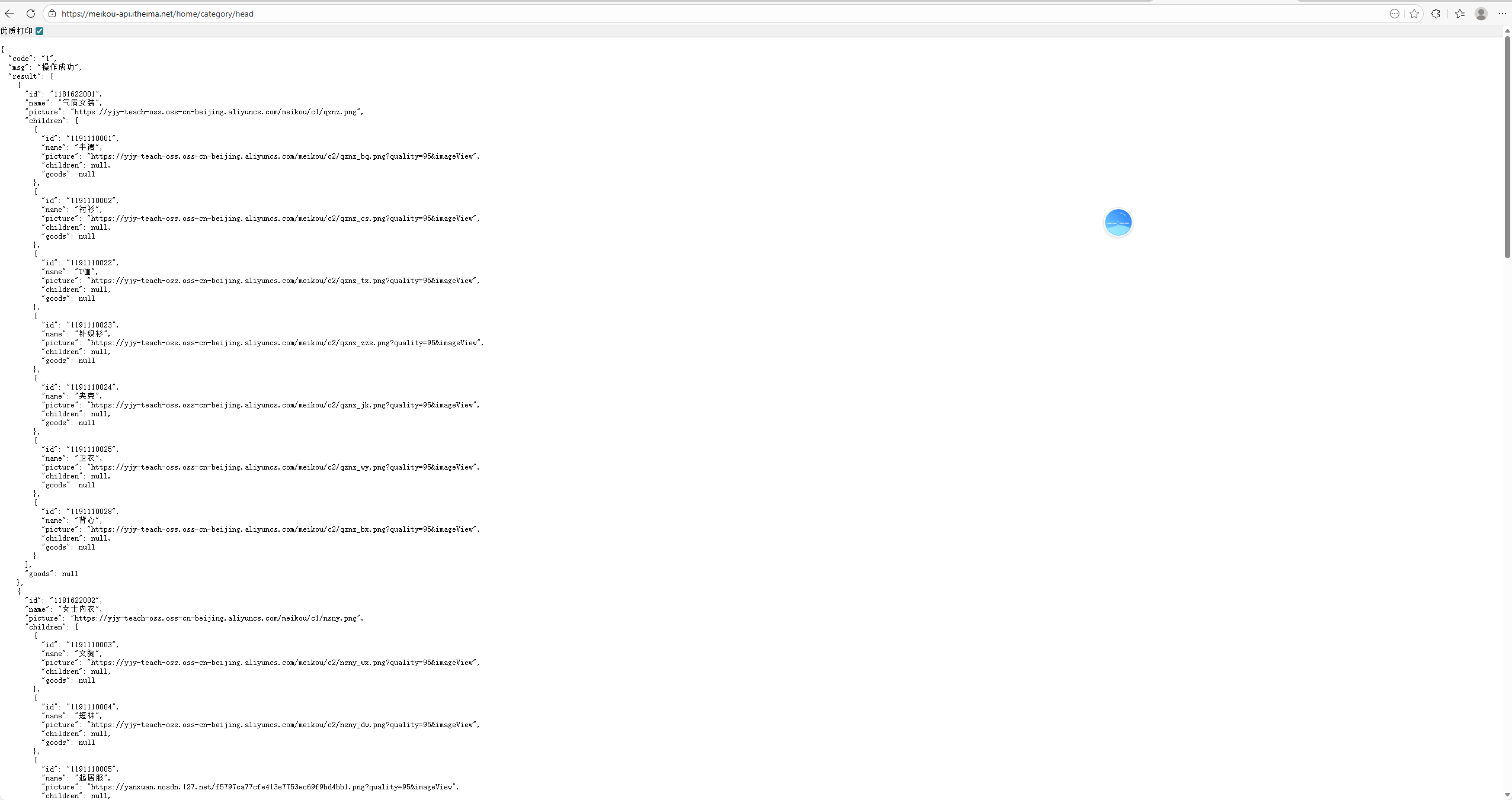
1.2 Trae编程实践
把下面这段复制到"lib/viewmodels/home.dart"。
 "result": [
    {
      "id": "1181622001",
      "name": "气质女装",
      "picture": "https://yjy-teach-oss.oss-cn-beijing.aliyuncs.com/meikou/c1/qznz.png",
      "children": [
        {
          "id": "1191110001",
          "name": "半裙",
          "picture": "https://yjy-teach-oss.oss-cn-beijing.aliyuncs.com/meikou/c2/qznz_bq.png?quality=95&imageView",
          "children": null,
          "goods": null
        },
        {
          "id": "1191110002",
          "name": "衬衫",
          "picture": "https://yjy-teach-oss.oss-cn-beijing.aliyuncs.com/meikou/c2/qznz_cs.png?quality=95&imageView",
          "children": null,
          "goods": null
        },
        {
          "id": "1191110022",
          "name": "T恤",
          "picture": "https://yjy-teach-oss.oss-cn-beijing.aliyuncs.com/meikou/c2/qznz_tx.png?quality=95&imageView",
          "children": null,
          "goods": null
        },
        {
          "id": "1191110023",
          "name": "针织衫",
          "picture": "https://yjy-teach-oss.oss-cn-beijing.aliyuncs.com/meikou/c2/qznz_zzs.png?quality=95&imageView",
          "children": null,
          "goods": null
        },
        {
          "id": "1191110024",
          "name": "夹克",
          "picture": "https://yjy-teach-oss.oss-cn-beijing.aliyuncs.com/meikou/c2/qznz_jk.png?quality=95&imageView",
          "children": null,
          "goods": null
        },
        {
          "id": "1191110025",
          "name": "卫衣",
          "picture": "https://yjy-teach-oss.oss-cn-beijing.aliyuncs.com/meikou/c2/qznz_wy.png?quality=95&imageView",
          "children": null,
          "goods": null
        },
        {
          "id": "1191110028",
          "name": "背心",
          "picture": "https://yjy-teach-oss.oss-cn-beijing.aliyuncs.com/meikou/c2/qznz_bx.png?quality=95&imageView",
          "children": null,
          "goods": null
        }
      ],
      "goods": null
    },
    {
      "id": "1181622002",
      "name": "女士内衣",
      "picture": "https://yjy-teach-oss.oss-cn-beijing.aliyuncs.com/meikou/c1/nsny.png",
      "children": [
        {
          "id": "1191110003",
          "name": "文胸",
          "picture": "https://yjy-teach-oss.oss-cn-beijing.aliyuncs.com/meikou/c2/nsny_wx.png?quality=95&imageView",
          "children": null,
          "goods": null
        },
        {
          "id": "1191110004",
          "name": "短袜",
          "picture": "https://yjy-teach-oss.oss-cn-beijing.aliyuncs.com/meikou/c2/nsny_dw.png?quality=95&imageView",
          "children": null,
          "goods": null
        },
        {
          "id": "1191110005",
          "name": "起居服",
          "picture": "https://yanxuan.nosdn.127.net/f5797ca77cfe413e7753ec69f9bd4bb1.png?quality=95&imageView",
          "children": null,
          "goods": null
        },
        {
          "id": "1191110029",
          "name": "内裤",
          "picture": "https://yjy-teach-oss.oss-cn-beijing.aliyuncs.com/meikou/c2/nsny_nk.png?quality=95&imageView",
          "children": null,
          "goods": null
        },
        {
          "id": "1191110030",
          "name": "连裤袜",
          "picture": "https://yjy-teach-oss.oss-cn-beijing.aliyuncs.com/meikou/c2/nsny_lkw.png?quality=95&imageView",
          "children": null,
          "goods": null
        },
        {
          "id": "1191110033",
          "name": "塑身衣/塑身裤",
          "picture": "https://yanxuan.nosdn.127.net/f5797ca77cfe413e7753ec69f9bd4bb1.png?quality=95&imageView",
          "children": null,
          "goods": null
        },
        {
          "id": "1191110034",
          "name": "内衣套装",
          "picture": "https://yanxuan.nosdn.127.net/f5797ca77cfe413e7753ec69f9bd4bb1.png?quality=95&imageView",
          "children": null,
          "goods": null
        }
      ],
      "goods": null
    },
    {
      "id": "1181622003",
      "name": "箱包手袋",
      "picture": "https://yjy-teach-oss.oss-cn-beijing.aliyuncs.com/meikou/c1/xbsd.png",
      "children": [
        {
          "id": "1191110006",
          "name": "单肩包",
          "picture": "https://yjy-teach-oss.oss-cn-beijing.aliyuncs.com/meikou/c2/xbsd_djb.png?quality=95&imageView",
          "children": null,
          "goods": null
        },
        {
          "id": "1191110007",
          "name": "双肩包",
          "picture": "https://yjy-teach-oss.oss-cn-beijing.aliyuncs.com/meikou/c2/xbsd_sjb.png?quality=95&imageView",
          "children": null,
          "goods": null
        },
        {
          "id": "1191110008",
          "name": "手提包",
          "picture": "https://yjy-teach-oss.oss-cn-beijing.aliyuncs.com/meikou/c2/xbsd_stb.png?quality=95&imageView",
          "children": null,
          "goods": null
        },
        {
          "id": "1191110026",
          "name": "斜挎包",
          "picture": "https://yjy-teach-oss.oss-cn-beijing.aliyuncs.com/meikou/c2/xbsd_xkb.png?quality=95&imageView",
          "children": null,
          "goods": null
        }
      ],
      "goods": null
    },
    {
      "id": "1181622004",
      "name": "时尚饰品",
      "picture": "https://yjy-teach-oss.oss-cn-beijing.aliyuncs.com/meikou/c1/sssp.png",
      "children": [
        {
          "id": "1191110009",
          "name": "耳饰",
          "picture": "https://yjy-teach-oss.oss-cn-beijing.aliyuncs.com/meikou/c2/sssp_es.png?quality=95&imageView",
          "children": null,
          "goods": null
        },
        {
          "id": "1191110010",
          "name": "项链",
          "picture": "https://yjy-teach-oss.oss-cn-beijing.aliyuncs.com/meikou/c2/sssp_xl.png?quality=95&imageView",
          "children": null,
          "goods": null
        },
        {
          "id": "1191110011",
          "name": "手链/手镯",
          "picture": "https://yjy-teach-oss.oss-cn-beijing.aliyuncs.com/meikou/c2/sssp_sz.png?quality=95&imageView",
          "children": null,
          "goods": null
        },
        {
          "id": "1191110012",
          "name": "戒指",
          "picture": "https://yjy-teach-oss.oss-cn-beijing.aliyuncs.com/meikou/c2/sssp_jz.png?quality=95&imageView",
          "children": null,
          "goods": null
        },
        {
          "id": "1191110014",
          "name": "挂饰及其他",
          "picture": "https://yjy-teach-oss.oss-cn-beijing.aliyuncs.com/meikou/c2/sssp_js.png?quality=95&imageView",
          "children": null,
          "goods": null
        }
      ],
      "goods": null
    },
    {
      "id": "1181622005",
      "name": "服饰配件",
      "picture": "https://yjy-teach-oss.oss-cn-beijing.aliyuncs.com/meikou/c1/zspj.png",
      "children": [
        {
          "id": "1191110015",
          "name": "渔夫帽",
          "picture": "https://yjy-teach-oss.oss-cn-beijing.aliyuncs.com/meikou/c2/fspj_yfm.png?quality=95&imageView",
          "children": null,
          "goods": null
        },
        {
          "id": "1191110016",
          "name": "贝雷帽",
          "picture": "https://yjy-teach-oss.oss-cn-beijing.aliyuncs.com/meikou/c2/fspj_blm.png?quality=95&imageView",
          "children": null,
          "goods": null
        },
        {
          "id": "1191110017",
          "name": "报童帽",
          "picture": "https://yjy-teach-oss.oss-cn-beijing.aliyuncs.com/meikou/c2/fspj_baotongmao.png?quality=95&imageView",
          "children": null,
          "goods": null
        },
        {
          "id": "1191110018",
          "name": "草帽",
          "picture": "https://yjy-teach-oss.oss-cn-beijing.aliyuncs.com/meikou/c2/fspj_cm.png?quality=95&imageView",
          "children": null,
          "goods": null
        },
        {
          "id": "1191110036",
          "name": "手套",
          "picture": "https://yjy-teach-oss.oss-cn-beijing.aliyuncs.com/meikou/c2/fspj_st.png?quality=95&imageView",
          "children": null,
          "goods": null
        },
        {
          "id": "1191110037",
          "name": "围巾丝巾",
          "picture": "https://yjy-teach-oss.oss-cn-beijing.aliyuncs.com/meikou/c2/fspj_wjsj.png?quality=95&imageView",
          "children": null,
          "goods": null
        },
        {
          "id": "1191110040",
          "name": "针织帽",
          "picture": "https://yjy-teach-oss.oss-cn-beijing.aliyuncs.com/meikou/c2/fspj_zzm.png?quality=95&imageView",
          "children": null,
          "goods": null
        }
      ],
      "goods": null
    },
    {
      "id": "1181622006",
      "name": "时尚女鞋",
      "picture": "https://yjy-teach-oss.oss-cn-beijing.aliyuncs.com/meikou/c1/ssnx.png",
      "children": [
        {
          "id": "1191110042",
          "name": "休闲鞋",
          "picture": "https://yjy-teach-oss.oss-cn-beijing.aliyuncs.com/meikou/c2/ssnx_xxx.png?quality=95&imageView",
          "children": null,
          "goods": null
        }
      ],
      "goods": null
    },
    {
      "id": "1181622009",
      "name": "眼镜配件",
      "picture": "https://yjy-teach-oss.oss-cn-beijing.aliyuncs.com/meikou/c1/yypj.png",
      "children": [
        {
          "id": "1191110020",
          "name": "太阳镜",
          "picture": "https://yjy-teach-oss.oss-cn-beijing.aliyuncs.com/meikou/c2/yjpj_tyj.png?quality=95&imageView",
          "children": null,
          "goods": null
        },
        {
          "id": "1191110021",
          "name": "光学眼镜",
          "picture": "https://yjy-teach-oss.oss-cn-beijing.aliyuncs.com/meikou/c2/yjpj_gxyj.png?quality=95&imageView",
          "children": null,
          "goods": null
        }
      ],
      "goods": null
    }
  ]
1.3 实现工厂函数数据转换
然后在Trae写上注释:根据json推断编写class对象和工厂转化函数,按下Tab键会自动生成一段代码
class CategoryItem {
  String id;
  String name;
  String picture;
  List<CategoryItem>? children;

  CategoryItem({
    required this.id,
    required this.name,
    required this.picture,
    this.children,
  });
// 扩展一个工厂函数 一般用factory来声明 一般用来创建实例对象
  factory CategoryItem.formJSON(Map<String, dynamic> json) {
    // 必须返回一个CategoryItem对象
    return CategoryItem(
      id: json["id"] ?? "",
      name: json["name"] ?? "",
      picture: json["picture"] ?? "",
      children: json["children"] == null
          ? null
          : (json["children"] as List)
          .map((item) => CategoryItem.formJSON(item as Map<String, dynamic>))
          .toList(),
    ); // CategoryItem
  }
}
lib/viewmodels/home.dart完整代码:
class BannerItem {
  String id;
  String imgUrl;

  BannerItem({required this.id, required this.imgUrl});

  //扩展一个工厂函数 一般用factory来声明 一般用来创建实例对象
  factory BannerItem.formJSON(Map<String, dynamic> json) {
    //必须返回一个BannerItem对象
    return BannerItem(id: json["id"] ?? "", imgUrl: json["imgUrl"] ?? "");
  }
}

//每一个轮播图具体类型

//flutter必须强制转换,没有隐式转化

//根据json推断编写class对象和工厂转化函数
class CategoryItem {
  String id;
  String name;
  String picture;
  List<CategoryItem>? children;

  CategoryItem({
    required this.id,
    required this.name,
    required this.picture,
    this.children,
  });
// 扩展一个工厂函数 一般用factory来声明 一般用来创建实例对象
  factory CategoryItem.formJSON(Map<String, dynamic> json) {
    // 必须返回一个CategoryItem对象
    return CategoryItem(
      id: json["id"] ?? "",
      name: json["name"] ?? "",
      picture: json["picture"] ?? "",
      children: json["children"] == null
          ? null
          : (json["children"] as List)
          .map((item) => CategoryItem.formJSON(item as Map<String, dynamic>))
          .toList(),
    ); // CategoryItem
  }
}
二、分类数据获取与展示
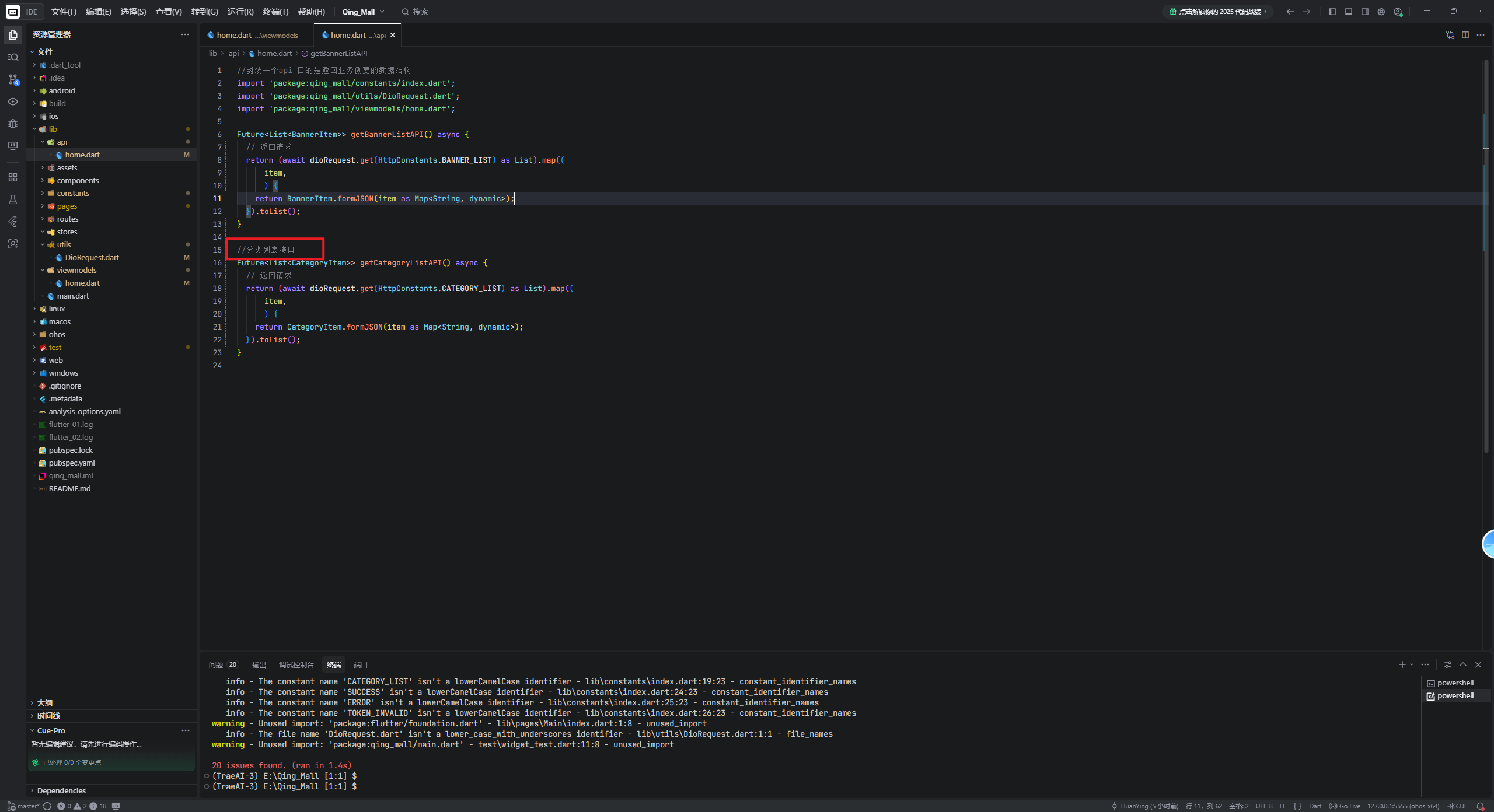
2.1 添加分类API接口调用
在lib/api/home.dart代码下,添加分类列表接口的注释,会自动生成代码,按下Tab即可
2.2 修改首页组件获取数据
修改lib/pages/Home/index.dart代码,新增的代码都是通过AI用Tab键补全生成,建议看视频可能比较好理解,文章不好表现出来。
import 'package:flutter/cupertino.dart';
import 'package:qing_mall/api/home.dart';
import 'package:qing_mall/components/Home/HmCategory.dart';
import 'package:qing_mall/components/Home/HmHot.dart';
import 'package:qing_mall/components/Home/HmMoreList.dart';
import 'package:qing_mall/components/Home/HmSlider.dart';
import 'package:qing_mall/components/Home/HmSuggestion.dart';
import 'package:qing_mall/viewmodels/home.dart';

class HomeView extends StatefulWidget {
  const HomeView({super.key});

  @override
  State<HomeView> createState() => _HomeViewState();
}

class _HomeViewState extends State<HomeView> {
  //分类列表
  List<CategoryItem> _categoryList = [];

  //轮播图列表
  List<BannerItem> _bannerList = [
    // BannerItem(
    //   id: "1",
    //   imgUrl: "https://yjy-teach-oss.oss-cn-beijing.aliyuncs.com/meituan/1.jpg",
    // ),
    // BannerItem(
    //   id: "2",
    //   imgUrl: "https://yjy-teach-oss.oss-cn-beijing.aliyuncs.com/meituan/2.png",
    // ),
    // BannerItem(
    //   id: "3",
    //   imgUrl: "https://yjy-teach-oss.oss-cn-beijing.aliyuncs.com/meituan/3.jpg",
    // ),
  ];

  //获取滚动容器的内容

  List<Widget> _getScrollChildren() {
    return [
      //包裹普通widget的sliver家族的组件内容
      SliverToBoxAdapter(child: HmSlider(bannerList: _bannerList)), //轮播图组件
      //放置分类组件
      SliverToBoxAdapter(child: SizedBox(height: 10)),
      //SliverGrid SliverList指南纵向排列
      SliverToBoxAdapter(child: HmCategory(categoryList: _categoryList)), //分类组件
      SliverToBoxAdapter(child: SizedBox(height: 10)),
      SliverToBoxAdapter(child: HmSuggestion()), //推荐组件
      SliverToBoxAdapter(child: SizedBox(height: 10)),

      //Flex和Expanded配合起来可以均分比例
      SliverToBoxAdapter(
        child: Padding(
            padding: EdgeInsets.symmetric(horizontal: 10),
            child: Flex(
              direction: Axis.horizontal,
              children: [
                Expanded(child: HmHot()),
                SizedBox(
                  width: 10,
                ),
                Expanded(child: HmHot()),
              ],
            )),
      ),
      SliverToBoxAdapter(child: SizedBox(height: 10)),
      HmMorelist(), //无限滚动列表
    ];
  }

  @override
  void initState() {
    // TODO: implement initState
    super.initState();
    _getBannederList();
    _getCategoryList();
  }

  //获取分类列表
  void _getCategoryList() async {
    _categoryList = await getCategoryListAPI();
    setState(() {});
  }

  void _getBannederList() async {
    _bannerList = await getBannerListAPI();
    setState(() {});
  }

  @override
  Widget build(BuildContext context) {
    //CustomScrollview要求:必须是sliver家族的内容
    return CustomScrollView(slivers: _getScrollChildren());
  }
}
修改HmCategory.dart代码
import 'package:flutter/material.dart';
import 'package:qing_mall/viewmodels/home.dart';

class HmCategory extends StatefulWidget {
  //分类列表
  final List<CategoryItem> categoryList;
  const HmCategory({super.key, required this.categoryList});

  @override
  State<HmCategory> createState() => _HmCategoryState();
}

class _HmCategoryState extends State<HmCategory> {
  @override
  Widget build(BuildContext context) {
    //返回一个横向滚动的组件,但是得设置高度。但是ListView自身不能设置高度.能设置高度的只有Container和SizeBox
    return SizedBox(
      height: 100,
      child: ListView.builder(
          scrollDirection: Axis.horizontal,
          itemCount: 10,
          itemBuilder: (BuildContext context, int index) {
            return Container(
              alignment: Alignment.center,
              width: 80,
              height: 100,
              color: Colors.blue,
              child: Text("分类$index", style: TextStyle(color: Colors.white)),
              margin: EdgeInsets.symmetric(horizontal: 10),
            );
          },

      ),
    );
  }
}
修改lib/components/home/HmCategory.dart
import 'package:flutter/material.dart';
import 'package:qing_mall/viewmodels/home.dart';

class HmCategory extends StatefulWidget {
  //分类列表
  final List<CategoryItem> categoryList;
  const HmCategory({super.key, required this.categoryList});

  @override
  State<HmCategory> createState() => _HmCategoryState();
}

class _HmCategoryState extends State<HmCategory> {
  @override
  Widget build(BuildContext context) {
    //返回一个横向滚动的组件,但是得设置高度。但是ListView自身不能设置高度.能设置高度的只有Container和SizeBox
    return SizedBox(
      height: 100,
      child: ListView.builder(
          scrollDirection: Axis.horizontal,
          itemCount: widget.categoryList.length,
          itemBuilder: (BuildContext context, int index) {
            //从分类列表中获取数据
            final categoryItem = widget.categoryList[index];
            return Container(
              alignment: Alignment.center,
              width: 80,
              height: 100,
              color: Colors.blue,
              child: Column(
                children: [
                  Image.network(categoryItem.picture ?? "", width: 40, height: 40),
                  Text(categoryItem.name ?? "分类$index", style: TextStyle(color: Colors.white)),
                ],
              ),
              margin: EdgeInsets.symmetric(horizontal: 10),
            );
          },

      ),
    );
  }
}
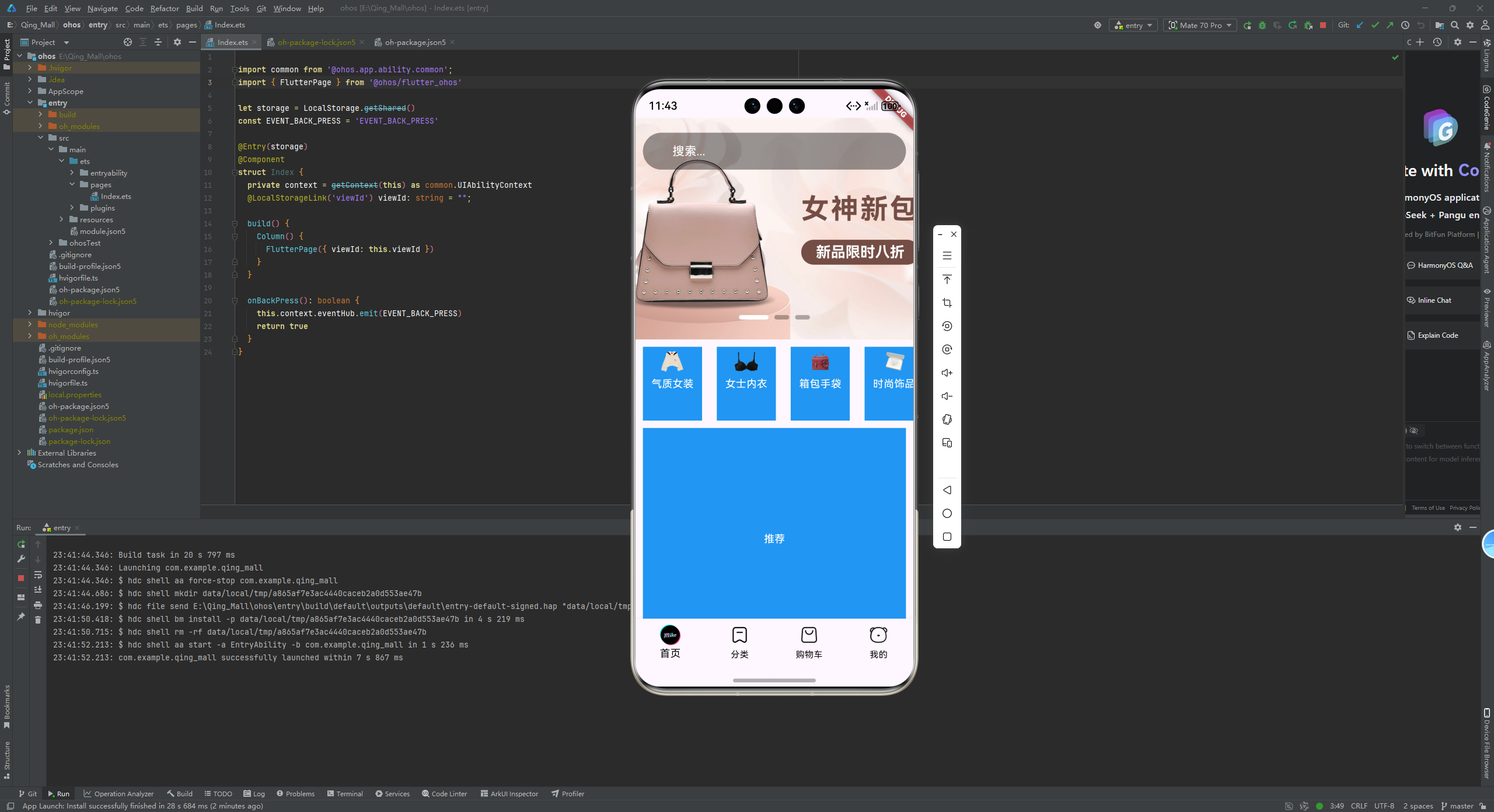
然后运行到鸿蒙模拟器,发现数据虽然出来了,但是UI不太对,所以我们需要手动调整一下代码。
2.3 优化分类组件UI展示
修改lib/components/home/HmCategory.dart
import 'package:flutter/material.dart';
import 'package:qing_mall/viewmodels/home.dart';

class HmCategory extends StatefulWidget {
  //分类列表
  final List<CategoryItem> categoryList;
  const HmCategory({super.key, required this.categoryList});

  @override
  State<HmCategory> createState() => _HmCategoryState();
}

class _HmCategoryState extends State<HmCategory> {
  @override
  Widget build(BuildContext context) {
    //返回一个横向滚动的组件,但是得设置高度。但是ListView自身不能设置高度.能设置高度的只有Container和SizeBox
    return SizedBox(
      height: 100,
      child: ListView.builder(
          scrollDirection: Axis.horizontal,
          itemCount: widget.categoryList.length,
          itemBuilder: (BuildContext context, int index) {
            //从分类列表中获取数据
            final categoryItem = widget.categoryList[index];
            return Container(
              alignment: Alignment.center,
              width: 80,
              height: 100,
              decoration: BoxDecoration(
              color: const Color.fromARGB(255, 231, 232, 234),
                borderRadius: BorderRadius.circular(40),
              ),
              margin: EdgeInsets.symmetric(horizontal: 10),
              child: Column(
                mainAxisAlignment: MainAxisAlignment.center,
                children: [
                  Image.network(categoryItem.picture ?? "", width: 40, height: 40),
                  Text(categoryItem.name ?? "分类$index", style: TextStyle(color: Colors.black)),
                ],
              ),

            );
          },

      ),
    );
  }
}
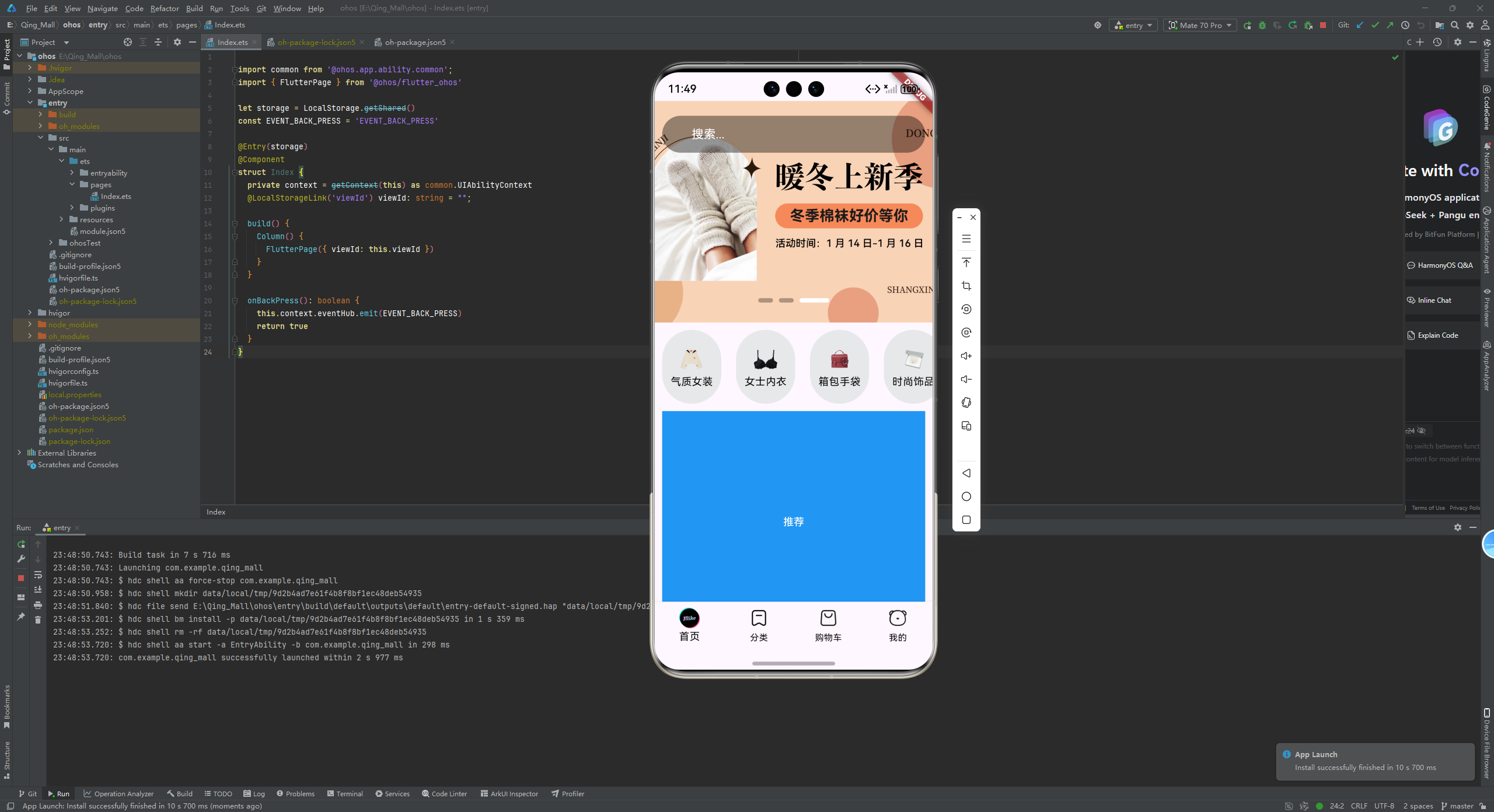
再次运行到模拟器,效果如图
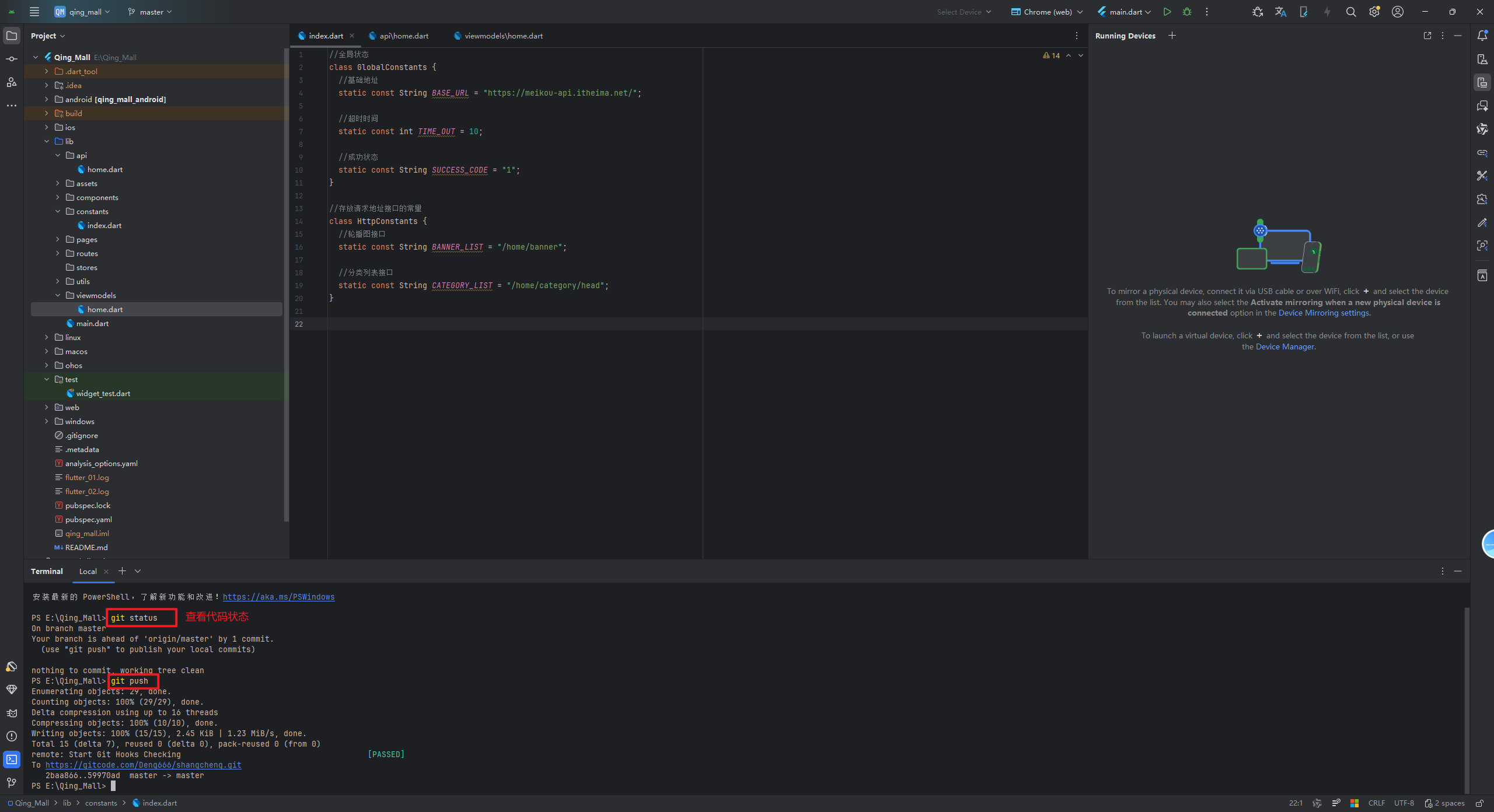
最后,使用Trae提交代码,但是我不知道在哪里提交的,可以直接打开终端进行推送
git add . -> git commit -m "使用TraeAI获取分类数据完渲染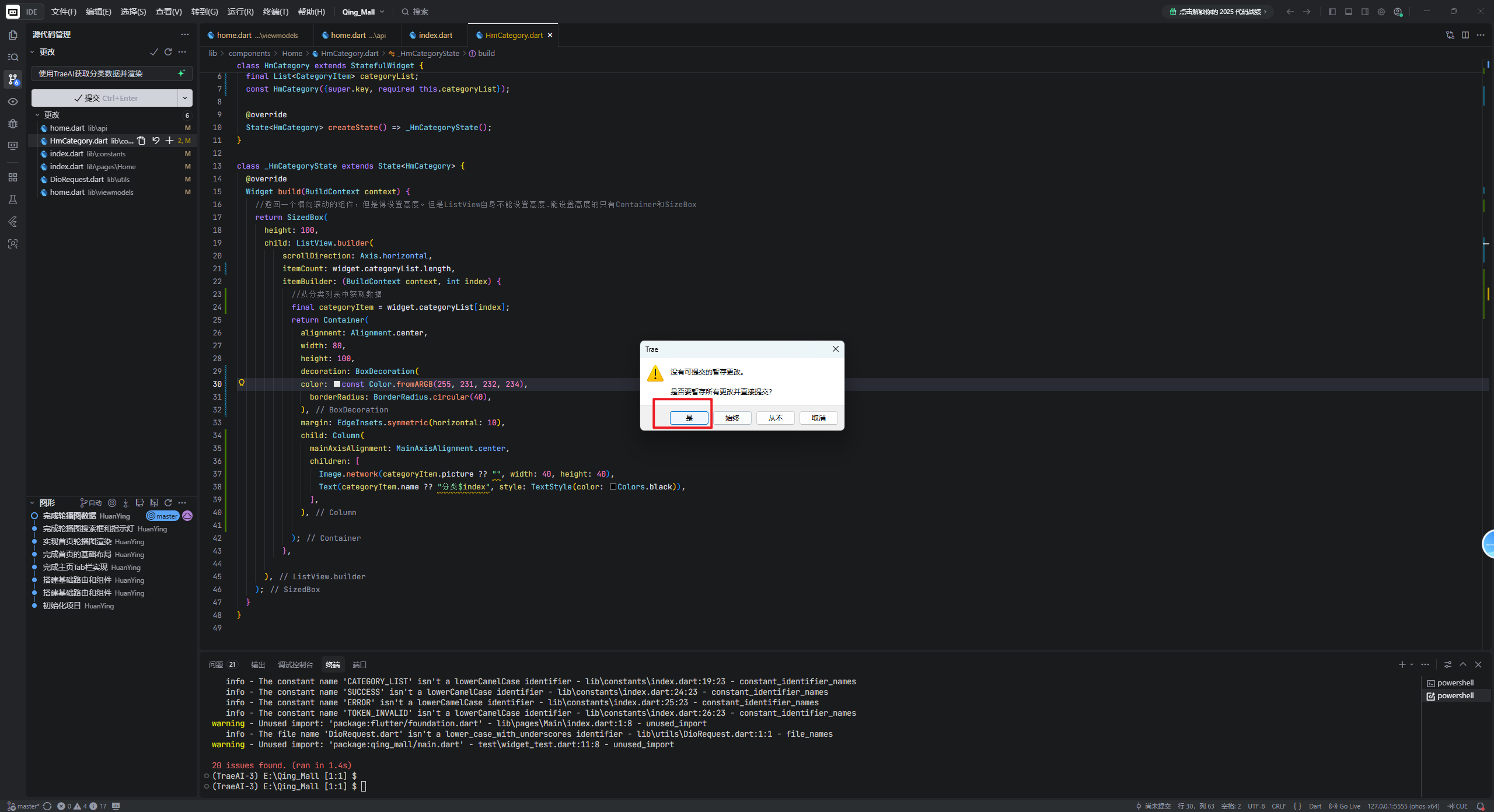
三、总结
本章使用Trae AI辅助编程,完成了分类数据的获取与展示功能。通过工厂模式构建CategoryItem数据模型,封装网络请求接口,并优化HmCategory组件UI。实现了分类数据从API获取到界面渲染的完整流程,进一步丰富了应用功能。
感谢您的观看,如果本文章对您有用,可以点赞支持一下。如果有疑问,可以在评论区留言,看到会回复。
最后,欢迎加入开源鸿蒙跨平台社区:
https://openharmonycrossplatform.csdn.net

讨论HarmonyOS开发技术,专注于API与组件、DevEco Studio、测试、元服务和应用上架分发等。
更多推荐

 12
12 0
0- 0


 已为社区贡献13条内容

所有评论(0)