【鸿蒙开发—顺 “瓜” 摸 “藤”】1. 应用的二次退出 / 防误触退出(小红薯案例版)
1. 引子
我们在开发时,会有突发奇想或者看到好的设计,希望能够模仿,但是会有处于毫无头绪的时候,不知道该如何下手,这就相当于一个考试,给你一个题目叫你作答,但不同于校园考试,他并不是在给定你范围并且复习的情况下进行作答。它是未知的,并不是顺藤摸瓜,总会遇到你所不清楚的内容,我希望能够通过案例顺瓜摸藤进行学习,通过“瓜”来推出是什么“藤”。
2. 注
这些案例都是现有APP的形式进行推论,因本人能力有限,可能不会是最优方案,如果您有更优方案,欢迎指出并讨论。
该系列的代码全部开源
-
在github JinnyWang-Space/HMOS_Space
 https://github.com/JinnyWang-Space/HMOS_Space或者gitee https://gitee.com/jinnywang/HMOS_Spacehttps://gitee.com/jinnywang/HMOS_Space上均可查看,下载使用
 -
文章在个人网站查看https://www.jinnyspace.online
https://www.jinnyspace.online/
3. 案例
应用的二次退出(防误触退出)
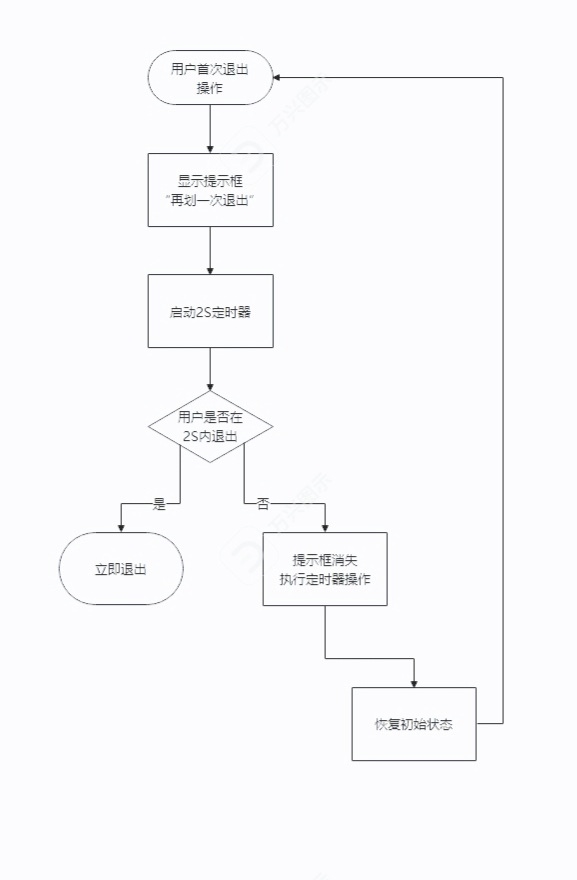
应用第一次退出后弹出提示框,再提示框消失前退出,则直接退出app,反之,则重回第一次退出过程。
以小红薯为例
演示见(由于是视频演示,因此很抱歉,您只能跳转到该链接)
Jinny Spacehttps://www.jinnyspace.online/articles/articleItem/4
4. 流程图
5. 知识点
5.1 Timer(定时器)
-
setTimeout (设置定时器)
-
clearTimeout (取消定时器)
5.2 自定义组件生命周期(onBackPress, aboutToDisappear)
-
onBackPress(返回逻辑)
注:在@Entry装饰器下的页面才能生效
-
aboutToDisappear(组件消失生命周期)
5.3 @ohos.promptAction (弹窗)
6. 代码(基础)
1. 状态管理V1版
import { promptAction } from '@kit.ArkUI';
@Entry
@Component
struct Index {
// 是否为第一次退出
@State isFirstExit: boolean = false;
// 记录定时器ID,方便后续操作(删除定时器)
@State timeoutID?: number = undefined;
// 系统返回操作
// true 代表拦截返回操作,false 代表不拦截返回操作
onBackPress(): boolean | void {
// 第一次返回操作
if (!this.isFirstExit) {
// 更改退出状态
this.isFirstExit = true;
// 清理旧的定时器(防御性编程)
if (this.timeoutID !== undefined) {
clearTimeout(this.timeoutID);
}
// 在 2S 后重置退出状态
this.timeoutID = setTimeout(() => {
this.isFirstExit = false;
this.timeoutID = undefined;
}, 2000)
// 弹出提示框
promptAction.openToast({ message: '再划一次退出', duration: 2000 }).catch(() => {
// TODO: Implement error handling.
})
}
// 最终返回操作
else {
// 重置状态
this.isFirstExit = false;
// 取消定时器
clearTimeout(this.timeoutID);
this.timeoutID = undefined;
// 不拦截返回操作
return false;
}
// 拦截返回操作
return true;
}
// 组件生命周期
aboutToDisappear(): void {
// 取消定时器
if (this.timeoutID !== undefined) {
clearTimeout(this.timeoutID);
this.timeoutID = undefined;
}
}
build() {
Column(){
}
.width('100%')
.height('100%')
}
}2. 状态管理V2版
import { promptAction } from '@kit.ArkUI';
@Entry
@ComponentV2
struct Index {
// 是否为第一次退出
@Local isFirstExit: boolean = false;
// 记录定时器ID,方便后续操作(删除定时器)
@Local timeoutID?: number;
// 系统返回操作
// true 代表拦截返回操作,false 代表不拦截返回操作
onBackPress(): boolean | void {
// 第一次返回操作
if (!this.isFirstExit) {
// 更改退出状态
this.isFirstExit = true;
// 清理旧的定时器(防御性编程)
if (this.timeoutID !== undefined) {
clearTimeout(this.timeoutID);
}
// 在 2S 后重置退出状态
this.timeoutID = setTimeout(() => {
this.isFirstExit = false;
this.timeoutID = undefined;
}, 2000)
// 弹出提示框
promptAction.openToast({ message: '再划一次退出', duration: 2000 }).catch(() => {
// TODO: Implement error handling.
})
}
// 最终返回操作
else {
// 重置状态
this.isFirstExit = false;
// 取消定时器
clearTimeout(this.timeoutID);
this.timeoutID = undefined;
// 不拦截返回操作
return false;
}
// 拦截返回操作
return true;
}
// 组件生命周期
aboutToDisappear(): void {
// 取消定时器
if (this.timeoutID !== undefined) {
clearTimeout(this.timeoutID);
this.timeoutID = undefined;
}
}
build() {
Column(){
}
.width('100%')
.height('100%')
}
}7. 代码(进阶)
采用 MVVM模式 思想,将其 数据 与 视图 独立出来,降低耦合,在ViewModel层 管理UI状态与业务逻辑 ,鸿蒙的装饰器对于这种思想有着天然的优势
注:
-
对于刚入门,进阶模式可能会比较抽象,可以先通过 注 里面的提示进行知识补充或者暂时只了解基础版代码,但 注 里面的内容最终是一定要掌握的
-
如果为入门,需先了解什么是 MVVM模式
-
如果使用状态管理 V1 版本,需先了解什么是 @Observed 与 @Track
-
如果使用状态管理 V2 版本,需先了解什么是 @ObservedV2 与 @Trace
-
最重要的,尽量不要状态管理V1与V2版混用,即视图模型层使用的状态管理与视图层使用的状态管理不一致,这里我更倾向于使用V2版本,因为它相比于V1版,更加强大,使用更加方便,对于想了解V1与V2具体差别的查看这篇文档:https://developer.huawei.com/consumer/cn/doc/harmonyos-guides/arkts-v1-v2-update-difference
https://developer.huawei.com/consumer/cn/doc/harmonyos-guides/arkts-v1-v2-update-difference
1. 封装为ViewModel层(状态管理V1版)
ExitViewModel(退出视图模型), 管理第一次退出,最终退出,销毁定时器
import { promptAction } from "@kit.ArkUI";
@Observed
export class ExitViewModel {
// 是否为第一次退出
@Track isFirstExit: boolean = false;
// 记录定时器ID,方便后续操作(销毁定时器)
@Track timeoutID?: number;
// 第一次退出操作
firstExit(){
// 更改退出状态
this.isFirstExit = true;
// 清理旧的定时器(防御性编程)
if (this.timeoutID !== undefined) {
clearTimeout(this.timeoutID);
}
// 在 2S 后重置退出状态
this.timeoutID = setTimeout(() => {
this.isFirstExit = false;
this.timeoutID = undefined;
}, 2000)
// 弹出提示框
promptAction.openToast({ message: '再划一次退出', duration: 2000 }).catch(() => {
// TODO: Implement error handling.
})
}
// 最后一次退出操作
endExit(){
// 重置状态
this.isFirstExit = false;
// 取消定时器
clearTimeout(this.timeoutID);
this.timeoutID = undefined;
// 不拦截返回操作
return false;
}
// 销毁定时器
clearTimeout(){
// 取消定时器
if (this.timeoutID !== undefined) {
clearTimeout(this.timeoutID);
this.timeoutID = undefined;
}
}
}2. 封装为ViewModel层(状态管理V2版)
import { promptAction } from "@kit.ArkUI";
@ObservedV2
export class ExitViewModel {
// 是否为第一次退出
@Trace isFirstExit: boolean = false;
// 记录定时器ID,方便后续操作(销毁定时器)
@Trace timeoutID?: number;
// 第一次退出操作
firstExit(){
// 更改退出状态
this.isFirstExit = true;
// 清理旧的定时器(防御性编程)
if (this.timeoutID !== undefined) {
clearTimeout(this.timeoutID);
}
// 在 2S 后重置退出状态
this.timeoutID = setTimeout(() => {
this.isFirstExit = false;
this.timeoutID = undefined;
}, 2000)
// 弹出提示框
promptAction.openToast({ message: '再划一次退出', duration: 2000 }).catch(() => {
// TODO: Implement error handling.
})
}
// 最后一次退出操作
endExit(){
// 重置状态
this.isFirstExit = false;
// 取消定时器
clearTimeout(this.timeoutID);
this.timeoutID = undefined;
// 不拦截返回操作
return false;
}
// 销毁定时器
clearTimeout(){
// 取消定时器
if (this.timeoutID !== undefined) {
clearTimeout(this.timeoutID);
this.timeoutID = undefined;
}
}
}视图层的引用
1. 状态管理V1版
import { ExitViewModel } from '../viewmodel/ExitViewModel';
@Entry
@Component
struct Index {
@State exitVM: ExitViewModel = new ExitViewModel();
// 系统返回操作
// true 代表拦截返回操作,false 代表不拦截返回操作
onBackPress(): boolean | void {
if (!this.exitVM.isFirstExit) {
this.exitVM.firstExit();
} else {
return this.exitVM.endExit();
}
return true;
}
// 组件生命周期
aboutToDisappear(): void {
this.exitVM.clearTimeout();
}
build() {
Column() {
}
.width('100%')
.height('100%')
}
}2. 状态管理V2版
import { ExitViewModel } from '../viewmodel/ExitViewModel';
@Entry
@ComponentV2
struct Index {
@Local exitVM: ExitViewModel = new ExitViewModel();
// 系统返回操作
// true 代表拦截返回操作,false 代表不拦截返回操作
onBackPress(): boolean | void {
if (!this.exitVM.isFirstExit) {
this.exitVM.firstExit();
} else {
return this.exitVM.endExit();
}
return true;
}
// 组件生命周期
aboutToDisappear(): void {
this.exitVM.clearTimeout();
}
build() {
Column() {
}
.width('100%')
.height('100%')
}
}8. 实现效果
实现效果与效果分析见该链接(由于是视频演示,因此很抱歉,您只能跳转到该链接)Jinny Spacehttps://www.jinnyspace.online/articles/articleItem/4

讨论HarmonyOS开发技术,专注于API与组件、DevEco Studio、测试、元服务和应用上架分发等。
更多推荐
 14
14 0
0- 0


 已为社区贡献3条内容

所有评论(0)