HarmonyOS:ohos.window.floatingBall (闪控球窗口)
·
一、简介
该模块提供闪控球的基础功能,包括判断设备是否支持闪控球功能,以及创建闪控球控制器来启动、更新或停止闪控球。适用于比价、搜题或抢单等场景,以小窗模式呈现内容。闪控球以悬浮小组件形式显示在其他应用之上,即时呈现应用的关键信息。
说明
- 本模块首批接口从HarmonyOS 6.0.0 ,API version 20开始支持。后续版本的新增接口,采用上角标单独标记接口的起始版本。
- 针对系统能力SystemCapability.Window.SessionManager,请先使用canIUse()接口判断当前设备是否支持此syscap及对应接口。
二、相关API介绍
- 导入模块
支持设备PhonePC | /2in1 | Tablet | TV | Wearable
import { floatingBall } from '@kit.ArkUI';
- floatingBall.isFloatingBallEnabled
支持设备PhonePC | /2in1 | Tablet | TV | Wearable
isFloatingBallEnabled(): boolean
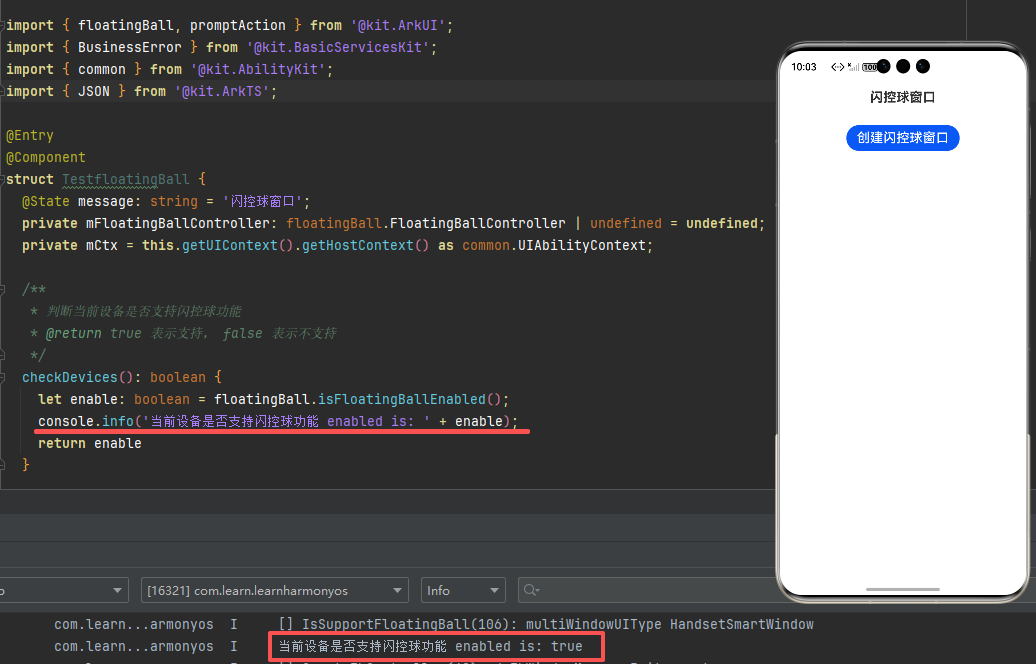
判断当前设备是否支持闪控球功能。
系统能力: SystemCapability.Window.SessionManager
返回值:
| 类型 | 说明 |
|---|---|
| boolean | 当前设备是否支持闪控球功能。true表示支持,false则表示不支持。 |
示例效果图
示例代码
let enable: boolean = floatingBall.isFloatingBallEnabled();
console.info('Floating ball enabled is: ' + enable);
- floatingBall.create
支持设备PhonePC | /2in1 | Tablet | TV | Wearable
create(config: FloatingBallConfiguration): Promise
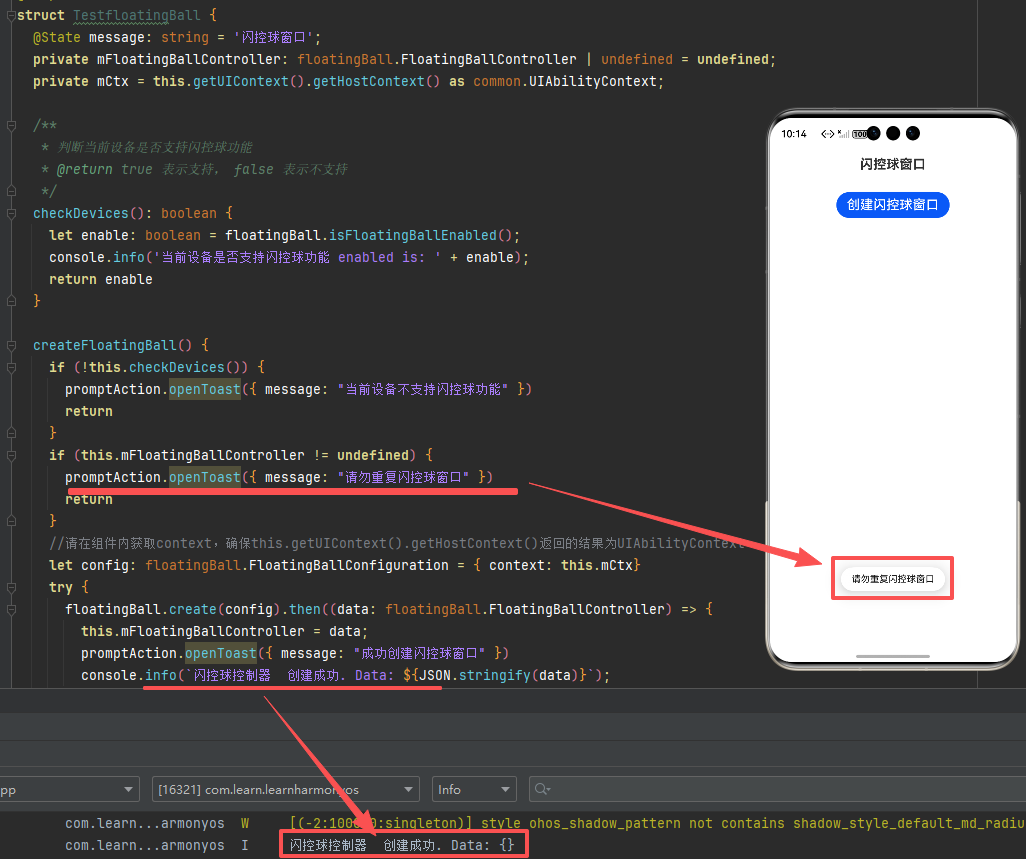
创建闪控球控制器,使用Promise异步回调。
系统能力: SystemCapability.Window.SessionManager
设备行为差异: 该接口在Phone和Tablet设备中可正常调用,在其他设备中返回801错误码。
参数:
| 参数名 | 类型 | 必填 | 说明 |
|---|---|---|---|
| config | FloatingBallConfiguration | 是 | 创建闪控球控制器的参数。该参数不能为空,并且构造该参数的context不能为空。 |
返回值:
| 类型 | 说明 |
|---|---|
| Promise<FloatingBallController> | Promise对象。返回当前创建的闪控球控制器。 |
示例效果图
示例代码:
import { floatingBall, promptAction } from '@kit.ArkUI';
import { BusinessError } from '@kit.BasicServicesKit';
import { common } from '@kit.AbilityKit';
import { JSON } from '@kit.ArkTS';

createFloatingBall() {
    if (!this.checkDevices()) {
      promptAction.openToast({ message: "当前设备不支持闪控球功能" })
      return
    }
    if (this.mFloatingBallController != undefined) {
      promptAction.openToast({ message: "请勿重复闪控球窗口" })
      return
    }
    //请在组件内获取context,确保this.getUIContext().getHostContext()返回的结果为UIAbilityContext
    let config: floatingBall.FloatingBallConfiguration = { context: this.mCtx}
    try {
      floatingBall.create(config).then((data: floatingBall.FloatingBallController) => {
        this.mFloatingBallController = data;
        promptAction.openToast({ message: "成功创建闪控球窗口" })
        console.info(`闪控球控制器  创建成功. Data: ${JSON.stringify(data)}`);
      }).catch((err: BusinessError) => {
        console.error(`闪控球控制器 创建失败1. Cause:${err.code}, message:${err.message}`);
      });
    } catch (e) {
      console.error(`闪控球控制器 创建失败2. Cause:${e.code}, message:${e.message}`);
    }
  }
- FloatingBallConfiguration
支持设备PhonePC | /2in1 | Tablet | TV | Wearable
创建闪控球控制器时需要提供的参数配置。
系统能力: SystemCapability.Window.SessionManager
| 名称 | 类型 | 只读 | 可选 | 说明 |
|---|---|---|---|---|
| context | BaseContext | 否 | 否 | 表示上下文环境。 |
- FloatingBallController
支持设备PhonePC | /2in1 | Tablet | TV | Wearable
闪控球控制器实例,用于启动、更新、停止闪控球以及注册回调等操作。
下列API示例中都需先使用floatingBall.create()方法获取到闪控球控制器实例(即floatingBallController),再通过此实例调用对应方法。
系统能力: SystemCapability.Window.SessionManager
- startFloatingBall
支持设备PhonePC | /2in1 | Tablet | TV | Wearable
startFloatingBall(params: FloatingBallParams): Promise
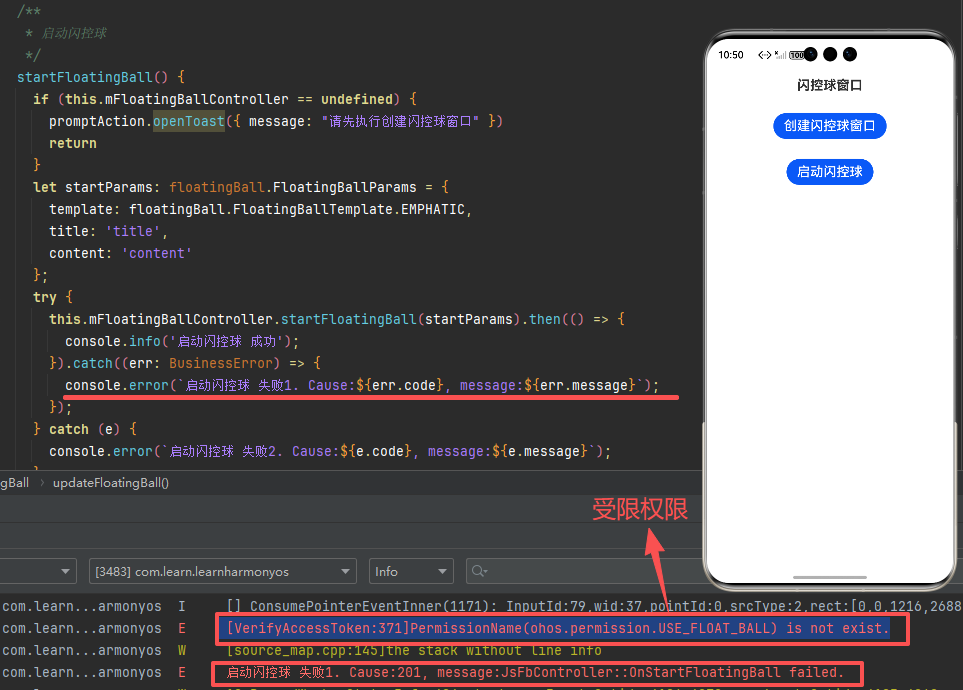
启动闪控球,使用Promise异步回调。
需要权限: ohos.permission.USE_FLOAT_BALL
系统能力: SystemCapability.Window.SessionManager
参数:
| 参数名 | 类型 | 必填 | 说明 |
|---|---|---|---|
| params | FloatingBallParams | 是 | 启动闪控球的参数。 |
返回值:
| 类型 | 说明 |
|---|---|
| Promise<void> | 无返回结果的Promise对象。 |
示例效果图
示例代码
import { BusinessError } from '@kit.BasicServicesKit';

let startParams: floatingBall.FloatingBallParams = {
  template: floatingBall.FloatingBallTemplate.EMPHATIC,
  title: 'title',
  content: 'content'
};
try {
  floatingBallController.startFloatingBall(startParams).then(() => {
    console.info('Succeeded in starting floating ball.');
  }).catch((err: BusinessError) => {
    console.error(`Failed to start floating ball. Cause:${err.code}, message:${err.message}`);
  });
} catch(e) {
  console.error(`Failed to start floating ball. Cause:${e.code}, message:${e.message}`);
}
- updateFloatingBall
支持设备PhonePC | /2in1 | Tablet | TV | Wearable
updateFloatingBall(params: FloatingBallParams): Promise<void>
更新闪控球,使用Promise异步回调。
系统能力: SystemCapability.Window.SessionManager
示例代码
import { BusinessError } from '@kit.BasicServicesKit';

let updateParams: floatingBall.FloatingBallParams = {
  template: floatingBall.FloatingBallTemplate.EMPHATIC,
  title: 'title2',
  content: 'content2'
};
try {
  floatingBallController.updateFloatingBall(updateParams).then(() => {
    console.info('Succeeded in updating floating ball.');
  }).catch((err: BusinessError) => {
    console.error(`Failed to update floating ball. Cause:${err.code}, message:${err.message}`);
  });
} catch(e) {
  console.error(`Failed to update floating ball. Cause:${e.code}, message:${e.message}`);
}
- stopFloatingBall
支持设备PhonePC | /2in1 | Tablet | TV | Wearable
stopFloatingBall(): Promise
停止闪控球,使用Promise异步回调。
系统能力: SystemCapability.Window.SessionManager
示例代码
import { BusinessError } from '@kit.BasicServicesKit';

floatingBallController.stopFloatingBall().then(() => {
  console.info('Succeeded in stopping floating ball.');
}).catch((err: BusinessError) => {
  console.error(`Failed to stop floating ball. Cause:${err.code}, message:${err.message}`);
});
三、ohos.permission.USE_FLOAT_BALL
ohos.permission.USE_FLOAT_BALL
允许应用使用全局闪控球的能力。
可申请此权限的特殊场景与功能:
- 需要识别当前屏幕内容,并返回应用处理相关数据,如跨应用的题目搜索、账单记录、商品比价、翻译等。
- 需要实时跟踪应用外数据,一步直达业务处理。如应用需要在桌面点击闪控球实时响应用户咨询;金融类应用在桌面上通过闪控球实时盯盘等。
权限级别:system_basic
授权方式:系统授权(system_grant)
支持设备:Phone | Tablet
API起始版本:20
四、示例完整代码
import { floatingBall, promptAction } from '@kit.ArkUI';
import { BusinessError } from '@kit.BasicServicesKit';
import { common } from '@kit.AbilityKit';
import { JSON } from '@kit.ArkTS';

@Entry
@Component
struct TestfloatingBall {
  @State message: string = '闪控球窗口';
  private mFloatingBallController: floatingBall.FloatingBallController | undefined = undefined;
  private mCtx = this.getUIContext().getHostContext() as common.UIAbilityContext;

  /**
   * 判断当前设备是否支持闪控球功能
   * @return true 表示支持, false 表示不支持
   */
  checkDevices(): boolean {
    let enable: boolean = floatingBall.isFloatingBallEnabled();
    console.info('当前设备是否支持闪控球功能 enabled is: ' + enable);
    return enable
  }

  createFloatingBall() {
    if (!this.checkDevices()) {
      promptAction.openToast({ message: "当前设备不支持闪控球功能" })
      return
    }
    if (this.mFloatingBallController != undefined) {
      promptAction.openToast({ message: "请勿重复闪控球窗口" })
      return
    }
    //请在组件内获取context,确保this.getUIContext().getHostContext()返回的结果为UIAbilityContext
    let config: floatingBall.FloatingBallConfiguration = { context: this.mCtx }
    try {
      floatingBall.create(config).then((data: floatingBall.FloatingBallController) => {
        this.mFloatingBallController = data;
        promptAction.openToast({ message: "成功创建闪控球窗口" })
        console.info(`闪控球控制器  创建成功. Data: ${JSON.stringify(data)}`);
      }).catch((err: BusinessError) => {
        console.error(`闪控球控制器 创建失败1. Cause:${err.code}, message:${err.message}`);
      });
    } catch (e) {
      console.error(`闪控球控制器 创建失败2. Cause:${e.code}, message:${e.message}`);
    }
  }

  /**
   * 启动闪控球
   */
  startFloatingBall() {
    if (this.mFloatingBallController == undefined) {
      promptAction.openToast({ message: "请先执行创建闪控球窗口" })
      return
    }
    let startParams: floatingBall.FloatingBallParams = {
      template: floatingBall.FloatingBallTemplate.EMPHATIC,
      title: 'title',
      content: 'content'
    };
    try {
      this.mFloatingBallController.startFloatingBall(startParams).then(() => {
        console.info('启动闪控球 成功');
      }).catch((err: BusinessError) => {
        console.error(`启动闪控球 失败1. Cause:${err.code}, message:${err.message}`);
      });
    } catch (e) {
      console.error(`启动闪控球 失败2. Cause:${e.code}, message:${e.message}`);
    }
  }

  /**
   * 更新闪控球
   */
  updateFloatingBall() {
    if (this.mFloatingBallController == undefined) {
      promptAction.openToast({ message: "请先执行创建闪控球窗口" })
      return
    }
    let updateParams: floatingBall.FloatingBallParams = {
      template: floatingBall.FloatingBallTemplate.EMPHATIC,
      title: 'title2',
      content: 'content2'
    };
    try {
      this.mFloatingBallController.updateFloatingBall(updateParams).then(() => {
        console.info('Succeeded in updating floating ball.');
      }).catch((err: BusinessError) => {
        console.error(`Failed to update floating ball. Cause:${err.code}, message:${err.message}`);
      });
    } catch (e) {
      console.error(`Failed to update floating ball. Cause:${e.code}, message:${e.message}`);
    }
  }

  /**
   * 停止闪控球
   */
  stopFloatingBall() {
    if (this.mFloatingBallController == undefined) {
      promptAction.openToast({ message: "请先执行创建闪控球窗口" })
      return
    }
    this.mFloatingBallController.stopFloatingBall().then(() => {
      console.info('Succeeded in stopping floating ball.');
    }).catch((err: BusinessError) => {
      console.error(`Failed to stop floating ball. Cause:${err.code}, message:${err.message}`);
    });
  }

  build() {
    Column({ space: 10 }) {
      Text(this.message)
        .id('TestfloatingBallHelloWorld')
        .fontSize($r('app.float.page_text_font_20fp'))
        .fontWeight(FontWeight.Bold)
        .margin({ top: 20 })

      Button('创建闪控球窗口')
        .fontColor(Color.White)
        .fontSize($r('app.float.page_text_font_20fp'))
        .fontWeight(FontWeight.Medium)
        .margin({ top: 20 })
        .onClick(() => {
          this.createFloatingBall();
        })
      Button('启动闪控球')
        .fontColor(Color.White)
        .fontSize($r('app.float.page_text_font_20fp'))
        .fontWeight(FontWeight.Medium)
        .margin({ top: 20 })
        .onClick(() => {
          this.startFloatingBall();
        })

      Button('更新闪控球')
        .fontColor(Color.White)
        .fontSize($r('app.float.page_text_font_20fp'))
        .fontWeight(FontWeight.Medium)
        .margin({ top: 20 })
        .onClick(() => {
          this.updateFloatingBall();
        })

      Button('停止闪控球')
        .fontColor(Color.White)
        .fontSize($r('app.float.page_text_font_20fp'))
        .fontWeight(FontWeight.Medium)
        .margin({ top: 20 })
        .onClick(() => {
          this.stopFloatingBall();
        })
    }
    .height('100%')
    .width('100%')
  }
}

讨论HarmonyOS开发技术,专注于API与组件、DevEco Studio、测试、元服务和应用上架分发等。
更多推荐

 19
19 0
0- 0


 已为社区贡献77条内容

所有评论(0)