鸿蒙FlutterView随笔
PlatformView与FlutterView对比
概述
本文档旨在分析PlatformView VS FlutterView,了解PlatformViewsController在Flutter 绘制渲染功能,为后续OHOS平台上适配提PlatformViewsController2支持,也可以作为了解Flutter UI上屏显示的切入点。
简要对比FlutterView与PlatformView,着重分析PlatformViewController在绘制渲染上差异。
为什么需要PlatformView?
PlatformView是Flutter支持跨平台开发中的一项核心技术,它允许Flutter应用嵌入和使用原生平台的UI组件,弥补其自渲染引擎在处理特定原生功能时的不足,从而实现更灵活、更强大的混合开发能力。尽管 Flutter 通过 Skia 引擎实现了高性能和一致的 UI 渲染,但某些平台特性的原生实现往往更成熟、功能更丰富或性能更优。PlatformView 的引入正是为了解决这一矛盾。
例如, 对于地图(MapView)、网页视图(WebView)等,原生平台(Android/iOS/OHOS)的 SDK 实现通常比在 Flutter 中完全重新开发更稳定、功能更完整。PlatformView 允许开发者直接将这些原生控件嵌入到 Flutter 界面中。
一、架构对比
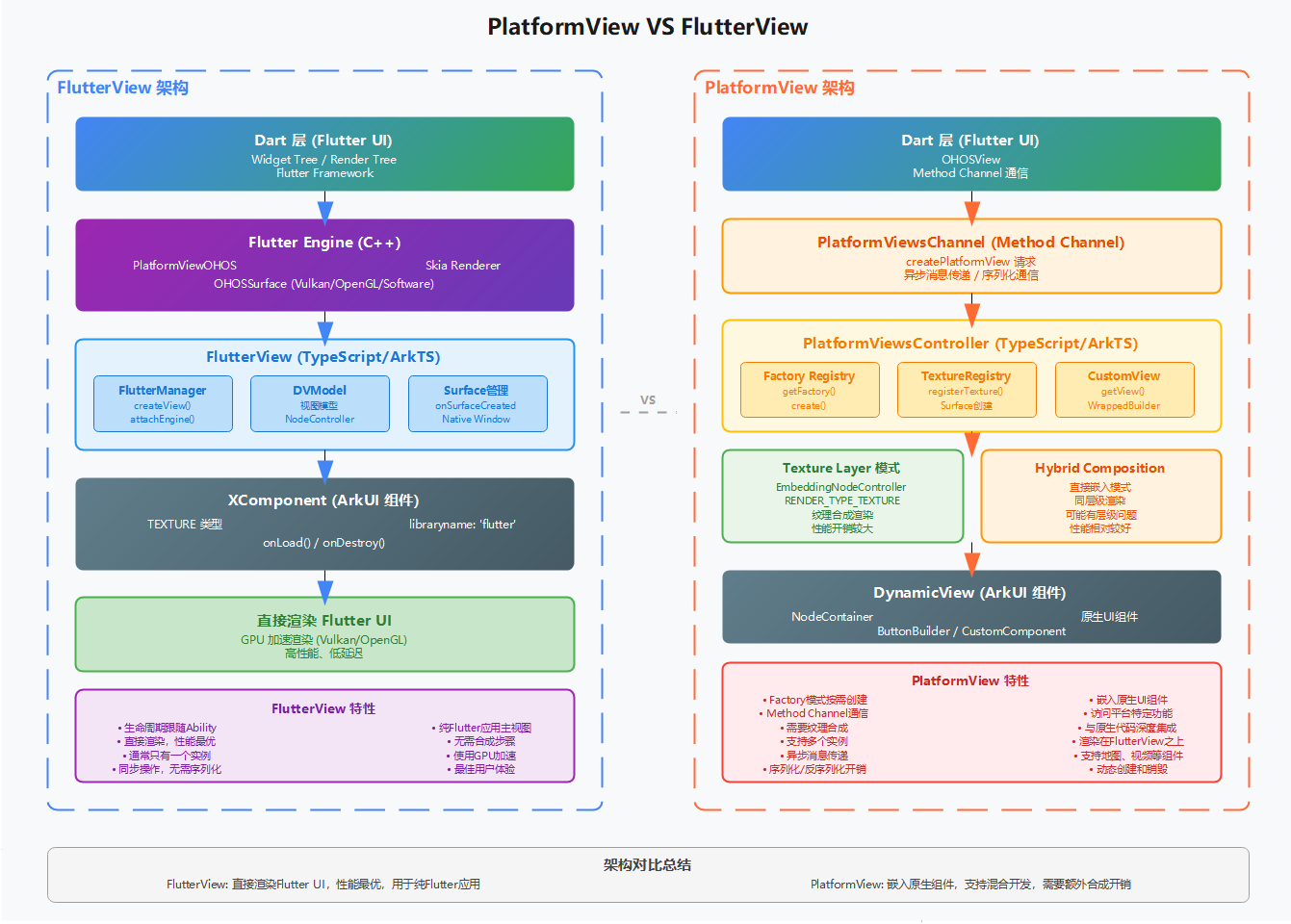
二、创建流程对比
2.1 FlutterView创建
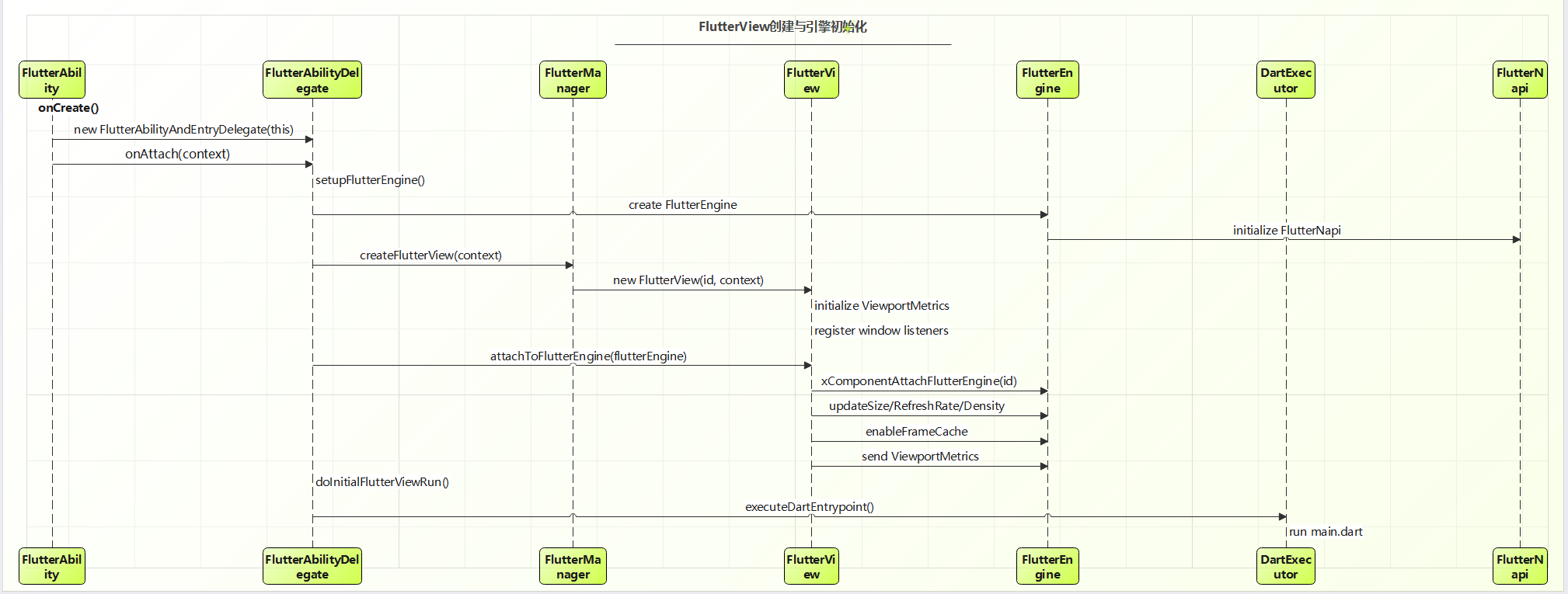
FlutterAbilityAndEntryDelegate持有FlutterEngine,FlutterView,前者负责集成原生系统底层能力(如绘制能力),后者负责Flutter UI上屏送显示(如图形相关:刷新频率、分辨率,尺寸)。FlutterView也需要使用原生平台底层能力,因此也持有FlutterEngine。
FlutterView创建过程实际上调用FlutterEngine就是创建原生窗口(NativeWindow),并为 OHOS 窗口覆盖一层 Vulkan Surface。
-
FlutterView的创建是由Ability生命周期驱动
在OnWindowStageCreate调用delegate!!.createView(this.context)创建flutterView,也就是说每个Flutter应用都有一个FlutterView。
  onWindowStageCreate(windowStage: window.WindowStage) {
    FlutterManager.getInstance().pushWindowStage(this, windowStage);
    this.delegate?.initWindow();
    this.mainWindow = windowStage.getMainWindowSync();
    try {
      .....
      this.flutterView = this.delegate!!.createView(this.context)
      Log.i(TAG, 'onWindowStageCreate:' + this.flutterView!!.getId());
      let storage: LocalStorage = new LocalStorage();
      storage.setOrCreate("viewId", this.flutterView!!.getId())
      windowStage.loadContent(this.pagePath(), storage, (err, data) => {
	      ......
      });
      ......
    }
  }
FlutterView渲染
FlutterView集成FlutterEngine集成平台绘制能力,流程较为复杂。
 |--FlutterView.attachToFlutterEngine
     |--FlutterNapi.xComponentAttachFlutterEngine(id)// id为FlutterViewId
        |-- XComponentAdapter.AttachFlutterEngine(xcomponent_id,shell_holder_str)//xComponent_id为flutterViewid
            |--XComponentBase.AttachFlutterEngine(shellholderId) //shellholderId为flutter应用持有平台shellid
               |--PlatformViewOHOSNapi.SurfaceCreated //调用平台底层能力创建surface
     			  |--PlatformViewOHOS.NotifyCreate(std::move(native_window))
-
为FlutterView创建对应的XComponentBase,其中XComponentBase的id为ViewId。
void XComponentAdapter::AttachFlutterEngine(std::string& id, std::string& shellholderId) { TRACE_EVENT1("flutter", "AttachFlutterEngine", "ShellID", shellholderId.c_str()); std::lock_guard<std::recursive_mutex> lock(xcomponentMap_mutex_); auto iter = xcomponetMap_.find(id); if (iter == xcomponetMap_.end()) { /* * comment by WEI ZHA * 为FlutterView创建相应的XComponentBase */ XComponentBase* xcomponet = new XComponentBase(id); xcomponetMap_[id] = xcomponet; } auto findIter = xcomponetMap_.find(id); if (findIter != xcomponetMap_.end()) { findIter->second->AttachFlutterEngine(shellholderId); // comment by WEI ZHA, XComponentBase::AttachFlutterEngine,flutterView相应的XComponentBase绘制 } if (OHOS_API_VERSION < 15) { SetCurrentXcomponentId(id); } } -
创建NativeWindow,将窗口的参数(height, width,一般是一屏大小)设置到surface
    fml::TaskRunner::RunNowOrPostTask(
        task_runners_.GetRasterTaskRunner(),
        [&, surface = ohos_surface_.get(),
         native_window = std::move(native_window)]() {
          LOGI("NotifyCreate start4");
          bool set_window_result = surface->SetDisplayWindow(native_window); //设置native_window 到 Vulkan surface
		  ......
        });
其中ohos_surface_是OHOSSurfaceVulkanImpeller,创建代码如下:
std::unique_ptr<OHOSSurface> OhosSurfaceFactoryImpl::CreateSurface() {
  switch (ohos_context_->RenderingApi()) {
    case OHOSRenderingAPI::kSoftware:
      FML_LOG(INFO) << "OhosSurfaceFactoryImpl::CreateSurface use software";
      return std::make_unique<OHOSSurfaceSoftware>(ohos_context_);
    ......
    case flutter::OHOSRenderingAPI::kImpellerVulkan: // 这里的OHOSRenderingAPI类型为kImpellerVulkan
      FML_LOG(INFO) << "OhosSurfaceFactoryImpl::CreateSurface use impeller-vulkan";
      return std::make_unique<OHOSSurfaceVulkanImpeller>(ohos_context_);
    default:
      FML_DCHECK(false);
      return nullptr;
  }
}
创建Vulkan surface, 持有原生窗口:
bool OHOSSurfaceVulkanImpeller::SetNativeWindow(
    fml::RefPtr<OHOSNativeWindow> window) {
  if (!window) {
    native_window_ = nullptr;
    return false;
  }
  TRACE_EVENT0("flutter", "OHOSSurfaceVulkanImpeller-SetNativeWindow");

  native_window_ = std::move(window);
  bool success = native_window_ && native_window_->IsValid();

  if (success) {
    auto surface =
        surface_context_vk_->CreateOHOSSurface(native_window_->Gethandle()); // 创建Vulkan surface持有原生窗口
    if (!surface) {
      FML_LOG(ERROR) << "Could not create a vulkan surface.";
      return false;
    }
    auto size = native_window_->GetSize();
    return surface_context_vk_->SetWindowSurface(
        std::move(surface), impeller::ISize{size.width(), size.height()});
  }

  native_window_ = nullptr;
  return false;
}
#ifdef FML_OS_OHOS
vk::UniqueSurfaceKHR SurfaceContextVK::CreateOHOSSurface(
    OHNativeWindow* window) const {
  if (!parent_->GetInstance()) {
    VALIDATION_LOG << "createSurface get null instance";
    return vk::UniqueSurfaceKHR{VK_NULL_HANDLE};
  }
  static PFN_vkCreateSurfaceOHOS vkCreateSurfaceOHOS =
      (PFN_vkCreateSurfaceOHOS)parent_->GetInstance().getProcAddr(
          "vkCreateSurfaceOHOS");
  if (!vkCreateSurfaceOHOS) {
    VALIDATION_LOG << "missing vkCreateSurfaceOHOS extension";
    return vk::UniqueSurfaceKHR{VK_NULL_HANDLE};
  }
  const VkSurfaceCreateInfoOHOS surfaceCreateInfo{
      (VkStructureType)VK_STRUCTURE_TYPE_SURFACE_CREATE_INFO_OHOS, nullptr, 0,
      window};
  VkSurfaceKHR surface = VK_NULL_HANDLE;
  if (vkCreateSurfaceOHOS(parent_->GetInstance(), &surfaceCreateInfo, nullptr,
                          &surface) != VK_SUCCESS) {
    VALIDATION_LOG << "vkCreateSurfaceOHOS get failed";
    return vk::UniqueSurfaceKHR{VK_NULL_HANDLE};
  }
  return vk::UniqueSurfaceKHR(surface, parent_->GetInstance());
}
#endif
2.2 PlatformView 创建流程
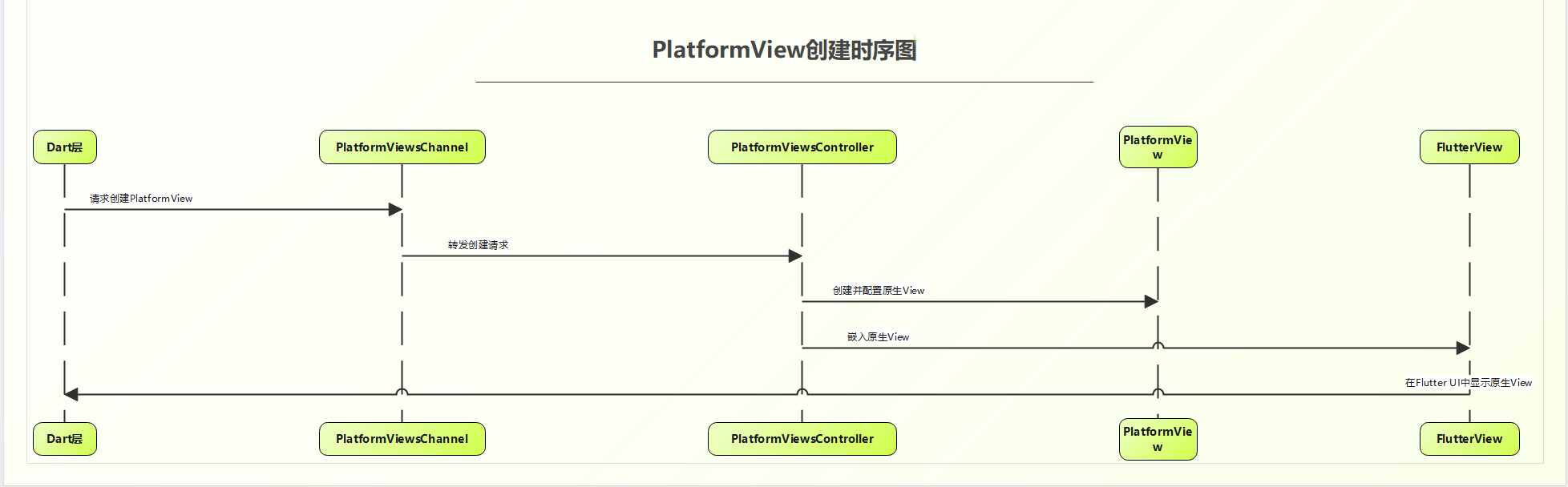
自定义PlatformView组件由Dart UI按需驱动创建,在Dart层创建OhosView,创建PlatformViewChannel与embedding层组件通信。
例如:
Widget build(BuildContext context) {
return Column(
children: [
_buildOhosView(),
_buildFlutterView(),
],
);
}
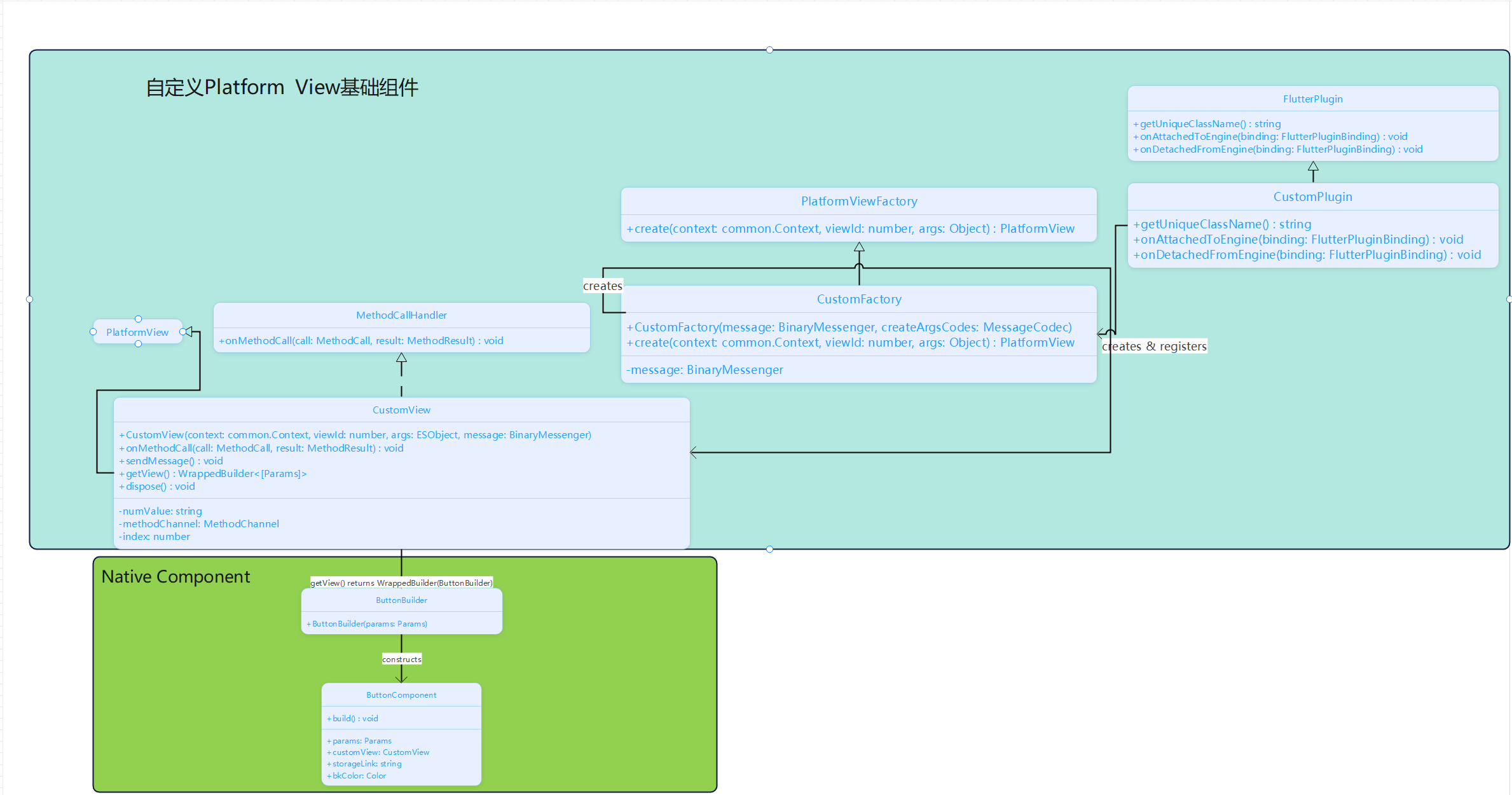
OHOS在实现自定义PlatformView,需要实现FlutterPlugin,PlatformViewFactory,PlatformView子类。
// EntryAbility.ets
configureFlutterEngine(flutterEngine: FlutterEngine) {
  // 注册 PlatformViewFactory
  flutterEngine.getPlatformViewsController()
    ?.getRegistry()
    ?.registerViewFactory(
      'CustomView',  // viewType
      new CustomFactory(message, StandardMethodCodec.INSTANCE)
    );
}
自定义类组件说明
CustomFactory类
继承PlatformViewFactory,负责创建自定义View。
// CustomFactory.ets
export class CustomFactory extends PlatformViewFactory {
  public create(context: common.Context, viewId: number, args: Object): PlatformView {
    return new CustomView(context, viewId, args, this.message);
  }
}
CustomPlugin类
负责 插件初始化时注册自定义PlatformView工厂
export class CustomPlugin implements FlutterPlugin {
  getUniqueClassName(): string {
    return 'CustomPlugin';
  }
  onAttachedToEngine(binding: FlutterPluginBinding): void {
    binding.getPlatformViewRegistry()?.registerViewFactory('com.rex.custom.ohos/customView',
      new CustomFactory(binding.getBinaryMessenger(), StandardMessageCodec.INSTANCE)); // comment by WEI ZHA, 注册PlatformView工厂
  }
  ......
}
PlatformView类
customView作为Native Component的容器
// CustomView.ets
export class CustomView extends PlatformView implements MethodCallHandler {
  ......
  // comment by WEI ZHA, 返回自定义组件的 Builder
  getView(): WrappedBuilder<[Params]> {
    return new WrappedBuilder(ButtonBuilder);  // ⭐ 返回 ArkUI Builder
  }
}

@Builder
function ButtonBuilder(params: Params) {
  ButtonComponent({ params: params })
    .backgroundColor(Color.Yellow)
}

// Native Component
@Component
struct ButtonComponent {
  @Prop params: Params
  customView: CustomView = this.params.platformView as CustomView

  build() {
    Column() {
      Button("发送数据给Flutter")
        .onClick(() => {
          this.customView.sendMessage();
        })
      Text(`来自Flutter的数据 : ${this.storageLink}`)
    }
  }
}
以上组件注册完成,可以在PlatformViewsController中获取自定义CustomFactory,通过CustomFactory创建自定义的CustomView,通过CustomView的getView方法获取平台原生组件:
// PlatformViewsController.ets
private createPlatformView(request: PlatformViewCreationRequest): PlatformView {
  // 1. 获取 ets 注册的CustomFactory
  const viewFactory: PlatformViewFactory = this.registry.getFactory(request.viewType);
  ......
  // 2. 调用CustomFactory 创建 PlatformView 实例
  let platformView = viewFactory.create(this.context, request.viewId, createParams);
  // 3. 调用CustomView 获取 WrappedBuilder
  let embeddedView: WrappedBuilder<[Params]> = platformView.getView();
  this.platformViews.set(request.viewId, platformView);

  return platformView;
}
PlatformView渲染
Dart层OhosView组件按需创建时,会调用PlatformViewsChannel.create,确定显示模式,创建纹理层。
模式可以参考 https://carguo.blog.csdn.net/article/details/153178711
/** Platform view display modes that can be requested at creation time. */
enum RequestedDisplayMode {
  /** Use Texture Layer if possible, falling back to Virtual Display if not. */
  TEXTURE_WITH_VIRTUAL_FALLBACK,
  /** Use Texture Layer if possible, falling back to Hybrid Composition if not. */
  TEXTURE_WITH_HYBRID_FALLBACK,
  /** Use Hybrid Composition in all cases. */
  HYBRID_ONLY,
}
PlatformViewsChannel.ets
create(call: MethodCall, result: MethodResult): void {
    ......
    let direction: Direction = Direction.Ltr;
    if (createArgs.get("direction") == 0) {
      direction = Direction.Ltr;
    } else if (createArgs.get("direction") == 1) {
      direction = Direction.Rtl;
    }

    try {
      if (usesPlatformViewLayer) {
        ......
      } else {
        const hybridFallback: boolean = createArgs.has("hybridFallback") && createArgs.get("hybridFallback");
        const displayMode: RequestedDisplayMode =
          hybridFallback ? RequestedDisplayMode.TEXTURE_WITH_HYBRID_FALLBACK
            : RequestedDisplayMode.TEXTURE_WITH_VIRTUAL_FALLBACK;
        ......
        // comment by WEI ZHA, 创建纹理层
        const textureId = this.handler?.createForTextureLayer(request);
      }
      ......
  }
this.textureRegistry是一个FlutterRender实例,FlutterRender类封装原生平台绘制能力。
// PlatformViewsController.ets
private configureForTextureLayerComposition(
  platformView: PlatformView,
  request: PlatformViewCreationRequest
): number {
  // 1. comment by WEI ZHA, FlutterRender实例,调用原生平台接口注册外部纹理,并获取到surfaceid设置给FlutterView
  if (this.textureRegistry != null) {
      textureId = this.textureRegistry!.getTextureId();
      surfaceId = this.textureRegistry!.registerTexture(textureId).getSurfaceId().toString();
      Log.i(TAG, "nodeController getSurfaceId: " + surfaceId);
      this.flutterView!.setSurfaceId(surfaceId);
    }

   ......
   let wrappedBuilder: WrappedBuilder<[Params]> = platformView.getView();
   this.flutterView?.setWrappedBuilder(wrappedBuilder);
   this.flutterView?.setPlatformView(platformView);
   ......

  this.flutterView?.getDVModel().children.push(viewWrapper.getDvModel());

  platformView.onFlutterViewAttached(this.flutterView!.getDVModel());

  return textureId;
}
分析原生平台底层绘制代码
-
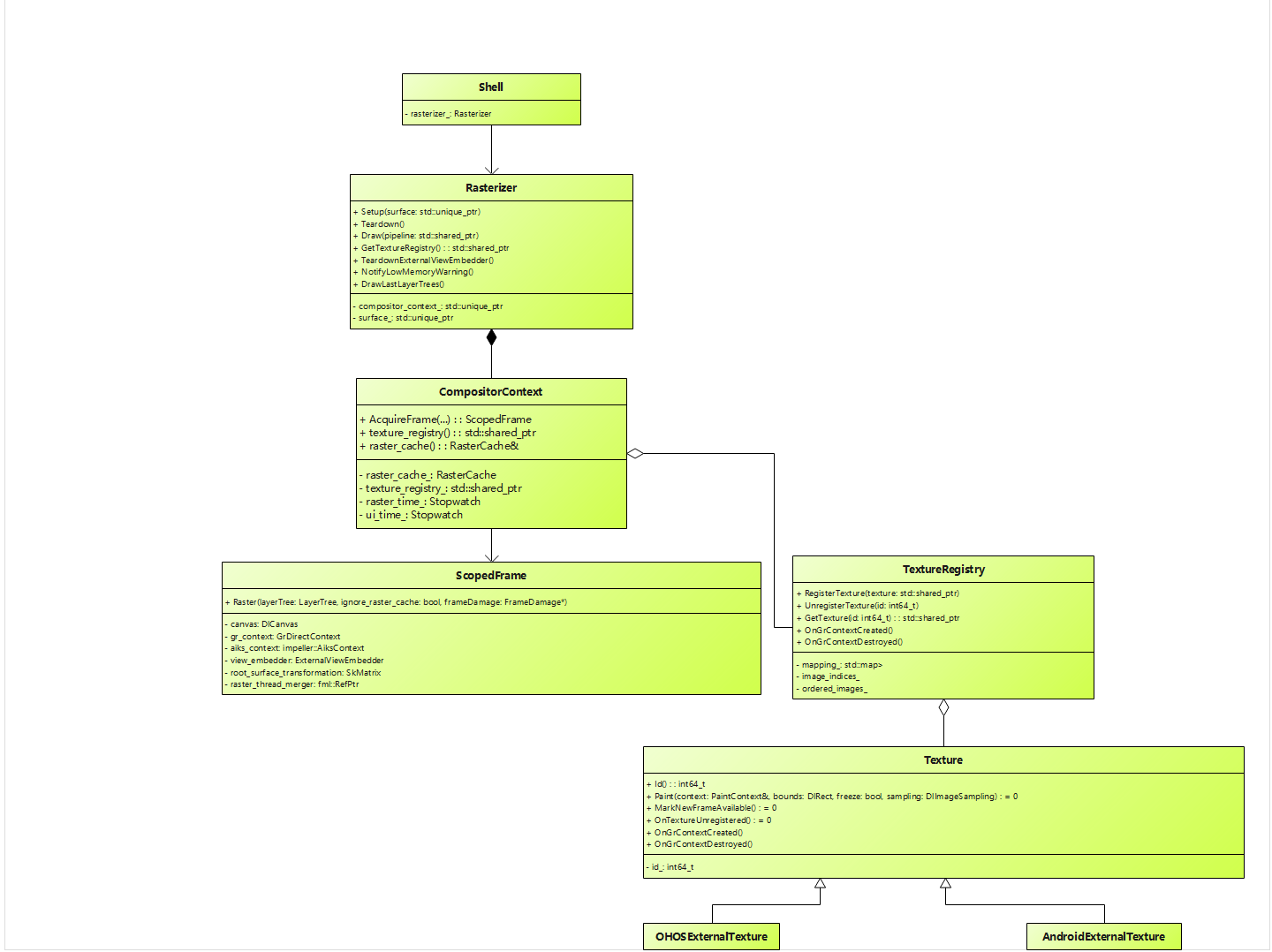
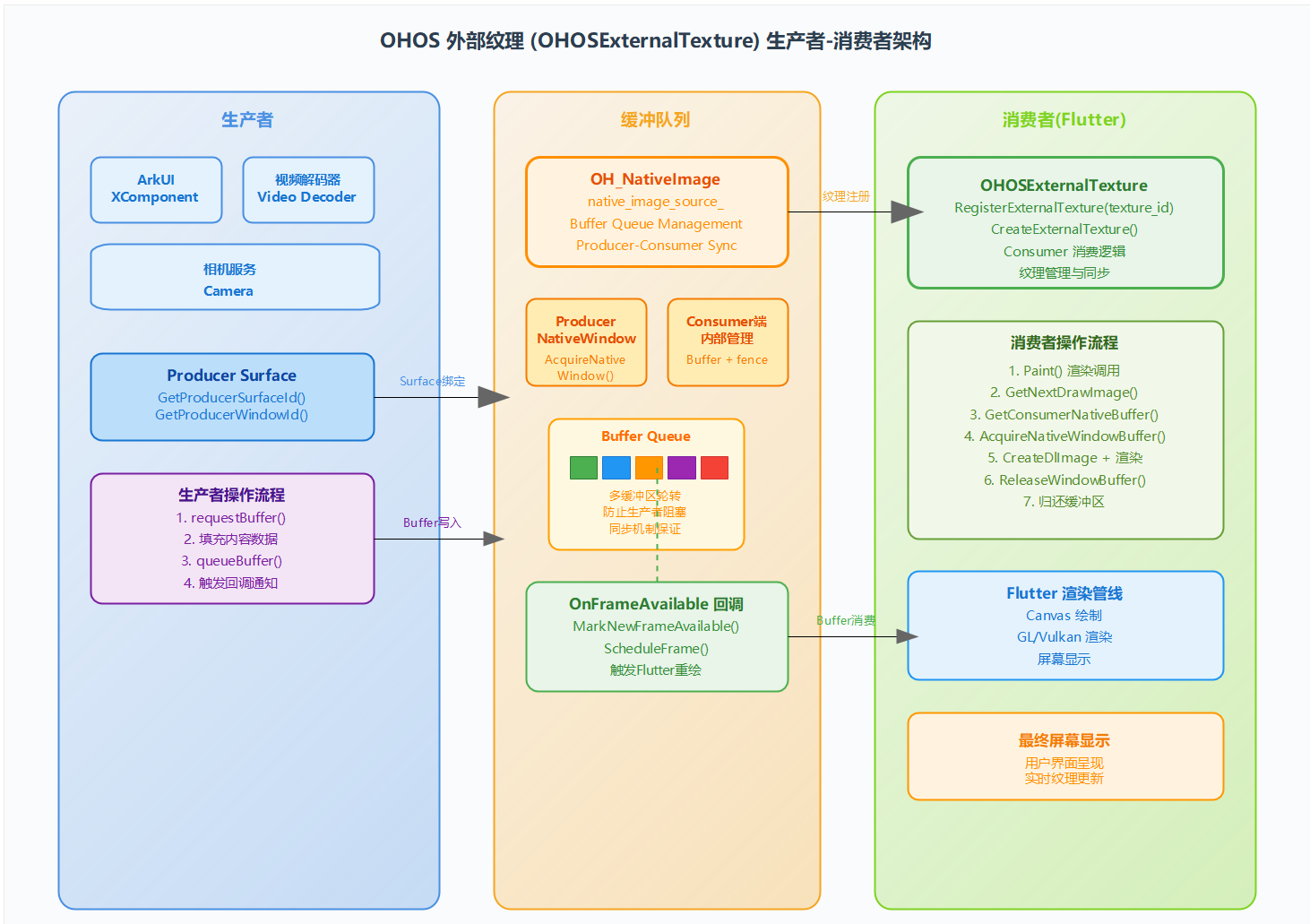
书接上文,FlutterRender通过PlatformViewOHOS创建外界纹理层以及纹理层对应的图像,以生产者和消费者模式进行图形渲染
沿着代码结构调用,继续往下看代码:
uint64_t PlatformViewOHOS::RegisterExternalTexture(int64_t texture_id) {
  auto extrenal_texture = CreateExternalTexture(texture_id); // comment by WEI ZHA, 创建OHOSExternalTexture 外部纹理
  if (extrenal_texture == nullptr) {
    return 0;
  } else {
    return extrenal_texture->GetProducerSurfaceId(); // 获取外部纹理的surfaceId,设置给PlatformView,见configureForTextureLayerComposition
  }
  return 0;
}
std::shared_ptr<OHOSExternalTexture> PlatformViewOHOS::CreateExternalTexture(int64_t texture_id) { uint64_t context_frame_data = (uint64_t)texture_id; OH_OnFrameAvailableListener listener; listener.context = (void*)context_frame_data; listener.onFrameAvailable = &PlatformViewOHOS::OnNativeImageFrameAvailable; std::shared_ptr<OHOSExternalTexture> extrenal_texture = nullptr; ...... if (ohos_context_->RenderingApi() == OHOSRenderingAPI::kOpenGLES) { extrenal_texture = std::make_shared<OHOSExternalTextureGL>(texture_id, listener); } else if (ohos_context_->RenderingApi() == OHOSRenderingAPI::kImpellerVulkan) { extrenal_texture = std::make_shared<OHOSExternalTextureVulkan>( std::static_pointer_cast<impeller::ContextVK>( ohos_context_->GetImpellerContext()), texture_id, listener); // comment by WEI ZHA, 走这个分支 } if (extrenal_texture && extrenal_texture->GetProducerSurfaceId() != 0 && extrenal_texture->GetProducerWindowId() != 0) { std::lock_guard<std::recursive_mutex> lock(g_map_mutex); g_texture_platformview_map[context_frame_data] = this; all_external_texture_[texture_id] = extrenal_texture; RegisterTexture(extrenal_texture); // comment by WEI ZHA 通过shell rasterizer_ } return extrenal_texture; }
创建Ohos平台外部纹理:
OHOSExternalTexture::OHOSExternalTexture(int64_t id, OH_OnFrameAvailableListener listener)
    : Texture(id), transform_(SkMatrix::I()), frame_listener_(listener) {
  //  创建一个OH_NativeImage实例,该实例与OpenGL ES的纹理ID和纹理目标相关联。
  native_image_source_ = OH_NativeImage_Create(0, GL_TEXTURE_EXTERNAL_OES);
  ......
  producer_nativewindow_ = OH_NativeImage_AcquireNativeWindow(native_image_source_);
  ... ...
  SetNativeWindowFrameworkType(producer_nativewindow_);
  if (!SetNativeWindowCPUAccess(producer_nativewindow_, false)) {
    FML_LOG(ERROR) << "Error with SetNativeWindowCPUAccess";
  }
  int ret = OH_NativeImage_SetOnFrameAvailableListener(native_image_source_,
                                                       frame_listener_);
  .....
  ret = OH_NativeWindow_NativeWindowHandleOpt(producer_nativewindow_,
                                              GET_SOURCE_TYPE, &type);
  ......
}
shell rasterizer_ 注册外部纹理
void Shell::OnPlatformViewRegisterTexture(
    std::shared_ptr<flutter::Texture> texture) {
  FML_DCHECK(is_set_up_);
  FML_DCHECK(task_runners_.GetPlatformTaskRunner()->RunsTasksOnCurrentThread());

  task_runners_.GetRasterTaskRunner()->PostTask(
      [rasterizer = rasterizer_->GetWeakPtr(), texture] {
        if (rasterizer) {
          if (auto registry = rasterizer->GetTextureRegistry()) {
            registry->RegisterTexture(texture);  // Comment By Zhawei
          }
        }
      });
}
std::shared_ptr<flutter::TextureRegistry> Rasterizer::GetTextureRegistry() {
  return compositor_context_->texture_registry();
}

void TextureRegistry::RegisterTexture(const std::shared_ptr<Texture>& texture) {
  if (!texture) {
    return;
  }
  mapping_[texture->Id()] = texture; // 注册到mapping_里面
}
总结一下模式:

讨论HarmonyOS开发技术,专注于API与组件、DevEco Studio、测试、元服务和应用上架分发等。
更多推荐

 16
16 0
0- 0


 已为社区贡献1条内容

所有评论(0)