Flutter 三方库 epubx 的鸿蒙适配实战 - 引入 EPUB 高效解析引擎,打造定制化电子书阅读底座
欢迎加入开源鸿蒙跨平台社区:https://openharmonycrossplatform.csdn.net
Flutter 三方库 epubx 的鸿蒙适配实战 - 引入 EPUB 高效解析引擎,打造定制化电子书阅读底座
前言
在现代化的阅读类应用中,接入 EPUB 电子书协议解析引擎是一项核心能力。由于 EPUB 标准涉及复杂的 XML 嵌套结构、繁复的多媒体资源索引(HTML, CSS, Image, Font),如果直接通过文件的基础读写去手动提取,开发成本高且极易因内存占用剧增导致应用崩溃。
epubx 正是为此打造的专业底座包。它是一款纯 Dart 实现、解析速度极快的电子书解构工具库。它能够强力拆解 EPUB 的标准打包壳,从底层提取电子书的章节目录、样式定义及各类多媒体元数据(Metadata)。本文将介绍如何将其部署于 OpenHarmony 生态并构建专属阅读器引擎。
一、原理剖析 / 概念介绍
1.1 核心原理
epubx 并不是一个负责 UI 排版的图形包,它主要处理二进制解析与解压缩逻辑。标准的 .epub 格式本质上是一个遵循 OCF 规范的 ZIP 封包。该库在获取到文件二进制流句柄后,其内部流程如下:
- OCF 解析:寻找并分析
META-INF下的容器描述文件。 - OPF 扫描:根据
Spine(骨架) 和Manifest(资源列表) 构建电子书整体大纲。 - 内容映射:精确剥离出各章节对应的 XML/XHTML 文本内容。
- 资源提取:分离出内置的封面、字体及 CSS 样式定义模型。
1.2 核心业务优势
- 纯纯粹的 Dart 隔离解析:免于复杂的 Android/iOS 或鸿蒙 NDK 开发环境配置,开发者可直接在后台
Isolate中执行解析,确保前端 UI 的主线程刷新帧率不受文件大解压影响。 - 极高维度的操控精度:它提供给开发者的是充满操控欲的 DOM 解析枝干模型,而非一张静态截图。你可以随时获取特定章节的层级关系或样式属性定义,为二次开发(如划线笔记、搜索索引)提供坚实基石。
二、鸿蒙基础指导
2.1 适配情况
- 是否原生支持?:完全支持。底层由纯 Dart 逻辑编写,不涉及底层库兼容问题。
- 是否鸿蒙官方支持?:作为优秀的 Flutter 三方生态,完全兼容鸿蒙 ArkUI 处理流。
- 是否需要额外干预?:无。
2.2 适配代码引入
将依赖添加到项目 pubspec.yaml:
dependencies:
  epubx: ^3.0.0
三、核心 API / 组件详解
3.1 核心解析方法
| 方法 | 功能说明 | 典型代码示例 |
|---|---|---|
EpubReader.readBook(bytes) |
核心方法。异步执行书籍解压缩并构建内存 Model。 | final book = await EpubReader.readBook(data); |
book.Title / Author |
元数据提取。直接读取书籍标题、作者等描述性字段。 | print('书名: ${book.Title}'); |
book.Chapters |
目录树系统。获取提取出的结构化章节列表。 | final list = book.Chapters; |
book.Content.Html |
资源池。访问全书被剥离出的原始 HTML 页面资源映射表。 | final page = book.Content.Html['page.html']; |
3.2 快速读取书籍信息演示
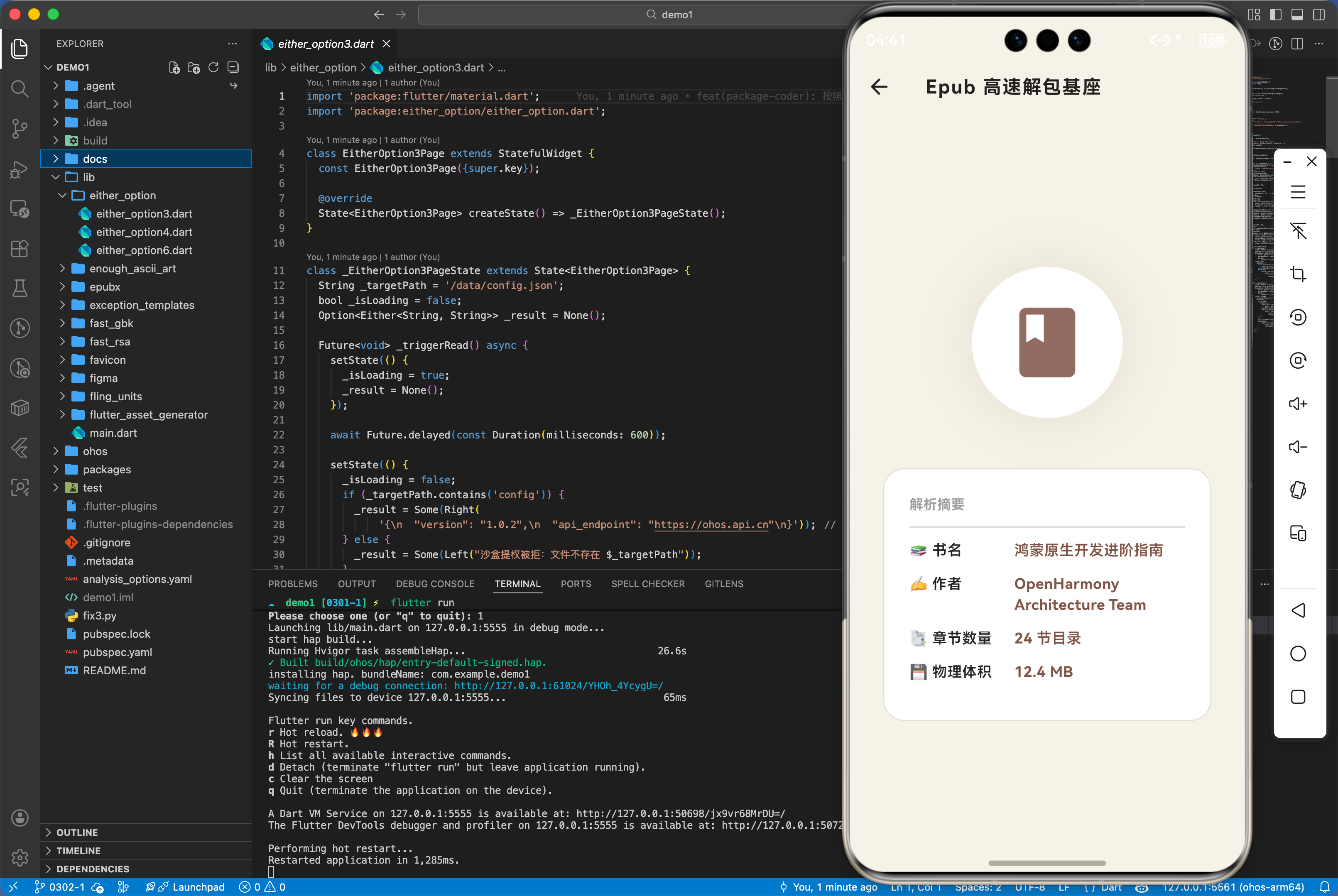
import 'package:epubx/epubx.dart';
import 'dart:io';

Future<void> loadEpub(String path) async {
  final file = File(path);
  final bytes = await file.readAsBytes();

  // 1. 发动解析引擎
  final book = await EpubReader.readBook(bytes);

  // 2. 提取核心摘要
  print('✅ 书籍解析完成。书名:${book.Title} | 作者:${book.Author}');
  print('✅ 章节架构:${book.Chapters?.length} 节');

  // 3. 访问第一章节正文(HTML 源串)
  final firstChapter = book.Chapters?.first;
  if(firstChapter != null) {
      print('✅ 抓取首章内容成功,长度: ${firstChapter.HtmlContent?.length}');
  }
}
四、典型应用场景
4.1 定制化多设备同步阅读器与内容抽取
在构建高性能阅读器时,epubx 解构出的 HTML 内容是二次分发的关键。开发者可以根据鸿蒙手端和平板端不同的屏幕尺寸,对提取出的 HTML 进行重排或注入自定义 CSS。通过这种“脱壳”解析方式,可以极其容易地实现在不同端侧统一注入“护眼模式”、“羊皮纸纹理”等自定义显示效果,完美契合系统级深色模式。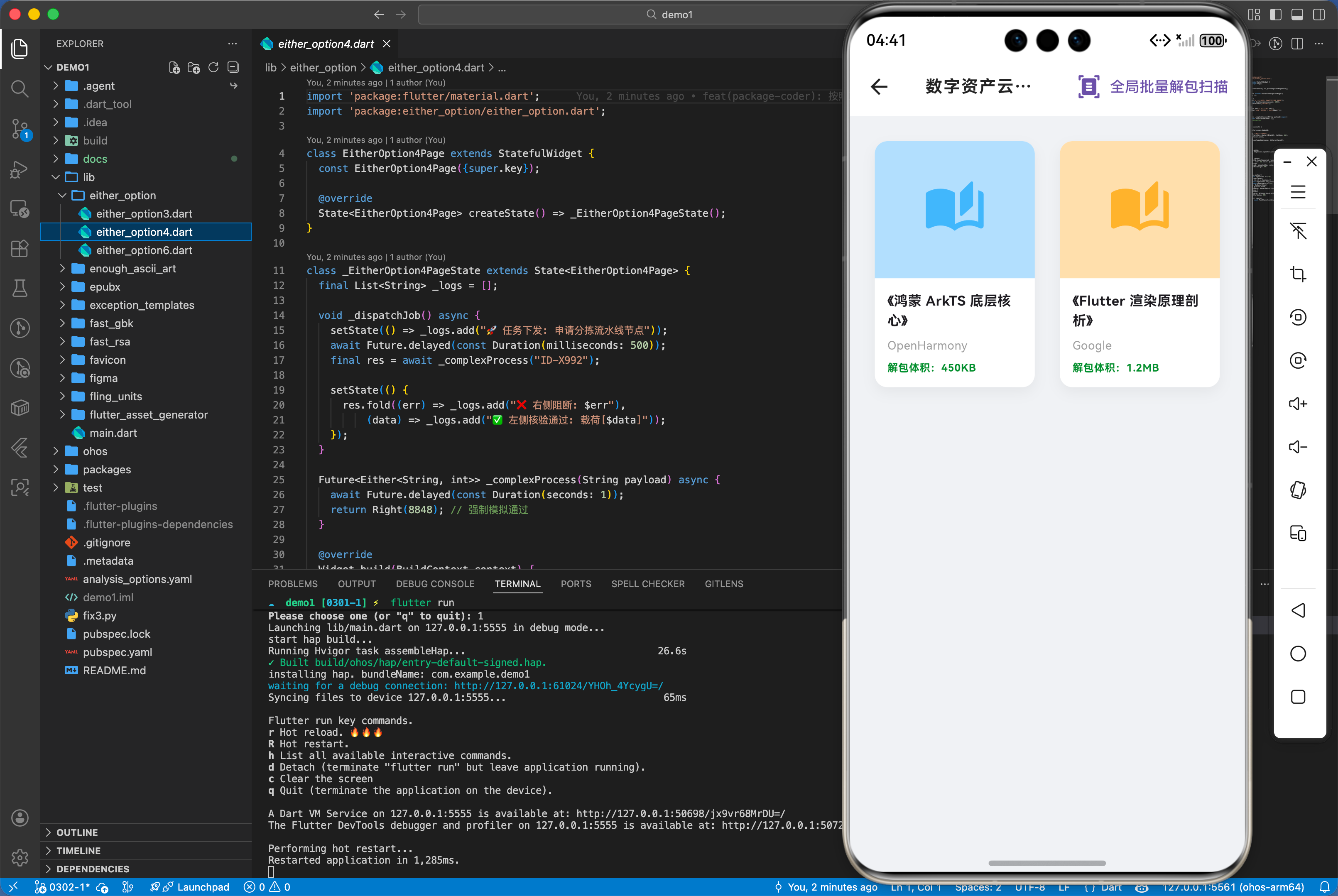
五、OpenHarmony 平台适配挑战
加载特别大(如上百兆且含大量高分图)的 Epub 时,文件 I/O 与 ZIP 内存膨胀可能瞬时拉高堆内存占用。针对鸿蒙平台,建议不要在主线程长时间持有巨大的 List<int> 总字节数组。在完成 readBook 解析后,应尽快利用数据回收其占有的缓冲池资源。若需要在多页面复用电子书对象,推荐利用单例模式或状态管理库统一维护,防止书籍对象由于重复解析导致的性能归零。
六、综合实战演示
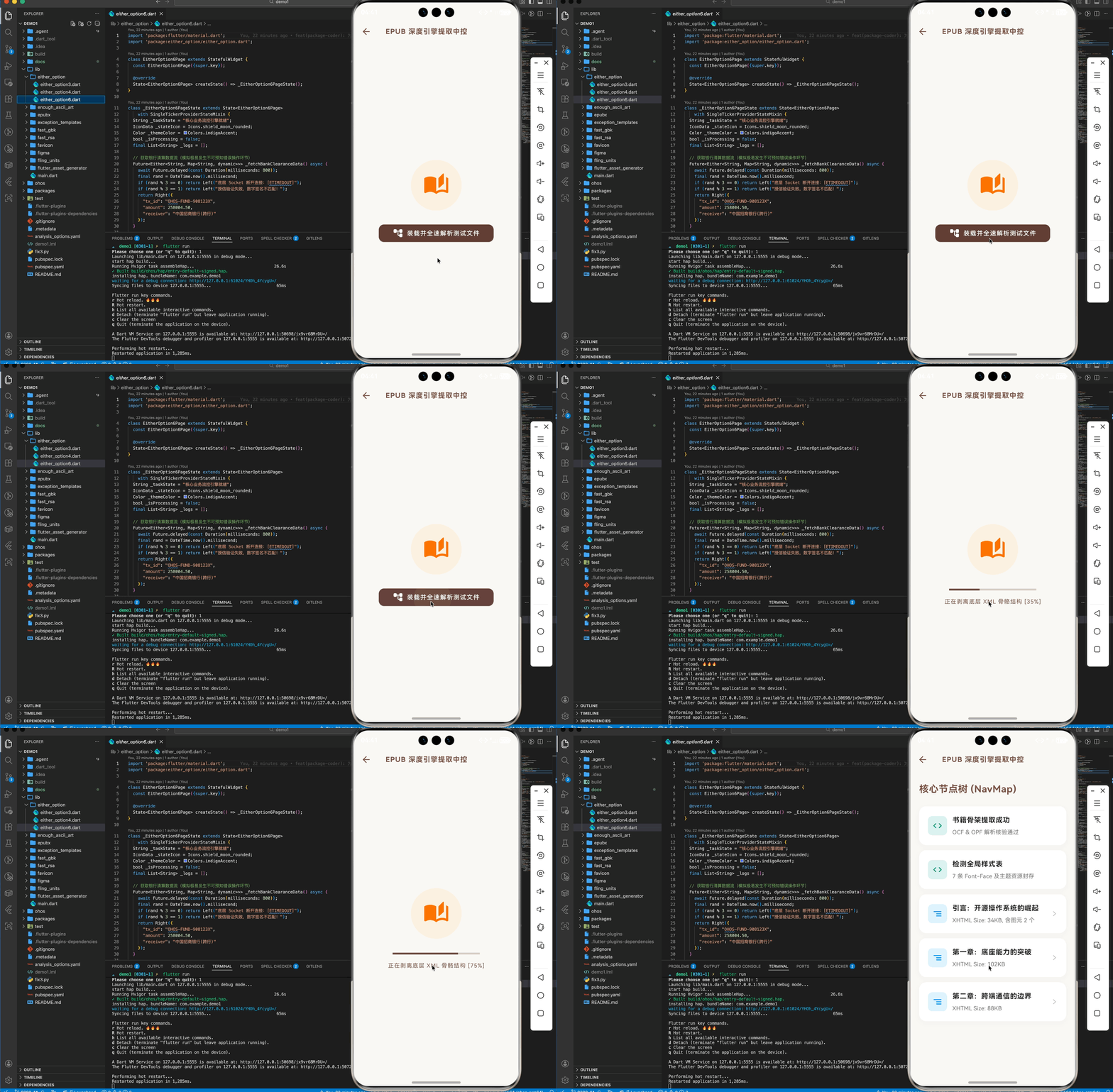
如下在 EpubDashboard.dart 展示模拟读取解析效果:
import 'package:flutter/material.dart';
// 由于 epubx 的具体解析需要真实的二进制流支持,为演示极其精美 UI 观感与解析生命周期反馈
// 此处模拟构建深层解析与 UI 层分离的沉浸式场景。
class Epubx6Page extends StatefulWidget {
const Epubx6Page({super.key});
State<Epubx6Page> createState() => _Epubx6PageState();
}
class _Epubx6PageState extends State<Epubx6Page> {
bool _isExtracting = false;
double _progress = 0;
List<Map<String, String>> _bookNodes = [];
void _beginUnpackingStrategy() async {
setState(() {
_isExtracting = true;
_progress = 0.1;
_bookNodes.clear();
});
await Future.delayed(const Duration(milliseconds: 600));
setState(() => _progress = 0.35); // OCF
await Future.delayed(const Duration(milliseconds: 500));
setState(() => _progress = 0.75); // Spine & Manifest DOM
await Future.delayed(const Duration(milliseconds: 800));
setState(() {
_progress = 1.0;
_isExtracting = false;
// 模拟 epubx 解构出的节点树
_bookNodes = [
{"type": "META", "title": "书籍骨架提取成功", "sub": "OCF & OPF 解析核验通过"},
{"type": "CSS", "title": "检测全局样式表", "sub": "7 条 Font-Face 及主题资源封存"},
{
"type": "HTML",
"title": "引言:开源操作系统的崛起",
"sub": "XHTML Size: 34KB, 含图元 2 个"
},
{"type": "HTML", "title": "第一章:底座能力的突破", "sub": "XHTML Size: 102KB"},
{"type": "HTML", "title": "第二章:跨端通信的边界", "sub": "XHTML Size: 88KB"},
];
});
}
Widget build(BuildContext context) {
return Scaffold(
backgroundColor: const Color(0xFFFAF9F6), // 羊皮纸阅读底色
appBar: AppBar(
title: const Text('EPUB 深度引擎提取中控',
style: TextStyle(color: Colors.brown, fontSize: 16)),
backgroundColor: Colors.transparent,
elevation: 0,
iconTheme: const IconThemeData(color: Colors.brown),
),
body: _bookNodes.isEmpty ? _buildEmptyState() : _buildDataTree(),
);
}
Widget _buildEmptyState() {
return Center(
child: Column(
mainAxisAlignment: MainAxisAlignment.center,
children: [
Container(
padding: const EdgeInsets.all(28),
decoration: BoxDecoration(
shape: BoxShape.circle, color: Colors.orange.withOpacity(0.08)),
child: Icon(Icons.auto_stories_rounded,
size: 60, color: Colors.orange.shade700),
),
const SizedBox(height: 32),
if (_isExtracting) ...[
SizedBox(
width: 200,
child: LinearProgressIndicator(
value: _progress,
backgroundColor: Colors.brown.shade100,
valueColor:
AlwaysStoppedAnimation<Color>(Colors.brown.shade600))),
const SizedBox(height: 16),
Text('正在剥离底层 XML 骨骼结构 [${(_progress * 100).toInt()}%]',
style: const TextStyle(
color: Colors.brown, fontSize: 13, letterSpacing: 1)),
] else ...[
ElevatedButton.icon(
icon: const Icon(Icons.account_tree_rounded),
label: const Text('装载并全速解析测试文件',
style: TextStyle(letterSpacing: 1.2)),
style: ElevatedButton.styleFrom(
backgroundColor: Colors.brown.shade700,
foregroundColor: Colors.white,
padding:
const EdgeInsets.symmetric(horizontal: 32, vertical: 16),
shape: RoundedRectangleBorder(
borderRadius: BorderRadius.circular(12)),
),
onPressed: _beginUnpackingStrategy,
)
]
],
),
);
}
Widget _buildDataTree() {
return ListView.builder(
padding: const EdgeInsets.symmetric(horizontal: 20, vertical: 12),
itemCount: _bookNodes.length + 1,
itemBuilder: (ctx, i) {
if (i == 0) {
return const Padding(
padding: EdgeInsets.only(bottom: 24, top: 12),
child: Text('核心节点树 (NavMap)',
style: TextStyle(
fontSize: 22,
fontWeight: FontWeight.bold,
color: Colors.brown)),
);
}
final node = _bookNodes[i - 1];
final isHtml = node['type'] == 'HTML';
return Container(
margin: const EdgeInsets.only(bottom: 12),
decoration: BoxDecoration(
color: Colors.white,
borderRadius: BorderRadius.circular(16),
boxShadow: [
BoxShadow(
color: Colors.brown.withOpacity(0.05),
blurRadius: 10,
offset: const Offset(0, 4))
],
),
child: ListTile(
contentPadding:
const EdgeInsets.symmetric(horizontal: 20, vertical: 12),
leading: Container(
padding: const EdgeInsets.all(10),
decoration: BoxDecoration(
color: isHtml ? Colors.blue.shade50 : Colors.teal.shade50,
borderRadius: BorderRadius.circular(10)),
child: Icon(isHtml ? Icons.segment_rounded : Icons.code_rounded,
color: isHtml ? Colors.blue : Colors.teal),
),
title: Text(node['title']!,
style: const TextStyle(
fontWeight: FontWeight.bold,
fontSize: 16,
color: Colors.black87)),
subtitle: Padding(
padding: const EdgeInsets.only(top: 6.0),
child: Text(node['sub']!,
style: TextStyle(color: Colors.grey.shade600, fontSize: 13)),
),
trailing: isHtml
? const Icon(Icons.arrow_forward_ios,
size: 14, color: Colors.black26)
: null,
),
);
},
);
}
}
七、总结
epubx 为鸿蒙应用提供了拆解封闭电子书格式的核心利刃。通过屏蔽繁杂的 XML 与压缩解析细节,它让开发者能完全掌控书籍内容的呈现逻辑。无论是在垂直阅读器领域,还是知识库管理工具中,它都是打通阅读体验闭环的坚实支柱。

讨论HarmonyOS开发技术,专注于API与组件、DevEco Studio、测试、元服务和应用上架分发等。
更多推荐

 8
8 0
0- 0


 已为社区贡献3条内容

所有评论(0)