HarmonyOS App开发——编程语言列表App开发
编程语言列表
1 “编程语言列表”App概述
基于HarmonyOS 6 来实现编程语言列表的显示,同时删除某个编程语言。
这款APP会使用List组件、自定义弹出框实现。
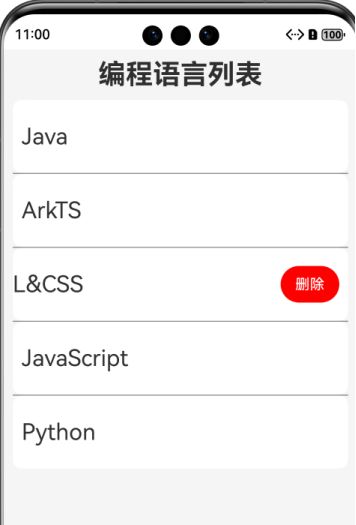
List列表展示所有的编程语言信息,向左滑动使用ListItem的swipeAction方法可显示删除按钮,点击删除,可删除某个编程语言。
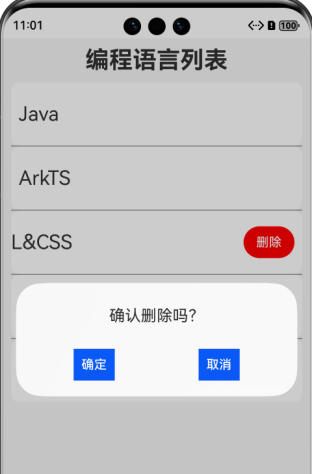
弹窗是当点击删除按钮时,需要弹出相应的确认信息,如确认则删除,否则保持原样。此处需用到自定义弹窗@CustomeDialog实现。
1.1“编程语言列表”页面
“编程语言列表”页面是展示所有的编程语言的名称列表
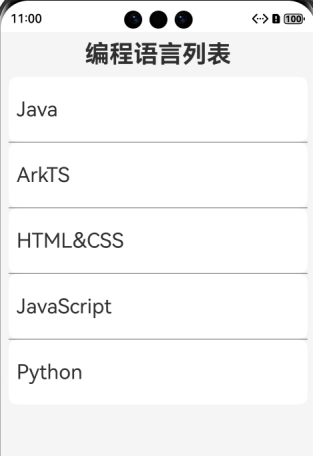
向左滑动,显示“删除”按钮。
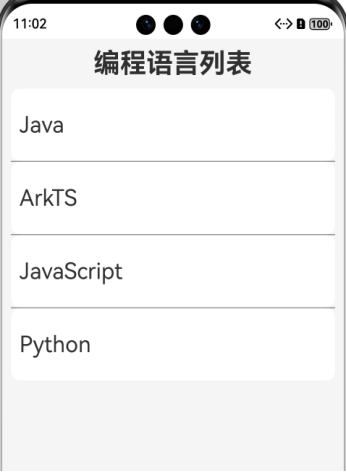
点击“删除”按键,弹窗提示,确认则可以删除对应语言项,界面刷新。
2 核心功能实现
2.1 页面基础结构
在pages创建TestCustomDialog .ets作为"编程语言"页面。页面基础结构。代码如下:
|
@Entry @Component struct TestCustomDialog { @State languages:string[]= ['Java','ArkTS','HTML&CSS','JavaScript','Python'] index:number = 0 //要删除的元素索引 //自定义构建函数,构建删除按钮的UI显示 @Builder del(index:number){ Button('删除') .backgroundColor(Color.Red) .onClick(()=>{ this.index = index }) } build() { Column({space:10}) { Text('编程语言列表') .fontSize(30) .fontWeight(FontWeight.Bold) List(){ ForEach(this.languages,(item:string,index:number)=>{ ListItem(){ Text(item) .fontSize(25) .width('100%') } .width('100%') .height(80) .backgroundColor('#fff') .padding(10) .borderRadius(10) //ListItem的swipeAction属性可用于实现列表项的左右滑动功能 .swipeAction({ end:{ //builder:向左滑动时显示的UI操作,index表示ListItem的索引 builder:()=>{this.del(index)} } }) }) } .width('100%') .layoutWeight(1) .divider({strokeWidth:1 ,color:Color.Gray}) .alignListItem(ListItemAlign.Start) } .height('100%') .width('100%') .backgroundColor('#f5f5f5') .padding(10) } } |
2.2 自定义弹出框
使用@CustomDialog自定义弹窗。代码如下。
|
@CustomDialog struct MyDelDialog{ // CustomDialogController类:自定义弹窗的控制器,用于控制弹出框的打开和关闭 controller:CustomDialogController build() { Column({space:20}){ Text('确认删除吗?').fontSize(20).margin({ top: 10, bottom: 10 })
Flex({justifyContent:FlexAlign.SpaceAround}){ Button('确定') .type(ButtonType.Normal) .padding(10) .onClick(()=>{ this.controller.close() //关闭弹出框 }) Button('取消') .type(ButtonType.Normal) .padding(10) .onClick(()=>{ this.controller.close() //关闭弹出框 }) } } .padding(20) } } |
2.3 CustomDialogController构造器
创建CustomDialogController构造器,与装饰器@CustomDialog相互连接。代码如下:
|
@Entry @Component struct TestCustomDialog { //省略其他代码...... delDialogController:CustomDialogController = new CustomDialogController({ builder: MyDelDialog() }) //省略其他代码...... } |
2.4 删除按钮
点击删除打开弹出框,代码如下:
|
@Entry @Component struct TestCustomDialog { //省略其他代码...... delDialogController:CustomDialogController = new CustomDialogController({ builder: MyDelDialog(), cornerRadius: 20, width: '80%', height: 200 }) //自定义构建函数,构建删除按钮的UI显示 @Builder del(index:number){ Button('删除') .backgroundColor(Color.Red) .onClick(()=>{ this.index = index //打开弹出框 this.delDialogController.open() }) } //省略其他代码...... } |
2.5 添加交互响应
弹出框显示后,单击确认按钮可以删除数组中对应的数据,界面刷新,单击取消,弹出框关闭且没有任何操作,从而实现一系列的数据响应交互效果,步骤如下:
- CustomDialog中定义函数接收确认按钮的操作
|
@CustomDialog struct MyDelDialog{ // CustomDialogController类:自定义弹窗的控制器,用于控制弹出框的打开和关闭 controller:CustomDialogController
//定义参数: 接收确认按钮的函数操作 confirm: ()=>void = ()=>{} build() { Column({space:20}){ Text('确认删除吗?').fontSize(20).margin({ top: 10, bottom: 10 }) Flex({justifyContent:FlexAlign.SpaceAround}){ Button('确定') .type(ButtonType.Normal) .padding(10) .onClick(()=>{ this.controller.close() //关闭弹出框
//调用confirm函数,执行确认按钮的响应操作 this.confirm()
})
//省略其他代码...... } } .padding(20) } } |
- 在页面中定义确定按钮的操作,并在CustomDialogController构造器中传递函数操作给CustomDialog
|
@Entry @Component struct TestCustomDialog { //省略其他代码...... delDialogController:CustomDialogController = new CustomDialogController({ builder: MyDelDialog({ //CustomDialog构造器传递确定按钮的函数参数 confirm: ()=>{ this.delLanguage() //调用删除数据的函数 } }), cornerRadius: 20, width: '80%', height: 200 }) /** * 从数组中删除对应的编程语言 */ delLanguage(){ //从数组中删除索引为index的元素 this.languages.splice(this.index,1) } //省略其他代码...... } |
3 关键实现功能点
(1)状态管理:
使用@State装饰器标记可变变量。
使用index变量保存要删除的元素索引。
(2)自定义弹窗:
@CustomDialog进行自定义弹窗组件的定义。
CustomDialogController对象控制弹窗的显示和关闭。
(3)布局技巧:
List布局语言列表。
ListItem的swipeAction方法实现向左滑动语言项是的UI操作。
完整代码如下:
|
@CustomDialog struct MyDelDialog{ // CustomDialogController类:自定义弹窗的控制器,用于控制弹出框的打开和关闭 controller:CustomDialogController //定义参数: 接收确认按钮的函数操作 confirm: ()=>void = ()=>{} build() { Column({space:20}){ Text('确认删除吗?').fontSize(20).margin({ top: 10, bottom: 10 }) Flex({justifyContent:FlexAlign.SpaceAround}){ Button('确定') .type(ButtonType.Normal) .padding(10) .onClick(()=>{ this.controller.close() //关闭弹出框 this.confirm() }) Button('取消') .type(ButtonType.Normal) .padding(10) .onClick(()=>{ this.controller.close() //关闭弹出框 }) } } .padding(20) } } @Entry @Component struct TestCustomDialog { @State languages:string[]= ['Java','ArkTS','HTML&CSS','JavaScript','Python'] delDialogController:CustomDialogController = new CustomDialogController({ builder: MyDelDialog({ confirm: ()=>{ this.delLanguage() } }), cornerRadius: 20, width: '80%', height: 200 }) index:number = 0 //要删除的元素索引 //自定义构建函数,构建删除按钮的UI显示 @Builder del(index:number){ Button('删除') .backgroundColor(Color.Red) .onClick(()=>{ this.index = index //打开弹出框 this.delDialogController.open() }) } /** * 从数组中删除对应的编程语言 */ delLanguage(){ this.languages.splice(this.index,1) } build() { Column({space:10}) { Text('编程语言列表') .fontSize(30) .fontWeight(FontWeight.Bold) List(){ ForEach(this.languages,(item:string,index:number)=>{ ListItem(){ Text(item) .fontSize(25) .width('100%') } .width('100%') .height(80) .backgroundColor('#fff') .padding(10) .borderRadius(10) //ListItem的swipeAction属性可用于实现列表项的左右滑动功能 .swipeAction({ end:{ //builder:向左滑动时显示的UI操作,index表示ListItem的索引 builder:()=>{this.del(index)} } }) }) } .width('100%') .layoutWeight(1) .divider({strokeWidth:1 ,color:Color.Gray}) .alignListItem(ListItemAlign.Start) } .height('100%') .width('100%') .backgroundColor('#f5f5f5') .padding(10) } } |

讨论HarmonyOS开发技术,专注于API与组件、DevEco Studio、测试、元服务和应用上架分发等。
更多推荐

 10
10 0
0- 0


 已为社区贡献45条内容

所有评论(0)