Flutter鸿蒙开发:壁纸生成器实战教程 - OpenHarmony跨平台指南
个性化壁纸是用户展示个性的重要方式,通过壁纸生成器可以创建独一无二的手机壁纸。本文将介绍如何使用Flutter开发壁纸生成器应用,支持多种风格和自定义选项。颜色选择模块:支持主色和副色的自定义选择风格选择模块:提供多种壁纸风格选项图案叠加模块:支持多种图案叠加效果预览模块:实时预览生成的壁纸效果保存模块:将生成的壁纸保存到本地本文详细介绍了Flutter鸿蒙壁纸生成器的实现方法,包括颜色选择、风格
Flutter鸿蒙开发:壁纸生成器实战教程 - OpenHarmony跨平台指南
Flutter 三方库 cached_network_image 的鸿蒙化适配与实战指南
欢迎加入开源鸿蒙跨平台社区: https://openharmonycrossplatform.csdn.net
本文详细介绍如何在Flutter鸿蒙应用中实现壁纸生成器功能,包含渐变色生成、图案叠加、风格选择等功能。
一、前言
个性化壁纸是用户展示个性的重要方式,通过壁纸生成器可以创建独一无二的手机壁纸。本文将介绍如何使用Flutter开发壁纸生成器应用,支持多种风格和自定义选项。
二、效果展示
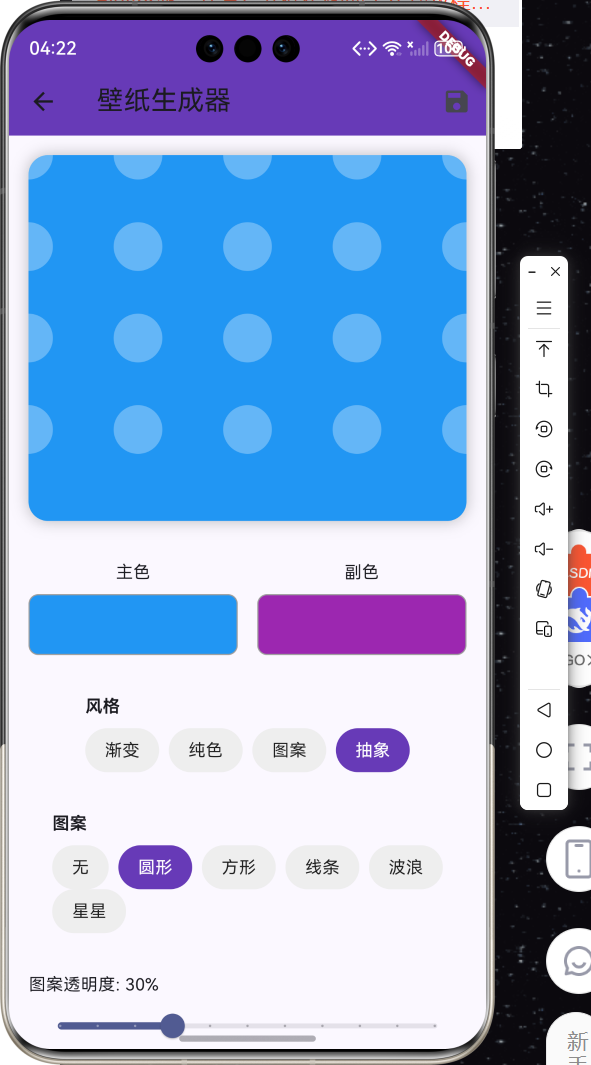
2.1 功能特性
| 功能 | 描述 |
|---|---|
| 颜色选择 | 主色和副色自定义选择 |
| 风格选择 | 渐变、纯色、图案、抽象多种风格 |
| 图案叠加 | 圆形、方形、线条、波浪等图案 |
| 透明度调节 | 图案透明度可调节 |
| 随机生成 | 一键随机生成壁纸 |
| 保存功能 | 保存生成的壁纸到本地 |
三、项目背景与目标
3.1 项目背景
随着个性化需求的增加,用户对手机壁纸的要求也越来越高。传统的壁纸应用只能选择预设壁纸,无法满足用户的个性化需求。壁纸生成器可以让用户自定义创建独一无二的壁纸。
3.2 项目目标
- 实现多种壁纸风格生成
- 支持颜色自定义选择
- 提供图案叠加功能
- 实现壁纸保存功能
四、技术架构设计
4.1 架构概述
壁纸生成器采用Flutter跨平台框架开发,主要包含以下模块:
- 颜色选择模块:支持主色和副色的自定义选择
- 风格选择模块:提供多种壁纸风格选项
- 图案叠加模块:支持多种图案叠加效果
- 预览模块:实时预览生成的壁纸效果
- 保存模块:将生成的壁纸保存到本地
4.2 技术原理
使用CustomPainter自定义绘制壁纸,通过LinearGradient实现渐变效果,结合不同的图案绘制方法实现多样化的壁纸效果。
五、详细实现
5.1 Flutter端实现
import 'package:flutter/material.dart';
import 'dart:math';
class WallpaperGeneratorPage extends StatefulWidget {
const WallpaperGeneratorPage({super.key});
State<WallpaperGeneratorPage> createState() => _WallpaperGeneratorPageState();
}
class _WallpaperGeneratorPageState extends State<WallpaperGeneratorPage> {
Color _primaryColor = Colors.blue;
Color _secondaryColor = Colors.purple;
String _selectedStyle = '渐变';
String _selectedPattern = '无';
double _patternOpacity = 0.3;
final Random _random = Random();
final List<String> _styles = ['渐变', '纯色', '图案', '抽象'];
final List<String> _patterns = ['无', '圆形', '方形', '线条', '波浪', '星星'];
void _randomize() {
setState(() {
_primaryColor = Color.fromRGBO(_random.nextInt(256), _random.nextInt(256), _random.nextInt(256), 1);
_secondaryColor = Color.fromRGBO(_random.nextInt(256), _random.nextInt(256), _random.nextInt(256), 1);
});
}
void _saveWallpaper() {
ScaffoldMessenger.of(context).showSnackBar(const SnackBar(content: Text('壁纸已保存'), backgroundColor: Colors.green));
}
Widget build(BuildContext context) {
return Scaffold(
appBar: AppBar(title: const Text('壁纸生成器'), backgroundColor: Colors.deepPurple, actions: [IconButton(icon: const Icon(Icons.save), onPressed: _saveWallpaper)]),
body: SingleChildScrollView(
child: Column(
children: [
_buildPreview(),
_buildColorPickers(),
_buildStyleSelector(),
_buildPatternSelector(),
_buildPatternOpacity(),
_buildActionButtons(),
],
),
),
);
}
Widget _buildPreview() {
return Container(
height: 300,
margin: const EdgeInsets.all(16),
decoration: BoxDecoration(borderRadius: BorderRadius.circular(16), boxShadow: [BoxShadow(color: Colors.black26, blurRadius: 10)]),
child: ClipRRect(
borderRadius: BorderRadius.circular(16),
child: CustomPaint(size: const Size(double.infinity, 300), painter: WallpaperPainter(_primaryColor, _secondaryColor, _selectedStyle, _selectedPattern, _patternOpacity)),
),
);
}
Widget _buildColorPickers() {
return Padding(
padding: const EdgeInsets.all(16),
child: Row(
children: [
Expanded(
child: Column(
children: [
const Text('主色'),
const SizedBox(height: 8),
GestureDetector(
onTap: () => _showColorPicker(true),
child: Container(height: 50, decoration: BoxDecoration(color: _primaryColor, borderRadius: BorderRadius.circular(8), border: Border.all(color: Colors.grey))),
),
],
),
),
const SizedBox(width: 16),
Expanded(
child: Column(
children: [
const Text('副色'),
const SizedBox(height: 8),
GestureDetector(
onTap: () => _showColorPicker(false),
child: Container(height: 50, decoration: BoxDecoration(color: _secondaryColor, borderRadius: BorderRadius.circular(8), border: Border.all(color: Colors.grey))),
),
],
),
),
],
),
);
}
Widget _buildStyleSelector() {
return Padding(
padding: const EdgeInsets.all(16),
child: Column(
crossAxisAlignment: CrossAxisAlignment.start,
children: [
const Text('风格', style: TextStyle(fontWeight: FontWeight.bold)),
const SizedBox(height: 8),
Wrap(
spacing: 8,
children: _styles.map((style) {
final isSelected = _selectedStyle == style;
return GestureDetector(
onTap: () => setState(() => _selectedStyle = style),
child: Container(
padding: const EdgeInsets.symmetric(horizontal: 16, vertical: 8),
decoration: BoxDecoration(color: isSelected ? Colors.deepPurple : Colors.grey.shade200, borderRadius: BorderRadius.circular(20)),
child: Text(style, style: TextStyle(color: isSelected ? Colors.white : Colors.black87)),
),
);
}).toList(),
),
],
),
);
}
Widget _buildPatternSelector() {
return Padding(
padding: const EdgeInsets.all(16),
child: Column(
crossAxisAlignment: CrossAxisAlignment.start,
children: [
const Text('图案', style: TextStyle(fontWeight: FontWeight.bold)),
const SizedBox(height: 8),
Wrap(
spacing: 8,
children: _patterns.map((pattern) {
final isSelected = _selectedPattern == pattern;
return GestureDetector(
onTap: () => setState(() => _selectedPattern = pattern),
child: Container(
padding: const EdgeInsets.symmetric(horizontal: 16, vertical: 8),
decoration: BoxDecoration(color: isSelected ? Colors.deepPurple : Colors.grey.shade200, borderRadius: BorderRadius.circular(20)),
child: Text(pattern, style: TextStyle(color: isSelected ? Colors.white : Colors.black87)),
),
);
}).toList(),
),
],
),
);
}
Widget _buildPatternOpacity() {
return Padding(
padding: const EdgeInsets.all(16),
child: Column(
crossAxisAlignment: CrossAxisAlignment.start,
children: [
Text('图案透明度: ${(_patternOpacity * 100).toStringAsFixed(0)}%'),
Slider(value: _patternOpacity, min: 0, max: 1, divisions: 10, onChanged: (v) => setState(() => _patternOpacity = v)),
],
),
);
}
Widget _buildActionButtons() {
return Padding(
padding: const EdgeInsets.all(16),
child: Row(
children: [
Expanded(
child: ElevatedButton.icon(
onPressed: _randomize,
icon: const Icon(Icons.shuffle),
label: const Text('随机'),
style: ElevatedButton.styleFrom(backgroundColor: Colors.orange, foregroundColor: Colors.white, padding: const EdgeInsets.symmetric(vertical: 16)),
),
),
const SizedBox(width: 16),
Expanded(
child: ElevatedButton.icon(
onPressed: _saveWallpaper,
icon: const Icon(Icons.save),
label: const Text('保存'),
style: ElevatedButton.styleFrom(backgroundColor: Colors.deepPurple, foregroundColor: Colors.white, padding: const EdgeInsets.symmetric(vertical: 16)),
),
),
],
),
);
}
void _showColorPicker(bool isPrimary) {
showDialog(
context: context,
builder: (context) {
double r = (isPrimary ? _primaryColor : _secondaryColor).red.toDouble();
double g = (isPrimary ? _primaryColor : _secondaryColor).green.toDouble();
double b = (isPrimary ? _primaryColor : _secondaryColor).blue.toDouble();
return StatefulBuilder(
builder: (context, setDialogState) {
return AlertDialog(
title: Text(isPrimary ? '选择主色' : '选择副色'),
content: Column(
mainAxisSize: MainAxisSize.min,
children: [
Container(height: 60, decoration: BoxDecoration(color: Color.fromRGBO(r.round(), g.round(), b.round(), 1), borderRadius: BorderRadius.circular(8))),
Slider(value: r, min: 0, max: 255, activeColor: Colors.red, onChanged: (v) => setDialogState(() => r = v)),
Slider(value: g, min: 0, max: 255, activeColor: Colors.green, onChanged: (v) => setDialogState(() => g = v)),
Slider(value: b, min: 0, max: 255, activeColor: Colors.blue, onChanged: (v) => setDialogState(() => b = v)),
],
),
actions: [
TextButton(onPressed: () => Navigator.pop(context), child: const Text('取消')),
ElevatedButton(
onPressed: () {
setState(() {
if (isPrimary) {
_primaryColor = Color.fromRGBO(r.round(), g.round(), b.round(), 1);
} else {
_secondaryColor = Color.fromRGBO(r.round(), g.round(), b.round(), 1);
}
});
Navigator.pop(context);
},
child: const Text('确定'),
),
],
);
},
);
},
);
}
}
class WallpaperPainter extends CustomPainter {
final Color primaryColor;
final Color secondaryColor;
final String style;
final String pattern;
final double patternOpacity;
WallpaperPainter(this.primaryColor, this.secondaryColor, this.style, this.pattern, this.patternOpacity);
void paint(Canvas canvas, Size size) {
if (style == '渐变') {
final rect = Rect.fromLTWH(0, 0, size.width, size.height);
final paint = Paint()..shader = LinearGradient(begin: Alignment.topLeft, end: Alignment.bottomRight, colors: [primaryColor, secondaryColor]).createShader(rect);
canvas.drawRect(rect, paint);
} else {
canvas.drawRect(Rect.fromLTWH(0, 0, size.width, size.height), Paint()..color = primaryColor);
}
final patternPaint = Paint()..color = Colors.white.withOpacity(patternOpacity);
if (pattern == '圆形') {
for (int i = 0; i < 20; i++) {
canvas.drawCircle(Offset(size.width * (i % 5) / 4, size.height * (i ~/ 5) / 4), 20, patternPaint);
}
} else if (pattern == '方形') {
for (int i = 0; i < 20; i++) {
canvas.drawRect(Rect.fromLTWH(size.width * (i % 5) / 4 - 15, size.height * (i ~/ 5) / 4 - 15, 30, 30), patternPaint);
}
}
}
bool shouldRepaint(covariant WallpaperPainter oldDelegate) => true;
}
5.2 核心功能解析
颜色选择器
通过RGB三色滑块实现颜色自定义选择,用户可以精确调节颜色的红、绿、蓝分量。
风格切换
支持渐变、纯色、图案、抽象四种风格,通过CustomPainter的不同绘制方法实现。
图案叠加
在基础背景上叠加圆形、方形等图案,通过透明度控制图案的显示效果。
六、实际应用场景
6.1 个性化手机壁纸
用户可以根据自己的喜好创建独一无二的手机壁纸,展示个人风格。
6.2 社交媒体背景
生成适合社交媒体使用的背景图片,如微信朋友圈背景、微博背景等。
6.3 设计素材生成
设计师可以快速生成渐变背景素材,用于UI设计、海报设计等场景。
七、优化建议
7.1 更多风格选项
添加更多壁纸风格选项,如几何图形、水彩效果、粒子效果等。
7.2 图片导入功能
支持导入本地图片作为壁纸基础,在此基础上进行编辑和调整。
7.3 分享功能
添加一键分享功能,将生成的壁纸分享到社交平台。
八、常见问题与解决方案
8.1 壁纸保存失败
问题: 部分设备保存壁纸时出现权限问题。
解决方案: 添加存储权限申请,使用path_provider插件获取安全的存储路径。
8.2 预览效果与实际不符
问题: 预览效果与实际保存的壁纸存在差异。
解决方案: 确保预览和保存使用相同的绘制参数,统一分辨率处理。
九、总结
本文详细介绍了Flutter鸿蒙壁纸生成器的实现方法,包括颜色选择、风格切换、图案叠加等功能。通过本教程,开发者可以快速实现个性化壁纸生成功能,为用户提供创意壁纸制作体验。
十、参考资料
- Flutter官方文档:https://flutter.dev
- HarmonyOS开发者文档:https://developer.harmonyos.com
- Flutter中国社区:https://flutter-io.cn

讨论HarmonyOS开发技术,专注于API与组件、DevEco Studio、测试、元服务和应用上架分发等。
更多推荐

 0
0 0
0- 0


 已为社区贡献5条内容

所有评论(0)