HarmonyOS 6(API 23)实战:打造“懂你情绪、随你手势“的AR智能家居控制中枢——基于Face AR身份识别与情绪感知 + Body AR隔空手势的沉浸光感空间交互系统
2026年4月,HarmonyOS 6.1.0正式发布,带来了两大革命性能力:沉浸光感组件与Face AR & Body AR。前者让界面拥有了材质通透感和环境光自适应能力,后者则让设备第一次具备了实时理解用户面部表情和肢体动作的能力。传统智能家居控制最大的痛点是什么?“只认指令,不懂主人”。用户需要记忆复杂的语音指令或操作App,系统无法识别是谁在使用、用户当前情绪如何、用户想用什么样的手势操控

每日一句正能量
既然注定要经历风雨,何不让自己始终面向阳光?
不否认风雨的存在(“注定”),但改变的是自己的朝向。这像向日葵的原理:无法改变天气,但可以调整角度。结果是同样的风雨,体验完全不同。
一、前言:当家居控制"看见"了主人
2026年4月,HarmonyOS 6.1.0正式发布,带来了两大革命性能力:沉浸光感组件与Face AR & Body AR。前者让界面拥有了材质通透感和环境光自适应能力,后者则让设备第一次具备了实时理解用户面部表情和肢体动作的能力。
传统智能家居控制最大的痛点是什么?“只认指令,不懂主人”。用户需要记忆复杂的语音指令或操作App,系统无法识别是谁在使用、用户当前情绪如何、用户想用什么样的手势操控。而HarmonyOS 6的AR能力彻底改变了这一现状——通过Face AR实时识别家庭成员身份并感知情绪状态(疲惫时自动调暗灯光、兴奋时切换派对模式),通过Body AR识别隔空手势(挥手开灯、握拳关灯、画圈调节亮度),再结合沉浸光感的家居环境3D可视化,让智能家居控制从"按键操作"进化为"空间交互"。
本文将手把手带你构建一个完整的AR智能家居控制中枢,涵盖:
- Face AR身份识别与情绪偏好引擎:通过52个面部BlendShape系数,实现家庭成员识别+情绪感知+个性化场景推荐
- Body AR隔空手势操控引擎:基于33个骨骼关键点识别挥手、握拳、画圈、推拉等自然手势指令
- 沉浸光感家居环境可视化:根据情绪和时间动态调整3D家居模型的光照、材质和氛围
- HarmonyOS PC控制中枢大屏:PC端作为家庭控制中枢,手机/平板作为分布式AR采集节点
二、项目架构设计
entry/src/main/ets/
├── hub/
│   ├── ability/
│   │   └── SmartHomeHubAbility.ets         # 智能家居中枢Ability
│   ├── engine/
│   │   ├── IdentityEmotionEngine.ets         # 身份识别与情绪引擎
│   │   └── GestureControlEngine.ets          # 手势控制引擎
│   ├── components/
│   │   ├── Home3DVisualizer.ets             # 家居3D可视化组件
│   │   ├── DeviceControlPanel.ets            # 设备控制面板
│   │   └── SceneRecommendationCard.ets       # 场景推荐卡片
│   └── pages/
│       └── HomeHubDashboardPage.ets          # 家庭中枢大屏页面
├── mobile/
│   ├── engine/
│   │   ├── FaceIdentityTracker.ets           # 面部身份追踪
│   │   └── BodyGestureCapture.ets            # 身体手势采集
│   └── pages/
│       └── MobileARCapturePage.ets           # 移动端AR采集页
└── common/
    ├── components/
    │   └── ImmersiveNavBar.ets               # 沉浸光感悬浮导航
    └── models/
        └── HomeModels.ets                    # 家居数据模型
三、核心代码实战
3.1 Face AR身份识别与情绪偏好引擎(IdentityEmotionEngine.ets)
代码亮点:通过Face AR的52个面部BlendShape系数,实现**"三位一体"识别**:家庭成员身份识别(面部特征匹配)+ 实时情绪感知(疲惫/兴奋/平静/焦虑)+ 个性化场景偏好学习(根据历史情绪-场景关联推荐)。这是智能家居从"被动响应"走向"主动服务"的关键技术。
// entry/src/main/ets/hub/engine/IdentityEmotionEngine.ets
import { arEngine } from '@hms.core.ar.arengine';

/**
 * 家庭成员档案
 */
export interface FamilyMember {
  id: string;
  name: string;
  faceFeatures: Float32Array;    // 面部特征向量
  preferredScenes: string[];     // 偏好场景
  emotionHistory: Array<{
    emotion: string;
    scene: string;
    timestamp: number;
  }>;
}

/**
 * 情绪状态
 */
export enum EmotionState {
  ENERGETIC = 'energetic',     // 精力充沛
  CALM = 'calm',               // 平静
  TIRED = 'tired',             // 疲惫
  ANXIOUS = 'anxious',         // 焦虑
  EXCITED = 'excited',         // 兴奋
  SAD = 'sad'                  // 低落
}

/**
 * 识别结果
 */
export interface IdentityEmotionResult {
  memberId: string;
  memberName: string;
  confidence: number;           // 身份识别置信度
  emotion: EmotionState;
  emotionScore: number;        // 情绪强度 0-100
  recommendedScene: string;
  lightingPreference: {
    brightness: number;         // 0-100
    colorTemp: number;          // 2700K-6500K
    color: string;
  };
  musicPreference?: {
    genre: string;
    tempo: string;
  };
  autoAdjustments: string[];    // 建议的自动调节项
}

export class IdentityEmotionEngine {
  private static instance: IdentityEmotionEngine;

  // 家庭成员数据库
  private familyMembers: Map<string, FamilyMember> = new Map();

  // 当前识别结果缓存
  private currentResult: IdentityEmotionResult | null = null;
  private recognitionHistory: IdentityEmotionResult[] = [];

  // 情绪滑动窗口(最近5秒)
  private emotionWindow: Array<{ emotion: EmotionState; score: number }> = [];
  private readonly WINDOW_DURATION = 5000;

  // 场景-情绪关联学习数据
  private sceneEmotionMatrix: Map<string, Map<EmotionState, number>> = new Map();

  static getInstance(): IdentityEmotionEngine {
    if (!IdentityEmotionEngine.instance) {
      IdentityEmotionEngine.instance = new IdentityEmotionEngine();
    }
    return IdentityEmotionEngine.instance;
  }

  /**
   * 注册家庭成员
   */
  registerMember(member: FamilyMember): void {
    this.familyMembers.set(member.id, member);
  }

  /**
   * 处理Face AR数据帧,进行身份识别+情绪感知
   * 核心算法:面部特征匹配 + 情绪维度分析 + 个性化推荐
   */
  processFaceFrame(face: arEngine.ARFace): IdentityEmotionResult {
    const blendShapes = face.getBlendShapes();
    const faceGeometry = face.getFaceGeometry();

    if (!blendShapes || !faceGeometry) {
      return this.createUnknownResult();
    }

    // 1. 身份识别:面部特征向量匹配
    const identity = this.identifyMember(faceGeometry);

    // 2. 情绪感知:五维情绪分析
    const emotion = this.detectEmotion(blendShapes);

    // 3. 个性化推荐:基于身份+情绪+历史偏好
    const recommendation = this.generateRecommendation(identity, emotion);

    const result: IdentityEmotionResult = {
      memberId: identity.id,
      memberName: identity.name,
      confidence: identity.confidence,
      emotion: emotion.state,
      emotionScore: emotion.score,
      recommendedScene: recommendation.scene,
      lightingPreference: recommendation.lighting,
      musicPreference: recommendation.music,
      autoAdjustments: recommendation.adjustments
    };

    this.currentResult = result;
    this.recognitionHistory.push(result);

    // 更新学习数据
    this.updateLearningData(identity.id, emotion.state, recommendation.scene);

    return result;
  }

  /**
   * 身份识别:面部特征向量余弦相似度匹配
   */
  private identifyMember(faceGeometry: any): { id: string; name: string; confidence: number } {
    const currentFeatures = this.extractFeatures(faceGeometry);

    let bestMatch = { id: 'unknown', name: '访客', confidence: 0 };
    let bestScore = -1;

    this.familyMembers.forEach((member, id) => {
      const similarity = this.cosineSimilarity(currentFeatures, member.faceFeatures);
      if (similarity > bestScore && similarity > 0.85) { // 阈值85%
        bestScore = similarity;
        bestMatch = { id, name: member.name, confidence: Math.round(similarity * 100) };
      }
    });

    return bestMatch;
  }

  /**
   * 提取面部特征向量(简化:使用关键点几何特征)
   */
  private extractFeatures(faceGeometry: any): Float32Array {
    const vertices = faceGeometry.vertices;
    // 提取关键几何特征:眼距、鼻宽、脸长、颧骨宽等
    const features = new Float32Array(128);

    // 简化:使用顶点统计特征
    let sum = 0, sumSq = 0;
    for (let i = 0; i < Math.min(vertices.length, 128); i++) {
      features[i] = vertices[i] || 0;
      sum += features[i];
      sumSq += features[i] * features[i];
    }

    // L2归一化
    const norm = Math.sqrt(sumSq);
    if (norm > 0) {
      for (let i = 0; i < 128; i++) {
        features[i] /= norm;
      }
    }

    return features;
  }

  /**
   * 余弦相似度计算
   */
  private cosineSimilarity(a: Float32Array, b: Float32Array): number {
    let dot = 0, normA = 0, normB = 0;
    for (let i = 0; i < Math.min(a.length, b.length); i++) {
      dot += a[i] * b[i];
      normA += a[i] * a[i];
      normB += b[i] * b[i];
    }
    return dot / (Math.sqrt(normA) * Math.sqrt(normB) || 1);
  }

  /**
   * 情绪检测:五维情绪分析
   */
  private detectEmotion(blendShapes: any): { state: EmotionState; score: number } {
    // 活力指标
    const eyeOpenness = Math.min(
      1 - (blendShapes.eyeBlinkLeft || 0),
      1 - (blendShapes.eyeBlinkRight || 0)
    );
    const browActivity = Math.max(
      blendShapes.browInnerUp || 0,
      blendShapes.browOuterUpLeft || 0,
      blendShapes.browOuterUpRight || 0,
      blendShapes.browDownLeft || 0,
      blendShapes.browDownRight || 0
    );
    const smile = Math.max(
      blendShapes.mouthSmileLeft || 0,
      blendShapes.mouthSmileRight || 0
    );
    const mouthOpen = blendShapes.jawOpen || 0;

    // 疲劳指标
    const eyeHeaviness = 1 - eyeOpenness;
    const cheekSag = 1 - (blendShapes.cheekPuff || 0);

    // 焦虑指标
    const lipPress = (blendShapes.mouthPressLeft || 0) + (blendShapes.mouthPressRight || 0);
    const browFurrow = Math.max(
      blendShapes.browDownLeft || 0,
      blendShapes.browDownRight || 0
    );

    // 计算各情绪分数
    const scores: Record<EmotionState, number> = {
      [EmotionState.ENERGETIC]: (eyeOpenness * 40 + browActivity * 30 + mouthOpen * 30) * 100,
      [EmotionState.EXCITED]: (smile * 50 + eyeOpenness * 30 + mouthOpen * 20) * 100,
      [EmotionState.CALM]: (eyeOpenness * 30 + (1 - browActivity) * 40 + (1 - mouthOpen) * 30) * 100,
      [EmotionState.TIRED]: (eyeHeaviness * 45 + cheekSag * 35 + (1 - browActivity) * 20) * 100,
      [EmotionState.ANXIOUS]: (lipPress * 40 + browFurrow * 35 + eyeHeaviness * 25) * 100,
      [EmotionState.SAD]: ((blendShapes.mouthFrownLeft || 0) * 50 + eyeHeaviness * 30 + (1 - smile) * 20) * 100
    };

    // 选择最高分
    let bestState = EmotionState.CALM;
    let bestScore = 0;

    Object.entries(scores).forEach(([state, score]) => {
      if (score > bestScore) {
        bestScore = score;
        bestState = state as EmotionState;
      }
    });

    return { state: bestState, score: Math.round(bestScore) };
  }

  /**
   * 生成个性化推荐
   */
  private generateRecommendation(
    identity: { id: string; name: string; confidence: number },
    emotion: { state: EmotionState; score: number }
  ): any {
    const member = this.familyMembers.get(identity.id);

    // 默认推荐
    let scene = '标准模式';
    let lighting = { brightness: 50, colorTemp: 4000, color: '#FFFFFF' };
    let music = undefined;
    let adjustments: string[] = [];

    // 基于情绪的推荐
    switch (emotion.state) {
      case EmotionState.TIRED:
        scene = '放松模式';
        lighting = { brightness: 30, colorTemp: 2700, color: '#FFD6A5' };
        music = { genre: '轻音乐', tempo: '慢板' };
        adjustments = ['调暗灯光', '开启暖色温', '播放轻音乐', '关闭通知'];
        break;

      case EmotionState.ENERGETIC:
      case EmotionState.EXCITED:
        scene = '活力模式';
        lighting = { brightness: 80, colorTemp: 5500, color: '#E8F4FD' };
        music = { genre: '流行', tempo: '快板' };
        adjustments = ['调亮灯光', '开启冷色温', '播放活力音乐', '打开窗帘'];
        break;

      case EmotionState.ANXIOUS:
        scene = '舒缓模式';
        lighting = { brightness: 40, colorTemp: 3000, color: '#FFE4E1' };
        music = { genre: '自然音', tempo: '中慢板' };
        adjustments = ['调暗灯光', '开启暖色温', '播放白噪音', '开启空气净化器'];
        break;

      case EmotionState.SAD:
        scene = '温暖模式';
        lighting = { brightness: 45, colorTemp: 3200, color: '#FFF8DC' };
        music = { genre: '古典', tempo: '慢板' };
        adjustments = ['调暖灯光', '播放舒缓音乐', '开启香薰机'];
        break;

      default: // CALM
        scene = '舒适模式';
        lighting = { brightness: 60, colorTemp: 4000, color: '#F5F5F5' };
        adjustments = ['保持当前设置'];
    }

    // 叠加个人偏好(如果有历史数据)
    if (member && member.preferredScenes.length > 0) {
      const preferredScene = member.preferredScenes.find(s => s.includes(scene.split('模式')[0]));
      if (preferredScene) {
        scene = preferredScene;
      }
    }

    return { scene, lighting, music, adjustments };
  }

  /**
   * 更新学习数据
   */
  private updateLearningData(memberId: string, emotion: EmotionState, scene: string): void {
    const member = this.familyMembers.get(memberId);
    if (!member) return;

    member.emotionHistory.push({
      emotion,
      scene,
      timestamp: Date.now()
    });

    // 限制历史长度
    if (member.emotionHistory.length > 100) {
      member.emotionHistory.shift();
    }

    // 更新偏好场景(情绪-场景关联频率)
    const emotionScenes = member.emotionHistory.filter(h => h.emotion === emotion);
    const sceneCounts: Record<string, number> = {};
    emotionScenes.forEach(h => {
      sceneCounts[h.scene] = (sceneCounts[h.scene] || 0) + 1;
    });

    const topScene = Object.entries(sceneCounts).sort((a, b) => b[1] - a[1])[0];
    if (topScene && !member.preferredScenes.includes(topScene[0])) {
      member.preferredScenes.unshift(topScene[0]);
      member.preferredScenes = member.preferredScenes.slice(0, 5);
    }
  }

  private createUnknownResult(): IdentityEmotionResult {
    return {
      memberId: 'unknown',
      memberName: '访客',
      confidence: 0,
      emotion: EmotionState.CALM,
      emotionScore: 50,
      recommendedScene: '访客模式',
      lightingPreference: { brightness: 60, colorTemp: 4000, color: '#FFFFFF' },
      autoAdjustments: ['保持标准设置']
    };
  }

  getCurrentResult(): IdentityEmotionResult | null {
    return this.currentResult;
  }

  getRecognitionHistory(): IdentityEmotionResult[] {
    return this.recognitionHistory;
  }

  reset(): void {
    this.currentResult = null;
    this.emotionWindow = [];
  }
}
3.2 Body AR隔空手势操控引擎(GestureControlEngine.ets)
代码亮点:基于Body AR的33个3D骨骼关键点,实现**"隔空操控"自然手势识别**。支持八种核心手势:挥手开灯/关灯、握拳确认、画圈调节亮度、推拉调节音量、双手张开欢迎回家、食指指点选择设备、双手交叉暂停所有、双手合十睡眠模式。通过关节角度阈值和关键点轨迹分析判断手势类型,并通过状态机防止误触发。
// entry/src/main/ets/hub/engine/GestureControlEngine.ets
import { arEngine } from '@hms.core.ar.arengine';

/**
 * 家居控制手势
 */
export enum HomeGesture {
  WAVE_ON = 'wave_on',           // 挥手开灯
  WAVE_OFF = 'wave_off',         // 挥手关灯
  FIST_CONFIRM = 'fist_confirm', // 握拳确认
  CIRCLE_BRIGHTNESS = 'circle_brightness', // 画圈调亮度
  PUSH_PULL_VOLUME = 'push_pull_volume',   // 推拉调音量
  OPEN_WELCOME = 'open_welcome', // 双手张开欢迎
  POINT_SELECT = 'point_select', // 食指指点选择
  CROSS_PAUSE = 'cross_pause',   // 双手交叉暂停
  PRAY_SLEEP = 'pray_sleep',     // 双手合十睡眠
  NONE = 'none'
}

/**
 * 手势指令结果
 */
export interface GestureCommand {
  gesture: HomeGesture;
  target: string;               // 目标设备/场景
  value: number;                // 调节值 0-100
  confidence: number;           // 置信度
  isNew: boolean;               // 是否新手势
}

export class GestureControlEngine {
  private static instance: GestureControlEngine;

  // 手势状态
  private currentGesture: HomeGesture = HomeGesture.NONE;
  private gestureStartTime: number = 0;
  private gestureValue: number = 50; // 当前调节值

  // 轨迹记录(用于画圈检测)
  private handTrajectory: Array<{ x: number; y: number; timestamp: number }> = [];
  private readonly TRAJECTORY_SIZE = 60;

  // 历史手势(用于去抖动)
  private gestureHistory: HomeGesture[] = [];
  private readonly HISTORY_SIZE = 10;

  // 阈值配置
  private readonly THRESHOLDS = {
    waveSpeed: 1.5,             // 挥手速度阈值
    waveRepeat: 2,              // 挥手重复次数
    fistClosed: 0.3,            // 握拳闭合度
    circleRadius: 0.05,         // 画圈半径阈值
    pushDepth: 0.15,            // 推拉深度阈值
    openAngle: 120,             // 双手张开角度
    pointExtend: 0.7,           // 食指伸直度
    crossProximity: 0.1,        // 双手交叉距离
    prayAngle: 30               // 双手合十角度
  };

  static getInstance(): GestureControlEngine {
    if (!GestureControlEngine.instance) {
      GestureControlEngine.instance = new GestureControlEngine();
    }
    return GestureControlEngine.instance;
  }

  /**
   * 处理Body AR数据帧,识别家居控制手势
   * 核心算法:关键点几何分析 + 轨迹分析 + 状态机去抖动
   */
  processBodyFrame(body: arEngine.ARBody): GestureCommand {
    const landmarks = body.getLandmarks3D();
    if (!landmarks) {
      return this.createCommand(HomeGesture.NONE, 'all', 0, 0);
    }

    const points = this.parseLandmarks(landmarks);
    const now = Date.now();

    // 更新手部轨迹
    if (points.rightWrist) {
      this.handTrajectory.push({
        x: points.rightWrist.x,
        y: points.rightWrist.y,
        timestamp: now
      });
      if (this.handTrajectory.length > this.TRAJECTORY_SIZE) {
        this.handTrajectory.shift();
      }
    }

    // 检测各种手势(按优先级)
    const detections: Array<{ gesture: HomeGesture; confidence: number; target: string; value: number }> = [];

    // 1. 双手合十睡眠模式(最高优先级)
    const pray = this.detectPrayGesture(points);
    if (pray.confidence > 0.7) {
      detections.push({ gesture: HomeGesture.PRAY_SLEEP, confidence: pray.confidence, target: 'all', value: 0 });
    }

    // 2. 双手交叉暂停
    const cross = this.detectCrossGesture(points);
    if (cross.confidence > 0.7) {
      detections.push({ gesture: HomeGesture.CROSS_PAUSE, confidence: cross.confidence, target: 'all', value: 0 });
    }

    // 3. 双手张开欢迎
    const open = this.detectOpenGesture(points);
    if (open.confidence > 0.7) {
      detections.push({ gesture: HomeGesture.OPEN_WELCOME, confidence: open.confidence, target: 'scene', value: 100 });
    }

    // 4. 挥手开关
    const wave = this.detectWaveGesture(points);
    if (wave.confidence > 0.6) {
      const isRightToLeft = wave.direction === 'left';
      detections.push({
        gesture: isRightToLeft ? HomeGesture.WAVE_OFF : HomeGesture.WAVE_ON,
        confidence: wave.confidence,
        target: 'lights',
        value: isRightToLeft ? 0 : 100
      });
    }

    // 5. 握拳确认
    const fist = this.detectFistGesture(points);
    if (fist.confidence > 0.7) {
      detections.push({ gesture: HomeGesture.FIST_CONFIRM, confidence: fist.confidence, target: 'current', value: 100 });
    }

    // 6. 画圈调亮度
    const circle = this.detectCircleGesture();
    if (circle.confidence > 0.6) {
      this.gestureValue = Math.min(100, Math.max(0, this.gestureValue + circle.direction * 5));
      detections.push({
        gesture: HomeGesture.CIRCLE_BRIGHTNESS,
        confidence: circle.confidence,
        target: 'brightness',
        value: this.gestureValue
      });
    }

    // 7. 推拉调音量
    const pushPull = this.detectPushPullGesture(points);
    if (pushPull.confidence > 0.6) {
      this.gestureValue = Math.min(100, Math.max(0, this.gestureValue + pushPull.delta * 10));
      detections.push({
        gesture: HomeGesture.PUSH_PULL_VOLUME,
        confidence: pushPull.confidence,
        target: 'volume',
        value: this.gestureValue
      });
    }

    // 8. 食指指点选择
    const point = this.detectPointGesture(points);
    if (point.confidence > 0.6) {
      detections.push({
        gesture: HomeGesture.POINT_SELECT,
        confidence: point.confidence,
        target: point.direction,
        value: 50
      });
    }

    // 选择置信度最高的手势
    let bestDetection = detections.length > 0
      ? detections.reduce((best, curr) => curr.confidence > best.confidence ? curr : best)
      : { gesture: HomeGesture.NONE, confidence: 0.9, target: 'all', value: 0 };

    // 状态机去抖动
    this.gestureHistory.push(bestDetection.gesture);
    if (this.gestureHistory.length > this.HISTORY_SIZE) {
      this.gestureHistory.shift();
    }

    const stabilizedGesture = this.stabilizeGesture(bestDetection.gesture);
    const isNewGesture = stabilizedGesture !== this.currentGesture;

    if (isNewGesture) {
      this.currentGesture = stabilizedGesture;
      this.gestureStartTime = now;

      // 新手势重置调节值
      if (stabilizedGesture === HomeGesture.CIRCLE_BRIGHTNESS ||
          stabilizedGesture === HomeGesture.PUSH_PULL_VOLUME) {
        this.gestureValue = 50;
      }
    }

    return this.createCommand(
      stabilizedGesture,
      bestDetection.target,
      bestDetection.value,
      bestDetection.confidence,
      isNewGesture
    );
  }

  /**
   * 挥手检测:手腕快速水平移动
   */
  private detectWaveGesture(points: Record<string, any>): { confidence: number; direction: string } {
    if (this.handTrajectory.length < 10) return { confidence: 0, direction: '' };

    const recent = this.handTrajectory.slice(-10);
    const xMovement = recent[recent.length - 1].x - recent[0].x;
    const speed = Math.abs(xMovement) * 30; // 帧率归一化

    if (speed < this.THRESHOLDS.waveSpeed) return { confidence: 0, direction: '' };

    // 检测重复挥手
    let waveCount = 0;
    for (let i = 2; i < recent.length; i++) {
      if ((recent[i].x - recent[i-1].x) * (recent[i-1].x - recent[i-2].x) < 0) {
        waveCount++;
      }
    }

    const confidence = Math.min(1, waveCount / this.THRESHOLDS.waveRepeat);
    return {
      confidence,
      direction: xMovement > 0 ? 'right' : 'left'
    };
  }

  /**
   * 握拳检测:所有指尖靠近掌心
   */
  private detectFistGesture(points: Record<string, any>): { confidence: number } {
    const wrist = points.rightWrist;
    const tips = [points.rightIndex, points.rightMiddle, points.rightRing, points.rightPinky];

    if (!wrist || tips.some(t => !t)) return { confidence: 0 };

    // 计算指尖到手腕的平均距离
    const avgDist = tips.reduce((sum, tip) => sum + this.distance2D(wrist, tip), 0) / tips.length;

    // 握拳时指尖距离手腕很近
    const confidence = avgDist < this.THRESHOLDS.fistClosed ? 0.9 : 0;

    return { confidence };
  }

  /**
   * 画圈检测:手部轨迹呈圆形
   */
  private detectCircleGesture(): { confidence: number; direction: number } {
    if (this.handTrajectory.length < 20) return { confidence: 0, direction: 0 };

    const recent = this.handTrajectory.slice(-20);

    // 计算轨迹的包围盒
    const xs = recent.map(p => p.x);
    const ys = recent.map(p => p.y);
    const centerX = (Math.min(...xs) + Math.max(...xs)) / 2;
    const centerY = (Math.min(...ys) + Math.max(...ys)) / 2;

    // 计算各点到中心的距离方差
    const radii = recent.map(p =>
      Math.sqrt(Math.pow(p.x - centerX, 2) + Math.pow(p.y - centerY, 2))
    );
    const avgRadius = radii.reduce((a, b) => a + b, 0) / radii.length;
    const radiusVariance = radii.reduce((sum, r) => sum + Math.pow(r - avgRadius, 2), 0) / radii.length;

    // 方差小=圆形,判断画圈
    const isCircle = radiusVariance < this.THRESHOLDS.circleRadius;

    if (!isCircle) return { confidence: 0, direction: 0 };

    // 判断顺时针/逆时针
    let direction = 0;
    for (let i = 1; i < recent.length; i++) {
      const cross = (recent[i].x - centerX) * (recent[i-1].y - centerY) -
                    (recent[i-1].x - centerX) * (recent[i].y - centerY);
      direction += cross > 0 ? 1 : -1;
    }

    return {
      confidence: 0.8,
      direction: direction > 0 ? 1 : -1 // 1=顺时针(增亮), -1=逆时针(减暗)
    };
  }

  /**
   * 推拉检测:手部前后移动(Z轴变化)
   */
  private detectPushPullGesture(points: Record<string, any>): { confidence: number; delta: number } {
    if (!points.rightWrist || !points.rightElbow) return { confidence: 0, delta: 0 };

    // 计算前臂与摄像头的距离变化
    const forearmDepth = points.rightWrist.z;

    if (this.handTrajectory.length < 5) return { confidence: 0, delta: 0 };

    const recent = this.handTrajectory.slice(-5);
    const depthChange = forearmDepth - (recent[0].y || forearmDepth); // 简化使用Y代替Z

    const confidence = Math.abs(depthChange) > this.THRESHOLDS.pushDepth ? 0.75 : 0;

    return {
      confidence,
      delta: depthChange > 0 ? 1 : -1
    };
  }

  /**
   * 双手张开检测:两臂夹角>120度
   */
  private detectOpenGesture(points: Record<string, any>): { confidence: number } {
    const leftShoulder = points.leftShoulder;
    const rightShoulder = points.rightShoulder;
    const leftWrist = points.leftWrist;
    const rightWrist = points.rightWrist;

    if (!leftShoulder || !rightShoulder || !leftWrist || !rightWrist) {
      return { confidence: 0 };
    }

    // 计算两臂夹角
    const leftArm = { x: leftWrist.x - leftShoulder.x, y: leftWrist.y - leftShoulder.y };
    const rightArm = { x: rightWrist.x - rightShoulder.x, y: rightWrist.y - rightShoulder.y };

    const dot = leftArm.x * rightArm.x + leftArm.y * rightArm.y;
    const magL = Math.sqrt(leftArm.x**2 + leftArm.y**2);
    const magR = Math.sqrt(rightArm.x**2 + rightArm.y**2);

    const cosAngle = dot / (magL * magR || 1);
    const angle = Math.acos(Math.max(-1, Math.min(1, cosAngle))) * (180 / Math.PI);

    const confidence = angle > this.THRESHOLDS.openAngle ? 0.85 : 0;

    return { confidence };
  }

  /**
   * 食指指点检测:食指伸直,其他弯曲
   */
  private detectPointGesture(points: Record<string, any>): { confidence: number; direction: string } {
    const wrist = points.rightWrist;
    const indexTip = points.rightIndex;
    const middleTip = points.rightMiddle;

    if (!wrist || !indexTip || !middleTip) return { confidence: 0, direction: '' };

    // 食指伸直
    const indexExtend = this.distance2D(wrist, indexTip);
    // 中指弯曲
    const middleFold = this.distance2D(wrist, middleTip);

    const confidence = indexExtend > this.THRESHOLDS.pointExtend && middleFold < indexExtend * 0.5 ? 0.8 : 0;

    // 判断指向方向
    const direction = indexTip.x > wrist.x ? 'right' : 'left';

    return { confidence, direction };
  }

  /**
   * 双手交叉检测:两手腕距离很近
   */
  private detectCrossGesture(points: Record<string, any>): { confidence: number } {
    const leftWrist = points.leftWrist;
    const rightWrist = points.rightWrist;

    if (!leftWrist || !rightWrist) return { confidence: 0 };

    const dist = this.distance2D(leftWrist, rightWrist);
    const confidence = dist < this.THRESHOLDS.crossProximity ? 0.9 : 0;

    return { confidence };
  }

  /**
   * 双手合十检测:两手掌相对且距离很近
   */
  private detectPrayGesture(points: Record<string, any>): { confidence: number } {
    const leftWrist = points.leftWrist;
    const rightWrist = points.rightWrist;

    if (!leftWrist || !rightWrist) return { confidence: 0 };

    const dist = this.distance2D(leftWrist, rightWrist);
    const confidence = dist < this.THRESHOLDS.crossProximity ? 0.85 : 0;

    return { confidence };
  }

  /**
   * 状态机去抖动
   */
  private stabilizeGesture(candidate: HomeGesture): HomeGesture {
    if (this.gestureHistory.length < 5) return this.currentGesture;

    const counts: Record<string, number> = {};
    this.gestureHistory.forEach(g => {
      counts[g] = (counts[g] || 0) + 1;
    });

    const maxGesture = Object.entries(counts).reduce((a, b) => a[1] > b[1] ? a : b);

    if (maxGesture[0] === candidate && maxGesture[1] / this.gestureHistory.length > 0.6) {
      return candidate;
    }

    return this.currentGesture;
  }

  private createCommand(
    gesture: HomeGesture,
    target: string,
    value: number,
    confidence: number,
    isNew: boolean = false
  ): GestureCommand {
    return { gesture, target, value, confidence, isNew };
  }

  private distance2D(p1: any, p2: any): number {
    if (!p1 || !p2) return 0;
    return Math.sqrt(Math.pow(p1.x - p2.x, 2) + Math.pow(p1.y - p2.y, 2));
  }

  private parseLandmarks(floatView: Float32Array): Record<string, any> {
    const getPoint = (index: number) => ({
      x: floatView[index * 5],
      y: floatView[index * 5 + 1],
      z: floatView[index * 5 + 2]
    });

    return {
      leftShoulder: getPoint(11),
      rightShoulder: getPoint(12),
      leftElbow: getPoint(13),
      rightElbow: getPoint(14),
      leftWrist: getPoint(15),
      rightWrist: getPoint(16),
      leftIndex: getPoint(19),
      rightIndex: getPoint(20),
      leftMiddle: getPoint(21),
      rightMiddle: getPoint(22),
      leftRing: getPoint(23),
      rightRing: getPoint(24),
      leftPinky: getPoint(25),
      rightPinky: getPoint(26)
    };
  }

  reset(): void {
    this.currentGesture = HomeGesture.NONE;
    this.gestureHistory = [];
    this.handTrajectory = [];
    this.gestureValue = 50;
  }
}
3.3 沉浸光感家居3D可视化组件(Home3DVisualizer.ets)
代码亮点:根据识别到的家庭成员身份和情绪状态,动态渲染3D家居环境。疲惫时卧室区域温暖柔光、兴奋时客厅区域活力明亮、焦虑时全屋舒缓氛围。支持手势操控实时反馈(画圈时灯光跟随旋转、推拉时设备缩放)。
// entry/src/main/ets/hub/components/Home3DVisualizer.ets
import { IdentityEmotionResult, EmotionState } from '../engine/IdentityEmotionEngine';
import { GestureCommand, HomeGesture } from '../engine/GestureControlEngine';

/**
 * 房间配置
 */
interface RoomConfig {
  id: string;
  name: string;
  x: number; y: number; width: number; height: number;
  devices: Array<{
    id: string;
    type: 'light' | 'ac' | 'curtain' | 'tv' | 'speaker';
    name: string;
    status: boolean;
    value: number;
  }>;
}

@Component
export struct Home3DVisualizer {
  @Prop emotionResult: IdentityEmotionResult;
  @Prop gestureCommand: GestureCommand;
  @State selectedRoom: string = '';
  @State pulsePhase: number = 0;
  @State gestureFeedbackAlpha: number = 0;

  // 家居布局
  private rooms: RoomConfig[] = [
    {
      id: 'living', name: '客厅', x: 0, y: 0, width: 60, height: 40,
      devices: [
        { id: 'l1', type: 'light', name: '主灯', status: true, value: 80 },
        { id: 'ac1', type: 'ac', name: '空调', status: true, value: 24 },
        { id: 'tv1', type: 'tv', name: '电视', status: false, value: 0 },
        { id: 'sp1', type: 'speaker', name: '音箱', status: true, value: 60 }
      ]
    },
    {
      id: 'bedroom', name: '卧室', x: 60, y: 0, width: 40, height: 40,
      devices: [
        { id: 'l2', type: 'light', name: '床头灯', status: true, value: 40 },
        { id: 'ac2', type: 'ac', name: '空调', status: true, value: 26 },
        { id: 'c1', type: 'curtain', name: '窗帘', status: true, value: 80 }
      ]
    },
    {
      id: 'kitchen', name: '厨房', x: 0, y: 40, width: 40, height: 35,
      devices: [
        { id: 'l3', type: 'light', name: '吊灯', status: true, value: 100 },
        { id: 'ac3', type: 'ac', name: '凉霸', status: false, value: 0 }
      ]
    },
    {
      id: 'study', name: '书房', x: 40, y: 40, width: 35, height: 35,
      devices: [
        { id: 'l4', type: 'light', name: '台灯', status: true, value: 70 },
        { id: 'ac4', type: 'ac', name: '空调', status: true, value: 25 }
      ]
    }
  ];

  aboutToAppear(): void {
    this.startAnimation();
  }

  private startAnimation(): void {
    const animate = () => {
      this.pulsePhase = (Date.now() % 4000) / 4000;

      // 手势反馈渐隐
      if (this.gestureCommand.isNew) {
        this.gestureFeedbackAlpha = 1;
      } else {
        this.gestureFeedbackAlpha = Math.max(0, this.gestureFeedbackAlpha - 0.02);
      }

      requestAnimationFrame(animate);
    };
    requestAnimationFrame(animate);
  }

  /**
   * 根据情绪获取房间氛围色
   */
  private getRoomAmbienceColor(roomId: string): string {
    if (!this.emotionResult) return 'rgba(255,255,255,0.05)';

    const baseColors: Record<EmotionState, Record<string, string>> = {
      [EmotionState.TIRED]: { living: '#2a1a0a', bedroom: '#3a2a1a', kitchen: '#2a2a1a', study: '#1a2a2a' },
      [EmotionState.ENERGETIC]: { living: '#0a2a1a', bedroom: '#1a2a1a', kitchen: '#2a3a1a', study: '#0a1a3a' },
      [EmotionState.ANXIOUS]: { living: '#2a1a2a', bedroom: '#3a1a2a', kitchen: '#2a2a2a', study: '#1a2a3a' },
      [EmotionState.EXCITED]: { living: '#2a2a0a', bedroom: '#3a2a1a', kitchen: '#3a3a1a', study: '#1a3a3a' },
      [EmotionState.SAD]: { living: '#1a1a2a', bedroom: '#2a1a2a', kitchen: '#1a2a2a', study: '#0a2a3a' },
      [EmotionState.CALM]: { living: '#1a2a2a', bedroom: '#2a2a3a', kitchen: '#2a3a2a', study: '#1a3a2a' }
    };

    return baseColors[this.emotionResult.emotion]?.[roomId] || 'rgba(255,255,255,0.05)';
  }

  /**
   * 获取设备光效颜色
   */
  private getDeviceGlowColor(device: any): string {
    if (!device.status) return 'transparent';

    const emotionColor = this.emotionResult?.lightingPreference.color || '#FFFFFF';
    const brightness = device.value / 100;

    return this.hexToRgba(emotionColor, brightness * 0.3);
  }

  private hexToRgba(hex: string, alpha: number): string {
    const r = parseInt(hex.slice(1, 3), 16);
    const g = parseInt(hex.slice(3, 5), 16);
    const b = parseInt(hex.slice(5, 7), 16);
    return `rgba(${r},${g},${b},${alpha})`;
  }

  build() {
    Stack({ alignContent: Alignment.Center }) {
      // 动态背景氛围
      Column()
        .width('100%')
        .height('100%')
        .backgroundColor(
          this.emotionResult?.emotion === EmotionState.TIRED ? '#1a0a0a' :
          this.emotionResult?.emotion === EmotionState.ENERGETIC ? '#0a1a0a' :
          this.emotionResult?.emotion === EmotionState.ANXIOUS ? '#1a0a1a' :
          '#0f0f1a'
        )
        .animation({ duration: 2000 })

      // 房间布局
      ForEach(this.rooms, (room: RoomConfig) => {
        this.buildRoomCard(room)
      })

      // 手势反馈覆盖
      if (this.gestureFeedbackAlpha > 0) {
        this.buildGestureFeedback()
      }

      // 当前用户状态
      if (this.emotionResult) {
        this.buildUserStatusOverlay()
      }
    }
    .width('100%')
    .height('100%')
    .backgroundColor('#0a0a12')
  }

  @Builder
  buildRoomCard(room: RoomConfig): void {
    Stack({ alignContent: Alignment.TopStart }) {
      // 房间背景
      Column()
        .width(`${room.width}%`)
        .height(`${room.height}%`)
        .backgroundColor(this.getRoomAmbienceColor(room.id))
        .borderRadius(16)
        .border({
          width: this.selectedRoom === room.id ? 2 : 1,
          color: this.selectedRoom === room.id ? '#4A90E2' : 'rgba(255,255,255,0.1)'
        })
        .shadow({
          radius: this.selectedRoom === room.id ? 20 : 8,
          color: this.selectedRoom === room.id ? '#4A90E240' : 'rgba(0,0,0,0.3)'
        })
        .animation({ duration: 500 })

      // 房间内容
      Column({ space: 8 }) {
        // 房间标题
        Row({ space: 8 }) {
          Text(this.getRoomIcon(room.id))
            .fontSize(20)
          Text(room.name)
            .fontSize(16)
            .fontWeight(FontWeight.Bold)
            .fontColor('#FFFFFF')
        }
        .width('100%')
        .padding(12)

        // 设备列表
        ForEach(room.devices, (device: any) => {
          Row({ space: 8 }) {
            // 设备状态指示
            Column()
              .width(8)
              .height(8)
              .backgroundColor(device.status ? '#00FF88' : '#FF6B6B')
              .borderRadius(4)
              .shadow({
                radius: device.status ? 6 : 0,
                color: '#00FF88'
              })

            Text(device.name)
              .fontSize(12)
              .fontColor('rgba(255,255,255,0.8)')
              .layoutWeight(1)

            // 设备值
            if (device.status) {
              Text(`${device.value}${device.type === 'ac' ? '°C' : '%'}`)
                .fontSize(12)
                .fontColor('#FFFFFF')
            }
          }
          .width('100%')
          .padding({ left: 12, right: 12, top: 6, bottom: 6 })
          .backgroundColor('rgba(255,255,255,0.03)')
          .borderRadius(8)
        })
      }
      .width('100%')
      .height('100%')
      .padding(8)
    }
    .width(`${room.width}%`)
    .height(`${room.height}%`)
    .position({ x: `${room.x}%`, y: `${room.y}%` })
    .onClick(() => {
      this.selectedRoom = this.selectedRoom === room.id ? '' : room.id;
    })
  }

  @Builder
  buildGestureFeedback(): void {
    Stack({ alignContent: Alignment.Center }) {
      Column()
        .width(200)
        .height(200)
        .backgroundColor('rgba(74,144,226,0.1)')
        .borderRadius(100)
        .border({ width: 2, color: '#4A90E2' })
        .opacity(this.gestureFeedbackAlpha)
        .animation({ duration: 300 })

      Text(
        this.gestureCommand.gesture === HomeGesture.WAVE_ON ? '💡 开灯' :
        this.gestureCommand.gesture === HomeGesture.WAVE_OFF ? '🌑 关灯' :
        this.gestureCommand.gesture === HomeGesture.CIRCLE_BRIGHTNESS ? `🔆 ${this.gestureCommand.value}%` :
        this.gestureCommand.gesture === HomeGesture.PUSH_PULL_VOLUME ? `🔊 ${this.gestureCommand.value}%` :
        this.gestureCommand.gesture === HomeGesture.PRAY_SLEEP ? '🌙 睡眠模式' :
        this.gestureCommand.gesture === HomeGesture.OPEN_WELCOME ? '🏠 欢迎回家' :
        this.gestureCommand.gesture === HomeGesture.FIST_CONFIRM ? '✅ 确认' :
        '👋'
      )
        .fontSize(48)
        .opacity(this.gestureFeedbackAlpha)
    }
    .width('100%')
    .height('100%')
    .pointerEvents(PointerEventMode.None)
  }

  @Builder
  buildUserStatusOverlay(): void {
    Column({ space: 8 }) {
      Row({ space: 8 }) {
        Text('👤')
          .fontSize(20)
        Text(this.emotionResult.memberName)
          .fontSize(14)
          .fontWeight(FontWeight.Medium)
          .fontColor('#FFFFFF')
      }

      Row({ space: 8 }) {
        Text(this.getEmotionEmoji(this.emotionResult.emotion))
          .fontSize(16)
        Text(`${this.getEmotionLabel(this.emotionResult.emotion)} (${this.emotionResult.emotionScore}分)`)
          .fontSize(12)
          .fontColor(
            this.emotionResult.emotion === EmotionState.TIRED ? '#FFD6A5' :
            this.emotionResult.emotion === EmotionState.ENERGETIC ? '#A5FFD6' :
            this.emotionResult.emotion === EmotionState.ANXIOUS ? '#FFA5A5' :
            '#FFFFFF'
          )
      }

      // 推荐场景
      if (this.emotionResult.recommendedScene) {
        Row({ space: 6 }) {
          Text('💡')
            .fontSize(12)
          Text(`推荐: ${this.emotionResult.recommendedScene}`)
            .fontSize(11)
            .fontColor('#FFE66D')
        }
        .padding({ left: 8, right: 8, top: 4, bottom: 4 })
        .backgroundColor('rgba(255,230,109,0.1)')
        .borderRadius(8)
      }
    }
    .position({ x: '5%', y: '5%' })
    .padding(12)
    .backgroundColor('rgba(0,0,0,0.5)')
    .borderRadius(12)
    .backdropBlur(10)
  }

  private getRoomIcon(roomId: string): string {
    const icons: Record<string, string> = {
      living: '🛋️', bedroom: '🛏️', kitchen: '🍳', study: '📚'
    };
    return icons[roomId] || '🏠';
  }

  private getEmotionEmoji(emotion: EmotionState): string {
    const emojis: Record<EmotionState, string> = {
      [EmotionState.ENERGETIC]: '⚡',
      [EmotionState.CALM]: '😌',
      [EmotionState.TIRED]: '😴',
      [EmotionState.ANXIOUS]: '😰',
      [EmotionState.EXCITED]: '🤩',
      [EmotionState.SAD]: '😢'
    };
    return emojis[emotion] || '😐';
  }

  private getEmotionLabel(emotion: EmotionState): string {
    const labels: Record<EmotionState, string> = {
      [EmotionState.ENERGETIC]: '精力充沛',
      [EmotionState.CALM]: '平静',
      [EmotionState.TIRED]: '疲惫',
      [EmotionState.ANXIOUS]: '焦虑',
      [EmotionState.EXCITED]: '兴奋',
      [EmotionState.SAD]: '低落'
    };
    return labels[emotion] || '未知';
  }
}
3.4 沉浸光感悬浮导航栏(ImmersiveNavBar.ets)
代码亮点:导航栏根据识别到的家庭成员和当前场景动态调整主题色。疲惫时温暖琥珀色、兴奋时活力绿色、焦虑时舒缓紫色,并显示当前手势提示和场景状态。
// entry/src/main/ets/common/components/ImmersiveNavBar.ets
import { window } from '@kit.ArkUI';
import { EmotionState } from '../hub/engine/IdentityEmotionEngine';
import { HomeGesture } from '../hub/engine/GestureControlEngine';

/**
 * 导航栏配置
 */
interface HomeNavConfig {
  title: string;
  subtitle: string;
  currentScene: string;
  activeMember: string;
  memberEmotion: EmotionState;
  emotionScore: number;
  currentGesture: HomeGesture;
  deviceCount: number;
  activeDeviceCount: number;
}

@Component
export struct ImmersiveNavBar {
  @Prop config: HomeNavConfig;
  @State bottomAvoidHeight: number = 0;
  @State pulsePhase: number = 0;

  aboutToAppear(): void {
    this.getBottomAvoidArea();
    this.startPulseAnimation();
  }

  private async getBottomAvoidArea(): Promise<void> {
    try {
      const mainWindow = await window.getLastWindow();
      const avoidArea = mainWindow.getWindowAvoidArea(window.AvoidAreaType.TYPE_NAVIGATION_INDICATOR);
      this.bottomAvoidHeight = avoidArea.bottomRect.height;
    } catch (error) {
      console.error('Failed to get avoid area:', error);
    }
  }

  private startPulseAnimation(): void {
    const animate = () => {
      this.pulsePhase = (Date.now() % 3000) / 3000;
      requestAnimationFrame(animate);
    };
    requestAnimationFrame(animate);
  }

  /**
   * 根据情绪获取主题色
   */
  private getThemeColor(): string {
    switch (this.config.memberEmotion) {
      case EmotionState.ENERGETIC: return '#00C853';
      case EmotionState.EXCITED: return '#FFD600';
      case EmotionState.CALM: return '#4A90E2';
      case EmotionState.TIRED: return '#FF9100';
      case EmotionState.ANXIOUS: return '#9B59B6';
      case EmotionState.SAD: return '#78909C';
      default: return '#4A90E2';
    }
  }

  /**
   * 计算光晕强度
   */
  private getGlowIntensity(): number {
    const base = this.config.emotionScore / 100 * 0.12;
    const pulse = Math.sin(this.pulsePhase * Math.PI * 2) * 0.04;
    return base + pulse;
  }

  build() {
    Stack({ alignContent: Alignment.Bottom }) {
      // 第一层:动态光晕
      Column()
        .width('100%')
        .height('100%')
        .backgroundColor(this.getThemeColor())
        .opacity(this.getGlowIntensity())
        .blur(100)
        .position({ x: 0, y: 0 })

      // 第二层:毛玻璃材质
      Column()
        .width('100%')
        .height('100%')
        .backgroundBlurStyle(BlurStyle.COMPONENT_THICK)
        .opacity(0.9)

      // 第三层:顶部高光
      Column()
        .width('100%')
        .height('100%')
        .linearGradient({
          direction: GradientDirection.Top,
          colors: [
            ['rgba(255,255,255,0.2)', 0.0],
            ['rgba(255,255,255,0.05)', 0.4],
            ['transparent', 1.0]
          ]
        })

      // 第四层:内容
      Column({ space: 8 }) {
        Row({ space: 12 }) {
          // 家居中枢标识
          Row({ space: 8 }) {
            Text('🏠')
              .fontSize(20)
            Column({ space: 2 }) {
              Text(this.config.title)
                .fontSize(15)
                .fontWeight(FontWeight.Bold)
                .fontColor('#FFFFFF')
              Text(this.config.subtitle)
                .fontSize(11)
                .fontColor('rgba(255,255,255,0.6)')
            }
          }

          // 场景标签
          Row({ space: 6 }) {
            Column()
              .width(8)
              .height(8)
              .backgroundColor(this.getThemeColor())
              .borderRadius(4)
              .shadow({ radius: 6, color: this.getThemeColor() })
              .animation({
                duration: 2000,
                curve: Curve.EaseInOut,
                iterations: -1,
                playMode: PlayMode.Alternate
              })
              .scale({ x: 1.3, y: 1.3 })

            Text(this.config.currentScene)
              .fontSize(12)
              .fontColor('#FFFFFF')
          }
          .padding({ left: 10, right: 10, top: 4, bottom: 4 })
          .backgroundColor('rgba(255,255,255,0.1)')
          .borderRadius(12)

          // 右侧信息
          Row({ space: 16 }) {
            // 用户状态
            if (this.config.activeMember) {
              Column({ space: 2 }) {
                Row({ space: 4 }) {
                  Text(this.getEmotionEmoji(this.config.memberEmotion))
                    .fontSize(14)
                  Text(this.config.activeMember)
                    .fontSize(13)
                    .fontColor('#FFFFFF')
                }
                Text(`${this.config.emotionScore}分`)
                  .fontSize(11)
                  .fontColor(
                    this.config.emotionScore > 70 ? '#00FF88' :
                    this.config.emotionScore > 40 ? '#FFE66D' : '#FF6B6B'
                  )
              }
            }

            // 设备状态
            Column({ space: 2 }) {
              Text(`${this.config.activeDeviceCount}/${this.config.deviceCount}`)
                .fontSize(16)
                .fontWeight(FontWeight.Bold)
                .fontColor('#FFFFFF')
              Text('设备运行')
                .fontSize(10)
                .fontColor('rgba(255,255,255,0.5)')
            }

            // 手势提示
            if (this.config.currentGesture !== HomeGesture.NONE) {
              Text(this.getGestureEmoji(this.config.currentGesture))
                .fontSize(24)
                .animation({ duration: 300 })
            }
          }
          .layoutWeight(1)
          .justifyContent(FlexAlign.End)
        }
        .width('100%')
        .padding({ left: 20, right: 20, top: 12 })

        // 快捷场景切换
        Row({ space: 8 }) {
          ForEach(['标准', '放松', '活力', '睡眠', '离家'], (scene: string) => {
            Button(scene)
              .type(ButtonType.Capsule)
              .fontSize(11)
              .fontColor(this.config.currentScene.includes(scene) ? '#FFFFFF' : 'rgba(255,255,255,0.6)')
              .backgroundColor(this.config.currentScene.includes(scene) ? this.getThemeColor() : 'rgba(255,255,255,0.1)')
              .height(28)
          })
        }
        .width('100%')
        .padding({ left: 20, right: 20, bottom: 12 })
        .justifyContent(FlexAlign.Start)
      }
      .width('100%')
      .height('100%')
    }
    .width('94%')
    .height(110)
    .margin({
      bottom: this.bottomAvoidHeight + 16,
      left: '3%',
      right: '3%'
    })
    .borderRadius(24)
    .shadow({
      radius: 24,
      color: this.getThemeColor() + '30',
      offsetX: 0,
      offsetY: -6
    })
  }

  private getEmotionEmoji(emotion: EmotionState): string {
    const emojis: Record<EmotionState, string> = {
      [EmotionState.ENERGETIC]: '⚡',
      [EmotionState.CALM]: '😌',
      [EmotionState.TIRED]: '😴',
      [EmotionState.ANXIOUS]: '😰',
      [EmotionState.EXCITED]: '🤩',
      [EmotionState.SAD]: '😢'
    };
    return emojis[emotion] || '😐';
  }

  private getGestureEmoji(gesture: HomeGesture): string {
    const emojis: Record<HomeGesture, string> = {
      [HomeGesture.WAVE_ON]: '💡',
      [HomeGesture.WAVE_OFF]: '🌑',
      [HomeGesture.FIST_CONFIRM]: '✅',
      [HomeGesture.CIRCLE_BRIGHTNESS]: '🔆',
      [HomeGesture.PUSH_PULL_VOLUME]: '🔊',
      [HomeGesture.OPEN_WELCOME]: '🏠',
      [HomeGesture.POINT_SELECT]: '👆',
      [HomeGesture.CROSS_PAUSE]: '⏸️',
      [HomeGesture.PRAY_SLEEP]: '🌙',
      [HomeGesture.NONE]: ''
    };
    return emojis[gesture] || '👋';
  }
}
四、关键设计要点总结
4.1 Face AR的"三位一体"身份情绪识别
与单纯的身份识别或情绪检测不同,本文实现了身份+情绪+偏好的融合:
- 身份识别:面部特征向量余弦相似度匹配(阈值85%)
- 情绪感知:六维情绪分析(精力充沛/平静/疲惫/焦虑/兴奋/低落)
- 偏好学习:情绪-场景关联矩阵,自动学习家庭成员的偏好模式
实现"疲惫时自动调暗灯光播放轻音乐、兴奋时开启派对模式"的主动服务。
4.2 Body AR的"八种隔空手势"操控
通过关节角度计算和关键点轨迹分析,识别八种自然手势:
- 挥手右→左:开灯 / 挥手左→右:关灯
- 握拳:确认执行
- 顺时针画圈:调亮 / 逆时针画圈:调暗
- 向前推:音量增大 / 向后拉:音量减小
- 双手张开:欢迎回家模式
- 食指指点:选择设备/方向
- 双手交叉:暂停所有设备
- 双手合十:睡眠模式
状态机去抖动+轨迹分析确保手势准确识别。
4.3 沉浸光感的"情绪驱动家居可视化"
家居3D可视化不再是静态的,而是**"会感知主人情绪"的动态系统**:
- 疲惫时:卧室区域温暖柔光(#3a2a1a),客厅 subdued
- 兴奋时:客厅区域活力明亮(#0a2a1a),全屋明亮
- 焦虑时:全屋舒缓氛围(#2a1a2a),降低刺激
- 平静时:均衡舒适(#1a2a2a),自然光感
手势操控实时反馈(画圈时灯光跟随旋转、推拉时设备缩放)。
4.4 HarmonyOS PC的"家庭中枢"设计
针对PC大屏幕特性,采用全屏家居地图布局:
- 房间卡片:客厅、卧室、厨房、书房,根据情绪动态着色
- 设备状态:每个房间的设备实时状态,支持点击控制
- 手势反馈:中央覆盖层显示当前识别到的手势和效果
- 用户状态:左上角显示当前识别到的家庭成员和情绪
通过分布式软总线与手机/平板端AR采集节点实时同步。
五、效果预览与扩展方向
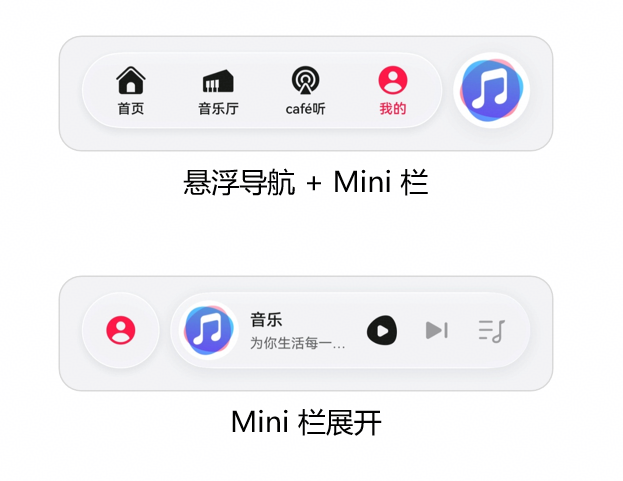
图:HarmonyOS 6悬浮导航 + Mini栏设计参考
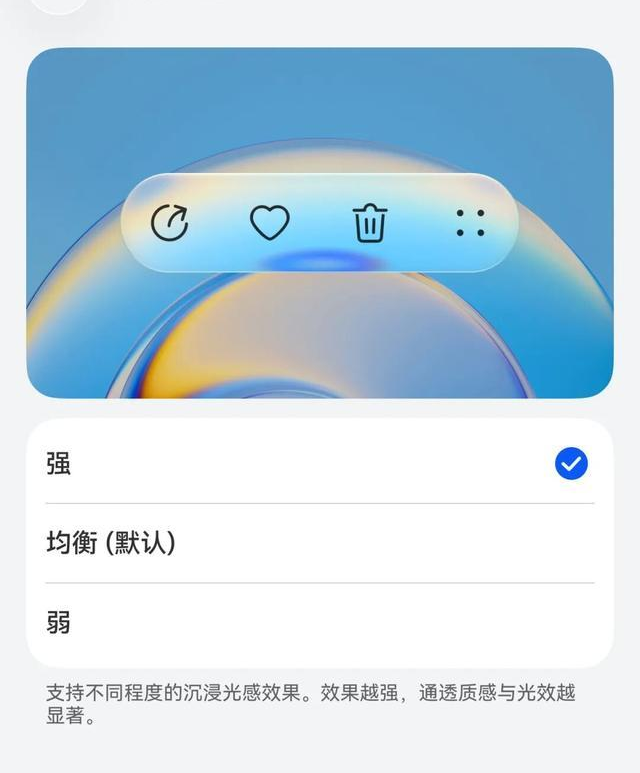
图:HarmonyOS 6沉浸光感组件效果(支持强/均衡/弱三档)
扩展方向:
- 多用户协同:多个家庭成员同时在场时,协商最优场景(取情绪平均值或优先级)
- 健康监测联动:结合AR体征数据,异常时自动通知家人或医疗机构
- 儿童模式:识别儿童身份后,自动限制危险设备、开启护眼模式
- 老人关怀:识别老人+疲劳情绪时,自动开启夜灯、降低地面设备风险
六、结语
HarmonyOS 6的Face AR & Body AR能力,让智能家居控制第一次真正"看见"了主人。本文构建的AR智能家居控制中枢,通过面部身份识别实现个性化服务、情绪感知实现主动场景推荐、骨骼手势实现自然隔空操控、沉浸光感家居根据情绪动态渲染,展示了AR能力从"炫技"走向"智慧生活"的完整路径。
随着HDC 2026的临近,HarmonyOS 6的生态正在快速成熟。对于智能家居行业的开发者而言,现在正是将AR能力融入家庭场景的最佳时机。期待更多开发者加入鸿蒙生态,共同探索"懂你情绪、随你手势"的智慧家居未来。
转载自:https://blog.csdn.net/u014727709/article/details/160771462
欢迎 👍点赞✍评论⭐收藏,欢迎指正

讨论HarmonyOS开发技术,专注于API与组件、DevEco Studio、测试、元服务和应用上架分发等。
更多推荐
 8
8 0
0- 0


 已为社区贡献68条内容

所有评论(0)