舒尔特方格游戏
鸿蒙智多星
·
舒尔特方格游戏
效果
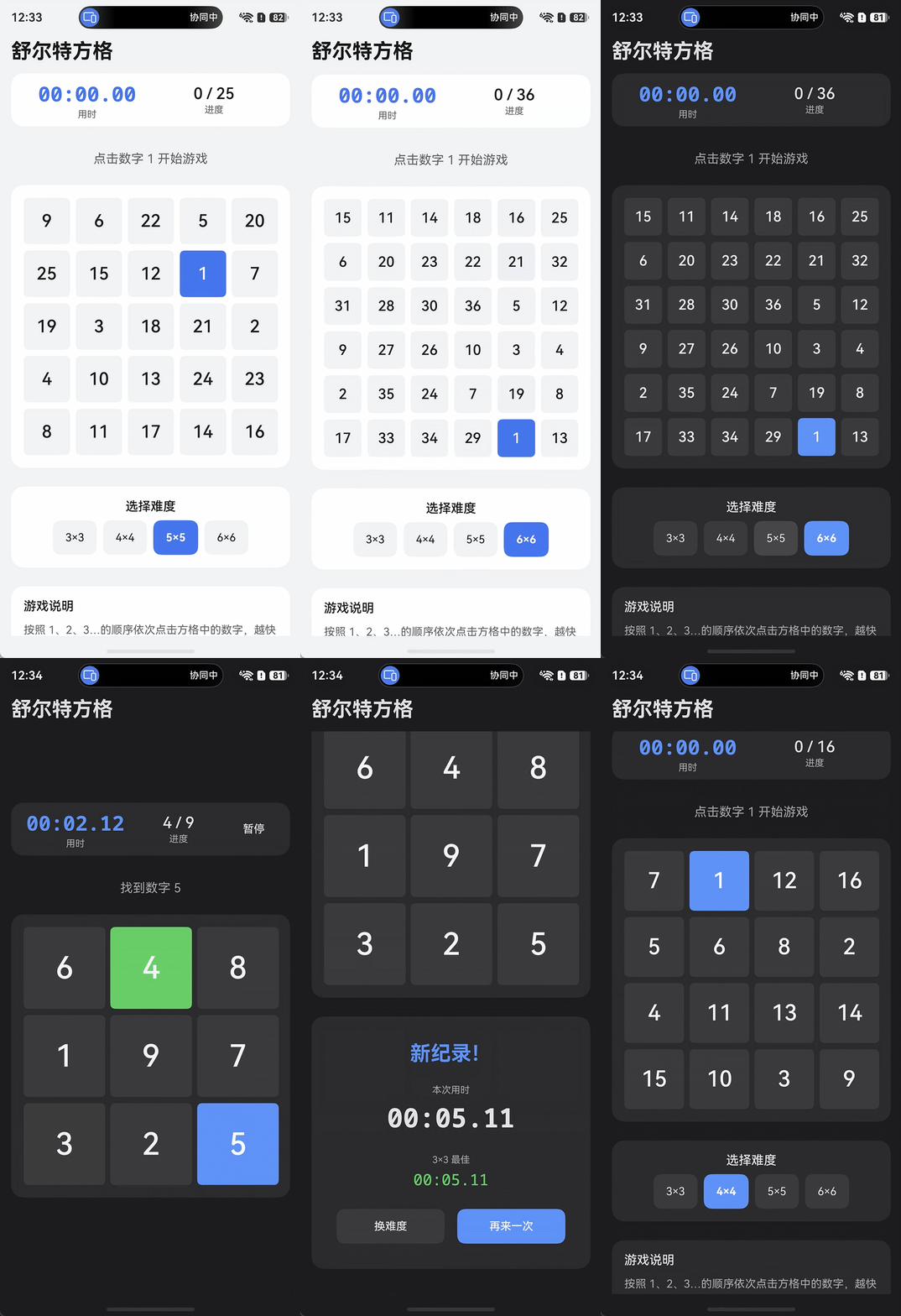
1. 项目结构
entry/src/main/ets/
├── model/
│   └── GameModel.ets           ← @ObservedV2 数据层
├── common/
│   └── DesignTokens.ets        ← 设计常量(间距/字体/动画)
├── components/
│   ├── SchulteCell.ets          ← 单元格(@ComponentV2)
│   ├── SchulteGrid.ets          ← 棋盘 Grid
│   ├── GameStatusBar.ets        ← 计时器/进度栏
│   ├── DifficultySelector.ets   ← 3×3~6×6 难度切换
│   └── ResultDialog.ets         ← 完成结果面板
└── pages/
    └── Index.ets               ← Navigation 主页面

entry/src/main/resources/
├── base/element/color.json     ← 浅色主题 token
└── dark/element/color.json     ← 深色主题 token(自动适配)
2. HarmonyOS 6.1 新特性使用清单
| 特性 | 用途 | 文件 |
|---|---|---|
@ObservedV2 + @Trace | 细粒度响应式,替代 @Observed | GameModel.ets |
@ComponentV2 | 所有组件声明,替代 @Component | 所有 components |
@Local | 组件内部状态,替代 @State | Index.ets |
@Param + @Event | 父子数据流,替代 @Prop+回调 | 所有 components |
@Computed | 派生属性缓存(cellSize、进度文本等) | SchulteGrid.ets |
Navigation + NavPathStack | 页面导航,替代废弃的 router 模块 | Index.ets |
TransitionEffect.asymmetric | 非对称入/出场动效 | Index.ets |
dark/element/color.json | 深色模式自动适配 | resources |
3. 关键设计决策
3.1. 为何不在 V2 组件上用 @Reusable?
@Reusable 仅支持 @Component(V1),不支持 @ComponentV2。本项目全面采用 V2,通过 @ObservedV2 + @Trace 使 CellData.highlighted 等属性实现属性级精确更新,无需组件池复用。
3.2. 计时器管理
GameModel 内部用 setInterval(50ms) 驱动计时,暂停时累加已用时间并清除定时器,恢复时重置 startTime,避免时间漂移。aboutToDisappear 中调用 pause() 防止后台泄漏。
3.3. @Trace bestRecords: Map 的更新
Map 引用不变时 @Trace 不触发更新,因此 finish() 中用 new Map(this.bestRecords) 替换整个引用,确保最佳成绩展示即时刷新。
4. 代码讲解
4.1 实体类GameModel部分代码
/** 游戏难度对应的方格尺寸 */
export enum GridSize {
  THREE = 3,
  FOUR = 4,
  FIVE = 5,
  SIX = 6
}

/** 游戏状态枚举 */
export enum GameStatus {
  IDLE = 'IDLE',       // 待开始
  RUNNING = 'RUNNING', // 进行中
  PAUSED = 'PAUSED',   // 暂停
  FINISHED = 'FINISHED' // 已完成
}

/** 单次游戏历史记录 */
export interface GameRecord {
  gridSize: number;
  duration: number; // ms
  timestamp: number;
}

/** 单元格数据 */
@ObservedV2
export class CellData {
  @Trace number: number = 0;
  @Trace highlighted: boolean = false; // 点击高亮反馈

  constructor(number: number) {
    this.number = number;
  }
}
/** 游戏核心状态模型 */
@ObservedV2
export class GameModel {
  @Trace gridSize: GridSize = GridSize.FIVE;
  @Trace status: GameStatus = GameStatus.IDLE;
  @Trace cells: CellData[] = [];
  @Trace nextTarget: number = 1;
  @Trace elapsedMs: number = 0;
  @Trace bestRecords: Map<number, number> = new Map(); // gridSize -> bestMs

  private startTime: number = 0;
  private timerHandle: number = -1;

  /** 初始化/重置棋盘 */
  reset(): void {
    this.stopTimer();
    const total = this.gridSize * this.gridSize;
    const nums: number[] = [];
    for (let k = 1; k <= total; k++) {
      nums.push(k);
    }
    // Fisher-Yates 随机洗牌
    for (let i = total - 1; i > 0; i--) {
      const j = Math.floor(Math.random() * (i + 1));
      const tmp = nums[i];
      nums[i] = nums[j];
      nums[j] = tmp;
    }
    const cells: CellData[] = [];
    for (let k = 0; k < nums.length; k++) {
      cells.push(new CellData(nums[k]));
    }
    this.cells = cells;
    this.nextTarget = 1;
    this.elapsedMs = 0;
    this.status = GameStatus.IDLE;
  }

  /** 开始游戏(第一次点击时调用) */
  start(): void {
    this.startTime = Date.now();
    this.status = GameStatus.RUNNING;
    this.startTimer();
  }

  ......
}
4.2 棋盘网格组件SchulteGrid
@ComponentV2
export struct SchulteGrid {
  @Param vm: GameModel = new GameModel();
  @Event onCellTap: (index: number) => void = (_: number) => {};

  /** 根据方格数动态计算单元格尺寸,确保在常规手机屏幕上正常显示 */
  @Computed
  get cellSize(): number {
    const n = this.vm.gridSize as number;
    // 假定可用宽度约为 360vp,留出间距
    const gap = DesignTokens.SPACE_SM;
    const available = 360 - DesignTokens.SPACE_MD * 2 - gap * (n - 1);
    const size = Math.floor(available / n);
    return Math.max(44, size); // 保证最小触控目标
  }

  @Computed
  get isFinished(): boolean {
    return this.vm.status === GameStatus.FINISHED;
  }

  build() {
    Grid() {
      ForEach(
        this.vm.cells,
        (cell: CellData, index: number) => {
          GridItem() {
            SchulteCell({
              cell: cell,
              isTarget: cell.number === this.vm.nextTarget && !this.isFinished,
              isFinished: this.isFinished,
              cellSize: this.cellSize,
              onTap: () => { this.onCellTap(index); }
            })
          }
        },
        (cell: CellData) => `${cell.number}`
      )
    }
    .columnsTemplate(this.buildTemplate())
    .columnsGap(DesignTokens.SPACE_SM)
    .rowsGap(DesignTokens.SPACE_SM)
    .padding(DesignTokens.SPACE_MD)
    .backgroundColor($r('app.color.card_bg'))
    .borderRadius(DesignTokens.RADIUS_LG)
  }

  private buildTemplate(): string {
    const n = this.vm.gridSize as number;
    let parts: string[] = [];
    for (let i = 0; i < n; i++) {
      parts.push('1fr');
    }
    return parts.join(' ');
  }
}
4.3 单元格组件SchulteCell
@ComponentV2
export struct SchulteCell {
  @Param cell: CellData = new CellData(0);
  @Param isTarget: boolean = false;       // 当前待点击的目标数字
  @Param isFinished: boolean = false;     // 游戏已结束
  @Param cellSize: number = 60;
  @Event onTap: () => void = () => {};

  private readonly FONT_RATIO: number = 0.38; // 字体与格子比例

  build() {
    Button() {
      Text(`${this.cell.number}`)
        .fontSize(Math.max(14, Math.floor(this.cellSize * this.FONT_RATIO)))
        .fontWeight(FontWeight.Medium)
        .fontColor(this.isTarget ? $r('app.color.cell_target_text') : $r('app.color.cell_text'))
        .textAlign(TextAlign.Center)
    }
    .width(this.cellSize)
    .height(this.cellSize)
    .borderRadius(DesignTokens.RADIUS_SM)
    .backgroundColor(this.resolveBg())
    .stateEffect(true)
    .accessibilityText(`数字 ${this.cell.number}${this.isTarget ? ',当前目标' : ''}`)
    .accessibilityRole(AccessibilityRoleType.BUTTON)
    .onClick(() => {
      if (!this.isFinished) {
        this.onTap();
      }
    })
    .animation({
      duration: DesignTokens.ANIM_FAST,
      curve: Curve.EaseOut
    })
  }

  private resolveBg(): Resource {
    if (this.cell.highlighted) {
      return $r('app.color.cell_correct_bg');
    }
    if (this.isTarget) {
      return $r('app.color.cell_target_bg');
    }
    return $r('app.color.cell_default_bg');
  }
}
5. 构建 & 运行
# DevEco Studio 菜单操作
Build → Make Module entry          # 编译检查
Run → Run 'entry' on Emulator      # 手机模拟器运行
@Param默认值提示:所有@Param字段必须声明默认值(= new GameModel()),或用@Require标注为必传,否则编译报错。所有文件已写入项目,右侧面板提供可交互的实现进度追踪和操作指南。以下是各文件的核心职责说明:
6. 总结
| 文件 | 说明 |
|---|---|
model/GameModel.ets | 游戏核心逻辑:Fisher-Yates 洗牌、计时器、状态机、最佳成绩记录 |
common/DesignTokens.ets | 统一间距/字体/动画常量,避免魔法数字 |
components/SchulteCell.ets | 单元格,@Param cell: CellData 接收 @Trace 对象,精确更新高亮状态 |
components/SchulteGrid.ets | Grid 棋盘,@Computed get cellSize 根据方格数动态计算格子尺寸 |
components/GameStatusBar.ets | 顶部计时/进度/暂停栏 |
components/DifficultySelector.ets | 3×3 / 4×4 / 5×5 / 6×6 切换 |
components/ResultDialog.ets | 完成后展示用时、最佳成绩、再来一次 |
pages/Index.ets | Navigation + NavPathStack 根页面,@ComponentV2 GamePage 主逻辑 |
resources/*/color.json | 浅色/深色双主题 token,系统自动选取 |

讨论HarmonyOS开发技术,专注于API与组件、DevEco Studio、测试、元服务和应用上架分发等。
更多推荐


 0
0 0
0- 0



 已为社区贡献73条内容

所有评论(0)