HarmonyOS 6 App 实战:蜜雪冰城 App 应用开发解析(二)
共创先锋
·
5. 项目展示
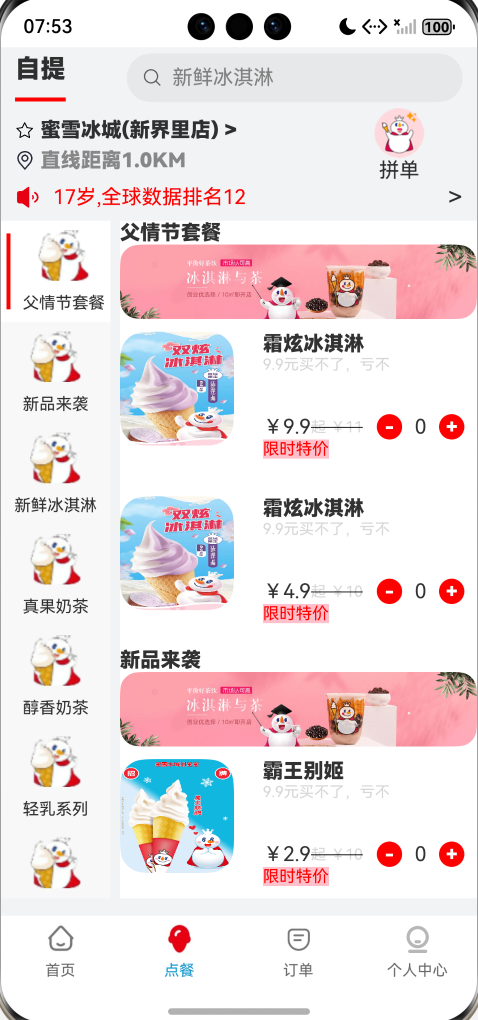
- 点餐页面展示
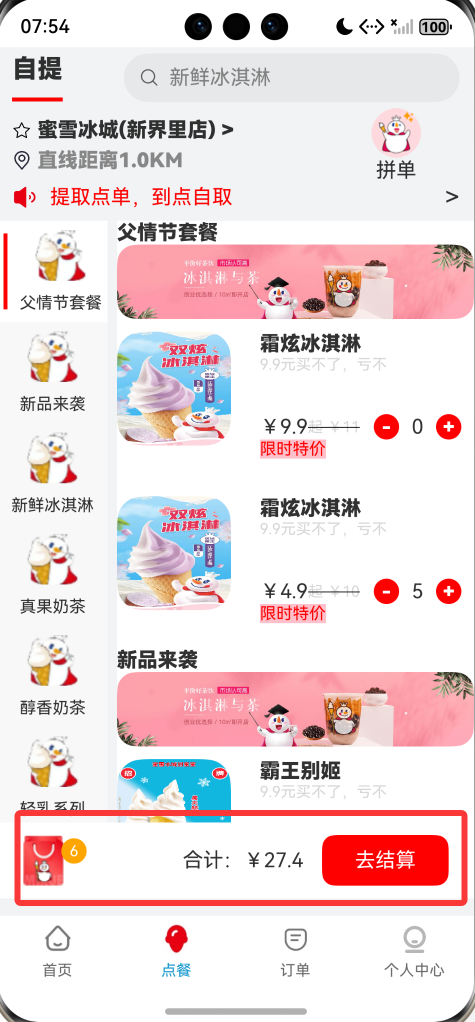
- 购物车页面
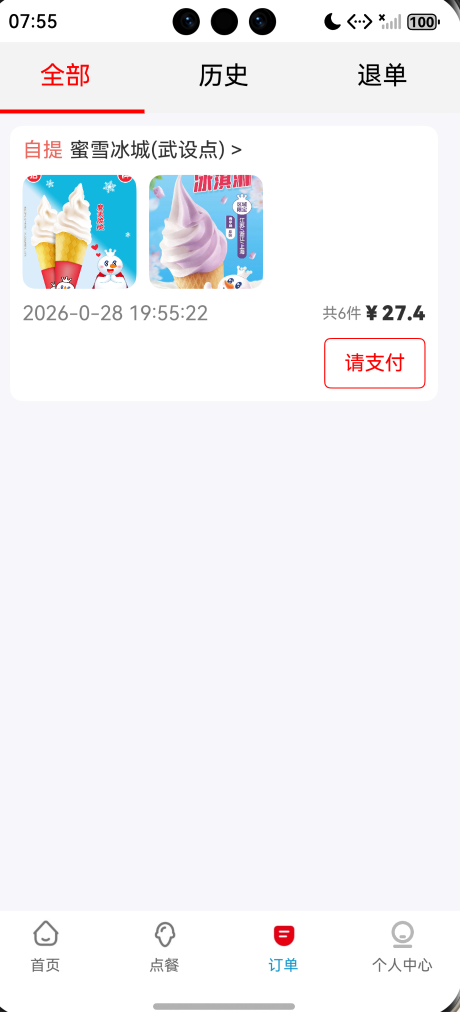
- 订单页面
6. 代码展示
6.1 点餐页面代码
新建组件view目录,
view/MenuFood:商品菜单页面,左侧可以滑动,右侧也可以滑动,根据左侧的内容定位到右侧的数据。
import MenuViewData from '../data/MenuViewData'
import MenuModel from '../model/MenuModel'
import NoticeModel from '../model/NoticeModel'
import ProductModel from '../model/ProductModel'
import UserModel from '../model/UserModel'
import ProductUI from "./ProductUI"
import CommonUtil from '../util/CommonUtil'
import OrderModel from '../model/OrderModel'
import router from '@ohos.router'
@Component
export default struct MenuFood{

  private LeftScroller:Scroller=new Scroller()
  private RightScroller:Scroller=new Scroller()

  //通知数据列表
  @State noticeArray:Array<NoticeModel>=[]

  //获取父组件传递过来的订单列表
  @Link currentOrderArray:Array<OrderModel>

  //创建一个当前被选中的菜单索引
  @State menuIndex:number=0

  //当前tabs子组件索引
 @Link currentIndex:number

  //菜单列表
  @State menuArray:Array<MenuModel>=[]

  //创建一个商品的总价
  @State totalPrice:number=0

  //创建一个触发购物车显示的索引(被选中的商品的总量0)
  @State totalNum:number=0

  //创建一个被选中的商品列表(购物车)
  @State proArray:Array<ProductModel>=[]

  //出发ProductUI组件的,selected更新的索引
  @State updateProIndex:boolean=false

  //封装通知UI
  @Builder noticeBuilder(img:Resource,desc:string){
    Row({space:10}){
        Image(img)
          .width(20)
          .height(20)
      Text(desc)
        .fontColor(Color.Red)
      Blank()  //空白填充组件
      Text(">")
        .fontSize(20)
    }
    .width("100%")
  }

  //菜单UI封装
  @Builder menuBuilder(menuIcon:Resource,menuTitle:string,index:number){
      Row({space:10}){
        //判断当前选中项添加红色的横线代表选中
        if(index===this.menuIndex){
          Line()
            .width(3)
            .height(60)
            .backgroundColor(Color.Red)
        }
        Column({space:10}){
          Image(menuIcon)
            .width(40)
            .height(40)
          Text(menuTitle)
            .fontSize(13)
        }
      }
    .width("100%")
    .height(80)
    .justifyContent(FlexAlign.Center)
    .backgroundColor(this.menuIndex===index?Color.White:"")
  }

  //商品头部UI封装
  @Builder headerBuilder(img:Resource,title:string){
    Column(){
      Text(title)
        .fontWeight(FontWeight.Bolder)
      Image(img)
        .borderRadius(15)
    }
    .alignItems(HorizontalAlign.Start)
  }

  //自定义组件的生命周期
  aboutToAppear(){
    //通知数据赋值
    this.noticeArray=new MenuViewData().getNoticeData()
    this.menuArray=new MenuViewData().getMenuData()

  }
  //结算
  goPay(){
      let userInfo=AppStorage.get<UserModel>("userInfo")
      if(userInfo?.tel){
        let userId=userInfo.id
        let orderId=CommonUtil.getRandomString()
        let createDate=CommonUtil.dateFormat(new Date())
        //创建一个订单
        let order=new OrderModel(orderId,userId,this.proArray,this.totalNum,this.totalPrice,createDate)
        //将订单添加到当前用户订单列表中
        this.currentOrderArray.push(order)
        //清空购物车,总价 数量
        this.totalNum=0
        this.totalPrice=0
        this.proArray=[]
        this.updateProIndex=!this.updateProIndex
        //跳转到订单页面
        this.currentIndex=2
      }else{
        //去登录
        router.pushUrl({
          url:"pages/Login"
        })
      }
  }

  build(){
    Column(){
        //头部模块开始------------------
      Row(){
         Column(){
           Text("自提")
             .fontSize(20)
             .fontWeight(FontWeight.Bolder)
           Line()
             .height(3)
             .width(40)
             .backgroundColor(Color.Red)
         }
          .height("100%")
          .justifyContent(FlexAlign.SpaceAround)
          Search({placeholder:"新鲜冰淇淋"})
            .width("75%")
            .height("80%")
            .placeholderColor(Color.Gray)
        }
        .width("94%")
        .height("7%")
        .justifyContent(FlexAlign.SpaceBetween)
      //----------------------头部模块结束----------------------------
      //中间模块
      Column(){
         Row(){
           //左侧
           Column({space:5}){
              Row({space:5}){
                Image($r("app.media.star"))
                  .width(15)
                  .height(15)
                Text("蜜雪冰城(新界里店) >")
                  .fontWeight(FontWeight.Bolder)
              }
             Row({space:5}){
                Image($r("app.media.localtionicon"))
                  .width(15)
                  .height(15)
               Text("直线距离1.0KM")
                 .fontWeight(FontWeight.Bolder)
                 .fontColor("#878787")
             }
           }
           .alignItems(HorizontalAlign.Start)
           //右侧
           Column(){
              Image($r("app.media.vipicon"))
                .width(40)
                .height(40)
             Text("拼单")
           }
           .width(100)
         }
        .width("100%")
        .justifyContent(FlexAlign.SpaceBetween)
        //通知
        Swiper(){
          ForEach(this.noticeArray,(item:NoticeModel)=>{
            this.noticeBuilder(item.src,item.desc)
          })
        }
        .width("100%")
        .autoPlay(true)  //自动播放
        .indicator(false)  //不显示指示点
        .vertical(true)  //纵向滑动
      }
      .width("94%")
      .height("13%")
      //中间模块结束----------------------------------------------------
      //商品模块开始---------------------------------------------------
      Row(){
            //左侧菜单
          List({scroller:this.LeftScroller}){
            ForEach(this.menuArray,(item:MenuModel,index:number)=>{
              ListItem(){
                this.menuBuilder(item.menuIcon,item.menuTitle,index)
              }
              //点击每一项套餐
              .onClick(()=>{
                //获取当前选择的项的索引赋值给当前定义的索引
                  this.menuIndex=index
                  this.RightScroller.scrollToIndex(index)
              })
            })
          }
          .width("23%")
          .height("100%")
          .backgroundColor("#F8F8F8")
          //右侧商品列表
          List({scroller:this.RightScroller}){
            //菜单
            ForEach(this.menuArray,(item:MenuModel,index)=>{
              ListItemGroup({header:this.headerBuilder(item.menuImage,item.menuTitle)}){
                    ForEach(item.projectArray,(pro:ProductModel)=>{
                      ListItem(){
                        ProductUI({updateProIndex:$updateProIndex,product:pro,totalNum:$totalNum,totalPrice:$totalPrice,proArray:$proArray})
                      }
                      .margin({top:10})
                    })
                  }
            })

          }
          .width("75%")
          .height("100%")
          .backgroundColor(Color.White)
          .onScrollIndex((start: number, end: number)=>{
            this.menuIndex=start
            this.LeftScroller.scrollToIndex(start)
          })
      }
      .width("100%")
      .height("78%")
      .justifyContent(FlexAlign.SpaceBetween)
      //商品模块结束-------------------------------------------
      //购物车开始--------------------------------------------
      Row({space:15}){
        Image($r("app.media.chart"))
          .height(40)
          .margin({left:20})
        Text(`${this.totalNum}`)
          .backgroundColor(Color.Orange)
          .borderRadius(50)
          .fontColor(Color.White)
          .width(20)
          .height(20)
          .textAlign(TextAlign.Center)
          .fontSize(12)
          .margin({left:-17,top:-15})
        Blank()
        Text(`合计:¥${this.totalPrice}`)
        Button({type:ButtonType.Normal}){
          Text("去结算")
            .fontColor(Color.White)
        }
        .width(100)
        .height(40)
        .backgroundColor(Color.Red)
        .borderRadius(10)
        .margin({right:20})
        .onClick(()=>{
          this.goPay()
        })
      }
      .width("100%")
      .height(60)
      .margin({top:-60})
      .backgroundColor("#FFFFFF")
      .visibility(this.totalNum>0?Visibility.Visible:Visibility.None)
    }
    .width("100%")
    .height("100%")
  }
}
6.2 购物车
view/ProductUI:购物车页面:根据选中的内容加入到购物车中。
import ProductModel from '../model/ProductModel'
@Component
export default struct ProductUI{


  //父组件传递给子组件的参数
  @Prop product:ProductModel

  //@Link 父子组件之间参数相互传递,但是变量不能赋初始值
  @Link totalNum:number

  @Link totalPrice:number

  @Link proArray:Array<ProductModel>

  @Watch("changeIndex") @Link updateProIndex:boolean
  changeIndex(){
    console.log("--------------------")
    this.selectedNum=0
  }

  //当前选中商品的数量
  @State selectedNum:number=0


  //创建一个添加商品数量的方法
  add(){
    if(this.selectedNum<10){
      //当前选中的商品数量+1
      this.selectedNum=this.selectedNum+1
      this.totalNum=this.totalNum+1
      if(this.product.discountPrice===0){
        this.totalPrice=this.totalPrice+this.product.originalPrice
      }else{
        this.totalPrice=this.totalPrice+this.product.discountPrice
      }

      if(this.proArray.length==0){
        this.product.selectedNum=this.selectedNum
        this.proArray.push(this.product)
      }
      if(this.proArray.length>0){
        for(const pro of this.proArray){
          //如果存在,修改数量
          if(pro.id===this.product.id){
            pro.selectedNum=this.selectedNum
            return
          }
        }
        //如果不存在
        this.product.selectedNum=this.selectedNum
        this.proArray.push(this.product)  //向数组中添加商品

      }
    }
  }

  //创建一个删除商品数量的方法  移除商品数量
  del(){
    if(this.selectedNum>0){
      this.selectedNum=this.selectedNum-1
      this.totalNum=this.totalNum-1
      if(this.product.discountPrice==0){
        this.totalPrice=this.totalPrice-this.product.originalPrice
      }else{
        this.totalPrice=this.totalPrice-this.product.discountPrice
      }
    }

  }

  //+号UI
  @Builder btnBuilder(value:string){
    Button({type:ButtonType.Circle}){
      Text(value)
        .fontColor(Color.White)
        .fontSize(15)
        .fontWeight(FontWeight.Bolder)
    }
    .width(20)
    .height(20)
    .backgroundColor(Color.Red)
    .onClick(()=>{
      if(value==="+"){

        this.add()
      }
      if(value==="-"){
        //实行减号操作
        this.del()
      }
    })
  }

  build(){

    Row(){
      Image(this.product.src)
        .width(90)
        .height(90)
        .objectFit(ImageFit.Fill)
        .borderRadius(20)

      Column(){
        Text(this.product.title)
          .fontWeight(FontWeight.Bolder)
        Text(this.product.desc)
          .fontSize(12)
          .fontColor("#D7D7D7")
        Blank()
        Row(){
          Text("¥"+this.product.discountPrice)
          Text("起 ¥"+this.product.originalPrice)
            .fontSize(12)
            .fontColor("#D7D7D7")
            .decoration({type:TextDecorationType.LineThrough})
          Blank()
          Row({space:10}){
            this.btnBuilder("-")
            Text(""+this.selectedNum)
            this.btnBuilder("+")
          }
          .margin({right:10})
        }
        .width("100%")
        Text("限时特价")
          .fontSize(13)
          .height(15)
          .fontColor(Color.Red)
          .backgroundColor(Color.Pink)
      }
      .alignItems(HorizontalAlign.Start)
      .justifyContent(FlexAlign.SpaceBetween)
      .width("60%")
      .height(100)
    }
    .width("100%")
    .height(120)
    .justifyContent(FlexAlign.SpaceBetween)
    .alignItems(VerticalAlign.Top)


  }


}
6.3 订单页面
view/OrderUI:订单页面布局
import HistoryOrderUI from './HistoryOrderUI'
import BackOrderUI from './BackOrderUI'
import AllOrderUI from './AllOrderUI'
import OrderModel from '../model/OrderModel'
@Component
export default struct OrderUI{

  @State currentIndex:number=0

  //父组件传递过来的订单列表
  @Link currentOrderArray:Array<OrderModel>

  //tab导航栏的ui封装
  @Builder tabBuilder(title:string,index:number){
    Column(){
      Text(title)
        .fontSize(20)
        .margin({top:15})
        .fontColor(this.currentIndex===index?Color.Red:"#000000")
      Blank()
      Line()
        .width("100%")
        .height(3)
        .backgroundColor(Color.Red)
        .visibility(this.currentIndex===index?Visibility.Visible:Visibility.Hidden)
    }
    .height(56)
    .backgroundColor("#F3F3F3")
  }

  build(){

    Tabs(){
      TabContent(){
          AllOrderUI({currentOrderArray:$currentOrderArray})
      }
      .tabBar(this.tabBuilder("全部",0))
      TabContent(){
          HistoryOrderUI()
      }
      .tabBar(this.tabBuilder("历史",1))
      TabContent(){
          BackOrderUI()
      }
      .tabBar(this.tabBuilder("退单",2))
    }
    .height("100%")
    .width("100%")
    .onChange((index:number)=>{
      this.currentIndex=index
    })


  }
}
view/OrderUIItem:订单的详情页面数据
import OrderModel from '../model/OrderModel'
import ProductModel from '../model/ProductModel'

@Component
export default struct OrderUIItem{
  //order从父组件中传递过来的  对象
  @ObjectLink order:OrderModel

  build(){
    Column(){
      Row({space:5}){
        Text("自提")
          .fontColor("#EA6A60")
        Text("蜜雪冰城(武设点) >")
        Blank()
        Text("已完成")
          .fontColor(Color.Gray)
          .visibility(this.order.orderState==true?Visibility.Visible:Visibility.None)
      }
      .width("100%")
      //商品
      Row({space:10}){
       ForEach(this.order.proArray,(pro:ProductModel)=>{
         Image(pro.src)
           .width(90)
           .height(90)
           .borderRadius(10)
       })
      }
      .margin({top:10,bottom:10})

      //时间
      Row(){
          Text(this.order.createDate)
            .fontColor(Color.Gray)
          Blank()
          Text(`共${this.order.totalNum}件`)
            .fontSize(12)
            .fontColor(Color.Gray)
          Text(`¥${this.order.totalPrice}`)
            .fontWeight(FontWeight.Bolder)
      }
      .width("100%")
      //请支付
      Row(){
        Blank()
        Button({type:ButtonType.Normal}){
          if(this.order.payState){
            if(this.order.orderState){
              Text("再来一单")
                .fontColor(Color.Red)
            }else{
              Text("未取餐")
                .fontColor(Color.Red)
            }
          }else{
              //未付款
            Text("请支付")
              .fontColor(Color.Red)
              .onClick(()=>{
                this.order.payState=true  //如果点击的去支付就改为已完成
              })
          }

        }
        .width(80)
        .height(40)
        .backgroundColor(Color.White)
        .borderWidth(1)
        .borderColor(Color.Red)
        .borderRadius(5)
        .margin({top:10})
      }
      .width("100%")
    }
    .width("100%")
    .alignItems(HorizontalAlign.Start)
    .padding(10)
  }
}
7. 实体Data数据
- ActivityModel:活动类
//活动类
export default class ActivityModel{

  id:number

  src:Resource

  title:string

  desc:string


  constructor(id:number,src:Resource,desc:string,title:string) {
    this.id=id
    this.src=src
    this.title=title
    this.desc=desc

  }
}
- 轮播图数据类
//轮播图数据类
export default class ImgModel{

  id:number   //编号

  src:Resource   //图片路径

  type:number   //0表示轮播图  1:表示登录方式图

  title:string  //标题

  desc:string   //描述

  constructor(id: number //编号
    , src: Resource //图片路径
    , type: number //0表示轮播图  1:表示登录方式图
    , title: string //标题
    , desc: string //描述
  ) {
    this.id = id
    this.src = src
    this.type = type
    this.title = title
    this.desc = desc
  }


}
- MenuModel:点餐页面的菜单
import ProductModel from './ProductModel'
//点餐页面的菜单
export default class MenuModel{

  menuId:number

  menuIcon:Resource   //菜单图标

  menuTitle:string

  menuImage:Resource

  //一对的关系
  projectArray:Array<ProductModel>  //商品列表

  constructor(menuId:number,menuTitle:string,projectArray:Array<ProductModel>,menuIcon:Resource,menuImage:Resource) {
    this.menuId=menuId
    this.menuIcon=menuIcon
    this.menuTitle=menuTitle
    this.menuImage=menuImage
    this.projectArray=projectArray
  }


}
- NoticeModel:点餐页面的提示消息类
//点餐页面的提示消息类
export default class NoticeModel{

  id:number

  src:Resource

  desc:string

  constructor(id:number,src:Resource,desc:string) {
    this.id=id
    this.src=src
    this.desc=desc
  }
}
- OrderModel:订单类
//订单类
import ProductModel from './ProductModel'
@Observed
export default class OrderModel{

  orderId:string

  userId:number   //当前人

  proArray:Array<ProductModel>

  totalNum:number

  totalPrice:number

  createDate:string

  orderState:boolean=false  //订单状态

  payState:boolean=false   //支付状态

  constructor(orderId:string,userId:number,proArray:Array<ProductModel>,totalNum:number,totalPrice:number,createDate:string) {
    this.orderId=orderId
    this.userId=userId
    this.proArray=proArray
    this.totalNum=totalNum
    this.totalPrice=totalPrice
    this.createDate=createDate
  }


}
- ProductModel:商品类
export default class ProductModel{

  id:number

  src:Resource

  title:string

  desc:string  //描述

  originalPrice:number  //原价

  discountPrice:number  //特价

  selectedNum:number=0

  constructor(id:number,src:Resource,title:string,originalPrice:number,discountPrice:number,desc:string) {
    this.id=id
    this.src=src
    this.title=title
    this.originalPrice=originalPrice
    this.discountPrice=discountPrice
    this.desc=desc
  }

}
- UserModel:用户类
export default class UserModel{

  id:number

  tel:string


  constructor(id:number,tel:string) {
    this.id=id
    this.tel=tel
  }

}
8.总结:
通过蜜雪冰城 App 的 HarmonyOS 6 实战开发,可以清晰看到:
ArkTS + ArkUI 非常适合业务型 App
鸿蒙原生开发在性能和体验上优势明显
一个真实商业 App,核心不在“炫技”,而在 结构设计与业务拆解能力。

讨论HarmonyOS开发技术,专注于API与组件、DevEco Studio、测试、元服务和应用上架分发等。
更多推荐

 11
11 0
0- 0



 已为社区贡献35条内容

所有评论(0)