水果抽奖转盘 - 实现流程操作指南
鸿蒙智多星
·
效果
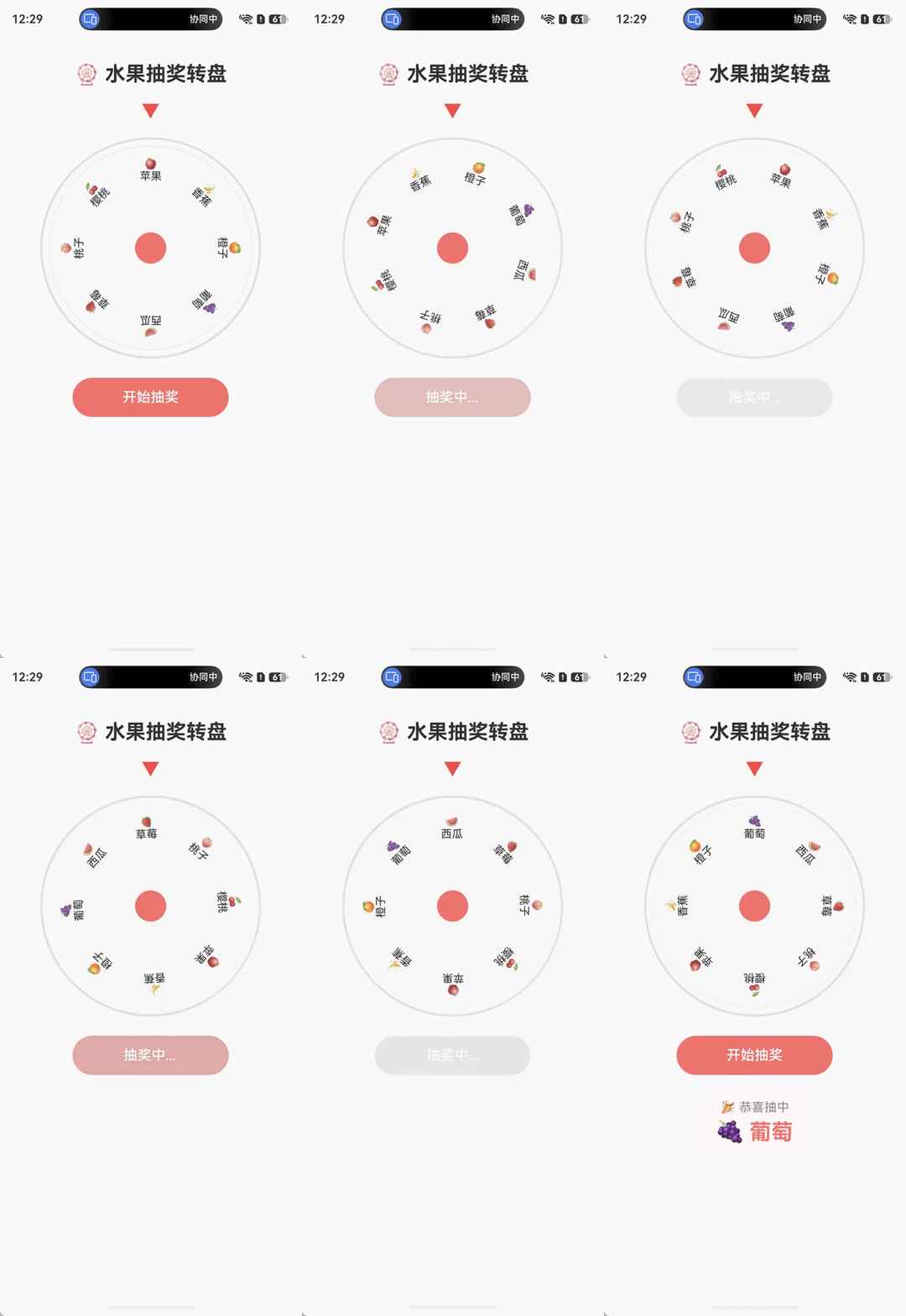
一、实现流程概览
| 步骤 | 说明 |
|---|---|
| 1. 定义数据模型 | 用 @ObservedV2 + @Trace 创建响应式数据类 |
| 2. 封装业务逻辑 | 用 @Computed 派生状态,animateTo 驱动旋转动画 |
| 3. 构建页面组件 | 用 @ComponentV2 + @Local 声明页面状态 |
| 4. 布局转盘 UI | Stack 叠放圆形底盘 + 水果项,Column 排列整体结构 |
| 5. 实现旋转交互 | 点击按钮触发 spin(),通过 animateTo 平滑旋转 |
| 6. 展示抽奖结果 | 动画结束后通过 @Computed 自动计算中奖项并显示 |
二、操作步骤
- 打开 DevEco Studio,确认项目 API 版本 >= 12(HarmonyOS 6.1)
- 编译运行 到模拟器或真机,即可看到转盘效果
- 点击"开始抽奖" 按钮,转盘旋转并缓动停止,展示中奖结果
三、关键代码讲解
1. @ObservedV2 + @Trace — 响应式数据模型
@ObservedV2
class FruitItem {
  @Trace id: number = 0;
  @Trace name: string = '';
  @Trace emoji: string = '';
  @Trace color: string = '';
}
@ObservedV2替代 V1 的@Observed,标记类为深度可观察对象@Trace替代手动通知,自动追踪属性变化并驱动 UI 更新- 这是 V2 状态管理的基础:所有需要响应式更新的类属性都应使用此组合
2. @Computed — 缓存派生属性
@ObservedV2
class WheelModel {
  @Trace fruits: FruitItem[] = [];
  @Trace currentRotation: number = 0;

  @Computed
  get segAngle(): number {
    return this.fruits.length > 0 ? 360 / this.fruits.length : 0;
  }

  @Computed
  get resultFruit(): string {
    const normalized = ((360 - (this.currentRotation % 360)) + 360) % 360;
    const idx = Math.floor(normalized / this.segAngle);
    return this.fruits[idx].emoji + ' ' + this.fruits[idx].name;
  }
}
@Computed是 只读计算属性,值自动缓存- 当依赖的
@Trace属性变化时,@Computed自动重新计算 segAngle根据水果数量计算每格角度;resultFruit根据旋转角度计算中奖项- 核心算法:通过
(360 - rotation % 360)反推指针指向的水果索引
3. animateTo — 显式动画驱动旋转
spin(): void {
  if (this.isSpinning || this.fruits.length === 0) return;
  this.isSpinning = true;

  const targetIdx = Math.floor(Math.random() * this.fruits.length);
  const targetAngle = targetIdx * segAngle + segAngle / 2;
  const totalRotation = 5 * 360 + (360 - targetAngle);

  animateTo({
    duration: 4000,
    curve: Curve.EaseOut,
    onFinish: () => {
      this.isSpinning = false;
      this.resultName = this.resultFruit;
    }
  }, () => {
    this.currentRotation += totalRotation;
  });
}
- 旋转策略:5 圈基础旋转 + 随机目标偏移量,产生真实的转盘效果
Curve.EaseOut缓动曲线:开始快、结尾慢,模拟物理减速onFinish回调:动画结束后更新中奖状态- 为什么不用
.animation()修饰符:animateTo已经管理了动画时序,不需要额外的属性动画修饰符,避免冲突
4. @ComponentV2 + @Local — V2 页面组件
@Entry
@ComponentV2
struct Index {
  @Local wheel: WheelModel = new WheelModel();
}
@ComponentV2替代 V1 的@Component,启用 V2 装饰器体系@Local替代 V1 的@State,声明组件内部响应式状态@Entry标记为页面入口组件
5. @Builder — 可复用 UI 片段
@Builder
wheelItem(item: FruitItem, index: number) {
  Text(`${item.emoji}\n${item.name}`)
    .fontSize(14)
    .textAlign(TextAlign.Center)
    .width(60)
    .height(60)
    .rotate({ angle: index * this.wheel.segAngle })
    .translate({
      x: 100 * Math.sin(index * this.wheel.segAngle * Math.PI / 180),
      y: -100 * Math.cos(index * this.wheel.segAngle * Math.PI / 180)
    })
}
@Builder封装每个水果项的渲染逻辑,在ForEach中复用- 圆形布局原理:先
.rotate()按索引角度旋转,再.translate({ y: -110 })沿旋转后方向平移,使文字沿圆周均匀分布 - 8 个水果 x 45 度间隔 = 完整圆周
6. ForEach + 稳定 Key — 列表渲染
ForEach(this.wheel.fruits, (item: FruitItem, index: number) => {
  this.wheelItem(item, index)
}, (item: FruitItem) => item.id.toString())
- 第三个参数
keyGenerator使用item.id作为稳定唯一键值 - 不使用 index 作为 key:避免数据变化时组件错误重建
7. TransitionEffect — 结果淡入动画
if (this.wheel.resultName !== '') {
  Column({ space: 6 }) { ... }
    .transition(TransitionEffect.OPACITY.animation({ duration: 300 }))
}
- 条件渲染
if控制结果显示 TransitionEffect.OPACITY使结果从透明到不透明平滑过渡
四、V2 装饰器对照表
| 本案例使用 | V1 等价物 | 作用 |
|---|---|---|
@ComponentV2 | @Component | 声明组件 |
@Local | @State | 组件内部响应式状态 |
@ObservedV2 | @Observed | 类深度可观察 |
@Trace | 手动通知 | 属性级细粒度追踪 |
@Computed | getter | 缓存派生计算属性 |
五、扩展建议
- 自定义概率权重:在
spin()中替换均匀随机为加权随机算法 - 音效反馈:在
animateTo的onFinish回调中添加音频播放 - 历史记录:增加
@Trace history: string[]记录每次抽奖结果 - 深色模式适配:将颜色值迁移到
resources/base/dark资源目录

讨论HarmonyOS开发技术,专注于API与组件、DevEco Studio、测试、元服务和应用上架分发等。
更多推荐


 0
0 0
0- 0



 已为社区贡献73条内容

所有评论(0)