Arkts基础<布局之栅格布局>
Arkts基础<布局之栅格布局>
定义及优势
在开发中没有特别需要注意的地方,所以文章内容以官方文档为主。
先看一下官方对于栅格布局的描述:
栅格布局是一种通用的辅助定位工具,对移动设备的界面设计有较好的借鉴作用。主要优势包括:
1、提供可循的规律:栅格布局可以为布局提供规律性的结构,解决多尺寸多设备的动态布局问题。通过将页面划分为等宽的列数和行数,可以方便地对页面元素进行定位和排版。
2、统一的定位标注:栅格布局可以为系统提供一种统一的定位标注,保证不同设备上各个模块的布局一致性。这可以减少设计和开发的复杂度,提高工作效率。
3、灵活的间距调整方法:栅格布局可以提供一种灵活的间距调整方法,满足特殊场景布局调整的需求。通过调整列与列之间和行与行之间的间距,可以控制整个页面的排版效果。
4、自动换行和自适应:栅格布局可以完成一对多布局的自动换行和自适应。当页面元素的数量超出了一行或一列的容量时,他们会自动换到下一行或下一列,并且在不同的设备上自适应排版,使得页面布局更加灵活和适应性强。
由此可以看出栅格布局在UI展示上有着统一的排列标准,能够根据屏幕变化进而自适应屏幕尺寸。在我们在布局搭建的过程中,可以根据实际需求,使用栅格布局完成对布局要求一定适应性的界面搭建。
栅格容器GridRow
GridRow为栅格容器组件,需与栅格子组件GridCol在栅格布局场景中联合使用。
1、栅格容器断点
栅格容器以设备的水平宽度(像素单位,单位vp)作为断点依据,定义设备的宽度类型,形成了一套断点规则。开发者可根据需求在不同的断点区间实现不同的页面布局效果。
栅格容器默认断点将设备宽度分为xs、sm、md、lg四类,尺寸范围如下:
| 断点名称 | 取值范围(vp) | 设备描述 |
|---|---|---|
| xs | [0, 320) | 最小宽度类型设备 |
| sm | [320, 600) | 小宽度类型设备。 |
| md | [600, 840) | 中等宽度类型设备。 |
| lg | [840, +∞) | 大宽度类型设备。 |
在GridRow栅格组件中,允许开发者使用BreakPoints自定义修改断点的取值范围,最多支持6个断点,除了默认的4个断点外,还可以启用xl和xxl断点,支持6种不同尺寸(xs,sm,md,lg,xl,xxl)设备的布局设置。
根据实际使用场景,通过一个单调递增数组设置断点位置。由于栅格容器默认支持4个断点,在不设置断点位置时,系统为默认断点配置的单调递增数组为[“320vp”, “600vp”, “840vp”]。开发者使用BreakPoints最多可支持6个断点,因此此单调递增数组最大长度为5。这里要解释一下为什么最大长度是5而不是6,是因为xs可以理解为默认点,然后算上5个点,就是最多支持的6个断点长度。
| 断点名称 | 设备描述 | 取值范围 |
|---|---|---|
| xs | 最小宽度类型设备。 | [0, n0) |
| sm | 小宽度类型设备。 | [n0, n1) |
| md | 中等宽度类型设备。 | [n1, n2) |
| lg | 大宽度类型设备。 | [n2, n3) |
| xl | 特大宽度类型设备。 | [n3, n4) |
| xxl | 超大宽度类型设备。 | [n4, INF) |
breakpoints: {value: ['100vp', '200vp']} // 表示xs、sm、md共3个断点被使用,小于100vp为xs,100vp-200vp为sm,大于200vp为md。
breakpoints: {value: ['320vp', '600vp']} // 表示xs、sm、md共3个断点被使用,小于320vp为xs,320vp-600vp为sm,大于600vp为md。
breakpoints: {value: ['320vp', '600vp', '840vp', '1440vp']} // 表示xs、sm、md、lg、xl共5个断点被使用,小于320vp为xs,320vp-600vp为sm,  600vp-840vp为md,840vp-1440vp为lg,大于1440vp为xl。
栅格容器通过监听窗口或容器的尺寸变化进行断点,通过reference设置断点切换参考物。如果应用以非全屏窗口的形式显示,以应用窗口宽度为参照物更为通用。
struct WindowRefGridLayout {
currentBp: string = "unknown"
bgColors: ResourceColor[] =
['rgb(213,213,213)', 'rgb(150,150,150)', 'rgb(0,74,175)', 'rgb(39,135,217)', 'rgb(61,157,180)', 'rgb(23,169,141)',
'rgb(255,192,0)', 'rgb(170,10,33)'];
build() {
Column({ space: 6 }) {
Text(this.currentBp)
GridRow({
columns: {
xs: 2, // 窗口宽度落入xs断点上,栅格容器分为2列。
sm: 4, // 窗口宽度落入sm断点上,栅格容器分为4列。
md: 8, // 窗口宽度落入md断点上,栅格容器分为8列。
lg: 12, // 窗口宽度落入lg断点上,栅格容器分为12列。
xl: 12, // 窗口宽度落入xl断点上,栅格容器分为12列。
xxl: 12 // 窗口宽度落入xxl断点上,栅格容器分为12列。
},
breakpoints: {
value: ['320vp', '600vp', '840vp', '1440vp', '1600vp'], // 表示在保留默认断点['320vp', '600vp', '840vp']的同时自定义增加'1440vp', '1600vp'的断点,实际开发中需要根据实际使用场景,合理设置断点值实现一次开发多端适配。
reference: BreakpointsReference.WindowSize
}
}) {
ForEach(this.bgColors, (color: ResourceColor, index?: number | undefined) => {
GridCol({ span: 1 }) { // 所有子组件占一列。
Row() {
Text(`${index}`)
}.width('100%').height('50vp')
}.backgroundColor(color)
})
}
.height(200)
.border({ color: 'rgb(39,135,217)', width: 2 })
.onBreakpointChange((breakPoint) => {
this.currentBp = breakPoint
})
}
}
}
2、布局的总列数
GridRow中通过columns设置栅格布局的总列数。
API version 20之前,columns默认值为12,即在未设置columns时,任何断点下,栅格布局均被分成12列。
API version 20及以后,columns默认值为{ xs: 2, sm: 4, md: 8, lg: 12, xl: 12, xxl: 12 }。
// xxx.ets
struct GridColumnsWithDefaults {
bgColors: ResourceColor[] =
['rgb(213,213,213)', 'rgb(150,150,150)', 'rgb(0,74,175)', 'rgb(39,135,217)', 'rgb(61,157,180)', 'rgb(23,169,141)',
'rgb(255,192,0)', 'rgb(170,10,33)', 'rgb(213,213,213)', 'rgb(150,150,150)', 'rgb(0,74,175)', 'rgb(39,135,217)'];
build() {
GridRow() {
ForEach(this.bgColors, (item: ResourceColor, index?: number | undefined) => {
GridCol({ span: 1 }) {
Row() {
Text(`${index}`)
}.width('100%').height('50')
}.backgroundColor(item)
})
}
}
}
API version 20之前布局显示:
API version 20及以后布局显示(以sm设备为例,默认栅格列数为4):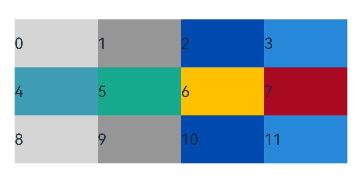
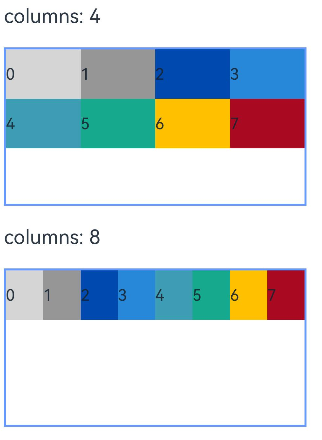
columns支持number和GridRowColumnOption两种类型, 可按两种方式设置栅格布局的总列数。
当columns类型为number时,栅格布局在任何尺寸设备下都被分为同一列数。下面分别设置栅格布局列数为4和8,子元素占一列,效果如下:
// xxx.ets
struct FixedFourColumnGrid {
bgColors: ResourceColor[] =
['rgb(213,213,213)', 'rgb(150,150,150)', 'rgb(0,74,175)', 'rgb(39,135,217)', 'rgb(61,157,180)', 'rgb(23,169,141)',
'rgb(255,192,0)', 'rgb(170,10,33)'];
build() {
Column({ space: 6 }) {
Text('columns:4').alignSelf(ItemAlign.Start)
Row() {
GridRow({ columns: 4 }) {
ForEach(this.bgColors, (item: ResourceColor, index?: number | undefined) => {
GridCol({ span: 1 }) {
Row() {
Text(`${index}`)
}.width('100%').height('50')
}.backgroundColor(item)
})
}
.width('100%').height('100%')
}
.height(160)
.border({ color: 'rgb(39,135,217)', width: 2 })
.width('90%')
}
}
}
// xxx.ets
struct FixedEightColumnGrid {
bgColors: ResourceColor[] =
['rgb(213,213,213)', 'rgb(150,150,150)', 'rgb(0,74,175)', 'rgb(39,135,217)', 'rgb(61,157,180)', 'rgb(23,169,141)',
'rgb(255,192,0)', 'rgb(170,10,33)'];
build() {
Column({ space: 6 }) {
Text('columns:8').alignSelf(ItemAlign.Start)
Row() {
GridRow({ columns: 8 }) {
ForEach(this.bgColors, (item: ResourceColor, index?: number | undefined) => {
GridCol({ span: 1 }) {
Row() {
Text(`${index}`)
}.width('100%').height('50')
}.backgroundColor(item)
})
}
.width('100%').height('100%')
}
.height(160)
.border({ color: 'rgb(39,135,217)', width: 2 })
.width('90%')
}
}
}
当columns类型为GridRowColumnOption时,支持下面6种不同尺寸(xs,sm,md,lg,xl,xxl)设备的栅格列数设置,不同尺寸的设备支持配置不同的栅格列数。
struct GridRowColumnOptionLayout {
bgColors: ResourceColor[] =
['rgb(213,213,213)', 'rgb(150,150,150)', 'rgb(0,74,175)', 'rgb(39,135,217)', 'rgb(61,157,180)', 'rgb(23,169,141)',
'rgb(255,192,0)', 'rgb(170,10,33)'];
build() {
GridRow({
columns: { sm: 4, md: 8 },
breakpoints: {
value: ['320vp', '600vp', '840vp', '1440vp', '1600vp'] // 表示在保留默认断点['320vp', '600vp', '840vp']的同时自定义增加'1440vp', '1600vp'的断点,实际开发中需要根据实际使用场景,合理设置断点值实现一次开发多端适配。
}
}) {
ForEach(this.bgColors, (item: ResourceColor, index?: number | undefined) => {
GridCol({ span: 1 }) {
Row() {
Text(`${index}`)
}.width('100%').height('50')
}.backgroundColor(item)
})
}
.height(200)
.border({ color: 'rgb(39,135,217)', width: 2 })
}
}
仅部分设置sm、md的栅格列数,未配置的xs、lg、xl、xxl设备根据栅格列数补全取默认值。
3、排列方向
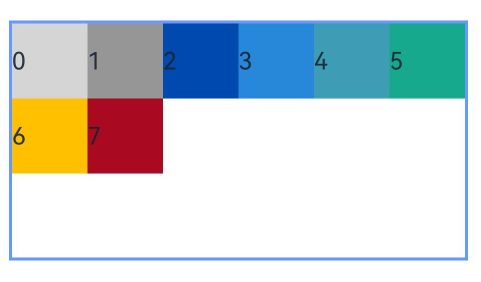
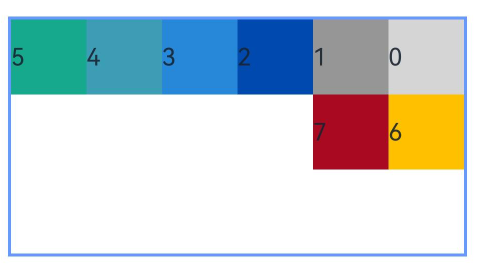
栅格布局中,可以通过设置GridRow的direction属性来指定栅格子组件在栅格容器中的排列方向。该属性可以设置为GridRowDirection.Row(从左往右排列)或GridRowDirection.RowReverse(从右往左排列),以满足不同的布局需求。
子组件默认从左往右排列。
GridRow({ direction: GridRowDirection.Row }) { /* ... */ }
子组件从右往左排列。
GridRow({ direction: GridRowDirection.RowReverse }) { /* ... */ }
4、子组件间距
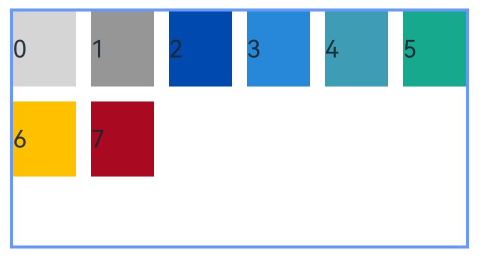
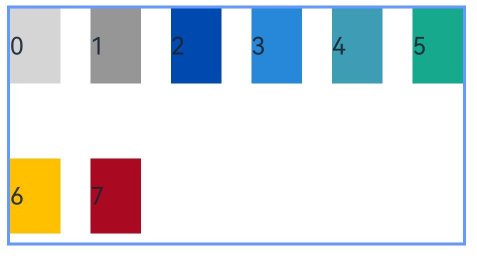
GridRow中通过gutter属性设置子元素在水平和垂直方向的间距。
当gutter类型为number时,同时设置栅格子组件间水平和垂直方向边距且相等。
GridRow({ gutter: 10 }) { /* ... */ }
当gutter类型为GutterOption时,单独设置栅格子组件水平垂直边距,x属性为水平方向间距,y为垂直方向间距。
GridRow({ gutter: { x: 20, y: 50 } }) { /* ... */ }
子组件GridCol
GridCol组件作为GridRow组件的子组件,通过给GridCol传参或者设置属性两种方式,设置span(占用列数),offset(偏移列数),order(元素序号)的值。
1、span
子组件占栅格布局的列数,决定了子组件的宽度。默认值为1。
span支持number和GridColColumnOption两种类型, 可按两种方式设置栅格子组件占栅格容器的列数。
当span类型为number时,子组件在所有尺寸设备下占用的列数相同。
// xxx.ets
struct SpanNumberExample {
bgColors: ResourceColor[] =
['rgb(213,213,213)', 'rgb(150,150,150)', 'rgb(0,74,175)', 'rgb(39,135,217)', 'rgb(61,157,180)', 'rgb(23,169,141)',
'rgb(255,192,0)', 'rgb(170,10,33)'];
build() {
GridRow({ columns: 8 }) {
ForEach(this.bgColors, (color: ResourceColor, index?: number | undefined) => {
GridCol({ span: 2 }) {
Row() {
Text(`${index}`)
}.width('100%').height('50vp')
}
.backgroundColor(color)
})
}
.border({ color: 'rgb(39,135,217)', width: 2 })
.height('150vp')
}
}
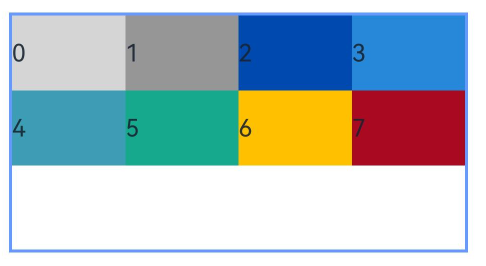
当span类型为GridColColumnOption时,支持6种不同尺寸(xs,sm,md,lg,xl,xxl)设备中子组件所占列数设置,不同尺寸的设备下子组件支持配置不同列数。若仅部分设置sm、md的列数,未配置的xs、lg、xl、xxl设备根据列数补全取默认值。
struct SpanColumnOptionExample {
currentBp: string = "unknown"
bgColors: ResourceColor[] =
['rgb(213,213,213)', 'rgb(150,150,150)', 'rgb(0,74,175)', 'rgb(39,135,217)', 'rgb(61,157,180)', 'rgb(23,169,141)',
'rgb(255,192,0)', 'rgb(170,10,33)'];
build() {
Column({ space: 6 }) {
GridRow({ columns: 8 }) {
ForEach(this.bgColors, (color: ResourceColor, index?: number | undefined) => {
GridCol({
span: {
xs: 1,
sm: 2,
md: 3,
lg: 4
}
}) {
Row() {
Text(`${index}`)
}.width('100%').height('50vp')
}
.backgroundColor(color)
})
}
.border({ color: 'rgb(39,135,217)', width: 2 })
.height('150vp')
.onBreakpointChange((breakPoint) => {
this.currentBp = breakPoint
})
Text(this.currentBp)
}
}
}
2、offset
栅格子组件相对于前一个子组件的偏移列数,默认为0。
当offset类型为number时,子组件偏移相同列数。
struct OffsetNumberExample {
bgColors: ResourceColor[] =
['rgb(213,213,213)', 'rgb(150,150,150)', 'rgb(0,74,175)', 'rgb(39,135,217)', 'rgb(61,157,180)', 'rgb(23,169,141)',
'rgb(255,192,0)', 'rgb(170,10,33)'];
build() {
Column() {
GridRow({ columns: 12 }) {
ForEach(this.bgColors, (color: ResourceColor, index?: number | undefined) => {
GridCol({ offset: 2, span: 1 }) {
Row() {
Text('' + index)
}.width('100%').height('50vp')
}
.backgroundColor(color)
})
}
Blank().width('100%').height(150)
}.border({ color: 'rgb(39,135,217)', width: 2 })
}
}
在lg及以上尺寸的设备上,栅格分成12列,每一个子组件占1列,偏移2列,每个子组件及间距共占3列,1行放4个子组件。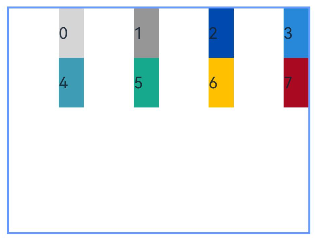
当offset类型为GridColColumnOption时,支持6种不同尺寸(xs,sm,md,lg,xl,xxl)设备中子组件所占列数设置,各个尺寸下数值可不同。
struct OffsetColumnOptionExample {
currentBp: string = "unknown"
bgColors: ResourceColor[] =
['rgb(213,213,213)', 'rgb(150,150,150)', 'rgb(0,74,175)', 'rgb(39,135,217)', 'rgb(61,157,180)', 'rgb(23,169,141)',
'rgb(255,192,0)', 'rgb(170,10,33)'];
build() {
Column({ space: 6 }) {
GridRow({ columns: 12 }) {
ForEach(this.bgColors, (color: ResourceColor, index?: number | undefined) => {
GridCol({
offset: {
xs: 1,
sm: 2,
md: 3,
lg: 4
},
span: 1
}) {
Row() {
Text('' + index)
}.width('100%').height('50vp')
}
.backgroundColor(color)
})
}
.height(200)
.border({ color: 'rgb(39,135,217)', width: 2 })
.onBreakpointChange((breakPoint) => {
this.currentBp = breakPoint
})
Text(this.currentBp)
}
}
}
3、order
栅格子组件的序号,决定子组件排列次序。当子组件不设置order或者设置相同的order, 子组件按照代码顺序展示。当子组件设置不同的order时,order较小的组件在前,较大的在后。
当子组件部分设置order,部分不设置order时,未设置order的子组件依次排序靠前,设置了order的子组件按照数值从小到大排列。
当order类型为number时,子组件在任何尺寸下排序次序一致。
GridRow({ columns: 12 }) {
    GridCol({ order: 4, span: 1 }) {
      Row() {
        Text('1')
      }.width('100%').height('50vp')
    }.backgroundColor('rgb(213,213,213)')

    GridCol({ order: 3, span: 1 }) {
      Row() {
        Text('2')
      }.width('100%').height('50vp')
    }.backgroundColor('rgb(150,150,150)')

    GridCol({ order: 2, span: 1 }) {
      Row() {
        Text('3')
      }.width('100%').height('50vp')
    }.backgroundColor('rgb(0,74,175)')

    GridCol({ order: 1, span: 1 }) {
      Row() {
        Text('4')
      }.width('100%').height('50vp')
    }.backgroundColor('rgb(39,135,217)')
}
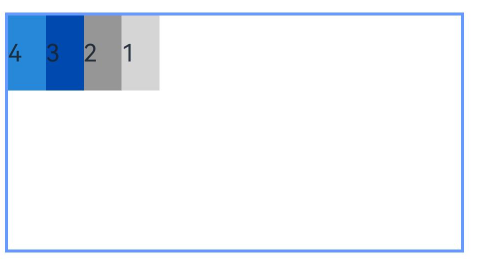
当order类型为GridColColumnOption时,支持6种不同尺寸(xs,sm,md,lg,xl,xxl)设备中子组件排序次序设置。在xs设备中,子组件排列顺序为1234;sm为2341,md为3412,lg为2431。
struct OrderColumnOptionExample {
currentBp: string = 'unknown'
build() {
Column({ space: 5 }) {
GridRow({ columns: 12 }) {
GridCol({
order: { xs: 1, sm: 5, md: 3, lg: 7 }, span: 1 }) {
Row() {
Text('1')
}.width('100%').height('50vp')
}.backgroundColor('rgb(213,213,213)')
GridCol({
order: { xs: 2, sm: 2, md: 6, lg: 1 }, span: 1 }) {
Row() {
Text('2')
}.width('100%').height('50vp')
}.backgroundColor('rgb(150,150,150)')
GridCol({ order: { xs: 3, sm: 3, md: 1, lg: 6 }, span: 1 }) {
Row() {
Text('3')
}.width('100%').height('50vp')
}.backgroundColor('rgb(0,74,175)')
GridCol({ order: { xs: 4, sm: 4, md: 2, lg: 5 }, span: 1 }) {
Row() {
Text('4')
}.width('100%').height('50vp')
}.backgroundColor('rgb(39,135,217)')
}.border({ width: 1, color: 'rgb(39,135,217)' }).height('200vp').onBreakpointChange((breakpoint) => {
this.currentBp = breakpoint
})
Text(this.currentBp)
}
}
}
栅格组件的嵌套使用
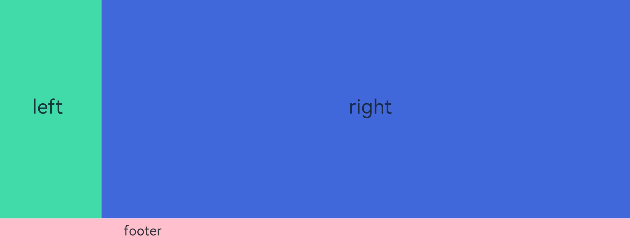
以下示例中,栅格把整个空间分为12份。第一层GridRow嵌套GridCol,分为中间大区域以及“footer”区域。第二层GridRow嵌套GridCol,分为“left”和“right”区域。子组件空间按照上一层父组件的空间划分,粉色的区域是屏幕空间的12列,绿色和蓝色的区域是父组件GridCol的12列,依次进行空间的划分。
struct GridRowExample {
build() {
GridRow({ columns: 12 }) {
GridCol({ span: 12 }) {
GridRow({ columns: 12 }) {
GridCol({ span: 2 }) {
Row() {
Text('left').fontSize(24)
}
.justifyContent(FlexAlign.Center)
.height('90%')
}.backgroundColor('#ff41dbaa')
GridCol({ span: 10 }) {
Row() {
Text('right').fontSize(24)
}
.justifyContent(FlexAlign.Center)
.height('90%')
}.backgroundColor('#ff4168db')
}
.backgroundColor('#19000000')
}
GridCol({ span: 12 }) {
Row() {
Text('footer').width('100%').textAlign(TextAlign.Center)
}.width('100%').height('10%').backgroundColor(Color.Pink)
}
}.width('100%').height(300)
}
}

讨论HarmonyOS开发技术,专注于API与组件、DevEco Studio、测试、元服务和应用上架分发等。
更多推荐



 13
13 0
0- 0


 已为社区贡献14条内容

所有评论(0)