HarmonyOS6 - Tabs组件实现仿微信页面实战
·
HarmonyOS6 - Tabs组件实现仿微信页面实战
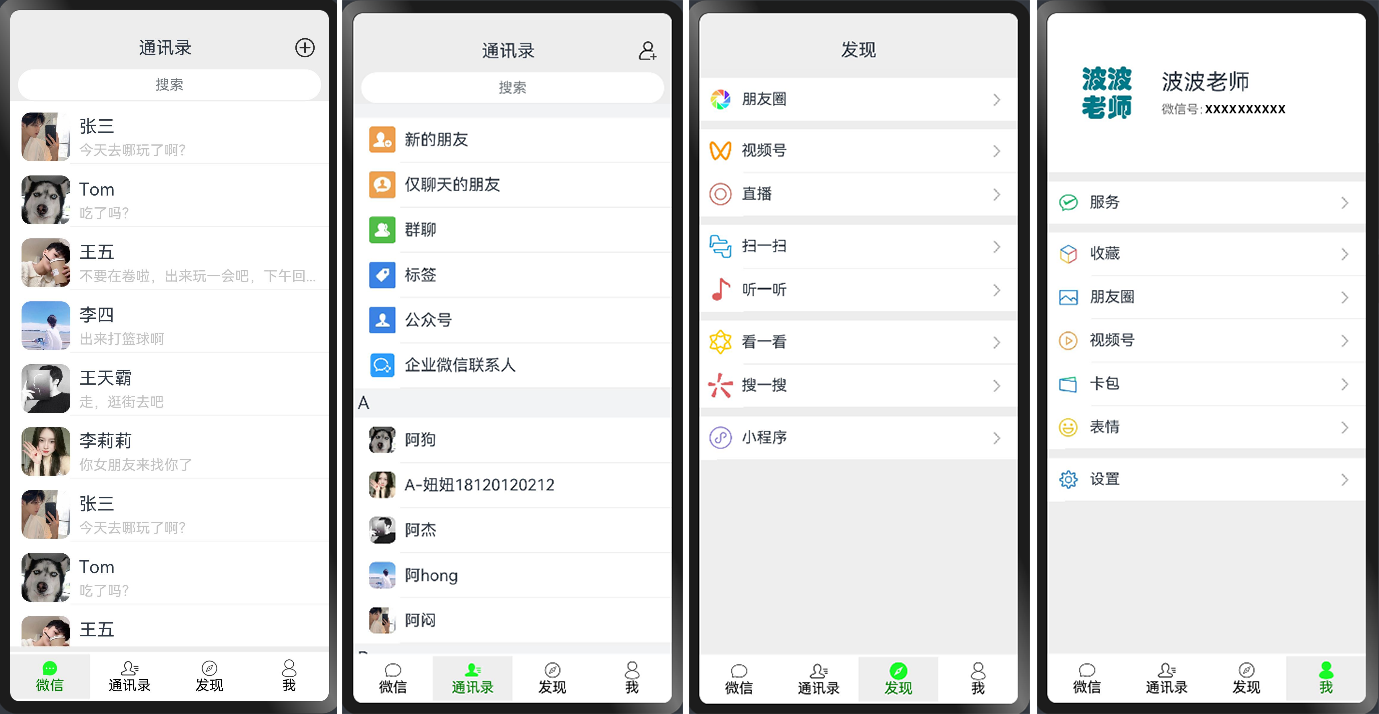
1. 效果图如下
2. 页面介绍
wechat 是微信的主界面,也是用户登录成功后看到的核心页面。这个页面采用了经典的底部 Tab 导航设计,包含四个标签页:
- 微信 - 聊天消息列表
- 通讯录 - 联系人列表
- 发现 - 发现功能入口
- 我 - 个人中心
本文将采用实战方式为大家演示 Tabs 架构的搭建方法,以及每个 Tab 页面的具体实现。
3. 编码
1. 微信首页
/**
 * 【微信】聊天列表页面
 */

import { UserModel } from './UserModel'

@Entry
@Component
export struct WeiXinChat01 {
  userArray: Array<UserModel> = [
    new UserModel($r('app.media.boy1'), '张三', '今天去哪玩了啊?'),
    new UserModel($r('app.media.dog'), 'Tom', '吃了吗?'),
    new UserModel($r('app.media.boy2'), '王五', '不要在卷啦,出来玩一会吧,下午回...'),
    new UserModel($r('app.media.1003'), '李四', '出来打篮球啊'),
    new UserModel($r('app.media.boy3'), '王天霸', '走,逛街去吧'),
    new UserModel($r('app.media.touxiang'), '李莉莉', '你女朋友来找你了'),

    new UserModel($r('app.media.boy1'), '张三', '今天去哪玩了啊?'),
    new UserModel($r('app.media.dog'), 'Tom', '吃了吗?'),
    new UserModel($r('app.media.boy2'), '王五', '不要在卷啦'),
    new UserModel($r('app.media.1003'), '李四', '出来打篮球啊'),
    new UserModel($r('app.media.boy3'), '王天霸', '走,逛街去吧'),
    new UserModel($r('app.media.touxiang'), '李莉莉', '你女朋友来找你了'),
  ]

  build() {

    Column() {

      //通讯录
      Row() {
        Column() {
          Text("通讯录").fontSize(20)
        }
        .width('57%')
        .alignItems(HorizontalAlign.End)

        Column() {
          Image($r('app.media.addPerson'))
            .width(25)
            .height(25)
            .margin({ right: 40 })
        }
        .alignItems(HorizontalAlign.End)
        .width('50%')
      }
      .margin({ top: 30, bottom: 2 })
      .width('100%')

      //分割线
      Divider().strokeWidth(10).color('#ededed')

      //搜索框
      Row() {
        TextInput({ placeholder: "搜索" })
          .backgroundColor('#ffffffff')
          .width('95%')
          .margin({ bottom: 1 })
          .textAlign(TextAlign.Center)
      }

      //用户列表
      List() {
        ForEach(this.userArray, (user: UserModel) => {
          ListItem() {
            Row() {
              Column() {
                Image(user.icon)
                  .width(55)
                  .height(55)
                  .borderRadius(10)
              }

              Column() {
                Row() {
                  Text(user.nickName)
                    .fontSize(20)
                    .margin({ top: 7, left: 10 })
                }
                .width('100%') //这里需要加上100%

                Row() {
                  Text(user.msg)
                    .fontSize(16)
                    .fontColor('#C3C3C3')
                    .margin({ top: 6, left: 10 })
                }
                .width('100%') //这里需要加上100%

                Row() {
                  Divider()
                    .color('#fff3f1f1')
                    .strokeWidth(1)
                }
                .margin({ top: 5 })
              }
            }
            .margin({ left: 5, top: 10 })
            .width('100%')

          }.padding({ left: 8 })

        })
      }
      .backgroundColor('#ffffffff') //白色
      .height('85%')

    }
    .width('100%')
    .height('100%')
    .backgroundColor('#ededed') //背景色:非白色

  }
}
UserModel代码如下:
/**
 * 微信首页聊天列表,每一行用户对象信息
 */
export class UserModel {
  icon: Resource;
  nickName: string
  msg: string

  constructor(icon: Resource, nickName: string, msg: string) {
    this.icon = icon;
    this.nickName = nickName;
    this.msg = msg;
  }
}
2. 通讯录页面
/**
 * 【通讯录】页面
 */
import { ItemModel } from './ItemModel'
import { PersonModel } from './PersonModel'

@Entry
@Component
export struct WeiXinAddressBook02 {
  itemArray1: Array<ItemModel> = [
    new ItemModel("新的朋友", $r('app.media.newFriend')),
    new ItemModel("仅聊天的朋友", $r('app.media.onlyChat')),
    new ItemModel("群聊", $r('app.media.qunliao')),
    new ItemModel("标签", $r('app.media.tag')),
    new ItemModel("公众号", $r('app.media.gongzhonghao')),
    new ItemModel("企业微信联系人", $r('app.media.qiyeweixin')),
  ]
  itemArrayA: Array<ItemModel> = [
    new ItemModel("阿狗", $r('app.media.dog')),
    new ItemModel("A-妞妞18120120212", $r('app.media.touxiang')),
    new ItemModel("阿杰", $r('app.media.boy3')),
    new ItemModel("阿hong", $r('app.media.1003')),
    new ItemModel("阿闷", $r('app.media.boy1')),
  ]
  itemArrayB: Array<ItemModel> = [
    new ItemModel("阿狗", $r('app.media.dog')),
    new ItemModel("A-妞妞18120120212", $r('app.media.touxiang')),
    new ItemModel("阿杰", $r('app.media.boy3')),
    new ItemModel("阿hong", $r('app.media.1003')),
    new ItemModel("阿闷", $r('app.media.boy1')),
  ]
  itemArrayC: Array<ItemModel> = [
    new ItemModel("阿狗", $r('app.media.dog')),
    new ItemModel("A-妞妞18120120212", $r('app.media.touxiang')),
    new ItemModel("阿杰", $r('app.media.boy3')),
    new ItemModel("阿hong", $r('app.media.1003')),
    new ItemModel("阿闷", $r('app.media.boy1')),
  ]
  itemArrayBottom: Array<ItemModel> = [
    new ItemModel("阿狗", $r('app.media.dog')),
    new ItemModel("A-妞妞18120120212", $r('app.media.touxiang')),
    new ItemModel("阿杰", $r('app.media.boy3')),
    new ItemModel("阿hong", $r('app.media.1003')),
    new ItemModel("阿闷", $r('app.media.boy1')),
  ]
  @State personList: Array<PersonModel> = [
    new PersonModel("", this.itemArray1),
    new PersonModel("A", this.itemArrayA),
    new PersonModel("B", this.itemArrayB),
    new PersonModel("C", this.itemArrayC),
  ]

  @Builder itemHead(text: string) {
    // 列表分组的头部组件,对应联系人分组A、B等位置的组件
    Text(text)
      .fontSize(20)
      .backgroundColor('#fff1f3f5')
      .width('100%')
      .padding(5)
  }

  build() {

    Column() {

      //通讯录
      Row() {
        Column() {
          Text("通讯录").fontSize(20)
        }
        .width('57%')
        .alignItems(HorizontalAlign.End)

        Column() {
          Image($r('app.media.addUser'))
            .width(25)
            .height(25)
            .margin({ right: 40 })
        }
        .alignItems(HorizontalAlign.End)
        .width('50%')
      }
      .margin({ top: 30, bottom: 2 })
      .width('100%')

      //分割线
      Divider().strokeWidth(10).color('#ededed')

      //搜索框
      Row() {
        TextInput({ placeholder: "搜索" })
          .backgroundColor('#ffffffff')
          .width('95%')
          .margin({ bottom: 1 })
          .textAlign(TextAlign.Center)
      }

      //List组件
      List() {
        ForEach(this.personList, (personModel) => {
          ListItemGroup({ header: this.itemHead(personModel.alphabet) }) {
            // 循环渲染ListItem
            ForEach(personModel.items, item => {
              ListItem() {
                //好友列表
                Column() {
                  Row() {
                    Image(item.icon)
                      .width(30)
                      .height(30)
                      .borderRadius(7) //圆角处理
                      .objectFit(ImageFit.Cover)

                    Text(item.title).fontSize(18).margin({ left: 10 })
                  }.width('100%').backgroundColor(Color.White)
                  .padding(10)

                  Divider()
                    .strokeWidth(1)
                    .color("#eee")
                    .padding({ left: 45, right: 0 })
                }
              }.padding({ left: 8 })
            })
          }
        })
      }
      .backgroundColor('#ffffffff') //白色
      .height('85%')

    }
    .width('100%')
    .height('100%')
    .backgroundColor('#ededed') //背景色:非白色

  }
}
ItemModel代码如下:
export class ItemModel {
  title: string;
  icon: Resource;

  constructor(title: string, icon: Resource) {
    this.title = title;
    this.icon = icon;
  }
}
PersonModel代码如下:
import { ItemModel } from './ItemModel';

export class PersonModel {
  alphabet: string;
  items: Array<ItemModel>

  constructor(alphabet: string, items: Array<ItemModel>) {
    this.alphabet = alphabet;
    this.items = items;
  }
}
3. 发现页面
/**
 * 【发现】页面
 */

@Entry
@Component
export struct WeiXinFind03 {
  build() {
    Column() {

      //发现
      Row() {
        Text("发现").fontSize(20)
      }.margin({ top: 30, bottom: 10 })

      Divider() //分隔器组件
        .strokeWidth(10) //分割线宽度,默认值1
        .color('#ededed') //分割线颜色

      Column() {
        Row() {
          Row() {
            Image($r('app.media.pengyouquan'))
              .width(28)
              .height(28)
              .objectFit(ImageFit.Cover) //设置图片的填充效果,保持宽高比进行缩小或者放大,使得图片两边都大于或等于显示边界
            Text("朋友圈").fontSize(17).margin({ left: 10 })
          }

          Image("https://photo-tupige.oss-cn-beijing.aliyuncs.com/wechat/arrow_forward.jpg")
            .width(28)
            .height(28)

        }.width('100%').backgroundColor('#ffffff')
        .padding(10)
        .justifyContent(FlexAlign.SpaceBetween) //水平方向方向均匀分配元素,相邻元素之间距离相同。第一个元素与行首对齐,最后一个元素与行尾对齐
      }.backgroundColor(Color.White)


      Divider()
        .strokeWidth(10)
        .color('#ededed')

      Column() {
        Row() {
          Row() {
            Image($r('app.media.shipinhao'))
              .width(28)
              .height(28)
              .objectFit(ImageFit.Cover)
            Text("视频号").fontSize(17).margin({ left: 10 })
          }

          Image("https://photo-tupige.oss-cn-beijing.aliyuncs.com/wechat/arrow_forward.jpg")
            .width(28)
            .height(28)
        }.width(`100%`).backgroundColor(Color.White)
        .padding(10)
        .justifyContent(FlexAlign.SpaceBetween)

        Divider()
          .strokeWidth(1)
          .color("#eee")
          .padding({ left: 50, right: 0 })
      }.backgroundColor(Color.White)

      Column() {
        Row() {
          Row() {
            Image($r('app.media.zhibo'))
              .width(28)
              .height(28)
              .objectFit(ImageFit.Cover)
            Text("直播").fontSize(17).margin({ left: 10 })
          }

          Image("https://photo-tupige.oss-cn-beijing.aliyuncs.com/wechat/arrow_forward.jpg")
            .width(28)
            .height(28)
        }.width(`100%`).backgroundColor(Color.White)
        .padding(10)
        .justifyContent(FlexAlign.SpaceBetween)

        Divider()
          .strokeWidth(1)
          .color("#eee")
          .padding({ left: 50, right: 0 })
      }.backgroundColor(Color.White)

      Divider()
        .strokeWidth(10)
        .color('#ededed')

      Column() {
        Row() {
          Row() {
            Image($r('app.media.saoyisao'))
              .width(28)
              .height(28)
              .objectFit(ImageFit.Cover)
            Text("扫一扫").fontSize(17).margin({ left: 10 })
          }

          Image("https://photo-tupige.oss-cn-beijing.aliyuncs.com/wechat/arrow_forward.jpg")
            .width(28)
            .height(28)
        }.width(`100%`).backgroundColor(Color.White)
        .padding(10)
        .justifyContent(FlexAlign.SpaceBetween)

        Divider()
          .strokeWidth(1)
          .color("#eee")
          .padding({ left: 50, right: 0 })
      }.backgroundColor(Color.White)

      Column() {
        Row() {
          Row() {
            Image($r('app.media.tingyiting'))
              .width(28)
              .height(28)
              .objectFit(ImageFit.Cover)
            Text("听一听").fontSize(17).margin({ left: 10 })
          }

          Image("https://photo-tupige.oss-cn-beijing.aliyuncs.com/wechat/arrow_forward.jpg")
            .width(28)
            .height(28)
        }.width(`100%`).backgroundColor(Color.White)
        .padding(10)
        .justifyContent(FlexAlign.SpaceBetween)

        Divider()
          .strokeWidth(1)
          .color("#eee")
          .padding({ left: 50, right: 0 })
      }.backgroundColor(Color.White)

      Divider()
        .strokeWidth(10)
        .color('#ededed')

      Column() {
        Row() {
          Row() {
            Image($r('app.media.kanyikan'))
              .width(28)
              .height(28)
              .objectFit(ImageFit.Cover)
            Text("看一看").fontSize(17).margin({ left: 10 })
          }

          Image("https://photo-tupige.oss-cn-beijing.aliyuncs.com/wechat/arrow_forward.jpg")
            .width(28)
            .height(28)
        }.width(`100%`).backgroundColor(Color.White)
        .padding(10)
        .justifyContent(FlexAlign.SpaceBetween)

        Divider()
          .strokeWidth(1)
          .color("#eee")
          .padding({ left: 50, right: 0 })
      }.backgroundColor(Color.White)

      Column() {
        Row() {
          Row() {
            Image($r('app.media.souyisou'))
              .width(28)
              .height(28)
              .objectFit(ImageFit.Cover)
            Text("搜一搜").fontSize(17).margin({ left: 10 })
          }

          Image("https://photo-tupige.oss-cn-beijing.aliyuncs.com/wechat/arrow_forward.jpg")
            .width(28)
            .height(28)
        }.width(`100%`).backgroundColor(Color.White)
        .padding(10)
        .justifyContent(FlexAlign.SpaceBetween)

        Divider()
          .strokeWidth(1)
          .color("#eee")
          .padding({ left: 50, right: 0 })
      }.backgroundColor(Color.White)


      Divider()
        .strokeWidth(10)
        .color('#ededed')

      Column() {
        Row() {
          Row() {
            Image($r('app.media.xiaochengxu'))
              .width(28)
              .height(28)
              .objectFit(ImageFit.Cover)
            Text("小程序").fontSize(17).margin({ left: 10 })
          }

          Image("https://photo-tupige.oss-cn-beijing.aliyuncs.com/wechat/arrow_forward.jpg")
            .width(28)
            .height(28)
        }.width(`100%`).backgroundColor(Color.White)
        .padding(10)
        .justifyContent(FlexAlign.SpaceBetween)

        Divider()
          .strokeWidth(1)
          .color("#eee")
          .padding({ left: 20, right: 0 })
      }.backgroundColor(Color.White)

    }
    .width('100%')
    .height('100%')
    .backgroundColor(0xeeeeee)
  }
}
4. 我的页面
/**
 * 【我】页面
 */
@Entry
@Component
export struct WeiXinMe04 {
  build() {
    Column() {
      Row() {
        Column() {
          Row() {
            Image('https://img1.baidu.com/it/u=357360635,2692794844&fm=253&fmt=auto&app=138&f=JPEG?w=500&h=500')
              .width(80)
              .height(80)
              .borderRadius(10) //圆角效果
              .margin({ left: 27 }) //左边距
          }
        }

        Column() {
          Row() {
            Text("波波老师").fontSize(25).fontWeight(90).margin({ left: 10 })
          }

          Row() {
            Text("微信号:wjb1134135987")
              .fontSize(14)
              .fontColor('#737373')
              .margin({ left: 10 })
          }
          .margin({ top: 8 })
        }
        .alignItems(HorizontalAlign.Start) //子元素在水平方向左对齐
        .margin({ left: 12 })
      }
      .width('100%')
      .height('180vp')
      .backgroundColor("#ffffff")

      Divider() //分隔器组件
        .strokeWidth(10) //分割线宽度,默认值1
        .color('#ededed') //分割线颜色

      Column() {
        Row() {
          Row() {
            Image("https://photo-tupige.oss-cn-beijing.aliyuncs.com/wechat/01.jpg")
              .width(28)
              .height(28)
              .objectFit(ImageFit.Cover) //设置图片的填充效果,保持宽高比进行缩小或者放大,使得图片两边都大于或等于显示边界
            Text("服务").fontSize(17).margin({ left: 10 })
          }

          Image("https://photo-tupige.oss-cn-beijing.aliyuncs.com/wechat/arrow_forward.jpg")
            .width(28)
            .height(28)

        }.width('100%').backgroundColor('#ffffff')
        .padding(10)
        .justifyContent(FlexAlign.SpaceBetween) //水平方向方向均匀分配元素,相邻元素之间距离相同。第一个元素与行首对齐,最后一个元素与行尾对齐
      }.backgroundColor(Color.White)


      Divider()
        .strokeWidth(10)
        .color('#ededed')

      Column() {
        Row() {
          Row() {
            Image("https://photo-tupige.oss-cn-beijing.aliyuncs.com/wechat/02.jpg")
              .width(28)
              .height(28)
              .objectFit(ImageFit.Cover)
            Text("收藏").fontSize(17).margin({ left: 10 })
          }

          Image("https://photo-tupige.oss-cn-beijing.aliyuncs.com/wechat/arrow_forward.jpg")
            .width(28)
            .height(28)
        }.width(`100%`).backgroundColor(Color.White)
        .padding(10)
        .justifyContent(FlexAlign.SpaceBetween)

        Divider()
          .strokeWidth(1)
          .color("#eee")
          .padding({ left: 50, right: 0 })
      }.backgroundColor(Color.White)

      Column() {
        Row() {
          Row() {
            Image("https://photo-tupige.oss-cn-beijing.aliyuncs.com/wechat/03.jpg")
              .width(28)
              .height(28)
              .objectFit(ImageFit.Cover)
            Text("朋友圈").fontSize(17).margin({ left: 10 })
          }

          Image("https://photo-tupige.oss-cn-beijing.aliyuncs.com/wechat/arrow_forward.jpg")
            .width(28)
            .height(28)
        }.width(`100%`).backgroundColor(Color.White)
        .padding(10)
        .justifyContent(FlexAlign.SpaceBetween)

        Divider()
          .strokeWidth(1)
          .color("#eee")
          .padding({ left: 50, right: 0 })
      }.backgroundColor(Color.White)


      Column() {
        Row() {
          Row() {
            Image("https://photo-tupige.oss-cn-beijing.aliyuncs.com/wechat/04.jpg")
              .width(28)
              .height(28)
              .objectFit(ImageFit.Cover)
            Text("视频号").fontSize(17).margin({ left: 10 })
          }

          Image("https://photo-tupige.oss-cn-beijing.aliyuncs.com/wechat/arrow_forward.jpg")
            .width(28)
            .height(28)
        }.width(`100%`).backgroundColor(Color.White)
        .padding(10)
        .justifyContent(FlexAlign.SpaceBetween)

        Divider()
          .strokeWidth(1)
          .color("#eee")
          .padding({ left: 50, right: 0 })
      }.backgroundColor(Color.White)


      Column() {
        Row() {
          Row() {
            Image("https://photo-tupige.oss-cn-beijing.aliyuncs.com/wechat/05.jpg")
              .width(28)
              .height(28)
              .objectFit(ImageFit.Cover)
            Text("卡包").fontSize(17).margin({ left: 10 })
          }

          Image("https://photo-tupige.oss-cn-beijing.aliyuncs.com/wechat/arrow_forward.jpg")
            .width(28)
            .height(28)
        }.width(`100%`).backgroundColor(Color.White)
        .padding(10)
        .justifyContent(FlexAlign.SpaceBetween)

        Divider()
          .strokeWidth(1)
          .color("#eee")
          .padding({ left: 50, right: 0 })
      }.backgroundColor(Color.White)


      Column() {
        Row() {
          Row() {
            Image("https://photo-tupige.oss-cn-beijing.aliyuncs.com/wechat/06.jpg")
              .width(28)
              .height(28)
              .objectFit(ImageFit.Cover)
            Text("表情").fontSize(17).margin({ left: 10 })
          }

          Image("https://photo-tupige.oss-cn-beijing.aliyuncs.com/wechat/arrow_forward.jpg")
            .width(28)
            .height(28)
        }.width(`100%`).backgroundColor(Color.White)
        .padding(10)
        .justifyContent(FlexAlign.SpaceBetween)

        Divider()
          .strokeWidth(1)
          .color("#eee")
          .padding({ left: 20, right: 0 })
      }.backgroundColor(Color.White)


      Divider()
        .strokeWidth(10)
        .color('#ededed')

      Column() {
        Row() {
          Row() {
            Image("https://photo-tupige.oss-cn-beijing.aliyuncs.com/wechat/07.jpg")
              .width(28)
              .height(28)
              .objectFit(ImageFit.Cover)
            Text("设置").fontSize(17).margin({ left: 10 })
          }

          Image("https://photo-tupige.oss-cn-beijing.aliyuncs.com/wechat/arrow_forward.jpg")
            .width(28)
            .height(28)
        }.width(`100%`).backgroundColor(Color.White)
        .padding(10)
        .justifyContent(FlexAlign.SpaceBetween)

        Divider()
          .strokeWidth(1)
          .color("#eee")
          .padding({ left: 20, right: 0 })
      }.backgroundColor(Color.White)

    }
    .width('100%')
    .height('100%')
    .backgroundColor(0xeeeeee)
  }
}
5. 菜单页
以上是微信的四个单页面,现在需要做底部的四个tab菜单页面,新建一个页面,代码如下:
/**
 * 微信首页
 */

//引入其他组件
import { WeiXinChat01 } from './WeiXinChat01';
import { WeiXinAddressBook02 } from './WeiXinAddressBook02';
import { WeiXinFind03 } from './WeiXinFind03';
import { WeiXinMe04 } from './WeiXinMe04';

@Entry
@Component
struct Weixin_Home {
  @State currentIndex: number = 0;
  private tabController: TabsController = new TabsController();

  @Builder tabBuilder(title: string, targetIndex, selectedImg: Resource, normalImg: Resource) {
    Column() {
      Image(this.currentIndex === targetIndex ? selectedImg : normalImg)
        .size({ width: 20, height: 20 })
      Text(title)
        .fontColor(this.currentIndex === targetIndex ? Color.Green : Color.Black)
    }
    .width('100%')
    .height(50)
    .justifyContent(FlexAlign.Center)
    .onClick(() => {
      this.currentIndex = targetIndex;
      this.tabController.changeIndex(targetIndex);
    })
    .backgroundColor(this.currentIndex === targetIndex ? 0xeeeeee : Color.White)
  }

  build() {
    Column() {
      Tabs({ barPosition: BarPosition.End, controller: this.tabController }) {

        //微信
        TabContent() {
          WeiXinChat01()
        }.tabBar(this.tabBuilder('微信', 0, $r('app.media.message_chosse'), $r('app.media.message')))

        //通讯录
        TabContent() {
          WeiXinAddressBook02()
        }.tabBar(this.tabBuilder('通讯录', 1, $r('app.media.book_chose'), $r('app.media.book')))

        //发现
        TabContent() {
          WeiXinFind03()
        }.tabBar(this.tabBuilder('发现', 2, $r('app.media.find_chose'), $r('app.media.find')))

        //我
        TabContent() {
          WeiXinMe04()
        }.tabBar(this.tabBuilder('我', 3, $r('app.media.my_chose'), $r('app.media.my')))

      }
    }
  }
}
4. 代码解读
以上案例代码中的图标,大家可以根据自己的需求进行修改,有些图片我用的是网络图片,你也可以改成本地图片。
以上案例中使用到了Tabs,它是通过页签进行内容视图切换的容器组件,每个页签对应一个内容视图。它仅支持子组件TabContent,以及渲染控制类型if/else和ForEach,不建议自定义组件作为子组件。
所以在案例中使用了TabContent作为子组件去存放每一个页面
Tab 切换动画原理:
当用户点击某个 Tab:
- 触发
onClick事件 - 执行
this.currentIndex = targetIndex; @State变量改变,触发 UI 刷新this.tabController.changeIndex(targetIndex)显示对应页面- tabBuilder中使用三目运算符控制图标和颜色同时更新

讨论HarmonyOS开发技术,专注于API与组件、DevEco Studio、测试、元服务和应用上架分发等。
更多推荐
 12
12 0
0- 0


 已为社区贡献36条内容

所有评论(0)