HarmonyOS APP开发-AI聊天机器人(2)
·
一、前言
书接上文,我们创建了一个鸿蒙项目,现在我们来给项目进行装修,也就是给它制作一个可视化界面。
第一步:创建一个聊天界面
路径//ets/page/ChatPage.ets
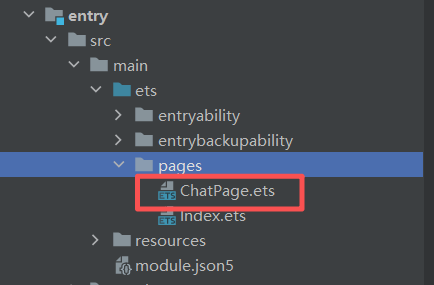
然后开始写UI代码:
import { MessageData } from '../madel/MessageModel';
import { TipsDialog } from '@kit.ArkUI';

@Entry
@Component
struct ChatPage {
  @State messages: Array<MessageData> = [];
  @State inputText: string = '';
  @State isBotTyping: boolean = false;
  @State isNewChat: boolean = true;


  // 模拟AI响应
  private simulateAIResponse() {
    this.isBotTyping = true;
    setTimeout(() => {
      this.messages.push({
        role: 'bot',
        content: '这是一个模拟回复,实际应调用AI接口',
        time: new Date().toLocaleTimeString('zh', { hour: '2-digit', minute: '2-digit' })
      });
      this.isBotTyping = false;
    }, 1000);
  }

  dialogController: CustomDialogController = new CustomDialogController({
    builder: TipsDialog({
      imageRes: $r('app.media.icon_chat'),
      content: '想要开启新的对话吗?',
      primaryButton: {
        value: '取消',
        action: () => {
        },
      },
      secondaryButton: {
        value: '确认',
        role: ButtonRole.ERROR,
        action: () => {
          this.isNewChat = true
          this.messages = []
        }
      },
      onCheckedChange: () => {
      }
    }),
  })


  sendMessage(text:string){
    this.isNewChat = false
    // 添加用户消息
    this.messages.push({
      role: 'user',
      content: text,
      time: new Date().toLocaleTimeString('zh', { hour: '2-digit', minute: '2-digit' })
    });
    this.inputText = '';
    this.simulateAIResponse();
  }

  aboutToAppear(): void {
    this.isNewChat = true
  }

  build() {

    Stack(){

      Column() {
        if (this.isNewChat){
          Column(){
            Image($r('app.media.icon_chat'))
              .width(80)
              .height(80)
              .margin(20)

            Text('嗨!我是AI聊天语音机器人助手')
              .fontColor('#000')
              .fontSize(20)
              .margin({bottom:10})
              .fontWeight(FontWeight.Regular)


            Text('你好,我是你的智能助手,有什么需要帮助的')
              .fontColor('#555')
              .fontSize(13)
              .margin({bottom:20})


            Text('今天天气怎么样')
              .fontColor('#333')
              .fontSize(15)
              .margin({bottom:20})
              .borderRadius(4)
              .backgroundColor('#ddd')
              .padding(5)
              .onClick(()=>{
                this.sendMessage('今天天气怎么样')
              })

            Text('给我几个城市选项')
              .fontColor('#333')
              .fontSize(15)
              .margin({bottom:20,right:'40%'})
              .borderRadius(4)
              .backgroundColor('#ddd')
              .padding(5)
              .onClick(()=>{
                this.sendMessage('给我几个城市选项')
              })

            Text('如何生成一篇800字的作文')
              .fontColor('#333')
              .fontSize(15)
              .margin({bottom:20,right:'10%'})
              .borderRadius(4)
              .backgroundColor('#ddd')
              .padding(5)
              .onClick(()=>{
                this.sendMessage('如何生成一篇800字的作文')
              })

            Text('推荐旅游攻略')
              .fontColor('#333')
              .fontSize(15)
              .margin({bottom:20,left:'30%'})
              .borderRadius(4)
              .backgroundColor('#ddd')
              .padding(5)
              .onClick(()=>{
                this.sendMessage('推荐旅游攻略')
              })

            Text('推荐生活小妙招')
              .fontColor('#333')
              .fontSize(15)
              .margin({bottom:20,right:'10%'})
              .borderRadius(4)
              .backgroundColor('#ddd')
              .padding(5)
              .onClick(()=>{
                this.sendMessage('推荐生活小妙招')
              })
          }
          .layoutWeight(1)
          .width('100%')
          .padding(16)
        }else {
          // 聊天内容区域
          List({ space: 12 }) {
            ForEach(this.messages, (item:MessageData) => {
              ListItem() {
                Column() {
                  if (item.role === 'user') {
                    // 用户消息样式
                    Row(){
                      Column(){
                        Text(item.content)
                          .padding(8)
                          .backgroundColor('#E6F7FF')
                          .borderRadius(10)

                        Text(item.time)
                          .fontSize(12)
                          .fontColor('#999')

                      }.layoutWeight(1)
                      .alignItems(HorizontalAlign.End)

                      Image($r('app.media.dolphin'))
                        .width(30)
                        .height(30)
                        .margin({left:5})
                    }

                  } else {
                    // 机器人消息样式
                    Row(){
                      Image($r('app.media.icon_chat'))
                        .width(30)
                        .height(30)
                        .margin({right:5})

                      Column(){
                        Text(item.content)
                          .padding(8)
                          .backgroundColor('#F5F5F5')
                          .borderRadius(10)

                        Text(item.time)
                          .fontSize(12)
                          .fontColor('#999')
                      }.layoutWeight(1)
                      .alignItems(HorizontalAlign.Start)
                    }


                  }
                }
              }
            })
          }
          .layoutWeight(1)
          .width('100%')
          .padding(16)
        }


        // 输入区域
        Row() {

          Image($r('app.media.microphone'))
            .padding(3)
            .height(30)
            .width(30)

          TextInput({
            text: this.inputText,
            placeholder: '请输入消息...'
          })
            .margin({left:10})
            .height(40)
            .layoutWeight(1)
            .borderRadius(24)
            .padding(8)
            .backgroundColor(Color.White)
            .onChange((value) => {
              this.inputText = value
            })


          Image(this.isBotTyping?$r('app.media.playing'):$r('app.media.send'))
            .height(30)
            .width(30)
            .margin({left:10})
            .onClick(() => {
              if (this.inputText.trim()) {
                this.sendMessage(this.inputText)
              }
            })

          Image($r('app.media.add_ring'))
            .height(30)
            .width(30)
            .margin({left:10})
            .onClick(() => {
              if (!this.isNewChat) {
                this.dialogController.open()
              }
            })
        }
        .width('100%')
        .padding(10)
        .backgroundColor('#F8F8F8')

      }
      .height('100%')

    }.height('100%')
    .width('100%')

  }
}
第二步:创建一个聊天消息数据模型
路径//ets/model/MessageModel.ets
export interface MessageData{
  role: 'bot'|'user',
  content: string,
  time: string
}
资源文件:






项目Demo:AIchatRobot: 鸿蒙app的AI聊天机器人
持续更新中······

讨论HarmonyOS开发技术,专注于API与组件、DevEco Studio、测试、元服务和应用上架分发等。
更多推荐



 8
8 0
0- 0


 已为社区贡献24条内容

所有评论(0)