基于HarmonyOS关系型数据库的房间管理系统设计与实现代码放置位置
·
代码放置位置:
将上述完整代码复制到 entry/src/main/ets/pages/Index.ets 文件中,替换原有内容即可。
功能说明
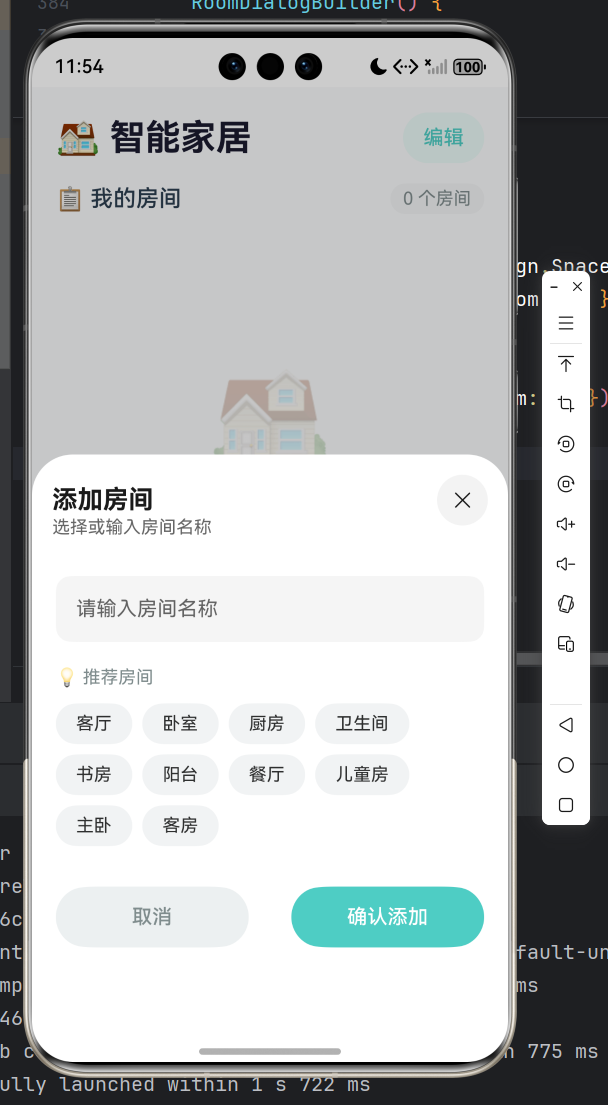
本实验实现了一个完整的智能家居房间管理应用,通过HarmonyOS的关系型数据库(relationalStore)对房间数据进行持久化存储,支持房间的添加、删除、修改、查询等核心功能。用户可以在应用首页查看所有房间列表,通过“编辑”模式对房间进行修改或删除操作,点击“添加房间”按钮可输入房间名称或从推荐的房间列表中选择快速添加。应用采用卡片式UI设计,每个房间以不同颜色的圆点进行视觉区分,界面简洁美观。该实验全面覆盖了数据库的建表、增删改查、结果集处理等核心知识点,是理解HarmonyOS数据持久化存储的完整实践案例。
代码:(ArkTS 语言)
// Index.ets - 简化完整版房间管理应用
// 功能:基于HarmonyOS关系型数据库实现房间的增删改查操作

// 导入关系型数据库模块 - 用于数据持久化存储
import relationalStore from '@ohos.data.relationalStore';
// 导入提示框模块 - 用于显示操作结果提示
import promptAction from '@ohos.promptAction';

/**
 * 房间数据模型类
 * 用于封装房间的数据结构,对应数据库中的ROOMS表
 */
class RoomData {
  id: number = -1;      // 房间ID,主键,自动递增
  name: string = '';    // 房间名称

  constructor(id: number, name: string) {
    this.id = id;
    this.name = name;
  }
}

@Entry
@Component
struct Index {
  // ==================== 状态变量定义 ====================

  @State rooms: RoomData[] = [];           // 房间列表数据,驱动UI更新
  @State isEditMode: boolean = false;      // 编辑模式标志:true显示编辑/删除按钮,false显示详情按钮
  @State showCreateDialog: boolean = false; // 对话框显示控制:true显示,false隐藏
  @State newRoomName: string = '';          // 新增房间的名称(临时存储)
  @State editRoomName: string = '';         // 编辑房间的名称(临时存储)
  @State editingRoomId: number = -1;        // 正在编辑的房间ID,-1表示新增模式
  @State isLoading: boolean = true;         // 加载状态:true显示加载动画,false显示内容

  // ==================== 私有成员变量 ====================

  private rdbStore: relationalStore.RdbStore | null = null;  // 数据库实例对象
  private context: Context = getContext(this);               // 应用上下文,用于获取数据库路径
  private isDbReady: boolean = false;                        // 数据库就绪标志

  // 推荐房间名称列表(快速选择用)
  private recommendedRooms: string[] = [
    '客厅', '卧室', '厨房', '卫生间', '书房',
    '阳台', '餐厅', '儿童房', '主卧', '客房'
  ];

  // ==================== 生命周期方法 ====================

  /**
   * 页面加载时自动调用
   * 执行顺序:初始化数据库 -> 加载房间数据 -> 关闭加载动画
   */
  async aboutToAppear() {
    await this.initDatabase();  // 初始化数据库(建库、建表)
    await this.loadRooms();     // 从数据库加载房间数据
    this.isLoading = false;     // 数据加载完成,关闭加载动画
  }

  // ==================== 数据库操作方法 ====================

  /**
   * 初始化数据库
   * 1. 创建/打开数据库文件
   * 2. 创建数据表(如果不存在)
   */
  async initDatabase(): Promise<void> {
    return new Promise((resolve) => {
      // 数据库配置对象
      const STORE_CONFIG: relationalStore.StoreConfig = {
        name: 'RoomDatabase.db',                    // 数据库文件名
        securityLevel: relationalStore.SecurityLevel.S1  // 安全级别
      };

      // 获取数据库实例(异步操作)
      relationalStore.getRdbStore(this.context, STORE_CONFIG, (err, store) => {
        if (err) {
          console.error('数据库初始化失败');
          resolve();
          return;
        }
        this.rdbStore = store;  // 保存数据库实例

        // 创建表:ID主键自增,NAME非空
        const sql = 'CREATE TABLE IF NOT EXISTS ROOMS (ID INTEGER PRIMARY KEY AUTOINCREMENT, NAME TEXT NOT NULL)';
        this.rdbStore!.executeSql(sql);  // 执行SQL语句

        this.isDbReady = true;  // 标记数据库已就绪
        console.info('数据库初始化成功');
        resolve();
      });
    });
  }

  /**
   * 从数据库加载所有房间数据
   * 使用RdbPredicates构建查询条件,按ID升序排列
   */
  async loadRooms(): Promise<void> {
    if (!this.rdbStore || !this.isDbReady) {
      this.rooms = [];
      return;
    }

    // 创建谓词(查询条件对象)
    const predicates = new relationalStore.RdbPredicates('ROOMS');
    predicates.orderByAsc('ID');  // 按ID升序排列

    return new Promise((resolve) => {
      // 执行查询,返回结果集
      this.rdbStore!.query(predicates, ['ID', 'NAME'], (err, resultSet) => {
        if (err) {
          this.rooms = [];
          resolve();
          return;
        }

        const roomList: RoomData[] = [];
        // 遍历结果集,将数据转换为RoomData对象
        if (resultSet && resultSet.rowCount > 0) {
          resultSet.goToFirstRow();  // 移动到第一行
          for (let i = 0; i < resultSet.rowCount; i++) {
            const id = resultSet.getLong(resultSet.getColumnIndex('ID'));    // 获取ID
            const name = resultSet.getString(resultSet.getColumnIndex('NAME')); // 获取名称
            roomList.push(new RoomData(id, name));
            resultSet.goToNextRow();  // 移动到下一行
          }
        }
        // 关闭结果集,释放资源
        if (resultSet) {
          resultSet.close();
        }
        this.rooms = roomList;  // 更新UI数据
        resolve();
      });
    });
  }

  /**
   * 添加新房间
   * 1. 校验数据库是否就绪
   * 2. 校验房间名称非空
   * 3. 校验名称是否重复
   * 4. 执行数据库插入操作
   */
  async addRoom(): Promise<void> {
    // 数据库未就绪提示
    if (!this.isDbReady) {
      promptAction.showToast({ message: '数据库初始化中...', duration: 1500 });
      return;
    }

    // 名称非空校验
    if (this.newRoomName.trim() === '') {
      promptAction.showToast({ message: '请输入房间名称', duration: 1500 });
      return;
    }

    // 名称重复校验
    const exists = this.rooms.some(room => room.name === this.newRoomName);
    if (exists) {
      promptAction.showToast({ message: '房间名称已存在', duration: 1500 });
      return;
    }

    // 构建要插入的数据
    const valueBucket: relationalStore.ValuesBucket = { 'NAME': this.newRoomName };

    // 执行插入操作
    this.rdbStore!.insert('ROOMS', valueBucket, async (err, rowId) => {
      if (err) {
        promptAction.showToast({ message: '添加失败', duration: 1500 });
      } else {
        promptAction.showToast({ message: '添加成功', duration: 1500 });
        this.newRoomName = '';           // 清空输入
        this.showCreateDialog = false;    // 关闭对话框
        await this.loadRooms();           // 刷新列表
      }
    });
  }

  /**
   * 删除房间
   * @param room - 要删除的房间对象
   */
  async deleteRoom(room: RoomData): Promise<void> {
    if (!this.isDbReady) return;

    // 构建删除条件:ID = 指定值
    const predicates = new relationalStore.RdbPredicates('ROOMS');
    predicates.equalTo('ID', room.id);

    // 执行删除操作
    this.rdbStore!.delete(predicates, async (err, rows) => {
      if (!err && rows > 0) {
        promptAction.showToast({ message: `已删除 ${room.name}`, duration: 1500 });
        await this.loadRooms();  // 刷新列表
      } else {
        promptAction.showToast({ message: '删除失败', duration: 1500 });
      }
    });
  }

  /**
   * 更新房间名称
   * 1. 校验名称非空
   * 2. 校验新名称是否与其他房间重复(排除自身)
   * 3. 执行数据库更新操作
   */
  async updateRoom(): Promise<void> {
    if (!this.isDbReady) return;

    // 名称非空校验
    if (this.editRoomName.trim() === '') {
      promptAction.showToast({ message: '请输入房间名称', duration: 1500 });
      return;
    }

    // 名称重复校验(排除当前编辑的房间)
    const exists = this.rooms.some(room =>
      room.name === this.editRoomName && room.id !== this.editingRoomId
    );
    if (exists) {
      promptAction.showToast({ message: '房间名称已存在', duration: 1500 });
      return;
    }

    // 构建要更新的数据
    const valueBucket: relationalStore.ValuesBucket = { 'NAME': this.editRoomName };
    // 构建更新条件:ID = 指定值
    const predicates = new relationalStore.RdbPredicates('ROOMS');
    predicates.equalTo('ID', this.editingRoomId);

    // 执行更新操作
    this.rdbStore!.update(valueBucket, predicates, async (err, rows) => {
      if (!err && rows > 0) {
        promptAction.showToast({ message: '修改成功', duration: 1500 });
        this.showCreateDialog = false;  // 关闭对话框
        await this.loadRooms();         // 刷新列表
      } else {
        promptAction.showToast({ message: '修改失败', duration: 1500 });
      }
    });
  }

  // ==================== UI交互方法 ====================

  /**
   * 显示删除确认对话框
   * @param room - 要删除的房间对象
   */
  showDeleteConfirm(room: RoomData): void {
    AlertDialog.show({
      title: '确认删除',
      message: `确定要删除 "${room.name}" 吗?`,
      autoCancel: true,
      alignment: DialogAlignment.Center,
      primaryButton: { value: '取消', action: () => {} },
      secondaryButton: {
        value: '删除',
        fontColor: Color.Red,
        action: () => { this.deleteRoom(room); }
      }
    });
  }

  /**
   * 打开编辑对话框
   * @param room - 要编辑的房间对象
   */
  openEditDialog(room: RoomData): void {
    this.editingRoomId = room.id;      // 记录正在编辑的房间ID
    this.editRoomName = room.name;      // 预填当前名称
    this.showCreateDialog = true;       // 显示对话框
  }

  /**
   * 获取房间卡片颜色(根据索引循环取色)
   * @param index - 房间在列表中的索引
   * @returns 颜色代码
   */
  getRoomColor(index: number): string {
    const colors = ['#FF6B6B', '#4ECDC4', '#45B7D1', '#96CEB4', '#FFEAA7', '#DDA0DD', '#98D8C8', '#F7B787'];
    return colors[index % colors.length];
  }

  // ==================== UI构建方法 ====================

  build() {
    Column() {
      // ---------- 顶部标题栏 ----------
      Row() {
        Text('🏠 智能家居')
          .fontSize(28)
          .fontWeight(FontWeight.Bold)
          .fontColor('#1A1A2E')

        Blank()  // 弹性空间,将按钮推到右侧

        // 编辑模式切换按钮
        Button(this.isEditMode ? '完成' : '编辑')
          .fontSize(16)
          .fontColor(this.isEditMode ? '#FF6B6B' : '#4ECDC4')
          .backgroundColor(this.isEditMode ? '#FFF0F0' : '#E8F8F5')
          .borderRadius(20)
          .padding({ left: 16, right: 16, top: 6, bottom: 6 })
          .onClick(() => { this.isEditMode = !this.isEditMode; })
      }
      .width('90%')
      .margin({ top: 20, bottom: 16 })

      // ---------- 统计栏:显示房间数量 ----------
      Row() {
        Text('📋 我的房间')
          .fontSize(18)
          .fontWeight(FontWeight.Medium)
          .fontColor('#2C3E50')
        Blank()
        Text(`${this.rooms.length} 个房间`)
          .fontSize(14)
          .fontColor('#7F8C8D')
          .padding({ left: 10, right: 10, top: 4, bottom: 4 })
          .backgroundColor('#F0F3F4')
          .borderRadius(15)
      }
      .width('90%')
      .margin({ bottom: 16 })

      // ---------- 内容区域(三种状态:加载中、空列表、列表展示)----------

      // 状态1:正在加载数据
      if (this.isLoading) {
        Column() {
          LoadingProgress().width(50).height(50).color('#4ECDC4').margin({ top: 100 })
          Text('加载中...').fontSize(14).fontColor('#95A5A6').margin({ top: 16 })
        }
        .width('100%')
        .layoutWeight(1)
      }
      // 状态2:列表为空
      else if (this.rooms.length === 0) {
        Column() {
          Text('🏠').fontSize(80).opacity(0.3).margin({ top: 100 })
          Text('暂无房间').fontSize(18).fontColor('#BDC3C7').margin({ top: 16 })
          Text('点击下方按钮添加第一个房间').fontSize(14).fontColor('#D5D8DC').margin({ top: 8 })
        }
        .width('100%')
        .layoutWeight(1)
      }
      // 状态3:显示房间列表
      else {
        Scroll() {
          Column() {
            // ForEach循环渲染每个房间卡片
            ForEach(this.rooms, (room: RoomData, index: number) => {
              Row() {
                // 左侧:彩色圆点 + 房间名称 + ID
                Row() {
                  Circle().width(12).height(12).fill(this.getRoomColor(index)).margin({ right: 12 })
                  Text(room.name)
                    .fontSize(18)
                    .fontWeight(FontWeight.Medium)
                    .fontColor('#2C3E50')
                  Text(` #${room.id}`)
                    .fontSize(12)
                    .fontColor('#95A5A6')
                }

                Blank()

                // 右侧按钮:根据编辑模式显示不同按钮
                if (this.isEditMode) {
                  // 编辑模式:显示编辑和删除按钮
                  Row() {
                    Button('编辑')
                      .fontSize(14)
                      .fontColor('#4ECDC4')
                      .backgroundColor('#E8F8F5')
                      .borderRadius(20)
                      .padding({ left: 16, right: 16, top: 6, bottom: 6 })
                      .margin({ right: 8 })
                      .onClick(() => { this.openEditDialog(room); })

                    Button('删除')
                      .fontSize(14)
                      .fontColor('#FF6B6B')
                      .backgroundColor('#FFF0F0')
                      .borderRadius(20)
                      .padding({ left: 16, right: 16, top: 6, bottom: 6 })
                      .onClick(() => { this.showDeleteConfirm(room); })
                  }
                } else {
                  // 正常模式:显示详情按钮
                  Button('详情')
                    .fontSize(14)
                    .fontColor(Color.White)
                    .backgroundColor('#4ECDC4')
                    .borderRadius(20)
                    .padding({ left: 20, right: 20, top: 6, bottom: 6 })
                    .onClick(() => {
                      AlertDialog.show({
                        title: room.name,
                        message: `房间ID: ${room.id}\n\n点击编辑按钮可修改房间名称`,
                        autoCancel: true,
                        alignment: DialogAlignment.Center,
                        confirm: { value: '知道了', action: () => {} }
                      });
                    })
                }
              }
              .width('90%')
              .padding({ left: 16, right: 16, top: 14, bottom: 14 })
              .backgroundColor(Color.White)
              .borderRadius(16)
              .margin({ bottom: 12 })
              .shadow({ radius: 6, color: '#1A000000', offsetY: 2 })  // 卡片阴影效果
            }, (room: RoomData) => room.id.toString())  // 使用id作为唯一键
          }
          .width('100%')
          .padding({ bottom: 20 })
        }
        .scrollBar(BarState.Off)  // 隐藏滚动条
        .layoutWeight(1)
      }

      // ---------- 底部添加按钮(固定位置)----------
      Button() {
        Row() {
          Text('+').fontSize(28).fontWeight(FontWeight.Bold).fontColor(Color.White)
          Text('添加房间').fontSize(18).fontWeight(FontWeight.Medium).fontColor(Color.White).margin({ left: 8 })
        }
      }
      .width('90%')
      .height(56)
      .backgroundColor('#4ECDC4')
      .borderRadius(28)
      .margin({ bottom: 20 })
      .onClick(() => {
        // 数据库未就绪提示
        if (!this.isDbReady) {
          promptAction.showToast({ message: '数据库初始化中...', duration: 1500 });
          return;
        }
        // 重置表单数据
        this.newRoomName = '';
        this.editingRoomId = -1;
        this.editRoomName = '';
        this.showCreateDialog = true;  // 显示对话框
      })
    }
    .width('100%')
    .height('100%')
    .backgroundColor('#F8F9FA')

    // ---------- 底部弹出对话框(添加/编辑共用)----------
    .bindSheet($$this.showCreateDialog, this.RoomDialogBuilder(), {
      height: this.editingRoomId === -1 ? 480 : 280,  // 添加模式更高(显示推荐列表),编辑模式较矮
      dragBar: true,        // 显示拖拽条
      backgroundColor: '#FFFFFF',
      showClose: true,      // 显示关闭按钮
      title: {
        title: this.editingRoomId === -1 ? '添加房间' : '编辑房间',
        subtitle: this.editingRoomId === -1 ? '选择或输入房间名称' : '修改房间名称'
      }
    })
  }

  /**
   * 房间对话框构建器(添加/编辑共用)
   * 包含:输入框、推荐列表(仅添加模式)、确认/取消按钮
   */
  @Builder
  RoomDialogBuilder() {
    Column() {
      // ---------- 名称输入框 ----------
      TextInput({
        placeholder: this.editingRoomId === -1 ? '请输入房间名称' : '请输入新的房间名称',
        text: this.editingRoomId === -1 ? this.newRoomName : this.editRoomName
      })
        .width('90%')
        .height(52)
        .fontSize(16)
        .backgroundColor('#F5F5F5')
        .borderRadius(12)
        .padding({ left: 16, right: 16 })
        .onChange((value: string) => {
          // 根据模式更新不同的状态变量
          if (this.editingRoomId === -1) {
            this.newRoomName = value;
          } else {
            this.editRoomName = value;
          }
        })

      // ---------- 推荐房间列表(仅添加模式显示)----------
      if (this.editingRoomId === -1) {
        Text('💡 推荐房间')
          .fontSize(14)
          .fontColor('#7F8C8D')
          .width('90%')
          .margin({ top: 20, bottom: 12 })

        // Flex布局实现换行效果
        Flex({ wrap: FlexWrap.Wrap, justifyContent: FlexAlign.Start }) {
          ForEach(this.recommendedRooms, (roomName: string) => {
            Text(roomName)
              .padding({ left: 16, right: 16, top: 8, bottom: 8 })
              .fontSize(14)
              .backgroundColor('#F0F3F4')
              .borderRadius(20)
              .margin({ right: 8, bottom: 8 })
              .onClick(() => {
                this.newRoomName = roomName;  // 点击推荐名称自动填充
              })
          }, (roomName: string) => roomName)
        }
        .width('90%')
      }

      // ---------- 底部按钮区域 ----------
      Row() {
        // 取消按钮
        Button('取消')
          .width('45%')
          .height(48)
          .fontSize(16)
          .backgroundColor('#ECF0F1')
          .fontColor('#7F8C8D')
          .borderRadius(24)
          .onClick(() => {
            this.showCreateDialog = false;  // 关闭对话框
            this.newRoomName = '';
            this.editRoomName = '';
          })

        // 确认按钮(根据模式显示不同文字和颜色)
        Button(this.editingRoomId === -1 ? '确认添加' : '保存修改')
          .width('45%')
          .height(48)
          .fontSize(16)
          .backgroundColor(this.editingRoomId === -1 ? '#4ECDC4' : '#FF6B6B')
          .fontColor(Color.White)
          .borderRadius(24)
          .onClick(() => {
            if (this.editingRoomId === -1) {
              this.addRoom();     // 添加模式
            } else {
              this.updateRoom();  // 编辑模式
            }
          })
      }
      .width('90%')
      .justifyContent(FlexAlign.SpaceBetween)
      .margin({ top: 24, bottom: 16 })
    }
    .width('100%')
    .padding({ top: 16, bottom: 16 })
  }
}
具体效果:

讨论HarmonyOS开发技术,专注于API与组件、DevEco Studio、测试、元服务和应用上架分发等。
更多推荐

 0
0 0
0- 0


 已为社区贡献2条内容

所有评论(0)