HarmonyOS 入门实战:随机名言卡片(含代码及具体实现效果)
·
简单介绍:
使用的是DevEco Studio
在项目结构中,该代码应放置在 entry/src/main/ets/pages/Index.ets 路径下(直接替换新建的 Empty Ability 项目中的同名文件即可),无需额外配置即可运行。
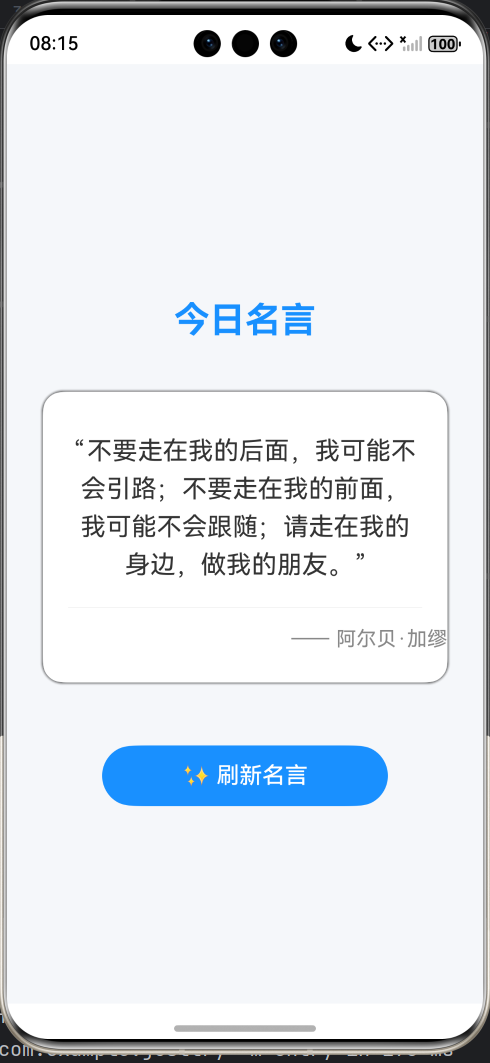
代码通过定义 Quote 数据类存放名言与作者,利用 @State 状态变量实现 UI 自动刷新,并在用户点击“✨ 刷新名言”按钮时从内置数组中随机选取一条名言进行展示。整个界面采用白色圆角卡片承载名言内容,配有柔和阴影与蓝色主题按钮。
代码:(ArkTS 语言)
// Index.ets
// 1. 引入必要的系统包
import { BusinessError } from '@kit.BasicServicesKit';

// 2. 定义数据结构,用来存放名言列表
class Quote {
  content: string = '';
  author: string = '';
}

// 3. 应用主入口(@Entry)和自定义组件(@Component)
@Entry
@Component
struct Index {
  // 4. 状态变量:当它变化时,界面会自动刷新
  @State currentQuote: Quote = { content: '加载中...', author: '' };

  // 5. 模拟一个名言数据库(实际开发中可以从网络获取)
  private quoteDatabase: Quote[] = [
    { content: '生活就像一盒巧克力,你永远不知道你会得到什么。', author: '《阿甘正传》' },
    { content: '我们所做的事,在永恒中都会留下回响。', author: '《角斗士》' },
    { content: '不要让你的梦想只是梦想。', author: '佚名' },
    { content: '不要走在我的后面,我可能不会引路;不要走在我的前面,我可能不会跟随;请走在我的身边,做我的朋友。', author: '阿尔贝·加缪' },
    { content: '简洁是智慧的灵魂。', author: '莎士比亚' },
  ];

  // 6. 业务逻辑:随机获取一条名言并更新状态变量
  refreshQuote(): void {
    // 随机生成一个索引
    let randomIndex = Math.floor(Math.random() * this.quoteDatabase.length);
    // 更新状态变量,这会自动触发UI刷新
    this.currentQuote = this.quoteDatabase[randomIndex];
  }

  // 7. UI构建函数
  build() {
    // 使用Column进行垂直布局
    Column() {
      // --- 应用标题 ---
      Text('今日名言')
        .fontSize(28)
        .fontWeight(FontWeight.Bold)
        .fontColor('#1890FF')
        .margin({ top: 30, bottom: 40 })

      // --- 卡片背景区域,用来显示名言内容 ---
      Column() {
        Text(`“${this.currentQuote.content}”`)
          .fontSize(20)
          .fontColor('#333333')
          .lineHeight(30) // 设置行高,让多行文本更舒适
          .margin({ left: 20, right: 20, top: 30, bottom: 20 })
          .textAlign(TextAlign.Center) // 文本居中

        Divider() // 一条优雅的分割线
          .margin({ left: 20, right: 20 })
          .height(1)
          .color('#E0E0E0')

        Text(`—— ${this.currentQuote.author}`)
          .fontSize(16)
          .fontColor('#888888')
          .margin({ left: 20, right: 20, top: 15, bottom: 25 })
          .width('100%')
          .textAlign(TextAlign.End) // 作者名右对齐
      }
      .width('85%')
      .borderRadius(16) // 圆角卡片
      .backgroundColor('#FFFFFF')
      .shadow({ radius: 10, color: '#RGBA(0,0,0,0.1)' }) // 添加阴影,提升质感
      .margin({ bottom: 50 })

      // --- 交互按钮 ---
      Button('✨ 刷新名言')
        .fontSize(18)
        .fontWeight(FontWeight.Medium)
        .height(48)
        .width('60%')
        .backgroundColor('#1890FF')
        .borderRadius(24)
        // 绑定点击事件,调用刷新方法
        .onClick(() => {
          this.refreshQuote();
          console.info('名言已刷新'); // 在控制台输出日志
        })
    }
    .width('100%')
    .height('100%')
    .backgroundColor('#F5F7FA') // 设置页面整体背景色
    .justifyContent(FlexAlign.Center) // 使Column内的所有子元素在垂直方向上居中
  }
}
实现效果:

讨论HarmonyOS开发技术,专注于API与组件、DevEco Studio、测试、元服务和应用上架分发等。
更多推荐

 0
0 0
0- 0


 已为社区贡献2条内容

所有评论(0)