用KMP鸿蒙处理数组操作
项目概述
数组(或称为集合)是现代编程中最基础的数据结构之一。在实际应用开发中,我们经常需要对数组进行各种操作,如排序、过滤、映射、聚合等。然而,不同的编程语言和平台对数组操作的支持各不相同,这导致开发者需要在不同平台上重复编写类似的逻辑。
本文介绍一个基于 Kotlin Multiplatform (KMP) 和 OpenHarmony 平台的数组处理工具库。这个工具库提供了一套完整的数组处理能力,包括排序、过滤、映射、聚合、去重、分组、查找等功能。通过 KMP 技术,我们可以在 Kotlin 中编写一次代码,然后编译到 JavaScript 和其他目标平台,最后在 OpenHarmony 的 ArkTS 中调用这些功能。
技术架构
多平台支持
- Kotlin/JVM: 后端服务和桌面应用
- Kotlin/JS: Web 应用和浏览器环境
- OpenHarmony/ArkTS: 鸿蒙操作系统应用
核心功能模块
- 数组排序: 支持多种排序算法和自定义排序规则
- 数组过滤: 根据条件过滤数组元素
- 数组映射: 将数组元素转换为其他形式
- 数组聚合: 对数组元素进行求和、求平均等操作
- 数组去重: 移除数组中的重复元素
- 数组分组: 按照条件对数组元素进行分组
- 数组查找: 查找数组中满足条件的元素
- 数组合并: 合并多个数组
Kotlin 实现
核心数组处理类
// 文件: src/commonMain/kotlin/ArrayProcessor.kt

/**
 * 数组处理工具类
 * 提供数组排序、过滤、映射、聚合等功能
 */
class ArrayProcessor {

    /**
     * 对数组进行排序
     * @param array 要排序的数组
     * @param ascending 是否升序排列
     * @return 排序后的数组
     */
    fun sortArray(array: List<Int>, ascending: Boolean = true): List<Int> {
        return if (ascending) {
            array.sorted()
        } else {
            array.sortedDescending()
        }
    }

    /**
     * 对字符串数组进行排序
     * @param array 要排序的字符串数组
     * @param ascending 是否升序排列
     * @return 排序后的数组
     */
    fun sortStringArray(array: List<String>, ascending: Boolean = true): List<String> {
        return if (ascending) {
            array.sorted()
        } else {
            array.sortedDescending()
        }
    }

    /**
     * 过滤数组
     * @param array 要过滤的数组
     * @param predicate 过滤条件
     * @return 过滤后的数组
     */
    fun filterArray(array: List<Int>, predicate: (Int) -> Boolean): List<Int> {
        return array.filter(predicate)
    }

    /**
     * 映射数组
     * @param array 要映射的数组
     * @param transform 转换函数
     * @return 映射后的数组
     */
    fun mapArray(array: List<Int>, transform: (Int) -> Int): List<Int> {
        return array.map(transform)
    }

    /**
     * 映射为字符串数组
     * @param array 要映射的数组
     * @return 映射后的字符串数组
     */
    fun mapToString(array: List<Int>): List<String> {
        return array.map { it.toString() }
    }

    /**
     * 求和
     * @param array 数组
     * @return 数组元素的和
     */
    fun sum(array: List<Int>): Int {
        return array.sum()
    }

    /**
     * 求平均值
     * @param array 数组
     * @return 数组元素的平均值
     */
    fun average(array: List<Int>): Double {
        return if (array.isEmpty()) 0.0 else array.average()
    }

    /**
     * 求最大值
     * @param array 数组
     * @return 数组中的最大值
     */
    fun max(array: List<Int>): Int? {
        return array.maxOrNull()
    }

    /**
     * 求最小值
     * @param array 数组
     * @return 数组中的最小值
     */
    fun min(array: List<Int>): Int? {
        return array.minOrNull()
    }

    /**
     * 去除数组中的重复元素
     * @param array 数组
     * @return 去重后的数组
     */
    fun removeDuplicates(array: List<Int>): List<Int> {
        return array.distinct()
    }

    /**
     * 对数组进行分组
     * @param array 数组
     * @param groupSize 每组的大小
     * @return 分组后的数组列表
     */
    fun groupArray(array: List<Int>, groupSize: Int): List<List<Int>> {
        return array.chunked(groupSize)
    }

    /**
     * 查找数组中的元素
     * @param array 数组
     * @param value 要查找的值
     * @return 元素的索引,如果不存在返回 -1
     */
    fun indexOf(array: List<Int>, value: Int): Int {
        return array.indexOf(value)
    }

    /**
     * 查找数组中满足条件的第一个元素
     * @param array 数组
     * @param predicate 条件
     * @return 满足条件的元素,如果不存在返回 null
     */
    fun findFirst(array: List<Int>, predicate: (Int) -> Boolean): Int? {
        return array.find(predicate)
    }

    /**
     * 查找数组中满足条件的所有元素
     * @param array 数组
     * @param predicate 条件
     * @return 满足条件的元素列表
     */
    fun findAll(array: List<Int>, predicate: (Int) -> Boolean): List<Int> {
        return array.filter(predicate)
    }

    /**
     * 合并多个数组
     * @param arrays 要合并的数组列表
     * @return 合并后的数组
     */
    fun mergeArrays(arrays: List<List<Int>>): List<Int> {
        return arrays.flatten()
    }

    /**
     * 反转数组
     * @param array 数组
     * @return 反转后的数组
     */
    fun reverseArray(array: List<Int>): List<Int> {
        return array.reversed()
    }

    /**
     * 检查数组是否包含某个元素
     * @param array 数组
     * @param value 要检查的值
     * @return 是否包含
     */
    fun contains(array: List<Int>, value: Int): Boolean {
        return array.contains(value)
    }

    /**
     * 获取数组的长度
     * @param array 数组
     * @return 数组长度
     */
    fun getLength(array: List<Int>): Int {
        return array.size
    }

    /**
     * 获取数组的子数组
     * @param array 数组
     * @param startIndex 开始索引
     * @param endIndex 结束索引
     * @return 子数组
     */
    fun subArray(array: List<Int>, startIndex: Int, endIndex: Int): List<Int> {
        return if (startIndex >= 0 && endIndex <= array.size && startIndex <= endIndex) {
            array.subList(startIndex, endIndex)
        } else {
            emptyList()
        }
    }

    /**
     * 统计数组中满足条件的元素个数
     * @param array 数组
     * @param predicate 条件
     * @return 满足条件的元素个数
     */
    fun count(array: List<Int>, predicate: (Int) -> Boolean): Int {
        return array.count(predicate)
    }

    /**
     * 检查数组中是否所有元素都满足条件
     * @param array 数组
     * @param predicate 条件
     * @return 是否所有元素都满足条件
     */
    fun all(array: List<Int>, predicate: (Int) -> Boolean): Boolean {
        return array.all(predicate)
    }

    /**
     * 检查数组中是否有元素满足条件
     * @param array 数组
     * @param predicate 条件
     * @return 是否有元素满足条件
     */
    fun any(array: List<Int>, predicate: (Int) -> Boolean): Boolean {
        return array.any(predicate)
    }
}
Kotlin 实现的核心特点
Kotlin 实现中的数组处理功能充分利用了 Kotlin 标准库的强大能力。sorted 和 sortedDescending 函数提供了简洁的排序方式,支持升序和降序两种模式。filter 和 map 函数是函数式编程的核心,它们允许开发者以声明式的方式表达数据转换逻辑。
聚合函数如 sum、average、max 和 min 提供了对数组元素的常见统计操作。这些函数返回单个值,代表了数组的某种特性。distinct 函数提供了简洁的去重方式,而 chunked 函数则提供了灵活的分组功能。
查找功能实现了多个版本:indexOf 用于查找值的位置,find 用于查找满足条件的第一个元素,findAll 用于查找所有满足条件的元素。这些不同的查找方式覆盖了实际应用中的各种需求。
flatten 函数提供了简洁的数组合并方式,它能够将嵌套的数组结构展平为单层数组。all 和 any 函数则提供了对数组元素的全局检查能力,这对于数据验证等场景非常有用。
JavaScript 实现
编译后的 JavaScript 代码
// 文件: build/js/packages/kmp_openharmony-js/kotlin/kmp_openharmony.js
// (由 Kotlin 编译器自动生成)

/**
 * ArrayProcessor 类的 JavaScript 版本
 * 通过 Kotlin/JS 编译器从 Kotlin 源代码生成
 */
class ArrayProcessor {
  /**
   * 对数组进行排序
   * @param {number[]} array - 要排序的数组
   * @param {boolean} ascending - 是否升序排列
   * @returns {number[]} 排序后的数组
   */
  sortArray(array, ascending = true) {
    const sorted = [...array].sort((a, b) => a - b);
    return ascending ? sorted : sorted.reverse();
  }

  /**
   * 对字符串数组进行排序
   * @param {string[]} array - 要排序的字符串数组
   * @param {boolean} ascending - 是否升序排列
   * @returns {string[]} 排序后的数组
   */
  sortStringArray(array, ascending = true) {
    const sorted = [...array].sort();
    return ascending ? sorted : sorted.reverse();
  }

  /**
   * 过滤数组
   * @param {number[]} array - 要过滤的数组
   * @param {Function} predicate - 过滤条件
   * @returns {number[]} 过滤后的数组
   */
  filterArray(array, predicate) {
    return array.filter(predicate);
  }

  /**
   * 映射数组
   * @param {number[]} array - 要映射的数组
   * @param {Function} transform - 转换函数
   * @returns {number[]} 映射后的数组
   */
  mapArray(array, transform) {
    return array.map(transform);
  }

  /**
   * 映射为字符串数组
   * @param {number[]} array - 要映射的数组
   * @returns {string[]} 映射后的字符串数组
   */
  mapToString(array) {
    return array.map(num => num.toString());
  }

  /**
   * 求和
   * @param {number[]} array - 数组
   * @returns {number} 数组元素的和
   */
  sum(array) {
    return array.reduce((acc, val) => acc + val, 0);
  }

  /**
   * 求平均值
   * @param {number[]} array - 数组
   * @returns {number} 数组元素的平均值
   */
  average(array) {
    return array.length === 0 ? 0 : array.reduce((acc, val) => acc + val, 0) / array.length;
  }

  /**
   * 求最大值
   * @param {number[]} array - 数组
   * @returns {number} 数组中的最大值
   */
  max(array) {
    return array.length === 0 ? null : Math.max(...array);
  }

  /**
   * 求最小值
   * @param {number[]} array - 数组
   * @returns {number} 数组中的最小值
   */
  min(array) {
    return array.length === 0 ? null : Math.min(...array);
  }

  /**
   * 去除数组中的重复元素
   * @param {number[]} array - 数组
   * @returns {number[]} 去重后的数组
   */
  removeDuplicates(array) {
    return [...new Set(array)];
  }

  /**
   * 对数组进行分组
   * @param {number[]} array - 数组
   * @param {number} groupSize - 每组的大小
   * @returns {number[][]} 分组后的数组列表
   */
  groupArray(array, groupSize) {
    const result = [];
    for (let i = 0; i < array.length; i += groupSize) {
      result.push(array.slice(i, i + groupSize));
    }
    return result;
  }

  /**
   * 查找数组中的元素
   * @param {number[]} array - 数组
   * @param {number} value - 要查找的值
   * @returns {number} 元素的索引
   */
  indexOf(array, value) {
    return array.indexOf(value);
  }

  /**
   * 查找数组中满足条件的第一个元素
   * @param {number[]} array - 数组
   * @param {Function} predicate - 条件
   * @returns {number} 满足条件的元素
   */
  findFirst(array, predicate) {
    return array.find(predicate) || null;
  }

  /**
   * 查找数组中满足条件的所有元素
   * @param {number[]} array - 数组
   * @param {Function} predicate - 条件
   * @returns {number[]} 满足条件的元素列表
   */
  findAll(array, predicate) {
    return array.filter(predicate);
  }

  /**
   * 合并多个数组
   * @param {number[][]} arrays - 要合并的数组列表
   * @returns {number[]} 合并后的数组
   */
  mergeArrays(arrays) {
    return arrays.flat();
  }

  /**
   * 反转数组
   * @param {number[]} array - 数组
   * @returns {number[]} 反转后的数组
   */
  reverseArray(array) {
    return [...array].reverse();
  }

  /**
   * 检查数组是否包含某个元素
   * @param {number[]} array - 数组
   * @param {number} value - 要检查的值
   * @returns {boolean} 是否包含
   */
  contains(array, value) {
    return array.includes(value);
  }

  /**
   * 获取数组的长度
   * @param {number[]} array - 数组
   * @returns {number} 数组长度
   */
  getLength(array) {
    return array.length;
  }

  /**
   * 获取数组的子数组
   * @param {number[]} array - 数组
   * @param {number} startIndex - 开始索引
   * @param {number} endIndex - 结束索引
   * @returns {number[]} 子数组
   */
  subArray(array, startIndex, endIndex) {
    if (startIndex >= 0 && endIndex <= array.length && startIndex <= endIndex) {
      return array.slice(startIndex, endIndex);
    } else {
      return [];
    }
  }

  /**
   * 统计数组中满足条件的元素个数
   * @param {number[]} array - 数组
   * @param {Function} predicate - 条件
   * @returns {number} 满足条件的元素个数
   */
  count(array, predicate) {
    return array.filter(predicate).length;
  }

  /**
   * 检查数组中是否所有元素都满足条件
   * @param {number[]} array - 数组
   * @param {Function} predicate - 条件
   * @returns {boolean} 是否所有元素都满足条件
   */
  all(array, predicate) {
    return array.every(predicate);
  }

  /**
   * 检查数组中是否有元素满足条件
   * @param {number[]} array - 数组
   * @param {Function} predicate - 条件
   * @returns {boolean} 是否有元素满足条件
   */
  any(array, predicate) {
    return array.some(predicate);
  }
}
JavaScript 实现的特点
JavaScript 版本完全由 Kotlin/JS 编译器自动生成,确保了与 Kotlin 版本的行为完全一致。JavaScript 的数组方法如 sort、filter、map 等提供了与 Kotlin 类似的功能。
JavaScript 的 reduce 函数是实现聚合操作的强大工具。在 sum 和 average 方法中,我们使用 reduce 来累积数组元素,这是一个函数式编程的经典模式。
JavaScript 的 Set 数据结构提供了一个优雅的去重方法。通过将数组转换为 Set,然后再转换回数组,我们可以轻松移除重复元素。
JavaScript 的 flat 方法提供了简洁的数组展平方式,这在合并嵌套数组时非常有用。every 和 some 方法则提供了对数组元素的全局检查能力。
ArkTS 调用代码
OpenHarmony 应用集成
// 文件: kmp_ceshiapp/entry/src/main/ets/pages/ArrayProcessorPage.ets

import { ArrayProcessor } from '../../../../../../../build/js/packages/kmp_openharmony-js/kotlin/kmp_openharmony';

@Entry
@Component
struct ArrayProcessorPage {
  @State inputArray: string = '';
  @State selectedOperation: string = 'sort';
  @State result: string = '';
  @State resultTitle: string = '';
  @State parameter: string = '';

  private arrayProcessor = new ArrayProcessor();

  private operations = [
    { name: '排序', value: 'sort' },
    { name: '过滤', value: 'filter' },
    { name: '映射', value: 'map' },
    { name: '求和', value: 'sum' },
    { name: '平均值', value: 'average' },
    { name: '最大值', value: 'max' },
    { name: '最小值', value: 'min' },
    { name: '去重', value: 'deduplicate' },
    { name: '分组', value: 'group' },
    { name: '查找', value: 'find' },
    { name: '反转', value: 'reverse' },
    { name: '统计', value: 'count' }
  ];

  build() {
    Column() {
      // 标题
      Text('📊 数组处理工具库')
        .fontSize(28)
        .fontWeight(FontWeight.Bold)
        .fontColor('#FFFFFF')
        .width('100%')
        .padding(20)
        .backgroundColor('#1A237E')
        .textAlign(TextAlign.Center)

      Scroll() {
        Column() {
          // 操作选择
          Column() {
            Text('选择操作')
              .fontSize(14)
              .fontWeight(FontWeight.Bold)
              .fontColor('#333333')
              .margin({ bottom: 12 })

            Flex({ wrap: FlexWrap.Wrap }) {
              ForEach(this.operations, (op: { name: string; value: string }) => {
                Button(op.name)
                  .layoutWeight(1)
                  .height(40)
                  .margin({ right: 8, bottom: 8 })
                  .backgroundColor(this.selectedOperation === op.value ? '#1A237E' : '#E0E0E0')
                  .fontColor(this.selectedOperation === op.value ? '#FFFFFF' : '#333333')
                  .fontSize(12)
                  .onClick(() => {
                    this.selectedOperation = op.value;
                    this.result = '';
                    this.resultTitle = '';
                    this.parameter = '';
                  })
              })
            }
            .width('100%')
          }
          .width('95%')
          .margin({ top: 16, left: '2.5%', right: '2.5%', bottom: 16 })
          .padding(12)
          .backgroundColor('#FFFFFF')
          .borderRadius(6)

          // 输入数组区域
          Column() {
            Text('输入数组 (逗号分隔)')
              .fontSize(14)
              .fontWeight(FontWeight.Bold)
              .fontColor('#333333')
              .margin({ bottom: 8 })

            TextInput({ placeholder: '例如: 5,2,8,1,9,3', text: this.inputArray })
              .onChange((value) => this.inputArray = value)
              .width('100%')
              .height(80)
              .padding(12)
              .border({ width: 1, color: '#4DB6AC' })
              .borderRadius(6)
              .fontSize(12)
              .backgroundColor('#F9F9F9')
          }
          .width('95%')
          .margin({ left: '2.5%', right: '2.5%', bottom: 16 })
          .padding(12)
          .backgroundColor('#FFFFFF')
          .borderRadius(6)

          // 参数输入区域
          if (this.selectedOperation === 'filter' || this.selectedOperation === 'group' ||
              this.selectedOperation === 'find' || this.selectedOperation === 'count') {
            Column() {
              Text('参数')
                .fontSize(12)
                .fontColor('#666666')
                .margin({ bottom: 8 })

              if (this.selectedOperation === 'group') {
                TextInput({ placeholder: '输入分组大小', text: this.parameter })
                  .onChange((value) => this.parameter = value)
                  .width('100%')
                  .height(50)
                  .padding(12)
                  .border({ width: 1, color: '#4DB6AC' })
                  .borderRadius(6)
                  .fontSize(12)
              } else {
                TextInput({ placeholder: '输入条件值或数字', text: this.parameter })
                  .onChange((value) => this.parameter = value)
                  .width('100%')
                  .height(50)
                  .padding(12)
                  .border({ width: 1, color: '#4DB6AC' })
                  .borderRadius(6)
                  .fontSize(12)
              }
            }
            .width('95%')
            .margin({ left: '2.5%', right: '2.5%', bottom: 16 })
            .padding(12)
            .backgroundColor('#FFFFFF')
            .borderRadius(6)
          }

          // 操作按钮
          Row() {
            Button('✨ 执行')
              .layoutWeight(1)
              .height(44)
              .backgroundColor('#1A237E')
              .fontColor('#FFFFFF')
              .fontSize(14)
              .fontWeight(FontWeight.Bold)
              .borderRadius(6)
              .onClick(() => this.executeOperation())

            Blank()
              .width(12)

            Button('🔄 清空')
              .layoutWeight(1)
              .height(44)
              .backgroundColor('#F5F5F5')
              .fontColor('#1A237E')
              .fontSize(14)
              .border({ width: 1, color: '#4DB6AC' })
              .borderRadius(6)
              .onClick(() => {
                this.inputArray = '';
                this.result = '';
                this.resultTitle = '';
                this.parameter = '';
              })
          }
          .width('95%')
          .margin({ left: '2.5%', right: '2.5%', bottom: 16 })

          // 结果显示
          if (this.resultTitle) {
            Column() {
              Text(this.resultTitle)
                .fontSize(16)
                .fontWeight(FontWeight.Bold)
                .fontColor('#FFFFFF')
                .width('100%')
                .padding(12)
                .backgroundColor('#1A237E')
                .borderRadius(6)
                .textAlign(TextAlign.Center)
                .margin({ bottom: 12 })

              Scroll() {
                Text(this.result)
                  .fontSize(12)
                  .fontColor('#333333')
                  .fontFamily('monospace')
                  .textAlign(TextAlign.Start)
                  .width('100%')
                  .padding(12)
              }
              .width('100%')
              .height(250)
              .backgroundColor('#F9F9F9')
              .border({ width: 1, color: '#4DB6AC' })
              .borderRadius(6)
            }
            .width('95%')
            .margin({ left: '2.5%', right: '2.5%', bottom: 16 })
            .padding(12)
            .backgroundColor('#FFFFFF')
            .borderRadius(6)
          }
        }
        .width('100%')
      }
      .layoutWeight(1)
      .width('100%')
    }
    .width('100%')
    .height('100%')
    .backgroundColor('#F5F5F5')
  }

  private executeOperation() {
    if (!this.inputArray.trim()) {
      this.resultTitle = '❌ 错误';
      this.result = '请输入数组数据';
      return;
    }

    try {
      const array = this.inputArray.split(',').map(s => parseInt(s.trim())).filter(n => !isNaN(n));

      if (array.length === 0) {
        this.resultTitle = '❌ 错误';
        this.result = '请输入有效的数字';
        return;
      }

      switch (this.selectedOperation) {
        case 'sort':
          const sorted = this.arrayProcessor.sortArray(array);
          this.resultTitle = '📊 排序结果';
          this.result = sorted.join(', ');
          break;

        case 'filter':
          const threshold = parseInt(this.parameter) || 5;
          const filtered = this.arrayProcessor.filterArray(array, (n) => n > threshold);
          this.resultTitle = `🔎 过滤结果 (> ${threshold})`;
          this.result = filtered.length > 0 ? filtered.join(', ') : '没有满足条件的元素';
          break;

        case 'map':
          const mapped = this.arrayProcessor.mapArray(array, (n) => n * 2);
          this.resultTitle = '🔄 映射结果 (×2)';
          this.result = mapped.join(', ');
          break;

        case 'sum':
          const total = this.arrayProcessor.sum(array);
          this.resultTitle = '➕ 求和结果';
          this.result = `总和: ${total}`;
          break;

        case 'average':
          const avg = this.arrayProcessor.average(array);
          this.resultTitle = '📈 平均值';
          this.result = `平均值: ${avg.toFixed(2)}`;
          break;

        case 'max':
          const maximum = this.arrayProcessor.max(array);
          this.resultTitle = '⬆️ 最大值';
          this.result = `最大值: ${maximum}`;
          break;

        case 'min':
          const minimum = this.arrayProcessor.min(array);
          this.resultTitle = '⬇️ 最小值';
          this.result = `最小值: ${minimum}`;
          break;

        case 'deduplicate':
          const unique = this.arrayProcessor.removeDuplicates(array);
          this.resultTitle = '✨ 去重结果';
          this.result = unique.join(', ');
          break;

        case 'group':
          const groupSize = parseInt(this.parameter) || 3;
          const grouped = this.arrayProcessor.groupArray(array, groupSize);
          this.resultTitle = `📋 分组结果 (每组${groupSize}个)`;
          this.result = grouped.map((g) => `[${g.join(', ')}]`).join('\n');
          break;

        case 'find':
          const searchValue = parseInt(this.parameter);
          if (isNaN(searchValue)) {
            this.resultTitle = '❌ 错误';
            this.result = '请输入要查找的数字';
            return;
          }
          const index = this.arrayProcessor.indexOf(array, searchValue);
          this.resultTitle = '🔍 查找结果';
          this.result = index >= 0 ? `找到元素 ${searchValue},位置: ${index}` : `未找到元素 ${searchValue}`;
          break;

        case 'reverse':
          const reversed = this.arrayProcessor.reverseArray(array);
          this.resultTitle = '🔃 反转结果';
          this.result = reversed.join(', ');
          break;

        case 'count':
          const threshold2 = parseInt(this.parameter) || 5;
          const count = this.arrayProcessor.count(array, (n) => n > threshold2);
          this.resultTitle = `📊 统计结果 (> ${threshold2})`;
          this.result = `满足条件的元素个数: ${count}`;
          break;
      }
    } catch (e) {
      this.resultTitle = '❌ 执行出错';
      this.result = `错误: ${e}`;
    }
  }
}
ArkTS 集成的关键要点
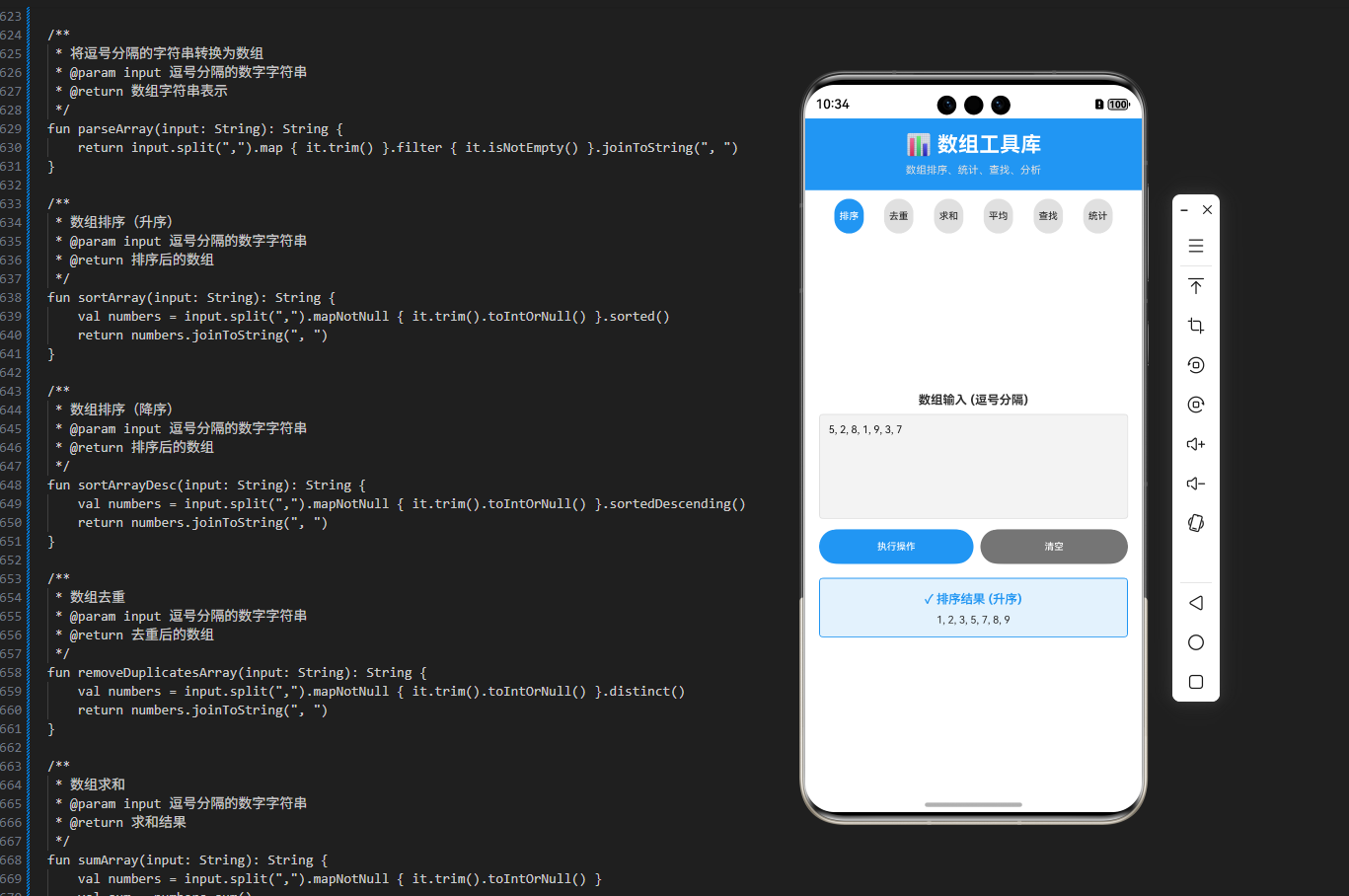
在 OpenHarmony 应用中集成数组处理工具库需要考虑多种操作类型和参数需求。我们设计了一个灵活的 UI,能够根据选择的操作动态显示相应的参数输入框。
操作选择界面使用了 Flex 布局和 FlexWrap 来实现响应式的按钮排列。这确保了在不同屏幕尺寸上都能有良好的显示效果。
输入数组的处理采用了逗号分隔的方式,这是一种常见且易于理解的格式。我们在解析时进行了验证,确保只有有效的数字才会被处理。
参数输入区域根据选择的操作动态显示。例如,分组操作需要一个分组大小参数,而查找操作需要一个要查找的数值。这种动态 UI 设计提高了用户体验。
结果显示使用了可滚动的文本区域,以便处理长的输出结果。对于某些操作(如分组),我们将结果格式化为易于阅读的形式,每行显示一个分组。
工作流程详解
数组处理的完整流程
- 用户输入: 用户在 ArkTS UI 中输入数组数据(逗号分隔)
- 操作选择: 用户选择要执行的数组操作
- 参数输入: 根据选择的操作输入必要的参数
- 数据解析: 将输入的字符串解析为数字数组
- 处理执行: 调用 ArrayProcessor 的相应方法
- 结果展示: 将处理结果显示在 UI 中
跨平台一致性
通过 KMP 技术,我们确保了在所有平台上的行为一致性。无论是在 Kotlin/JVM、Kotlin/JS 还是通过 ArkTS 调用,数组处理的逻辑和结果都是完全相同的。
实际应用场景
数据分析和统计
在处理数据集时,可以使用数组处理工具库来进行各种统计分析,如求和、平均值、最大值、最小值等。这对于生成报表和数据可视化非常有用。
数据清洗和转换
可以使用过滤和映射功能来清洗和转换数据。例如,可以过滤出满足条件的数据,或者将数据转换为其他形式。
数据去重和分组
在处理大量数据时,可以使用去重功能来移除重复项,使用分组功能来按照条件对数据进行组织。
搜索和查找
可以使用查找功能来在数组中快速定位特定的元素,这对于实现搜索功能非常有用。
性能优化
算法选择
对于大型数组,应该选择合适的排序算法。JavaScript 的 sort 方法通常使用快速排序或合并排序,性能较好。
内存管理
在处理大型数组时,应该避免创建过多的中间数组。可以使用迭代器或生成器来实现更高效的内存使用。
安全性考虑
输入验证
在处理用户输入的数组时,应该始终进行验证,确保数据的有效性和安全性。
边界检查
在进行数组访问时,应该检查索引是否在有效范围内,防止越界访问。
总结
这个 KMP OpenHarmony 数组处理工具库展示了如何使用现代的跨平台技术来处理常见的数组操作任务。通过 Kotlin Multiplatform 技术,我们可以在一个地方编写业务逻辑,然后在多个平台上使用。
数组处理是应用开发中的基础技能。通过使用这样的工具库,开发者可以快速、可靠地处理各种数组操作,从而提高开发效率和代码质量。
在实际应用中,建议根据具体的需求进行定制和扩展,例如添加更复杂的数据结构支持、实现自定义排序规则等高级特性。同时,定期进行性能测试和优化,确保应用在处理大型数组时仍然保持良好的性能。
欢迎加入开源鸿蒙跨平台社区:https://openharmonycrossplatform.csdn.net

讨论HarmonyOS开发技术,专注于API与组件、DevEco Studio、测试、元服务和应用上架分发等。
更多推荐



 29
29 0
0- 0


 已为社区贡献4条内容

所有评论(0)