用ArkTS写一个登录页面(实现简单的数据请求逻辑)
·
登录页面
1.登录页面编码
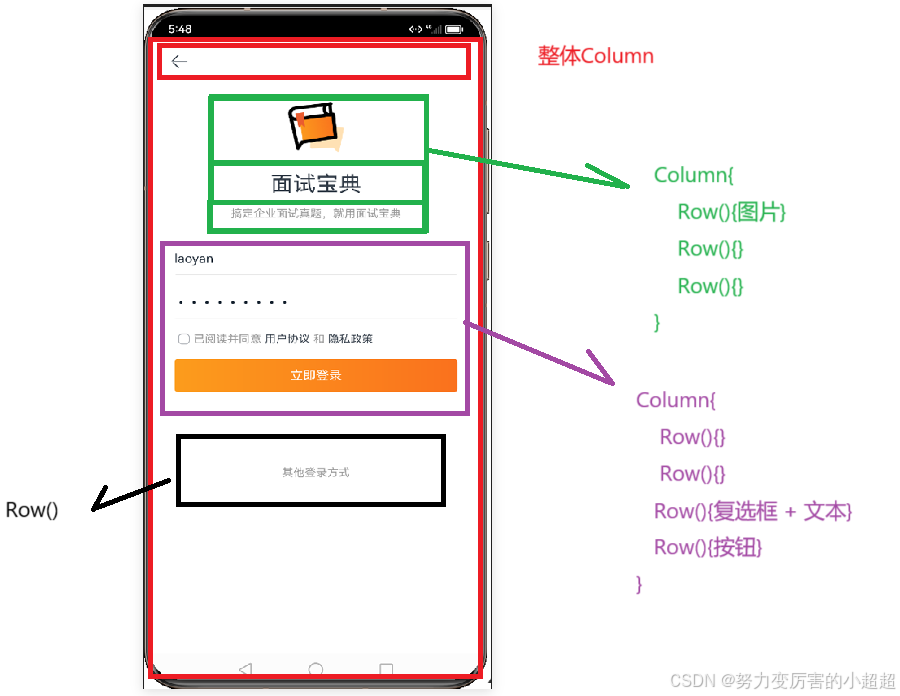
@Extend(TextInput) function customStyle(){
  .backgroundColor('#fff')
  .border({width:{bottom:0.5},color:'#e4e4e4'})
  .borderRadius(1) //让圆角不明显
  .placeholderColor('#c3c3c5')
  .caretColor('#fa711d') //input获取焦点样式
}

@Entry
@Component
struct LoginPage {

  build() {
    Column(){  //整个登录页面
      //图片文字部分
      Column(){
        Image($r('app.media.avatar'))
          .width(120)
          .aspectRatio(1)
        Text('面试宝典')
          .fontSize(28)
          .margin({bottom:15})
        Text('搞定企业面试真题,就用面试宝典')
          .fontSize(15)
          .fontColor('gray')
      }
      //表单部分
      Column({space:15}){
        TextInput({placeholder:'请输入账号'})
          .customStyle()
        TextInput({placeholder:'请输入密码'})
          .customStyle()
        Row(){
          Checkbox()
            .selectedColor('red')//选中的时候都额颜色
            .width(14)
            .aspectRatio(1)
            .shape(CheckBoxShape.ROUNDED_SQUARE) //也可以是0或是1
          Text('已阅读并同意')
            .fontSize(14)
            .fontColor('gray')
          Text(' 用户协议 ')
            .fontSize(14)
          Text('和')
            .fontSize(14)
            .fontColor('gray')
          Text(' 隐私政策')
            .fontSize(14)
        }
        .width('100%')

        Button({type:ButtonType.Normal,stateEffect:false}){
          Text('立即登录')
            .fontColor('#fff')
          }
          .width('100%')
          .backgroundColor('transparent') //透明
          //.stateEffect(false)  //设置button默认点击,false默认不可以点击
          .borderRadius(4)
          .height(44)
          .linearGradient({  //颜色渐变
            direction:GradientDirection.Right,
            colors: [['#FC9B1C',0],['#FA711D',1]]
          })

      }
      .padding({
        top:30,
        bottom:80
      })

      //其它登录方式
      Column(){
        Text('其它登录方式')
          .fontSize(14)
          .fontColor('gray')
      }
    }
    .width('100%')
    .height('100%')
    .padding(15)
  }
}
2.是否勾选的逻辑
import promptAction from '@ohos.promptAction';

@Extend(TextInput) function customStyle(){
  .backgroundColor('#fff')
  .border({width:{bottom:0.5},color:'#e4e4e4'})
  .borderRadius(1) //让圆角不明显
  .placeholderColor('#c3c3c5')
  .caretColor('#fa711d') //input获取焦点样式
}

@Entry
@Component
struct LoginPage {
  @State isAgree:boolean = false; //是否勾选,默认没有勾选
  //登录按钮逻辑处理
  login(){
    if(!this.isAgree){
      promptAction.showToast({
        message: '请阅读条款',
        duration: 5000
      })
    } else {
      promptAction.showToast({
        message: '登录成功',
        duration: 5000
      })
    }
  }
  build() {
    Column(){  //整个登录页面
        Button({type:ButtonType.Normal,stateEffect:false}){
          Text('立即登录')
            .fontColor('#fff')
          }
          .width('100%')
          .backgroundColor('transparent') //透明
          //.stateEffect(false)  //设置button默认点击,false默认不可以点击
          .borderRadius(4)
          .height(44)
          .linearGradient({  //颜色渐变
            direction:GradientDirection.Right,
            colors: [['#FC9B1C',0],['#FA711D',1]]
          })
        .onClick(() => {
          // console.log('login','登录成功')
          this.login();//登录逻辑处理
        })


    }
    .width('100%')
    .height('100%')
    .padding(15)
  }
}

//checkbox
Checkbox(){

}
.onchange((value)=>{
    this.isAggree = value
})
3.密码框
TextInput({placeholder:'请输入密码'})
          .customStyle()
          .type(InputType.Password)  //设置类型为密码框
4.获取数据
import promptAction from '@ohos.promptAction';

@Extend(TextInput) function customStyle(){
  .backgroundColor('#fff')
  .border({width:{bottom:0.5},color:'#e4e4e4'})
  .borderRadius(1) //让圆角不明显
  .placeholderColor('#c3c3c5')
  .caretColor('#fa711d') //input获取焦点样式
}

@Entry
@Component
struct LoginPage {
  @State isAgree:boolean = false; //是否勾选,默认没有勾选
  @State username:string = '';//用户名
  @State password:string = '';//密码
  //登录按钮逻辑处理
  login(){
    //是否勾选同意
    if(!this.isAgree){
      promptAction.showToast({
        message: '请阅读条款',
        duration: 5000
      })
      return; //结束
    }
    //输入的校验
    let reg = /^[a-zA-Z0-9_]{3,10}$/
    if(reg.test(this.username) == false){
      promptAction.showToast({
        message: '用户名输入格式错误',
        duration: 5000
      })
      return; //结束
    }
    let reg_pwd = /^[a-zA-Z0-9_]{6,}$/
    if(reg_pwd.test(this.password) == false){
      promptAction.showToast({
        message: '密码输入格式错误',
        duration: 5000
      })
      return; //结束
    }

    promptAction.showToast({
      message: '登录成功'+ this.username + '--->'+ this.password,
      duration: 5000
    })

  }
  build() {
    Column(){  //整个登录页面
      //表单部分
      Column({space:15}){
        TextInput({placeholder:'请输入账号'})
          .customStyle()
          .onChange((value)=>{
            this.username = value
          })
        TextInput({placeholder:'请输入密码'})
          .customStyle()
          .type(InputType.Password)
          .onChange((value)=>{
            this.password = value
          })
        Row(){
          Checkbox()
            .selectedColor('red')//选中的时候都额颜色
            .width(14)
            .aspectRatio(1)
            .shape(CheckBoxShape.ROUNDED_SQUARE) //也可以是0或是1
            .onChange((value)=>{
              // console.log('login',value)
              this.isAgree = value //修改状态值
            })

        }
        .width('100%')

        Button({type:ButtonType.Normal,stateEffect:false}){
          Text('立即登录')
            .fontColor('#fff')
          }
          .width('100%')
          .backgroundColor('transparent') //透明
          //.stateEffect(false)  //设置button默认点击,false默认不可以点击
          .borderRadius(4)
          .height(44)
          .linearGradient({  //颜色渐变
            direction:GradientDirection.Right,
            colors: [['#FC9B1C',0],['#FA711D',1]]
          })
        .onClick(() => {
          // console.log('login','登录成功')
          this.login();//登录逻辑处理
        })

      }
    }
    .width('100%')
    .height('100%')
    .padding(15)
  }
}

讨论HarmonyOS开发技术,专注于API与组件、DevEco Studio、测试、元服务和应用上架分发等。
更多推荐
 2
2 0
0- 0


 已为社区贡献4条内容

所有评论(0)