HarmonyOS使用Canvas绘制自定义图形
·
@Entry
@Component
struct CanvasSimple {
  //用来配置CanvasRenderingContext2D对象的参数,包括是否开启抗锯齿,true表明开启抗锯齿。
  private settings: RenderingContextSettings = new RenderingContextSettings(true)
  //用来创建CanvasRenderingContext2D对象,通过在canvas中调用CanvasRenderingContext2D对象来绘制。
  private context: CanvasRenderingContext2D = new CanvasRenderingContext2D(this.settings)


  build() {
    Row() {
      Column() {
        Flex({ direction: FlexDirection.Column, alignItems: ItemAlign.Center, justifyContent: FlexAlign.Center }) {
          Canvas(this.context)
            .width('100%')
            .height('100%')
            .backgroundColor('#F5DC62')
            .onReady(() => {
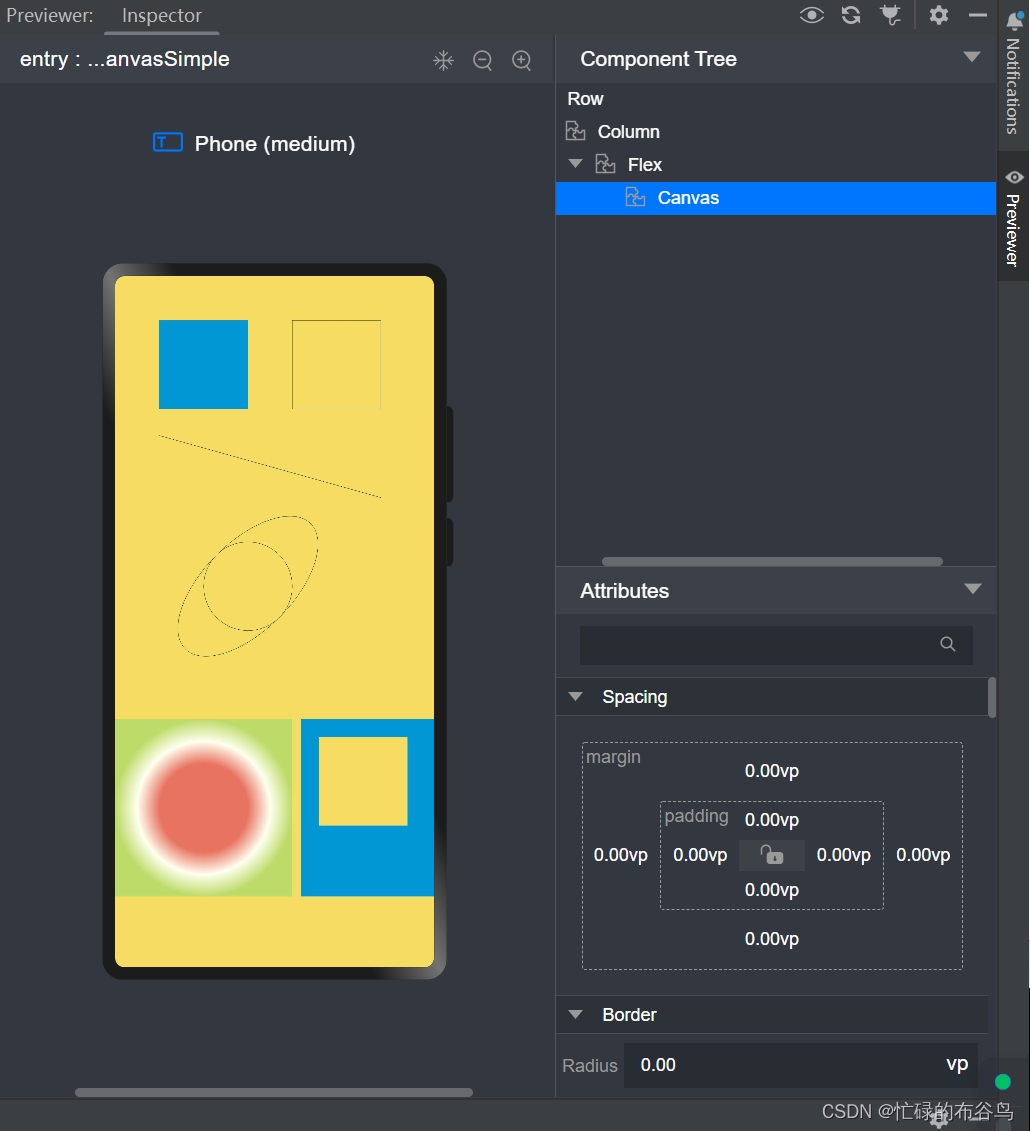
              //填充矩形
              this.context.fillStyle = '#0097D4';
              this.context.fillRect(50, 50, 100, 100);

              //绘制矩形
              this.context.beginPath();
              this.context.rect(200, 50, 100, 100);
              this.context.stroke();

              //绘制直线
              this.context.beginPath();
              this.context.moveTo(50, 180);
              this.context.lineTo(300, 250);
              this.context.stroke();

              //绘制圆形
              this.context.beginPath();
              this.context.arc(150, 350, 50, 0, 6.28);
              this.context.stroke();
              //绘制椭圆
              this.context.beginPath();
              this.context.ellipse(150, 350, 50, 100, Math.PI * 0.25, Math.PI * 0, Math.PI * 2);
              this.context.stroke();

              //创建一个径向渐变色的CanvasGradient对象
              //createRadialGradient(x0: number, y0: number, r0: number, x1: number, y1: number, r1: number)
              //(x0,y0)起始圆心,(x1,y1)终点圆心,r0起始圆半径,r1终点圆半径
              let grad = this.context.createRadialGradient(100,600,50, 100,600,100)
              //为CanvasGradient对象设置渐变断点值,包括偏移和颜色
              grad.addColorStop(0.0, '#E87361');
              grad.addColorStop(0.5, '#FFFFF0');
              grad.addColorStop(1.0, '#BDDB69');
              //用CanvasGradient对象填充矩形
              this.context.fillStyle = grad;
              this.context.fillRect(0, 500, 200, 200);

              // 设定填充样式,填充颜色设为蓝色
              this.context.fillStyle = '#0097D4';
              // 以(50, 50)为左上顶点,画一个宽高200的矩形
              this.context.fillRect(210,500,150,200);
              // 以(70, 70)为左上顶点,清除宽150高100的区域
              this.context.clearRect(230,520,100,100);

            })
        }

      }
      .width('100%')
    }
    .height('100%')
  }
}

讨论HarmonyOS开发技术,专注于API与组件、DevEco Studio、测试、元服务和应用上架分发等。
更多推荐
 2
2 0
0- 0


 已为社区贡献10条内容

所有评论(0)