2024年Android最新鸿蒙HarmonyOS APP开发入门3——组件(九 按钮组件 )—,2024年最新面试阿里巴巴
重要知识点
下面是有几位Android行业大佬对应上方技术点整理的一些进阶资料。
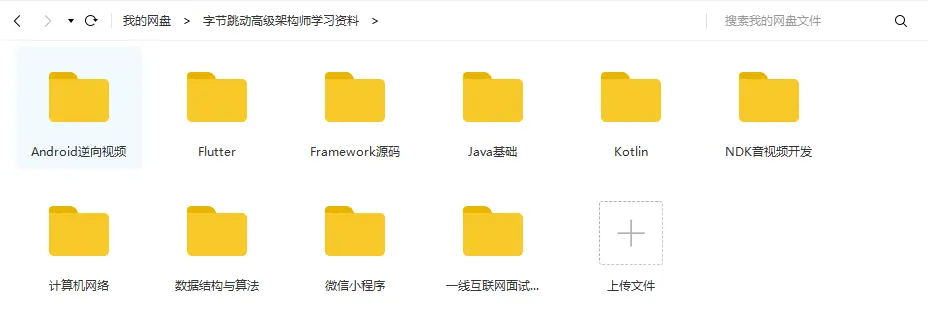
高级进阶篇——高级UI,自定义View(部分展示)
UI这块知识是现今使用者最多的。当年火爆一时的Android入门培训,学会这小块知识就能随便找到不错的工作了。不过很显然现在远远不够了,拒绝无休止的CV,亲自去项目实战,读源码,研究原理吧!
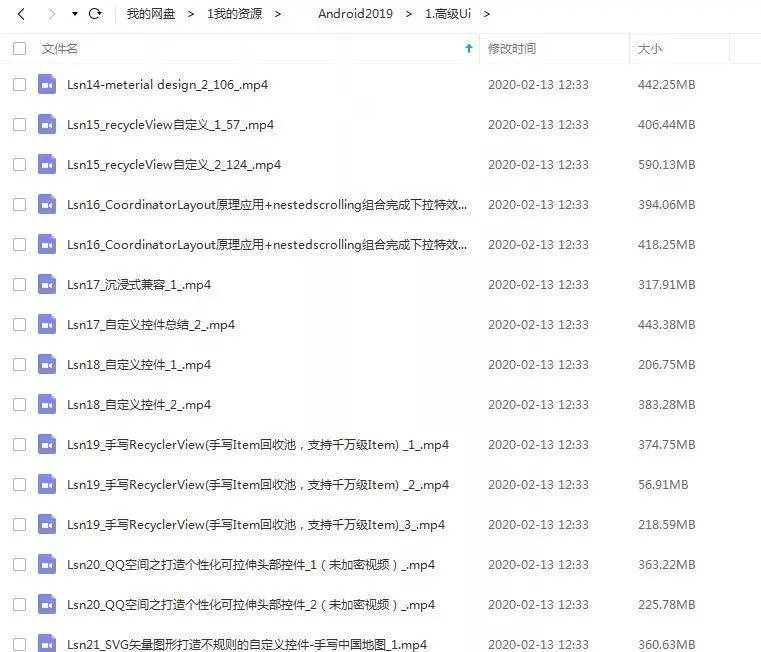
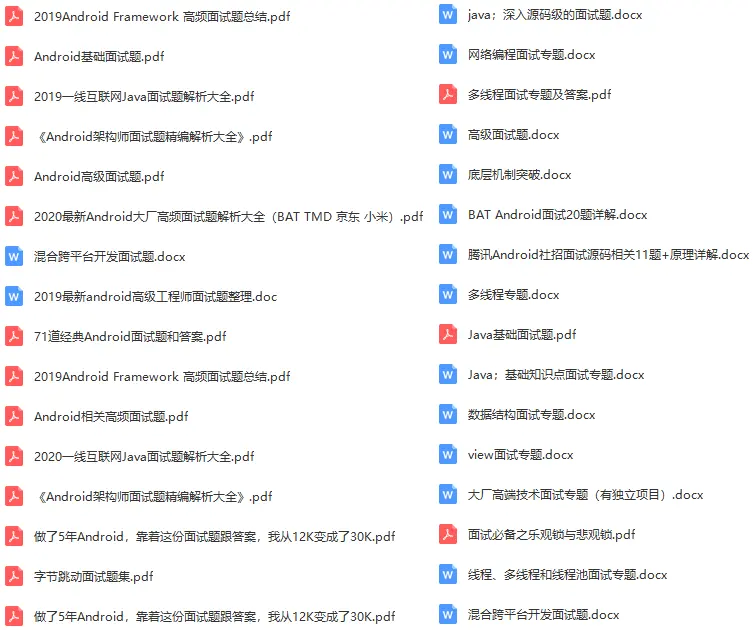
- 面试题部分合集
网上学习资料一大堆,但如果学到的知识不成体系,遇到问题时只是浅尝辄止,不再深入研究,那么很难做到真正的技术提升。
一个人可以走的很快,但一群人才能走的更远!不论你是正从事IT行业的老鸟或是对IT行业感兴趣的新人,都欢迎加入我们的的圈子(技术交流、学习资源、职场吐槽、大厂内推、面试辅导),让我们一起学习成长!
ohos:right_padding=“8vp”
ohos:left_padding=“8vp”/>
graphic目录下的color\_blue\_element.xml文件示例如下:
#### 椭圆按钮
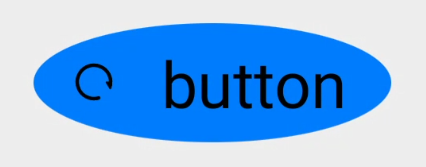
椭圆按钮是通过设置background\_element的来实现的,background\_element的shape设置为椭圆(oval),例如:
<Button ohos:width=“150vp”
ohos:height=“50vp”
ohos:text_size=“27fp”
ohos:text=“button”
ohos:background_element=“
g
r
a
p
h
i
c
:
o
v
a
l
_
b
u
t
t
o
n
_
e
l
e
m
e
n
t
"
o
h
o
s
:
l
e
f
t
_
m
a
r
g
i
n
=
"
15
v
p
"
o
h
o
s
:
b
o
t
t
o
m
_
m
a
r
g
i
n
=
"
15
v
p
"
o
h
o
s
:
r
i
g
h
t
_
p
a
d
d
i
n
g
=
"
8
v
p
"
o
h
o
s
:
l
e
f
t
_
p
a
d
d
i
n
g
=
"
8
v
p
"
o
h
o
s
:
e
l
e
m
e
n
t
_
l
e
f
t
=
"
graphic:oval\_button\_element" ohos:left\_margin="15vp" ohos:bottom\_margin="15vp" ohos:right\_padding="8vp" ohos:left\_padding="8vp" ohos:element\_left="
graphic:oval_button_element"ohos:left_margin="15vp"ohos:bottom_margin="15vp"ohos:right_padding="8vp"ohos:left_padding="8vp"ohos:element_left="media:ic_btn_reload”/>
graphic目录下的oval\_button\_element.xml文件示例如下:
#### 胶囊按钮
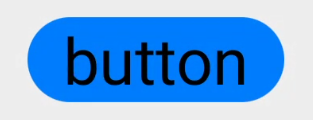
胶囊按钮是一种常见的按钮,设置按钮背景时将背景设置为矩形形状,并且设置ShapeElement的radius的半径,例如:
<Button ohos:id=“
+
i
d
:
b
u
t
t
o
n
"
o
h
o
s
:
w
i
d
t
h
=
"
m
a
t
c
h
_
c
o
n
t
e
n
t
"
o
h
o
s
:
h
e
i
g
h
t
=
"
m
a
t
c
h
_
c
o
n
t
e
n
t
"
o
h
o
s
:
t
e
x
t
_
s
i
z
e
=
"
27
f
p
"
o
h
o
s
:
t
e
x
t
=
"
b
u
t
t
o
n
"
o
h
o
s
:
b
a
c
k
g
r
o
u
n
d
_
e
l
e
m
e
n
t
=
"
+id:button" ohos:width="match\_content" ohos:height="match\_content" ohos:text\_size="27fp" ohos:text="button" ohos:background\_element="
+id:button"ohos:width="match_content"ohos:height="match_content"ohos:text_size="27fp"ohos:text="button"ohos:background_element="graphic:capsule_button_element”
ohos:left_margin=“15vp”
ohos:bottom_margin=“15vp”
ohos:right_padding=“15vp”
ohos:left_padding=“15vp”/>
graphic目录下的capsule\_button\_element.xml文件示例如下:
#### 圆形按钮
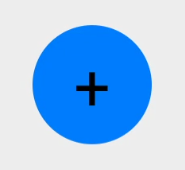
圆形按钮和椭圆按钮的区别在于组件本身的宽度和高度需要相同,例如:
<Button
ohos:id=“
+
i
d
:
b
u
t
t
o
n
"
o
h
o
s
:
w
i
d
t
h
=
"
50
v
p
"
o
h
o
s
:
h
e
i
g
h
t
=
"
50
v
p
"
o
h
o
s
:
t
e
x
t
_
s
i
z
e
=
"
27
f
p
"
o
h
o
s
:
b
a
c
k
g
r
o
u
n
d
_
e
l
e
m
e
n
t
=
"
+id:button" ohos:width="50vp" ohos:height="50vp" ohos:text\_size="27fp" ohos:background\_element="
+id:button"ohos:width="50vp"ohos:height="50vp"ohos:text_size="27fp"ohos:background_element="graphic:circle_button_element”
ohos:text=“+” ohos:left_margin=“15vp”
ohos:bottom_margin=“15vp”
ohos:right_padding=“15vp”
ohos:left_padding=“15vp”/>
graphic目录下的circle\_button\_element.xml文件示例如下:
#### 场景示例
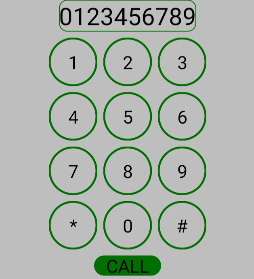
利用圆形按钮,胶囊按钮,文本组件可以绘制出如下拨号盘的UI界面。
\*\*图4 界面效果
##### 源码示例:
<DirectionalLayout
xmlns:ohos=“http://schemas.huawei.com/res/ohos”
ohos:width=“match_parent”
ohos:height=“match_parent”
ohos:background_element=“
g
r
a
p
h
i
c
:
c
o
l
o
r
_
l
i
g
h
t
_
g
r
a
y
_
e
l
e
m
e
n
t
"
o
h
o
s
:
o
r
i
e
n
t
a
t
i
o
n
=
"
v
e
r
t
i
c
a
l
"
>
<
T
e
x
t
o
h
o
s
:
w
i
d
t
h
=
"
m
a
t
c
h
_
c
o
n
t
e
n
t
"
o
h
o
s
:
h
e
i
g
h
t
=
"
m
a
t
c
h
_
c
o
n
t
e
n
t
"
o
h
o
s
:
t
e
x
t
_
s
i
z
e
=
"
20
f
p
"
o
h
o
s
:
t
e
x
t
=
"
0123456789
"
o
h
o
s
:
b
a
c
k
g
r
o
u
n
d
_
e
l
e
m
e
n
t
=
"
graphic:color\_light\_gray\_element" ohos:orientation="vertical"> <Text ohos:width="match\_content" ohos:height="match\_content" ohos:text\_size="20fp" ohos:text="0123456789" ohos:background\_element="
graphic:color_light_gray_element"ohos:orientation="vertical"><Textohos:width="match_content"ohos:height="match_content"ohos:text_size="20fp"ohos:text="0123456789"ohos:background_element="graphic:green_text_element”
ohos:text_alignment=“center”
ohos:layout_alignment=“horizontal_center”
/>
<DirectionalLayout
ohos:width=“match_parent”
ohos:height=“match_content”
ohos:alignment=“horizontal_center”
ohos:orientation=“horizontal”
ohos:top_margin=“5vp”
ohos:bottom_margin=“5vp”>
<Button
ohos:width=“40vp”
ohos:height=“40vp”
ohos:text_size=“15fp”
ohos:background_element=“
g
r
a
p
h
i
c
:
g
r
e
e
n
_
c
i
r
c
l
e
_
b
u
t
t
o
n
_
e
l
e
m
e
n
t
"
o
h
o
s
:
t
e
x
t
=
"
1
"
o
h
o
s
:
t
e
x
t
_
a
l
i
g
n
m
e
n
t
=
"
c
e
n
t
e
r
"
/
>
<
B
u
t
t
o
n
o
h
o
s
:
w
i
d
t
h
=
"
40
v
p
"
o
h
o
s
:
h
e
i
g
h
t
=
"
40
v
p
"
o
h
o
s
:
t
e
x
t
_
s
i
z
e
=
"
15
f
p
"
o
h
o
s
:
b
a
c
k
g
r
o
u
n
d
_
e
l
e
m
e
n
t
=
"
graphic:green\_circle\_button\_element" ohos:text="1" ohos:text\_alignment="center" /> <Button ohos:width="40vp" ohos:height="40vp" ohos:text\_size="15fp" ohos:background\_element="
graphic:green_circle_button_element"ohos:text="1"ohos:text_alignment="center"/><Buttonohos:width="40vp"ohos:height="40vp"ohos:text_size="15fp"ohos:background_element="graphic:green_circle_button_element”
ohos:text=“2”
ohos:left_margin=“5vp”
ohos:right_margin=“5vp”
ohos:text_alignment=“center”
/>
<Button
ohos:width=“40vp”
ohos:height=“40vp”
ohos:text_size=“15fp”
ohos:background_element=“
g
r
a
p
h
i
c
:
g
r
e
e
n
_
c
i
r
c
l
e
_
b
u
t
t
o
n
_
e
l
e
m
e
n
t
"
o
h
o
s
:
t
e
x
t
=
"
3
"
o
h
o
s
:
t
e
x
t
_
a
l
i
g
n
m
e
n
t
=
"
c
e
n
t
e
r
"
/
>
<
/
D
i
r
e
c
t
i
o
n
a
l
L
a
y
o
u
t
>
<
D
i
r
e
c
t
i
o
n
a
l
L
a
y
o
u
t
o
h
o
s
:
w
i
d
t
h
=
"
m
a
t
c
h
_
p
a
r
e
n
t
"
o
h
o
s
:
h
e
i
g
h
t
=
"
m
a
t
c
h
_
c
o
n
t
e
n
t
"
o
h
o
s
:
a
l
i
g
n
m
e
n
t
=
"
h
o
r
i
z
o
n
t
a
l
_
c
e
n
t
e
r
"
o
h
o
s
:
o
r
i
e
n
t
a
t
i
o
n
=
"
h
o
r
i
z
o
n
t
a
l
"
o
h
o
s
:
b
o
t
t
o
m
_
m
a
r
g
i
n
=
"
5
v
p
"
>
<
B
u
t
t
o
n
o
h
o
s
:
w
i
d
t
h
=
"
40
v
p
"
o
h
o
s
:
h
e
i
g
h
t
=
"
40
v
p
"
o
h
o
s
:
t
e
x
t
_
s
i
z
e
=
"
15
f
p
"
o
h
o
s
:
b
a
c
k
g
r
o
u
n
d
_
e
l
e
m
e
n
t
=
"
graphic:green\_circle\_button\_element" ohos:text="3" ohos:text\_alignment="center" /> </DirectionalLayout> <DirectionalLayout ohos:width="match\_parent" ohos:height="match\_content" ohos:alignment="horizontal\_center" ohos:orientation="horizontal" ohos:bottom\_margin="5vp"> <Button ohos:width="40vp" ohos:height="40vp" ohos:text\_size="15fp" ohos:background\_element="
graphic:green_circle_button_element"ohos:text="3"ohos:text_alignment="center"/></DirectionalLayout><DirectionalLayoutohos:width="match_parent"ohos:height="match_content"ohos:alignment="horizontal_center"ohos:orientation="horizontal"ohos:bottom_margin="5vp"><Buttonohos:width="40vp"ohos:height="40vp"ohos:text_size="15fp"ohos:background_element="graphic:green_circle_button_element”
ohos:text=“4”
ohos:text_alignment=“center”
/>
<Button
ohos:width=“40vp”
ohos:height=“40vp”
ohos:text_size=“15fp”
ohos:left_margin=“5vp”
ohos:right_margin=“5vp”
ohos:background_element=“
g
r
a
p
h
i
c
:
g
r
e
e
n
_
c
i
r
c
l
e
_
b
u
t
t
o
n
_
e
l
e
m
e
n
t
"
o
h
o
s
:
t
e
x
t
=
"
5
"
o
h
o
s
:
t
e
x
t
_
a
l
i
g
n
m
e
n
t
=
"
c
e
n
t
e
r
"
/
>
<
B
u
t
t
o
n
o
h
o
s
:
w
i
d
t
h
=
"
40
v
p
"
o
h
o
s
:
h
e
i
g
h
t
=
"
40
v
p
"
o
h
o
s
:
t
e
x
t
_
s
i
z
e
=
"
15
f
p
"
o
h
o
s
:
b
a
c
k
g
r
o
u
n
d
_
e
l
e
m
e
n
t
=
"
graphic:green\_circle\_button\_element" ohos:text="5" ohos:text\_alignment="center" /> <Button ohos:width="40vp" ohos:height="40vp" ohos:text\_size="15fp" ohos:background\_element="
graphic:green_circle_button_element"ohos:text="5"ohos:text_alignment="center"/><Buttonohos:width="40vp"ohos:height="40vp"ohos:text_size="15fp"ohos:background_element="graphic:green_circle_button_element”
ohos:text=“6”
ohos:text_alignment=“center”
/>
<DirectionalLayout
ohos:width=“match_parent”
ohos:height=“match_content”
ohos:alignment=“horizontal_center”
ohos:orientation=“horizontal”
ohos:bottom_margin=“5vp”>
<Button
ohos:width=“40vp”
ohos:height=“40vp”
ohos:text_size=“15fp”
ohos:background_element=“
g
r
a
p
h
i
c
:
g
r
e
e
n
_
c
i
r
c
l
e
_
b
u
t
t
o
n
_
e
l
e
m
e
n
t
"
o
h
o
s
:
t
e
x
t
=
"
7
"
o
h
o
s
:
t
e
x
t
_
a
l
i
g
n
m
e
n
t
=
"
c
e
n
t
e
r
"
/
>
<
B
u
t
t
o
n
o
h
o
s
:
w
i
d
t
h
=
"
40
v
p
"
o
h
o
s
:
h
e
i
g
h
t
=
"
40
v
p
"
o
h
o
s
:
t
e
x
t
_
s
i
z
e
=
"
15
f
p
"
o
h
o
s
:
l
e
f
t
_
m
a
r
g
i
n
=
"
5
v
p
"
o
h
o
s
:
r
i
g
h
t
_
m
a
r
g
i
n
=
"
5
v
p
"
o
h
o
s
:
b
a
c
k
g
r
o
u
n
d
_
e
l
e
m
e
n
t
=
"
graphic:green\_circle\_button\_element" ohos:text="7" ohos:text\_alignment="center" /> <Button ohos:width="40vp" ohos:height="40vp" ohos:text\_size="15fp" ohos:left\_margin="5vp" ohos:right\_margin="5vp" ohos:background\_element="
graphic:green_circle_button_element"ohos:text="7"ohos:text_alignment="center"/><Buttonohos:width="40vp"ohos:height="40vp"ohos:text_size="15fp"ohos:left_margin="5vp"ohos:right_margin="5vp"ohos:background_element="graphic:green_circle_button_element”
ohos:text=“8”
ohos:text_alignment=“center”
/>
<Button
ohos:width=“40vp”
ohos:height=“40vp”
ohos:text_size=“15fp”
ohos:background_element=“
g
r
a
p
h
i
c
:
g
r
e
e
n
_
c
i
r
c
l
e
_
b
u
t
t
o
n
_
e
l
e
m
e
n
t
"
o
h
o
s
:
t
e
x
t
=
"
9
"
o
h
o
s
:
t
e
x
t
_
a
l
i
g
n
m
e
n
t
=
"
c
e
n
t
e
r
"
/
>
<
/
D
i
r
e
c
t
i
o
n
a
l
L
a
y
o
u
t
>
<
D
i
r
e
c
t
i
o
n
a
l
L
a
y
o
u
t
o
h
o
s
:
w
i
d
t
h
=
"
m
a
t
c
h
_
p
a
r
e
n
t
"
o
h
o
s
:
h
e
i
g
h
t
=
"
m
a
t
c
h
_
c
o
n
t
e
n
t
"
o
h
o
s
:
a
l
i
g
n
m
e
n
t
=
"
h
o
r
i
z
o
n
t
a
l
_
c
e
n
t
e
r
"
o
h
o
s
:
o
r
i
e
n
t
a
t
i
o
n
=
"
h
o
r
i
z
o
n
t
a
l
"
o
h
o
s
:
b
o
t
t
o
m
_
m
a
r
g
i
n
=
"
5
v
p
"
>
<
B
u
t
t
o
n
o
h
o
s
:
w
i
d
t
h
=
"
40
v
p
"
o
h
o
s
:
h
e
i
g
h
t
=
"
40
v
p
"
o
h
o
s
:
t
e
x
t
_
s
i
z
e
=
"
15
f
p
"
o
h
o
s
:
b
a
c
k
g
r
o
u
n
d
_
e
l
e
m
e
n
t
=
"
graphic:green\_circle\_button\_element" ohos:text="9" ohos:text\_alignment="center" /> </DirectionalLayout> <DirectionalLayout ohos:width="match\_parent" ohos:height="match\_content" ohos:alignment="horizontal\_center" ohos:orientation="horizontal" ohos:bottom\_margin="5vp"> <Button ohos:width="40vp" ohos:height="40vp" ohos:text\_size="15fp" ohos:background\_element="
graphic:green_circle_button_element"ohos:text="9"ohos:text_alignment="center"/></DirectionalLayout><DirectionalLayoutohos:width="match_parent"ohos:height="match_content"ohos:alignment="horizontal_center"ohos:orientation="horizontal"ohos:bottom_margin="5vp"><Buttonohos:width="40vp"ohos:height="40vp"ohos:text_size="15fp"ohos:background_element="graphic:green_circle_button_element”
ohos:text=“*”
ohos:text_alignment=“center”
/>
<Button
ohos:width=“40vp”
ohos:height=“40vp”
ohos:text_size=“15fp”
ohos:left_margin=“5vp”
ohos:right_margin=“5vp”
ohos:background_element=“
g
r
a
p
h
i
c
:
g
r
e
e
n
_
c
i
r
c
l
e
_
b
u
t
t
o
n
_
e
l
e
m
e
n
t
"
o
h
o
s
:
t
e
x
t
=
"
0
"
o
h
o
s
:
t
e
x
t
_
a
l
i
g
n
m
e
n
t
=
"
c
e
n
t
e
r
"
/
>
<
B
u
t
t
o
n
o
h
o
s
:
w
i
d
t
h
=
"
40
v
p
"
o
h
o
s
:
h
e
i
g
h
t
=
"
40
v
p
"
o
h
o
s
:
t
e
x
t
_
s
i
z
e
=
"
15
f
p
"
o
h
o
s
:
b
a
c
k
g
r
o
u
n
d
_
e
l
e
m
e
n
t
=
"
graphic:green\_circle\_button\_element" ohos:text="0" ohos:text\_alignment="center" /> <Button ohos:width="40vp" ohos:height="40vp" ohos:text\_size="15fp" ohos:background\_element="
graphic:green_circle_button_element"ohos:text="0"ohos:text_alignment="center"/><Buttonohos:width="40vp"ohos:height="40vp"ohos:text_size="15fp"ohos:background_element="graphic:green_circle_button_element”
ohos:text=“#”
ohos:text_alignment=“center”
/>
<Button
ohos:width=“match_content”
ohos:height=“match_content”
ohos:text_size=“15fp”
ohos:text=“CALL”
ohos:background_element=“$graphic:green_capsule_button_element”
ohos:bottom_margin=“5vp”
ohos:text_alignment=“center”
ohos:layout_alignment=“horizontal_center”
ohos:left_padding=“10vp”
分享读者
作者2013年java转到Android开发,在小厂待过,也去过华为,OPPO等大厂待过,18年四月份进了阿里一直到现在。
被人面试过,也面试过很多人。深知大多数初中级Android工程师,想要提升技能,往往是自己摸索成长,不成体系的学习效果低效漫长,而且极易碰到天花板技术停滞不前!
我们整理了一份阿里P7级别的Android架构师全套学习资料,特别适合有3-5年以上经验的小伙伴深入学习提升。
主要包括阿里,以及字节跳动,腾讯,华为,小米,等一线互联网公司主流架构技术。如果你有需要,尽管拿走好了。
35岁中年危机大多是因为被短期的利益牵着走,过早压榨掉了价值,如果能一开始就树立一个正确的长远的职业规划。35岁后的你只会比周围的人更值钱。
网上学习资料一大堆,但如果学到的知识不成体系,遇到问题时只是浅尝辄止,不再深入研究,那么很难做到真正的技术提升。
一个人可以走的很快,但一群人才能走的更远!不论你是正从事IT行业的老鸟或是对IT行业感兴趣的新人,都欢迎加入我们的的圈子(技术交流、学习资源、职场吐槽、大厂内推、面试辅导),让我们一起学习成长!
中…(img-VBuMjfoG-1714980321586)]
35岁中年危机大多是因为被短期的利益牵着走,过早压榨掉了价值,如果能一开始就树立一个正确的长远的职业规划。35岁后的你只会比周围的人更值钱。
网上学习资料一大堆,但如果学到的知识不成体系,遇到问题时只是浅尝辄止,不再深入研究,那么很难做到真正的技术提升。
一个人可以走的很快,但一群人才能走的更远!不论你是正从事IT行业的老鸟或是对IT行业感兴趣的新人,都欢迎加入我们的的圈子(技术交流、学习资源、职场吐槽、大厂内推、面试辅导),让我们一起学习成长!

讨论HarmonyOS开发技术,专注于API与组件、DevEco Studio、测试、元服务和应用上架分发等。
更多推荐
 11
11 0
0- 0


 已为社区贡献1条内容

所有评论(0)