【鸿蒙学习笔记】ForEach:循环渲染
·
官方文档:ForEach:循环渲染
[Q&A] ForEach作用
ForEach接口基于数组类型数据来进行循环渲染
首次渲染
@Entry
@Component
struct PracExample {
  @State list: Array<string> = ['one', 'two', 'three'];

  build() {
      Column() {
        ForEach(this.list, (item: string) => {ChildItem({ value: item })}, (item: string) => item)
      }.width('100%').height('30%').backgroundColor(Color.Pink)
  }
}

@Component
struct ChildItem {
  @Prop value: string;

  build() {
    Text(this.value).fontSize(30).backgroundColor(Color.Orange)
  }
}
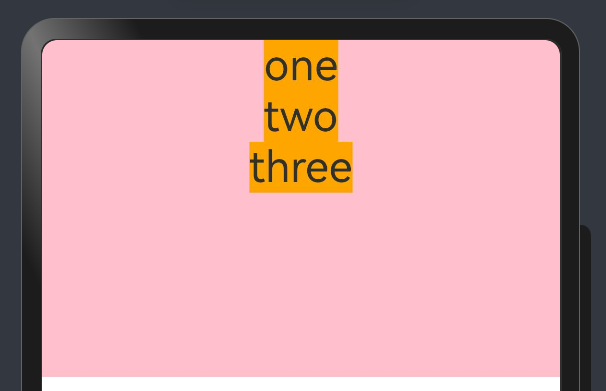
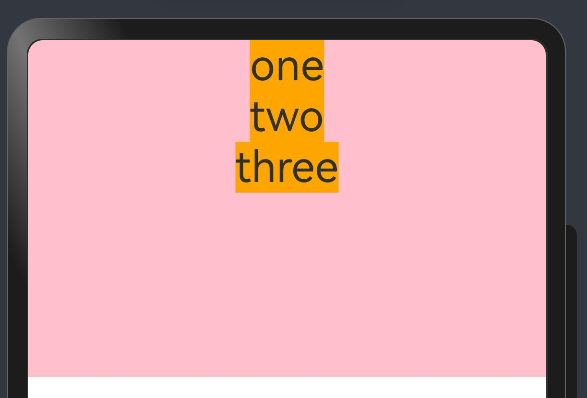
注意体会ForEach第3个参数:有种hash的感觉
  @State list: Array<string> = ['one', 'two', 'two', 'three'];

  build() {
      Column() {
        ForEach(this.list, (item: string) => {ChildItem({ value: item })}, (item: string) => item)
      }.width('100%').height('30%').backgroundColor(Color.Pink)
  }
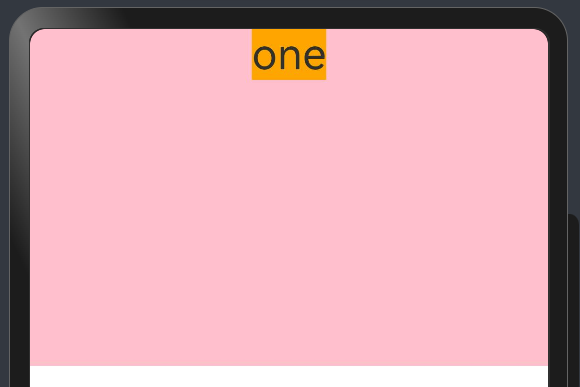
  @State list: Array<string> = ['one', 'two', 'two', 'three'];

  build() {
      Column() {
        ForEach(this.list, (item: string) => {ChildItem({ value: item })}, (item: string) => "1")
      }.width('100%').height('30%').backgroundColor(Color.Pink)
  }
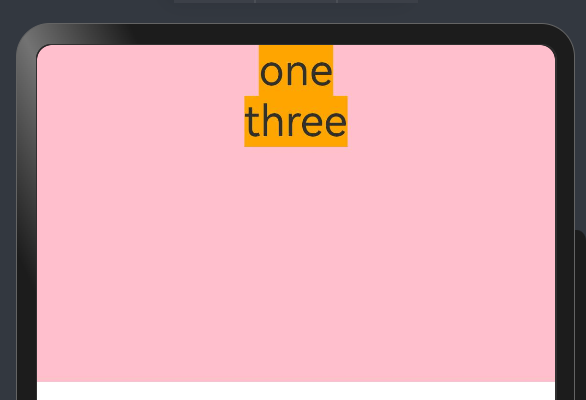
  @State list: Array<string> = ['one', 'two', 'two', 'three'];

  build() {
      Column() {
        ForEach(this.list, (item: string) => {ChildItem({ value: item })}, (item: string) => item.length.toString())
      }.width('100%').height('30%').backgroundColor(Color.Pink)
  }
@State list: Array<string> = ['one', 'two', 'three'];

build() {
  Column() {
    Button() {
      Text('在第1项后插入新项').fontSize(30)
    }
    .onClick(() => {
      this.list.push('new item');
    })
    ForEach(this.list, (item: string) => {ChildItem({ value: item })}, (item: string, index: number) => index.toString())
  }.width('100%').height('30%').backgroundColor(Color.Pink)
}
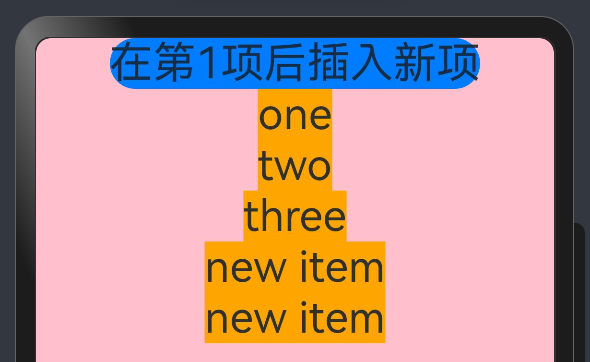
非首次渲染
@Entry
@Component
struct PracExample {
  @State simpleList: Array<string> = ['one', 'two', 'three'];

  build() {
      Column() {
        Text('点击修改第3个数组项的值').fontSize(24).fontColor(Color.Red)
          .onClick(() => {
            this.simpleList[2] = 'new three';
          })

        ForEach(this.simpleList, (item: string) => {ChildItem({ item: item })}, (item: string) => item)
      }.justifyContent(FlexAlign.Start).width('100%').height('100%')
  }
}

@Component
struct ChildItem {
  @Prop item: string;

  build() {
    Text(this.item).fontSize(30)
  }
}
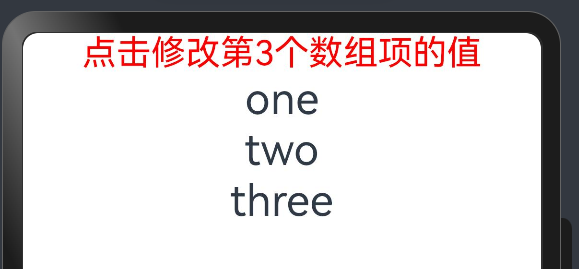
键值one和two在上次渲染中已经存在,所以 ForEach 复用了对应的组件并进行了渲染。对于第三个数组项 “new three”,由于其通过键值生成规则 item 生成的键值new three在上次渲染中不存在,因此 ForEach 为该数组项创建了一个新的组件。
数据源不变
在数据源保持不变的场景中,数据源可以直接采用基本数据类型。
@Entry
@Component
struct PracExample {
  @State list: Array<number> = [1, 2, 3, 4, 5];

  build() {
    Column() {
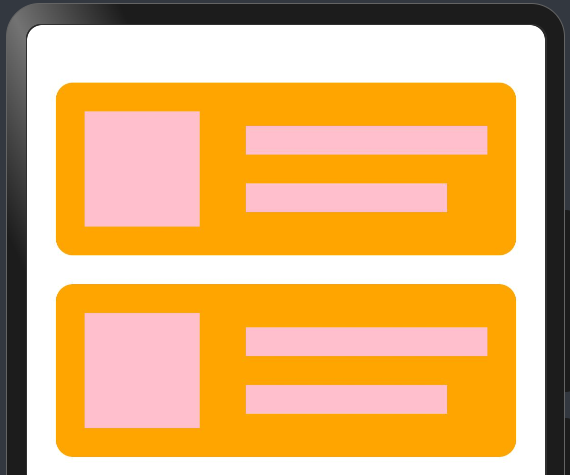
      ForEach(this.list, (item: number) => {ArticleSkeletonView().margin({ top: 20 })}, (item: number) => item.toString())
    }.padding(20).width('100%').height('100%')
  }
}

@Builder
function textArea(width: number | Resource | string = '100%', height: number | Resource | string = '100%') {
  Row().width(width).height(height).backgroundColor(Color.Pink)
}

@Component
struct ArticleSkeletonView {
  build() {
    Row() {
      Column() {
        textArea(80, 80)
      }.margin({ right: 20 })

      Column() {
        textArea('60%', 20)
        textArea('50%', 20)
      }.alignItems(HorizontalAlign.Start).justifyContent(FlexAlign.SpaceAround).height('100%')
    }.padding(20).borderRadius(12).backgroundColor(Color.Orange).height(120).width('100%').justifyContent(FlexAlign.SpaceBetween)
  }
}
数据源数组项发生变化
不要贪多,仅需理解ForEach和push思路即可,别的用法后续消化
class Article {
  id: string;
  title: string;
  brief: string;

  constructor(id: string, title: string, brief: string) {
    this.id = id;
    this.title = title;
    this.brief = brief;
  }
}

@Entry
@Component
struct PracExample {
  @State isListReachEnd: boolean = false;
  @State articleList: Array<Article> = [
    new Article('001', '第1篇文章', '文章简介内容'),
    new Article('002', '第2篇文章', '文章简介内容'),
    new Article('003', '第3篇文章', '文章简介内容'),
    new Article('004', '第4篇文章', '文章简介内容'),
    new Article('005', '第5篇文章', '文章简介内容'),
    new Article('006', '第6篇文章', '文章简介内容')
  ]

  loadMoreArticles() {
    this.articleList.push(new Article('007', '加载的新文章', '文章简介内容'));
  }

  build() {
    Column({ space: 5 }) {
      List() {
        ForEach(this.articleList, (item: Article) => {
          ListItem() {
            ArticleCard({ article: item }).margin({ top: 20 })
          }
        }, (item: Article) => item.id)
      }.onReachEnd(() => {
        this.isListReachEnd = true;
      })
      .parallelGesture(
        PanGesture({ direction: PanDirection.Up, distance: 80 })
          .onActionStart(() => {
            if (this.isListReachEnd) {
              this.loadMoreArticles();
              this.isListReachEnd = false;
            }
          })
      ).padding(20).scrollBar(BarState.Off)
    }.width('100%').height('100%').backgroundColor(0xF1F3F5)
  }
}

@Component
struct ArticleCard {
  @Prop article: Article;

  build() {
    Row() {
      Image($r('app.media.icon')).width(80).height(80).margin({ right: 20 })

      Column() {
        Text(this.article.title).fontSize(20).margin({ bottom: 8 })
        Text(this.article.brief).fontSize(16).fontColor(Color.Gray).margin({ bottom: 8 })
      }.alignItems(HorizontalAlign.Start).width('80%').height('100%')
    }.padding(20).borderRadius(12).backgroundColor(Color.Pink).height(120).width('100%').justifyContent(FlexAlign.SpaceBetween)
  }
}
数据源数组项子属性变化
不要贪多,仅需理解ForEach即可
@Observed
class Article {
  id: string;
  title: string;
  brief: string;
  isLiked: boolean;
  likesCount: number;

  constructor(id: string, title: string, brief: string, isLiked: boolean, likesCount: number) {
    this.id = id;
    this.title = title;
    this.brief = brief;
    this.isLiked = isLiked;
    this.likesCount = likesCount;
  }
}

@Entry
@Component
struct PracExample {
  @State articleList: Array<Article> = [
    new Article('001', '第0篇文章', '文章简介内容', false, 100),
    new Article('002', '第1篇文章', '文章简介内容', false, 100),
    new Article('003', '第2篇文章', '文章简介内容', false, 100),
    new Article('004', '第4篇文章', '文章简介内容', false, 100),
    new Article('005', '第5篇文章', '文章简介内容', false, 100),
    new Article('006', '第6篇文章', '文章简介内容', false, 100),
  ];

  build() {
    List() {
      ForEach(this.articleList, (item: Article) => {ListItem() {ArticleCard({ article: item }).margin({ top: 20 })}}, (item: Article) => item.id)
    }.padding(20).scrollBar(BarState.Off).backgroundColor(0xF1F3F5)
  }
}

@Component
struct ArticleCard {
  @ObjectLink article: Article;

  handleLiked() {
    this.article.isLiked = !this.article.isLiked;
    this.article.likesCount = this.article.isLiked ? this.article.likesCount + 1 : this.article.likesCount - 1;
  }

  build() {
    Row() {
      Image($r('app.media.icon')).width(80).height(80).margin({ right: 20 })

      Column() {
        Text(this.article.title).fontSize(20).margin({ bottom: 8 })
        Text(this.article.brief).fontSize(16).fontColor(Color.Gray).margin({ bottom: 8 })

        Row() {
          Image(this.article.isLiked ? $r('app.media.startIcon') : $r('app.media.icon')).width(24).height(24).margin({ right: 8 })
          Text(this.article.likesCount.toString()).fontSize(16)
        }.justifyContent(FlexAlign.Center)
        .onClick(() => this.handleLiked())

      }.alignItems(HorizontalAlign.Start).width('80%').height('100%')
    }.padding(20).borderRadius(12).backgroundColor('#FFECECEC').height(120).width('100%').justifyContent(FlexAlign.SpaceBetween)
  }
}
private arr: number[] = [0, 1, 2, 3, 4, 5, 6, 7, 8, 9]

List({ space: 20, initialIndex: 0 }) {
  ForEach(this.arr, (item: number) => {
    ListItem() {
      Text('' + item).width('100%').height(100)
    };
  }, (item: number) => item.toString());
}.width('90%');

讨论HarmonyOS开发技术,专注于API与组件、DevEco Studio、测试、元服务和应用上架分发等。
更多推荐



 9
9 0
0- 0


 已为社区贡献14条内容

所有评论(0)