鸿蒙ArkTS声明式开发:跨平台支持列表【颜色渐变】 通用属性
颜色渐变
设置组件的颜色渐变效果。
说明:
从API Version 7开始支持。后续版本如有新增内容,则采用上角标单独标记该内容的起始版本。
属性
linearGradient { angle?: number string, direction?: [GradientDirection], colors: Array<[[ResourceColor], number]>, repeating?: boolean }
sweepGradient { center: [Point], start?: number string, end?: number
radialGradient { center: [Point], radius: number string, colors: Array<[[ResourceColor], number]>, repeating?: boolean }
| 名称 | 参数类型 | 描述 |
|---|---|---|
| linearGradient | { angle?: number | string, direction?: [GradientDirection], colors: Array<[[ResourceColor], number]>, repeating?: boolean } |
| sweepGradient | { center: [Point], start?: number | string, end?: number |
| radialGradient | { center: [Point], radius: number | string, colors: Array<[[ResourceColor], number]>, repeating?: boolean } |
说明:
colors参数的约束:
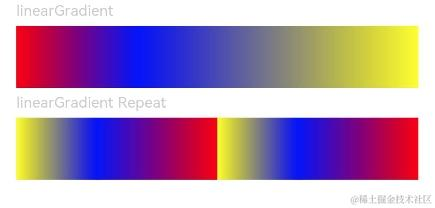
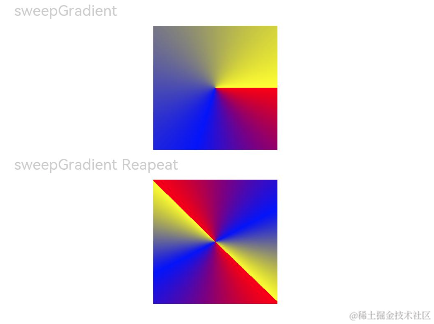
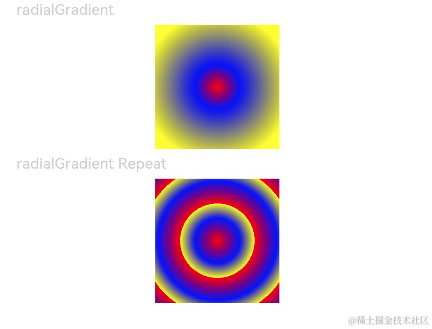
[ResourceColor]表示填充的颜色,number表示指定颜色所处的位置,取值范围为[0,1.0],0表示需要设置渐变色的容器的开始处,1.0表示容器的结尾处。想要实现多个颜色渐变效果时,多个数组中number参数建议递增设置,如后一个数组number参数比前一个数组number小的话,按照等于前一个数组number的值处理。
示例
// xxx.ets
@Entry
@Component
struct ColorGradientExample {
  build() {
    Column({ space: 5 }) {
      Text('linearGradient').fontSize(12).width('90%').fontColor(0xCCCCCC)
      Row()
        .width('90%')
        .height(50)
        .linearGradient({
          angle: 90,
          colors: [[0xff0000, 0.0], [0x0000ff, 0.3], [0xffff00, 1.0]]
        })
      Text('linearGradient Repeat').fontSize(12).width('90%').fontColor(0xCCCCCC)
      Row()
        .width('90%')
        .height(50)
        .linearGradient({
          direction: GradientDirection.Left, // 渐变方向
          repeating: true, // 渐变颜色是否重复
          colors: [[0xff0000, 0.0], [0x0000ff, 0.3], [0xffff00, 0.5]] // 数组末尾元素占比小于1时满足重复着色效果
        })
    }
    .width('100%')
    .padding({ top: 5 })
  }
}
@Entry
@Component
struct ColorGradientExample {
  build() {
    Column({ space: 5 }) {
      Text('sweepGradient').fontSize(12).width('90%').fontColor(0xCCCCCC)
      Row()
        .width(100)
        .height(100)
        .sweepGradient({
          center: [50, 50],
          start: 0,
          end: 359,
          colors: [[0xff0000, 0.0], [0x0000ff, 0.3], [0xffff00, 1.0]]
        })

      Text('sweepGradient Reapeat').fontSize(12).width('90%').fontColor(0xCCCCCC)
      Row()
        .width(100)
        .height(100)
        .sweepGradient({
          center: [50, 50],
          start: 0,
          end: 359,
          rotation: 45, // 旋转角度
          repeating: true, // 渐变颜色是否重复
          colors: [[0xff0000, 0.0], [0x0000ff, 0.3], [0xffff00, 0.5]] // 数组末尾元素占比小于1时满足重复着色效果
        })
    }
    .width('100%')
    .padding({ top: 5 })
  }
}
// xxx.ets
@Entry
@Component
struct ColorGradientExample {
  build() {
    Column({ space: 5 }) {
      Text('radialGradient').fontSize(12).width('90%').fontColor(0xCCCCCC)
      Row()
        .width(100)
        .height(100)
        .radialGradient({
          center: [50, 50],
          radius: 60,
          colors: [[0xff0000, 0.0], [0x0000ff, 0.3], [0xffff00, 1.0]]
        })
      Text('radialGradient Repeat').fontSize(12).width('90%').fontColor(0xCCCCCC)
      Row()
        .width(100)
        .height(100)
        .radialGradient({
          center: [50, 50],
          radius: 60,
          repeating: true,
          colors: [[0xff0000, 0.0], [0x0000ff, 0.3], [0xffff00, 0.5]] // 数组末尾元素占比小于1时满足重复着色效果
        })
    }
    .width('100%')
    .padding({ top: 5 })
  }
}
————————————————
原文链接:https://blog.csdn.net/2401_82772199/article/details/139455075

讨论HarmonyOS开发技术,专注于API与组件、DevEco Studio、测试、元服务和应用上架分发等。
更多推荐


 0
0 0
0- 0


 已为社区贡献18条内容

所有评论(0)