Harmony OS-CoreVision Kit-faceComparator-实现人脸比对
·
思路很简单,拉起相册、选取两个照片、将照片处理成PixelMap类型、喂给faceComparator,拿到结果,处理结果
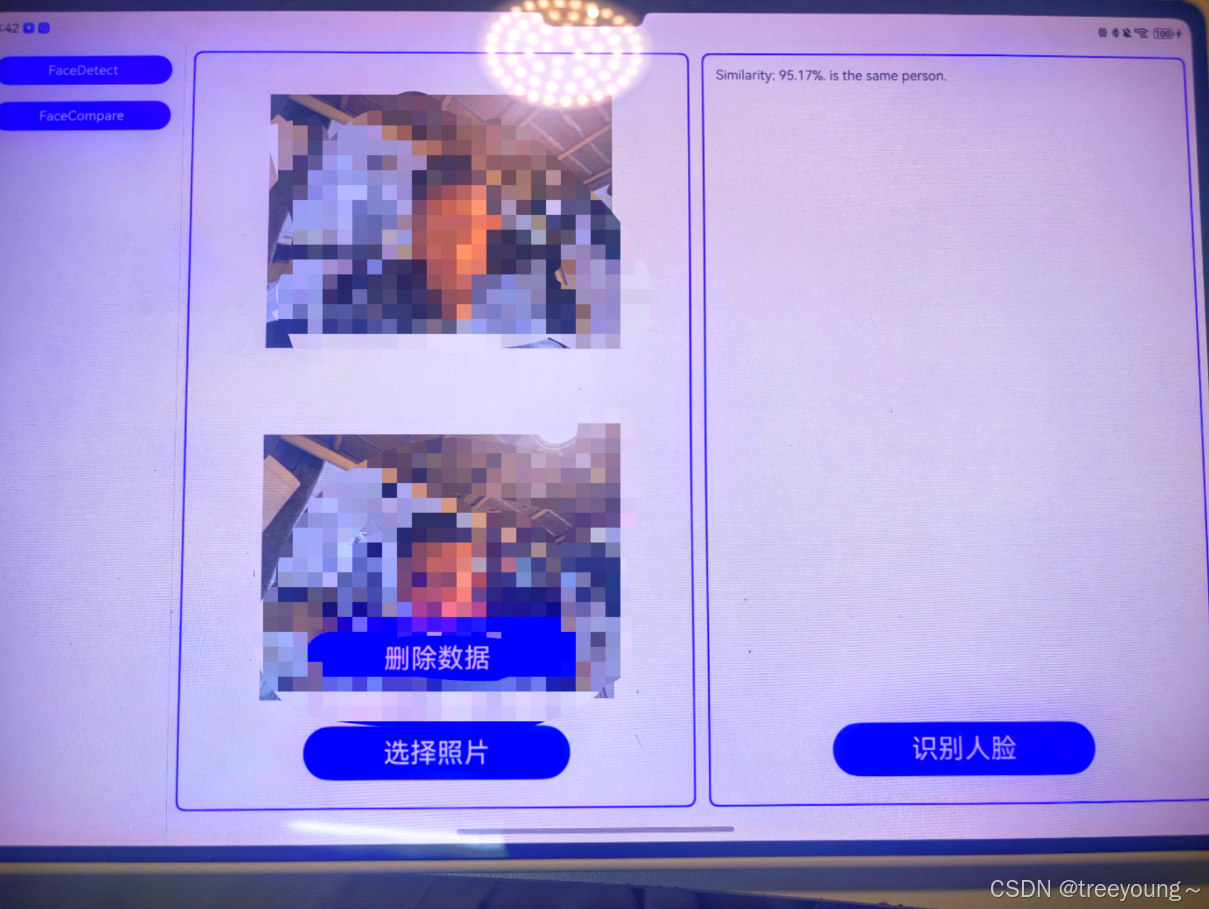
注意:只有在真机才能测试成功,模拟器尚不支持
第一步:封装好人脸比对工具类
这样的话后续如果有相关的需求,也方便修改代码实现功能
// 引入必要的模块
import { faceComparator, faceDetector } from '@kit.CoreVisionKit'; // 引入人脸检测模块
import { promptAction } from '@kit.ArkUI'; // 引入UI提示模块

/**
 * FaceDetectClass 类用于处理面部检测的逻辑
 */
export class FaceDetectClass {

  // 比对人脸的函数
  // 使用try-catch处理可能的错误,如网络错误或API返回错误
  static async compareFace(pixMap1: PixelMap, pixMap2: PixelMap): Promise<string> {
    try {
      // 初始化两个VisionInfo对象,分别包含要比较的两张人脸的PixelMap
      let visionInfo1: faceComparator.VisionInfo = {
        pixelMap: pixMap1,
        // 如果有其他必要的属性,可以在这里添加
      };
      let visionInfo2: faceComparator.VisionInfo = {
        pixelMap: pixMap2,
        // 如果有其他必要的属性,可以在这里添加
      };

      // 调用人脸比对接口
      let data: faceComparator.FaceCompareResult = await faceComparator.compareFaces(visionInfo1, visionInfo2);

      // 计算相似度百分比,并格式化结果
      let similarity = (data.similarity * 100).toFixed(2);

      // 判断是否为同一人
      let isSamePerson = data.isSamePerson ? "是" : "不是";

      // 构造返回字符串
      let faceString = `相似度: ${similarity}%. ${isSamePerson} 同一个人.`;

      // 返回比对结果
      return faceString;
    } catch (error) {
      // 如果在调用人脸比对接口或处理过程中发生错误,捕获并处理
      // 你可以根据实际需求记录错误日志、返回错误信息等
      console.error('Error comparing faces:', error);
      // 返回一个包含错误信息的字符串或自定义的错误对象
      return `Error comparing faces: ${error.message || 'An unknown error occurred'}`;
    }
  }
}
第二步,调用方法
// 引入必要的库和自定义类
import { promptAction } from '@kit.ArkUI';
import { FaceDetectClass } from '../../utils/FaceDetector';
import { PhotoPickerClass } from '../../utils/PhotoPicker';

@Component
export struct FaceComparePage {
  // 使用@State装饰器定义状态变量
  @State currentUris: string[] = []; // 当前选择的图片URI数组
  @State dataValue: string = ""; // 用于存储人脸识别结果
  @State testPixMaps: PixelMap[] | undefined = undefined; // 用于存储根据URI创建的PixelMap对象
  @State cltData: string[] = []; // 存储每次识别结果的数据

  // 组件即将消失时释放资源
  aboutToDisappear(): void {
    if (this.testPixMaps) {
      this.testPixMaps.forEach((tpm: PixelMap) => {
        tpm.release(); // 释放PixelMap资源
      });
    }
  }

  // 组件的构建方法
  build() {
    // 使用Row布局,将页面分为左右两部分
    Row({ space: 15 }) {
      // 图片选择和显示区域
      Column({ space: 10 }) {
        // 显示已选择的图片
        Column() {
          ForEach(this.currentUris, (uri: string) => {
            Image(uri)
              .width(400)
              .aspectRatio(1)
              .objectFit(ImageFit.Contain);
          });
        }
        .justifyContent(FlexAlign.Center)
        .layoutWeight(1)
        .width("100%");

        // 操作按钮区域
        Column({ space: 15 }) {
          // 删除数据按钮
          Button("删除数据")
            .margin({ bottom: 30 })
            .fontSize(30)
            .width(300)
            .height(60)
            .onClick(() => {
              this.cltData.pop(); // 假设这里只是简单移除最后一个结果
            });

          // 选择照片按钮
          Button("选择照片")
            .margin({ bottom: 30 })
            .fontSize(30)
            .width(300)
            .height(60)
            .onClick(async () => {
              try {
                this.currentUris = await PhotoPickerClass.selectFaceCompareImg();
                this.testPixMaps = await PhotoPickerClass.creatPixMapsByUris(this.currentUris);
              } catch (err) {
                promptAction.showToast({ message: `Error: ${err.message}` });
              }
            });
        }
      }
      .height('100%')
      .layoutWeight(1)
      .border({ width: 2, color: Color.Blue })
      .borderRadius(10)

      // 人脸识别结果显示区域
      Column() {
        // 识别结果显示列表
        List({ space: 10 }) {
          ForEach(this.cltData, (dataItem: string, index) => {
            ListItem() {
              Text(dataItem ? dataItem : "");
            }
            .border({ width: index % 2 === 0 ? 0 : 4 });
          });
        }
        .padding(15)
        .layoutWeight(1)
        .width("100%");

        // 识别人脸按钮
        Button("识别人脸")
          .margin({ bottom: 30 })
          .fontSize(30)
          .width(300)
          .height(60)
          .onClick(async () => {
            try {
              if (this.testPixMaps && this.testPixMaps.length >= 2) {
                this.dataValue = await FaceDetectClass.compareFace(this.testPixMaps[0], this.testPixMaps[1]);
                this.cltData.push(this.dataValue);
                promptAction.showToast({ message: "识别成功" });
              }
            } catch (err) {
              promptAction.showToast({ message: `识别错误: ${err.message}` });
            }
          });
      }
      .height('100%')
      .layoutWeight(1)
      .border({ width: 2, color: Color.Blue })
      .borderRadius(10)
    }
    .padding(10)
    .height('100%')
    .width('100%');
  }
}

讨论HarmonyOS开发技术,专注于API与组件、DevEco Studio、测试、元服务和应用上架分发等。
更多推荐



 4
4 0
0- 0


 已为社区贡献6条内容

所有评论(0)