【鸿蒙开发】 少帅下飞机 Canvas应用
·
效果展示
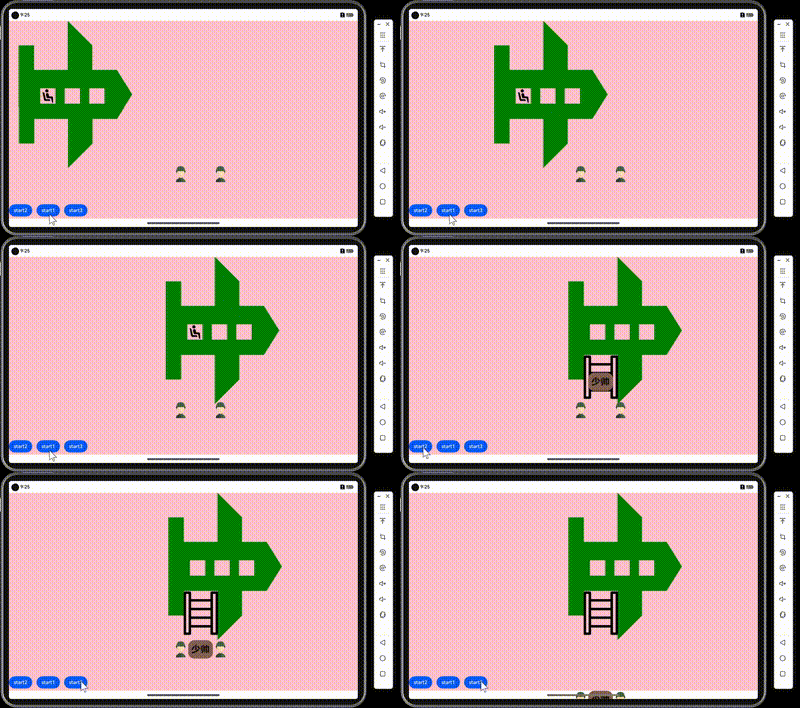
代码分析
画飞机
- 首先可以先在电脑自带的画图工具中画出飞机的简笔画,然后再把相关点的坐标算出来填到程序中即可
Canvas(this.context)
        .position({x:this.planeX,y:this.planeY})
        .animation({duration:10000,curve:Curve.Linear,onFinish:()=>{this.tiziFlag = true;
          setTimeout(()=>{this.zuoziflag = false;this.ShaoshuaiFlag = true},1000)}})
        .width('100%')
        .height('100%')
        .backgroundColor(Color.Pink)
        .onClick((event?:ClickEvent)=>{
          console.log("此时的x坐标为:"+event?.windowX)
          console.log("此时的y坐标为:"+event?.windowY)
        })
        .onReady(() => {
            this.path.moveTo(200-190, 90-10)
            this.path.lineTo(250-190, 90-10)
            this.path.lineTo(250-190, 170-10)
            this.path.lineTo(360-190, 170-10)
            this.path.lineTo(360-190, 10-10)
            this.path.lineTo(440-190, 90-10)
            this.path.lineTo(440-190, 170-10)
            this.path.lineTo(520-190, 170-10)
            this.path.lineTo(570-190, 250-10)
            this.path.lineTo(520-190, 330-10)
            this.path.lineTo(440-190, 330-10)
            this.path.lineTo(440-190, 410-10)
            this.path.lineTo(360-190, 490-10)
            this.path.lineTo(360-190, 330-10)
            this.path.lineTo(250-190, 330-10)
            this.path.lineTo(250-190, 410-10)
            this.path.lineTo(200-190, 410-10)
            this.context.fillStyle = Color.Green
            this.context.closePath()
            this.context.fill(this.path)
            this.context.clearRect(80,220,50,50)
            this.context.clearRect(160,220,50,50)
            this.context.clearRect(240,220,50,50)
        })
少帅模块
- 这个程序中我将少帅模块封装到了另一个文件中进行编写,代码如下
@Preview
@Component

export struct shaoshuai{
  build() {
   Column(){

     Text("少帅")
       .fontSize(30)
       .fontWeight(FontWeight.Bolder)//字体设置为粗体
       .fontStyle(FontStyle.Normal)

   }.width(80)
   .borderRadius(20)
    .height(60)
    .backgroundColor('#836053')
    .justifyContent(FlexAlign.Center)//垂直方向居中
    .align(Alignment.Center)//水平方向居中
  }
}
梯子
- 定义一个布尔类型的值来判断是否需要加载出梯子
 if(this.tiziFlag) {
      Image($r('app.media.tizi'))
        .position({ x: 547, y: 312 })
        .width(160)
    }
其他
- 其他士兵和要素与梯子同理
全部代码
注意:
下面我将少帅模块和主页面模块放在了一起
import { shaoshuai } from '../model/ShaoShuai'

@Entry
@Component
struct Index {
  @State toggle: boolean = true
  path = new Path2D()
  Xend:number = 570
  @State planeX:number = 0;
  @State planeY:number = 0;
  @State tiziFlag:boolean = false;
  @State zuoziflag:boolean = true;
  @State ShaoshuaiFlag:boolean = false
  @State zuoziX:number = 80;
  @State zuoziY:number = 220;
  settings:RenderingContextSettings = new RenderingContextSettings()
  context:CanvasRenderingContext2D = new CanvasRenderingContext2D()
  @State shaoshuaiX:number = 585
  @State shaoshuaiY:number = 320
  @State soliderY:number = 470
  build() {
    Stack() {
      Canvas(this.context)
        .position({x:this.planeX,y:this.planeY})
        .animation({duration:10000,curve:Curve.Linear,onFinish:()=>{this.tiziFlag = true;
          setTimeout(()=>{this.zuoziflag = false;this.ShaoshuaiFlag = true},1000)}})
        .width('100%')
        .height('100%')
        .backgroundColor(Color.Pink)
        .onClick((event?:ClickEvent)=>{
          console.log("此时的x坐标为:"+event?.windowX)
          console.log("此时的y坐标为:"+event?.windowY)
        })
        .onReady(() => {
            this.path.moveTo(200-190, 90-10)
            this.path.lineTo(250-190, 90-10)
            this.path.lineTo(250-190, 170-10)
            this.path.lineTo(360-190, 170-10)
            this.path.lineTo(360-190, 10-10)
            this.path.lineTo(440-190, 90-10)
            this.path.lineTo(440-190, 170-10)
            this.path.lineTo(520-190, 170-10)
            this.path.lineTo(570-190, 250-10)
            this.path.lineTo(520-190, 330-10)
            this.path.lineTo(440-190, 330-10)
            this.path.lineTo(440-190, 410-10)
            this.path.lineTo(360-190, 490-10)
            this.path.lineTo(360-190, 330-10)
            this.path.lineTo(250-190, 330-10)
            this.path.lineTo(250-190, 410-10)
            this.path.lineTo(200-190, 410-10)
            this.context.fillStyle = Color.Green
            this.context.closePath()
            this.context.fill(this.path)
            this.context.clearRect(80,220,50,50)
            this.context.clearRect(160,220,50,50)
            this.context.clearRect(240,220,50,50)
        })
    if(this.tiziFlag) {
      Image($r('app.media.tizi'))
        .position({ x: 547, y: 312 })
        .width(160)
    }

    if(this.ShaoshuaiFlag) {

      shaoshuai()
        .position({ x:this.shaoshuaiX, y: this.shaoshuaiY })
        .animation({duration:5000,curve:Curve.Linear})
    }
    if(this.zuoziflag)
      Image($r('app.media.zuozi'))
        .width(50)
        .position({x:this.zuoziX,y:this.zuoziY})
        .animation({duration:10000,curve:Curve.Linear})

      Image($r('app.media.soldier'))
        .width(60)
        .position({x:530,y:this.soliderY})
        .animation({duration:5000,curve:Curve.Linear})


      Image($r('app.media.soldier'))
        .width(60)
        .position({x:660,y:this.soliderY})
        .animation({duration:5000,curve:Curve.Linear})

      Button('start1')
        .position({x:90,y:598})
        .onClick(()=>{
          this.planeX=510;
          this.zuoziX = 590
          this.zuoziY = 220
         // console.log("此时的x坐标为:"+this.planeX)
        })
      Button('start2')
        .position({x:0,y:598})
        .onClick(()=>{
          this.shaoshuaiY = 470
         // console.log("此时的x坐标为:"+this.planeX)
        })
      Button('start3')
        .position({x:180,y:598})
        .onClick(()=>{
          this.shaoshuaiY = 650
          this.soliderY = 650
         // console.log("此时的x坐标为:"+this.planeX)
        })


    }.backgroundColor(Color.Pink)
  }
}


//少帅模块
@Preview
@Component

export struct shaoshuai{
  build() {
   Column(){

     Text("少帅")
       .fontSize(30)
       .fontWeight(FontWeight.Bolder)
       .fontStyle(FontStyle.Normal)

   }.width(80)
   .borderRadius(20)
    .height(60)
    .backgroundColor('#836053')
    .justifyContent(FlexAlign.Center)
    .align(Alignment.Center)
  }
}

讨论HarmonyOS开发技术,专注于API与组件、DevEco Studio、测试、元服务和应用上架分发等。
更多推荐


 15
15 0
0- 0


 已为社区贡献8条内容

所有评论(0)