【鸿蒙实战开发】—— 包管理:NativeBundle开发
·
📚往期笔录记录✏️:
✏️ 鸿蒙(HarmonyOS)北向开发知识点记录~
✏️ 鸿蒙(OpenHarmony)南向开发保姆级知识点汇总~
✏️ 鸿蒙应用开发与鸿蒙系统开发哪个更有前景?
✏️ 嵌入式开发适不适合做鸿蒙南向开发?看完这篇你就了解了~
✏️ 对于大前端开发来说,转鸿蒙开发究竟是福还是祸?
✏️ 鸿蒙岗位需求突增!移动端、PC端、IoT到底该怎么选?
✏️ 记录一场鸿蒙开发岗位面试经历~
✏️ 持续更新中……
场景介绍
开发者可以通过本指导了解在HarmonyOS应用中,如何使用Native Bundle接口获取应用自身相关信息。
接口说明
| 接口名 | 描述 |
|---|---|
| OH_NativeBundle_GetCurrentApplicationInfo | 获取应用自身相关信息。 |
| OH_NativeBundle_GetAppId | 获取自身应用的appId信息。 |
| OH_NativeBundle_GetAppIdentifier | 获取自身应用的appIdentifier信息。 |
开发步骤
1. 创建工程
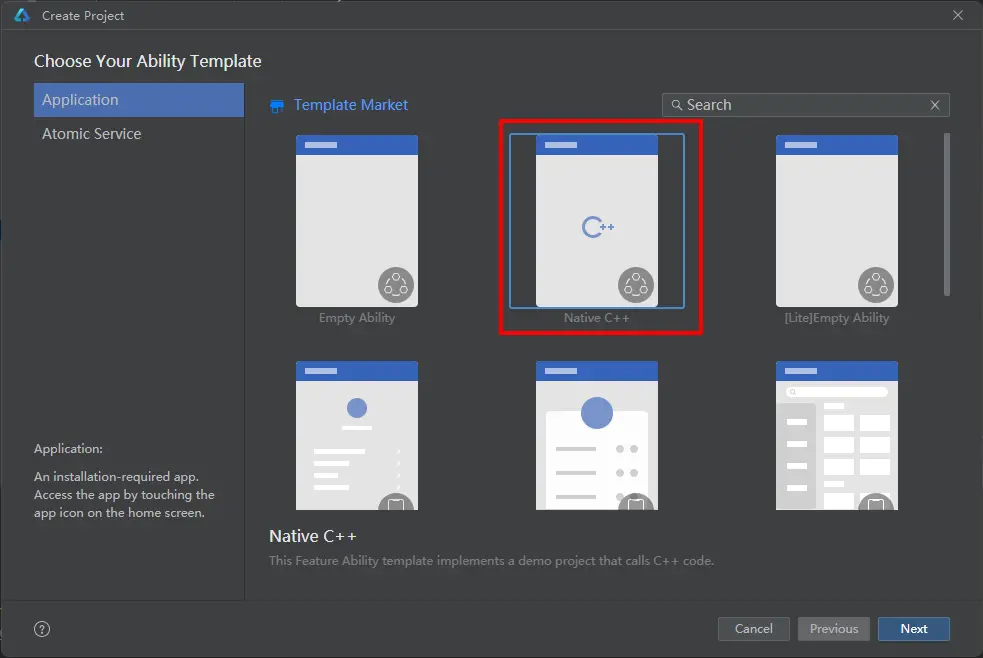
2. 添加依赖
创建完成后,IDE会在工程生成cpp目录,目录有libentry/index.d.ts、hello.cpp、CMakeLists.txt等文件。
- 打开src/main/cpp/CMakeLists.txt,在target_link_libraries依赖中添加包管理的libbundle_ndk.z.so。
target_link_libraries(entry PUBLIC libace_napi.z.so libbundle_ndk.z.so)
- 打开src/main/cpp/hello.cpp文件,添加头文件。
#include "bundle/native_interface_bundle.h"
3. 修改源文件
- 打开src/main/cpp/hello.cpp文件,文件Init会对当前方法进行初始化映射,这里定义对外接口为getCurrentApplicationInfo。
EXTERN_C_START
static napi_value Init(napi_env env, napi_value exports)
{
    napi_property_descriptor desc[] = {
        { "getCurrentApplicationInfo", nullptr, GetCurrentApplicationInfo, nullptr, nullptr, nullptr, napi_default, nullptr}
    };

    napi_define_properties(env, exports, sizeof(desc) / sizeof(desc[0]), desc);
    return exports;
}
EXTERN_C_END
- 把src/main/cpp/hello.cpp文件中,增加对应的方法,如下所示:
static napi_value GetCurrentApplicationInfo(napi_env env, napi_callback_info info)
- 在hello.cpp文件中获取Native的包信息对象,并转为js的包信息对象,即可在js测获取应用的信息:
static napi_value GetCurrentApplicationInfo(napi_env env, napi_callback_info info)
{
    // 调用Native接口获取应用信息
    OH_NativeBundle_ApplicationInfo nativeApplicationInfo = OH_NativeBundle_GetCurrentApplicationInfo();
    napi_value result = nullptr;
    napi_create_object(env, &result);
    // Native接口获取的应用包名转为js对象里的bundleName属性
    napi_value bundleName;
    napi_create_string_utf8(env, nativeApplicationInfo.bundleName, NAPI_AUTO_LENGTH, &bundleName);
    napi_set_named_property(env, result, "bundleName", bundleName);
    // Native接口获取的指纹信息转为js对象里的fingerprint属性
    napi_value fingerprint;
    napi_create_string_utf8(env, nativeApplicationInfo.fingerprint, NAPI_AUTO_LENGTH, &fingerprint);
    napi_set_named_property(env, result, "fingerprint", fingerprint);

    char* appId = OH_NativeBundle_GetAppId();
    // Native接口获取的appId转为js对象里的appId属性
    napi_value napi_appId;
    napi_create_string_utf8(env, appId, NAPI_AUTO_LENGTH, &napi_appId);
    napi_set_named_property(env, result, "appId", napi_appId);

    char* appIdentifier = OH_NativeBundle_GetAppIdentifier();
    // Native接口获取的appIdentifier转为js对象里的appIdentifier属性
    napi_value napi_appIdentifier;
    napi_create_string_utf8(env, appIdentifier, NAPI_AUTO_LENGTH, &napi_appIdentifier);
    napi_set_named_property(env, result, "appIdentifier", napi_appIdentifier);
    // 最后为了防止内存泄漏,手动释放
    free(nativeApplicationInfo.bundleName);
    free(nativeApplicationInfo.fingerprint);
    free(appId);
    free(appIdentifier);
    return result;
}
4. js侧调用
-
打开src\main\ets\pages\index.ets, 导入"libentry.so"。
-
调用Native接口getCurrentApplicationInfo即可获取应用信息。示例如下:
import hilog from '@ohos.hilog';
import testNapi from 'libentry.so';

@Entry
@Component
struct Index {
@State message: string = 'Hello World';

    build() {
        Row() {
        Column() {
            Text(this.message)
            .fontSize(50)
            .fontWeight(FontWeight.Bold)

            Button(){
            Text("GetCurrentApplicationInfo").fontSize(30)
            }.type(ButtonType.Capsule)
            .margin({
            top: 20
            })
            .backgroundColor('#0D9FFB')
            .width('70%')
            .height('5%')
            .onClick(()=>{
            try {
                let data = testNapi.getCurrentApplicationInfo();
                console.info("getCurrentApplicationInfo success, data is " + JSON.stringify(data));
            } catch (error) {
                console.error("getCurrentApplicationInfo failed");
                this.message = "getCurrentApplicationInfo failed";
            }
            })
        }
        .width('100%')
        }
        .height('100%')
    }
}
关于包管理NDK开发,可参考 Bundle模块介绍 。

讨论HarmonyOS开发技术,专注于API与组件、DevEco Studio、测试、元服务和应用上架分发等。
更多推荐


 13
13 0
0- 0


 已为社区贡献22条内容

所有评论(0)