【鸿蒙ArkUI实战开发】基于promptAction全局弹窗
📚往期笔录记录🔖:
🔖鸿蒙(HarmonyOS)北向开发知识点记录~
🔖鸿蒙(OpenHarmony)南向开发保姆级知识点汇总~
🔖鸿蒙应用开发与鸿蒙系统开发哪个更有前景?
🔖嵌入式开发适不适合做鸿蒙南向开发?看完这篇你就了解了~
🔖对于大前端开发来说,转鸿蒙开发究竟是福还是祸?
🔖鸿蒙岗位需求突增!移动端、PC端、IoT到底该怎么选?
🔖记录一场鸿蒙开发岗位面试经历~
🔖持续更新中……
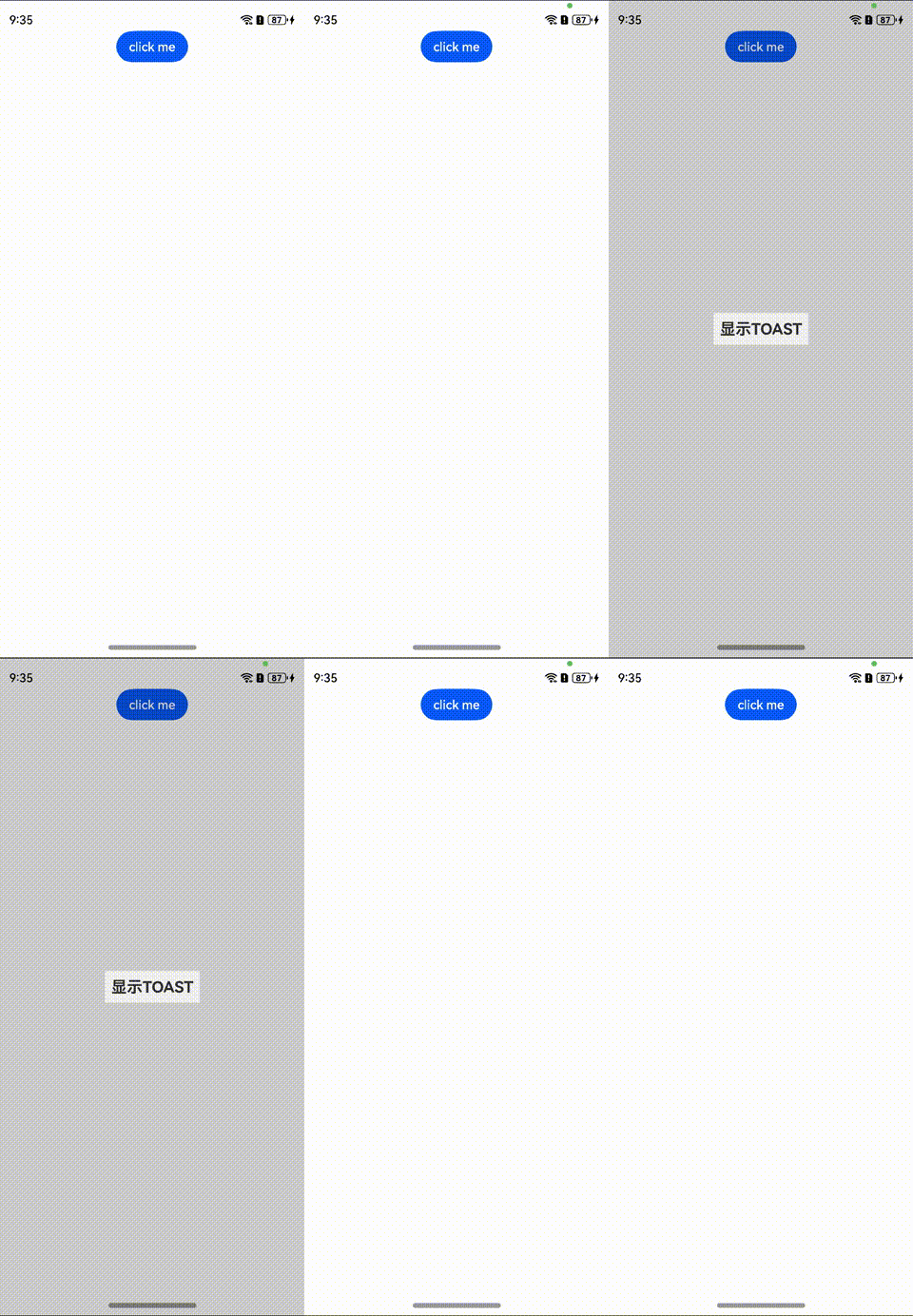
场景一:创建并显示全局自定义弹窗
方案
可以使用openCustomDialog接口, 创建并弹出dialogContent对应的自定义弹窗,使用Promise异步回调。
创建Params类方便开发者进行传参的,开发者可以在@Builder里自定义组件的内容,宽度跟随子节点自适应,圆角为0,弹窗背景色为透明色;
let contentNode = new ComponentContent(uiContext, wrapBuilder(buildText), new Params(this.message))
上述代码中uiContext代表上下文,wrapBuilder(buildText)代表自定义节点,new Params(this.message)代表传参。
核心代码
import { BusinessError } from '@ohos.base';
import { ComponentContent } from "@ohos.arkui.node";

class Params {
  text: string = ""
  constructor(text: string) {
    this.text = text;
  }
}//传参

@Builder
function buildText(params: Params) {
  Row(){
    Column() {
      Text(params.text)
        .fontSize(50)
        .fontWeight(FontWeight.Bold)
        .margin({bottom: 36})
    }.backgroundColor('#FFF0F0F0')
  }
  .height("100%")
} //自定义组件的内容

@Entry
@Component
struct Index {
  @State message: string = "显示TOAST"

  build() {
    Row() {
      Column() {
        Button("click me")
          .onClick(() => {
            let uiContext = this.getUIContext();
            let promptAction = uiContext.getPromptAction();
            let contentNode = new ComponentContent(uiContext, wrapBuilder(buildText), new Params(this.message));//上下文、自定义节点、传参
            try {
              promptAction.openCustomDialog(contentNode);
            } catch (error) {
              let message = (error as BusinessError).message;
              let code = (error as BusinessError).code;
              console.error(`OpenCustomDialog args error code is ${code}, message is ${message}`);
            };
          })
      }
      .width('100%')
      .height('100%')
    }
    .height('100%')
  }
}
import { BusinessError } from '@ohos.base';
import { ComponentContent } from "@ohos.arkui.node";

class Params {
  text: string = ""
  constructor(text: string) {
    this.text = text;
  }
}//传参

@Builder
function buildText(params: Params) {
  Row(){
    Column() {
      Text(params.text)
        .fontSize(50)
        .fontWeight(FontWeight.Bold)
        .margin({bottom: 36})
    }.backgroundColor('#FFF0F0F0')
  }
  .height("100%")
} //自定义组件的内容

@Entry
@Component
struct Index {
  @State message: string = "显示TOAST"

  build() {
    Row() {
      Column() {
        Button("click me")
          .onClick(() => {
            let uiContext = this.getUIContext();
            let promptAction = uiContext.getPromptAction();
            let contentNode = new ComponentContent(uiContext, wrapBuilder(buildText), new Params(this.message));//上下文、自定义节点、传参
            try {
              promptAction.openCustomDialog(contentNode);
            } catch (error) {
              let message = (error as BusinessError).message;
              let code = (error as BusinessError).code;
              console.error(`OpenCustomDialog args error code is ${code}, message is ${message}`);
            };
          })
      }
      .width('100%')
      .height('100%')
    }
    .height('100%')
  }
}
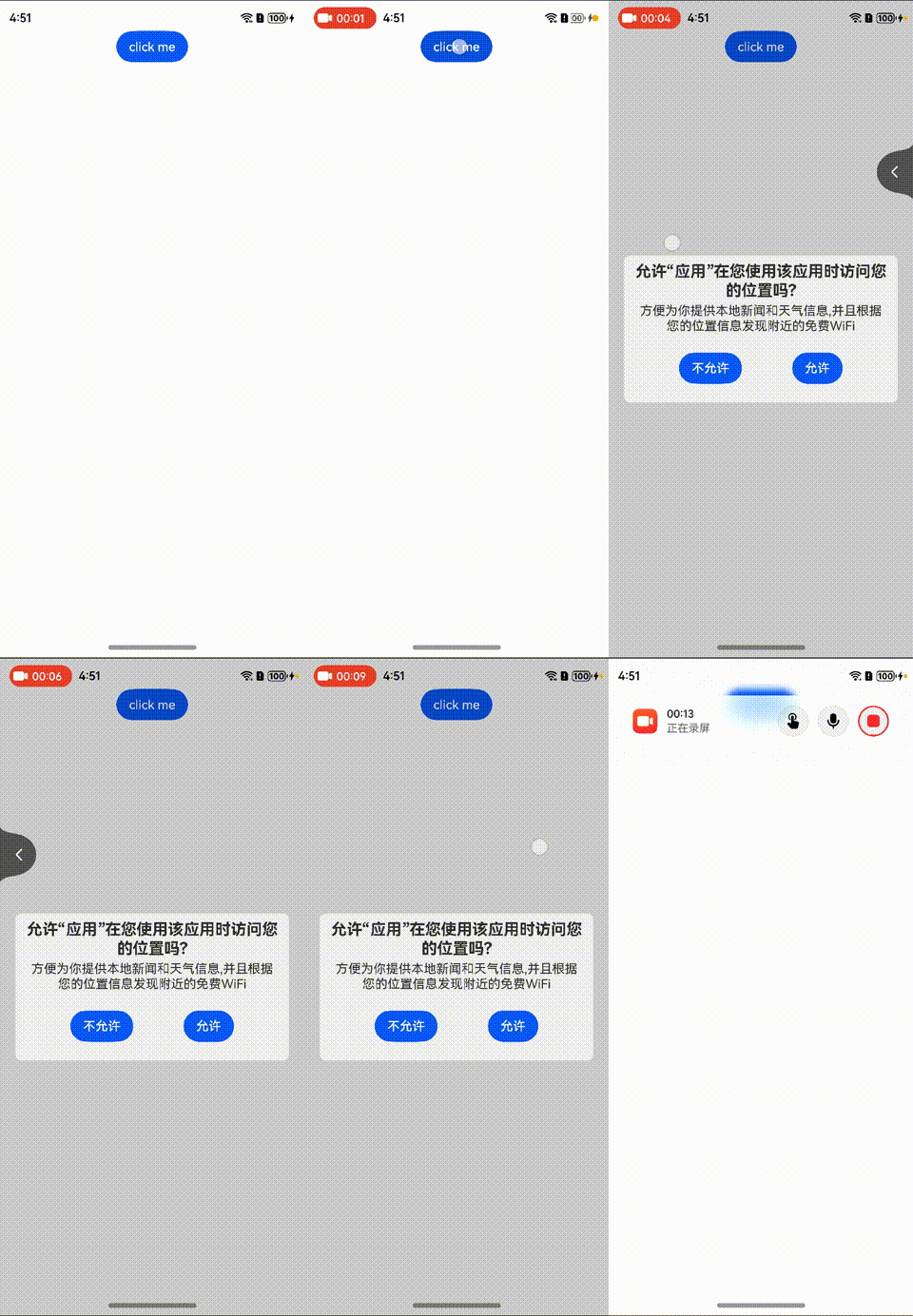
场景二:全局弹窗拦截返回并监听返回事件
方案
onWillDismiss Callback,当用户执行点击遮障层关闭、左滑/右滑、三键back、键盘ESC关闭交互操作时,如果注册该回调函数,则不会立刻关闭弹窗。在回调函数中可以通过reason得到阻拦关闭弹窗的操作类型,从而根据原因选择是否能关闭弹窗。
| 名称 | 描述 |
|---|---|
| PRESS_BACK | 点击三键back、左滑/右滑、键盘ESC。 |
| TOUCH_OUTSIDE | 点击遮障层时。 |
| CLOSE_BUTTON | 点击关闭按钮。 |
当前组件返回的reason中,暂不支持CLOSE_BUTTON的枚举值。
核心代码
import { BusinessError } from '@ohos.base';
import { ComponentContent } from "@ohos.arkui.node";

class Params {
  text: string = ""

  constructor(text: string) {
    this.text = text;
  }
} //传参

@Builder
function buildText(params: Params) {
  Row() {
    Column() {
      Text(params.text)
        .fontSize(20)
        .textAlign(TextAlign.Center)
        .fontWeight(FontWeight.Bold)
        .padding(8)
      Text('方便为你提供本地新闻和天气信息,并且根据您的位置信息发现附近的免费WiFi')
        .fontSize(16)
        .textAlign(TextAlign.Center)
        .padding({ left: 14, right: 14 })
        .margin({ top: -4 })
      Row({ space: 64 }) {
        Button("不允许")
          .onClick(() => {
            let link1: SubscribedAbstractProperty<number> = storage.link('PropA');
            let numsss = link1.get()
            console.log('nums', link1.get())
            link1.set(++numsss)
          })

        Button("允许")
      }
      .padding(24)
    }
    .width("90%")
    .borderRadius(8)
    .backgroundColor('#FFF0F0F0')
  }
  .height("100%")
} //自定义组件的内容

let para: Record<string, number> = { 'PropA': 1 };
let storage: LocalStorage = new LocalStorage(para); // 创建新实例并使用给定对象初始化

@Entry(storage)
@Component
struct Index {
  @State message: string = "允许“应用”在您使用该应用时访问您的位置吗?"
  @LocalStorageLink('uiContext') aaa: UIContext = this.getUIContext();
  @LocalStorageLink('PropAA') shjsh: ComponentContent<Params> | null = null
  @LocalStorageLink('PropA') @Watch('onchang') nums: number = 0;

  onchang() {
    try {
      this.aaa.getPromptAction().closeCustomDialog(this.shjsh);
    } catch (error) {
      let message = (error as BusinessError).message;
      let code = (error as BusinessError).code;
      console.error(`OpenCustomDialog args error code is ${code}, message is ${message}`);
    }
  }

  build() {
    Row() {
      Column() {
        Button("click me")
          .onClick(() => {
            let uiContext = this.getUIContext();
            let promptAction = uiContext.getPromptAction();
            let contentNode =
              new ComponentContent(uiContext, wrapBuilder(buildText), new Params(this.message)); // 上下文、自定义节点、传参
            this.shjsh = contentNode
            try {
              promptAction.openCustomDialog(contentNode,
                {
                  onWillDismiss: (dismissDialogAction: DismissDialogAction) => {
                    console.info("reason" + JSON.stringify(dismissDialogAction.reason))
                    console.log("dialog onWillDismiss")
                  }
                });
            } catch (error) {
              let message = (error as BusinessError).message;
              let code = (error as BusinessError).code;
              console.error(`OpenCustomDialog args error code is ${code}, message is ${message}`);
            }
          })
      }
      .width('100%')
      .height('100%')
    }
    .height('100%')
  }
}
import { BusinessError } from '@ohos.base';
import { ComponentContent } from "@ohos.arkui.node";

class Params {
  text: string = ""

  constructor(text: string) {
    this.text = text;
  }
} //传参

@Builder
function buildText(params: Params) {
  Row() {
    Column() {
      Text(params.text)
        .fontSize(20)
        .textAlign(TextAlign.Center)
        .fontWeight(FontWeight.Bold)
        .padding(8)
      Text('方便为你提供本地新闻和天气信息,并且根据您的位置信息发现附近的免费WiFi')
        .fontSize(16)
        .textAlign(TextAlign.Center)
        .padding({ left: 14, right: 14 })
        .margin({ top: -4 })
      Row({ space: 64 }) {
        Button("不允许")
          .onClick(() => {
            let link1: SubscribedAbstractProperty<number> = storage.link('PropA');
            let numsss = link1.get()
            console.log('nums', link1.get())
            link1.set(++numsss)
          })

        Button("允许")
      }
      .padding(24)
    }
    .width("90%")
    .borderRadius(8)
    .backgroundColor('#FFF0F0F0')
  }
  .height("100%")
} //自定义组件的内容

let para: Record<string, number> = { 'PropA': 1 };
let storage: LocalStorage = new LocalStorage(para); // 创建新实例并使用给定对象初始化

@Entry(storage)
@Component
struct Index {
  @State message: string = "允许“应用”在您使用该应用时访问您的位置吗?"
  @LocalStorageLink('uiContext') aaa: UIContext = this.getUIContext();
  @LocalStorageLink('PropAA') shjsh: ComponentContent<Params> | null = null
  @LocalStorageLink('PropA') @Watch('onchang') nums: number = 0;

  onchang() {
    try {
      this.aaa.getPromptAction().closeCustomDialog(this.shjsh);
    } catch (error) {
      let message = (error as BusinessError).message;
      let code = (error as BusinessError).code;
      console.error(`OpenCustomDialog args error code is ${code}, message is ${message}`);
    }
  }

  build() {
    Row() {
      Column() {
        Button("click me")
          .onClick(() => {
            let uiContext = this.getUIContext();
            let promptAction = uiContext.getPromptAction();
            let contentNode =
              new ComponentContent(uiContext, wrapBuilder(buildText), new Params(this.message)); // 上下文、自定义节点、传参
            this.shjsh = contentNode
            try {
              promptAction.openCustomDialog(contentNode,
                {
                  onWillDismiss: (dismissDialogAction: DismissDialogAction) => {
                    console.info("reason" + JSON.stringify(dismissDialogAction.reason))
                    console.log("dialog onWillDismiss")
                  }
                });
            } catch (error) {
              let message = (error as BusinessError).message;
              let code = (error as BusinessError).code;
              console.error(`OpenCustomDialog args error code is ${code}, message is ${message}`);
            }
          })
      }
      .width('100%')
      .height('100%')
    }
    .height('100%')
  }
}
场景三:自定义弹窗样式
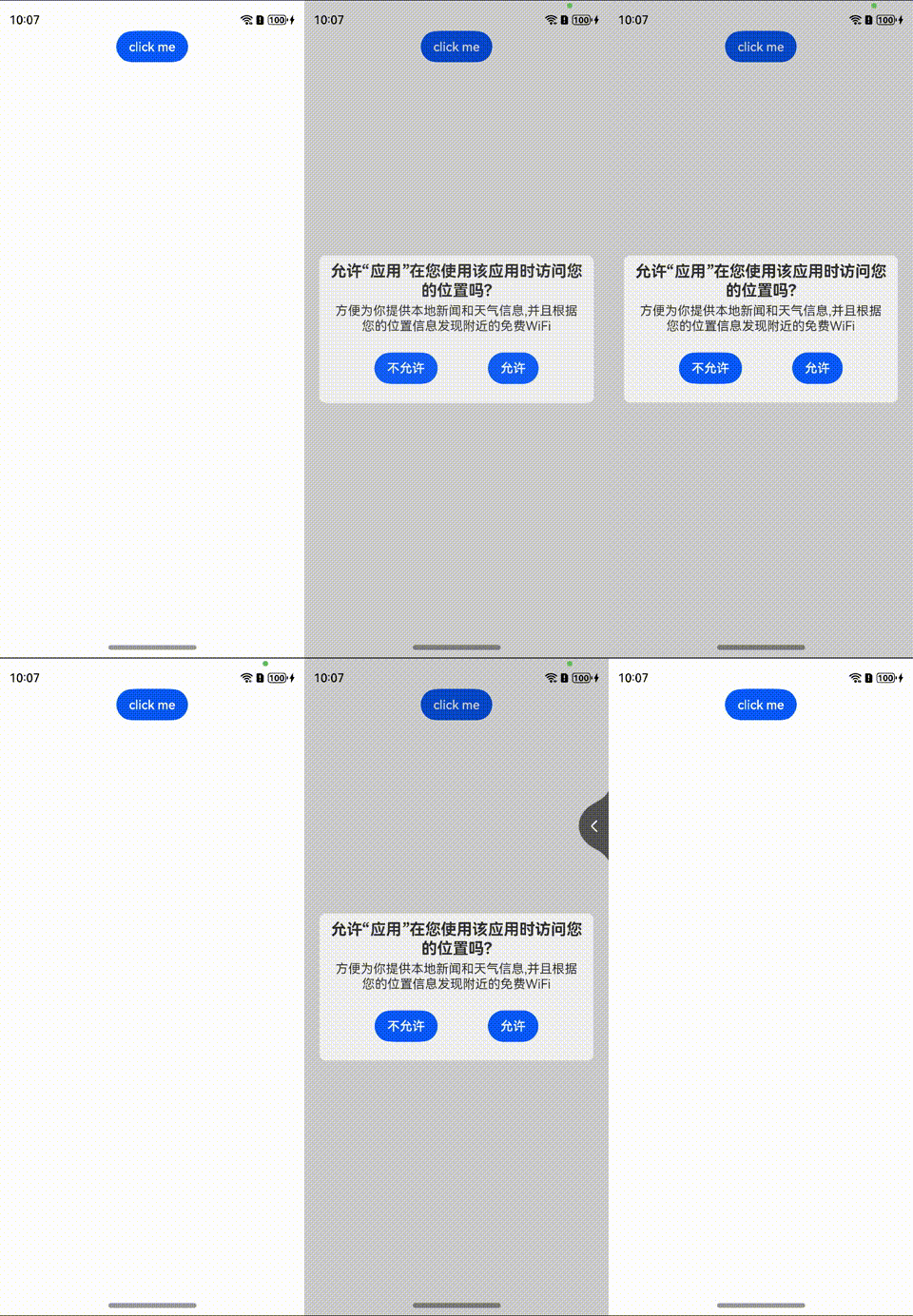
样式一:渐隐渐显的方式弹出
效果图
方案
promptAction.openCustomDialog接口,弹窗的样式相当于customdialog设置customStyle为true时;此时弹窗的样式完全按照dialogContent中设置的样式显示,完全由开发者自己来定义。
核心代码
import { BusinessError } from '@ohos.base';
import { ComponentContent } from "@ohos.arkui.node";

class Params {
  text: string = ""

  constructor(text: string) {
    this.text = text;
  }
} //传参

@Builder
function buildText(params: Params) {
  Row(){
    Column() {
      Text(params.text)
        .fontSize(20)
        .textAlign(TextAlign.Center)
        .fontWeight(FontWeight.Bold)
        .padding(8)
      Text('方便为你提供本地新闻和天气信息,并且根据您的位置信息发现附近的免费WiFi')
        .fontSize(16)
        .textAlign(TextAlign.Center)
        .padding({ left:14,right:14})
        .margin({top:-4})
      Row({space:64}){
        Button("不允许")
        Button("允许")
      }
      .padding(24)
    }
    .width("90%")
    .borderRadius(8)
    .backgroundColor('#FFF0F0F0')
  }
  .height("100%")
} //自定义组件的内容

@Entry
@Component
struct Index {
  @State message: string = "允许“应用”在您使用该应用时访问您的位置吗?"

  build() {
    Row() {
      Column() {
        Button("click me")
          .onClick(() => {
            let uiContext = this.getUIContext();
            let promptAction = uiContext.getPromptAction();
            let contentNode =
              new ComponentContent(uiContext, wrapBuilder(buildText), new Params(this.message)); //上下文、自定义节点、传参
            try {
              promptAction.openCustomDialog(contentNode);
            } catch (error) {
              let message = (error as BusinessError).message;
              let code = (error as BusinessError).code;
              console.error(`OpenCustomDialog args error code is ${code}, message is ${message}`);
            }
          })
      }
      .width('100%')
      .height('100%')
    }
    .height('100%')
  }
}
import { BusinessError } from '@ohos.base';
import { ComponentContent } from "@ohos.arkui.node";

class Params {
  text: string = ""

  constructor(text: string) {
    this.text = text;
  }
} //传参

@Builder
function buildText(params: Params) {
  Row(){
    Column() {
      Text(params.text)
        .fontSize(20)
        .textAlign(TextAlign.Center)
        .fontWeight(FontWeight.Bold)
        .padding(8)
      Text('方便为你提供本地新闻和天气信息,并且根据您的位置信息发现附近的免费WiFi')
        .fontSize(16)
        .textAlign(TextAlign.Center)
        .padding({ left:14,right:14})
        .margin({top:-4})
      Row({space:64}){
        Button("不允许")
        Button("允许")
      }
      .padding(24)
    }
    .width("90%")
    .borderRadius(8)
    .backgroundColor('#FFF0F0F0')
  }
  .height("100%")
} //自定义组件的内容

@Entry
@Component
struct Index {
  @State message: string = "允许“应用”在您使用该应用时访问您的位置吗?"

  build() {
    Row() {
      Column() {
        Button("click me")
          .onClick(() => {
            let uiContext = this.getUIContext();
            let promptAction = uiContext.getPromptAction();
            let contentNode =
              new ComponentContent(uiContext, wrapBuilder(buildText), new Params(this.message)); //上下文、自定义节点、传参
            try {
              promptAction.openCustomDialog(contentNode);
            } catch (error) {
              let message = (error as BusinessError).message;
              let code = (error as BusinessError).code;
              console.error(`OpenCustomDialog args error code is ${code}, message is ${message}`);
            }
          })
      }
      .width('100%')
      .height('100%')
    }
    .height('100%')
  }
}
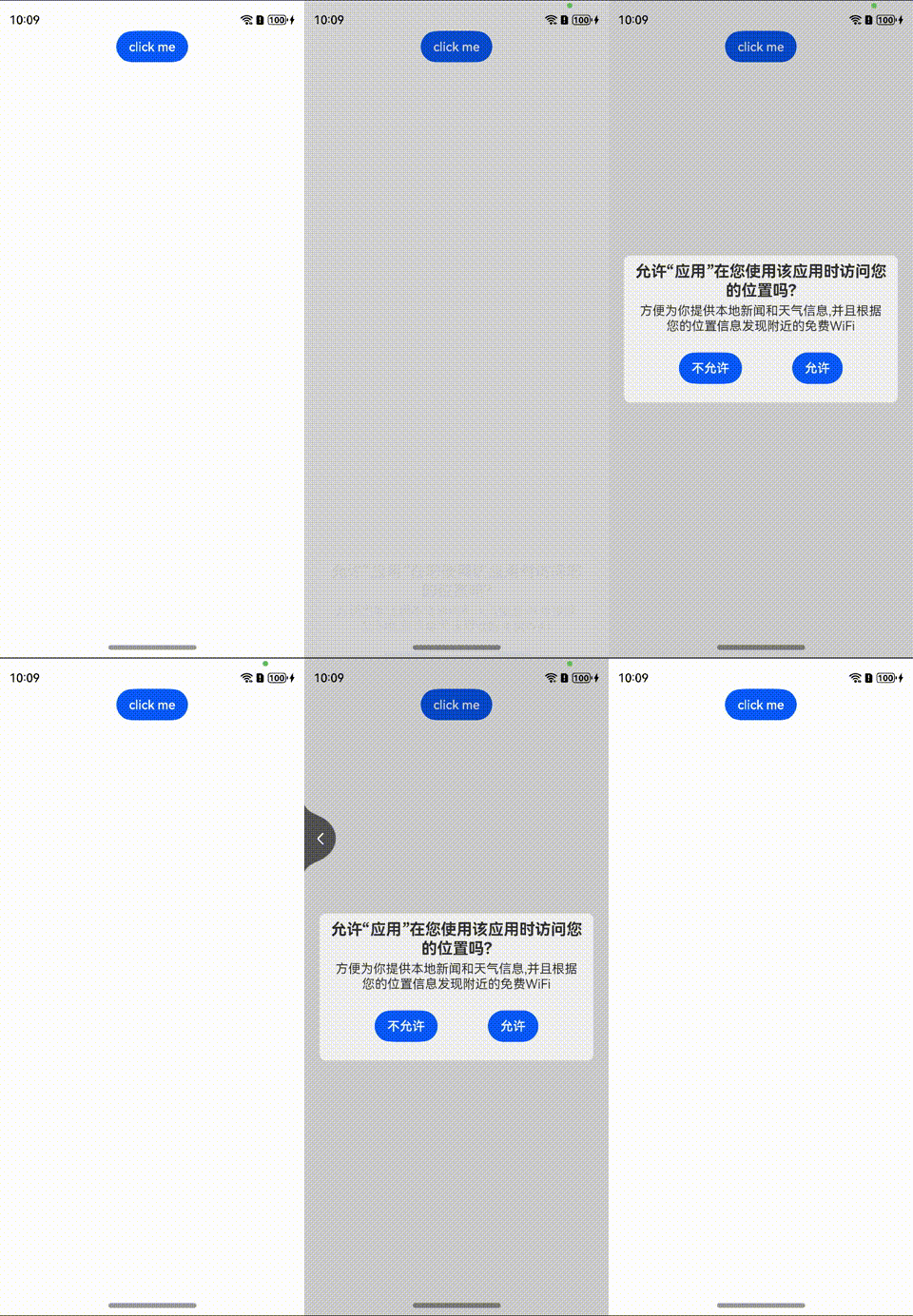
样式二:由下往上的方式弹出
效果图.
方案
在自定义组件Builder里添加组件内转场动画(transition),设置组件转场时的平移效果和纵向的平移距离。
核心代码
@Builder
function buildText(params: Params) {
  Row(){
    Column() {
      Text(params.text)
        .fontSize(20)
        .textAlign(TextAlign.Center)
        .fontWeight(FontWeight.Bold)
        .padding(8)
      Text('方便为你提供本地新闻和天气信息,并且根据您的位置信息发现附近的免费WiFi')
        .fontSize(16)
        .textAlign(TextAlign.Center)
        .padding({ left:14,right:14})
        .margin({top:-4})
      Row({space:64}){
        Button("不允许")
        Button("允许")
      }
      .padding(24)
    }
    .width("90%")
    .borderRadius(8)
    .backgroundColor('#FFF0F0F0')
  }
  .height("100%")
  .visibility(800)
  // 定义进场出场转场动画效果
  .transition(TransitionEffect.OPACITY.animation({duration: 800}).combine(TransitionEffect.translate({y: 100})))
} //自定义组件的内容
最后
总是有很多小伙伴反馈说:鸿蒙开发不知道学习哪些技术?不知道需要重点掌握哪些鸿蒙应用开发知识点? 为了解决大家这些学习烦恼。在这准备了一份很实用的鸿蒙开发学习路线与学习文档,希望给大家提供一个正确的方向学习:https://docs.qq.com/doc/DSHRVT0NZb05PUklN

讨论HarmonyOS开发技术,专注于API与组件、DevEco Studio、测试、元服务和应用上架分发等。
更多推荐
 8
8 0
0- 0


 已为社区贡献71条内容

所有评论(0)