ArkTs如何实现一个动态表单
·
概要
本人是一位Java开发,所以思路可能更偏向于后端;如有前端大神有不同见解,可以留言交流;
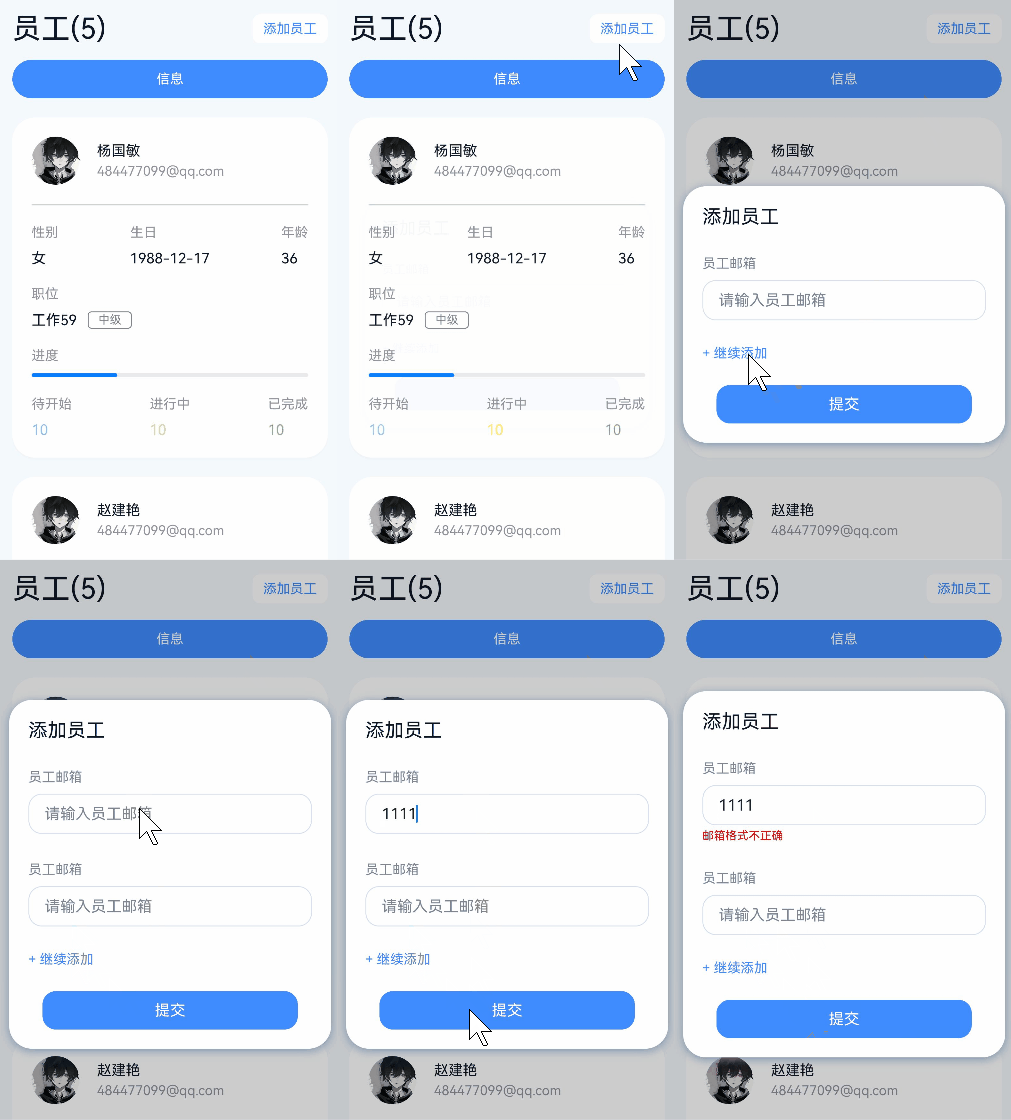
动态表单,顾名思义就是用户可以自定义添加表单的组数量;业务中常用在收集用户数据,或者提交多个表单组成数组的情况;
整体思路借鉴了vue中实现动态表单的思路;
技术分析
博主在写这篇文章,由于需要涉及到功能,用户可能会一次性添加多组数据发送到后端;
由于需要多组,那我们可以定义一个数组用来装载表单的属性;其中数据的泛型是一个类或者是一个接口,这样就可以实现不同的表单数据隔离;
interface InputModel {
  index: number;
  text: string;
}

@State inputArrays: Array<InputModel> = [
    {
      index: 0,
      text: ""
    }
  ]
那么,我们的组件就只需要去循环这个数组,用户在添加的时候只需要给这个数组添加进去一个新的对象,就能自动触发ui刷新;
Text('+ 继续添加')
   .width('100%')
   .textAlign(TextAlign.Start)
   .fontColor($r('app.color.xieliyun'))
   .fontSize(14)
   .margin({ top: rvp(26) })
   .onClick(() => {
      if (this.inputArrays.length + 1 > 5) {
         ToastUtil.showToast("数量超限!")
      } else {
         this.inputArrays.push(
      {
         index: this.inputArrays.length,
         text: ""
          }
        )
      }
    })
代码实现
封装一个@Builder 用来构建布局;
 @Builder
  inputBuilder(index: number) {
    Column({}) {
      Text('员工邮箱').fontColor('#7D8592').fontSize(rvp(14))
      TextInput({ placeholder: "请输入员工邮箱" })
        .placeholderColor('#7D8592')
        .backgroundColor('#fff')
        .width('100%')
        .borderRadius(rvp(14))
        .border({ width: rvp(1), color: '#D8E0F0' })
        .margin({ top: rvpHeight(9) })
        .onChange((value: string) => {
          this.inputArrays[index].text = value
        })
      if (this.showCheck && this.indexArray.indexOf(index) > -1) {
        Text('邮箱格式不正确')
          .fontSize(12)
          .fontColor(Color.Red)
          .margin({ top: rvpHeight(4) })
      }

    }.alignItems(HorizontalAlign.Start).width('100%').margin({ top: rvp(29) })
  }
文件代码
import { JSONUtil, RegexUtil, ToastUtil } from "@pura/harmony-utils"
import { rvp, rvpHeight } from "../constant/Index"

/**
 * 添加员工
 */
@CustomDialog
export struct AddEmployeeDialog {
  confirm?: () => void =
    () => {
    }
  controller: CustomDialogController
  // 定义一个数组用来刷新输入框
  @State inputArrays: Array<InputModel> = [
    {
      index: 0,
      text: ""
    }
  ]
  @State showCheck: boolean = false;
  @State indexArray: Array<number> = []

  build() {
    Scroll() {
      Column() {
        Row() {
          Text('添加员工').fontSize(rvp(20)).fontColor('#0A1629')
        }.width('100%').justifyContent(FlexAlign.Start)

        ForEach(this.inputArrays, (item: InputModel) => {
          this.inputBuilder(item.index);
        })

        Text('+ 继续添加')
          .width('100%')
          .textAlign(TextAlign.Start)
          .fontColor($r('app.color.xieliyun'))
          .fontSize(14)
          .margin({ top: rvp(26) })
          .onClick(() => {
            if (this.inputArrays.length + 1 > 5) {
              ToastUtil.showToast("数量超限!")
            } else {
              this.inputArrays.push(
                {
                  index: this.inputArrays.length,
                  text: ""
                }
              )
            }
          })

        Row() {
          Text('提交')
            .width('90%')
            .height(rvpHeight(40))
            .backgroundColor($r('app.color.xieliyun'))
            .textAlign(TextAlign.Center)
            .borderRadius(rvp(14))
            .fontColor(Color.White)
            .onClick(() => {
              // 如果每一项都是空 给出提示
              const data = this.inputArrays.filter(item => item.text)
              if (data.length === 0) {
                ToastUtil.showToast("邮箱不允许为空")
                return
              }
              this.inputArrays.forEach(item => {
                if (item.text && !RegexUtil.isEmail(item.text)) {
                  this.showCheck = true
                  this.indexArray.push(item.index)
                } else {
                  // 过滤掉邮箱校验通过的
                  this.indexArray = this.indexArray.filter(data => data !== item.index)
                }
              })
              if (this.indexArray.length === 0) {
                this.showCheck = false;
              }
              if (!this.showCheck) {
                // 允许提交
                this.controller.close()
                if (this.confirm) {
                  this.confirm()
                }
              }
            })
        }.width('100%').justifyContent(FlexAlign.Center).alignItems(VerticalAlign.Center).margin({ top: rvpHeight(25) })
      }
      .width('100^')
      .padding(rvp(20))
      .justifyContent(FlexAlign.Center)
      .alignItems(HorizontalAlign.Center)
    }.width('100%')
    // .height('100%')
    .scrollBar(BarState.Off)
    .align(Alignment.Top)
  }

  @Builder
  inputBuilder(index: number) {
    Column({}) {
      Text('员工邮箱').fontColor('#7D8592').fontSize(rvp(14))
      TextInput({ placeholder: "请输入员工邮箱" })
        .placeholderColor('#7D8592')
        .backgroundColor('#fff')
        .width('100%')
        .borderRadius(rvp(14))
        .border({ width: rvp(1), color: '#D8E0F0' })
        .margin({ top: rvpHeight(9) })
        .onChange((value: string) => {
          this.inputArrays[index].text = value
        })
      if (this.showCheck && this.indexArray.indexOf(index) > -1) {
        Text('邮箱格式不正确')
          .fontSize(12)
          .fontColor(Color.Red)
          .margin({ top: rvpHeight(4) })
      }

    }.alignItems(HorizontalAlign.Start).width('100%').margin({ top: rvp(29) })
  }
}


interface InputModel {
  index: number;
  text: string;
}

讨论HarmonyOS开发技术,专注于API与组件、DevEco Studio、测试、元服务和应用上架分发等。
更多推荐



 5
5 0
0- 0


 已为社区贡献3条内容

所有评论(0)