【鸿蒙实战开发】边框或背景图片拉伸案例
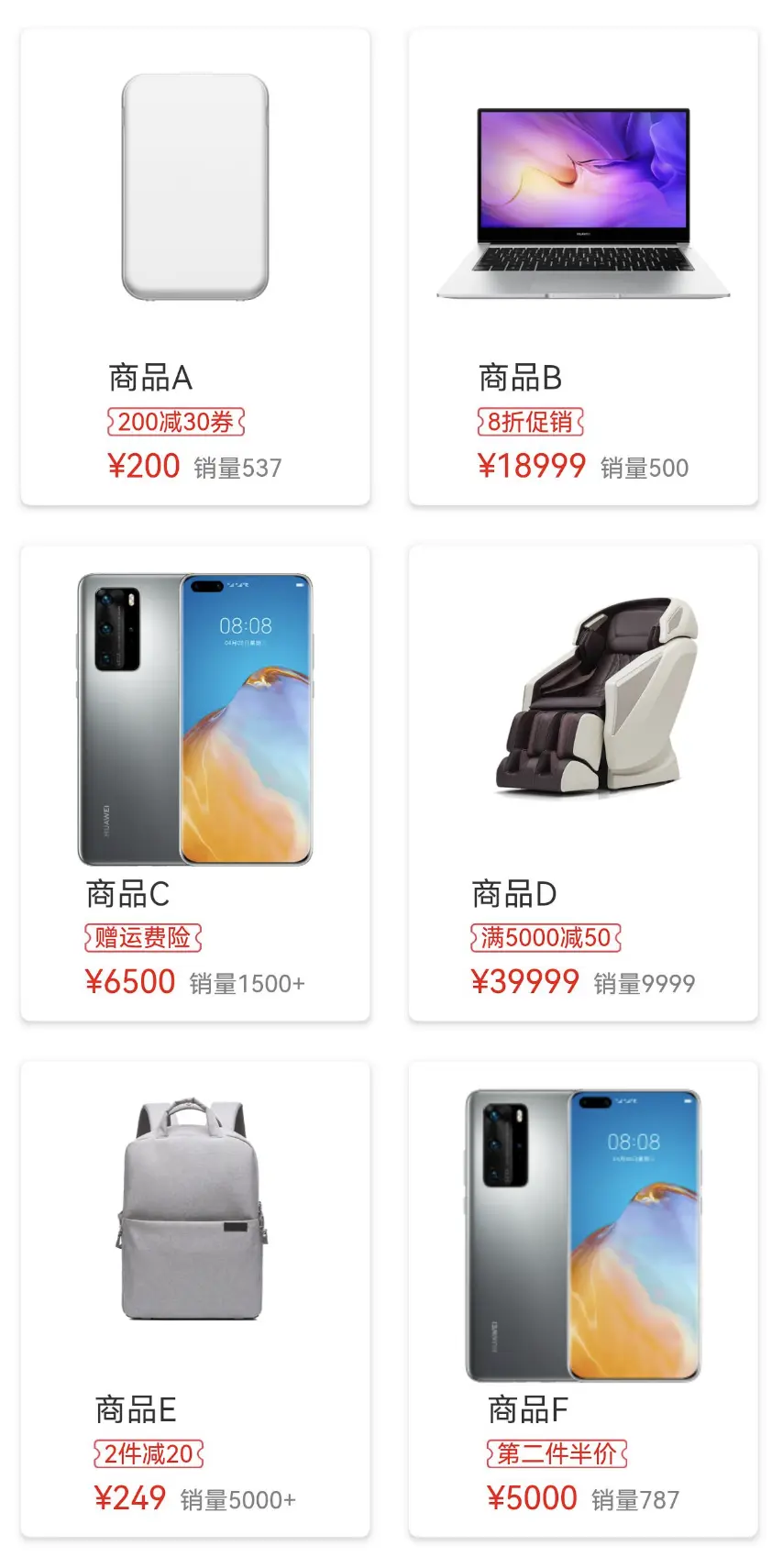
HarmonyOS上不支持.9资源文件进行安全拉伸。作为替代方案,本案例中商城页面的促销标签边框使用同一张图片资源,通过设置图片的resizable属性,展示不同长度的促销标签效果。
·
📚鸿蒙开发往期学习笔录📌:
📌 鸿蒙(OpenHarmony)南向开发保姆级知识点汇总~
📌 鸿蒙应用开发与鸿蒙系统开发哪个更有前景?
📌 嵌入式开发适不适合做鸿蒙南向开发?看完这篇你就了解了~
📌 对于大前端开发来说,转鸿蒙开发究竟是福还是祸?
📌 鸿蒙岗位需求突增!移动端、PC端、IoT到底该怎么选?
📌 记录一场鸿蒙开发岗位面试经历~
📌 持续更新中……
介绍
HarmonyOS上不支持.9资源文件进行安全拉伸。
作为替代方案,本案例中商城页面的促销标签边框使用同一张图片资源,通过设置图片的resizable属性,展示不同长度的促销标签效果。
效果图预览
使用说明
- 打开案例即可直接查看效果。
- 每一个商品的促销标签都使用同一张本地资源图片,不同长度的文案对应不同的图片拉伸比例。
实现思路
- 通过设置图片组件的resizable属性实现图片的安全拉伸。
Image($r('app.media.ninepatchimage_border'))
  .width(this.discountTextWidth)
  .height(this.discountTextHeight)
    // TODO: 知识点:通过设置图片组件的resizable属性,设置顶部、右侧、底部、左侧的距离,使其边缘部分在图片拉伸时不会发生变化,仅图片中央区域被拉伸
  .resizable({
    slice: {
      top: $r('app.integer.ninepatchimage_product_discount_image_resizable_top'),
      right: $r('app.integer.ninepatchimage_product_discount_image_resizable_right'),
      bottom: $r('app.integer.ninepatchimage_product_discount_image_resizable_bottom'),
      left: $r('app.integer.ninepatchimage_product_discount_image_resizable_left')
    }
  })
- 依赖onAreaChange事件,观察促销标签文案所在Text组件的宽高变化,通过状态绑定的形式,动态修改促销标签边框底图的宽高。
Text(discount)
  .fontSize($r('app.integer.ninepatchimage_product_discount_font_size'))
  .fontColor(Color.Red)
    // TODO: 知识点:通过监听文本组件的宽高,以及状态变量,动态设置背景图片的宽高
  .onAreaChange((oldValue: Area, newValue: Area) => {
    this.discountTextWidth = newValue.width;
    this.discountTextHeight = newValue.height;
  })
  .padding({
    left: $r('app.integer.ninepatchimage_product_discount_padding'),
    right: $r('app.integer.ninepatchimage_product_discount_padding')
  })
高性能知识点
- WaterFlow组件下使用LazyForEach、组件复用,从而提升瀑布流列表首次渲染和滚动时的性能。
WaterFlow() {
  LazyForEach(this.productsDataSource, (item: Product) => {
    FlowItem() {
      // TODO:性能知识点:使用@Reusable修饰可复用的组件,并通过设置reuseId提供瀑布流滑动场景中的组件复用能力
      ProductItemComp({
        product: item
      })
        .reuseId(item.type)
    }
    .width('100%')
  })
}
@Reusable
@Component
export struct ProductItemComp {
  ...
}
- 通过onAreaChange事件监听文本组件宽高的变化,设置背景图片的宽高,然而onAreaChange为系统高频回调,每一帧都会执行,应避免在其中进行冗余和耗时的操作。
Text(discount)
    .fontSize($r('app.integer.imageresizable_product_discount_font_size'))
    .fontColor(Color.Red)
    // TODO: 知识点:通过监听文本组件的宽高,以及状态变量,动态设置背景图片的宽高
    // TODO: 性能知识点:onAreaChange为系统高频回调,每一帧都会执行,应避免在其中进行冗余和耗时的操作
    .onAreaChange((oldValue: Area, newValue: Area) => {
      this.discountTextWidth = newValue.width;
      this.discountTextHeight = newValue.height;
    })
工程结构&模块类型
ninepatchimage                       // har类型
|---common
|   |---constants
|   |    |---CommonConstants.ets     // 通用常量
|---components
|   |---ProductItemComp.ets          // 自定义组件-商品简易信息
|---model
|   |---ProductModel.ets             // 模型层-商品数据模型
|---pages
|   |---ProductWaterFlowPage.ets     // 展示层-商品瀑布流页面
最后
总是有很多小伙伴反馈说:鸿蒙开发不知道学习哪些技术?不知道需要重点掌握哪些鸿蒙应用开发知识点? 为了解决大家这些学习烦恼。在这准备了一份很实用的鸿蒙开发学习路线与学习文档,希望给大家提供一个正确的方向学习:https://docs.qq.com/doc/DSHRVT0NZb05PUklN

讨论HarmonyOS开发技术,专注于API与组件、DevEco Studio、测试、元服务和应用上架分发等。
更多推荐
 13
13 0
0- 0


 已为社区贡献46条内容

所有评论(0)