鸿蒙开发(17)案例 app登录首页我的布局
鸿蒙学习总结,案例用到了路由和tabs、Grid、GridItem、Image等组件,是通常用到的布局结构,具体代码资源已放到gitee仓库ArkTS学习。
·
一、效果图
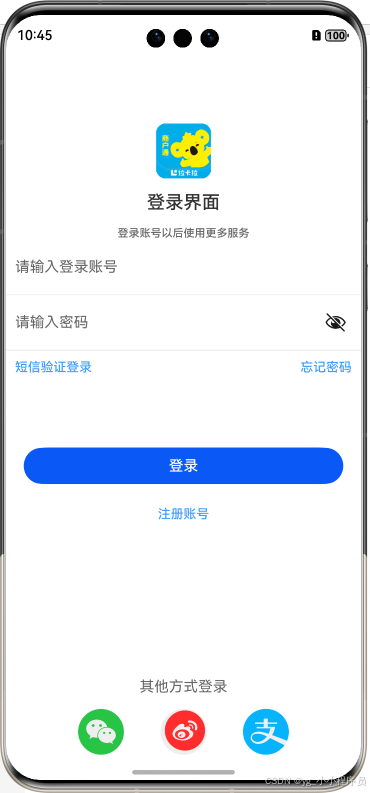
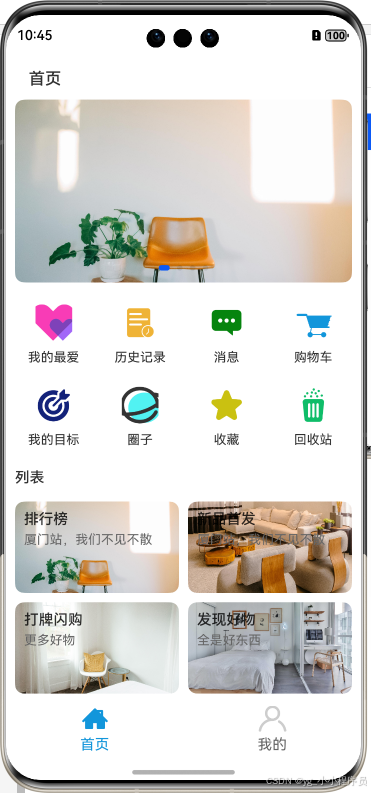
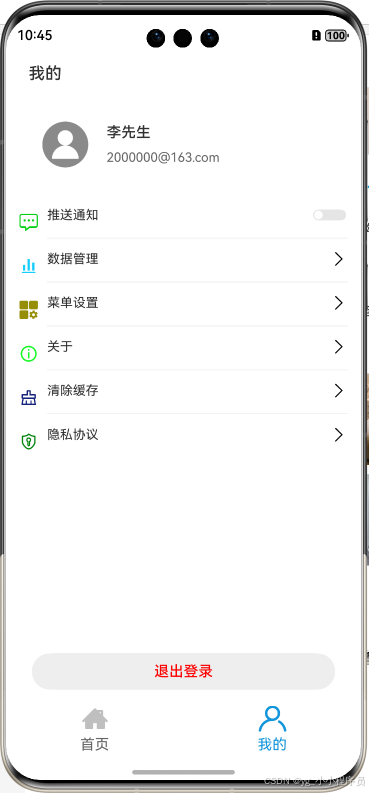
二、代码资源布文件
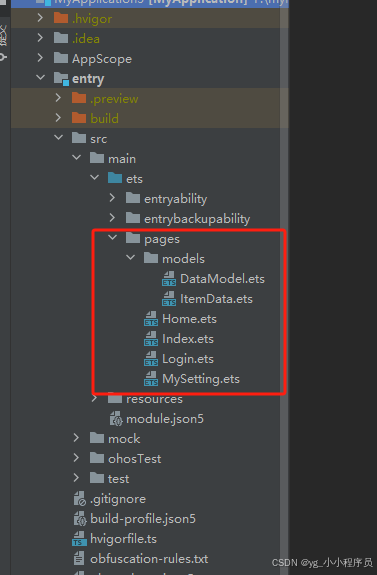
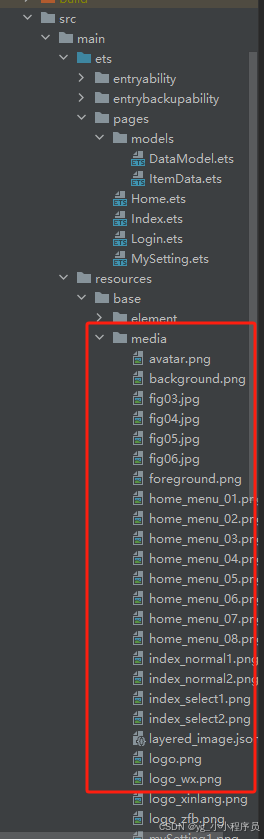
三、代码实现
DataModel、ItemData文件为数据模型
DataModel代码
import ItemData  from './ItemData'

export default class DataModel {
//获取轮播图片数据
  getSwiperImages(): Array<Resource>{
    let swiperImages:Resource[] =[
      $r('app.media.fig03'),
      $r('app.media.fig04'),
      $r('app.media.fig05'),
      $r('app.media.fig06'),
    ]
    return swiperImages
  }

//菜单列表
  getFirstGridData():Array<ItemData>{
    let firstGridData: ItemData[] = [
      new ItemData( $r('app.media.home_menu_01'),'我的最爱'),
      new ItemData( $r('app.media.home_menu_02'),'历史记录'),
      new ItemData( $r('app.media.home_menu_03'),'消息'),
      new ItemData( $r('app.media.home_menu_04'),'购物车'),
      new ItemData( $r('app.media.home_menu_05'),'我的目标'),
      new ItemData( $r('app.media.home_menu_06'),'圈子'),
      new ItemData( $r('app.media.home_menu_07'),'收藏'),
      new ItemData( $r('app.media.home_menu_08'),'回收站'),
    ]
    return firstGridData
  }

  //列表
  getSecondGridData():Array<ItemData>{
    let secondGridData: ItemData[] = [
      new ItemData( $r('app.media.fig03'),'排行榜','厦门站,我们不见不散'),
      new ItemData( $r('app.media.fig04'),'新品首发','厦门站,我们不见不散'),
      new ItemData( $r('app.media.fig05'),'打牌闪购','更多好物'),
      new ItemData( $r('app.media.fig06'),'发现好物','全是好东西'),
    ]
    return secondGridData
  }
}
ItemData代码
export default  class ItemData{
  img:Resource;
  label:string;
  describe?:string;

  constructor(img:Resource,label:string,describe?:string) {
    this.img = img
    this.label = label
    this.describe = describe
  }
}
Login
import { promptAction, router } from '@kit.ArkUI'
//登录界面
@Extend(TextInput)
function inputStyle(){
  .placeholderColor($r('app.color.placeholder_color'))
  .height($r('app.float.lonin_input_height'))
  .width('100%')
  .backgroundColor(Color.White)
  .margin('10fp')
  .padding({left:'10fp'})
}

@Extend(Line)
function lineStyle(){
  .height('1fp')
  .width('100%')
  .backgroundColor($r('app.color.line_color'))
}

@Extend(Text)
function blueStyle(){
  .fontColor($r('app.color.blue_color'))
  .fontSize('14fp')
  .fontWeight(500)
  .padding('10fp')
}

interface AccountData {
  name:string,
  email:string
}
@Entry
@Component
struct Login {
  @State
    account:string = ''
  @State
   password:string = ''
  @State
  isShowProgress:boolean = false //
  private timeOutId:number = -1 //控制登录超时时间

  @State accountData:AccountData = {
    name:'李先生',
    email:'2000000@163.com'

  }

  login(noRequerd?:boolean):void{
    if ((this.account==='' || this.password === '') && !noRequerd) {
      promptAction.showToast({
        message:'请输入账号或密码!',
        textColor:Color.Red
      })
    }else {
      this.isShowProgress = true
      if (this.timeOutId === -1) {
        //设置一个定时器,定时2秒
        this.timeOutId = setTimeout(()=>{
          this.isShowProgress = false
          this.timeOutId = -1
          //页面跳转
          router.replaceUrl({
            url:'pages/Index',
            params:{
              name:this.accountData.name,
              email:this.accountData.email,
            }
          })
        },2000)
      }
    }
  }
  @Builder
  imageButton(image:Resource) {
    Button({type:ButtonType.Circle,stateEffect:true}){
      Image(image)
    }
    .width('50fp')
    .height('50fp')
    .backgroundColor('#EEEEEE')
    .onClick(()=>{
      this.login(true)
    })
  }

  build() {
   Column(){
      Image($r('app.media.logo'))
        .width($r('app.float.logo_image_size'))
        .height($r('app.float.logo_image_size'))
        .margin({
          top:'80fp',
          bottom:'15fp'
        })
      //登录标题
     Text($r('app.string.login_page'))
       .fontSize('20fp')
       .fontWeight(FontWeight.Medium)
       .fontColor($r('app.color.title_text_color'))
       .margin({bottom:'15fp'})

     //登录了解
     Text($r('app.string.login_more'))
       .fontSize('12fp')
       .fontWeight(FontWeight.Medium)
       .fontColor($r('app.color.title_text_more_color'))

     //账号输入框
     TextInput({placeholder:$r('app.string.login_input_count')})
       .inputStyle()
       .maxLength(8)
       .type(InputType.Number)
       .onChange((value:string)=>{
         this.account = value
       })

     Line().lineStyle()
     // 密码
     TextInput({placeholder:$r('app.string.login_input_pass')})
       .inputStyle()
       .maxLength(8)
       .type(InputType.Password)
       .onChange((value:string)=>{
         this.password = value
       })
     Line().lineStyle()

     Row(){ //短信提示 忘记密码
        Text('短信验证登录').blueStyle()
        Text('忘记密码').blueStyle()
     }
     .justifyContent(FlexAlign.SpaceBetween)
     .width('100%')

     //登录按钮
     Button('登录',{type:ButtonType.Capsule})
       .width('90%')
       .margin({
         top:'70fp'
       })
       .onClick(()=>{
         this.login()
       })
     //注册
     Text('注册账号').blueStyle()
       .margin({top:'15fp'})

     //进度条
     if(this.isShowProgress) {
       LoadingProgress() //圆圈形状的进度条
         .color('#CCCCCC')
         .width('80fp')
     }
     Blank() //站位

     //其他登录方式
     Text('其他方式登录')
       .fontSize('16fp')
       .fontColor('#666666')
     //三种登录方式
     Row({space:'40fp'}){
       this.imageButton($r('app.media.logo_wx'))
       this.imageButton($r('app.media.logo_xinlang'))
       this.imageButton($r('app.media.logo_zfb'))
     }
     .margin({top:'15fp'})
   }
   .height('100%')
  }
}
Home组件
import  DataModel  from './models/DataModel'
import ItemData  from './models/ItemData'


// @Entry
@Component
export default struct Home {
  private model = new DataModel()
  private swiperController: SwiperController = new SwiperController()

  build() {
    Scroll() {
      Column({ space: '12fp' }) {
        // 标题
        Text('首页')
          .fontWeight(FontWeight.Medium)
          .fontSize(18)
          .margin({top:15})
          .padding({left:15})
          .width('360fp')
        //第二部分轮播
        Swiper(this.swiperController){
          ForEach(this.model.getSwiperImages(),(item:Resource)=>{
            Image(item)
              .borderRadius(10)
              .width('100%')
          })
        }
        .width('100%')
        .height(200)
        .autoPlay(true)
        .interval(4000)

        //第三部分 菜单
        Grid(){//网格布局
          ForEach(this.model.getFirstGridData(),(item:ItemData)=>{
            GridItem(){
              Column(){
                Image(item.img)
                  .width(40)
                  .height(40)
                Text(item.label)
                  .fontSize(14)
                  .margin({top:10})
              }
            }
          })
        }
        .height(180)//设置网格高度
        .columnsTemplate('1fr 1fr 1fr 1fr') //设置网格的列模板
        .rowsTemplate('1fr 1fr') //设置网格的行模板 每行评分空间
        .columnsGap(10) //设置列之间的额间隔
        .rowsGap(10) //设置行之间的额间隔
        .padding({top:5,bottom:5})
        .backgroundColor(Color.White)
        .borderRadius(10)

        //第四部分
        Text('列表')
          .fontSize(16)
          .fontWeight(FontWeight.Medium)
          .width('100%')

        Grid(){
          ForEach(this.model.getSecondGridData(),(item:ItemData)=>{
            GridItem(){
              Column(){
                Text(item.label)
                  .width('100%')
                  .fontSize(16)
                  .fontWeight(FontWeight.Medium)
                Text(item.describe)
                  .width('100%')
                  .fontSize(14)
                  .fontColor('#666666')
                  .margin({top:5})
              }
            }
            .padding(10)
            .borderRadius(10)
            .align(Alignment.TopStart)
            .backgroundImage(item.img)
            .backgroundImageSize(ImageSize.Cover)
            .width('100%')
            .height('100%')
          })
        }
        .height(220)//设置网格高度
        .columnsTemplate('1fr 1fr') //设置网格的列模板
        .rowsTemplate('1fr 1fr') //设置网格的行模板 每行评分空间
        .columnsGap(10) //设置列之间的额间隔
        .rowsGap(10) //设置行之间的额间隔
        .padding({top:5,bottom:5})
        .backgroundColor(Color.White)
        .borderRadius(10)

      }
      .width('100%')
      .alignItems(HorizontalAlign.Start)
    }

  }
}
MySetting文件代码
import router from '@ohos.router';

interface ItemData {
  img:Resource,
  title:string,
  other?:boolean
  isShowBoder?:boolean

}
interface AccountData {
  name:string,
  email:string
}
// @Entry
@Component
export default struct MySetting {
  @Prop
  account:string = ''
  @Prop
  email:string = ''
  //构建设置单元格的函数
  @Builder
  settingCell(item:ItemData){
    Row({space:'10fp'}){
      Image(item.img)
        .width('20fp')
        .height('20fp')

      Row(){
        Text(item.title)
          .fontSize('14fp')
        if (item.other==null){
          Image($r('app.media.right_arrow'))
            .width('20fp')
            .height('20fp')
        }else {
          Toggle({ type: ToggleType.Switch, isOn: false })
            .selectedColor('#007DFF')
            .switchPointColor('#FFFFFF')
            .onChange((isOn: boolean) => {
              console.info('Component status:' + isOn)
            })
        }
      }
      .flexGrow(1)
      .borderWidth({bottom:item.isShowBoder?1:0})
      .borderColor({ bottom:'#eeeeee' })
      .justifyContent(FlexAlign.SpaceBetween)
      .padding({top:10,bottom:10})
    }
    .justifyContent(FlexAlign.SpaceBetween)
    .width('100%')
    .padding({left:'5fp',right:'5fp'})
    .margin({bottom:0,top:0})
  }

  build() {
    Scroll(){
      Column(){
        Text('我的')
          .fontWeight(FontWeight.Medium)
          .fontSize(18)
          .margin({top:15})
          .padding({left:15})
          .width('360fp')
        //头像姓名账号
        Row(){
          Image($r('app.media.avatar'))
            .width(50)
            .height(50)
            .margin({right:20})
          Column() {
            Text(this.account)
              .fontSize(16)
              .fontWeight(500)
            Text(this.email)
              .fontSize(14)
              .fontColor('#666666')
              .margin({ top: 10})
          }
          .alignItems(HorizontalAlign.Start)
        }
        .width('100%')
        .padding({left:30,top:30,bottom:'30fp'})

        //列表
        this.settingCell({img:$r('app.media.mySetting5'),title:'推送通知',other:true,isShowBoder:true})
        this.settingCell({img:$r('app.media.mySetting4'),title:'数据管理',isShowBoder:true})
        this.settingCell({img:$r('app.media.mySetting1'),title:'菜单设置',isShowBoder:true})
        this.settingCell({img:$r('app.media.mySetting2'),title:'关于',isShowBoder:true})
        this.settingCell({img:$r('app.media.mySetting3'),title:'清除缓存',isShowBoder:true})
        this.settingCell({img:$r('app.media.mySetting6'),title:'隐私协议'})

        Blank()
        //退出登录
        Row(){
          Button('退出登录',{type:ButtonType.Capsule})
            .width('90%')
            .fontSize(16)
            .fontColor(Color.Red)
            .backgroundColor('#eeeeee')
            .fontWeight(FontWeight.Medium)
            .onClick(()=>{
              router.replaceUrl({
                url:'pages/Login',
              })
            })
        }
        .width('100%')
        .justifyContent(FlexAlign.Center)
        .padding({bottom:15})
      }
      .width('100%')
      .height('100%')
      .alignItems(HorizontalAlign.Start)

    }
  }
}
Index登录后页面
import Home from './Home'
import MySetting from './MySetting'
import router from '@ohos.router';
@Entry
@Component
struct Index {
  private tabsController:TabsController = new TabsController()
  @State
  currentIndex:number = 0
  @State
  account:string = ''
  @State
  email:string = ''
  onPageShow(): void {
    let acc =  router.getParams() as Record<string,string>
    this.account = acc['name']
    this.email = acc['email']
  }
  @Builder
  TabBuilder (title:string,index:number,selectImg:Resource,normalImg:Resource){
    Column(){
      Image(this.currentIndex == index?selectImg:normalImg)
        .width(30)
        .height(28)

      Text(title)
        .margin({top:5})
        .fontSize(16)
        .fontColor(this.currentIndex==index?'#1296db':'#666666')
    }
    .justifyContent(FlexAlign.Center)
    .height(50)
    .width('50%')
    .onClick(()=>{
      this.currentIndex = index
      this.tabsController.changeIndex(this.currentIndex) //修改页签的索引
    })
  }
  build() {
    Tabs({
      barPosition:BarPosition.End,//底部显示
      controller:this.tabsController //
    }){//标签容器

      //首页
      TabContent(){
        Home()
      }
      .padding({left:10,right:10})
      .backgroundColor(Color.White)
      .tabBar(this.TabBuilder('首页',0,$r("app.media.index_select1"),$r('app.media.index_normal1')))

      //我的
      TabContent(){
        MySetting({account:this.account,email:this.email})
      }
      .padding({left:10,right:10})
      .backgroundColor(Color.White)
      .tabBar(this.TabBuilder('我的',1,$r("app.media.index_select2"),$r('app.media.index_normal2')))
    }

  }
}
总结
鸿蒙学习总结,案例用到了路由和tabs、Grid、GridItem、Image等组件,是通常用到的布局结构,具体代码资源已放到
gitee仓库
感谢B站博主ArkTS学习

讨论HarmonyOS开发技术,专注于API与组件、DevEco Studio、测试、元服务和应用上架分发等。
更多推荐
 9
9 0
0- 0


 已为社区贡献9条内容

所有评论(0)