【HarmonyOS 鸿蒙 黑马程序员 学习笔记 112.1】
·
评论页面开发

分析分解布局
头
中
底
头
全部评论 时间排序按钮 热门排序按钮
中
滚动包含各种人评论
1个人结构左右
右 : 上下
上下 :
名字 等级图标
评论
时间 (可以搞个时间戳)
点赞数 本人是否点赞
底
输入
点赞
(逻辑上不能理解此点赞手势与评论里面点赞手势的区别
如果是给作品点赞,没必要放在评论这边)
收藏
逻辑分析
- 排序其实还没有试过
- 等级是个图标就不想搞,搞个text
- 时间那里弄个时间戳,便于排序
- 评论都4排了也没有进行省略?
- 本人是否点赞,可以用单独的一个变量(数组的话要多一个位来)来识别
- 这个页面还有个奇怪的地方没有返回或者关闭当前评论页面,需要用系统的返回来返回(感觉不合理)
布局
如果这是个独立页面的话
头与顶是不需要模块化来开发的,可以直接写死,
如果不是,比如现在的抖音,快手评论,应该需要模块化开发,便于弹出或隐藏
@Entry
@Component struct Index {

  build() {
    Column(){
      Row(){
        Text('顶').fontSize(40)
      }.width('100%')
      Column(){ //  限制
        Scroll(){
          Column(){ //  Scroll规则
            ForEach(Array.from({length:15}),(s:string,i:number)=>{ //  循环建立假评论
              Text(`评论 ${s} ${i}`).fontSize(40)
            })
          }.width('100%')
        }
      }.width('100%').layoutWeight(1) //  多的空间都给中间
      Row(){
        Text('底').fontSize(40)
      }.width('100%')
    }.width('100%').height('100%').backgroundColor('#aaa')
  }
}
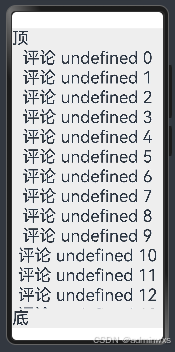
框架就搭建完毕了
- 实际写顶的时候发现排序有高亮状态,加入高亮状态
- 查询时间戳相关语法得出
now1 : number = Date.now()	//	获取当前时间戳
Text(new Date(this.now1).toString())	//	时间戳转换成时间
- 查询JS数组排序得出
nums.sort((a, b) => a - b);
中途写顶部发现联动滚动区域
就也写了中间的滚动区域
但中间点赞还没写好,为什么不增加或减少
中间有很多事基于实验性质的代码
页面代码
import * as MK from '../tests/test1'


@Entry
@Component struct Index {
  @State pai : number = 0
  now1 : number = Date.now()
  //  https://developer.aliyun.com/article/1538160
  @State sz1 : MK.pl_dx[] = MK.sz_pl

  build() {
    Column(){
      Row(){
        Text('全部评论').fontSize(30).margin(10).fontWeight(700)
        Blank()
        Text('最新').fontSize(20).margin(10).borderWidth(1).borderRadius(10).padding(5)
          .backgroundColor(this.pai==0 ? '#fff':'#eee').fontWeight(this.pai == 0 ? 700 :400)
          .onClick(()=>{
            this.pai = 0
            this.sz1.sort((a,b)=>b.time-a.time) //  降序
            //console.log(JSON.stringify(this.sz2[0]))
          })
        Text('最热').fontSize(20).margin(10).borderWidth(1).borderRadius(10).padding(5)
          .backgroundColor(this.pai==1 ? '#fff':'#eee').fontWeight(this.pai == 1 ? 700 :400)
          .onClick(()=>{
            this.pai = 1
          })
      }.width('100%')
      Column(){ //  限制
        Scroll(){
          Column(){ //  Scroll规则
            Button('时间').onClick(()=>{console.log('now',this.now1,)})
            Text(this.now1.toString())
            Text(new Date(this.now1).toString())
            ForEach(Array.from({length:5}),(s:string,i:number)=>{ //  循环建立假评论
              Text(`评论 ${s} ${i}`).fontSize(40)
              MK.pl_ui({
                pl1:this.sz1[i],
                zdz:()=>{this.sz1[i] = {
                  head:this.sz1[i].head,
                  name:this.sz1[i].name,
                  lv:this.sz1[i].lv,
                  pl:this.sz1[i].pl,
                  time:this.sz1[i].time,
                  dz1:this.sz1[i].dz2 == false ? this.sz1[i].dz1++ : this.sz1[i].dz1--,
                  dz2:!this.sz1[i].dz2
                }}
              })
            })
          }.width('100%')
        }
      }.width('100%').layoutWeight(1) //  多的空间都给中间
      Row(){
        Text('底').fontSize(40)
      }.width('100%')
    }.width('100%').height('100%').backgroundColor('#eee')
  }
}
模块代码
interface pl_dx{
  head:ResourceStr
  name:string
  lv:number
  pl:string
  time:number
  dz1:number  //  总点赞数
  dz2:boolean //  自己是否点赞
}

let p1 : pl_dx = {
  head: $r('app.media.ic_celiakeyboard_menu'),
  name: 'sdfgsdg',
  lv:6,
  pl:'这个数据这么多,我真不知道要怎么弄',
  time:1734770163467,
  dz1:6,
  dz2:true
}
let p2 : pl_dx = {
  head: $r('app.media.ic_celiakeyboard_menu'),
  name: '奥术大师多',
  lv:2,
  pl:'这个数据这么多,我真不知道要怎么弄',
  time:1734786504204,
  dz1:26,
  dz2:false
}
let p3 : pl_dx = {
  head: $r('app.media.ic_celiakeyboard_menu'),
  name: '好几家',
  lv:1,
  pl:'这个数据这么多,我真不知道要怎么弄',
  time:1734720169467,
  dz1:16,
  dz2:true
}
let p4 : pl_dx = {
  head: $r('app.media.ic_celiakeyboard_menu'),
  name: '奥术大师多',
  lv:3,
  pl:'这个数据这么多,我真不知道要怎么弄',
  time:1734730169467,
  dz1:8,
  dz2:true
}
let p5 : pl_dx = {
  head: $r('app.media.ic_celiakeyboard_menu'),
  name: '回家看她',
  lv:2,
  pl:'这个数据这么多,我真不知道要怎么弄',
  time:1734760169467,
  dz1:3,
  dz2:true
}
let sz_pl : pl_dx[] = [p1,p2,p3,p4,p5]

@Component struct pl_ui{
  @Prop pl1 : pl_dx = p1
  zdz = () => {}

  build() {
    Column(){
      Row(){
        Image(this.pl1.head).width('8%').borderWidth(1).borderRadius(99)
        Text(this.pl1.name).margin({left:'2%'})
        Text(`LV ${this.pl1.lv.toFixed()}`).fontSize(8).margin({left:'2%'})
      }.width('100%')
      Text(this.pl1.pl).width('90%').margin({left:'10%'})
      Row(){
        Text(new Date(this.pl1.time).toString()).fontSize(12)
        Blank()
        Text(this.pl1.dz1.toFixed()).margin({right:'2%'})
        Image($r('app.media.ic_public_input_search')).width('5%').margin({right:'2%'})
          .backgroundColor(this.pl1.dz2 ? '#f00' : '#eee')
          .onClick(()=>{
            this.zdz()
          })
      }.width('90%').margin({left:'10%'})
    }
  }
}
export {pl_dx,pl_ui,sz_pl}
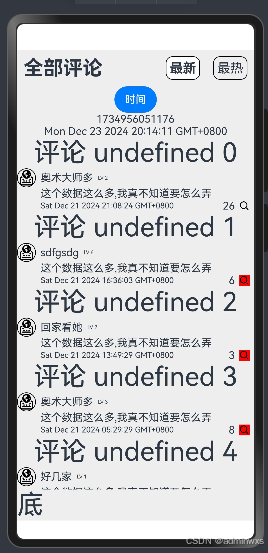
本代码还没观看老师的讲解
现在本代码已实现
- 顶_最新_高亮_排序
- 顶_最热_高亮
- 中_自己是否点赞
可能与老师的代码有,等写的差不多了,或者有确实攻克不了的,再看老师的讲解

讨论HarmonyOS开发技术,专注于API与组件、DevEco Studio、测试、元服务和应用上架分发等。
更多推荐
 5
5 0
0- 0


 已为社区贡献46条内容

所有评论(0)