【HarmonyOS 鸿蒙 黑马程序员 学习笔记 112.2】
·
评论页面开发2
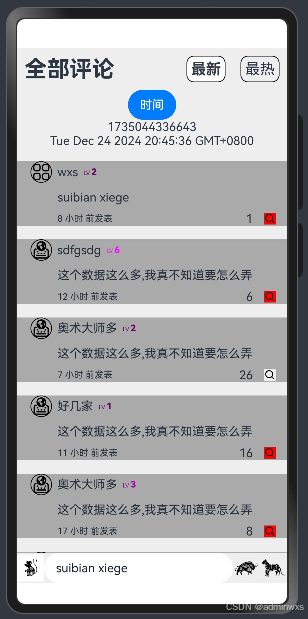
点赞数字增加减少
用三元条件表达式发现无法实现数的增长
改用简单的++,发现还是不能触发增长
改用+=1,可以实现增长
再改回三元条件表达式
zdz:()=>{
                  console.log('1',this.sz1[i].dz1,this.sz1[i].dz2)
                  this.sz1[i] = {
                  head:this.sz1[i].head,
                  name:this.sz1[i].name,
                  lv:this.sz1[i].lv,
                  pl:this.sz1[i].pl,
                  time:this.sz1[i].time,
                  dz1:this.sz1[i].dz2 ? this.sz1[i].dz1 -= 1 : this.sz1[i].dz1 += 1,
                  dz2:!this.sz1[i].dz2
                  }
                  console.log('2',this.sz1[i].dz1,this.sz1[i].dz2)
                }
优化等级显示
原
Text(`LV ${this.pl1.lv.toFixed()}`).fontSize(8).margin({left:'2%'})
改
三元表达式中加三元表达式
多条件满足 &&
Text(){
          Span(`LV `)
          Span(`${this.pl1.lv.toFixed()}`).fontSize(12).fontWeight(800)
        }.fontSize(8).margin({left:'2%'})
        .fontColor(this.pl1.lv < 3 ? '#999' : 2<this.pl1.lv && this.pl1.lv<6 ? '#f0f' : '#0ff')
优化时间显示
原
Text(new Date(this.now1).toString())
改
function ftime (c1:number){
  if (c1<99999999999) {return '时间戳输入错误'}
  const now1 : number = Date.now()
  //https://www.zhihu.com/question/588006865
  const date = new Date(now1 - c1)
  let hour = date.getHours()
  if (hour < 1) {return `刚刚 发表`}
  if (hour < 24) {return `${hour.toFixed()} 小时 前发表`}
  let day = date.getDate()
  if (day < 30) {return `${day.toFixed()} 天 前发表`}
  let month = date.getMonth() + 1
  if (month < 12) {return `${month.toFixed()} 月 前发表`}
  let year = date.getFullYear()
  return `${year.toFixed()} 年 前发表`
}

Text(ftime(this.pl1.time)).fontSize(12)
没有仔细研究时间戳相关
最热排序更新
Text('最热').fontSize(20).margin(10).borderWidth(1).borderRadius(10).padding(5)
          .backgroundColor(this.pai==1 ? '#fff':'#eee').fontWeight(this.pai == 1 ? 700 :400)
          .onClick(()=>{
            this.pai = 1
            this.sz1.sort((a,b)=>b.dz1-a.dz1) //  降序
          })
新增评论
- 获取到输入的内容
@State input_t : string = ''
//	先创建变量,再把输入文本保存到变量
TextInput({placeholder:'写评论'}).backgroundColor('#fff').layoutWeight(1)
          .onChange((s:string)=>{this.input_t = s})
下面是TextInput官方示例有演示
官方API跳转
再加入新的评论
Image($r('app.media.1_2')).width('10%').backgroundColor('#fff')
          .onClick(()=>{
            const pme : MK.pl_dx = {
              head : $r('app.media.ic_public_view_grid'),
              name : 'wxs',
              lv : 2,
              pl : this.input_t,
              time : Date.now(),
              dz1 : 0,
              dz2 : false
            }
            this.sz1.unshift(pme) //  数组插入数据 下面是之前写的语法
            //https://blog.csdn.net/adminwxs/article/details/143970390?spm=1001.2014.3001.5501
          })
完整代码
本人写的比较乱,一边写一边验证,尽请见谅
写完看看老师的视频,如果有新的知识点会再更新一篇
页面代码
import * as MK from '../tests/test1'


@Entry
@Component struct Index {
  @State pai : number = 0
  now1 : number = Date.now()
  //  https://developer.aliyun.com/article/1538160
  @State sz1 : MK.pl_dx[] = MK.sz_pl
  @State input_t : string = ''

  build() {
    Column(){
      Row(){
        Text('全部评论').fontSize(30).margin(10).fontWeight(700)
        Blank()
        Text('最新').fontSize(20).margin(10).borderWidth(1).borderRadius(10).padding(5)
          .backgroundColor(this.pai==0 ? '#fff':'#eee').fontWeight(this.pai == 0 ? 700 :400)
          .onClick(()=>{
            this.pai = 0
            this.sz1.sort((a,b)=>b.time-a.time) //  降序
            //console.log(JSON.stringify(this.sz2[0]))
          })
        Text('最热').fontSize(20).margin(10).borderWidth(1).borderRadius(10).padding(5)
          .backgroundColor(this.pai==1 ? '#fff':'#eee').fontWeight(this.pai == 1 ? 700 :400)
          .onClick(()=>{
            this.pai = 1
            this.sz1.sort((a,b)=>b.dz1-a.dz1) //  降序
          })
      }.width('100%')
      Column(){ //  限制
        Scroll(){
          Column(){ //  Scroll规则
            Button('时间').onClick(()=>{console.log('now',this.now1,)})
            Text(this.now1.toString())
            Text(new Date(this.now1).toString())
            ForEach(this.sz1,(s:string,i:number)=>{ //  循环建立假评论
              MK.pl_ui({
                pl1:this.sz1[i],
                //因为状态变量只能监测到下一级,所以必须更新数组下的对象
                zdz:()=>{
                  console.log('1',this.sz1[i].dz1,this.sz1[i].dz2)
                  this.sz1[i] = {
                  head:this.sz1[i].head,
                  name:this.sz1[i].name,
                  lv:this.sz1[i].lv,
                  pl:this.sz1[i].pl,
                  time:this.sz1[i].time,
                  dz1:this.sz1[i].dz2 ? this.sz1[i].dz1 -= 1 : this.sz1[i].dz1 += 1,
                  dz2:!this.sz1[i].dz2
                  }
                  console.log('2',this.sz1[i].dz1,this.sz1[i].dz2)
                }
              }).margin({top:'5%'})
            })
          }.width('100%')
        }
      }.width('100%').layoutWeight(1) //  多的空间都给中间
      Row(){
        Image($r('app.media.1_2')).width('10%').backgroundColor('#fff')
          .onClick(()=>{
            const pme : MK.pl_dx = {
              head : $r('app.media.ic_public_view_grid'),
              name : 'wxs',
              lv : 2,
              pl : this.input_t,
              time : Date.now(),
              dz1 : 0,
              dz2 : false
            }
            this.sz1.unshift(pme) //  数组插入数据 下面是之前写的语法
            //https://blog.csdn.net/adminwxs/article/details/143970390?spm=1001.2014.3001.5501
          })
        TextInput({placeholder:'写评论'}).backgroundColor('#fff').layoutWeight(1)
          .onChange((s:string)=>{this.input_t = s})
        //下面是TextInput官方示例有演示
        //https://developer.huawei.com/consumer/cn/doc/harmonyos-references-V5/ts-basic-components-textinput-V5#%E7%A4%BA%E4%BE%8B1%E8%AE%BE%E7%BD%AE%E4%B8%8E%E8%8E%B7%E5%8F%96%E5%85%89%E6%A0%87%E4%BD%8D%E7%BD%AE
        Image($r('app.media.2_2')).width('10%')
        Image($r('app.media.3_2')).width('10%')
      }.width('100%')
    }.width('100%').height('100%').backgroundColor('#eee')
  }
}
模块代码
interface pl_dx{
  head:ResourceStr
  name:string
  lv:number
  pl:string
  time:number
  dz1:number  //  总点赞数
  dz2:boolean //  自己是否点赞
}

let p1 : pl_dx = {
  head: $r('app.media.ic_celiakeyboard_menu'),
  name: 'sdfgsdg',
  lv:6,
  pl:'这个数据这么多,我真不知道要怎么弄',
  time:1734770163467,
  dz1:6,
  dz2:true
}
let p2 : pl_dx = {
  head: $r('app.media.ic_celiakeyboard_menu'),
  name: '奥术大师多',
  lv:2,
  pl:'这个数据这么多,我真不知道要怎么弄',
  time:1734786504204,
  dz1:26,
  dz2:false
}
let p3 : pl_dx = {
  head: $r('app.media.ic_celiakeyboard_menu'),
  name: '好几家',
  lv:1,
  pl:'这个数据这么多,我真不知道要怎么弄',
  time:1634720169467,
  dz1:16,
  dz2:true
}
let p4 : pl_dx = {
  head: $r('app.media.ic_celiakeyboard_menu'),
  name: '奥术大师多',
  lv:3,
  pl:'这个数据这么多,我真不知道要怎么弄',
  time:1224730169467,
  dz1:8,
  dz2:true
}
let p5 : pl_dx = {
  head: $r('app.media.ic_celiakeyboard_menu'),
  name: '回家看她',
  lv:2,
  pl:'这个数据这么多,我真不知道要怎么弄',
  time:1734760169467,
  dz1:3,
  dz2:true
}
let p6 : pl_dx = {
  head: $r('app.media.ic_celiakeyboard_menu'),
  name: 'rtyu',
  lv:2,
  pl:'这个数据这么多,我真不知道要怎么弄,把那几个大字准备去掉恐撑不开Scroll下的Column',
  time:1835768299467,
  dz1:4,
  dz2:false
}
let sz_pl : pl_dx[] = [p1,p2,p3,p4,p5,p6]

function ftime (c1:number){
  if (c1<99999999999) {return '时间戳输入错误'}
  const now1 : number = Date.now()
  //https://www.zhihu.com/question/588006865
  const date = new Date(now1 - c1)
  let hour = date.getHours()
  if (hour < 1) {return `刚刚 发表`}
  if (hour < 24) {return `${hour.toFixed()} 小时 前发表`}
  let day = date.getDate()
  if (day < 30) {return `${day.toFixed()} 天 前发表`}
  let month = date.getMonth() + 1
  if (month < 12) {return `${month.toFixed()} 月 前发表`}
  let year = date.getFullYear()
  return `${year.toFixed()} 年 前发表`
}

@Component struct pl_ui{
  @Prop pl1 : pl_dx = p1
  zdz = () => {}

  build() {
    Column({space:10}){
      Row(){
        Image(this.pl1.head).width('8%').borderWidth(1).borderRadius(99).margin({left:'5%'})
        Text(this.pl1.name).margin({left:'2%'})
        Text(){
          Span(`LV `)
          Span(`${this.pl1.lv.toFixed()}`).fontSize(12).fontWeight(800)
        }.fontSize(8).margin({left:'2%'})
        .fontColor(this.pl1.lv < 3 ? '#606' : 2<this.pl1.lv && this.pl1.lv<6 ? '#a0a' : '#f0f')
      }.width('100%')
      Text(this.pl1.pl).width('85%').margin({left:'15%'})
      Row(){
        Text(ftime(this.pl1.time)).fontSize(12)
        Blank()
        Text(this.pl1.dz1.toFixed()).margin({right:'5%'})
        Image($r('app.media.ic_public_input_search')).width('5%').margin({right:'5%'})
          .backgroundColor(this.pl1.dz2 ? '#f00' : '#eee')
          .onClick(()=>{
            this.zdz()
          })
      }.width('85%').margin({left:'15%'})
    }.backgroundColor('#aaa')
  }
}
export {pl_dx,pl_ui,sz_pl,ftime}

讨论HarmonyOS开发技术,专注于API与组件、DevEco Studio、测试、元服务和应用上架分发等。
更多推荐
 4
4 0
0- 0


 已为社区贡献46条内容

所有评论(0)