

涉及知识点和装饰器
- @ComponentV2,@Local, @Builder,@Extend, @Event,!!双向绑定,@Require ,@Param,preferences首选项
先上效果图
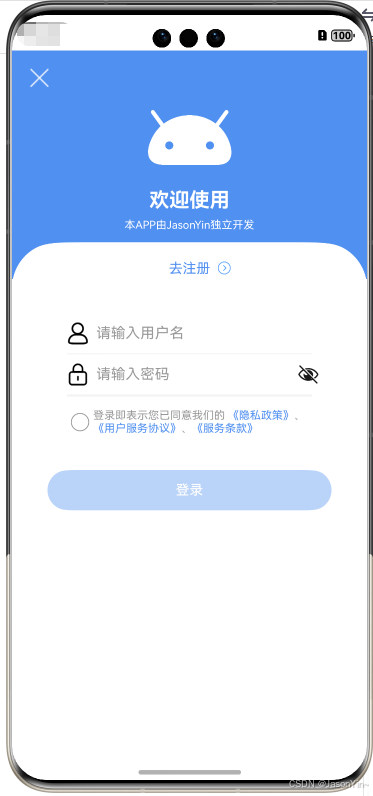
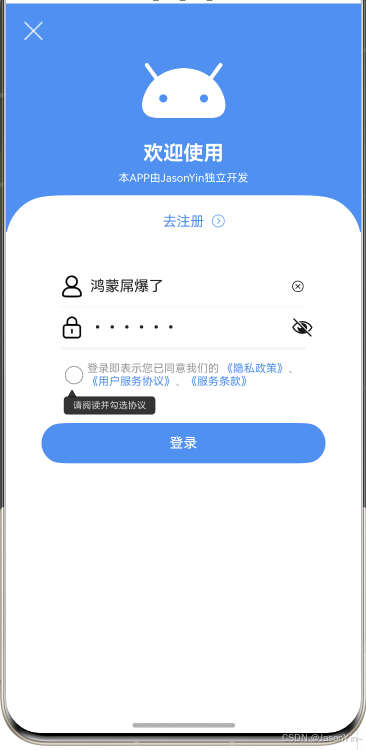
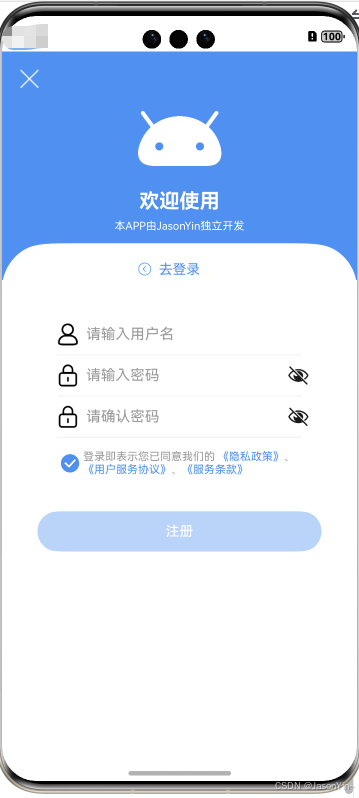
完整代码
登录页
import { Route } from '@hzw/zrouter'
import { CommonConst, NavName } from 'utils'
import { ToastUtil } from '@pura/harmony-utils'
import { SwitchLoginTypeComp } from '../components/SwitchLoginTypeComp'
import { LoginService } from '../service/LoginService'
import json from '@ohos.util.json'

@Preview
@ComponentV2
@Route({ name: NavName.LOGIN_VIEW, description: '登录/注册页' })
export struct LoginView {
  @Local account: string = '' //  用户名
  @Local password: string = '' // 密码
  @Local isLogin: boolean = true // 登录注册切换


  aboutToAppear(): void {
    // console.log(`xxx : ---` + 'LoginView')
    // console.log(`xxx获取参数 : ---` + ZRouter.getInstance().getParamByName(NavName.LOGIN_VIEW).toString())

  }

  build() {
    NavDestination() {
      Column() {
        this.headBuilder()
       // 登录,注册页面
        SwitchLoginTypeComp({
          changeFactory: (account: string, password: string, isLogin: boolean) => {
            console.log(`xxx : ---account--` + account + ',password--' + password + ',isLogin--' + isLogin)
            this.account = account
            this.password = password
            this.loadNet()
          }
        })


      }.width(CommonConst.FULL_PARENT)
      .height(CommonConst.FULL_PARENT)
    }
    .hideTitleBar(true)
    .backgroundColor($r('app.color.white'))
    .width(CommonConst.FULL_PARENT)
    .height(CommonConst.FULL_PARENT)

  }

  async loadNet() {
    let login = await LoginService.login({
      'username': this.account,
      'password': this.password
    })
    console.log('xxxlogin--' + '' + json.stringify(login))
    if (login.data?.getSuccess()) {

      console.log('xxxxxdata参数--' + '' + json.stringify(login.data.getData()))
    } else {
      console.log('xxx--' + login.data?.getMsg())
      ToastUtil.showToast(login.data?.getMsg())
    }
  }

  /** 头部 */
  @Builder
  headBuilder() {
    Stack({ alignContent: Alignment.Top }) {
      Text()
        .width(CommonConst.FULL_PARENT)
        .height(250)
        .backgroundColor($r('app.color.colorPrimary'))
      Text()
        .width(CommonConst.FULL_PARENT)
        .height(100)
        .backgroundColor(Color.White)
        .borderRadius(50)
        .margin({ top: 210 })

      Image($r('app.media.ic_close'))
        .width(20)
        .height(20)
        .position({ x: 20, y: 20 })
        .onClick(() => {
          ToastUtil.showToast('关闭')
        })

      Column({ space: 7 }) {
        Image($r('app.media.startIcon')).width(100).height(100)
        Text('欢迎使用').fontSize(22).fontColor($r('app.color.white')).fontWeight(FontWeight.Bold)
        Text('本APP由JasonYin独立开发').fontSize(12).fontColor($r('app.color.white'))
      }.margin({ top: 44 })
    }.width(CommonConst.FULL_PARENT)

  }
}- 1.
- 2.
- 3.
- 4.
- 5.
- 6.
- 7.
- 8.
- 9.
- 10.
- 11.
- 12.
- 13.
- 14.
- 15.
- 16.
- 17.
- 18.
- 19.
- 20.
- 21.
- 22.
- 23.
- 24.
- 25.
- 26.
- 27.
- 28.
- 29.
- 30.
- 31.
- 32.
- 33.
- 34.
- 35.
- 36.
- 37.
- 38.
- 39.
- 40.
- 41.
- 42.
- 43.
- 44.
- 45.
- 46.
- 47.
- 48.
- 49.
- 50.
- 51.
- 52.
- 53.
- 54.
- 55.
- 56.
- 57.
- 58.
- 59.
- 60.
- 61.
- 62.
- 63.
- 64.
- 65.
- 66.
- 67.
- 68.
- 69.
- 70.
- 71.
- 72.
- 73.
- 74.
- 75.
- 76.
- 77.
- 78.
- 79.
- 80.
- 81.
- 82.
- 83.
- 84.
- 85.
- 86.
- 87.
- 88.
- 89.
- 90.
- 91.
- 92.
- 93.
- 94.
- 95.
登录/注册页面自定义组件
import { ToastUtil } from '@pura/harmony-utils'
import { CommonConst } from "utils"
import { ProtocolComp } from "./ProtocolComp"

@Extend(TextInput)
function inputStyle() {
  .height(44)
  .fontColor($r('app.color.color_222222'))
  .fontSize(16)
  .placeholderColor($r('app.color.color_999999'))
  .placeholderFont({ size: 16 })
  .backgroundColor($r('app.color.white'))
  .caretColor($r('app.color.colorPrimary'))
  .padding({ left: 8 })
}

@Extend(Divider)
function dividerStyle() {
  .strokeWidth(1)
  .color($r('app.color.color_F0F0F0'))
  .padding({ left: 60, right: 60 })

}

/**
 * Author:J
 * Describe: 登录,注册页面
 */
@ComponentV2
export struct SwitchLoginTypeComp {
  @Local account: string = '鸿蒙屌爆了' //  用户名
  @Local password: string = '123456' // 密码
  @Local confirmPassword: string = '' // 确认密码
  @Local isLogin: boolean = true // 登录注册切换
  @Local selectProtocol: boolean = false; //是否勾选协议
  @Local confirm: boolean = false; //是否弹窗协议
  @Event changeFactory: (account: string, password: string, isLogin: boolean) => void = () => {
  }

  build() {
    Column() {
      Text() {
        ImageSpan($r('app.media.ic_next'))
          .width(15)
          .colorBlend($r('app.color.colorPrimary'))
          .rotate({ angle: 180 })
          .margin({ right: 8, bottom: 2 })
          .visibility(this.isLogin ? Visibility.Hidden : Visibility.Visible)
        Span(this.isLogin ? '去注册' : '去登录')
        ImageSpan($r('app.media.ic_next'))
          .width(15).colorBlend($r('app.color.colorPrimary'))
          .margin({ left: 8, bottom: 2 })
          .visibility(this.isLogin ? Visibility.Visible : Visibility.Hidden)
      }
      .fontSize(15)
      .fontColor($r('app.color.colorPrimary'))
      .onClick(() => {
        this.isLogin = !this.isLogin
        this.account = ''
        this.password = ''
        this.confirmPassword = ''
      })

      Row() {
        Image($r('app.media.ic_account_normal')).width(24).height(24)
        TextInput({ placeholder: '请输入用户名', text: `${this.account}` })
          .inputStyle()
          .onChange((value: string) => {
            this.account = value
          })
        Image($r('app.media.ic_delete')).width(14).height(14)
          .visibility(this.account.length > 0 ? Visibility.Visible : Visibility.None)
          .onClick(() => {
            this.account = ''
          })
      }.width(CommonConst.FULL_PARENT).height(44).padding({ left: 60, right: 100 }).margin({ top: 40 })

      Divider().dividerStyle()

      Row() {
        Image($r('app.media.ic_password_normal')).width(24).height(24)
        TextInput({ placeholder: '请输入密码', text: `${this.password}` })
          .inputStyle()
          .type(InputType.Password)
          .onChange((value: string) => {
            this.password = value
          })
      }.width(CommonConst.FULL_PARENT).height(44).padding({ left: 60, right: 60 })

      Divider().dividerStyle()

      Row() {
        Image($r('app.media.ic_password_normal')).width(24).height(24)
        TextInput({ placeholder: '请确认密码', text: `${this.confirmPassword}` })
          .inputStyle()
          .type(InputType.Password)
          .onChange((value: string) => {
            this.confirmPassword = value
          })
      }
      .width(CommonConst.FULL_PARENT)
      .height(44)
      .padding({ left: 60, right: 60 })
      .visibility(this.isLogin ? Visibility.None : Visibility.Visible)

      Divider().dividerStyle()
      // 协议相关
      ProtocolComp({ selectProtocol: this.selectProtocol!!, confirm: this.confirm!! })


      Button(this.isLogin ? '登录' : '注册')
        .width('80%')
        .height(44)
        .fontSize(15)
        .fontColor($r('app.color.white'))
        .backgroundColor($r('app.color.colorPrimary'))
        .margin({ top: 31 })
        .enabled(this.account.length > 0 && this.password.length > 0)
        .onClick(() => {
          if (!this.isLogin && this.password != this.confirmPassword) {
            ToastUtil.showToast('两次密码不一致')
            return
          }
          if (!this.selectProtocol) {
            // ToastUtil.showToast('' + '请勾选协议')
            this.confirm = !this.selectProtocol
            return
          }
          this.changeFactory(this.account, this.password, this.isLogin)
        })


    }
    .width(CommonConst.FULL_PARENT)
    .margin({ top: -80 })

  }
}- 1.
- 2.
- 3.
- 4.
- 5.
- 6.
- 7.
- 8.
- 9.
- 10.
- 11.
- 12.
- 13.
- 14.
- 15.
- 16.
- 17.
- 18.
- 19.
- 20.
- 21.
- 22.
- 23.
- 24.
- 25.
- 26.
- 27.
- 28.
- 29.
- 30.
- 31.
- 32.
- 33.
- 34.
- 35.
- 36.
- 37.
- 38.
- 39.
- 40.
- 41.
- 42.
- 43.
- 44.
- 45.
- 46.
- 47.
- 48.
- 49.
- 50.
- 51.
- 52.
- 53.
- 54.
- 55.
- 56.
- 57.
- 58.
- 59.
- 60.
- 61.
- 62.
- 63.
- 64.
- 65.
- 66.
- 67.
- 68.
- 69.
- 70.
- 71.
- 72.
- 73.
- 74.
- 75.
- 76.
- 77.
- 78.
- 79.
- 80.
- 81.
- 82.
- 83.
- 84.
- 85.
- 86.
- 87.
- 88.
- 89.
- 90.
- 91.
- 92.
- 93.
- 94.
- 95.
- 96.
- 97.
- 98.
- 99.
- 100.
- 101.
- 102.
- 103.
- 104.
- 105.
- 106.
- 107.
- 108.
- 109.
- 110.
- 111.
- 112.
- 113.
- 114.
- 115.
- 116.
- 117.
- 118.
- 119.
- 120.
- 121.
- 122.
- 123.
- 124.
- 125.
- 126.
- 127.
- 128.
- 129.
- 130.
- 131.
- 132.
- 133.
- 134.
- 135.
- 136.
- 137.
- 138.
用户协议、隐私政策相关
import { ToastUtil } from '@pura/harmony-utils'
import { CommonConst } from "utils";

/**
 * Author:J
 * Describe:协议
 */
@ComponentV2
export struct ProtocolComp {
  @Require @Param selectProtocol: boolean=false //是否勾选协议
  @Event $selectProtocol: (val: boolean) => void = () => {
  }
  @Require @Param confirm: boolean=false //是否弹窗协议
  @Event $confirm: (val: boolean) => void = () => {
  }

  build() {
    Column() {
      Row() {
        Checkbox()
          .select(this.selectProtocol)
          .selectedColor($r('app.color.colorPrimary'))
          .onChange((value: boolean) => {
            this.$selectProtocol(value)
            //协议不选中,不赋值confirm
            if (!value) {
              return
            }
            this.$confirm(!value)
          })
        Text() {
          span('登录即表示您已同意我们的 ', $r('app.color.color_999999'))
          span('《隐私政策》', $r('app.color.colorPrimary'), 1, true)
          span('、', $r('app.color.color_999999'))
          span('《用户服务协议》', $r('app.color.colorPrimary'), 2, true)
          span('、', $r('app.color.color_999999'))
          span('《服务条款》', $r('app.color.colorPrimary'), 3, true)
        }
      }
      .justifyContent(FlexAlign.Start)
      .alignItems(VerticalAlign.Top)
      .margin({ top: 14, right: 30 })

      // 若没有勾选协议,则会出现提示文本:“请阅读并勾选协议”
      if (this.confirm) {
        Row() {
          Column() {
            Image($r('app.media.login_popup'))
              .width(10)
              .height(10)
              .position({ x: 7, y: 1 })
              .opacity(0.8)

            Text('请阅读并勾选协议')
              .fontColor($r('app.color.white'))
              .fontSize(10)
              .textAlign(TextAlign.Center)
              .backgroundColor($r('app.color.black'))
              .width(100)
              .height(20)
              .position({ x: 3, y: 9 })
              .borderRadius(4)
              .opacity(0.8)
          }
          .width(100)
          .height(30)
        }
        .height(30)
        .width('100%')
      }


    }.width(CommonConst.FULL_PARENT)
    .height(50)
    .padding({ left: 60, right: 60 })

  }
}


@Builder
function span(value: string | Resource, fontColor: ResourceColor, k: number = 0, isClick: boolean = false) {
  Span(value)
    .fontColor(fontColor)
    .fontSize(12)
    .onClick(() => {
      if (!isClick) {
        return
      }
      ToastUtil.showToast(`我要进web页面了k:${value}=====值:${k}`)
    })
}- 1.
- 2.
- 3.
- 4.
- 5.
- 6.
- 7.
- 8.
- 9.
- 10.
- 11.
- 12.
- 13.
- 14.
- 15.
- 16.
- 17.
- 18.
- 19.
- 20.
- 21.
- 22.
- 23.
- 24.
- 25.
- 26.
- 27.
- 28.
- 29.
- 30.
- 31.
- 32.
- 33.
- 34.
- 35.
- 36.
- 37.
- 38.
- 39.
- 40.
- 41.
- 42.
- 43.
- 44.
- 45.
- 46.
- 47.
- 48.
- 49.
- 50.
- 51.
- 52.
- 53.
- 54.
- 55.
- 56.
- 57.
- 58.
- 59.
- 60.
- 61.
- 62.
- 63.
- 64.
- 65.
- 66.
- 67.
- 68.
- 69.
- 70.
- 71.
- 72.
- 73.
- 74.
- 75.
- 76.
- 77.
- 78.
- 79.
- 80.
- 81.
- 82.
- 83.
- 84.
- 85.
- 86.
- 87.
- 88.
- 89.
- 90.
- 91.
- 92.
使用首选项存储用户信息到本地
以往系列文章
- 《探索 HarmonyOS NEXT(5.0):开启构建模块化项目架构奇幻之旅 —— 模块化基础篇》
- 《探索 HarmonyOS NEXT(5.0):开启构建模块化项目架构奇幻之旅 —— 构建基础特性层》
- 《探索 HarmonyOS NEXT(5.0):开启构建模块化项目架构奇幻之旅 —— 构建公共能力层》
- 《探索 HarmonyOS NEXT(5.0):开启构建模块化项目架构奇幻之旅 —— Tabs底部导航栏》
- 《探索 HarmonyOS NEXT (5.0):开启构建模块化项目架构奇幻之旅 —— 动态路由 ZRouter:引领高效模块通信的智慧中枢》
- 《探索 HarmonyOS NEXT(5.0):开启构建模块化项目架构奇幻之旅 ——第三方库的使用:网络请求RCP、二次封装上下拉刷新、弹窗》
- HarmonyOS NEXT:模块化项目 ——修改应用图标+启动页等
若本文对您稍有帮助


 已为社区贡献120条内容

所有评论(0)