【错误记录】HarmonyOS 编译报错 ( 混淆文件报错 | The obfuscation file declared in configuration does not exist. )
·
一、报错信息
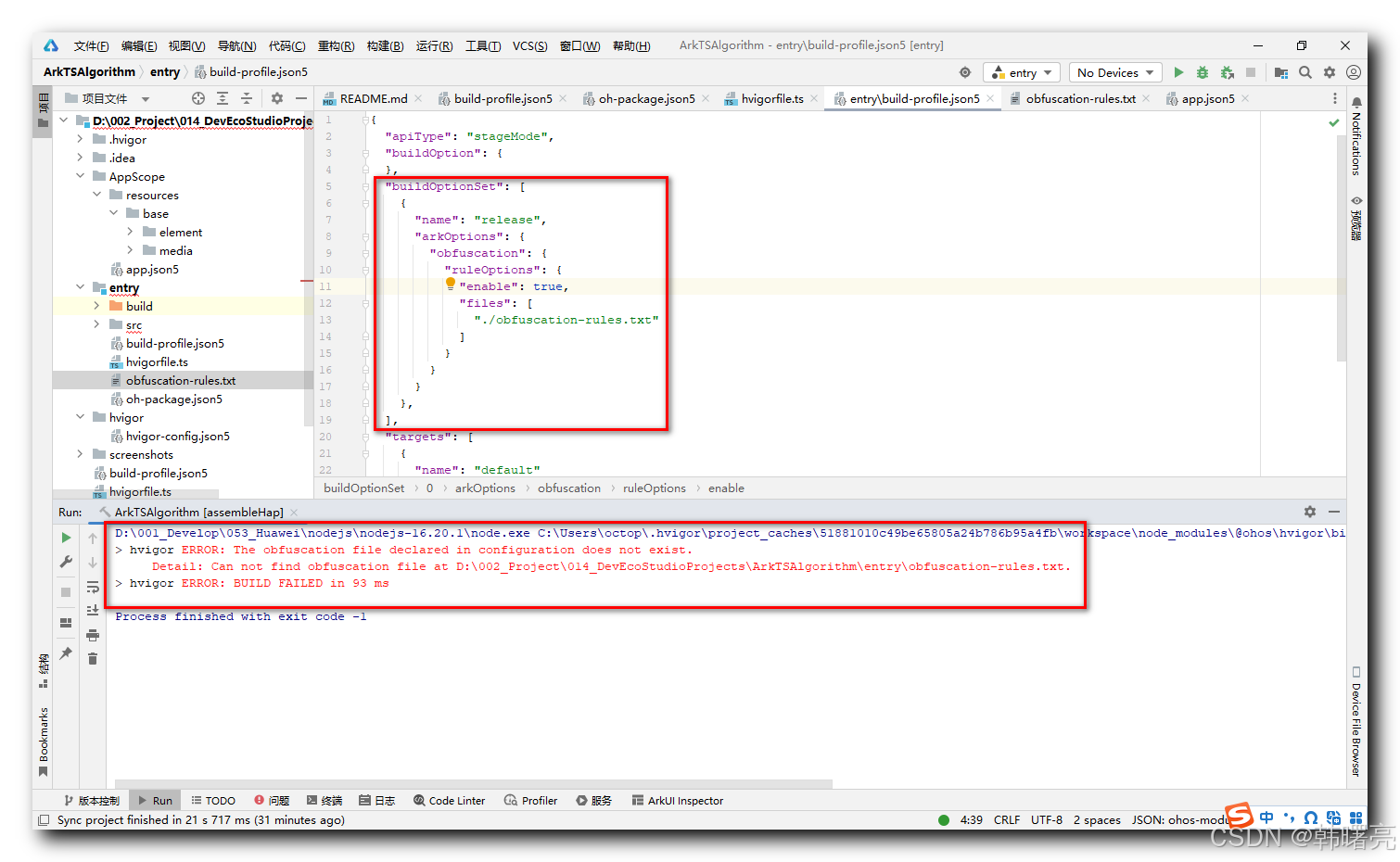
HarmonyOS 应用编译时 , 报错 hvigor ERROR: The obfuscation file declared in configuration does not exist.
详细报错信息 :
D:\001_Develop\053_Huawei\nodejs\nodejs-16.20.1\node.exe C:\Users\octop\.hvigor\project_caches\51881010c49be65805a24b786b95a4fb\workspace\node_modules\@ohos\hvigor\bin\hvigor.js --mode module -p module=entry@default -p product=default assembleHap --parallel --incremental --daemon
> hvigor ERROR: The obfuscation file declared in configuration does not exist.
	 Detail: Can not find obfuscation file at D:\002_Project\014_DevEcoStudioProjects\ArkTSAlgorithm\entry\obfuscation-rules.txt.
> hvigor ERROR: BUILD FAILED in 93 ms

Process finished with exit code -1
二、解决方案
混淆文件配置是在 entry/build-profile.json5 配置文件中设置的 ,
当前的 entry/build-profile.json5 配置文件如下 :
{
  "apiType": "stageMode",
  "buildOption": {
  },
  "buildOptionSet": [
    {
      "name": "release",
      "arkOptions": {
        "obfuscation": {
          "ruleOptions": {
            "enable": true,
            "files": [
              "./obfuscation-rules.txt"
            ]
          }
        }
      }
    },
  ],
  "targets": [
    {
      "name": "default"
    },
    {
      "name": "ohosTest",
    }
  ]
}
在上述 buildOptionSet / arkOptions / obfuscation 层级配置的就是 代码混淆 , ruleOptions 下的 enable 设置为 true , 则打开了代码混淆 , 这里注意 只要配置了 obfuscation 选项 , 不管 enable 是 true 还是 false , 都必须有混淆文件 ;
        "obfuscation": {
          "ruleOptions": {
            "enable": true,
            "files": [
              "./obfuscation-rules.txt"
            ]
          }
        }
上述配置的混淆文件 是 ./obfuscation-rules.txt , 这是相对路径 , entry/build-profile.json5 相同目录下应该有 obfuscation-rules.txt 混淆文件 , 完整路径是 entry/obfuscation-rules.txt ;
由于没有 该混淆文件 , 导致报错 hvigor ERROR: The obfuscation file declared in configuration does not exist.
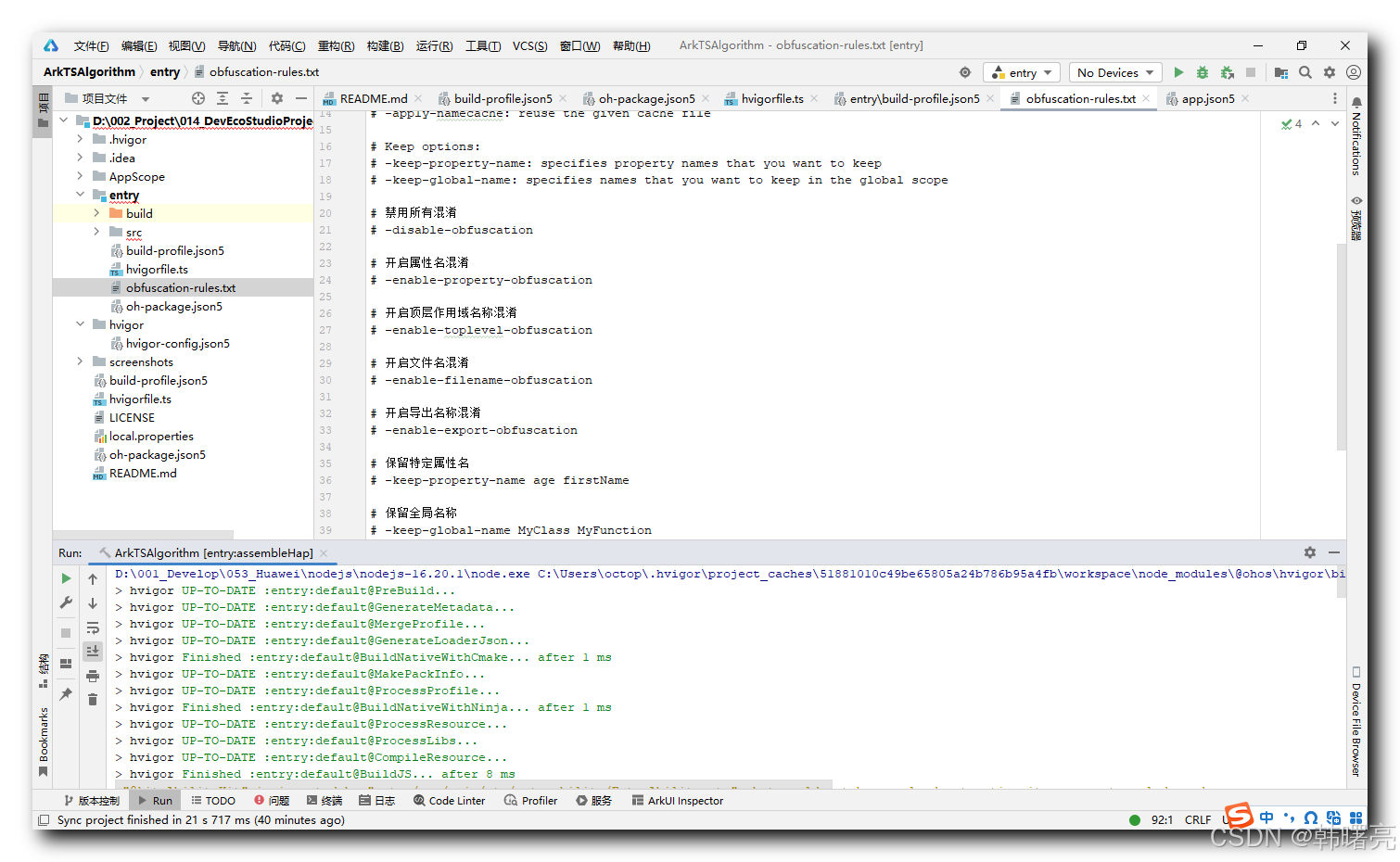
这里配置一个 entry/obfuscation-rules.txt 混淆文件 , 参考配置项如下 :
# Define project specific obfuscation rules here.
# You can include the obfuscation configuration files in the current module's build-profile.json5.
#
# For more details, see
#   https://developer.huawei.com/consumer/cn/doc/harmonyos-guides-V5/source-obfuscation-V5

# Obfuscation options:
# -disable-obfuscation: disable all obfuscations
# -enable-property-obfuscation: obfuscate the property names
# -enable-toplevel-obfuscation: obfuscate the names in the global scope
# -compact: remove unnecessary blank spaces and all line feeds
# -remove-log: remove all console.* statements
# -print-namecache: print the name cache that contains the mapping from the old names to new names
# -apply-namecache: reuse the given cache file

# Keep options:
# -keep-property-name: specifies property names that you want to keep
# -keep-global-name: specifies names that you want to keep in the global scope

# 禁用所有混淆
# -disable-obfuscation

# 开启属性名混淆
# -enable-property-obfuscation

# 开启顶层作用域名称混淆
# -enable-toplevel-obfuscation

# 开启文件名混淆
# -enable-filename-obfuscation

# 开启导出名称混淆
# -enable-export-obfuscation

# 保留特定属性名
# -keep-property-name age firstName

# 保留全局名称
# -keep-global-name MyClass MyFunction

# 保留文件名
# -keep-file-name index entry

# 保留.d.ts文件中的名称
# -keep-dts ./path/to/file.d.ts
配置完之后 , 代码正常编译 ;

讨论HarmonyOS开发技术,专注于API与组件、DevEco Studio、测试、元服务和应用上架分发等。
更多推荐



 7
7 0
0- 0


 已为社区贡献50条内容

所有评论(0)