HarmonyOS-渲染控制:健康排行榜案例
·
目的:
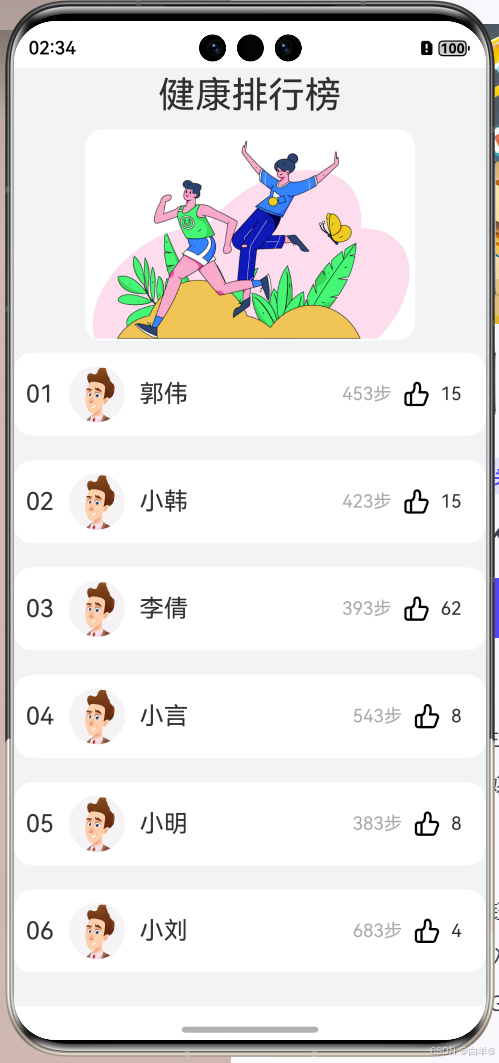
第1部分:实现排行榜下方的用户步数排名展示区,需要构建一个列表对排名数据进行展示。我们可以使用循环渲染来进行页面书写。
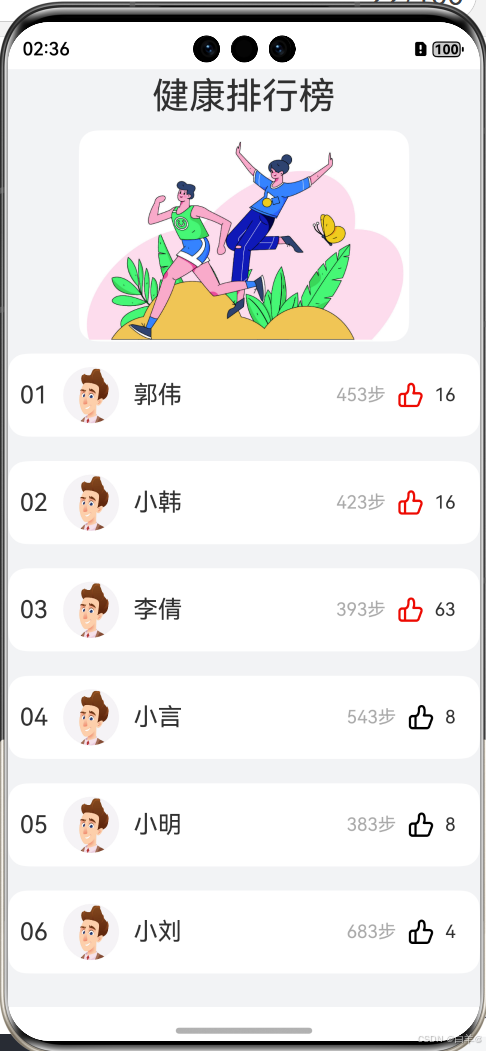
第2部分:实现每一个用户行最右方的点赞展示功能。当用户点赞成功后,展示红色点赞图标,并且点赞数加一。我们可以使用条件渲染进行不同点赞图标的显隐展示。
效果图:
 **
**
点击点赞图标后,图标变红,点赞数增加。
**
源码:
@Observed
class person {
  id: string;
  name: string;
  step: string;
  state: boolean;
  love: number; // 点赞数量

  constructor(id: string, name: string, step: string, state: boolean, love: number) {
    this.id = id;
    this.name = name;
    this.step = step;
    this.state = state;
    this.love = love;
  }
}

@Entry
@Component
struct Health {
  @State simpleList: Array<person> = [
    new person('01', '郭伟', '453步', false, 13),
    new person('02', '小韩', '423步', false, 11),
    new person('03', '李倩', '393步', false, 54),
    new person('04', '小言', '543步', false, 4),
    new person('05', '小明', '383步', false, 6),
    new person('06', '小刘', '683步', false, 2),
  ]

  build() {
    Column({ space: 10 }) {
      Text('健康排行榜')
        .fontSize(30)
        .margin({ top: 5 })

      Image($r('app.media.run'))
        .width('70%')
        .borderRadius(15)

      List({ space: 20 }) {
        ForEach(this.simpleList, (item: person, index: number) => {
          ListItem() {
            ChildItem2({ item: item })
          }
        })
      }

    }
    .height('100%')
    .width('100%')
    .backgroundColor('#f2f3f5')
  }
}

// @ObjectLink
@Component
struct ChildItem2 {
  @ObjectLink item: person;

  build() {
    Row() {
      Row({ space: 10 }) {
        Text(this.item.id)
          .fontSize(20)

        Image($r('app.media.person01'))
          .width(50)

        Text(this.item.name)
          .fontSize(20)
      }

      Row({ space: 10 }) {
        Text(this.item.step)
          .fontSize(15)
          .fontColor('#aaaaaa')

        Image($r(this.item.state ? 'app.media.like' : 'app.media.unlike'))
          .width(20)
          .onClick(() => {
            this.item.state = !this.item.state;
            this.item.love ? this.item.love++ : this.item.love--;
          })

        Text(this.item.love.toString())
          .fontSize(15)


      }
    }
    .width('100%')
    .backgroundColor('#ffffff')
    .justifyContent(FlexAlign.SpaceBetween)
    .padding({
      left: 10,
      right: 20,
      top: 10,
      bottom: 10
    })
    .borderRadius(15)
  }
}

讨论HarmonyOS开发技术,专注于API与组件、DevEco Studio、测试、元服务和应用上架分发等。
更多推荐
 7
7 0
0- 0


 已为社区贡献24条内容

所有评论(0)