HarmonyOS NEXT——【鸿蒙拉起应用/元服务】
·
鸿蒙应用跳转应用市场APP/元服务
1、鸿蒙拉起应用:

2、鸿蒙拉起元服务:

        .onClick(() => {
          // select()
          const context: common.UIAbilityContext = getContext(this) as common.UIAbilityContext;
          let link: string =
            // "https://h5hosting-drcn.dbankcdn.cn/cch5/ScenarizedDist/filePageV2/dist/index.html#/filePageMain?id=C870FE8389FEDDEC8A7404A9C1857EB692EB7B06F260D5510C8392B3D25F5016&language=zh_CN";
        "https://appgallery.huawei.com/app/detail?id=com.taobao.taobao4hmos&channelId=SHARE"
          context.openLink(link)
            .then(() => {
              WindowUtils.getRouter().back()
            })
            .catch(() => {
              WindowUtils.getRouter().back()
            })
        })
小技巧:链接是如何获取到的呢?其实很简单,我们点开应用市场的应用详情,点击右上角的分享按钮,下一步点击复制链接,操作图如下:

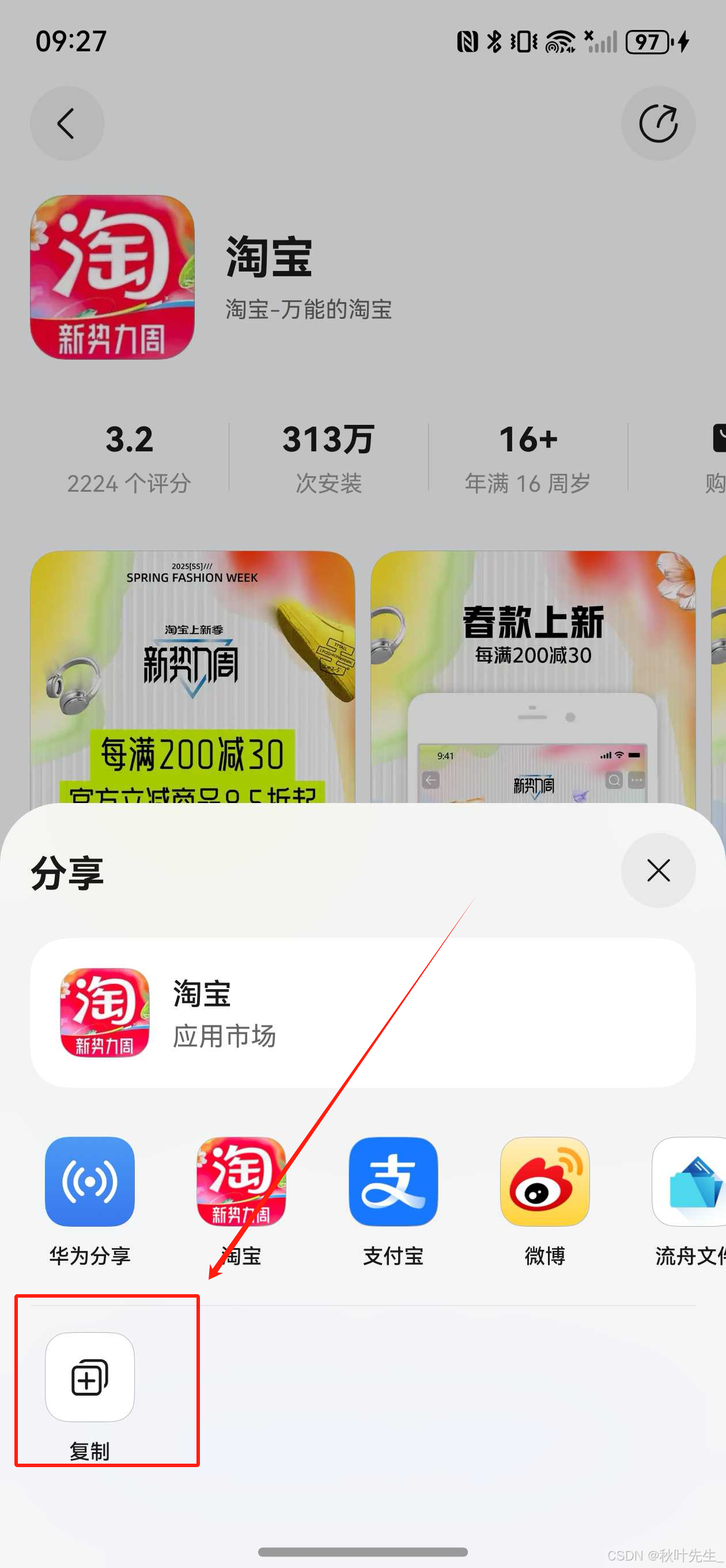
点击复制链接,这样就能拿到跳转url链接了
3、拉起手机设置示例:

参考代码
import { bundleManager, common, Want } from '@kit.AbilityKit';
import { BusinessError } from '@kit.BasicServicesKit';
import Logger from './Logger';
// 拉起设置应用的指定页面
export function openSettingsPage(uri: SettingPageUri) {
// 获取上下文
const context = getContext() as common.UIAbilityContext
// 获取包信息
const bundleInfo = bundleManager.getBundleInfoForSelfSync(bundleManager.BundleFlag.GET_BUNDLE_INFO_WITH_APPLICATION)
context.startAbility({
bundleName: 'com.huawei.hmos.settings',
abilityName: 'com.huawei.hmos.settings.MainAbility',
uri: uri,
parameters: {
// 自动获取包名
pushParams: bundleInfo.name
}
})
}
// 拉起应用市场对应的应用详情页面
export function startAppGalleryDetailAbility(context: common.UIAbilityContext, bundleName: string): void {
let want: Want = {
action: 'ohos.want.action.appdetail', //隐式指定action为ohos.want.action.appdetail
uri: 'store://appgallery.huawei.com/app/detail?id=' + bundleName, // bundleName为需要打开应用详情的应用包名
};
context.startAbility(want).then(() => {
Logger.info('TAG_success', "Succeeded in starting Ability successfully.")
}).catch((error: BusinessError) => {
Logger.error('TAG_Error', `Failed to startAbility.Code: ${error.code}, message is ${error.message}`);
});
}
type SettingPageUri = | '/'
| 'wifi_entry'
| 'bluetooth_entry'
| 'mobile_network_entry'
| 'hotspot_data_settings'
| 'password_entry'
| 'connected_device_entry'
| 'more_share_entry'
| 'more_connections_settings'
| 'nfc_settings'
| 'display_settings'
| 'screen_zoom'
| 'screen_refresh_rate_entry'
| 'volume_settings'
| 'systemui_notification_settings'
| 'accessibility_feature'
| 'accessibility_operation_entry'
| 'accessibility_more_settings_entry'
| 'application_and_service_settings'
| 'application_settings'
| 'application_info_entry'
| 'storage_settings'
| 'battery'
| 'biometrics_and_password_settings'
| 'lock_screen_password_title'
| 'change_six_to_number_entry'
| 'change_six_to_mixed_entry'
| 'fingerprint_settings_entry'
| 'privacy_settings'
| 'location_help_entry'
| 'users_accounts'
| 'current_user'
| 'system_and_updates'
| 'time_zone_settings'
| 'date_and_time'
| 'set_language'
| 'set_language_region'
| 'reset_settings'
| 'developer_options_settings'
| 'edit_language_entry'
| 'add_language_entry'
| 'select_region_entry'
| 'reset_factory_settings'
| 'reset_net_settings'
| 'reset_confirm_settings'
| 'reset_net_confirm_settings'
| 'about_device'
| 'device_name'

讨论HarmonyOS开发技术,专注于API与组件、DevEco Studio、测试、元服务和应用上架分发等。
更多推荐

 1
1 0
0- 0


 已为社区贡献21条内容

所有评论(0)