鸿蒙harmonyOS:案例练习正则表达式验证登录
·
代码:
@Entry
@Component
struct Index {
  @State time: number = 0
  @State phone: string = ''
  @State code: string = ''

  build() {
    Column() {

      this.titleBuilder()
      TextInput({ placeholder: '请输入手机号', text: $$this.phone })
        .backgroundColor(Color.White)
        .padding({ left: 0, top: 20, bottom: 20 })
        .placeholderColor('#ccc')
      Divider()
      Row() {
        TextInput({ placeholder: '请输入验证码', text: $$this.code })
          .backgroundColor(Color.White)
          .padding({ left: 0, top: 20, bottom: 20 })
          .placeholderColor('#ccc')
          .layoutWeight(1)
        Text(this.time == 0 ? '发送验证码' : `${this.time}秒后获取`)
          .fontSize(14)
          .fontColor(Color.Gray)
          .onClick(() => {
            // 避免重复点击
            if (this.time != 0) {
              // return 会阻断后续代码执行
              return
            }
            // 延迟获取验证码
            setTimeout(() => {
              const code = Math.floor(1000 + Math.random() * 9000)
              // console.log('code:', code)
              AlertDialog.show({
                message: code.toString()
              })
            }, 2000)
            // 修改 倒计时时间
            this.time = 5
            const timeId = setInterval(() => {
              this.time--
              // 到了 0 关闭定时器

              if (this.time == 0) {
                clearInterval(timeId)
              }
            }, 1000)
          })
      }
      .width('100%')
      Divider()
      Button('登录')
        .width('100%')
        .type(ButtonType.Normal)
        .backgroundColor('#ea6051')
        .margin({ top: 50 })
        .onClick(() => {
          const reg1 = /^(?:(?:\+|00)86)?1\d{10}$/
          const reg2 = /^\d{6}$/
          if (reg1.test(this.phone) == false) {
            AlertDialog.show({
              message: '手机号有误'
            })
            return
          }
          if (reg2.test(this.code) == false) {
            AlertDialog.show({
              message: '验证码有误'
            })
          }
        })
    }
    .padding({ top: 80, left: 40, right: 40 })
    .width('100%')
    .alignItems(HorizontalAlign.Start)
  }
  @Builder
  titleBuilder() {
    Text('短信登录')
      .fontSize(25)
      .fontWeight(600)
      .margin({ bottom: 30 })
  }
}
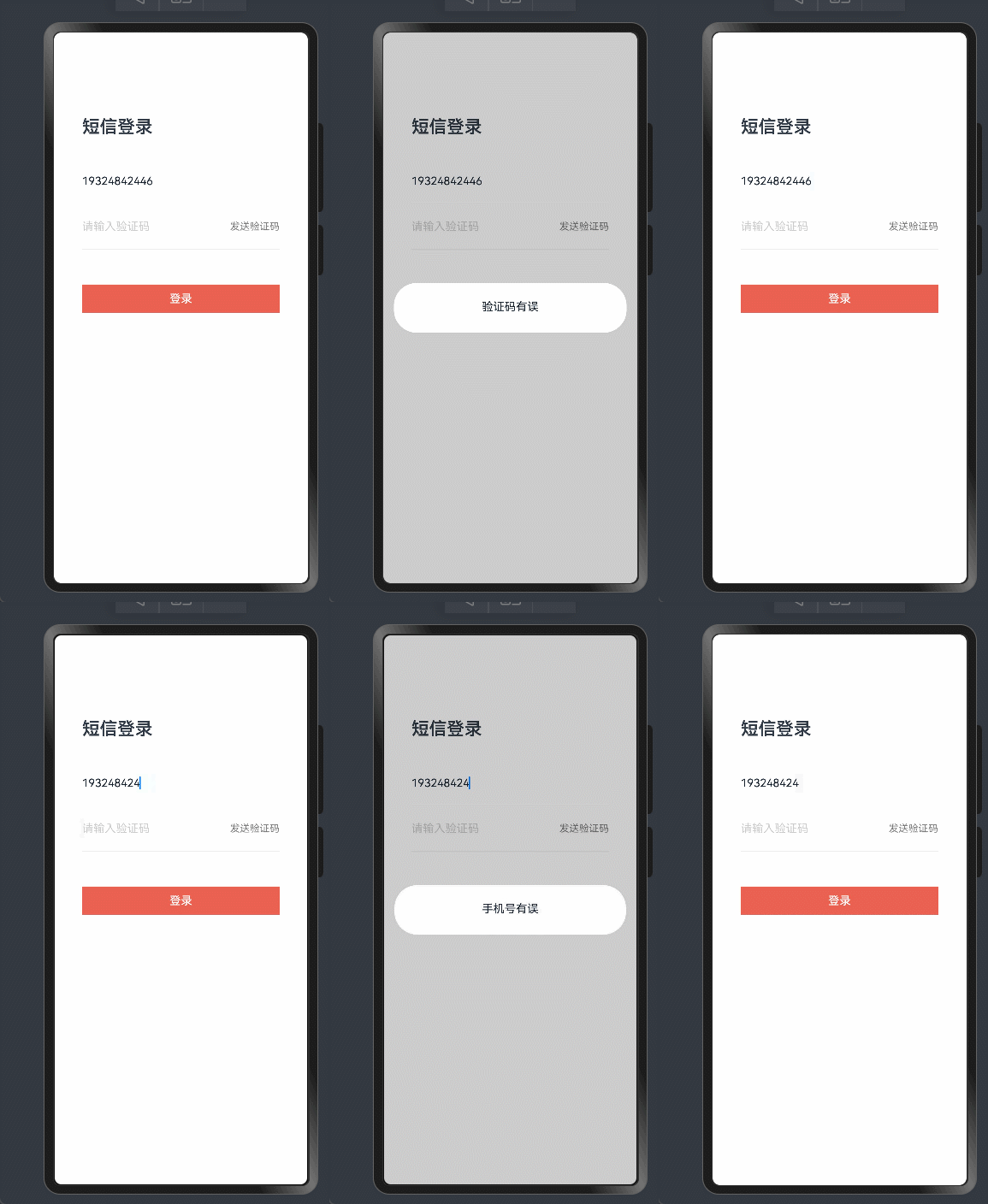
效果展示:

讨论HarmonyOS开发技术,专注于API与组件、DevEco Studio、测试、元服务和应用上架分发等。
更多推荐



 14
14 0
0- 0


 已为社区贡献32条内容

所有评论(0)