(ArkTs)改造对象数组内部数组属性结构方法
·
(ArkTs)改造对象数组内部数组属性结构方法
一种 TypeScript 接口与类约束结合 的数据结构设计方法,主要用于 响应式数据管理(通过 @Observed 装饰器)。这种模式常见于前端框架中需要响应式更新的场景(如小程序、React、Vue 等)。
使用场景:商品规格选择
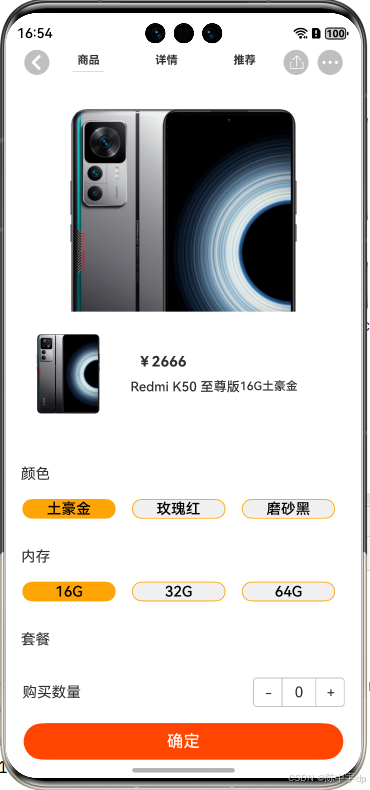
服务器接口数据示例:
 "attr": [
      {
        "cate": "颜色",
        "list": [
          "土豪金",
          "玫瑰红",
          "磨砂黑"
        ],
        "attrList": []
      },
      {
        "cate": "内存",
        "list": [
          "16G",
          "32G",
          "64G"
        ],
        "attrList": []
      }
    ]
##### 将“attrList”改造成
[
new AttrListModel("16G",true)
newAttrListModel("32G",false)
newAttrListModel("64G",false)
]
步骤1:改造结构(数据模型定义)
1 .类约束数组 (AttrListModel[])
2.响应式改造 (@Observed)
通过装饰器实现 数据变化的自动监听,当 checked 属性被修改时,UI会自动更新。
interface AttrInterface{
	cate:string           //- 分类名称
	list:string[]         //-字符串数组
	attrList: AttrListModel[] //-受类约束的数组
}
@Observed
class AttrListModel {
	title:string
	checked:boolean    //-选择状态
  constructor(title:string,checked:boolean){
	this.title=title
	this.checked=checked
	}
}
步骤2:状态管理与数据初始化
@State attrList:AttrListModel[]=[
 {
	cate:"颜色",
	list:[
	"土豪金",
	"玫瑰红",
	"烟蓝色"
	],
	attrList:[]
 },
 {
 	cate:"内存",
	list:[
	"16G",
	"32G",
	"64G"
	],
	attrList:[]
 }
]

//钩子函数
aboutToAppear():void{
	this.initAttr()
}

//初始化数据方法
initAttr(){
	for(leti=0;i<this.attrList.length;i++){
		let attr =this.attrList[i]
		for(let j=0;j<this.attr.list.length,j++){
			let tempList = new AttrListModel(attr.list[j],j==0?true:false)//默认选中第一个选项
			attr.attrList.push(this.tempList)
		}
	}
	 console.log(JSON.stringify(this.attrList))
}

//处理选项点击方法
 handleSelect(){

 }
定义该数据结构的意义:强类型约束改造,要求 attrList 数组中的每个元素必须是 AttrListModel 的实例。伪代码示例:
const data: AttrInterface[] = [{
  cate: "颜色",
  list: ["红色", "蓝色"],
  attrList: [
    new AttrListModel("S码", false), // ✅ 必须用 new 创建实例
    { title: "M码", checked: true }  // ❌ 直接对象会报错(除非有类型断言)
  ]
}];
步骤3:页面渲染方法
  build() {
    Column() {
      // 商品规格标题
      Text('选择规格').fontSize(20).margin(10)

      // 规格分类列表
      ForEach(this.categories, (category, cateIndex) => {
        Column() {
          // 分类标题
          Text(category.cate).fontSize(16).margin(5)

          // 规格选项
          Flex({ wrap: FlexWrap.Wrap }) {
            ForEach(category.attrList, (item, itemIndex) => {
              // 每个规格选项
              Button(item.title)
                .stateEffect(item.checked) // 选中状态效果
                .type(ButtonType.Capsule)
                .margin(5)
                .backgroundColor(item.checked ? '#ff5500' : '#f5f5f5')
                .onClick(() => {
                  this.handleSelect(cateIndex, itemIndex);
                })
            })
          }
        }.margin({ bottom: 15 })
      })

      // 底部确认按钮
      Button('确定选择')
        .width('90%')
        .margin(20)
        .onClick(() => {
          this.confirmSelection();
        })
    }
  }

  // 获取已选规格
   confirmSelection(){

   }
最终实现页面
选择规格
──────────
颜色
[土豪金] 玫瑰红 磨砂黑

内存
[16G] 32G 64G

[确定选择]
当用户点击不同选项时,选中状态会实时更新,且可以通过confirmSelection()方法获取最终选择结果。

讨论HarmonyOS开发技术,专注于API与组件、DevEco Studio、测试、元服务和应用上架分发等。
更多推荐

 4
4 0
0- 0


 已为社区贡献3条内容

所有评论(0)