HarmonyOS里面的双层Tabs无法完成嵌套滑动
解决多层Tabs的嵌套滑动问题
·
介绍
在开发多层嵌套Tabs的时候,有时候在第二层Tabs划到最右端或者最左端的时候,没有办法在滑动上一层Tabs,影响用户的使用体验。目前官方给出的解决方案是PanGesture结合TabsController的changeIndex来实现一二级的Tab切换问题。然后我们可以在这个基础上结合手势事件的自定义手势判断事件,可以很好的解决这个问题。
效果预览
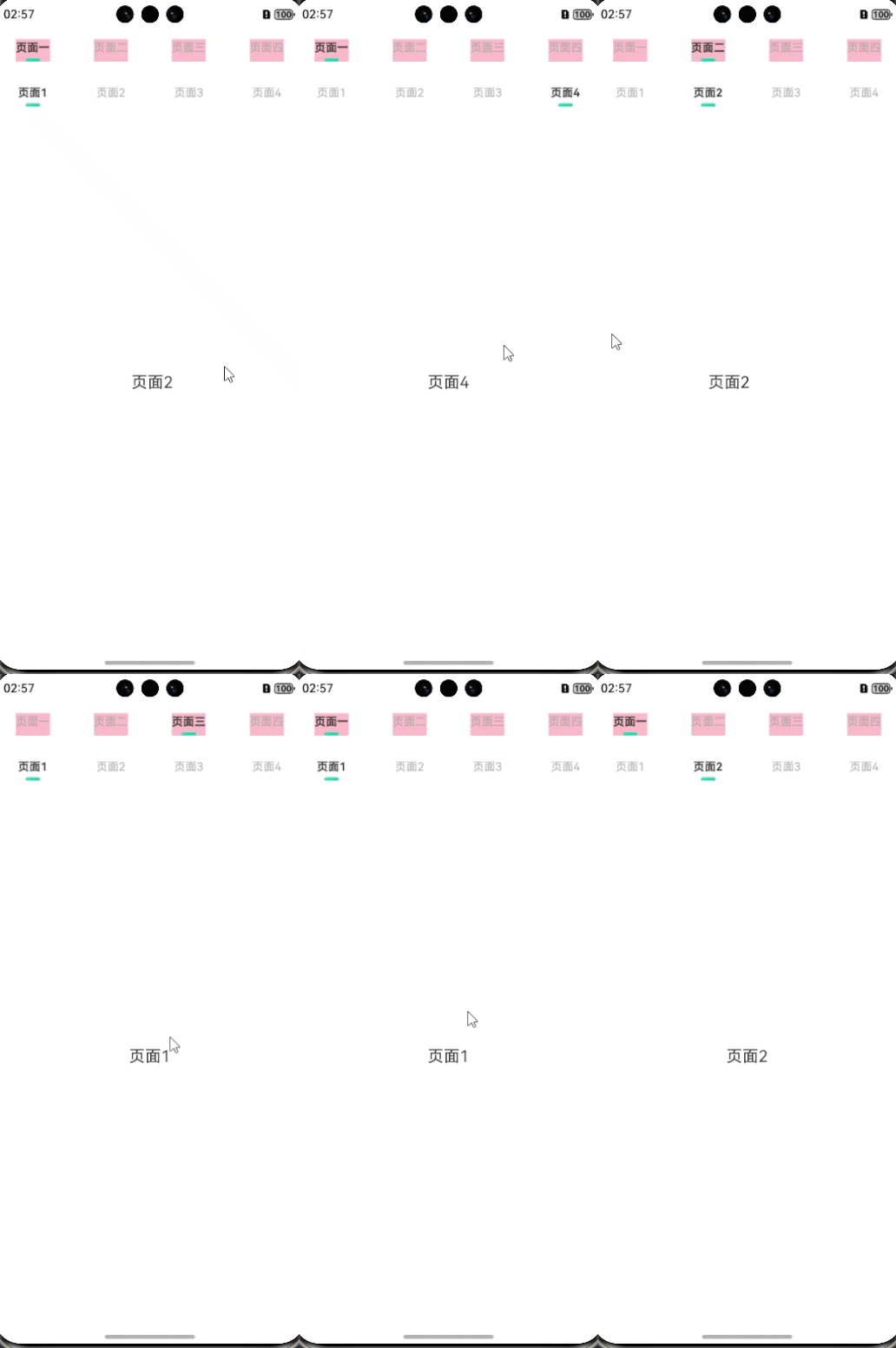
实现
import { emitter } from '@kit.BasicServicesKit'

@Entry
@Component
struct Index {
  @StorageProp('topHeight') topHeight: number = 0
  @StorageProp('bottomHeight') bottomHeight: number = 0
  @State TabList1: string[] = ['页面一', '页面二', '页面三', '页面四']
  @State TabList2: string[] = ['页面1', '页面2', '页面3', '页面4']
  @State TopCurrentIndex: number = 0
  @State SubCurrentIndex: number = 0
  private controller1 = new TabsController()
  private controller2 = new TabsController()
  private panOptionLeft: PanGestureOptions = new PanGestureOptions({ direction: PanDirection.Left });
  private panOptionRight: PanGestureOptions = new PanGestureOptions({ direction: PanDirection.Right });
  KEY: string = 'changeTabsIndex'

  //第一层Tabs的样式
  @Builder
  TopTabsBuilder(title: string, id: number) {
    Column({ space: 4 }) {
      Text(title)
        .fontFamily("PingFang SC")
        .fontSize(14)
        .fontWeight(this.TopCurrentIndex === id ? FontWeight.Bold : FontWeight.Regular)
        .fontColor(this.TopCurrentIndex === id ? '#333333' : '#AAAAAA')
        .lineHeight(20)
      Row()
        .width(this.TopCurrentIndex === id ? 18 : 0)
        .height(4)
        .borderRadius(2)
        .linearGradient({
          angle: 90,
          colors: [['#00D6B5', 0], ['#22BFA7', 1]],
        })
    }
    .backgroundColor(Color.Pink)
  }

  //第二层Tabs的样式
  @Builder
  SubTabsBuilder(title: string, id: number) {
    Column({ space: 4 }) {
      Text(title)
        .fontFamily("PingFang SC")
        .fontSize(14)
        .fontWeight(this.SubCurrentIndex === id ? FontWeight.Bold : FontWeight.Regular)
        .fontColor(this.SubCurrentIndex === id ? '#333333' : '#AAAAAA')
        .lineHeight(20)
      Row()
        .width(this.SubCurrentIndex === id ? 18 : 0)
        .height(4)
        .borderRadius(2)
        .linearGradient({
          angle: 90,
          colors: [['#00D6B5', 0], ['#22BFA7', 1]],
        })
    }
  }

  changeTabsIndex() {
    emitter.on(this.KEY, (e) => {
      if (e.data) {
        this.controller1.changeIndex(this.TopCurrentIndex + e.data.addNum)
      }
    })


  }

  aboutToAppear(): void {
    this.changeTabsIndex()
  }

  build() {
    Tabs({ controller: this.controller1, index: this.TopCurrentIndex }) {
      ForEach(this.TabList1, (it: string, index: number) => {
        TabContent() {
          Tabs({ controller: this.controller2, index: this.SubCurrentIndex }) {
            ForEach(this.TabList2, (subIt: string, index: number) => {
              TabContent() {
                Column() {
                  Text(subIt)
                    .fontSize(20)
                }
              }
              .tabBar(this.SubTabsBuilder(subIt, index))
              .gesture(PanGesture(this.panOptionRight).onActionEnd(() => {
                console.log('手势事件触发---右滑')
                emitter.emit(this.KEY, { data: { "addNum": -1 } })
              }).tag("swipeRight"))
              .gesture(PanGesture(this.panOptionLeft).onActionEnd(() => {
                console.log('手势事件触发---左滑')
                emitter.emit(this.KEY, { data: { "addNum": 1 } })
              }).tag("swipeLeft"))
              .onGestureJudgeBegin((gestureInfo: GestureInfo) => {
                if (gestureInfo.type == GestureControl.GestureType.PAN_GESTURE && gestureInfo.tag === 'swipeRight' &&
                  index === 0) {
                  return GestureJudgeResult.CONTINUE
                } else if (gestureInfo.type == GestureControl.GestureType.PAN_GESTURE &&
                  gestureInfo.tag === 'swipeLeft' && index === this.TabList2.length - 1) {
                  return GestureJudgeResult.CONTINUE
                }

                return GestureJudgeResult.REJECT;
              })
            })
          }
          .onChange((index) => {
            this.SubCurrentIndex = index
          })
        }
        .tabBar(this.TopTabsBuilder(it, index))
      })


    }
    .onChange((index) => {
      this.TopCurrentIndex = index
      this.SubCurrentIndex = 0

    })
    .padding({ top: this.topHeight, bottom: this.bottomHeight })
  }
}
总结
本文很好的实现了多层Tabs的嵌套滑动问题,希望官方能够把事件分发机制再优化下,如果能够像安卓那样从事件分发的角度解决这个问题要简单的多。

讨论HarmonyOS开发技术,专注于API与组件、DevEco Studio、测试、元服务和应用上架分发等。
更多推荐
 10
10 0
0- 0


 已为社区贡献4条内容

所有评论(0)