HarmonyOS(next5.0)里面实现竖向跑马灯的效果
本例子可以很好的实现垂直方向的数据滚动效果。总的来说,华为鸿蒙不再兼容安卓,对程序员来说是一个挑战,也是一个机会。只有积极应对变化,不断学习和提升自己,才能在这个变革的时代中立于不败之地。如果有什么更好的建议和方法可以在评论区交流,或者QQ:2325726365。
·
介绍
本示例介绍了如何实现一个在垂直方向类似于跑马灯的效果,可以实现数据的上下滚动,从而达到数据展示的效果。
效果图预览
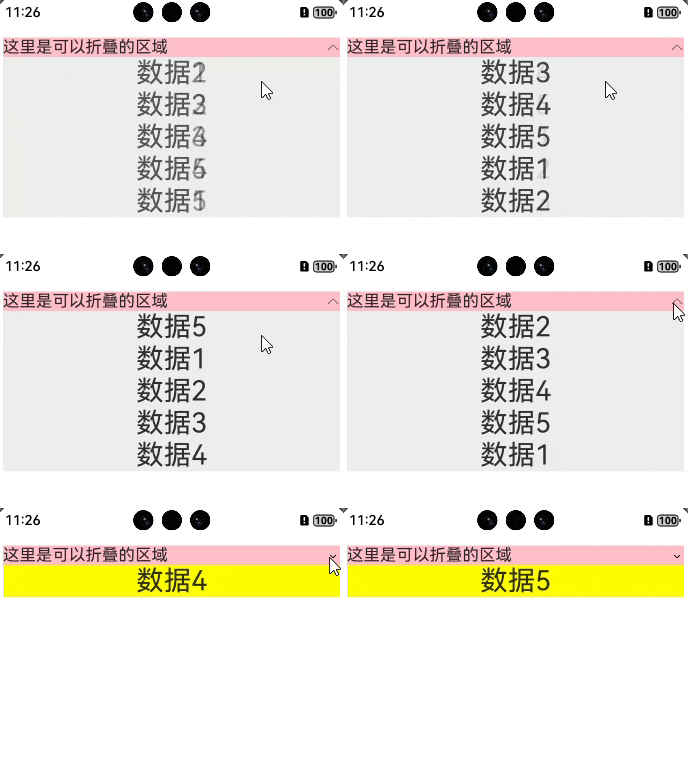
使用说明
需要定时器结合动画效果,搭配使用可以完成这样的效果。
实现
实现思路
由于ArkUI里面并没有类似的组件可以直接实现这样的效果,因此就需要结合定时器和动画,来实现数据上下滚动的渲染
代码实现
@State isExpand: boolean = false //控制折叠
@State private dataList: string[] = ['数据1', '数据2', '数据3', '数据4', '数据5']  //数据

//首先在aboutToAppear里面实现数据的变化
  aboutToAppear() {
    setInterval(() => {
      animateTo({ duration: 500 }, () => {
        const firstItem = this.dataList.shift()
        if (firstItem !== undefined) {
          this.dataList.push(firstItem)
        }
      })
    }, 1000)
  }


Column() {
      Row() {
        Row() {
          Text('这里是可以折叠的区域')
            .fontSize(18)
        }
        .layoutWeight(1)

        Image(!this.isExpand ? $r('app.media.zhankai') : $r('app.media.zhedie'))
          .width(15)
          .aspectRatio(1)
          .onClick(() => {
            this.isExpand = !this.isExpand
          })
      }
      .width('100%')
      .backgroundColor(Color.Pink)

      if (!this.isExpand) {

        Column() {
          Text(this.dataList[0])
            .fontSize(30)
            .textAlign(TextAlign.Center)
        }
        .width('100%')
        .backgroundColor(Color.Yellow)
      } else {

        Scroll() {
          Column() {
            ForEach(this.dataList, (item: string) => {
              Text(item)
                .fontSize(30)
                .textAlign(TextAlign.Center)
            })
          }
          .width('100%')
          .backgroundColor('#eeeeee')
        }
        .scrollable(ScrollDirection.Vertical)
      }
    }
总结
本例子可以很好的实现垂直方向的数据滚动效果 。总的来说,华为鸿蒙不再兼容安卓,对程序员来说是一个挑战,也是一个机会。只有积极应对变化,不断学习和提升自己,才能在这个变革的时代中立于不败之地。 如果有什么更好的建议和方法可以在评论区交流,或者QQ:2325726365。

讨论HarmonyOS开发技术,专注于API与组件、DevEco Studio、测试、元服务和应用上架分发等。
更多推荐


 9
9 0
0- 0


 已为社区贡献4条内容

所有评论(0)