HarmonyOS Next 渐变色折线图
·
渐变色折线图,上效果图
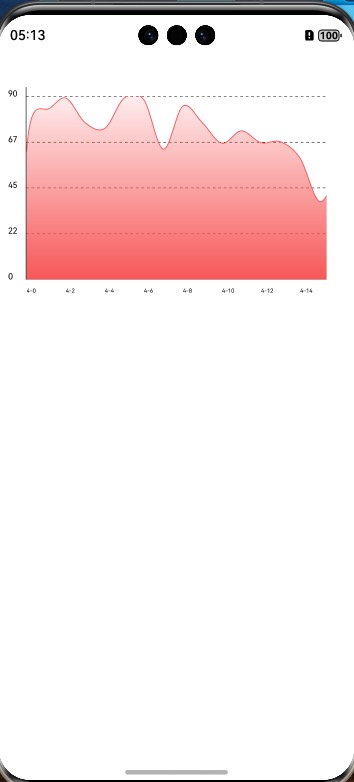
代码如下:
interface Point {
  x:number;
  y:number;
}


@Entry
@Component

export struct TestChartPage {

  private settings1: RenderingContextSettings = new RenderingContextSettings(true)
  private context1: CanvasRenderingContext2D = new CanvasRenderingContext2D(this.settings1)

  private settings2: RenderingContextSettings = new RenderingContextSettings(true)
  private context2: CanvasRenderingContext2D = new CanvasRenderingContext2D(this.settings2)

  private preHeight:number = 200

  private left_space:number = 40
  private bottom_space:number = 50

  private maxValue:number = 1000
  private scroller: Scroller = new Scroller()
  private scroWidth:number = 1000
  private isFull:boolean = false

  //曲线宽度
  private lineWidth:number = 1
  @State temPoint:Point[] = []

  aboutToAppear(): void {
      this.generateRandomData(31)
  }


  generateRandomData(points: number) {

    const x_space = 20;
    let maxWidth = (points + 1) * x_space;

    const sWidth = ResManager.getScreenWidth() - 60;
    if (maxWidth < sWidth) {
      this.isFull = true;
      maxWidth = sWidth;
    }

    this.scroWidth = maxWidth;

    const offset = maxWidth / (points - 1)

    let maxValue = 0;
    let value = 400
    let tempValue:number[] = []
    for (let i = 0; i < points; i++) {
      value += (Math.random() - 0.5) * 50
      value = Math.max(20, Math.min(90, value))
      if (maxValue < value) {
        maxValue = value;
      }
      tempValue.push(value)
    }

    this.maxValue = maxValue;
    maxValue += 1;//曲线顶部预留一点的余地,要不曲线会缺失

    const allHeight = this.preHeight;
    const pointsAry:Point[] = tempValue.map((value,index):Point=>({
        x:index * offset,
        y:(1 - value/maxValue) * allHeight
    }))
    this.temPoint = pointsAry
    Logger.log(`====tempAry:${JSON.stringify(tempValue)}===${this.maxValue}`)

  }

  private calculateControlPoints(points: Point[], tension: number = 0.5):[Point[],Point[]]{

    const cp1: Point[] = [];
    const cp2: Point[] = [];
    const n = points.length;

    const k = tension / 3;
    for (let i = 0; i < n; i++) {
      const p0 = points[Math.max(0, i - 1)];
      const p1 = points[i];
      const p2 = points[Math.min(n - 1, i + 1)];
      const p3 = points[Math.min(n - 1, i + 2)];

      // 计算后向控制点 (CP1)
      const cp1x = p1.x + (p2.x - p0.x) * k;
      const cp1y = p1.y + (p2.y - p0.y) * k;
      cp1.push({ x: cp1x, y: cp1y });

      // 计算前向控制点 (CP2)
      const cp2x = p2.x - (p3.x - p1.x) * k;
      const cp2y = p2.y - (p3.y - p1.y) * k;
      cp2.push({ x: cp2x, y: cp2y });
    }
    return [cp1,cp2]
  }

  private testMoreView(){

    this.drawBottomAxis()

    this.context2.strokeStyle = '#FF5858';
    this.context2.lineWidth = this.lineWidth;

    const result = this.calculateControlPoints(this.temPoint)
    this.context2.moveTo(this.temPoint[0].x,this.temPoint[0].y + 60 - this.lineWidth)

    const cp1:Point[] = result[0]
    const cp2:Point[] = result[1]
    for (let i = 0; i < this.temPoint.length - 1; i++) {
      // 绘制三次贝塞尔曲线
      this.context2.bezierCurveTo(
        cp1[i].x, cp1[i].y,    // 当前段起点控制点 (CP1)
        cp2[i].x, cp2[i].y,    // 当前段终点控制点 (CP2)
        this.temPoint[i + 1].x,
        this.temPoint[i + 1].y
      );
    }

    this.context2.lineTo(this.temPoint[this.temPoint.length - 1].x,this.preHeight)
    this.context2.lineTo(this.temPoint[0].x,this.preHeight)

    //  创建渐变填充
    const gradient = this.context2.createLinearGradient(0, 0, 0, this.preHeight);
    gradient.addColorStop(0, 'rgba(246, 88, 88, 0.1)'); // 半透明蓝色
    gradient.addColorStop(1, 'rgba(246, 88, 88, 1)'); // 完全透明
    this.context2.stroke();
    this.context2.closePath()
    this.context2.fillStyle = gradient;
    this.context2.fill();


  }

  private drawleftAxis(){
    this.context1.clearRect(0,0,ResManager.getScreenWidth(),this.preHeight);

    const lineWdith = 0.5;//y轴和x轴的线宽
    this.context1.lineWidth = lineWdith;
    const leftSpace = 30 - lineWdith;
    this.context1.beginPath();

    const count = 5;
    const offset = this.preHeight / (count - 1);

    let start_y = 30 - lineWdith;
    this.context1.strokeStyle = Color.Black;

    let y_point:number[] = []

    for (let i = 0; i < count; i++) {

      y_point.push(start_y)
      this.context1.beginPath();
      this.context1.moveTo(leftSpace,start_y);
      this.context1.lineTo(ResManager.getScreenWidth() - 30,start_y);
      if (i < count - 1) {
        this.context1.setLineDash([3,3])
      }else{
        this.context1.setLineDash([])
      }
      this.context1.stroke();
      this.context1.closePath()
      this.context1.fill();

      start_y += offset;

    }

    const topSpace = 10;
    this.context1.beginPath();
    this.context1.moveTo(leftSpace,30 - lineWdith - topSpace);
    this.context1.lineTo(leftSpace,this.preHeight + 30 - lineWdith);
    this.context1.stroke();
    this.context1.closePath()
    this.context1.fill();

    const value = this.maxValue / (count - 1);

    for (let i = 0; i < count; i++) {
      const num = Math.floor(this.maxValue - value * i);
      this.context1.font = '30px sans-serif'
      this.context1.fillText(num.toString(),10,y_point[i],10);
      this.context1.stroke()

    }


  }

  private drawBottomAxis(){

    const bottom_y = this.preHeight + 15;

    this.context2.beginPath();
    this.context2.font = '20px sans-serif';

    for (let i = 0; i < this.temPoint.length; i++) {
      this.context2.strokeStyle = Color.Black;

      if (this.isFull === false){
        let endx = this.temPoint[i].x;
        if (i === this.temPoint.length - 1) {
          endx -= 5;
        }
        if ((i % 2 === 0 || i === this.temPoint.length - 1)) {
          this.context2.fillText(`4-${i}`,this.temPoint[i].x,bottom_y);
        }
      }else{
        let endx = this.temPoint[i].x;
        if (i === this.temPoint.length - 1) {
          endx -= 5;
        }
        this.context2.fillText(`4-${i}`,endx,bottom_y);
      }

      this.context2.stroke()

    }


  }


  build() {
    Column() {
      Stack({alignContent:Alignment.Center}){
        Canvas(this.context1)
          .width('100%')
          .height(this.preHeight + 60)
          .onReady(() => {
            this.drawleftAxis()
          })

        Scroll(this.scroller){
          Column(){
            Canvas(this.context2)
              .width(this.scroWidth)
              // .backgroundColor(Color.Pink)
              .height(this.preHeight + 62)
              .margin({top:30})
              .onReady(() => {
                this.testMoreView()
              })
          }
        }
        .scrollable(ScrollDirection.Horizontal) // 滚动方向纵向
        .width(ResManager.getScreenWidth() - 60)
        .height(this.preHeight + 62)
      }
    }
    .height('100%')
    .width('100%')
    .margin({top:20})
  }
}

讨论HarmonyOS开发技术,专注于API与组件、DevEco Studio、测试、元服务和应用上架分发等。
更多推荐

 3
3 0
0- 0


 已为社区贡献5条内容

所有评论(0)