一文彻底拿下HarmonyOS NEXT实现石头剪刀布
·
程序员Feri一名12年+的程序员,做过开发带过团队创过业,擅长嵌入式、鸿蒙、人工智能、Java等,专注于程序员成长那点儿事,希望在成长的路上有我相伴!君志所向,一往无前!
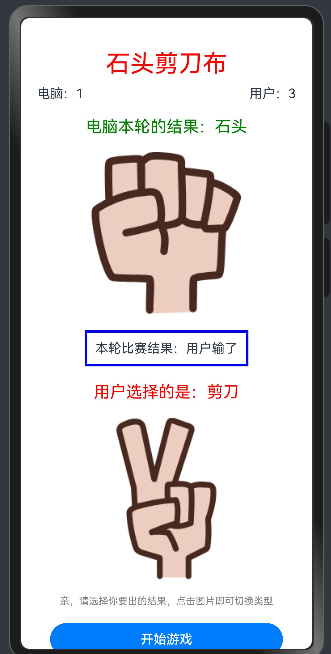
最近在使用ArkUI的基础组件,结合基础组件实现一个小朋友经常玩的石头剪刀布小游戏。
只需学习HarmonyOS,2小时,即可轻松实现哈
需求
实现一个石头剪刀布小游戏,灵活运用ArkUI的按钮、图片和ArkTS的随机数、函数等知识点
分析
研究需求,发现石头剪刀布小游戏有以下几个点需要解决:
1.用户可以选择剪刀石头布
2.电脑随机出剪刀石头布
3.判断输赢,完成计分
设计
-
用户决策区:采用Button组件构建操作面板,支持点击手势识别
-
视觉反馈区:运用Image组件实现双方面板(用户/电脑),通过状态绑定动态展示选择结果
-
数据展示区:使用Text组件构建比分统计系统,实时更新对战数据
编码
@Entry
@Component
struct Demo1Page {
  @State message: string = 'Hello World';
  //变量 存储 石头剪刀布 的图片
  imgs:Resource[]=[$r("app.media.st"),$r("app.media.jd"),$r("app.media.bu")];
  //电脑选手的结果
  // 图片
  @State cimg:Resource=$r("app.media.startIcon");
  //文本
  @State cmsg:string="";
  //成绩
  @State cscore:number=0;

  //用户选手的结果
  //图片索引
  uindex:number=0;
  //图片
  @State uimg:Resource=this.imgs[0];
  //文本
  @State umsg:string="";
  //成绩
  @State uscore:number=0;

  //结果
  @State result:string='';
  build() {
   Column(){
     Text("石头剪刀布")
       .fontColor(Color.Red)
       .fontSize(30)
     Row(){
       Text("电脑:"+this.cscore)
         .margin({left:20})

       Text("用户:"+this.uscore)
         .margin({right:20})
     }
     .width("100%")
     .justifyContent(FlexAlign.SpaceBetween)
     .margin({top:10,bottom:20})

     //电脑的随机结果
     Column({space:20}){
       Text(this.cmsg)
         .fontColor(Color.Green)
         .fontSize(20)

       Image(this.cimg)
         .height(200)
     }.width("100%")

     Text("本轮比赛结果:"+this.result)
      .margin(20)
       .padding(10)
      .border({style:BorderStyle.Solid,color:Color.Blue,width:3})//设置边框

     //用户选择的结果
     Column({space:20}){
       Text(this.umsg)
         .fontColor(Color.Red)
         .fontSize(20)

       Image(this.uimg)
         .onClick(()=>{
           //切换下一个图片
            this.uindex++;
            //从图片数组中获取对应的图片
            this.uimg=this.imgs[this.uindex%this.imgs.length];
            this.umsg="用户选择的是:"+getMsg(this.uindex%this.imgs.length);
           // if(this.uindex>=2){
           //   this.uindex=0;
           // }else {
           //   this.uindex++;
           // }
           // this.uimg=this.imgs[this.uindex];
         })
         .height(200)
       Text("亲,请选择你要出的结果,点击图片即可切换类型")
         .fontColor(Color.Gray)
         .fontSize(12)
     }
     .width("100%")

     //判断输赢
    Button("开始游戏")
      .onClick(()=>{
        //游戏
        //电脑出结果 随机
        let cindex=Math.floor(Math.random()*this.imgs.length);
        this.cimg=this.imgs[cindex];
        this.cmsg="电脑本轮的结果:"+getMsg(cindex);

        //判断输赢 用一个角色的角度进行
        //石头 0 -->剪刀 1
        //剪刀 1 --->布 2
        //布 2 --->石头 0
        //用户 为 角色进行判断
        let ui:number=this.uindex%this.imgs.length;
        //是否平局
        if(ui==cindex){
          //平局 相同 各加1分
          this.uscore++;
          this.cscore++;
          this.result="平局";
        }else if(
          (ui==0&&cindex==1) || (ui==1&&cindex==2) || (ui==2&&cindex==0)
        ){
          //用户赢了
          this.uscore++;
          this.cscore--;
          this.result="用户赢了";
        }else {
          //用户输了
          this.uscore--;
          this.cscore++;
          this.result="用户输了";
        }
      })
      .width("80%")
      .margin({top:20})

   }
    .height('100%')
    .width('100%')
  }
}
//函数 把索引转换为 对应的字符串 剪刀石头布
function getMsg(index:number):string{
  let r:string="未知";
  switch (index){
    case 0:r="石头";break;
    case 1:r="剪刀";break;
    case 2:r="布";break;
  }
  return r;
}
测试
好啦,就写到这里啦,关注我,跟着我一起成长哈!

讨论HarmonyOS开发技术,专注于API与组件、DevEco Studio、测试、元服务和应用上架分发等。
更多推荐



 15
15 0
0- 0


 已为社区贡献74条内容

所有评论(0)