

在应用程序开发过程中,除了产品功能、界面视觉,有一个容易被开发者忽略的用户界面元素,也是影响用户体验的重要因素,那就是Button(按钮)。应用内的Button组件具有动作触发快、互动性增强、提高用户体验等优势,然而由于Button所适用的场景范围较广,部分应用存在Button视觉动态不统一的情况。
为了避免这一问题,HarmonyOS SDK 融合场景服务(Scenario Fusion Kit)的 场景化Button 能力提供了跨多个子系统融合的场景化组件,帮助规范组件单击行为,降低开发者接入复杂度,确保鸿蒙生态体验统一。
融合场景服务通过与华为账号、系统设置等部件协同,提供了快速验证手机号、选择头像、打开授权设置页、打开App、选择收货地址、选择发票抬头、地图选点7个场景化Button能力,本文将针对这些Button分别介绍其功能及其开发步骤。
一、快速验证手机号Button
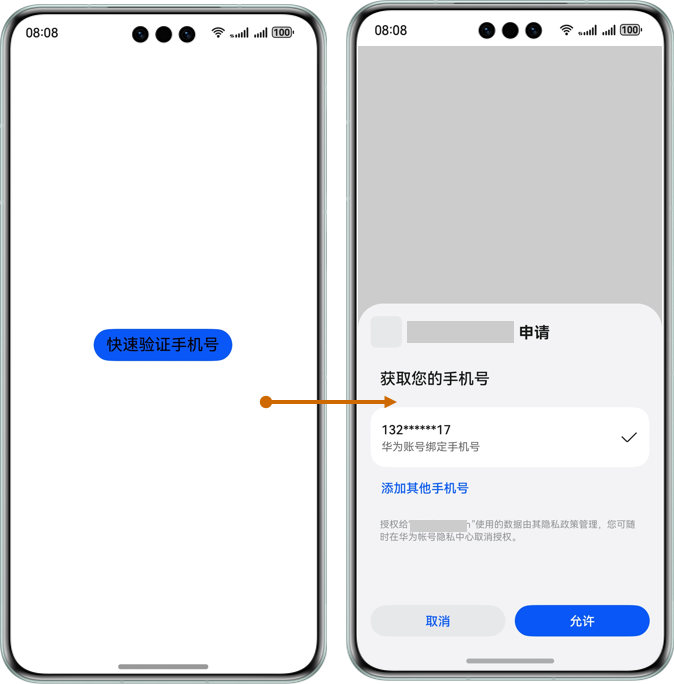
快速验证手机号Button功能用于帮助开发者向用户发起手机号申请,当应用在必要业务场景中需要使用手机号时使用该Button调用华为账号快速验证手机号,经过用户同意后,应用可获取手机号,并为用户提供相应服务。
import { FunctionalButton, functionalButtonComponentManager } from '@kit.ScenarioFusionKit';
import { hilog } from '@kit.PerformanceAnalysisKit';

[@Entry](https://my.oschina.net/u/4127701)
[@Component](https://my.oschina.net/u/3907912)
struct Index {
  build() {
    Row() {
      Column() {
        // 声明FunctionalButton
        FunctionalButton({
          params: {
            // OpenType.GET_PHONE_NUMBER表示Button为快速验证手机号类型
            openType: functionalButtonComponentManager.OpenType.GET_PHONE_NUMBER,
            label: '快速验证手机号',
            // 调整Button样式
            styleOption: {
              styleConfig: new functionalButtonComponentManager.ButtonConfig()
                .fontSize(20)
                .fontColor(Color.Black)
            },
          },
          // OpenType为"GET_PHONE_NUMBER"时,回调必须选择"onGetPhoneNumber"
          controller: new functionalButtonComponentManager.FunctionalButtonController()
            .onGetPhoneNumber((err, data) => {
              if (err) {
                // 错误日志处理
                hilog.error(0x0000, "testTag", "error: %{public}d %{public}s", err.code, err.message);
                return;
              }
              // 成功日志处理
              hilog.info(0x0000, "testTag", "succeeded in authenticating");
              // 开发者处理AuthorizationCode
              let authorizationCode = data.code;
            })
        })
      }
      .width('100%')
    }
    .height('100%')
  }
}- 1.
- 2.
- 3.
- 4.
- 5.
- 6.
- 7.
- 8.
- 9.
- 10.
- 11.
- 12.
- 13.
- 14.
- 15.
- 16.
- 17.
- 18.
- 19.
- 20.
- 21.
- 22.
- 23.
- 24.
- 25.
- 26.
- 27.
- 28.
- 29.
- 30.
- 31.
- 32.
- 33.
- 34.
- 35.
- 36.
- 37.
- 38.
- 39.
- 40.
- 41.
- 42.
二、选择头像Button
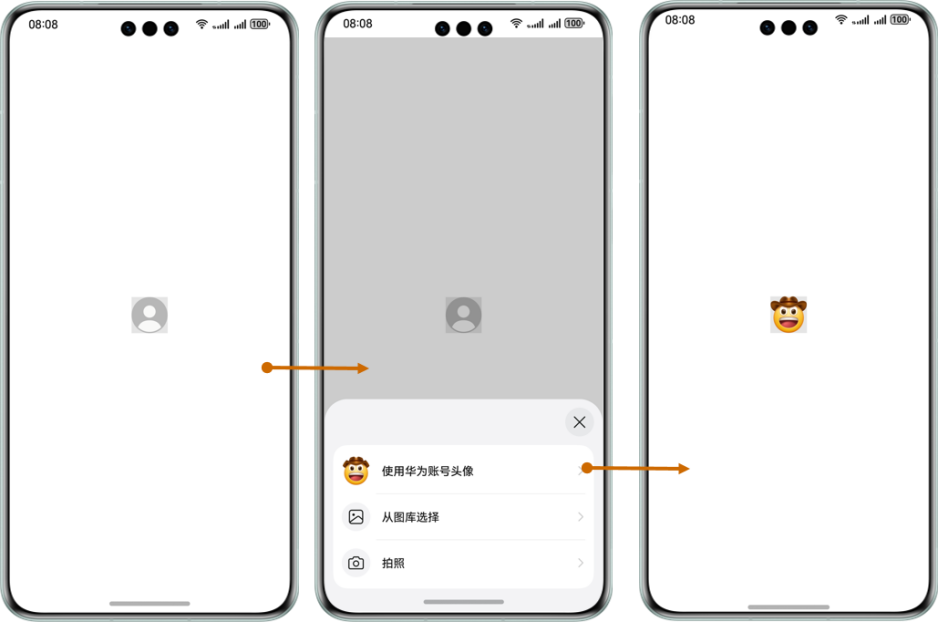
选择头像Button适用于应用需要获取或设置头像的场景,用户通过点击选择按钮拉起半模态选择头像页面,在该页面中可直接选择使用华为账号头像,也可从图库或实时拍摄选取头像。
import { FunctionalButton, functionalButtonComponentManager } from '@kit.ScenarioFusionKit'
import { hilog } from '@kit.PerformanceAnalysisKit';

@Entry
@Component
struct Index {
  // 对应路径 /resources/base/media/下新增 account.png,否则会报错找不到
  @State url: ResourceStr = $r('app.media.account');

  build() {
    Column() {
      // 声明FunctionalButton
      FunctionalButton({
        params: {
          // OpenType.CHOOSE_AVATAR表示Button为选择头像类型
          openType: functionalButtonComponentManager.OpenType.CHOOSE_AVATAR,
          label: '',
          // 调整Button样式
          styleOption: {
            styleConfig: new functionalButtonComponentManager.ButtonConfig()
              .type(ButtonType.Normal)
              .backgroundImage(this.url)
              .backgroundImageSize(ImageSize.Cover)
              .width(80)
              .height(80)
              .backgroundColor('#E5E5E5')
          },
        },
        // OpenType为"CHOOSE_AVATAR"时,回调必须选择"onChooseAvatar"
        controller: new functionalButtonComponentManager.FunctionalButtonController().onChooseAvatar((err, data) => {
          if (err) {
            // 错误日志处理
            hilog.error(0x0000, "testTag", "error: %{public}d %{public}s", err.code, err.message);
            return;
          }
          // 成功日志处理
          hilog.info(0x0000, "testTag", "succeeded in choosing avatar");
          this.url = data.avatarUri!;
        })
      })
    }
    .padding({ top: 200 })
    .height('100%')
    .width('100%')
  }
}- 1.
- 2.
- 3.
- 4.
- 5.
- 6.
- 7.
- 8.
- 9.
- 10.
- 11.
- 12.
- 13.
- 14.
- 15.
- 16.
- 17.
- 18.
- 19.
- 20.
- 21.
- 22.
- 23.
- 24.
- 25.
- 26.
- 27.
- 28.
- 29.
- 30.
- 31.
- 32.
- 33.
- 34.
- 35.
- 36.
- 37.
- 38.
- 39.
- 40.
- 41.
- 42.
- 43.
- 44.
- 45.
- 46.
三、打开授权设置页Button
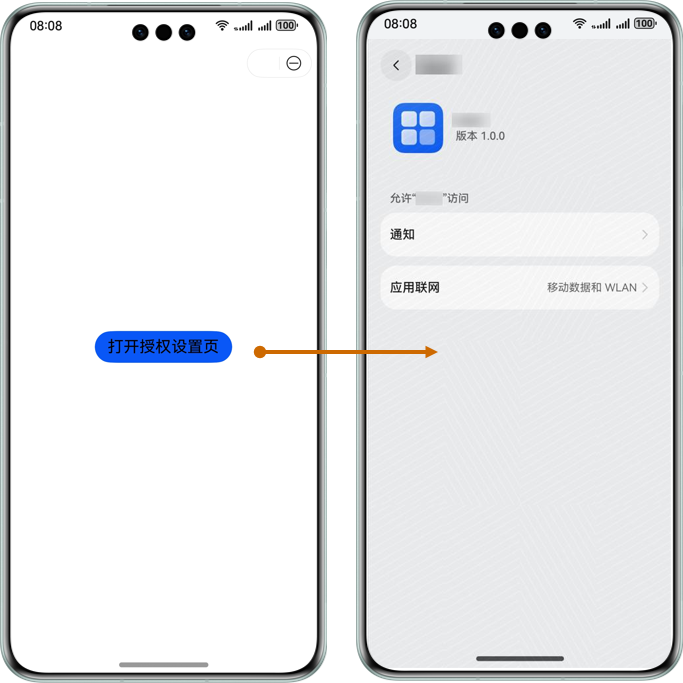
在用户使用应用某些功能的过程中,经常需要手动设置授权对应权限,比如当用户需要接收通知消息时,需要授权开通通知权限。
import { FunctionalButton, functionalButtonComponentManager } from '@kit.ScenarioFusionKit';
import { hilog } from '@kit.PerformanceAnalysisKit';
@Entry
@Component
struct Index {
  build() {
    Row() {
      Column() {
        // 声明FunctionalButton
        FunctionalButton({
          params: {
            // OpenType.OPEN_SETTING表示Button为打开授权设置页类型
            openType: functionalButtonComponentManager.OpenType.OPEN_SETTING,
            label: '打开授权设置页',
            // 调整Button样式
            styleOption: {
              styleConfig: new functionalButtonComponentManager.ButtonConfig()
                .fontSize(20)
                .fontColor(Color.Black)
            },
          },
          // OpenType为"OPEN_SETTING"时,回调必须选择"onOpenSetting"
          controller: new functionalButtonComponentManager.FunctionalButtonController().onOpenSetting((err, data) => {
            if (err) {
              // 错误日志处理
              hilog.error(0x0000, "testTag", "error: %{public}d %{public}s", err.code, err.message);
              return;
            }
            // 成功日志处理,终止设置应用程序时触发
            hilog.info(0x0000, "testTag", "succeeded in opening setting");
            data.permissions!.forEach((value, key) => {
              hilog.info(0x0000, "testTag", "key: %{public}s value: %{public}s", String(key), value);
            })
          })
        })
      }.width('100%')
    }.height('100%')
  }
}- 1.
- 2.
- 3.
- 4.
- 5.
- 6.
- 7.
- 8.
- 9.
- 10.
- 11.
- 12.
- 13.
- 14.
- 15.
- 16.
- 17.
- 18.
- 19.
- 20.
- 21.
- 22.
- 23.
- 24.
- 25.
- 26.
- 27.
- 28.
- 29.
- 30.
- 31.
- 32.
- 33.
- 34.
- 35.
- 36.
- 37.
- 38.
- 39.
四、打开App Button
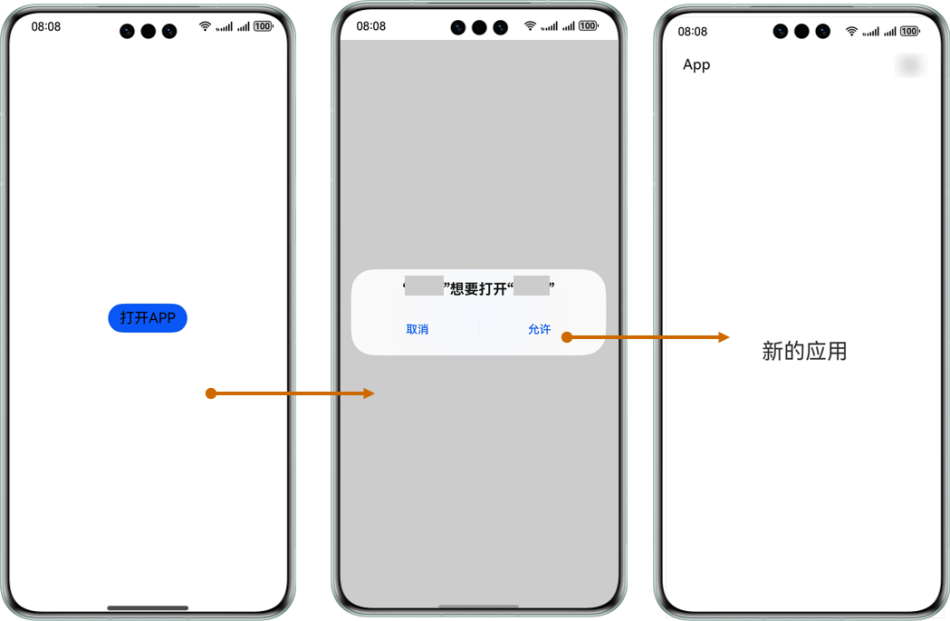
打开App Button支持应用通过调用组件打开另一个应用,当用户需要从当前使用中的应用跳转至其他应用时,单击"打开App Button"按钮,出现提示弹窗,用户单击"允许",即可跳转至新的应用界面。
import { FunctionalButton, functionalButtonComponentManager } from '@kit.ScenarioFusionKit';
import { hilog } from '@kit.PerformanceAnalysisKit';

@Entry
@Component
struct Index {
  build() {
    Row() {
      Column() {
        // 声明FunctionalButton
        FunctionalButton({
          params: {
            // OpenType.LAUNCH_APP表示Button为打开APP类型
            openType: functionalButtonComponentManager.OpenType.LAUNCH_APP,
            label: '打开APP',
            // OpenType为"functionalButtonComponentManager.OpenType.LAUNCH_APP"时,appParam参数必填
            appParam: {
              bundleName: "xxx",
              abilityName: "xxx"
            },
            // 调整Button样式
            styleOption: {
              styleConfig: new functionalButtonComponentManager.ButtonConfig()
                .fontSize(20)
                .fontColor(Color.Black)
            },
          },
          // OpenType为"LAUNCH_APP"时,回调必须选择"onLaunchAPP"
          controller: new functionalButtonComponentManager.FunctionalButtonController().onLaunchApp((err) => {
            if (err) {
              // 错误日志处理
              hilog.error(0x0000, "testTag", "error: %{public}d %{public}s", err.code, err.message);
              return;
            }
            // 成功日志处理,成功时无返回值
            hilog.info(0x0000, "testTag", "succeeded in launching app");
          })
        })
      }
      .width('100%')
    }
    .height('100%')
  }
}- 1.
- 2.
- 3.
- 4.
- 5.
- 6.
- 7.
- 8.
- 9.
- 10.
- 11.
- 12.
- 13.
- 14.
- 15.
- 16.
- 17.
- 18.
- 19.
- 20.
- 21.
- 22.
- 23.
- 24.
- 25.
- 26.
- 27.
- 28.
- 29.
- 30.
- 31.
- 32.
- 33.
- 34.
- 35.
- 36.
- 37.
- 38.
- 39.
- 40.
- 41.
- 42.
- 43.
- 44.
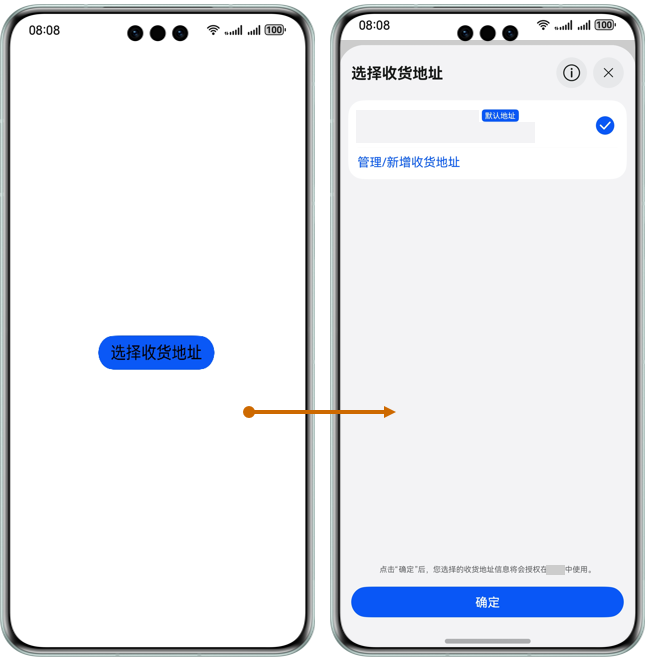
五、选择收货地址Button
选择收货地址Button支持应用调用对应Button组件快速拉起地址选择页面,并返回用户选择的收货地址。当用户在应用内购物或寄件时需要填写地址信息,可以单击"选择收货地址Button"按钮,拉起华为账号下已保存的收货地址信息,选择对应地址或对地址信息进行管理。
import { FunctionalButton, functionalButtonComponentManager } from '@kit.ScenarioFusionKit';
import { hilog } from '@kit.PerformanceAnalysisKit';

@Entry
@Component
struct Index {
  build() {
    Row() {
      Column() {
        // 声明FunctionalButton
        FunctionalButton({
          params: {
            // OpenType.CHOOSE_ADDRESS表示Button为选择收货地址类型
            openType: functionalButtonComponentManager.OpenType.CHOOSE_ADDRESS,
            label: '选择收货地址',
            // 调整Button样式
            styleOption: {
              bgColor: functionalButtonComponentManager.ColorType.DEFAULT,
              size: functionalButtonComponentManager.SizeType.DEFAULT,
              plain: false,
              disabled: false,
              loading: false,
              hoverClass: functionalButtonComponentManager.HoverClassType.HOVER_CLASS,
              hoverStartTime: 0,
              hoverStayTime: 0,
              styleConfig: new functionalButtonComponentManager.ButtonConfig()
                .fontSize(20)
                .fontColor(Color.Black)
            },
          },
          // OpenType为"CHOOSE_ADDRESS"时,回调必须选择"onChooseAddress"
          controller: new functionalButtonComponentManager.FunctionalButtonController()
            .onChooseAddress((err, data) => {
              if (err) {
                // 错误日志处理
                hilog.error(0x0000, "testTag", "error: %{public}d %{public}s", err.code, err.message);
                return;
              }
              // 成功日志处理
              hilog.info(0x0000, "testTag", "succeeded in choosing address");
              // 获取Address info
              let userName: string = data.userName;
              let mobileNumber: string = data.mobileNumber as string;
              let countryCode: string = data.countryCode as string;
              let provinceName: string = data.provinceName as string;
              let cityName: string = data.cityName as string;
              let districtName: string = data.districtName as string;
              let streetName: string = data.streetName as string;
              let detailedAddress: string = data.detailedAddress;
            })
        })
      }.width('100%')
    }.height('100%')
  }
}- 1.
- 2.
- 3.
- 4.
- 5.
- 6.
- 7.
- 8.
- 9.
- 10.
- 11.
- 12.
- 13.
- 14.
- 15.
- 16.
- 17.
- 18.
- 19.
- 20.
- 21.
- 22.
- 23.
- 24.
- 25.
- 26.
- 27.
- 28.
- 29.
- 30.
- 31.
- 32.
- 33.
- 34.
- 35.
- 36.
- 37.
- 38.
- 39.
- 40.
- 41.
- 42.
- 43.
- 44.
- 45.
- 46.
- 47.
- 48.
- 49.
- 50.
- 51.
- 52.
- 53.
- 54.
- 55.
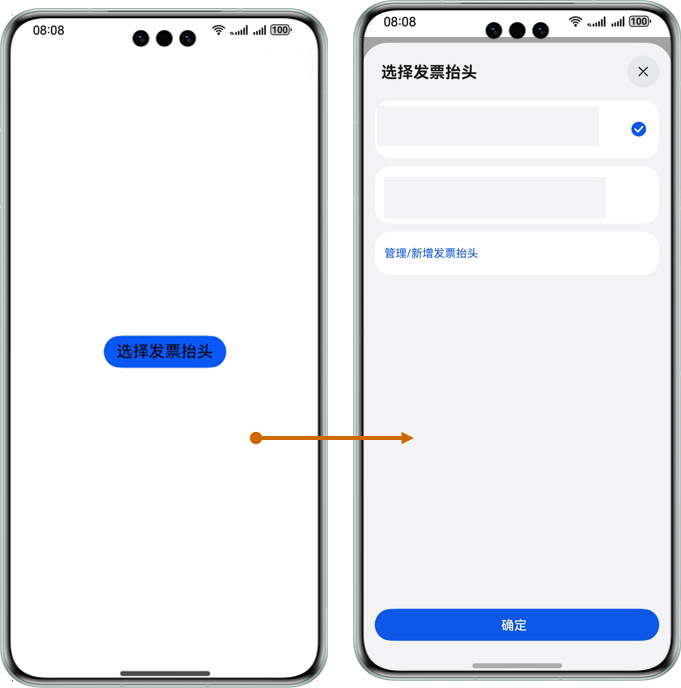
六、选择发票抬头Button
选择发票抬头Button支持应用调用Button组件拉起华为账号下发票抬头选择页面,供用户完成已保存发票抬头选择,同样,用户还可以对已有发票信息进行管理或新增发票信息。
import { FunctionalButton, functionalButtonComponentManager } from '@kit.ScenarioFusionKit';
import { hilog } from '@kit.PerformanceAnalysisKit';

@Entry
@Component
struct Index {
  build() {
    Row() {
      Column() {
        // 声明FunctionalButton
        FunctionalButton({
          params: {
            // OpenType.CHOOSE_INVOICE_TITLE表示Button为选择发票抬头
            openType: functionalButtonComponentManager.OpenType.CHOOSE_INVOICE_TITLE,
            label: '选择发票抬头',
            // 调整Button样式
            styleOption: {
              bgColor: functionalButtonComponentManager.ColorType.DEFAULT,
              size: functionalButtonComponentManager.SizeType.DEFAULT,
              plain: false,
              disabled: false,
              loading: false,
              hoverClass: functionalButtonComponentManager.HoverClassType.HOVER_CLASS,
              hoverStartTime: 0,
              hoverStayTime: 0,
              styleConfig: new functionalButtonComponentManager.ButtonConfig()
                .fontSize(20)
                .fontColor(Color.Black)
            },
          },
          // OpenType为"CHOOSE_INVOICE_TITLE"时,回调必须选择"onChooseInvoiceTitle"
          controller: new functionalButtonComponentManager.FunctionalButtonController()
            .onChooseInvoiceTitle((err, data) => {
              if (err) {
                // 错误日志处理
                hilog.error(0x0000, "testTag", "error: %{public}d %{public}s", err.code, err.message);
                return;
              }
              // 成功日志处理
              hilog.info(0x0000, "testTag", "succeeded in obtaining invoice title");
              // 获取发票信息
              let type: string = data.type;
              let title: string = data.title;
              let taxNumber: string = data.taxNumber;
              let companyAddress: string | undefined = data.companyAddress;
              let telephone: string | undefined = data.telephone;
              let bankName: string | undefined = data.bankName;
              let bankAccount: string | undefined = data.bankAccount;
            })
        })
      }
      .width('100%')
    }
    .height('100%')
  }
}- 1.
- 2.
- 3.
- 4.
- 5.
- 6.
- 7.
- 8.
- 9.
- 10.
- 11.
- 12.
- 13.
- 14.
- 15.
- 16.
- 17.
- 18.
- 19.
- 20.
- 21.
- 22.
- 23.
- 24.
- 25.
- 26.
- 27.
- 28.
- 29.
- 30.
- 31.
- 32.
- 33.
- 34.
- 35.
- 36.
- 37.
- 38.
- 39.
- 40.
- 41.
- 42.
- 43.
- 44.
- 45.
- 46.
- 47.
- 48.
- 49.
- 50.
- 51.
- 52.
- 53.
- 54.
- 55.
- 56.
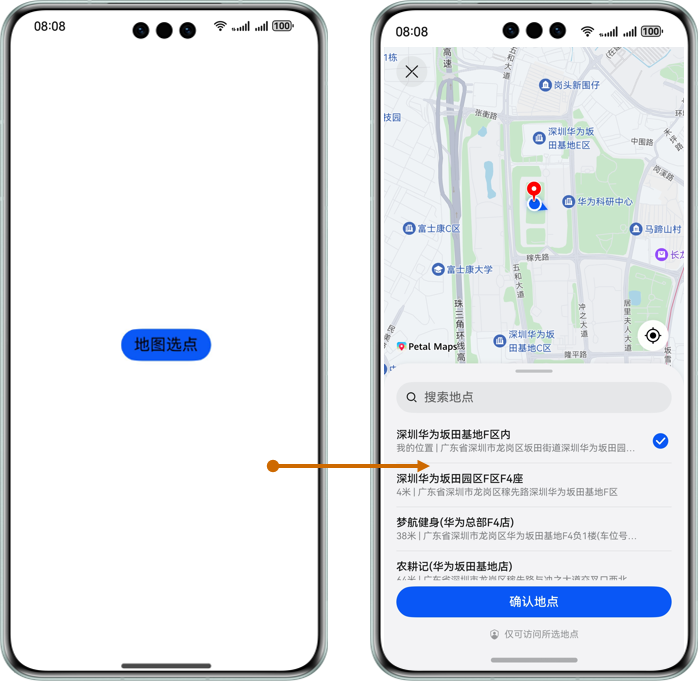
七、地图选点Button
地图选点Button支持应用调用Button组件拉起地图服务的地图选点页面,用户在地图中选择位置后,位置相关信息即可返回Button界面。
import { FunctionalButton, functionalButtonComponentManager } from '@kit.ScenarioFusionKit';
import { hilog } from '@kit.PerformanceAnalysisKit';

@Entry
@Component
struct Index {
  build() {
    Row() {
      Column() {
        // 声明FunctionalButton
        FunctionalButton({
          params: {
            // OpenType.CHOOSE_LOCATION表示Button为地图选点
            openType: functionalButtonComponentManager.OpenType.CHOOSE_LOCATION,
            label: '地图选点',
            // 调整Button样式
            styleOption: {
              bgColor: functionalButtonComponentManager.ColorType.DEFAULT,
              size: functionalButtonComponentManager.SizeType.DEFAULT,
              plain: false,
              disabled: false,
              loading: false,
              hoverClass: functionalButtonComponentManager.HoverClassType.HOVER_CLASS,
              hoverStartTime: 0,
              hoverStayTime: 0,
              styleConfig: new functionalButtonComponentManager.ButtonConfig()
                .fontSize(20)
                .fontColor(Color.Black)
            }
          },
          // OpenType为"CHOOSE_LOCATION"时,回调必须选择"onChooseLocation"
          controller: new functionalButtonComponentManager.FunctionalButtonController()
            .onChooseLocation((err, data) => {
              if (err) {
                // 错误日志处理
                hilog.error(0x0000, "testTag", "error: %{public}d %{public}s", err.code, err.message);
                return;
              }
              // 成功日志处理
              hilog.info(0x0000, "testTag", "succeeded in choosing location");
              let name: string = data.name;
              let address: string = data.address;
              let longitude: number = data.longitude;
              let latitude: number = data.latitude;
            })
        })
      }
      .width('100%')
    }
    .height('100%')
  }
}- 1.
- 2.
- 3.
- 4.
- 5.
- 6.
- 7.
- 8.
- 9.
- 10.
- 11.
- 12.
- 13.
- 14.
- 15.
- 16.
- 17.
- 18.
- 19.
- 20.
- 21.
- 22.
- 23.
- 24.
- 25.
- 26.
- 27.
- 28.
- 29.
- 30.
- 31.
- 32.
- 33.
- 34.
- 35.
- 36.
- 37.
- 38.
- 39.
- 40.
- 41.
- 42.
- 43.
- 44.
- 45.
- 46.
- 47.
- 48.
- 49.
- 50.
- 51.
- 52.
了解更多详情\>\>
访问 融合场景服务联盟官网




 已为社区贡献62条内容

所有评论(0)