【每日学点HarmonyOS Next知识】列表控制器、全屏视频增加子组件、列表滚动监听、悬浮窗按钮组件、哈希字典刷新UI
1、HarmonyOS List控制器Scroller相关?
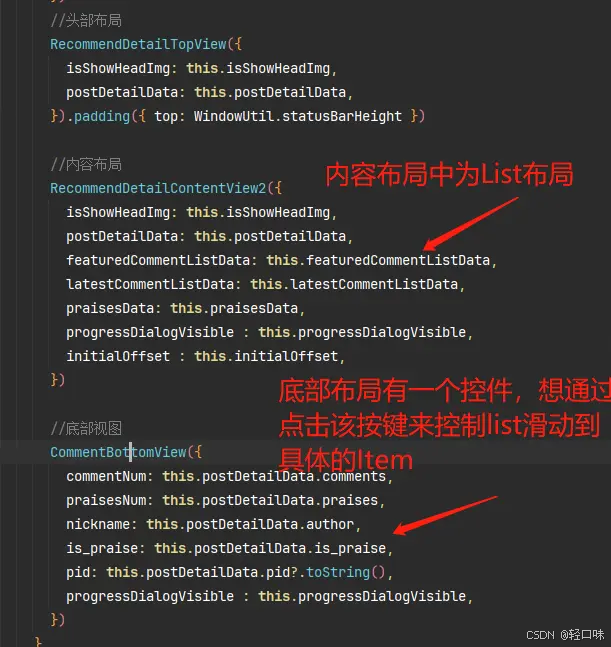
我想通过List中的控制器来控制滑动到具体的Item上例如 this.scrollerForList.scrollToItemInGroup(1,2,true)目前的问题是,一个主布局中有三个子布局,具体描述如图所示;当前我使用的方法是通过emmiter来通知内容布局去进行滑动,但是会报错,如图所示;希望能给出一些建议和其他方法实现

![[【每日学点HarmonyOS Next知识】25.04.22-1.png]]
参考代码:
import {ListItemGroupExample} from './ListItemGroupExample'
@Entry
@Component
struct ListScrollerPage {
  @State message: string = 'Hello World';
  @State groupInfo:number[] = [0,0]

  onClickItem(item: number[]){
    this.groupInfo = item
  }

  build() {
    Row() {
      Column() {
        //头部布局
        RecommendDetailTopView()

        //内容区
        ListItemGroupExample({
          groupInfo:this.groupInfo
        })
          .layoutWeight(1)

        //头部布局
        CommnetBootomView({
          onClickItem: (item: number[]): void => this.onClickItem(item)
        })
      }
      .width('100%')
    }
    .height('100%')
  }
}


@Component
struct RecommendDetailTopView{
  build() {
    Row(){
      Text('头部布局')
    }
  }
}

@Component
struct CommnetBootomView{
  @State list:number[][] = [[1,1],[2,1],[3,2]]
  private onClickItem = (item: number[]) => {};
  build() {
    Row(){
      ForEach(this.list,(item:number[])=>{
        Row(){
          ForEach(item,(num:number)=>{
            Text(`${num}`)
              .margin({
                right:5
              })
          },(num:number,index:number)=>JSON.stringify(index))
        }
        .backgroundColor(Color.Pink)
        .onClick(()=>{
          if(this.onClickItem){
            this.onClickItem(item)
          }
        })
      },(item:number[])=>JSON.stringify(item))

    }
    .width('100%')
    .justifyContent(FlexAlign.SpaceBetween)
    .padding(10)
  }
}
//ListItemGroupExample文件
// xxx.ets
@Entry
@Component
export struct ListItemGroupExample {
  private scrollerForList: ListScroller = new ListScroller()
  private timeTable: TimeTable[] = [
    {
      title: '星期一',
      projects: ['语文', '数学', '英语']
    },
    {
      title: '星期二',
      projects: ['物理', '化学', '生物']
    },
    {
      title: '星期三',
      projects: ['历史', '地理', '政治']
    },
    {
      title: '星期四',
      projects: ['美术', '音乐', '体育']
    }
  ]

  @Link @Watch('groupInfoChange') groupInfo:number[]

  groupInfoChange(){
    console.log(JSON.stringify(this.groupInfo))
    this.scrollerForList.scrollToItemInGroup(this.groupInfo[0],this.groupInfo[1],true)
  }

  @Builder
  itemHead(text: string) {
    Text(text)
      .fontSize(20)
      .backgroundColor(0xAABBCC)
      .width("100%")
      .padding(10)
  }

  @Builder
  itemFoot(num: number) {
    Text('共' + num + "节课")
      .fontSize(16)
      .backgroundColor(0xAABBCC)
      .width("100%")
      .padding(5)
  }

  build() {
    Column() {
      List({ space: 20, scroller: this.scrollerForList }) {
        ForEach(this.timeTable, (item: TimeTable) => {
          ListItemGroup({ header: this.itemHead(item.title), footer: this.itemFoot(item.projects.length) }) {
            ForEach(item.projects, (project: string) => {
              ListItem() {
                Text(project)
                  .width("100%")
                  .height(100)
                  .fontSize(20)
                  .textAlign(TextAlign.Center)
                  .backgroundColor(0xFFFFFF)
              }
            }, (item: string) => item)
          }
          .divider({ strokeWidth: 1, color: Color.Blue }) // 每行之间的分界线
        })
      }
      .width('90%')
      // .height(300)
      .sticky(StickyStyle.Header | StickyStyle.Footer)
      .scrollBar(BarState.Off)
    }.width('100%').height('100%').backgroundColor(0xDCDCDC).padding({ top: 5 })
  }
}

interface TimeTable {
  title: string;
  projects: string[];
}
2、HarmonyOS 如何在视频全屏时增加子组件?
基于Video组件开发的视频功能,使用VideoController设置全屏后,看起来是把video组件给放在了最顶层并且全屏铺满了,其它所有组件都不见了。这样的话怎么能在全屏视频上增加一些播控组件呢?
用Stack组件配合z序控制实现组件的堆叠,这样可以实现在Video组件的上层添加播控组件详情请参考:https://developer.huawei.com/consumer/cn/doc/harmonyos-references-V5/ts-universal-attributes-z-order-V5
3、HarmonyOS List组件的滚动监听?
实现滚动条同步滚动效果,现在无法获取list在x坐标轴的滚动距离以及实际能滚动的总长度
推荐使用swiper组件参考以下文档:https://gitee.com/harmonyos-cases/cases/blob/master/CommonAppDevelopment/feature/swipersmoothvariation/README.md#%E4%BD%BF%E7%94%A8%E8%AF%B4%E6%98%8E
llist组件相应滚动的位置实现出来的效果不如swiper,list组件的 可以参考onScrollIndex方法来监听list组件的滚动事件:https://developer.huawei.com/consumer/cn/doc/harmonyos-guides-V5/arkts-layout-development-create-list-V5#%E5%93%8D%E5%BA%94%E6%BB%9A%E5%8A%A8%E4%BD%8D%E7%BD%AE
许多应用需要监听列表的滚动位置变化并作出响应。例如,在联系人列表滚动时,如果跨越了不同字母开头的分组,则侧边字母索引栏也需要更新到对应的字母位置。
除了字母索引之外,滚动列表结合多级分类索引在应用开发过程中也很常见,例如购物应用的商品分类页面,多级分类也需要监听列表的滚动位置。
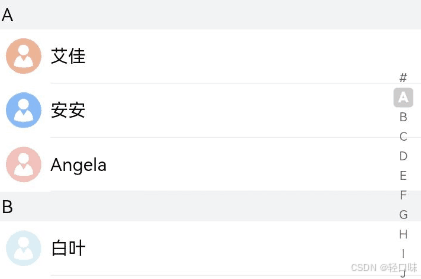
如上图所示,当联系人列表从A滚动到B时,右侧索引栏也需要同步从选中A状态变成选中B状态。此场景可以通过监听List组件的onScrollIndex事件来实现,右侧索引栏需要使用字母表索引组件AlphabetIndexer。
在列表滚动时,根据列表此时所在的索引值位置firstIndex,重新计算字母索引栏对应字母的位置selectedIndex。由于AlphabetIndexer组件通过selected属性设置了选中项索引值,当selectedIndex变化时会触发AlphabetIndexer组件重新渲染,从而显示为选中对应字母的状态。
const alphabets = ['#', 'A', 'B', 'C', 'D', 'E', 'F', 'G', 'H', 'I', 'J', 'K',
  'L', 'M', 'N', 'O', 'P', 'Q', 'R', 'S', 'T', 'U', 'V', 'W', 'X', 'Y', 'Z'];
@Entry
@Component
struct ContactsList {
  @State selectedIndex: number = 0;
  private listScroller: Scroller = new Scroller();

  build() {
    Stack({ alignContent: Alignment.End }) {
      List({ scroller: this.listScroller }) {}
      .onScrollIndex((firstIndex: number) => {
        // 根据列表滚动到的索引值,重新计算对应联系人索引栏的位置this.selectedIndex
      })

      // 字母表索引组件
      AlphabetIndexer({ arrayValue: alphabets, selected: 0 })
        .selected(this.selectedIndex)
    }
  }
}
4、HarmonyOS ArkTS中如何使用悬浮窗按钮组件?
开发悬浮窗,可以参考此文档:https://developer.huawei.com/consumer/cn/doc/harmonyos-guides/application-window-stage
5、HarmonyOS HashMap中放入数组,数组数据发生改变时如增加或者删除元素,如何触发UI刷新?
定义一个HashMap:
@State allChannelsMaps: HashMap<string, Array<ChannelGroupDataChannelList>> = new HashMap();
UI布局如下:
List(){
          ForEach(this.channelTypeList, (channelData: ChannelTypeEntityData, index: number) =>{
            ListItem(){
              this.channelGrid(this.allChannelsMaps.get(channelData.channelType?.toString()),
                index,)
            }
          })
        }.width('100%')
.height('100%')
@Builder channelGrid(channelGroupData: Array<ChannelGroupDataChannelList>, index: number){
Grid(){
          ForEach(channelGroupData, (channel: ChannelGroupDataChannelList, index: number) =>{
            GridItem() {
              Text(channel.channelName)
                .fontSize((channel.channelName ?? '').length > 5 ? '11fp': '15fp')
                .fontColor($r('app.color.color202022'))
                .fontFamily(CommonConstants.SI_YUAN)
                .textAlign(TextAlign.Center)
                .width(this.itemWidth)
                .height(this.itemHeight)
                .backgroundColor($r('app.color.colorF9F9F9'))
                .borderRadius(4)
                .onClick(() =>{
                  const tapChannel: ChannelGroupDataChannelList = channelGroupData[index];
                  this.addChannelUpdateMap(tapChannel);
                })
            }
          })
        }
        .columnsTemplate('1fr 1fr 1fr 1fr')
        .columnsGap(10)
        .rowsGap(10)
        .height(this.channelTypeList[index].channelHeight)
        .nestedScroll({
          scrollForward: NestedScrollMode.PARENT_FIRST,
          scrollBackward: NestedScrollMode.SELF_FIRST
        })
}
参考以下demo:
import HashMap from '@ohos.util.HashMap'
class  DataItem {
  title:string;
  id:number
  constructor(title:string,id:number) {
    this.title = title;
    this.id = id
  }
}
@Entry
@Component
struct MapExample {
  @State hashMap: HashMap<string, Array<DataItem>>= new HashMap();
  @State keys:Array<string> =[ ]
  aboutToAppear(): void {
    this.hashMap.set("squirrel", [new DataItem("123",20)]);
    this.hashMap.set("sparrow", [new DataItem("human",45)]);
    this.keys = Array.from(this.hashMap.keys());
    console.info('valuesaaa',this.hashMap.values())
    for (let key of  this.keys) {
      console.log("key:" + key);
      console.log("value:" + this.hashMap.get(key));
    }
  }
  build(){
    List(){
      ForEach(this.keys , (item: string, index: number) =>{
        ChildItem({item:item})
      },(item:string)=>item)
    }
  }
}
@Component
struct ChildItem {
  @Prop item: string;
  build() {
    Text(this.item)
      .fontSize(50)
  }
}

讨论HarmonyOS开发技术,专注于API与组件、DevEco Studio、测试、元服务和应用上架分发等。
更多推荐


 13
13 0
0- 0


 已为社区贡献129条内容

所有评论(0)